

كما هو الحال في الإصدارات السابقة، يتضمّن Android 15 تغييرات في السلوك قد تؤثر في تطبيقك. تنطبق تغييرات السلوك التالية حصريًا على التطبيقات التي تستهدف Android 15 أو الإصدارات الأحدث. إذا كان تطبيقك يستهدف الإصدار 15 من نظام التشغيل Android أو الإصدارات الأحدث، عليك تعديل تطبيقك ليتوافق مع هذه السلوكيات بشكل سليم، حيثما ينطبق ذلك.
احرص أيضًا على مراجعة قائمة التغييرات في السلوك التي تؤثّر في جميع التطبيقات
التي تعمل على Android 15 بغض النظر عن targetSdkVersion لتطبيقك.
الوظيفة الأساسية
يعدّل نظام التشغيل Android 15 العديد من الإمكانات الأساسية لنظام Android أو يوسّع نطاقها.
التغييرات على الخدمات التي تعمل في المقدّمة
نحن بصدد إجراء التغييرات التالية على الخدمات التي تعمل في المقدّمة في Android 15.
- سلوك مهلة الخدمة التي تعمل في المقدّمة لمزامنة البيانات
- نوع الخدمة الجديدة التي تعمل في المقدّمة لمعالجة الوسائط
- القيود المفروضة على
BOOT_COMPLETEDمستقبلات البث التي تبدأ الخدمات التي تعمل في المقدّمة - قيود على بدء الخدمات التي تعمل في المقدّمة عندما يكون لدى التطبيق إذن
SYSTEM_ALERT_WINDOW
سلوك مهلة الخدمة التي تعمل في المقدّمة لمزامنة البيانات
对于以 Android 15(API 级别 35)或更高版本为目标平台的应用,Android 15 为 dataSync 引入了新的超时行为。此行为也适用于新的 mediaProcessing 前台服务类型。
系统允许应用的 dataSync 服务在 24 小时内总共运行 6 小时,之后系统会调用正在运行的服务的 Service.onTimeout(int, int) 方法(在 Android 15 中引入)。此时,该服务有几秒钟时间来调用 Service.stopSelf()。调用 Service.onTimeout() 后,该服务将不再被视为前台服务。如果服务未调用 Service.stopSelf(),系统会抛出内部异常。系统会在 Logcat 中记录此异常,并显示以下消息:
Fatal Exception: android.app.RemoteServiceException: "A foreground service of
type dataSync did not stop within its timeout: [component name]"
为避免因行为变更而导致问题,您可以执行以下一项或多项操作:
- 让您的服务实现新的
Service.onTimeout(int, int)方法。当您的应用收到回调时,请务必在几秒钟内调用stopSelf()。(如果您不立即停止应用,系统会生成故障。) - 确保应用的
dataSync服务在任何 24 小时内总运行时间不超过 6 小时(除非用户与应用互动,重置计时器)。 - 仅通过直接的用户互动来启动
dataSync前台服务;由于您的应用在服务启动时位于前台,因此服务会在应用进入后台后的 6 小时内完整运行。 - 请改用替代 API,而不是使用
dataSync前台服务。
如果您的应用的 dataSync 前台服务在过去 24 小时内运行了 6 小时,则您无法启动其他 dataSync 前台服务,除非用户已将您的应用切换到前台(这会重置计时器)。如果您尝试启动其他 dataSync 前台服务,系统会抛出 ForegroundServiceStartNotAllowedException,并显示类似“前台服务类型 dataSync 的时间限制已用尽”的错误消息。
测试
如需测试应用的行为,您可以启用数据同步超时功能,即使应用未以 Android 15 为目标平台也是如此(前提是应用在 Android 15 设备上运行)。如需启用超时,请运行以下 adb 命令:
adb shell am compat enable FGS_INTRODUCE_TIME_LIMITS your-package-name
您还可以调整超时期限,更轻松地测试应用在达到此限制时的行为。如需设置新的超时期限,请运行以下 adb 命令:
adb shell device_config put activity_manager data_sync_fgs_timeout_duration duration-in-milliseconds
نوع الخدمة الجديدة التي تعمل في المقدّمة لمعالجة الوسائط
Android 15 引入了一种新的前台服务类型 mediaProcessing。此服务类型适用于转码媒体文件等操作。例如,媒体应用可能会下载音频文件,并需要先将其转换为其他格式,然后才能播放。您可以使用 mediaProcessing 前台服务,确保即使应用在后台运行时转换也会继续。
系统允许应用的 mediaProcessing 服务在 24 小时内总共运行 6 小时,之后系统会调用正在运行的服务的 Service.onTimeout(int, int) 方法(在 Android 15 中引入)。此时,服务有几秒钟的时间来调用 Service.stopSelf()。如果服务未调用 Service.stopSelf(),系统会抛出内部异常。系统会在 Logcat 中记录此异常,并显示以下消息:
Fatal Exception: android.app.RemoteServiceException: "A foreground service of
type mediaProcessing did not stop within its timeout: [component name]"
为避免出现此异常,您可以执行以下任一操作:
- 让您的服务实现新的
Service.onTimeout(int, int)方法。当您的应用收到回调时,请务必在几秒钟内调用stopSelf()。(如果您未立即停止应用,系统会生成失败情况。) - 确保应用的
mediaProcessing服务在任何 24 小时内总运行时间不超过 6 小时(除非用户与应用互动,重置计时器)。 - 仅在有直接用户互动时启动
mediaProcessing前台服务;由于服务启动时应用位于前台,因此您的服务在应用进入后台后有完整的 6 小时时间。 - 请改用 替代 API(例如 WorkManager),而不是使用
mediaProcessing前台服务。
如果您的应用的 mediaProcessing 前台服务在过去 24 小时内运行了 6 小时,则您无法启动其他 mediaProcessing 前台服务,除非用户将您的应用切换到前台(这会重置计时器)。如果您尝试启动另一个 mediaProcessing 前台服务,系统会抛出 ForegroundServiceStartNotAllowedException,并显示类似于“前台服务类型 mediaProcessing 的时间限制已用尽”的错误消息。
如需详细了解 mediaProcessing 服务类型,请参阅 Android 15 前台服务类型变更:媒体处理。
测试
如需测试应用的行为,您可以启用媒体处理超时,即使您的应用并非以 Android 15 为目标平台也是如此(前提是应用在 Android 15 设备上运行)。如需启用超时,请运行以下 adb 命令:
adb shell am compat enable FGS_INTRODUCE_TIME_LIMITS your-package-name
您还可以调整超时期限,以便更轻松地测试应用在达到上限时的行为方式。如需设置新的超时期限,请运行以下 adb 命令:
adb shell device_config put activity_manager media_processing_fgs_timeout_duration duration-in-milliseconds
القيود المفروضة على تطبيقات BOOT_COMPLETED التي تستخدم مستقبلات البث لتشغيل الخدمات التي تعمل في المقدّمة
There are new restrictions on BOOT_COMPLETED broadcast receivers launching
foreground services. BOOT_COMPLETED receivers are not allowed to launch the
following types of foreground services:
dataSynccameramediaPlaybackphoneCallmediaProjectionmicrophone(this restriction has been in place formicrophonesince Android 14)
If a BOOT_COMPLETED receiver tries to launch any of those types of foreground
services, the system throws ForegroundServiceStartNotAllowedException.
Testing
To test your app's behavior, you can enable these new restrictions even if your
app is not targeting Android 15 (as long as the app is running on an Android 15
device). Run the following adb command:
adb shell am compat enable FGS_BOOT_COMPLETED_RESTRICTIONS your-package-name
To send a BOOT_COMPLETED broadcast without restarting the device,
run the following adb command:
adb shell am broadcast -a android.intent.action.BOOT_COMPLETED your-package-name
القيود المفروضة على بدء الخدمات التي تعمل في المقدّمة عندما يكون لدى التطبيق إذن SYSTEM_ALERT_WINDOW
Previously, if an app held the SYSTEM_ALERT_WINDOW permission, it could launch
a foreground service even if the app was currently in the background (as
discussed in exemptions from background start restrictions).
If an app targets Android 15, this exemption is now narrower. The app now needs
to have the SYSTEM_ALERT_WINDOW permission and also have a visible overlay
window. That is, the app needs to first launch a
TYPE_APPLICATION_OVERLAY window and the window
needs to be visible before you start a foreground service.
If your app attempts to start a foreground service from the background without
meeting these new requirements (and it does not have some other exemption), the
system throws ForegroundServiceStartNotAllowedException.
If your app declares the SYSTEM_ALERT_WINDOW permission
and launches foreground services from the background, it may be affected by this
change. If your app gets a ForegroundServiceStartNotAllowedException, check
your app's order of operations and make sure your app already has an active
overlay window before it attempts to start a foreground service from the
background. You can check if your overlay window is currently visible
by calling View.getWindowVisibility(), or you
can override View.onWindowVisibilityChanged()
to get notified whenever the visibility changes.
Testing
To test your app's behavior, you can enable these new restrictions even if your
app is not targeting Android 15 (as long as the app is running on an Android 15
device). To enable these new restrictions on starting foreground services
from the background, run the following adb command:
adb shell am compat enable FGS_SAW_RESTRICTIONS your-package-name
تغييرات على الأوقات التي يمكن فيها للتطبيقات تعديل الحالة العامة لوضع "عدم الإزعاج"
以 Android 15(API 级别 35)及更高版本为目标平台的应用无法再更改设备上的勿扰 (DND) 功能的全局状态或政策(无论是通过修改用户设置还是关闭勿扰模式)。相反,应用必须提供 AutomaticZenRule,系统会将其与现有的“最严格的政策优先”方案合并为一个全局政策。对之前会影响全局状态的现有 API 的调用(setInterruptionFilter、setNotificationPolicy)会导致创建或更新隐式 AutomaticZenRule,该 AutomaticZenRule 会根据这些 API 调用的调用周期开启和关闭。
请注意,只有当应用调用 setInterruptionFilter(INTERRUPTION_FILTER_ALL) 并希望该调用停用之前由其所有者激活的 AutomaticZenRule 时,此更改才会影响可观察到的行为。
التغييرات في واجهة برمجة تطبيقات OpenJDK
Android 15 将继续更新 Android 的核心库,以与最新 OpenJDK LTS 版本中的功能保持一致。
以下变更可能会影响以 Android 15(API 级别 35)为目标平台的应用的兼容性:
对字符串格式化 API 进行了更改:现在,使用以下
String.format()和Formatter.format()API 时,对实参索引、标志、宽度和精度的验证要求变得更加严格:String.format(String, Object[])String.format(Locale, String, Object[])Formatter.format(String, Object[])Formatter.format(Locale, String, Object[])
例如,当使用参数索引 0(格式字符串中的
%0)时,系统会抛出以下异常:IllegalFormatArgumentIndexException: Illegal format argument index = 0在这种情况下,可以使用实参索引 1(格式字符串中的
%1)来解决此问题。对
Arrays.asList(...).toArray()的组件类型所做的更改:使用Arrays.asList(...).toArray()时,所得数组的组件类型现在是Object,而不是底层数组元素的类型。因此,以下代码会抛出ClassCastException:String[] elements = (String[]) Arrays.asList("one", "two").toArray();在这种情况下,为了在生成的数组中保留
String作为组件类型,您可以改用Collection.toArray(Object[]):String[] elements = Arrays.asList("two", "one").toArray(new String[0]);语言代码处理方面的变更:使用
LocaleAPI 时,希伯来语、意第绪语和印度尼西亚语的语言代码不再转换为其过时的形式(希伯来语:iw、意第绪语:ji和印度尼西亚语:in)。指定这些语言区域的语言代码时,请改用 ISO 639-1 中的代码(希伯来语:he、意第绪语:yi和印度尼西亚语:id)。随机整数序列的更改:根据 https://bugs.openjdk.org/browse/JDK-8301574 中所做的更改,以下
Random.ints()方法现在返回的数字序列与Random.nextInt()方法返回的数字序列不同:一般来说,此更改不应导致应用出现破坏性行为,但您的代码不应期望从
Random.ints()方法生成的序列与Random.nextInt()相匹配。
在您更新应用 build 配置中的 compileSdk 以使用 Android 15(API 级别 35)后,新的 SequencedCollection API 可能会影响应用的兼容性:
kotlin-stdlib中MutableList.removeFirst()和MutableList.removeLast()扩展函数的冲突Java 中的
List类型会映射到 Kotlin 中的MutableList类型。 由于List.removeFirst()和List.removeLast()API 已在 Android 15(API 级别 35)中引入,因此 Kotlin 编译器会将函数调用(例如list.removeFirst())静态解析为新的ListAPI,而不是kotlin-stdlib中的扩展函数。如果某个应用重新编译时将
compileSdk设置为35,并将minSdk设置为34或更低值,然后该应用在 Android 14 及更低版本上运行,则会抛出运行时错误:java.lang.NoSuchMethodError: No virtual method removeFirst()Ljava/lang/Object; in class Ljava/util/ArrayList;Android Gradle 插件中现有的
NewApilint 选项可以捕获这些新的 API 用法。./gradlew lintMainActivity.kt:41: Error: Call requires API level 35 (current min is 34): java.util.List#removeFirst [NewApi] list.removeFirst()如需修正运行时异常和 lint 错误,可以在 Kotlin 中将
removeFirst()和removeLast()函数调用分别替换为removeAt(0)和removeAt(list.lastIndex)。如果您使用的是 Android Studio Ladybug | 2024.1.3 或更高版本,它还会针对这些错误提供快速修复选项。如果已停用 lint 选项,请考虑移除
@SuppressLint("NewApi")和lintOptions { disable 'NewApi' }。与 Java 中的其他方法发生冲突
现有类型中添加了新方法,例如
List和Deque。这些新方法可能与具有相同名称和实参类型的其他接口和类中的方法不兼容。如果方法签名发生不兼容的冲突,javac编译器会输出 build 时错误。例如:错误示例 1:
javac MyList.javaMyList.java:135: error: removeLast() in MyList cannot implement removeLast() in List public void removeLast() { ^ return type void is not compatible with Object where E is a type-variable: E extends Object declared in interface List错误示例 2:
javac MyList.javaMyList.java:7: error: types Deque<Object> and List<Object> are incompatible; public class MyList implements List<Object>, Deque<Object> { both define reversed(), but with unrelated return types 1 error错误示例 3:
javac MyList.javaMyList.java:43: error: types List<E#1> and MyInterface<E#2> are incompatible; public static class MyList implements List<Object>, MyInterface<Object> { class MyList inherits unrelated defaults for getFirst() from types List and MyInterface where E#1,E#2 are type-variables: E#1 extends Object declared in interface List E#2 extends Object declared in interface MyInterface 1 error如需修复这些 build 错误,实现这些接口的类应使用兼容的返回类型替换相应方法。例如:
@Override
public Object getFirst() {
    return List.super.getFirst();
}
الأمان
يتضمّن Android 15 تغييرات تعزّز أمان النظام للمساعدة في حماية التطبيقات والمستخدمين من التطبيقات الضارة.
إصدارات TLS المحظورة
Android 15 限制了对 TLS 版本 1.0 和 1.1 的使用。这些版本之前已在 Android 中被弃用,但现在不允许面向 Android 15 的应用使用。
عمليات إطلاق الأنشطة الآمنة في الخلفية
Android 15 protects users from malicious apps and gives them more control over their devices by adding changes that prevent malicious background apps from bringing other apps to the foreground, elevating their privileges, and abusing user interaction. Background activity launches have been restricted since Android 10 (API level 29).
Other changes
- Change
PendingIntentcreators to block background activity launches by default. This helps prevent apps from accidentally creating aPendingIntentthat could be abused by malicious actors. - Don't bring an app to the foreground unless the
PendingIntentsender allows it. This change aims to prevent malicious apps from abusing the ability to start activities in the background. By default, apps are not allowed to bring the task stack to the foreground unless the creator allows background activity launch privileges or the sender has background activity launch privileges. - Control how the top activity of a task stack can finish its task. If the top activity finishes a task, Android will go back to whichever task was last active. Moreover, if a non-top activity finishes its task, Android will go back to the home screen; it won't block the finish of this non-top activity.
- Prevent launching arbitrary activities from other apps into your own task. This change prevents malicious apps from phishing users by creating activities that appear to be from other apps.
- Block non-visible windows from being considered for background activity launches. This helps prevent malicious apps from abusing background activity launches to display unwanted or malicious content to users.
نوايا أكثر أمانًا
Android 15 针对 intent 引入了 StrictMode。
如需查看有关 Intent 使用违规行为的详细日志,请使用以下方法:
Kotlin
fun onCreate() {
    StrictMode.setVmPolicy(VmPolicy.Builder()
        .detectUnsafeIntentLaunch()
        .build()
    )
}
Java
public void onCreate() {
    StrictMode.setVmPolicy(new VmPolicy.Builder()
            .detectUnsafeIntentLaunch()
            .build());
}
تجربة المستخدم وواجهة مستخدم النظام
يتضمّن Android 15 بعض التغييرات التي تهدف إلى توفير تجربة مستخدم أكثر اتساقًا وسهولة.
تغييرات في مساحة العرض داخل النافذة
Android 15 中与窗口内边距相关的两项变更:默认强制执行边到边,此外还有配置变更,例如系统栏的默认配置。
التنفيذ الشامل
تكون ميزة "العرض حتى حافة الشاشة" مفعّلة تلقائيًا في التطبيقات على الأجهزة التي تعمل بنظام التشغيل Android 15 إذا كان التطبيق يستهدف الإصدار 15 من نظام التشغيل Android (المستوى 35 لواجهة برمجة التطبيقات).
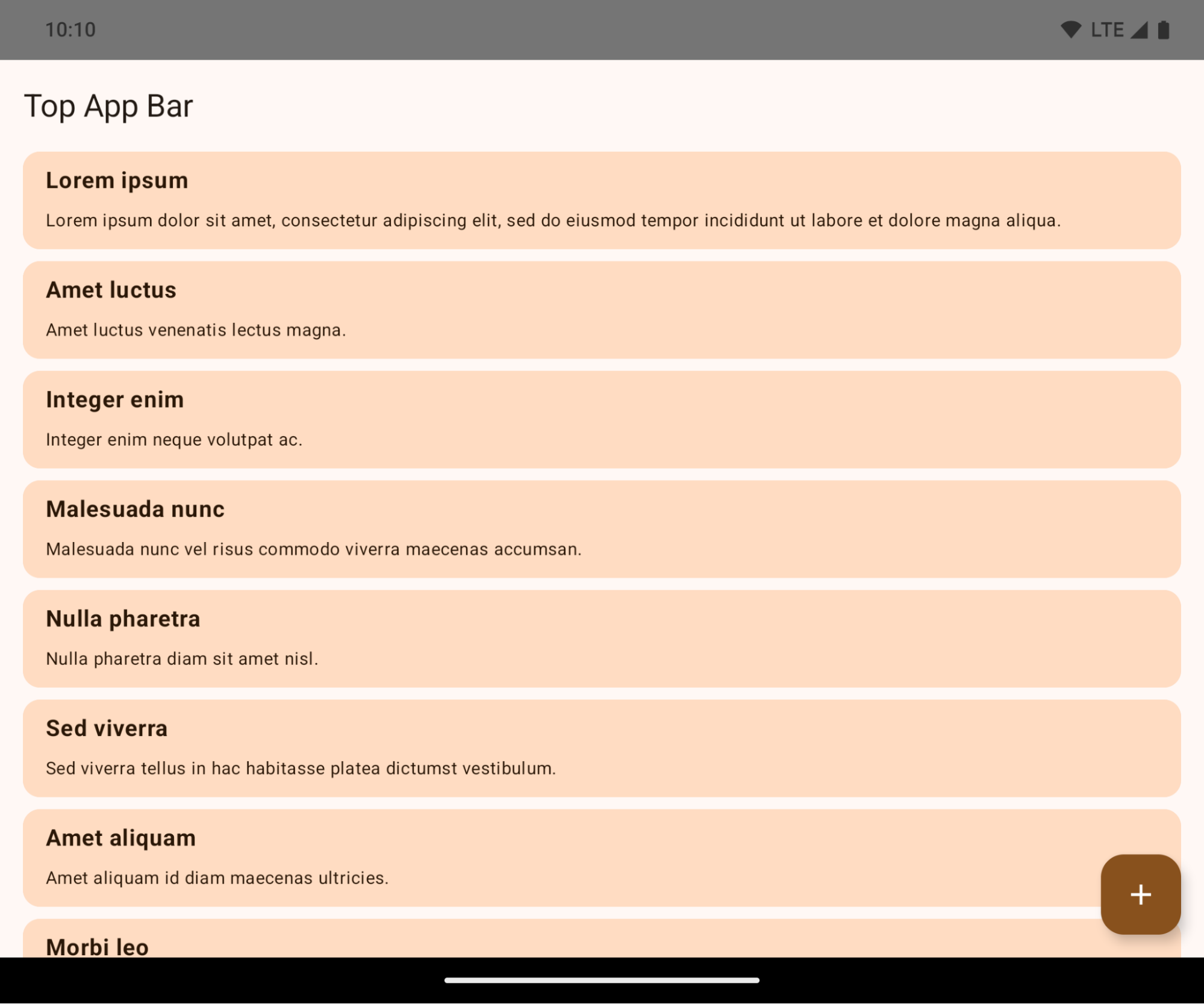
هذا تغيير غير متوافق قد يؤثر سلبًا في واجهة مستخدم تطبيقك. تؤثّر التغييرات في مناطق واجهة المستخدم التالية:
- شريط التنقل باستخدام مقبض الإيماءات
- تكون شفافة تلقائيًا.
- يتم إيقاف الإزاحة السفلية كي يتم عرض المحتوى خلف شريط التنقّل في النظام ما لم يتم تطبيق هوامش داخلية.
- تم إيقاف
setNavigationBarColorوR.attr#navigationBarColorنهائيًا، ولا يؤثران في التنقّل بالإيماءات. - لن يكون
setNavigationBarContrastEnforcedوR.attr#navigationBarContrastEnforcedأي تأثير على التنقّل بالإيماءات.
- التنقّل باستخدام ثلاثة أزرار
- يتم ضبط مستوى الشفافية على 80% تلقائيًا، وقد يتطابق اللون مع لون خلفية النافذة.
- تم إيقاف الإزاحة السفلية كي يتم عرض المحتوى خلف شريط التنقّل في النظام ما لم يتم تطبيق الحواف الداخلية.
- يتم ضبط
setNavigationBarColorوR.attr#navigationBarColorتلقائيًا ليتطابقا مع خلفية النافذة. يجب أن تكون خلفية النافذة قابلة للرسم بلون حتى يتم تطبيق هذا الإعداد التلقائي. تم إيقاف هذه الواجهة، ولكنها لا تزال تؤثر في التنقّل باستخدام 3 أزرار. - يتم تلقائيًا تفعيل
setNavigationBarContrastEnforcedوR.attr#navigationBarContrastEnforced، ما يؤدي إلى إضافة خلفية غير شفافة بنسبة% 80 في جميع أنحاء شاشة التنقّل باستخدام ثلاثة أزرار.
- شريط الحالة
- تكون شفافة تلقائيًا.
- يتم إيقاف الإزاحة العلوية، وبالتالي يتم عرض المحتوى خلف شريط الحالة ما لم يتم تطبيق هوامش داخلية.
- تم إيقاف
setStatusBarColorوR.attr#statusBarColorنهائيًا ولن يكون لهما أي تأثير في Android 15. - تم إيقاف
setStatusBarContrastEnforcedوR.attr#statusBarContrastEnforcedنهائيًا، ولكن سيظل لهما تأثير على Android 15.
- فتحة الشاشة
- يجب أن تكون قيمة
layoutInDisplayCutoutModeللنوافذ غير العائمةLAYOUT_IN_DISPLAY_CUTOUT_MODE_ALWAYS. يتم تفسيرSHORT_EDGESوNEVERوDEFAULTعلى أنّهاALWAYSحتى لا يظهر للمستخدمين شريط أسود بسبب فتحة العرض، ويظهر المحتوى من الحافة إلى الحافة.
- يجب أن تكون قيمة
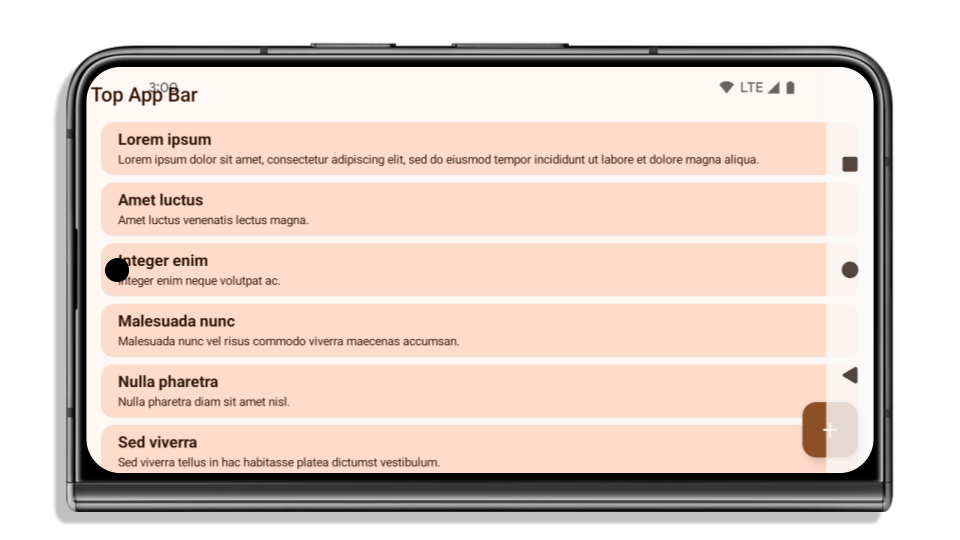
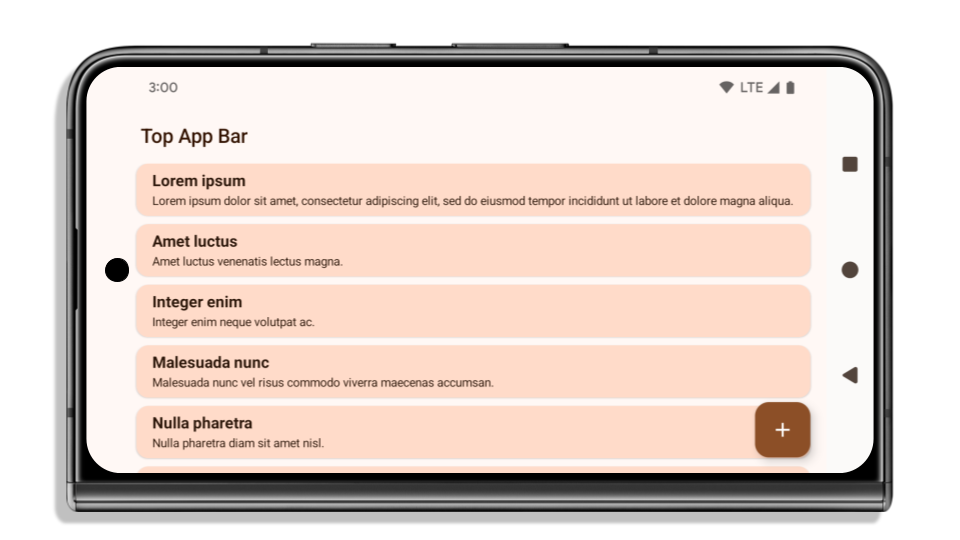
يوضّح المثال التالي تطبيقًا قبل وبعد استهداف Android 15 (المستوى 35 لواجهة برمجة التطبيقات)، وقبل وبعد تطبيق العناصر المضمّنة. هذا المثال ليس شاملاً، وقد يظهر بشكل مختلف على Android Auto.

ما يجب التحقّق منه إذا كان تطبيقك معروضًا من الحافة إلى الحافة
إذا كان تطبيقك يعرض المحتوى من الحافة إلى الحافة ويطبّق هوامش داخلية، لن تتأثر في معظم الحالات، باستثناء السيناريوهات التالية. ومع ذلك، حتى إذا كنت تعتقد أنّك لن تتأثر بهذا التغيير، ننصحك باختبار تطبيقك.
- لديك نافذة غير عائمة، مثل
ActivityتستخدمSHORT_EDGESأوNEVERأوDEFAULTبدلاً منLAYOUT_IN_DISPLAY_CUTOUT_MODE_ALWAYS. إذا كان تطبيقك يتعطّل عند تشغيله، قد يكون ذلك بسبب شاشة البداية. يمكنك إما ترقية تبعية شاشة البداية الأساسية إلى الإصدار 1.2.0-alpha01 أو إصدار أحدث، أو ضبطwindow.attributes.layoutInDisplayCutoutMode = WindowManager.LayoutInDisplayCutoutMode.always. - قد تكون هناك شاشات ذات عدد زيارات أقل مع واجهة مستخدم محجوبة. تأكَّد من أنّ الشاشات الأقل زيارة لا تتضمّن واجهة مستخدم محجوبة. تشمل الشاشات التي تسجّل عددًا أقل من الزيارات ما يلي:
- شاشات الإعداد أو تسجيل الدخول
- صفحات الإعدادات
الإجراءات التي يجب اتّخاذها إذا لم يكن تطبيقك يعرض المحتوى من الحافة إلى الحافة
إذا لم يكن تطبيقك معروضًا من الحافة إلى الحافة، من المرجّح أن تتأثّر بذلك. بالإضافة إلى سيناريوهات التطبيقات التي تعرض المحتوى من الحافة إلى الحافة، يجب مراعاة ما يلي:
- إذا كان تطبيقك يستخدم مكوّنات Material 3 (
androidx.compose.material3) في Compose، مثلTopAppBarوBottomAppBarوNavigationBar، من المحتمل أنّ هذه المكوّنات لن تتأثر لأنّها تتعامل تلقائيًا مع الحواف الداخلية. - إذا كان تطبيقك يستخدم مكوّنات Material 2 (
androidx.compose.material) في Compose، لن تتعامل هذه المكوّنات تلقائيًا مع الحواف الداخلية. ومع ذلك، يمكنك الوصول إلى الحواف الداخلية وتطبيقها يدويًا. في androidx.compose.material 1.6.0 والإصدارات الأحدث، استخدِم المَعلمةwindowInsetsلتطبيق الهوامش الداخلية يدويًا علىBottomAppBarوTopAppBarوBottomNavigationوNavigationRail. وبالمثل، استخدِم المَعلمةcontentWindowInsetsمعScaffold. - إذا كان تطبيقك يستخدم طرق العرض ومكوّنات Material
(
com.google.android.material)، فإنّ معظم مكوّنات Material المستندة إلى طرق العرض، مثلBottomNavigationViewأوBottomAppBarأوNavigationRailViewأوNavigationView، تتعامل مع الحواف الداخلية ولا تتطلّب أي عمل إضافي. ومع ذلك، عليك إضافةandroid:fitsSystemWindows="true"إذا كنت تستخدمAppBarLayout. - بالنسبة إلى العناصر القابلة للإنشاء المخصّصة، طبِّق الحواف الداخلية يدويًا كمسافة بادئة. إذا كان المحتوى الخاص بك ضمن
Scaffold، يمكنك استخدام الحواف الداخلية باستخدام قيم الحشوScaffold. بخلاف ذلك، طبِّق الحشو باستخدام أحدWindowInsets. - إذا كان تطبيقك يستخدم طرق العرض و
BottomSheetأوSideSheetأو الحاويات المخصّصة، طبِّق مساحة متروكة باستخدامViewCompat.setOnApplyWindowInsetsListener. بالنسبة إلىRecyclerView، طبِّق المساحة المتروكة باستخدام أداة معالجة الأحداث هذه، وأضِف أيضًاclipToPadding="false".
ما يجب التحقّق منه إذا كان تطبيقك يجب أن يوفّر حماية مخصّصة في الخلفية
إذا كان تطبيقك يوفّر حماية مخصّصة في الخلفية لشريط التنقّل بثلاثة أزرار أو شريط الحالة، يجب أن يضع تطبيقك عنصرًا قابلاً للإنشاء أو عرضًا خلف شريط النظام باستخدام WindowInsets.Type#tappableElement() للحصول على ارتفاع شريط التنقّل بثلاثة أزرار أو WindowInsets.Type#statusBars.
مراجع إضافية حول العرض من الحافة إلى الحافة
راجِع الدليلَين طرق العرض من الحافة إلى الحافة وإنشاء محتوى من الحافة إلى الحافة باستخدام Compose للاطّلاع على اعتبارات إضافية بشأن تطبيق عمليات الإزاحة.
واجهات برمجة التطبيقات المتوقّفة نهائيًا
تم إيقاف واجهات برمجة التطبيقات التالية نهائيًا ولكن لم يتم إيقافها:
R.attr#enforceStatusBarContrastR.attr#navigationBarColor(للتنقّل باستخدام ثلاثة أزرار، مع قيمة ألفا تبلغ %80)Window#isStatusBarContrastEnforcedWindow#setNavigationBarColor(للتنقّل باستخدام ثلاثة أزرار، مع قيمة ألفا بنسبة% 80)Window#setStatusBarContrastEnforced
تم إيقاف واجهات برمجة التطبيقات التالية:
R.attr#navigationBarColor(للتنقّل بالإيماءات)R.attr#navigationBarDividerColorR.attr#statusBarColorWindow#setDecorFitsSystemWindowsWindow#getNavigationBarColorWindow#getNavigationBarDividerColorWindow#getStatusBarColorWindow#setNavigationBarColor(للتنقّل بالإيماءات)Window#setNavigationBarDividerColorWindow#setStatusBarColor
الإعدادات الثابتة
如果您的应用以 Android 15(API 级别 35)或更高版本为目标平台,Configuration 不再排除系统栏。如果您在 Configuration 类中使用屏幕尺寸进行布局计算,则应根据需要将其替换为更好的替代方案,例如适当的 ViewGroup、WindowInsets 或 WindowMetricsCalculator。
Configuration 自 API 1 起便已开始提供。通常从 Activity.onConfigurationChanged 获取。它提供窗口密度、方向和大小等信息。从 Configuration 返回的窗口大小的一个重要特征是,它之前不包括系统栏。
配置大小通常用于资源选择(例如 /res/layout-h500dp),这仍然是一个有效的使用情形。不过,我们一直不建议使用它进行布局计算。如果您正在这样做,请立即远离该设备。您应根据自己的使用场景,将 Configuration 的使用替换为更合适的用法。
如果您使用它来计算布局,请使用适当的 ViewGroup,例如 CoordinatorLayout 或 ConstraintLayout。如果您使用它来确定系统导航栏的高度,请使用 WindowInsets。如果您想知道应用窗口的当前大小,请使用 computeCurrentWindowMetrics。
以下列表介绍了受此变更影响的字段:
Configuration.screenWidthDp和screenHeightDp尺寸不再排除系统栏。Configuration.smallestScreenWidthDp会受到screenWidthDp和screenHeightDp更改的间接影响。Configuration.orientation会受到近乎正方形的设备上screenWidthDp和screenHeightDp更改的间接影响。Display.getSize(Point)受到Configuration中的更改间接影响。此方法已从 API 级别 30 开始弃用。- 自 API 级别 33 以来,
Display.getMetrics()一直以这种方式运行。
تكون القيمة التلقائية لسمة elegantTextHeight هي true
For apps targeting Android 15 (API level 35), the
elegantTextHeight TextView attribute
becomes true by default, replacing the compact font used by default with some
scripts that have large vertical metrics with one that is much more readable.
The compact font was introduced to prevent breaking layouts; Android 13 (API
level 33) prevents many of these breakages by allowing the text layout to
stretch the vertical height utilizing the fallbackLineSpacing
attribute.
In Android 15, the compact font still remains in the system, so your app can set
elegantTextHeight to false to get the same behavior as before, but it is
unlikely to be supported in upcoming releases. So, if your app supports the
following scripts: Arabic, Lao, Myanmar, Tamil, Gujarati, Kannada, Malayalam,
Odia, Telugu or Thai, test your app by setting elegantTextHeight to true.

elegantTextHeight behavior for apps targeting Android 14 (API level 34) and lower.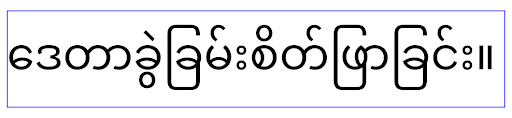
elegantTextHeight behavior for apps targeting Android 15.تغيير عرض TextView لأشكال الحروف المعقّدة
In previous versions of Android, some cursive fonts or languages that have
complex shaping might draw the letters in the previous or next character's area.
In some cases, such letters were clipped at the beginning or ending position.
Starting in Android 15, a TextView allocates width for drawing enough space
for such letters and allows apps to request extra paddings to the left to
prevent clipping.
Because this change affects how a TextView decides the width, TextView
allocates more width by default if the app targets Android 15 (API level 35) or
higher. You can enable or disable this behavior by calling the
setUseBoundsForWidth API on TextView.
Because adding left padding might cause a misalignment for existing layouts, the
padding is not added by default even for apps that target Android 15 or higher.
However, you can add extra padding to preventing clipping by calling
setShiftDrawingOffsetForStartOverhang.
The following examples show how these changes can improve text layout for some fonts and languages.

<TextView
    android:fontFamily="cursive"
    android:text="java" />
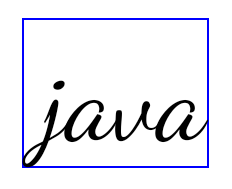
<TextView
    android:fontFamily="cursive"
    android:text="java"
    android:useBoundsForWidth="true"
    android:shiftDrawingOffsetForStartOverhang="true" />

<TextView
    android:text="คอมพิวเตอร์" />

<TextView
    android:text="คอมพิวเตอร์"
    android:useBoundsForWidth="true"
    android:shiftDrawingOffsetForStartOverhang="true" />
ارتفاع السطر التلقائي المتوافق مع اللغة المحلية في EditText
In previous versions of Android, the text layout stretched the height of the
text to meet the line height of the font that matched the current locale. For
example, if the content was in Japanese, because the line height of the Japanese
font is slightly larger than the one of a Latin font, the height of the text
became slightly larger. However, despite these differences in line heights, the
EditText element was sized uniformly, regardless
of the locale being used, as illustrated in the following image:

EditText elements that
can contain text from English (en), Japanese (ja), and Burmese (my). The
height of the EditText is the same, even though these languages
have different line heights from each other.For apps targeting Android 15 (API level 35), a minimum line height is now
reserved for EditText to match the reference font for the specified Locale, as
shown in the following image:

EditText elements that
can contain text from English (en), Japanese (ja), and Burmese (my). The
height of the EditText now includes space to accommodate the
default line height for these languages' fonts.If needed, your app can restore the previous behavior by specifying the
useLocalePreferredLineHeightForMinimum attribute
to false, and your app can set custom minimum vertical metrics using the
setMinimumFontMetrics API in Kotlin and Java.
الكاميرا والوسائط
يُجري Android 15 التغييرات التالية على سلوك الكاميرا والوسائط في التطبيقات التي تستهدف الإصدار 15 من Android أو الإصدارات الأحدث.
القيود المفروضة على طلب تركيز الصوت
يجب أن تكون التطبيقات التي تستهدف الإصدار 15 من نظام التشغيل Android (المستوى 35 لواجهة برمجة التطبيقات) هي التطبيق الأهم أو أن تعمل
بخدمة في المقدّمة من أجل طلب تركيز الصوت. إذا حاول أحد التطبيقات طلب التركيز عندما لا يستوفي أحد هذه المتطلبات، يعرض الإجراء AUDIOFOCUS_REQUEST_FAILED.
يمكنك الاطّلاع على مزيد من المعلومات حول ميزة "تركيز الصوت" في مقالة إدارة ميزة "تركيز الصوت".
تعديل القيود المفروضة على استخدام واجهات برمجة التطبيقات غير التابعة لحزمة SDK
Android 15 包含更新后的受限非 SDK 接口列表(基于与 Android 开发者之间的协作以及最新的内部测试)。在限制使用非 SDK 接口之前,我们会尽可能确保有可用的公开替代方案。
如果您的应用并非以 Android 15 为目标平台,其中一些变更可能不会立即对您产生影响。不过,虽然您的应用可以访问某些非 SDK 接口(具体取决于应用的目标 API 级别),但只要您使用任何非 SDK 方法或字段,就始终会有很高风险导致应用功能异常。
如果您不确定自己的应用是否使用了非 SDK 接口,则可以通过测试该应用来进行确认。如果您的应用依赖非 SDK 接口,则应开始计划迁移到 SDK 替代方案。不过,我们知道某些应用存在使用非 SDK 接口的合理场景。如果您无法为应用中的某项功能找到使用非 SDK 接口的替代方案,则应该请求新的公共 API。
如需详细了解此 Android 版本中的变更,请参阅 Android 15 中有关限制非 SDK 接口的更新。如需全面了解有关非 SDK 接口的详细信息,请参阅对非 SDK 接口的限制。