

Android 14에는 개발자를 위한 훌륭한 기능과 API가 도입되었습니다. 다음은 앱의 기능을 알아보고 관련 API를 시작하는 데 도움이 됩니다.
추가된 API, 수정된 API, 삭제된 API에 관한 자세한 목록은 API 차이점 보고서를 참고하세요. 추가된 API에 관한 자세한 내용은 Android API 참조를 참고하세요. Android 14의 경우 API 수준 34에 추가된 API를 찾아보세요. 플랫폼 변경이 앱에 영향을 줄 수 있는 분야에 관해 알아보려면 Android 14를 타겟팅하는 앱 및 모든 앱의 Android 14 동작 변경사항을 확인해야 합니다.
다국어 지원
앱별 언어 설정
Android 14 expands on the per-app language features that were introduced in Android 13 (API level 33) with these additional capabilities:
Automatically generate an app's
localeConfig: Starting with Android Studio Giraffe Canary 7 and AGP 8.1.0-alpha07, you can configure your app to support per-app language preferences automatically. Based on your project resources, the Android Gradle plugin generates theLocaleConfigfile and adds a reference to it in the final manifest file, so you no longer have to create or update the file manually. AGP uses the resources in theresfolders of your app modules and any library module dependencies to determine the locales to include in theLocaleConfigfile.Dynamic updates for an app's
localeConfig: Use thesetOverrideLocaleConfig()andgetOverrideLocaleConfig()methods inLocaleManagerto dynamically update your app's list of supported languages in the device's system settings. Use this flexibility to customize the list of supported languages per region, run A/B experiments, or provide an updated list of locales if your app utilizes server-side pushes for localization.App language visibility for input method editors (IMEs): IMEs can utilize the
getApplicationLocales()method to check the language of the current app and match the IME language to that language.
Grammatical Inflection API
30억 명의 사용자가 성별이 지정된 언어를 사용합니다. 이 언어는 이야기하는 사람과 사물의 성별에 따라 문법적 카테고리(예: 명사, 동사, 형용사, 전치사)가 영향을 받는 언어입니다. 일반적으로 성별이 지정된 많은 언어에서 남성형 문법적 성별을 기본 성별이나 일반 성별로 사용합니다.
여성을 남성형 문법적 성별로 언급하는 등 잘못된 문법적 성별로 사용자를 언급하면 사용자의 실적과 태도에 부정적인 영향을 미칠 수 있습니다. 반면 사용자의 문법적 성별을 올바르게 반영하는 언어로 된 UI는 사용자 참여를 개선하고 보다 맞춤설정되고 자연스러운 사용자 환경을 제공할 수 있습니다.
To help you build a user-centric UI for gendered languages, Android 14 introduces the Grammatical Inflection API, which lets you add support for grammatical gender without refactoring your app.
지역 설정
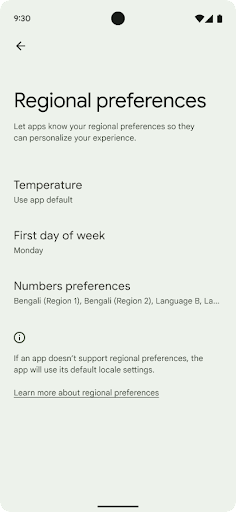
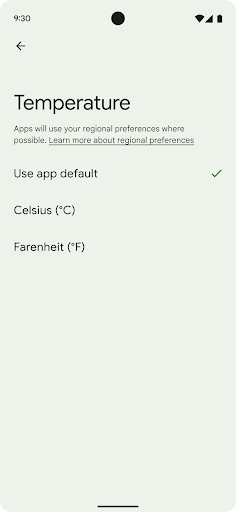
지역 설정을 통해 사용자는 온도 단위, 한 주의 첫째 날, 번호 매기기 시스템을 맞춤설정할 수 있습니다. 미국에 거주하는 유럽인은 온도 단위로 화씨보다 섭씨를 선호하고, 앱이 미국의 기본값인 일요일이 아닌 월요일을 한 주의 시작으로 간주하는 것을 선호할 수 있습니다.
이러한 환경설정에 관한 새로운 Android 설정 메뉴는 사용자에게 앱 환경설정을 변경할 수 있는 쉽게 검색 가능한 중앙 집중식 위치를 제공합니다. 이러한 환경설정은 백업 및 복원에도 유지됩니다. 여러 API 및 인텐트(예: getTemperatureUnit 및 getFirstDayOfWeek)는 앱에 사용자 환경설정에 대한 읽기 액세스 권한을 부여하므로 앱에서 정보를 표시하는 방식을 조정할 수 있습니다. ACTION_LOCALE_CHANGED에 BroadcastReceiver를 등록하여 지역 설정이 변경될 때 언어 구성 변경을 처리할 수도 있습니다.
이러한 설정을 찾으려면 설정 앱을 열고 시스템 > 언어 및 입력 > 지역 설정으로 이동하세요.
접근성
비선형 글꼴 크기 200%로 조정
Starting in Android 14, the system supports font scaling up to 200%, providing users with additional accessibility options.
To prevent large text elements on screen from scaling too large, the system applies a nonlinear scaling curve. This scaling strategy means that large text doesn't scale at the same rate as smaller text. Nonlinear font scaling helps preserve the proportional hierarchy between elements of different sizes while mitigating issues with linear text scaling at high degrees (such as text being cut off or text that becomes harder to read due to an extremely large display sizes).
Test your app with nonlinear font scaling
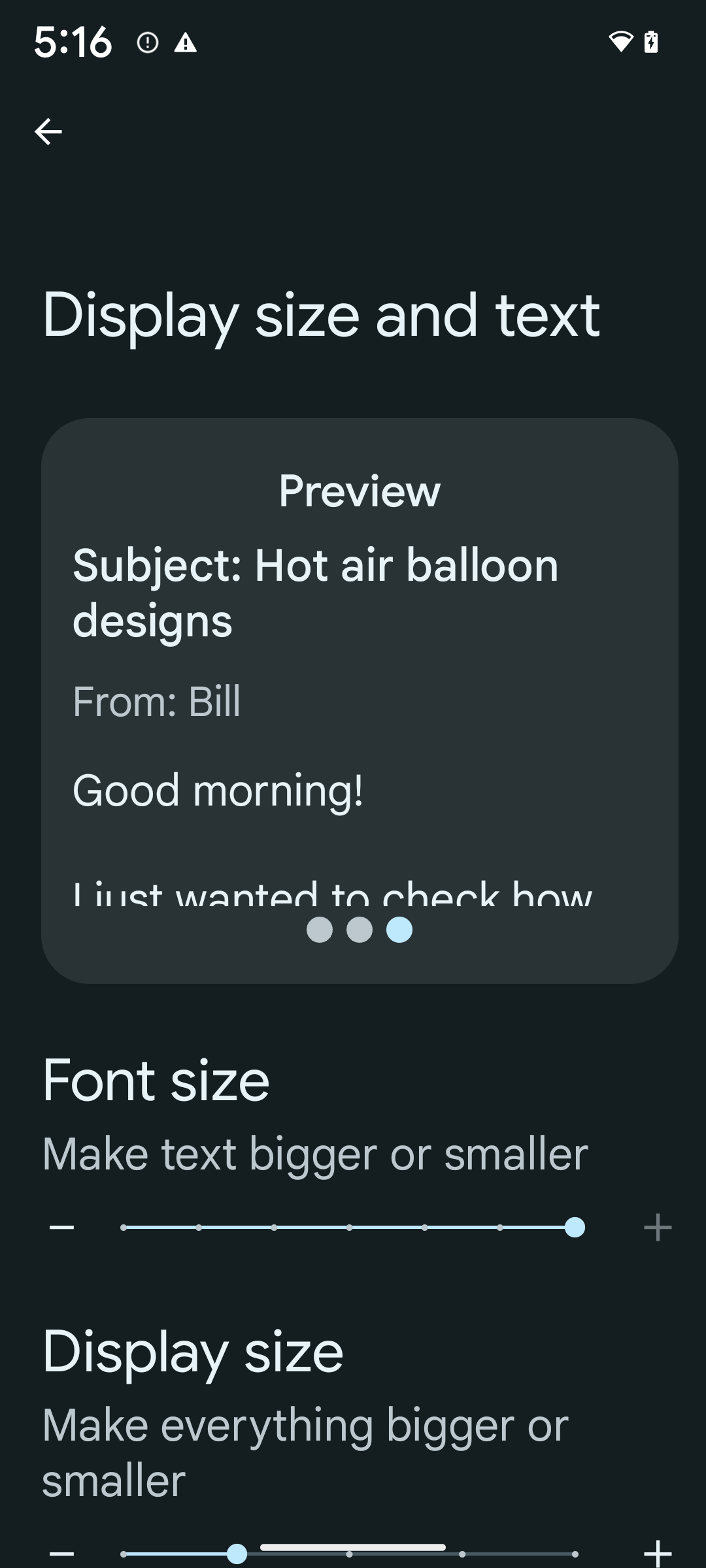
If you already use scaled pixels (sp) units to define text sizing, then these additional options and scaling improvements are applied automatically to the text in your app. However, you should still perform UI testing with the maximum font size enabled (200%) to ensure that your app applies the font sizes correctly and can accommodate larger font sizes without impacting usability.
To enable 200% font size, follow these steps:
- Open the Settings app and navigate to Accessibility > Display size and text.
- For the Font size option, tap the plus (+) icon until the maximum font size setting is enabled, as shown in the image that accompanies this section.
Use scaled pixel (sp) units for text-sizes
Remember to always specify text sizes in sp units. When your app uses sp units, Android can apply the user's preferred text size and scale it appropriately.
Don't use sp units for padding or define view heights assuming implicit padding: with nonlinear font scaling sp dimensions might not be proportional, so 4sp + 20sp might not equal 24sp.
Convert scaled pixel (sp) units
Use TypedValue.applyDimension() to convert from sp units
to pixels, and use TypedValue.deriveDimension() to
convert pixels to sp. These methods apply the appropriate nonlinear scaling
curve automatically.
Avoid hardcoding equations using
Configuration.fontScale or
DisplayMetrics.scaledDensity. Because font scaling is
nonlinear, the scaledDensity field is no longer accurate. The fontScale
field should be used for informational purposes only because fonts are no longer
scaled with a single scalar value.
Use sp units for lineHeight
Always define android:lineHeight using sp units instead
of dp, so the line height scales along with your text. Otherwise, if your text
is sp but your lineHeight is in dp or px, it doesn't scale and looks cramped.
TextView automatically corrects the lineHeight so that your intended
proportions are preserved, but only if both textSize and lineHeight are
defined in sp units.
카메라 및 미디어
이미지용 울트라 HDR
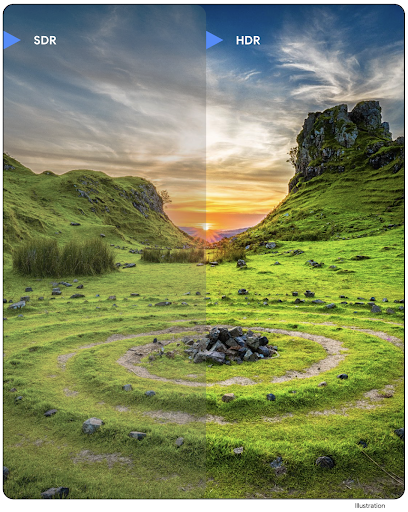
Android 14 新增了对高动态范围 (HDR) 图片的支持,可在拍摄照片时保留更多来自传感器的信息,从而实现鲜艳的色彩和更高的对比度。Android 使用 Ultra HDR 格式,该格式与 JPEG 图片完全向后兼容,可让应用与 HDR 图片无缝互操作,并根据需要以标准动态范围 (SDR) 显示这些图片。
当您的应用选择为其 activity 窗口使用 HDR 界面(通过清单条目或通过在运行时调用 Window.setColorMode())时,框架会自动在界面中以 HDR 格式渲染这些图片。您还可以在受支持的设备上拍摄压缩的 Ultra HDR 静态图片。从传感器中恢复的颜色越多,后期编辑的灵活性就越高。与 Ultra HDR 图片关联的 Gainmap 可用于使用 OpenGL 或 Vulkan 渲染这些图片。
카메라 확장 프로그램의 확대/축소, 초점, Postview 등
Android 14 upgrades and improves camera extensions, allowing apps to handle longer processing times, which enables improved images using compute-intensive algorithms like low-light photography on supported devices. These features give users an even more robust experience when using camera extension capabilities. Examples of these improvements include:
- Dynamic still capture processing latency estimation provides much more
accurate still capture latency estimates based on the current scene and
environment conditions. Call
CameraExtensionSession.getRealtimeStillCaptureLatency()to get aStillCaptureLatencyobject that has two latency estimation methods. ThegetCaptureLatency()method returns the estimated latency betweenonCaptureStartedandonCaptureProcessStarted(), and thegetProcessingLatency()method returns the estimated latency betweenonCaptureProcessStarted()and the final processed frame being available. - Support for capture progress callbacks so that apps can display the current
progress of long-running, still-capture processing operations. You can check
if this feature is available with
CameraExtensionCharacteristics.isCaptureProcessProgressAvailable, and if it is, you implement theonCaptureProcessProgressed()callback, which has the progress (from 0 to 100) passed in as a parameter. Extension specific metadata, such as
CaptureRequest.EXTENSION_STRENGTHfor dialing in the amount of an extension effect, such as the amount of background blur withEXTENSION_BOKEH.Postview Feature for Still Capture in camera extensions, which provides a less-processed image more quickly than the final image. If an extension has increased processing latency, a postview image could be provided as a placeholder to improve UX and switched out later for the final image. You can check if this feature is available with
CameraExtensionCharacteristics.isPostviewAvailable. Then you can pass anOutputConfigurationtoExtensionSessionConfiguration.setPostviewOutputConfiguration.Support for
SurfaceViewallowing for a more optimized and power-efficient preview render path.Support for tap to focus and zoom during extension usage.
인센서 줌
When REQUEST_AVAILABLE_CAPABILITIES_STREAM_USE_CASE in
CameraCharacteristics contains
SCALER_AVAILABLE_STREAM_USE_CASES_CROPPED_RAW, your app
can use advanced sensor capabilities to give a cropped RAW stream the same
pixels as the full field of view by using a CaptureRequest
with a RAW target that has stream use case set to
CameraMetadata.SCALER_AVAILABLE_STREAM_USE_CASES_CROPPED_RAW.
By implementing the request override controls, the updated camera gives users
zoom control even before other camera controls are ready.
무손실 USB 오디오
Android 14 支持无损音频格式,可通过 USB 有线耳机提供发烧友级体验。您可以查询 USB 设备的首选混音器属性,注册监听器以监听首选混音器属性的更改,以及使用 AudioMixerAttributes 类配置混音器属性。此类表示音频混音器的格式,例如声道掩码、采样率和行为。该类允许直接发送音频,而无需混音、调节音量或处理效果。
개발자 생산성 및 도구
인증 관리자
Android 14 将 Credential Manager 添加为平台 API,并通过使用 Google Play 服务的 Jetpack 库,向后额外支持 Android 4.4(API 级别 19)设备。Credential Manager 旨在通过 API 使用用户配置的凭据提供程序检索和存储凭据,让用户更轻松地登录。Credential Manager 在单个 API 中支持多种登录方法,包括用户名和密码、通行密钥和联合登录解决方案(如“使用 Google 账号登录”)。
通行密钥具有许多优势。例如,通行密钥是基于业界标准构建的,可在各种不同的操作系统和浏览器生态系统中使用,并且可用于网站和应用。
如需了解详情,请参阅 Credential Manager 和通行密钥文档以及介绍 Credential Manager 和通行密钥的博文。
헬스 커넥트
Health Connect is an on-device repository for user health and fitness data. It allows users to share data between their favorite apps, with a single place to control what data they want to share with these apps.
On devices running Android versions prior to Android 14, Health Connect is available to download as an app on the Google Play store. Starting with Android 14, Health Connect is part of the platform and receives updates through Google Play system updates without requiring a separate download. With this, Health Connect can be updated frequently, and your apps can rely on Health Connect being available on devices running Android 14 or higher. Users can access Health Connect from the Settings in their device, with privacy controls integrated into the system settings.
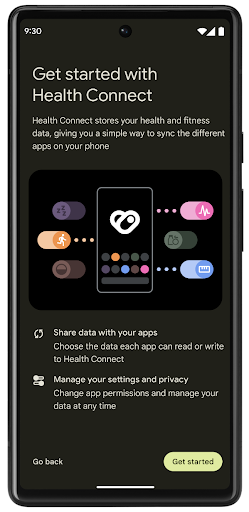
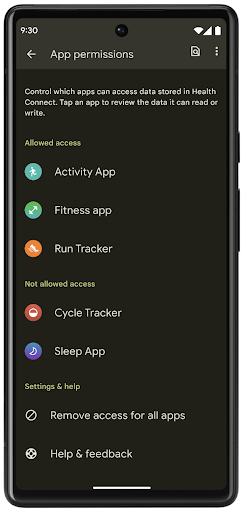
Health Connect includes several new features in Android 14, such as exercise routes, allowing users to share a route of their workout which can be visualized on a map. A route is defined as a list of locations saved within a window of time, and your app can insert routes into exercise sessions, tying them together. To ensure that users have complete control over this sensitive data, users must allow sharing individual routes with other apps.
For more information, see the Health Connection documentation and the blogpost on What's new in Android Health.
OpenJDK 17 업데이트
Android 14 将继续更新 Android 的核心库,以与最新 OpenJDK LTS 版本中的功能保持一致,包括适合应用和平台开发者的库更新和 Java 17 语言支持。
其中包含以下功能和改进:
- 将大约 300 个
java.base类更新为支持 Java 17。 - 文本块 - 为 Java 编程语言引入了多行字符串字面量。
- instanceof 模式匹配:可让对象在
instanceof中被视为具有特定类型,而无需任何额外的变量。 - 密封类:允许您限制哪些类和接口可以扩展或实现它们。
得益于 Google Play 系统更新 (Project Mainline),6 亿多台设备能够接收包含这些更改的最新 Android 运行时 (ART) 更新。我们致力于为应用提供更加一致、安全的跨设备环境,并为用户提供独立于平台版本的新功能。
Java 和 OpenJDK 是 Oracle 及/或其关联公司的商标或注册商标。
앱 스토어 개선사항
Android 14 introduces several PackageInstaller APIs that
allow app stores to improve their user experience.
Request install approval before downloading
Installing or updating an app might require user approval.
For example, when an installer making use of the
REQUEST_INSTALL_PACKAGES permission attempts to install a
new app. In prior Android versions, app stores can only request user approval
after APKs are written to the install session and the
session is committed.
Starting with Android 14, the requestUserPreapproval()
method lets installers request user approval before committing the install
session. This improvement lets an app store defer downloading any APKs until
after the installation has been approved by the user. Furthermore, once a user
has approved installation, the app store can download and install the app in the
background without interrupting the user.
Claim responsibility for future updates
The setRequestUpdateOwnership() method allows an installer
to indicate to the system that it intends to be responsible for future updates
to an app it is installing. This capability enables update ownership
enforcement, meaning that only the update owner is permitted
to install automatic updates to the app. Update ownership enforcement helps to
ensure that users receive updates only from the expected app store.
Any other installer, including those making use of the
INSTALL_PACKAGES permission, must receive explicit user
approval in order to install an update. If a user decides to proceed with an
update from another source, update ownership is lost.
Update apps at less-disruptive times
App stores typically want to avoid updating an app that is actively in use because this leads to the app's running processes being killed, which potentially interrupts what the user was doing.
Starting with Android 14, the InstallConstraints API
gives installers a way to ensure that their app updates happen at an opportune
moment. For example, an app store can call the
commitSessionAfterInstallConstraintsAreMet() method to
make sure that an update is only committed when the user is no longer
interacting with the app in question.
Seamlessly install optional splits
With split APKs, features of an app can be delivered in separate APK files,
rather than as a monolithic APK. Split APKs allow app stores to optimize the
delivery of different app components. For example, app stores might optimize
based on the properties of the target device. The
PackageInstaller API has supported splits since its
introduction in API level 22.
In Android 14, the setDontKillApp() method allows an
installer to indicate that the app's running processes shouldn't be killed when
new splits are installed. App stores can use this feature to seamlessly install
new features of an app while the user is using the app.
앱 메타데이터 번들
Starting in Android 14, the Android package installer lets you specify app metadata, such as data safety practices, to include on app store pages such as Google Play.
사용자가 기기 스크린샷을 찍을 때 감지
To create a more standardized experience for detecting screenshots, Android 14 introduces a privacy-preserving screenshot detection API. This API lets apps register callbacks on a per-activity basis. These callbacks are invoked, and the user is notified, when the user takes a screenshot while that activity is visible.
사용자 환경
Sharesheet 맞춤 작업 및 개선된 순위 지정
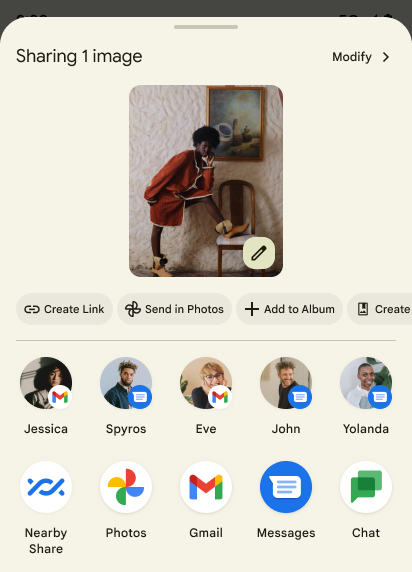
Android 14에서는 맞춤 앱 작업과 사용자에게 더 많은 정보를 제공하는 미리보기 결과를 지원하도록 시스템 Sharesheet를 업데이트합니다.
맞춤 작업 추가
Android 14에서는 앱에서 호출하는 시스템 Sharesheet에 맞춤 작업을 추가할 수 있습니다.
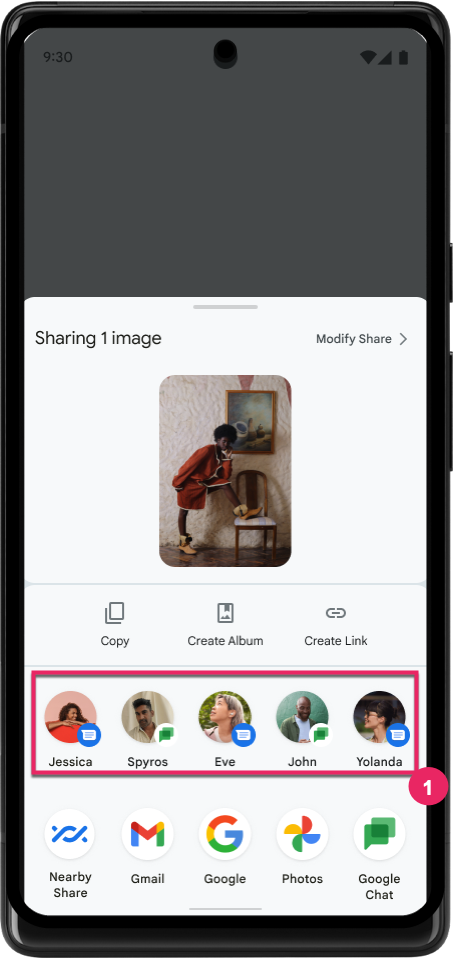
직접 공유 타겟의 순위 향상
Android 14는 앱에서 더 많은 신호를 사용하여 직접 공유 타겟의 순위를 결정하고 사용자에게 더 유용한 결과를 제공합니다. 순위에 가장 유용한 신호를 제공하려면 직접 공유 타겟의 순위 향상에 관한 안내를 따르세요. 커뮤니케이션 앱은 발신 및 수신 메시지의 단축키 사용을 보고할 수도 있습니다.
뒤로 탐색 예측을 위한 내장 및 맞춤 애니메이션 지원
Android 13 introduced the predictive back-to-home animation behind a developer option. When used in a supported app with the developer option enabled, swiping back shows an animation indicating that the back gesture exits the app back to the home screen.
Android 14 includes multiple improvements and new guidance for Predictive Back:
- You can set
android:enableOnBackInvokedCallback=trueto opt in to predictive back system animations per-Activity instead of for the entire app. - We've added new system animations to accompany the back-to-home animation from Android 13. The new system animations are cross-activity and cross-task, which you get automatically after migrating to Predictive Back.
- We've added new Material Component animations for Bottom sheets, Side sheets, and Search.
- We've created design guidance for creating custom in-app animations and transitions.
- We've added new APIs to support custom in-app transition animations:
handleOnBackStarted,handleOnBackProgressed,handleOnBackCancelledinOnBackPressedCallbackonBackStarted,onBackProgressed,onBackCancelledinOnBackAnimationCallback- Use
overrideActivityTransitioninstead ofoverridePendingTransitionfor transitions that respond as the user swipes back.
With this Android 14 preview release, all features of Predictive Back remain behind a developer option. See the developer guide to migrate your app to predictive back, as well as the developer guide to creating custom in-app transitions.
대형 화면 기기 제조업체 앱별 재정의
Per-app overrides enable device manufacturers to change the behavior of apps on large screen devices. For example, the FORCE_RESIZE_APP override instructs the system to resize the app to fit display dimensions (avoiding size compatibility mode) even if resizeableActivity="false" is set in the app manifest.
Overrides are intended to improve the user experience on large screens.
New manifest properties enable you to disable some device manufacturer overrides for your app.
대형 화면 사용자 앱별 재정의
Per-app overrides change the behavior of apps on large screen devices. For example, the OVERRIDE_MIN_ASPECT_RATIO_LARGE device manufacturer override sets the app aspect ratio to 16:9 regardless of the app's configuration.
Android 14 QPR1 enables users to apply per‑app overrides by means of a new settings menu on large screen devices.
앱 화면 공유
借助应用界面共享功能,用户可以在录制屏幕内容时共享应用窗口,而不是整个设备屏幕。
在应用屏幕共享模式下,状态栏、导航栏、通知和其他系统界面元素会从共享显示屏中排除。系统只会分享所选应用的内容。
应用屏幕共享功能可让用户运行多个应用,但将内容共享限制为单个应用,从而提高工作效率并保护隐私。
Pixel 8 Pro의 Gboard에서 LLM 기반 스마트 답장
在搭载 12 月功能分块的 Pixel 8 Pro 设备上,开发者可以在 Gboard 中试用质量更高的智能回复,这些回复由在 Google Tensor 上运行的设备端大语言模型 (LLM) 提供支持。
此功能目前仅在 WhatsApp、Line 和 KakaoTalk 中以美式英语的形式提供给用户进行小范围测试。此功能需要使用 Pixel 8 Pro 设备,并将 Gboard 用作键盘。
如需试用此功能,请先依次前往设置 > 开发者选项 > AiCore 设置 > 启用 Aicore 持久性,启用该功能。
接下来,在受支持的应用中打开对话,即可在 Gboard 的建议栏中看到依托 LLM 的智能回复,以便回复收到的消息。
그래픽
경로를 쿼리하고 보간할 수 있음
Android의 Path API는 벡터 그래픽을 만들고 렌더링하기 위한 강력하고 유연한 메커니즘으로, 경로를 획 처리하거나 채우고, 선분이나 이차 또는 삼차 곡선으로 경로를 구성하고, 불리언 연산을 실행하여 훨씬 더 복잡한 도형을 가져오거나 이 모든 작업을 동시에 실행할 수 있습니다. 한 가지 제한사항은 경로 객체에 실제로 무엇이 있는지 찾을 수 있다는 것입니다. 객체의 내부는 생성 후 호출자에게 불투명합니다.
Path를 만들려면 moveTo(), lineTo(), cubicTo()와 같은 메서드를 호출하여 경로 세그먼트를 추가하세요. 그러나 이 경로에 세그먼트가 무엇인지 물어볼 방법이 없으므로 생성 시 해당 정보를 유지해야 합니다.
Android 14부터 경로를 쿼리하여 그 안에 포함된 항목을 확인할 수 있습니다.
먼저 Path.getPathIterator API를 사용하여 PathIterator 객체를 가져와야 합니다.
Kotlin
val path = Path().apply {
    moveTo(1.0f, 1.0f)
    lineTo(2.0f, 2.0f)
    close()
}
val pathIterator = path.pathIterator
자바
Path path = new Path();
path.moveTo(1.0F, 1.0F);
path.lineTo(2.0F, 2.0F);
path.close();
PathIterator pathIterator = path.getPathIterator();
그런 다음 PathIterator를 호출하여 세그먼트를 하나씩 반복하면서 각 세그먼트에 필요한 모든 데이터를 검색할 수 있습니다. 이 예에서는 데이터를 패키징하는 PathIterator.Segment 객체를 사용합니다.
Kotlin
for (segment in pathIterator) {
    println("segment: ${segment.verb}, ${segment.points}")
}
자바
while (pathIterator.hasNext()) {
    PathIterator.Segment segment = pathIterator.next();
    Log.i(LOG_TAG, "segment: " + segment.getVerb() + ", " + segment.getPoints());
}
PathIterator에는 포인트 데이터를 보유할 버퍼를 전달할 수 있는 비할당 버전의 next()도 있습니다.
Path 데이터 쿼리에 관한 중요한 사용 사례 중 하나는 보간 유형입니다. 예를 들어 서로 다른 두 경로 간에 애니메이션을 적용하거나 모핑할 수 있습니다. 이러한 사용 사례를 더욱 단순화하기 위해 Android 14에는 Path에 interpolate() 메서드도 포함되어 있습니다. 두 경로의 내부 구조가 같다고 가정하면 interpolate() 메서드는 보간된 결과를 사용하여 새 Path를 만듭니다. 이 예에서는 path 및 otherPath 사이의 도형이 중간(선형 보간 유형 0.5)인 경로를 반환합니다.
Kotlin
val interpolatedResult = Path()
if (path.isInterpolatable(otherPath)) {
    path.interpolate(otherPath, .5f, interpolatedResult)
}
자바
Path interpolatedResult = new Path();
if (path.isInterpolatable(otherPath)) {
    path.interpolate(otherPath, 0.5F, interpolatedResult);
}
Jetpack graphics-path 라이브러리를 사용하면 이전 버전의 Android에서도 유사한 API를 사용할 수 있습니다.
버텍스 및 프래그먼트 셰이더가 있는 맞춤 메시
Android 长期以来一直支持使用自定义着色绘制三角网格,但输入网格格式仅限于一些预定义的属性组合。Android 14 增加了对自定义网格的支持,可将其定义为三角形或三角形条,并且可以选择是否编入索引。这些网格是使用自定义属性、顶点步长、可变以及使用 AGSL 编写的顶点着色器和片段着色器指定的。
顶点着色器定义了位置和颜色等变量,而片段着色器可以选择为像素定义颜色,通常是使用顶点着色器创建的变量。如果片段着色器提供颜色,则系统会使用绘制网格时选择的混合模式将其与当前 Paint 颜色混合。Uniform 可以传递到片段着色器和顶点着色器,以提高灵活性。
캔버스의 하드웨어 버퍼 렌더러
Android의 Canvas API를 사용하여 하드웨어 가속으로 HardwareBuffer에 그리는 것을 지원하기 위해 Android 14에서는 HardwareBufferRenderer를 도입합니다. 이 API는
시스템과의 통신이 포함된 사용 사례에 특히 유용합니다
짧은 지연 시간을 위해 SurfaceControl를 통한 컴포지터
있습니다.