

La piattaforma Android 15 include modifiche al comportamento che potrebbero influire sulla tua app.
Le seguenti modifiche al comportamento si applicano a tutte le app quando vengono eseguite su Android 15,
indipendentemente dal targetSdkVersion. Devi testare la tua app e poi modificarla in base alle necessità per supportare correttamente questi comportamenti, ove applicabile.
Assicurati di esaminare anche l'elenco delle modifiche al comportamento che interessano solo le app che hanno come target Android 15.
Funzionalità di base
Android 15 modifica o espande varie funzionalità di base del sistema Android.
Modifiche allo stato interrotto del pacchetto
L'intenzione dello stato del pacchetto FLAG_STOPPED (che gli utenti possono attivare nelle build AOSP premendo a lungo l'icona di un'app e selezionando "Forza interruzione") è sempre stata quella di mantenere le app in questo stato finché l'utente non le rimuove esplicitamente da questo stato avviandole direttamente o interagendo indirettamente con l'app (tramite la scheda di condivisione o un widget, selezionando l'app come sfondo animato e così via). In Android 15, abbiamo aggiornato il comportamento del sistema in modo che sia in linea con questo comportamento previsto. Le app devono essere rimosse
dallo stato di interruzione solo tramite un'azione diretta o indiretta dell'utente.
Per supportare il comportamento previsto, oltre alle limitazioni esistenti, il sistema annulla anche tutti gli intent in attesa quando l'app entra nello stato di fermata su un dispositivo con Android 15. Quando le azioni dell'utente rimuovono l'app dallo stato di fermata, il broadcast ACTION_BOOT_COMPLETED viene inviato all'app, offrendo la possibilità di registrare nuovamente gli intent in attesa.
Puoi chiamare il nuovo metodo
ApplicationStartInfo.wasForceStopped()
per verificare se l'app è stata messa in stato di arresto.
Supporto delle dimensioni delle pagine di 16 kB
Storicamente, Android ha supportato solo dimensioni delle pagine di memoria di 4 KB, il che ha ottimizzato le prestazioni della memoria di sistema per la quantità media di memoria totale che i dispositivi Android hanno in genere avuto. A partire da Android 15, AOSP supporta i dispositivi configurati per utilizzare una dimensione pagina di 16 KB (dispositivi da 16 KB). Se la tua app utilizza librerie NDK, direttamente o indirettamente tramite un SDK, dovrai ricompilare l'app per farla funzionare su questi dispositivi da 16 KB.
Man mano che i produttori di dispositivi continuano a creare dispositivi con quantità maggiori di memoria fisica (RAM), molti di questi dispositivi adotteranno dimensioni delle pagine di 16 KB (e alla fine maggiori) per ottimizzare le prestazioni del dispositivo. L'aggiunta del supporto per i dispositivi con dimensioni di pagina di 16 kB consente alla tua app di essere eseguita su questi dispositivi e di sfruttare i miglioramenti delle prestazioni associati. Senza ricompilazione, le app non funzioneranno sui dispositivi da 16 KB nelle versioni future di Android.
Per aiutarti ad aggiungere il supporto per la tua app, abbiamo fornito indicazioni su come verificare se la tua app è interessata, su come ricompilare l'app (se applicabile) e su come testarla in un ambiente da 16 kB utilizzando emulatori (incluse le immagini di sistema Android 15 per Android Emulator).
Vantaggi e miglioramenti delle prestazioni
I dispositivi configurati con dimensioni di pagina di 16 KB in media utilizzano un po' più di memoria, ma ottengono anche vari miglioramenti delle prestazioni sia per il sistema sia per le app:
- Tempi di avvio delle app più ridotti quando il sistema è sotto pressione di memoria: in media il 3,16% meno, con miglioramenti più significativi (fino al 30%) per alcune app che abbiamo testato
- Assorbimento di corrente ridotto durante l'avvio dell'app: riduzione media del 4,56%
- Avvio più rapido della fotocamera: in media gli avvii a caldo più veloci del 4,48% e degli avvii a freddo del 6,60% più velocemente
- Tempo di avvio del sistema migliorato: miglioramento medio dell'8% (circa 950 millisecondi)
Questi miglioramenti si basano sui nostri test iniziali e i risultati sui dispositivi effettivi potrebbero essere diversi. Forniremo ulteriori analisi dei potenziali guadagni per le app man mano che continuiamo i test.
Controllare se la tua app è interessata
Se la tua app utilizza codice nativo, devi ricompilarla con il supporto per i dispositivi da 16 kB. Se non sai con certezza se la tua app utilizza codice nativo, puoi utilizzare APK Analyzer per identificare se è presente codice nativo e poi controllare l'allineamento dei segmenti ELF per le librerie condivise che trovi. Android Studio offre anche funzionalità che ti aiutano a rilevare automaticamente i problemi di allineamento.
Se la tua app utilizza solo codice scritto nel linguaggio di programmazione Java o in Kotlin, incluse tutte le librerie o gli SDK, allora la tua app supporta già dispositivi da 16 KB. Tuttavia, ti consigliamo di testare l'app in un ambiente da 16 KB per verificare che non si verifichino regressioni impreviste nel comportamento dell'app.
Modifiche necessarie per alcune app per supportare lo spazio privato
Spazio privato è una nuova funzionalità di Android 15 che consente agli utenti di creare uno spazio separato sul proprio dispositivo in cui possono proteggere le app sensibili da occhi indiscreti mediante un ulteriore livello di autenticazione. Poiché le app nello spazio privato hanno visibilità limitata, alcuni tipi di app devono eseguire passaggi aggiuntivi per poter vedere e interagire con le app nello spazio privato di un utente.
Tutte le app
Poiché le app nello spazio privato vengono conservate in un profilo utente separato, simile ai profili di lavoro, le app non devono presumere che le eventuali copie installate della loro app che non si trovano nel profilo principale siano nel profilo di lavoro. Se la tua app ha una logica relativa alle app del profilo di lavoro che fa questa supposizione, dovrai modificarla.
App di medicina
Quando un utente blocca lo spazio privato, tutte le app al suo interno vengono interrotte e non possono eseguire attività in primo piano o in background, inclusa la visualizzazione delle notifiche. Questo comportamento potrebbe influire in modo significativo sull'utilizzo e sul funzionamento delle app mediche installate nello spazio privato.
L'esperienza di configurazione dello spazio privato avvisa gli utenti che lo spazio privato non è adatto per le app che devono eseguire attività in primo piano o in background critiche, ad esempio la visualizzazione di notifiche di app mediche. Tuttavia, le app non possono determinare se vengono utilizzate o meno nello spazio privato, quindi non possono mostrare un avviso all'utente in questo caso.
Per questi motivi, se sviluppi un'app medica, controlla in che modo questa funzionalità potrebbe influire sulla tua app e adotta le misure appropriate, ad esempio informando gli utenti di non installarla nello spazio privato, per evitare di interrompere le funzionalità critiche dell'app.
App di avvio
Se sviluppi un'app Avvio app, devi eseguire le seguenti operazioni prima che le app nello spazio privato siano visibili:
- La tua app deve essere assegnata come app di avvio predefinita per il dispositivo, ovvero deve disporre del ruolo
ROLE_HOME. - L'app deve dichiarare l'autorizzazione normale
ACCESS_HIDDEN_PROFILESnel file manifest dell'app.
Le app di Avvio app che dichiarano l'autorizzazione ACCESS_HIDDEN_PROFILES devono gestire
i seguenti casi d'uso dello spazio privato:
- L'app deve avere un contenitore Avvio app separato per le app installate nello spazio privato. Utilizza il metodo
getLauncherUserInfo()per determinare il tipo di profilo utente gestito. - L'utente deve essere in grado di nascondere e mostrare il contenitore dello spazio privato.
- L'utente deve essere in grado di bloccare e sbloccare il contenitore dello spazio privato. Utilizza il metodo
requestQuietModeEnabled()per bloccare (passandotrue) o sbloccare (passandofalse) lo spazio privato. Quando è bloccato, nessuna app nel contenitore dello spazio privato deve essere visibile o rilevabile tramite meccanismi come la ricerca. L'app deve registrare un transceiver per le trasmissioni
ACTION_PROFILE_AVAILABLEeACTION_PROFILE_UNAVAILABLEe aggiornare l'UI nell'app quando cambia lo stato bloccato o sbloccato del contenitore dello spazio privato. Entrambe le trasmissioni includonoEXTRA_USER, che la tua app può utilizzare per fare riferimento all' utente del profilo privato.Puoi anche utilizzare il metodo
isQuietModeEnabled()per verificare se il profilo dello spazio privato è bloccato o meno.
App dello store
Lo spazio privato include un pulsante "Installa app" che avvia un'intent implicita per installare app nello spazio privato dell'utente. Affinché la tua app possa ricevere questo intent implicito, dichiara un <intent-filter> nel file manifest dell'app con un <category> di CATEGORY_APP_MARKET.
Carattere emoji basato su PNG rimosso
Il file del carattere emoji precedente (NotoColorEmojiLegacy.ttf) basato su PNG è stato
rimosso, lasciando solo il file basato su vettori. A partire da Android 13 (livello API 33), il file del carattere emoji utilizzato dal renderer emoji di sistema è passato da un file basato su PNG a un file basato su vettori. Il sistema ha mantenuto il file dei caratteri legacy in Android 13 e 14 per motivi di compatibilità, in modo che le app con i propri visualizzatori dei caratteri potessero continuare a utilizzarlo fino a quando non fosse stato possibile eseguire l'upgrade.
Per verificare se la tua app è interessata, cerca nel codice riferimenti al
NotoColorEmojiLegacy.ttf file.
Puoi scegliere di adattare la tua app in diversi modi:
- Utilizza le API di piattaforma per il rendering del testo. Puoi eseguire il rendering del testo in un
Canvasbasato su bitmap e utilizzarlo per ottenere un'immagine non elaborata, se necessario. - Aggiungi il supporto dei caratteri COLRv1 alla tua app. La libreria open source FreeType supporta COLRv1 nella versione 2.13.0 e superiori.
- Come ultima risorsa, puoi includere il file del carattere emoji precedente
(
NotoColorEmoji.ttf) nel tuo APK, anche se in questo caso la tua app non avrà gli aggiornamenti emoji più recenti. Per maggiori informazioni, consulta la pagina del progetto GitHub di Noto Emoji.
È stata aumentata la versione minima dell'SDK target da 23 a 24
Android 15 基于
在 Android 14 中进行的更改,并扩展了
安全性。在 Android 15 中,
无法安装低于 24 的 targetSdkVersion。
要求应用符合现代 API 级别有助于确保更好的安全性和
保护隐私。
恶意软件通常会以较低的 API 级别为目标平台,以绕过安全和隐私
更高的 Android 版本中引入的保护机制。例如,有些恶意软件应用使用 targetSdkVersion 22,以避免受到 Android 6.0 Marshmallow(API 级别 23)在 2015 年引入的运行时权限模型的约束。这项 Android 15 变更使恶意软件更难以规避安全和隐私权方面的改进限制。尝试安装以较低 API 级别为目标平台的应用将导致安装失败,并且 Logcat 中会显示如下所示的消息:
INSTALL_FAILED_DEPRECATED_SDK_VERSION: App package must target at least SDK version 24, but found 7
在升级到 Android 15 的设备上,targetSdkVersion 级别较低的任何应用
安装在 Google Play 上
如果您需要测试以旧版 API 级别为目标平台的应用,请使用以下 ADB 命令:
adb install --bypass-low-target-sdk-block FILENAME.apk
Sicurezza e privacy
Android 15 引入了强大的措施来防范动态密码 (OTP) 欺诈并保护用户的敏感内容,重点是增强通知监听器服务和屏幕共享保护措施。主要增强功能包括从可供不可信应用访问的通知中隐去 OTP、在屏幕共享期间隐藏通知,以及在发布 OTP 时保护应用 activity。这些变更旨在保护用户的敏感内容,使其免受未经授权的操作者的侵害。
开发者需要注意以下事项,以确保其应用与 Android 15 中的变更兼容:
动态密码隐去
Android 会阻止实现 NotificationListenerService 的不受信任应用读取已检测到 OTP 的通知中的未隐去的内容。配套设备管理器关联等受信任应用不受这些限制。
屏幕共享保护
- 在屏幕共享会话期间,系统会隐藏通知内容,以保护用户的隐私。如果应用实现了
setPublicVersion(),Android 会显示通知的公开版本,该版本在不安全情境中用作替换通知。否则,系统会隐去通知内容,不提供任何其他背景信息。 - 系统会向远程观看者隐藏密码输入等敏感内容,以防止泄露用户的敏感信息。
- 如果在屏幕共享期间检测到动态密码,系统会隐藏在该时间段内发布通知的应用的活动。应用内容在启动时会向远程查看器隐藏。
- 除了 Android 自动识别敏感字段之外,开发者还可以使用
setContentSensitivity手动将应用的部分标记为敏感,在屏幕共享期间,这些敏感字段会对远程观看者隐藏。 - 开发者可以选择切换开发者选项下的停用屏幕共享防护选项,以便出于演示或测试目的豁免屏幕共享防护。默认的系统屏幕录制工具不受这些更改的影响,因为录制内容会保留在设备上。
Fotocamera e contenuti multimediali
Android 15 apporta le seguenti modifiche al comportamento della fotocamera e dei contenuti multimediali per tutte le app.
La riproduzione audio diretta e l'offload invalidano le tracce audio dirette o offload precedentemente aperte quando vengono raggiunti i limiti delle risorse
在 Android 15 之前,如果某个应用在另一个应用播放音频且达到资源限制时请求直接或分流音频播放,该应用将无法打开新的 AudioTrack。
从 Android 15 开始,当应用请求直接播放或分流播放且达到资源限制时,系统会使任何当前打开的 AudioTrack 对象失效,以防止执行新轨道请求。
(直接音轨和分流音轨通常会打开,以播放压缩音频格式。播放直接音频的常见用例包括通过 HDMI 将编码的音频流式传输到电视。分流轨道通常用于在具有硬件 DSP 加速的移动设备上播放压缩音频。)
Esperienza utente e UI di sistema
Android 15 include alcune modifiche volte a creare un'esperienza utente più coerente e intuitiva.
Animazioni per Indietro predittivo attivate per le app che hanno eseguito l'opt-in
从 Android 15 开始,预测性返回动画的开发者选项已被移除。现在,如果应用已完全或在 activity 级别选择启用预测性返回手势,则系统会为其显示“返回主屏幕”“跨任务”和“跨 activity”等系统动画。如果您的应用受到了影响,请执行以下操作:
- 确保您的应用已正确迁移,以使用预测性返回手势。
- 确保 fragment 转场效果可与预测性返回导航搭配使用。
- 请弃用动画和框架过渡,改用动画和 androidx 过渡。
- 从
FragmentManager不认识的返回堆栈迁移。请改用由FragmentManager或 Navigation 组件管理的返回堆栈。
Widget disattivati quando l'utente arresta forzatamente un'app
Se un utente forza l'interruzione di un'app su un dispositivo con Android 15, il sistema disattiva temporaneamente tutti i widget dell'app. I widget non sono selezionabili e l'utente non può interagire con loro. Questo perché, a partire da Android 15, il sistema annulla tutti gli intent in attesa di un'app quando questa viene interrotta forzatamente.
Il sistema riattiva questi widget alla successiva apertura dell'app da parte dell'utente.
Per ulteriori informazioni, consulta Modifiche allo stato di arresto del pacchetto.
Il chip della barra di stato della proiezione multimediale avvisa gli utenti di condivisione schermo, trasmissione e registrazione
屏幕投影漏洞会泄露用户的私密数据(例如财务信息),因为用户不知道自己的设备屏幕正在共享。
对于搭载 Android 15 QPR1 或更高版本的设备上运行的应用,系统会在状态栏中显示一个醒目的大条状标签,以提醒用户正在进行的任何屏幕投影。用户可以点按该条状标签,停止共享、投放或录制其屏幕。此外,当设备屏幕锁定时,屏幕投影会自动停止。
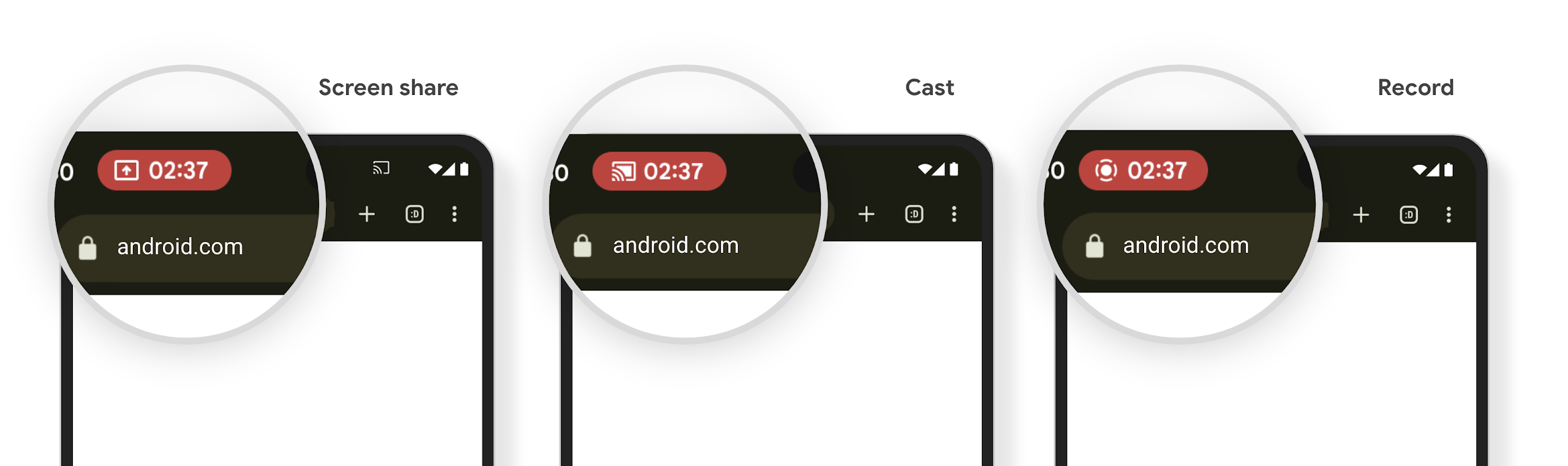
Verificare se la tua app è interessata
Per impostazione predefinita, l'app include il chip della barra di stato e sospende automaticamente la proiezione dello schermo quando si attiva la schermata di blocco.
Per scoprire di più su come testare la tua app per questi casi d'uso, consulta Chip barra stato e arresto automatico.
Limitazioni di accesso alla rete in background
In Android 15, le app che avviano una richiesta di rete al di fuori di un ciclo di vita
del processo valido ricevono un'eccezione. In genere, un
UnknownHostException o un altro
IOException correlato alla presa. Le richieste di rete che si verificano al di fuori di un ciclo di vita valido sono solitamente dovute al fatto che le app continuano inconsapevolmente una richiesta di rete anche dopo che l'app non è più attiva.
Per ridurre al minimo questa eccezione, assicurati che le richieste di rete siano sensibili al ciclo di vita e annullate al termine di un ciclo di vita del processo valido utilizzando componenti sensibili al ciclo di vita. Se è importante che la richiesta di rete venga eseguita anche quando l'utente abbandona l'applicazione, valuta la possibilità di pianificarla utilizzando WorkManager o di continuare un'attività visibile all'utente utilizzando il servizio in primo piano.
Ritiri
A ogni release, API Android specifiche potrebbero diventare obsolete o dover essere refattorizzate per offrire una migliore esperienza per gli sviluppatori o supportare nuove funzionalità della piattaforma. In questi casi, ritiriamo ufficialmente le API obsolete e indirizziamo gli sviluppatori verso API alternative da utilizzare.
Il ritiro significa che abbiamo interrotto il supporto ufficiale per le API, ma queste continueranno a essere disponibili per gli sviluppatori. Per scoprire di più sui ritiri più importanti di questa release di Android, consulta la pagina dei ritiri.