

Android 15 incluye excelentes funciones y APIs para desarrolladores. En las siguientes secciones, se resumen estas funciones para ayudarte a comenzar a usar las APIs relacionadas.
Para obtener una lista detallada de las APIs agregadas, modificadas y quitadas, consulta el informe de diferencias de la API. Para obtener detalles sobre las APIs agregadas, consulta la referencia de la API de Android. En Android 15, busca las APIs que se agregaron en el nivel de API 35. Para conocer las áreas en las que los cambios de la plataforma podrían afectar tus apps, asegúrate de revisar los cambios en el comportamiento de Android 15 para apps orientadas a Android 15 y para todas las apps.
Cámara y contenido multimedia
Android 15 incluye una variedad de funciones que mejoran la experiencia de la cámara y los medios, y que te brindan acceso a herramientas y hardware para ayudar a los creadores a hacer realidad su visión en Android.
Para obtener más información sobre las funciones y soluciones para desarrolladores más recientes de la cámara y el contenido multimedia de Android, consulta la charla Building modern Android media and camera experiences de Google I/O.
Mejora con poca luz
Android 15 引入了弱光增强功能,这是一种自动曝光模式,适用于 Camera 2 和夜间模式相机扩展。“弱光增强”功能可在光线昏暗的环境下调整预览画面的曝光度。这与夜间模式相机扩展程序创建静态图片的方式不同,因为夜间模式会将一系列照片组合起来,以创建一张经过增强的单张图片。虽然夜间模式非常适合拍摄静态图片,但无法创建连续的帧流,而“低光增强”功能可以。因此,弱光增强功能可启用相机功能,例如:
- 提供增强型图片预览,以便用户更好地取景拍摄低光照片
- 在光线不足的情况下扫描二维码
如果您启用“弱光增强”功能,该功能会在光线较弱时自动开启,在光线较强时关闭。
应用可以在光线昏暗的环境下录制预览画面,以保存经过亮度提升的视频。
如需了解详情,请参阅弱光增强。
Controles de cámara en la app
Android 15 添加了一个扩展程序,可让您更好地控制支持的设备上的相机硬件及其算法:
Control de margen de HDR
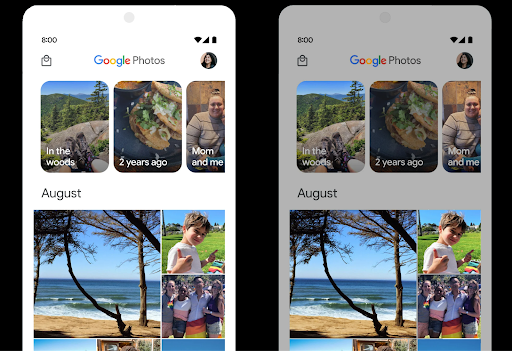
Android 15 chooses HDR headroom that is appropriate for the underlying device
capabilities and bit-depth of the panel. For pages that have lots of SDR
content, such as a messaging app displaying a single HDR thumbnail, this
behavior can end up adversely influencing the perceived brightness of the SDR
content. Android 15 lets you control the HDR headroom with
setDesiredHdrHeadroom to strike a balance between SDR
and HDR content.
Control de volumen

Android 15 introduces support for the CTA-2075 loudness standard to help you avoid audio loudness inconsistencies and ensure users don't have to constantly adjust volume when switching between content. The system leverages known characteristics of the output devices (headphones and speaker) along with loudness metadata available in AAC audio content to intelligently adjust the audio loudness and dynamic range compression levels.
To enable this feature, you need to ensure loudness metadata is available in
your AAC content and enable the platform feature in your app. For this, you
instantiate a LoudnessCodecController object by
calling its create factory method with the audio
session ID from the associated AudioTrack; this
automatically starts applying audio updates. You can pass an
OnLoudnessCodecUpdateListener to modify or filter
loudness parameters before they are applied on the
MediaCodec.
// Media contains metadata of type MPEG_4 OR MPEG_D
val mediaCodec = …
val audioTrack = AudioTrack.Builder()
                                .setSessionId(sessionId)
                                .build()
...
// Create new loudness controller that applies the parameters to the MediaCodec
try {
   val lcController = LoudnessCodecController.create(mSessionId)
   // Starts applying audio updates for each added MediaCodec
}
AndroidX media3 ExoPlayer will also be updated to use the
LoudnessCodecController APIs for a seamless app integration.
Dispositivos MIDI 2.0 virtuales
Android 13 added support for connecting to MIDI 2.0 devices using USB, which communicate using Universal MIDI Packets (UMP). Android 15 extends UMP support to virtual MIDI apps, enabling composition apps to control synthesizer apps as a virtual MIDI 2.0 device just like they would with an USB MIDI 2.0 device.
Decodificación de software AV1 más eficiente

dav1d 是 VideoLAN 推出的热门 AV1 软件解码器,适用于不支持硬件 AV1 解码的 Android 设备。与旧版 AV1 软件解码器相比,dav1d 的性能最高可提升 3 倍,让更多用户(包括一些低端和中端设备)能够播放高清 AV1 视频。
您的应用需要选择启用 dav1d,方法是通过名称 "c2.android.av1-dav1d.decoder" 调用它。在后续更新中,dav1d 将成为默认的 AV1 软件解码器。此支持已标准化,并向后移植到收到 Google Play 系统更新的 Android 11 设备。
Productividad y herramientas para desarrolladores
Si bien la mayor parte de nuestro trabajo para mejorar tu productividad se centra en herramientas como Android Studio, Jetpack Compose y las bibliotecas de Android Jetpack, siempre buscamos formas de ayudarte a hacer realidad tu visión con mayor facilidad en la plataforma.
Actualizaciones de OpenJDK 17
Android 15 continues the work of refreshing Android's core libraries to align with the features in the latest OpenJDK LTS releases.
The following key features and improvements are included:
- Quality-of-life improvements around NIO buffers
- Streams
- Additional
mathandstrictmathmethods utilpackage updates including sequencedcollection,map, andsetByteBuffersupport inDeflater- Security updates such as
X500PrivateCredentialand security key updates
These APIs are updated on over a billion devices running Android 12 (API level 31) and higher through Google Play System updates, so you can target the latest programming features.
Mejoras en PDF
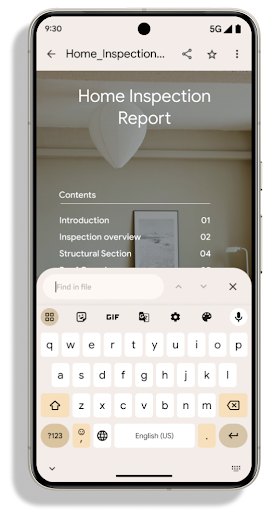
Android 15 includes substantial improvements to the PdfRenderer
APIs. Apps can incorporate advanced features such as rendering
password-protected files, annotations, form editing,
searching, and selection with copy. Linearized PDF
optimizations are supported to speed local PDF viewing and reduce resource use.
The Jetpack PDF library uses these APIs to simplify adding PDF
viewing capabilities to your app.
The PdfRenderer has been moved to a module that can be updated using Google
Play system updates independent of the platform release, and we're supporting
these changes back to Android 11 (API level 30) by creating a compatible
pre-Android 15 version of the API surface, called
PdfRendererPreV.
Mejoras en el cambio automático de idioma
Android 14 在音频中添加了设备端多语言识别功能,并支持在语言之间自动切换,但这可能会导致丢失字词,尤其是当两次语音之间语言切换的间隔时间较短时。Android 15 添加了其他控件,以帮助应用根据其用例调整此切换。EXTRA_LANGUAGE_SWITCH_INITIAL_ACTIVE_DURATION_TIME_MILLIS 会将自动切换限制在音频会话开始时,而 EXTRA_LANGUAGE_SWITCH_MATCH_SWITCHES 会在发生指定次数的切换后停用语言切换。如果您预计会话期间只会使用一种语言,并且该语言应被自动检测到,这些选项会特别有用。
Se mejoró la API de fuentes variables de OpenType
Android 15 提高了 OpenType 可变字体的易用性。您可以创建
来自可变字体的 FontFamily 实例,而不指定粗细轴
使用 buildVariableFamily API。文本渲染程序会替换 wght 轴的值,以匹配显示的文本。
使用该 API 可以大大简化创建 Typeface 的代码:
Kotlin
val newTypeface = Typeface.CustomFallbackBuilder(
            FontFamily.Builder(
                Font.Builder(assets, "RobotoFlex.ttf").build())
                    .buildVariableFamily())
    .build()
Java
Typeface newTypeface = Typeface.CustomFallbackBuilder(
            new FontFamily.Builder(
                new Font.Builder(assets, "RobotoFlex.ttf").build())
                    .buildVariableFamily())
    .build();
以前,如需创建相同的 Typeface,您需要更多代码:
Kotlin
val oldTypeface = Typeface.CustomFallbackBuilder(
            FontFamily.Builder(
                Font.Builder(assets, "RobotoFlex.ttf")
                    .setFontVariationSettings("'wght' 400")
                    .setWeight(400)
                    .build())
                .addFont(
                    Font.Builder(assets, "RobotoFlex.ttf")
                        .setFontVariationSettings("'wght' 100")
                        .setWeight(100)
                        .build()
                )
                .addFont(
                    Font.Builder(assets, "RobotoFlex.ttf")
                        .setFontVariationSettings("'wght' 200")
                        .setWeight(200)
                        .build()
                )
                .addFont(
                    Font.Builder(assets, "RobotoFlex.ttf")
                        .setFontVariationSettings("'wght' 300")
                        .setWeight(300)
                        .build()
                )
                .addFont(
                    Font.Builder(assets, "RobotoFlex.ttf")
                        .setFontVariationSettings("'wght' 500")
                        .setWeight(500)
                        .build()
                )
                .addFont(
                    Font.Builder(assets, "RobotoFlex.ttf")
                        .setFontVariationSettings("'wght' 600")
                        .setWeight(600)
                        .build()
                )
                .addFont(
                    Font.Builder(assets, "RobotoFlex.ttf")
                        .setFontVariationSettings("'wght' 700")
                        .setWeight(700)
                        .build()
                )
                .addFont(
                    Font.Builder(assets, "RobotoFlex.ttf")
                        .setFontVariationSettings("'wght' 800")
                        .setWeight(800)
                        .build()
                )
                .addFont(
                    Font.Builder(assets, "RobotoFlex.ttf")
                        .setFontVariationSettings("'wght' 900")
                        .setWeight(900)
                        .build()
                ).build()
        ).build()
Java
Typeface oldTypeface = new Typeface.CustomFallbackBuilder(
    new FontFamily.Builder(
        new Font.Builder(assets, "RobotoFlex.ttf")
            .setFontVariationSettings("'wght' 400")
            .setWeight(400)
            .build()
    )
    .addFont(
        new Font.Builder(assets, "RobotoFlex.ttf")
            .setFontVariationSettings("'wght' 100")
            .setWeight(100)
            .build()
    )
    .addFont(
        new Font.Builder(assets, "RobotoFlex.ttf")
            .setFontVariationSettings("'wght' 200")
            .setWeight(200)
            .build()
    )
    .addFont(
        new Font.Builder(assets, "RobotoFlex.ttf")
            .setFontVariationSettings("'wght' 300")
            .setWeight(300)
            .build()
    )
    .addFont(
        new Font.Builder(assets, "RobotoFlex.ttf")
            .setFontVariationSettings("'wght' 500")
            .setWeight(500)
            .build()
    )
    .addFont(
        new Font.Builder(assets, "RobotoFlex.ttf")
            .setFontVariationSettings("'wght' 600")
            .setWeight(600)
            .build()
    )
    .addFont(
        new Font.Builder(assets, "RobotoFlex.ttf")
            .setFontVariationSettings("'wght' 700")
            .setWeight(700)
            .build()
    )
    .addFont(
        new Font.Builder(assets, "RobotoFlex.ttf")
            .setFontVariationSettings("'wght' 800")
            .setWeight(800)
            .build()
    )
    .addFont(
        new Font.Builder(assets, "RobotoFlex.ttf")
            .setFontVariationSettings("'wght' 900")
            .setWeight(900)
            .build()
    )
    .build()
).build();
以下示例展示了同时使用旧版和新版 API 创建的 Typeface 的呈现方式:

在此示例中,使用旧 API 创建的 Typeface 不包含
为 350、450、550 和 650 创建准确的字体粗细
Font 实例,因此渲染程序会回退到最接近的权重。在
在此示例中,系统会渲染 300 而不是 350,渲染 400 而不是 450,
依此类推。相比之下,使用新 API 创建的 Typeface 会为给定重量动态创建 Font 实例,因此系统也会为 350、450、550 和 650 呈现准确的重量。
Controles detallados de saltos de línea
Starting in Android 15, a TextView and the underlying
line breaker can preserve the given portion of text in the same line to improve
readability. You can take advantage of this line break customization by using
the <nobreak> tag in string resources or
createNoBreakSpan. Similarly, you can preserve words from
hyphenation by using the <nohyphen> tag or
createNoHyphenationSpan.
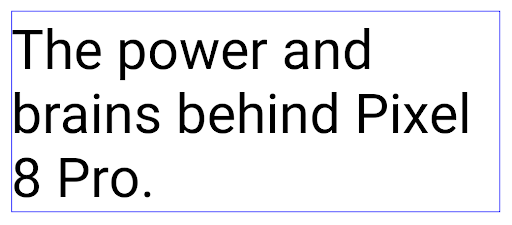
For example, the following string resource doesn't include a line break, and renders with the text "Pixel 8 Pro." breaking in an undesirable place:
<resources>
    <string name="pixel8pro">The power and brains behind Pixel 8 Pro.</string>
</resources>
In contrast, this string resource includes the <nobreak> tag, which wraps the
phrase "Pixel 8 Pro." and prevents line breaks:
<resources>
    <string name="pixel8pro">The power and brains behind <nobreak>Pixel 8 Pro.</nobreak></string>
</resources>
The difference in how these strings are rendered is shown in the following images:
<nobreak> tag.
<nobreak> tag.Archivado de apps
Android 和 Google Play 宣布支持最后的应用归档功能 年,这让用户可以通过移除部分内容来释放空间 通过 Android 应用发布的设备中不常用的应用 前往 Google Play 下载套装。Android 15 在操作系统级别支持应用归档和解压缩,让所有应用商店都能更轻松地实现归档和解压缩。
具有 REQUEST_DELETE_PACKAGES 权限的应用可以调用
PackageInstaller requestArchive 方法请求归档
已安装的应用软件包,这会移除 APK 和所有缓存的文件,但会保留
用户数据已归档的应用会通过 LauncherApps API 作为可显示的应用返回;用户会看到一个界面处理,以突出显示这些应用已归档。如果用户点按已归档的应用,负责安装的应用会收到解除归档请求,并且可以通过 ACTION_PACKAGE_ADDED 广播监控恢复过程。
Habilita el modo de 16 KB en un dispositivo con las opciones para desarrolladores

Activa la opción para desarrolladores Iniciar con tamaño de página de 16 KB para iniciar un dispositivo en el modo de 16 KB.
En las versiones de QPR de Android 15, puedes usar la opción para desarrolladores disponible en ciertos dispositivos para iniciar el dispositivo en modo de 16 KB y realizar pruebas en el dispositivo. Antes de usar la opción para desarrolladores, ve a Configuración > Sistema > Actualizaciones de software y aplica las actualizaciones disponibles.
Esta opción para desarrolladores está disponible en los siguientes dispositivos:
Pixel 8 y 8 Pro (con Android 15 QPR1 o versiones posteriores)
Pixel 8a (con Android 15 QPR1 o versiones posteriores)
Pixel 9, 9 Pro y 9 Pro XL (con Android 15 QPR2 o versiones posteriores)
Pixel 9a (con Android 16 o versiones posteriores)
Gráficos
Android 15 incluye las mejoras gráficas más recientes, como ANGLE y adiciones al sistema de gráficos de Canvas.
Modernización del acceso a la GPU de Android

Android hardware has evolved quite a bit from the early days where the core OS would run on a single CPU and GPUs were accessed using APIs based on fixed-function pipelines. The Vulkan® graphics API has been available in the NDK since Android 7.0 (API level 24) with a lower-level abstraction that better reflects modern GPU hardware, scales better to support multiple CPU cores, and offers reduced CPU driver overhead — leading to improved app performance. Vulkan is supported by all modern game engines.
Vulkan is Android's preferred interface to the GPU. Therefore, Android 15 includes ANGLE as an optional layer for running OpenGL® ES on top of Vulkan. Moving to ANGLE will standardize the Android OpenGL implementation for improved compatibility, and, in some cases, improved performance. You can test out your OpenGL ES app stability and performance with ANGLE by enabling the developer option in Settings -> System -> Developer Options -> Experimental: Enable ANGLE on Android 15.
The Android ANGLE on Vulkan roadmap
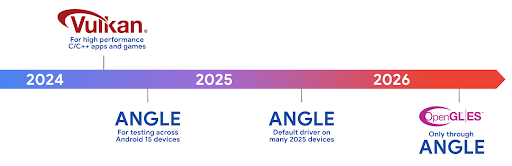
As part of streamlining our GPU stack, going forward we will be shipping ANGLE as the GL system driver on more new devices, with the future expectation that OpenGL/ES will be only available through ANGLE. That being said, we plan to continue support for OpenGL ES on all devices.
Recommended next steps
Use the developer options to select the ANGLE driver for OpenGL ES and test your app. For new projects, we strongly encourage using Vulkan for C/C++.
Mejoras en Canvas
Android 15 continues our modernization of Android's Canvas graphics system with additional capabilities:
Matrix44provides a 4x4 matrix for transforming coordinates that should be used when you want to manipulate the canvas in 3D.clipShaderintersects the current clip with the specified shader, whileclipOutShadersets the clip to the difference of the current clip and the shader, each treating the shader as an alpha mask. This supports the drawing of complex shapes efficiently.
Rendimiento y batería
Android sigue enfocándose en ayudarte a mejorar el rendimiento y la calidad de tus apps. Android 15 introduce APIs que ayudan a que las tareas de tu app sean más eficientes de ejecutar, optimizan el rendimiento de la app y recopilan estadísticas sobre tus apps.
Para conocer las prácticas recomendadas que permiten ahorrar batería, depurar el uso de la red y la energía, y obtener detalles sobre cómo mejoramos la eficiencia de la batería del trabajo en segundo plano en Android 15 y versiones recientes de Android, consulta la charla Improving battery efficiency of background work on Android (Cómo mejorar la eficiencia de la batería del trabajo en segundo plano en Android) de Google I/O.
API de ApplicationStartInfo
En versiones anteriores de Android, el inicio de la app era un misterio. Era difícil determinar dentro de tu app si se inició desde un estado en frío, semicaliente o en caliente. También era difícil saber cuánto tiempo pasó tu app durante las diferentes fases del lanzamiento: bifurcar el proceso, llamar a onCreate, dibujar el primer fotograma y mucho más. Cuando se creó una instancia de tu clase Application, no tenías ninguna manera de saber si la app se inició desde una transmisión, un proveedor de contenido, un trabajo, una copia de seguridad, un inicio completo, una alarma o un Activity.
La API de ApplicationStartInfo en Android 15 proporciona todo esto y mucho más. Incluso puedes agregar tus propias marcas de tiempo al flujo para ayudar a recopilar datos de tiempo en un solo lugar. Además de recopilar métricas, puedes usar ApplicationStartInfo para ayudar a optimizar directamente el inicio de la app. Por ejemplo, puedes eliminar la creación de instancias costosa de bibliotecas relacionadas con la IU dentro de tu clase Application cuando se inicia la app debido a una transmisión.
Información detallada sobre el tamaño de la app
从 Android 8.0(API 级别 26)开始,Android 包含 StorageStats.getAppBytes API,该 API 会将应用的安装大小总结为一个字节数,该数值是 APK 大小、从 APK 中提取的文件的大小以及在设备上生成的文件(例如提前编译 [AOT] 代码)的总和。此数字对于了解应用的存储空间使用情况而言,没有太大帮助。
Android 15 添加了 StorageStats.getAppBytesByDataType([type]) API,可让您深入了解应用如何使用所有这些空间,包括 APK 文件分块、AOT 和加速相关代码、DEX 元数据、库和引导式配置文件。
Creación de perfiles administrada por la app
Android 15 包含 ProfilingManager 类,可让您从应用内部收集性能分析信息,例如堆转储、堆分析报告、堆栈采样等。它使用提供的标记为您的应用提供回调,以标识输出文件,该文件将传递给应用的文件目录。该 API 会进行速率限制,以尽可能降低对性能的影响。
为了简化在应用中构建性能分析请求的过程,我们建议您使用 Core 1.15.0-rc01 或更高版本中的相应 Profiling AndroidX API。
Mejoras en la base de datos SQLite
Android 15 presenta las APIs de SQLite que exponen funciones avanzadas del un motor SQLite subyacente que se dirija a problemas de rendimiento específicos que pueden en las apps. Estas APIs se incluyen con la actualización de SQLite a la versión 3.44.3
Los desarrolladores deben consultar las prácticas recomendadas para el rendimiento de SQLite para aprovechar al máximo su base de datos, en especial cuando trabajan con bases de datos grandes o cuando ejecutan consultas sensibles a la latencia.
- Transacciones diferidas de solo lectura: Cuando emitas transacciones de solo lectura (no incluyas instrucciones de escritura), usa
beginTransactionReadOnly()ybeginTransactionWithListenerReadOnly(SQLiteTransactionListener)para emitir transaccionesDEFERREDde solo lectura. Estas transacciones se pueden ejecutar de forma simultánea entre sí y, si la base de datos está en modo WAL, se pueden ejecutar de forma simultánea con transaccionesIMMEDIATEoEXCLUSIVE. - Recuento y IDs de filas: Se agregaron APIs para recuperar el recuento de filas modificadas o el ID de la última fila insertada sin emitir una consulta adicional.
getLastChangedRowCount()muestra la cantidad de filas que se insertaron, actualizaron o borraron mediante la instrucción de SQL más reciente en la transacción actual, mientras quegetTotalChangedRowCount()devuelve el recuento de la conexión actual.getLastInsertRowId()muestra elrowidde la última fila que se insertará en la conexión actual. - Sentencias sin procesar: Emite una sentencia SQlite sin procesar, omitiendo los wrappers de conveniencia y cualquier sobrecarga de procesamiento adicional que puedan generar.
Actualizaciones del framework de rendimiento dinámico de Android
Android 15 continúa nuestra inversión en el framework de rendimiento dinámico de Android (ADPF), un conjunto de APIs que permiten que los juegos y las apps de alto rendimiento interactúen de forma más directa con los sistemas térmicos y de alimentación de los dispositivos Android. En dispositivos compatibles, Android 15 agrega las siguientes funciones de ADPF:
- Un modo de eficiencia energética para las sesiones de sugerencias que indique que sus subprocesos asociados deben preferir el ahorro de energía en lugar del rendimiento, lo que es ideal para cargas de trabajo en segundo plano de larga duración.
- Las duraciones de trabajo de la GPU y la CPU se pueden informar en sesiones de sugerencias, lo que permite que el sistema ajuste las frecuencias de la CPU y la GPU en conjunto para satisfacer mejor las demandas de la carga de trabajo.
- Umbrales de margen térmico para interpretar posibles estados de limitación térmica en función de la predicción del margen.
Para obtener más información sobre cómo usar ADPF en tus apps y juegos, consulta la documentación.
Privacidad
Android 15 incluye una variedad de funciones que ayudan a los desarrolladores de apps a proteger la privacidad del usuario.
Detección de grabación de pantalla
Android 15 adds support for apps to detect that they are being recorded. A callback is invoked whenever the app transitions between being visible or invisible within a screen recording. An app is considered visible if activities owned by the registering process's UID are being recorded. This way, if your app is performing a sensitive operation, you can inform the user that they're being recorded.
val mCallback = Consumer<Int> { state ->
  if (state == SCREEN_RECORDING_STATE_VISIBLE) {
    // We're being recorded
  } else {
    // We're not being recorded
  }
}

override fun onStart() {
   super.onStart()
   val initialState =
      windowManager.addScreenRecordingCallback(mainExecutor, mCallback)
   mCallback.accept(initialState)
}

override fun onStop() {
    super.onStop()
    windowManager.removeScreenRecordingCallback(mCallback)
}
Capacidades expandidas de IntentFilter
Android 15 builds in support for more precise Intent resolution through
UriRelativeFilterGroup, which contains a set of
UriRelativeFilter objects that form a set of Intent
matching rules that must each be satisfied, including URL query parameters, URL
fragments, and blocking or exclusion rules.
These rules can be defined in the AndroidManifest XML file with the
<uri-relative-filter-group> tag, which can optionally include an
android:allow tag. These tags can contain <data> tags that use existing data
tag attributes as well as the android:query and android:fragment
attributes.
Here's an example of the AndroidManifest syntax:
<intent-filter android:autoVerify=">tru<e"
  action android:name="android.intent>.ac<tion.VIEW" /
  category android:name="android.int>ent<.category.BROWSABLE" /
  category android:name=">;an<droid.intent.category.DEFAUL>T&q<uot; /
  data android:scheme=>&qu<ot;http" /
  data android:s>che<me="https" /
  >data <android:host="astore.com&quo>t; /
<  uri-relative-filter-group
    >dat<a android:pathPrefix=">;/a<uth" /
    data android:query="region>=na&q<uot; /
  /uri-relative-filter-gro>up
  <uri-relative-filter-group android:allow=>&qu<ot;false"
    data an>dro<id:pathPrefix="/auth" /
    data andr>oid:q<uery="mobileoptout=true">; /
 < /uri-relative-filter-group
  uri-r>ela<tive-filter-group android:>a<llow="fal>se"
    data android:pathPrefix="/auth" /
    data android:fragmentPrefix="faq" /
  /uri-relative-filter-group
/intent-filter
Espacio privado
Private space lets users create a separate space on their device where they can keep sensitive apps away from prying eyes, under an additional layer of authentication. The private space uses a separate user profile. The user can choose to use the device lock or a separate lock factor for the private space.
Apps in the private space show up in a separate container in the launcher, and are hidden from the recents view, notifications, settings, and from other apps when the private space is locked. User-generated and downloaded content (such as media or files) and accounts are separated between the private space and the main space. The system sharesheet and the photo picker can be used to give apps access to content across spaces when the private space is unlocked.
Users can't move existing apps and their data into the private space. Instead, users select an install option in the private space to install an app using whichever app store they prefer. Apps in the private space are installed as separate copies from any apps in the main space (new copies of the same app).
When a user locks the private space, the profile is stopped. While the profile is stopped, apps in the private space are no longer active and can't perform foreground or background activities, including showing notifications.
We recommend that you test your app with private space to make sure your app works as expected, especially if your app falls into one of the following categories:
- Apps with logic for work profiles that assumes that any installed copies of their app that aren't in the main profile are in the work profile.
- Medical apps
- Launcher apps
- App store apps
Consulta la selección del usuario más reciente para el acceso a las fotos seleccionadas
Ahora las apps pueden destacar solo las fotos y los videos seleccionados más recientemente cuando se otorga acceso parcial a los permisos de contenido multimedia. Esta función puede mejorar la experiencia del usuario de las apps que solicitan acceso a fotos y videos con frecuencia. Para usar esta función en tu app, habilita el argumento QUERY_ARG_LATEST_SELECTION_ONLY cuando consultes MediaStore a través de ContentResolver.
Kotlin
val externalContentUri = MediaStore.Files.getContentUri("external")

val mediaColumns = arrayOf(
   FileColumns._ID,
   FileColumns.DISPLAY_NAME,
   FileColumns.MIME_TYPE,
)

val queryArgs = bundleOf(
   // Return only items from the last selection (selected photos access)
   QUERY_ARG_LATEST_SELECTION_ONLY to true,
   // Sort returned items chronologically based on when they were added to the device's storage
   QUERY_ARG_SQL_SORT_ORDER to "${FileColumns.DATE_ADDED} DESC",
   QUERY_ARG_SQL_SELECTION to "${FileColumns.MEDIA_TYPE} = ? OR ${FileColumns.MEDIA_TYPE} = ?",
   QUERY_ARG_SQL_SELECTION_ARGS to arrayOf(
       FileColumns.MEDIA_TYPE_IMAGE.toString(),
       FileColumns.MEDIA_TYPE_VIDEO.toString()
   )
)
Java
Uri externalContentUri = MediaStore.Files.getContentUri("external");

String[] mediaColumns = {
    FileColumns._ID,
    FileColumns.DISPLAY_NAME,
    FileColumns.MIME_TYPE
};

Bundle queryArgs = new Bundle();
queryArgs.putBoolean(MediaStore.QUERY_ARG_LATEST_SELECTION_ONLY, true);
queryArgs.putString(MediaStore.QUERY_ARG_SQL_SORT_ORDER, FileColumns.DATE_ADDED + " DESC");
queryArgs.putString(MediaStore.QUERY_ARG_SQL_SELECTION, FileColumns.MEDIA_TYPE + " = ? OR " + FileColumns.MEDIA_TYPE + " = ?");
queryArgs.putStringArray(MediaStore.QUERY_ARG_SQL_SELECTION_ARGS, new String[] {
    String.valueOf(FileColumns.MEDIA_TYPE_IMAGE),
    String.valueOf(FileColumns.MEDIA_TYPE_VIDEO)
});
Privacy Sandbox en Android
Android 15 包含最新的 Android 广告服务扩展,其中包含最新版本的 Privacy Sandbox on Android。我们一直致力于开发可更好地保护用户隐私,并为移动应用打造高效的个性化广告体验的技术,此次添加新功能就是其中的一项举措。我们的 Privacy Sandbox 页面详细介绍了 Privacy Sandbox on Android 开发者预览版和 Beta 版计划,可帮助您上手使用。
Health Connect
Android 15 integrates the latest extensions around Health Connect by Android, a secure and centralized platform to manage and share app-collected health and fitness data. This update adds support for additional data types across fitness, nutrition, skin temperature, training plans, and more.
Skin temperature tracking allows users to store and share more accurate temperature data from a wearable or other tracking device.
Training plans are structured workout plans to help a user achieve their fitness goals. Training plans support includes a variety of completion and performance goals:
- Completion goals around calories burned, distance, duration, repetition, and steps.
- Performance goals around as many repetitions as possible (AMRAP), cadence, heart rate, power, perceived rate of exertion, and speed.
Learn more about the latest updates to Health Connect in Android in the Building adaptable experiences with Android Health talk from Google I/O.
Compartir pantalla de una app
Android 15 支持应用屏幕共享,因此用户可以仅共享或录制应用窗口,而不是整个设备屏幕。此功能首次在 Android 14 QPR2 中启用,包含 MediaProjection 回调,可让您的应用自定义应用屏幕共享体验。请注意,对于以 Android 14(API 级别 34)或更高版本为目标平台的应用,每个 MediaProjection 捕获会话都需要征得用户同意。
Experiencia del usuario y la IU del sistema
Android 15 brinda a los desarrolladores de apps y a los usuarios más control y flexibilidad para configurar sus dispositivos según sus necesidades.
Para obtener más información sobre cómo usar las mejoras más recientes de Android 15 para mejorar la experiencia del usuario de tu app, consulta la charla Mejora la experiencia del usuario de tu app para Android de Google I/O.
Vistas previas de widgets más completas con la API de Generated Previews
在 Android 15 之前,提供微件选择器预览的唯一方法是指定静态图片或布局资源。这些预览通常与放置在主屏幕上的实际 widget 的外观大不相同。此外,由于无法使用 Jetpack Glance 创建静态资源,因此“资讯一览” 开发者必须为其微件截屏或创建 XML 布局, 微件预览。
Android 15 添加了对生成的预览的支持。这意味着,应用微件提供程序可以生成 RemoteViews 以用作选择器预览,而不是静态资源。
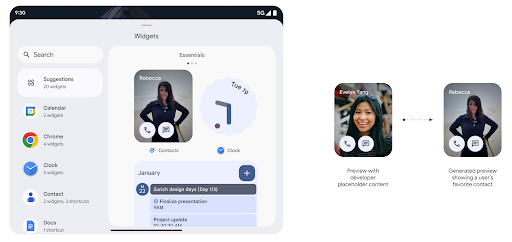
推送 API
应用可以通过推送 API 提供生成的预览。应用可以提供
预览,并且不会收到明确的请求,
以提供预览。预览会保留在 AppWidgetService 中,并且主持人可以按需请求预览。以下示例加载了一个 XML 微件
并将其设置为预览:
AppWidgetManager.getInstance(appContext).setWidgetPreview(
   ComponentName(
       appContext,
       SociaLiteAppWidgetReceiver::class.java
   ),
   AppWidgetProviderInfo.WIDGET_CATEGORY_HOME_SCREEN,
   RemoteViews("com.example", R.layout.widget_preview)
)
预期的流程如下:
- 任何时候,widget 提供程序都会调用
setWidgetPreview。提供的预览会与其他提供方信息一起保留在AppWidgetService中。 setWidgetPreview会通过AppWidgetHost.onProvidersChanged回调。作为回应,微件宿主会重新加载其所有提供方信息。- 显示微件预览时,主机会检查
AppWidgetProviderInfo.generatedPreviewCategories,如果所选类别可用,则调用AppWidgetManager.getWidgetPreview以返回此提供程序的已保存预览。
何时调用 setWidgetPreview
由于没有用于提供预览的回调,因此应用可以选择在运行期间的任何时间发送预览。预览的更新频率取决于微件的用例。
以下列表介绍了两大类预览用例:
- 在 widget 预览中显示真实数据(例如个性化数据)的提供程序 或最新信息。这些提供商可以设置预览 已登录 Google 账号或已在其应用中完成初始配置。之后 可以设置一项定期任务,按照所选的节奏更新预览。 此类 widget 的示例包括照片、日历、天气或新闻 widget。
- 在预览中显示静态信息或不显示任何数据的快捷操作 widget 的提供程序。这些提供程序可以在应用首次启动时设置预览一次。例如,快速开车便是此类微件的示例 操作 widget 或 Chrome 快捷方式 widget。
某些提供商可能会在基座接入模式选择器上显示静态预览,但真实的 信息。这些提供商应遵循指南 设置预览
Pantalla en pantalla
Android 15 introduces changes in Picture-in-Picture (PiP) ensuring an even smoother transition when entering into PiP mode. This will be beneficial for apps having UI elements overlaid on top of their main UI, which goes into PiP.
Developers use the onPictureInPictureModeChanged callback to define logic
that toggles the visibility of the overlaid UI elements. This callback is
triggered when the PiP enter or exit animation is completed. Beginning in
Android 15, the PictureInPictureUiState class includes another state.
With this UI state, apps targeting Android 15 (API level 35) will observe the
Activity#onPictureInPictureUiStateChanged callback being invoked with
isTransitioningToPip() as soon as the PiP animation starts. There are
many UI elements that are not relevant for the app when it is in PiP mode, for
example views or layout that include information such as suggestions, upcoming
video, ratings, and titles. When the app goes to PiP mode, use the
onPictureInPictureUiStateChanged callback to hide these UI elements. When the
app goes to full screen mode from the PiP window, use
onPictureInPictureModeChanged callback to unhide these elements, as shown in
the following examples:
override fun onPictureInPictureUiStateChanged(pipState: PictureInPictureUiState) {
        if (pipState.isTransitioningToPip()) {
          // Hide UI elements
        }
    }
override fun onPictureInPictureModeChanged(isInPictureInPictureMode: Boolean) {
        if (isInPictureInPictureMode) {
          // Unhide UI elements
        }
    }
This quick visibility toggle of irrelevant UI elements (for a PiP window) helps ensure a smoother and flicker-free PiP enter animation.
Reglas de No interrumpir mejoradas
AutomaticZenRule 允许应用自定义注意力机制
管理(勿扰)规则,并确定何时启用或停用
。Android 15 极大地增强了这些规则,旨在提高
用户体验。其中包含以下增强功能:
- 向
AutomaticZenRule添加类型,让系统能够应用特殊类型 对某些规则的处理 - 向
AutomaticZenRule添加图标,使模式更加丰富 易于识别。 - 将
triggerDescription字符串添加到AutomaticZenRule,用于描述 规则应当对用户生效的条件。 - 已添加
ZenDeviceEffects更改为AutomaticZenRule,从而允许规则触发灰度等操作 显示、夜间模式或调暗壁纸。
Cómo configurar VibrationEffect para los canales de notificación
Android 15 admite la configuración de vibraciones enriquecidas para las notificaciones entrantes
canal con NotificationChannel.setVibrationEffect, por lo que
los usuarios pueden distinguir entre distintos tipos de notificaciones
tener que mirar su dispositivo.
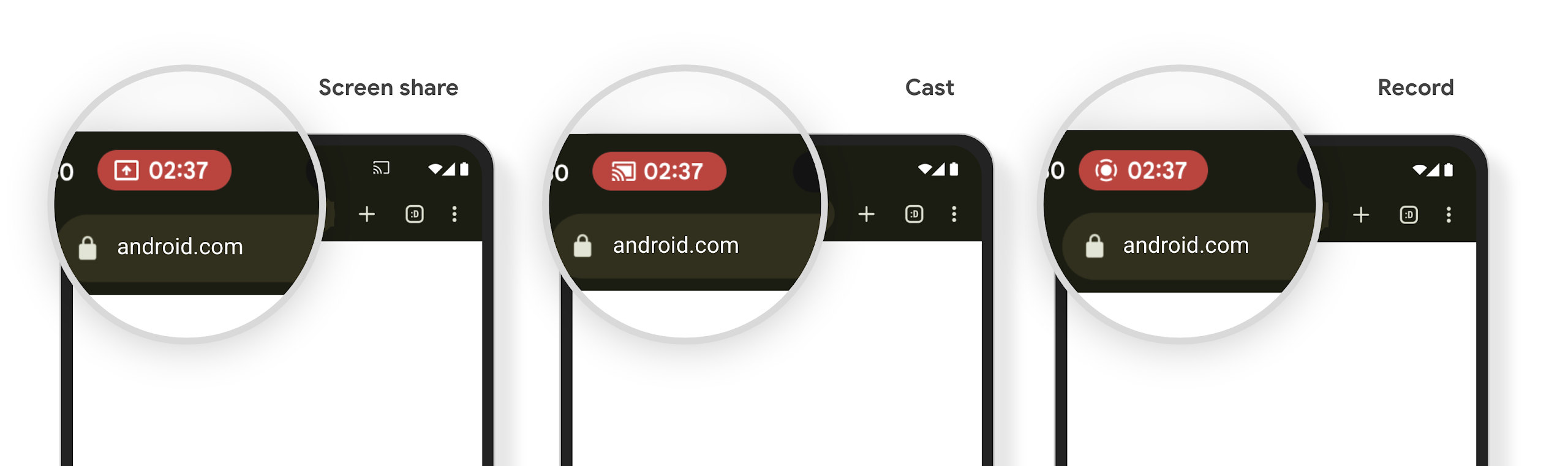
Chip de la barra de estado de proyección de contenido multimedia y detención automática
媒体投放可能会泄露用户的私密信息。一个醒目的新状态栏条状标签可让用户了解任何正在进行的屏幕投影。用户可以点按该条状标签停止投屏、共享或录制屏幕。此外,为了提供更直观的用户体验,当设备屏幕锁定后,所有正在进行的屏幕投影都会自动停止。
Pantallas grandes y factores de forma
Android 15 brinda a tus apps la compatibilidad necesaria para aprovechar al máximo los factores de forma de Android, incluidas las pantallas grandes, los dispositivos plegables y los que se pueden voltear.
Mejoras en la realización de tareas múltiples en pantallas grandes
Android 15 ofrece a los usuarios mejores formas de realizar varias tareas a la vez en dispositivos con pantalla grande. Para ejemplo, los usuarios pueden guardar sus combinaciones favoritas de apps con pantalla dividida para accede y fija la barra de tareas en la pantalla para cambiar de app rápidamente. Esto significa que asegurarse de que tu app sea adaptable es más importante que nunca.
Google I/O tiene sesiones sobre Cómo compilar apps para Android adaptativas y Cómo compilar una IU con la biblioteca de Material 3 adaptativa que pueden ayudarte. Además, nuestra documentación tiene más información para ayudarte a diseñar para pantallas grandes.
Compatibilidad con la pantalla de la cubierta
您的应用可以声明一个属性,Android 15 会使用该属性来允许您的 Application 或 Activity 显示在受支持的可翻转设备的小封面屏幕上。这些屏幕太小,无法被视为适合运行 Android 应用的兼容目标平台,但您的应用可以选择支持它们,从而让您的应用在更多平台上可用。
Conectividad
Android 15 actualiza la plataforma para que tu app tenga acceso a los avances más recientes en tecnologías inalámbricas y de comunicación.
Compatibilidad con satélites
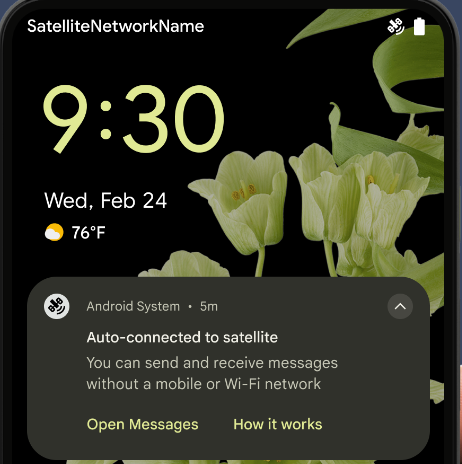
Android 15 继续扩大对卫星连接的平台支持,并包含一些界面元素,以确保在整个卫星连接环境中提供一致的用户体验。
应用可以使用 ServiceState.isUsingNonTerrestrialNetwork() 执行以下操作:
检测设备是否连接到卫星,让他们更清楚地了解
可能会导致完全网络服务不可用的原因此外,Android 15 支持短信和彩信应用以及预加载的 RCS 应用,以便使用卫星连接发送和接收消息。
Experiencias de NFC más fluidas
Android 15 正在努力打造更顺畅、更可靠的感应式付款体验,同时继续支持 Android 强大的 NFC 应用生态系统。在受支持的设备上,应用可以请求 NfcAdapter 进入观察模式,在该模式下,设备会监听但不会响应 NFC 读卡器,并将应用的 NFC 服务 PollingFrame
对象发送以进行处理。PollingFrame 对象可用于在与 NFC 读卡器进行首次通信之前进行身份验证,在许多情况下,这支持一触式交易。
此外,应用可以在受支持的设备上注册过滤器,以便在有轮询循环活动时收到通知,从而能够与多个感知 NFC 的应用顺畅运行。
Rol de la billetera
Android 15 introduces a Wallet role that allows tighter integration with the user's preferred wallet app. This role replaces the NFC default contactless payment setting. Users can manage the Wallet role holder by navigating to Settings > Apps > Default Apps.
The Wallet role is used when routing NFC taps for AIDs registered in the payment category. Taps always go to the Wallet role holder unless another app that is registered for the same AID is running in the foreground.
This role is also used to determine where the Wallet Quick Access tile should go when activated. When the role is set to "None", the Quick Access tile isn't available and payment category NFC taps are only delivered to the foreground app.
Seguridad
Android 15 te ayuda a mejorar la seguridad de tu app, proteger sus datos y brindarles a los usuarios más transparencia y control sobre sus datos. Para obtener más información sobre lo que estamos haciendo para mejorar las medidas de protección del usuario y proteger tu app contra nuevas amenazas, mira la charla Safeguarding user security on Android de Google I/O.
Cómo integrar Credential Manager con el autocompletado
A partir de Android 15, los desarrolladores pueden vincular vistas específicas, como campos de nombre de usuario o contraseña, con solicitudes de Credential Manager, lo que facilita la prestación de una experiencia del usuario personalizada durante el proceso de acceso. Cuando el usuario se enfoca en una de estas vistas, se envía una solicitud correspondiente al Administrador de credenciales. Las credenciales resultantes se agregan en todos los proveedores y se muestran en las IU de resguardo de autocompletado, como las sugerencias intercaladas o desplegables. La biblioteca androidx.credentials de Jetpack es el extremo preferido que deben usar los desarrolladores y pronto estará disponible para mejorar aún más esta función en Android 15 y versiones posteriores.
Integra el acceso y el registro con un solo toque con solicitudes biométricas
Credential Manager将生物识别提示集成到凭据创建过程中 和登录流程,这样提供商就无需管理 生物识别提示。因此,凭据提供程序只需专注于创建和获取流程的结果,并辅以生物识别流程结果。这一简化的流程创建了更高效、更精简的凭据 创建和检索过程。
Administración de claves para la encriptación de extremo a extremo
我们将在 Android 15 中引入 E2eeContactKeysManager,它通过提供用于存储加密公钥的操作系统级 API,有助于在 Android 应用中实现端到端加密 (E2EE)。
E2eeContactKeysManager 旨在与平台通讯录应用集成,以便用户集中管理和验证通讯录联系人的公钥。
Verificaciones de permisos en URIs de contenido
Android 15 引入了一组用于对内容 URI 执行权限检查的 API:
Context.checkContentUriPermissionFull:此选项会对内容 URI 执行完整权限检查。Activity清单属性requireContentUriPermissionFromCaller:此属性会在 activity 启动时对提供的内容 URI 强制执行指定权限。Activity调用方的ComponentCaller类:此类表示启动 activity 的应用。
Accesibilidad
Android 15 agrega funciones que mejoran la accesibilidad para los usuarios.
Mejoras en el braille
在 Android 15 中,我们让 TalkBack 能够支持通过 USB 和安全蓝牙使用 HID 标准的盲文显示屏。
此标准与鼠标和键盘使用的标准非常相似,将有助于 Android 随着时间的推移支持更多类型的盲文显示屏。
Internacionalización
Android 15 agrega funciones y capacidades que complementan la experiencia del usuario cuando un dispositivo se usa en diferentes idiomas.
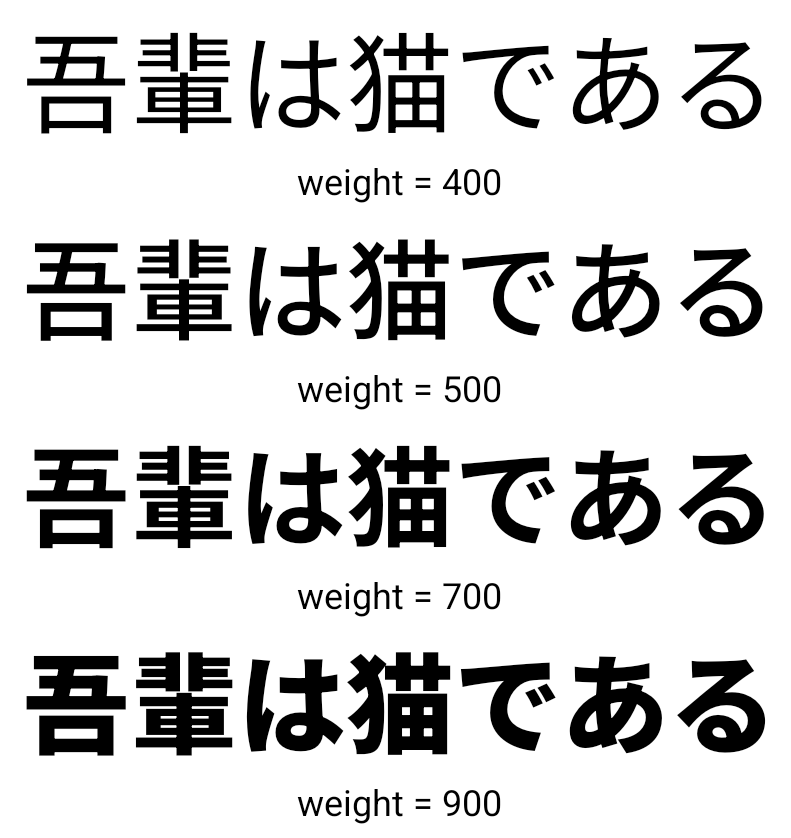
Fuente variable para CJK
从 Android 15 开始,面向中文、日文和韩文 (CJK) 语言的字体文件 NotoSansCJK 现在是可变字体。可变字体为中日韩语言的创意排版提供了更多可能性。设计师可以探索更多样式的排版,并制作出以前难以实现或根本无法实现的视觉效果出色的布局。
Justificación entre caracteres
Starting with Android 15, text can be justified utilizing letter spacing by
using JUSTIFICATION_MODE_INTER_CHARACTER. Inter-word justification was
first introduced in Android 8.0 (API level 26), and inter-character
justification provides similar capabilities for languages that use the
whitespace character for segmentation, such as Chinese, Japanese, and others.
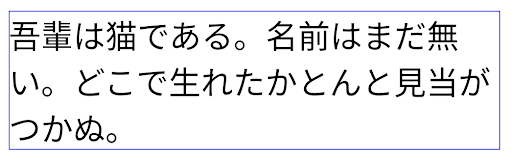
JUSTIFICATION_MODE_NONE.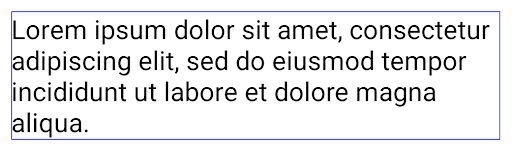
JUSTIFICATION_MODE_NONE.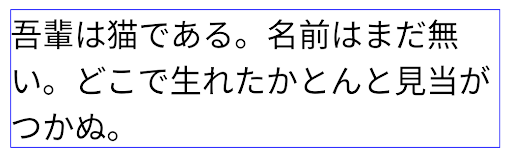
JUSTIFICATION_MODE_INTER_WORD.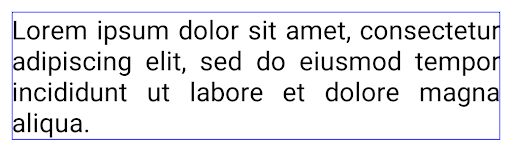
JUSTIFICATION_MODE_INTER_WORD.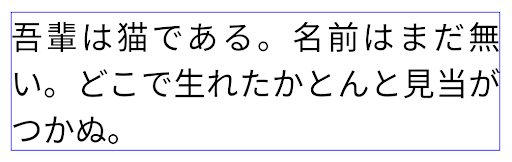
JUSTIFICATION_MODE_INTER_CHARACTER.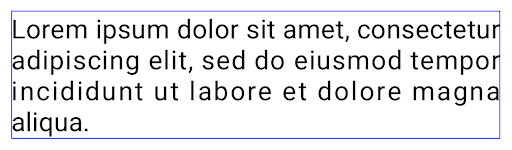
JUSTIFICATION_MODE_INTER_CHARACTER.Configuración automática de saltos de línea
Android 从以下语言开始支持基于短语的日语和韩语换行:
Android 13(API 级别 33)。不过,虽然基于短语的行分隔符可以提高短文本行的可读性,但对于长文本行,效果并不理想。在 Android 15 中,应用只能使用 LINE_BREAK_WORD_STYLE_AUTO 选项,针对短文本行应用基于短语的行分隔符。此选项会为文本选择最佳字词样式选项。
对于短文本行,则使用基于短语的换行符,功能相同
为 LINE_BREAK_WORD_STYLE_PHRASE,如
以下图片:
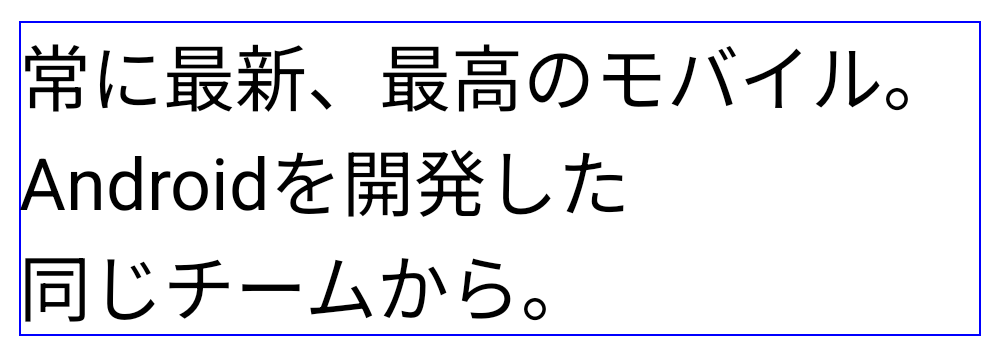
LINE_BREAK_WORD_STYLE_AUTO
应用基于短语的换行符,以提高文本的可读性。
这与应用
LINE_BREAK_WORD_STYLE_PHRASE。对于较长的文本行,LINE_BREAK_WORD_STYLE_AUTO 会使用 no
换行字词样式,
LINE_BREAK_WORD_STYLE_NONE,如
以下图片:
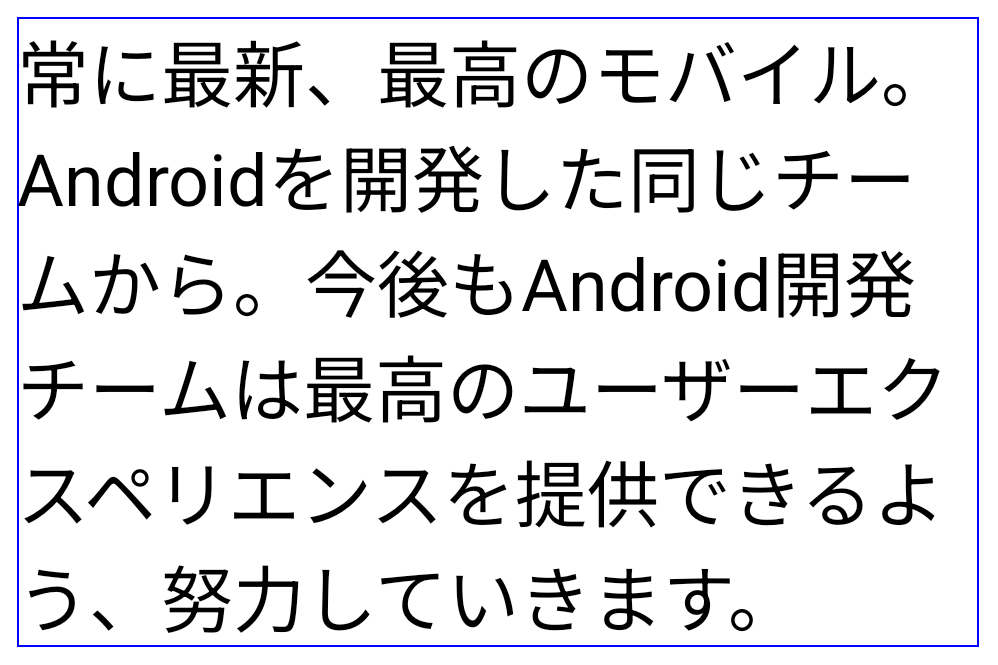
LINE_BREAK_WORD_STYLE_AUTO
应用不换行的字词样式,以提高文本的可读性。
这与应用
LINE_BREAK_WORD_STYLE_NONE。Fuente adicional de Hentaigana japonés
In Android 15, a font file for old Japanese Hiragana (known as Hentaigana) is bundled by default. The unique shapes of Hentaigana characters can add a distinctive flair to artwork or design while also helping to preserve accurate transmission and understanding of ancient Japanese documents.

VideoLAN 圆锥图标 版权所有 (c) 1996-2010 VideoLAN。任何人都可以使用此徽标或修改版徽标来提及 VideoLAN 项目或 VideoLAN 团队开发的任何产品,但这并不表示该项目对其表示认可。
Vulkan 和 Vulkan 徽标是 Khronos Group Inc.的注册商标。
OpenGL 是注册商标,OpenGL ES 徽标是 Hewlett Packard Enterprise 的商标,已获得 Khronos 的许可。