

对于需要实时低延迟语音支持的应用(例如聊天机器人或代理交互),Gemini Live API 提供了一种优化的方式来为 Gemini 模型流式传输输入和输出。通过使用 Firebase AI Logic,您可以直接从 Android 应用调用 Gemini Live API,而无需进行后端集成。本指南将向您介绍如何在 Android 应用中使用 Firebase AI Logic 中的 Gemini Live API。
开始使用
在开始之前,请确保您的应用以 API 级别 23 或更高级别 为目标平台。
如果尚未设置 Firebase 项目并将应用连接到 Firebase,请先完成这些操作。如需了解详情,请参阅 Firebase AI Logic 文档。
设置 Android 项目
将 Firebase AI Logic 库和 App Check 依赖项添加到应用级
build.gradle.kts 或 build.gradle 文件。使用
Firebase Android BoM 管理库版本。
dependencies {
  // Import the Firebase BoM
  implementation(platform("com.google.firebase:firebase-bom:34.15.0"))

  // Add the dependencies for the Firebase AI Logic and App Check libraries
  // When using the BoM, you don't specify versions in Firebase library dependencies
  implementation("com.google.firebase:firebase-ai")
  implementation("com.google.firebase:firebase-appcheck-debug")
}
添加依赖项后,将 Android 项目与 Gradle 同步。
为本地开发配置 App Check 调试提供程序
从 2026 年 7 月初开始,在 Firebase 控制台中 AI Logic 的引导式设置工作流中,系统会自动强制执行 Firebase App Check 以保护 Gemini API。对于本地开发,您需要配置 App Check 调试提供程序,以绕过证明,同时仍保持 App Check 的强制执行。
在调试 build 中,将 App Check 配置为使用调试提供程序工厂:
Kotlin
Firebase.initialize(context = this)
Firebase.appCheck.installAppCheckProviderFactory(
    DebugAppCheckProviderFactory.getInstance(),
)
Java
FirebaseApp.initializeApp(/*context=*/ this);
FirebaseAppCheck firebaseAppCheck = FirebaseAppCheck.getInstance();
firebaseAppCheck.installAppCheckProviderFactory(
        DebugAppCheckProviderFactory.getInstance());
获取调试令牌:
在模拟器中或在测试设备上运行应用。
在日志中查找 App Check 调试令牌。例如:
D DebugAppCheckProvider: Enter this debug secret into the allow list
in the Firebase Console for your project: 123a4567-b89c-12d3-e456-789012345678
复制令牌(例如
123a4567-b89c-12d3-e456-789012345678)。
向 App Check 注册调试令牌:
在 Firebase 控制台中,依次前往 安全性 > App Check > 应用 标签页。
找到您的应用,点击溢出菜单 (),然后选择 管理调试令牌。
按照屏幕上的说明注册调试令牌。
如需详细了解调试提供程序(包括如何获取新的调试令牌), 请查看官方 App Check 文档。
集成 Firebase AI Logic 并初始化生成式模型
将 RECORD_AUDIO 权限添加到应用的 AndroidManifest.xml 文件:
<uses-permission android:name="android.permission.RECORD_AUDIO" />
初始化 Gemini Developer API 后端服务并访问 LiveModel。
使用支持 Live API 的模型,例如 gemini-2.5-flash-native-audio-preview-12-2025。
如需查看可用的 Live API 模型,请参阅 Firebase 文档。
如需指定语音,请在
speechConfig 对象中设置 语音名称,作为 模型配置 的一部分。如果未指定语音,则默认为 Puck。
Kotlin
// Initialize the `LiveModel` val model = Firebase.ai(backend = GenerativeBackend.googleAI()).liveModel( modelName = "gemini-2.5-flash-native-audio-preview-12-2025", generationConfig = liveGenerationConfig { responseModality = ResponseModality.AUDIO speechConfig = SpeechConfig(voice = Voice("FENRIR")) } )
Java
// Initialize the `LiveModel`
LiveGenerativeModel model = FirebaseAI
       .getInstance(GenerativeBackend.googleAI())
       .liveModel(
              "gemini-2.5-flash-native-audio-preview-12-2025",
              new LiveGenerationConfig.Builder()
                     .setResponseModality(ResponseModality.AUDIO)
                     .setSpeechConfig(new SpeechConfig(new Voice("FENRIR"))
              ).build(),
        null,
        null
);
您可以选择通过设置系统指令来定义模型扮演的角色:
Kotlin
val systemInstruction = content { text("You are a helpful assistant, you main role is [...]") } val model = Firebase.ai(backend = GenerativeBackend.googleAI()).liveModel( modelName = "gemini-2.5-flash-native-audio-preview-12-2025", generationConfig = liveGenerationConfig { responseModality = ResponseModality.AUDIO speechConfig = SpeechConfig(voice = Voice("FENRIR")) }, systemInstruction = systemInstruction, )
Java
Content systemInstruction = new Content.Builder()
       .addText("You are a helpful assistant, you main role is [...]")
       .build();

LiveGenerativeModel model = FirebaseAI
       .getInstance(GenerativeBackend.googleAI())
       .liveModel(
              "gemini-2.5-flash-native-audio-preview-12-2025",
              new LiveGenerationConfig.Builder()
                     .setResponseModality(ResponseModality.AUDIO)
                     .setSpeechConfig(new SpeechConfig(new Voice("FENRIR"))
              ).build(),
        tools, // null if you don't want to use function calling
        systemInstruction
);
您还可以使用系统指令提供特定于应用(例如用户应用内活动历史记录)的上下文,从而进一步专门化与模型的对话。
初始化 Live API 会话
创建 LiveModel 实例后,调用 model.connect() 以创建 LiveSession 对象,并使用低延迟流式传输与模型建立持久连接。LiveSession 可让您通过启动和停止语音会话以及发送和接收文本与模型进行交互。
然后,您可以调用 startAudioConversation() 以开始与模型的对话:
Kotlin
val session = model.connect() session.startAudioConversation()
Java
LiveModelFutures model = LiveModelFutures.from(liveModel);
ListenableFuture<LiveSession> sessionFuture = model.connect();

Futures.addCallback(sessionFuture, new FutureCallback<LiveSession>() {
    @Override
    public void onSuccess(LiveSession ses) {
        LiveSessionFutures session = LiveSessionFutures.from(ses);
        session.startAudioConversation();
    }
    @Override
    public void onFailure(Throwable t) {
        // Handle exceptions
    }
}, executor);
在与模型的对话中,请注意模型不会处理中断。 此外,Live API 是双向的,因此您可以使用同一连接来发送和接收内容。
您还可以使用 Gemini Live API 从不同的输入模态生成音频:
- 发送文本和音频输入。
- 发送视频输入(查看 Firebase 快速入门应用)。
函数调用:将 Gemini Live API 连接到您的应用
如需更进一步,您还可以让模型使用函数调用直接与应用的逻辑进行交互。
函数调用(或工具调用)是生成式 AI 实现的一项功能,允许模型主动调用函数来执行操作。如果函数有输出,模型会将其添加到上下文中,并将其用于后续生成。
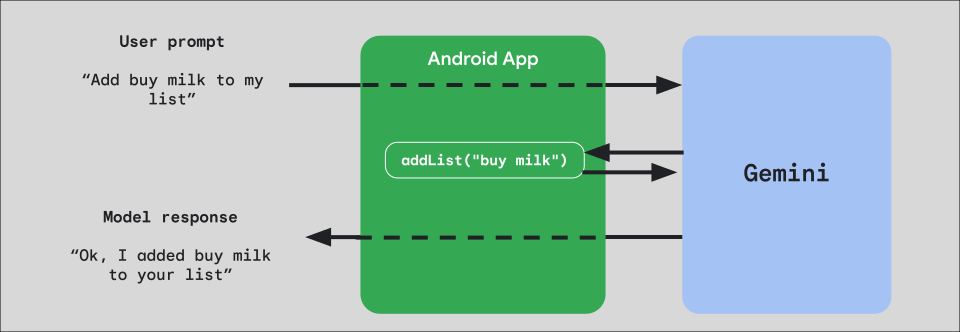
如需在应用中实现函数调用,请先为要向模型公开的每个函数创建一个 FunctionDeclaration 对象。
例如,如需向 Gemini 公开一个将字符串附加到字符串列表的 addList 函数,请先创建一个 FunctionDeclaration 变量,其中包含函数的名称以及函数及其参数的简短纯英文说明:
Kotlin
val itemList = mutableListOf<String>() fun addList(item: String) { itemList.add(item) } val addListFunctionDeclaration = FunctionDeclaration( name = "addList", description = "Function adding an item the list", parameters = mapOf( "item" to Schema.string("A short string describing the item to add to the list") ) )
Java
HashMap<String, Schema> addListParams = new HashMap<String, Schema>(1);

addListParams.put("item", Schema.str("A short string describing the item to add to the list"));

FunctionDeclaration addListFunctionDeclaration = new FunctionDeclaration(
    "addList",
    "Function adding an item the list",
    addListParams,
    Collections.emptyList()
);
然后,在实例化模型时,将此 FunctionDeclaration 作为 Tool 传递给模型:
Kotlin
val addListTool = Tool.functionDeclarations(listOf(addListFunctionDeclaration)) val model = Firebase.ai(backend = GenerativeBackend.googleAI()).liveModel( modelName = "gemini-2.5-flash-native-audio-preview-12-2025", generationConfig = liveGenerationConfig { responseModality = ResponseModality.AUDIO speechConfig = SpeechConfig(voice = Voice("FENRIR")) }, systemInstruction = systemInstruction, tools = listOf(addListTool) )
Java
LiveGenerativeModel model = FirebaseAI.getInstance(
    GenerativeBackend.googleAI()).liveModel(
        "gemini-2.5-flash-native-audio-preview-12-2025",
  new LiveGenerationConfig.Builder()
        .setResponseModalities(ResponseModality.AUDIO)
        .setSpeechConfig(new SpeechConfig(new Voice("FENRIR")))
        .build(),
  List.of(Tool.functionDeclarations(List.of(addListFunctionDeclaration))),
               null,
               systemInstruction
        );
最后,实现一个处理程序函数来处理模型发出的工具调用,并将响应传递回模型。当您调用 startAudioConversation 时,提供给 LiveSession 的此处理程序函数会采用 FunctionCallPart 参数并返回 FunctionResponsePart:
Kotlin
session.startAudioConversation(::functionCallHandler) // ... fun functionCallHandler(functionCall: FunctionCallPart): FunctionResponsePart { return when (functionCall.name) { "addList" -> { // Extract function parameter from functionCallPart val itemName = functionCall.args["item"]!!.jsonPrimitive.content // Call function with parameter addList(itemName) // Confirm the function call to the model val response = JsonObject( mapOf( "success" to JsonPrimitive(true), "message" to JsonPrimitive("Item $itemName added to the todo list") ) ) FunctionResponsePart(functionCall.name, response) } else -> { val response = JsonObject( mapOf( "error" to JsonPrimitive("Unknown function: ${functionCall.name}") ) ) FunctionResponsePart(functionCall.name, response) } } }
Java
Futures.addCallback(sessionFuture, new FutureCallback<LiveSessionFutures>() {

    @RequiresPermission(Manifest.permission.RECORD_AUDIO)
    @Override
    @OptIn(markerClass = PublicPreviewAPI.class)
    public void onSuccess(LiveSessionFutures ses) {
        ses.startAudioConversation(::handleFunctionCallFuture);
    }

    @Override
    public void onFailure(Throwable t) {
        // Handle exceptions
    }
}, executor);

// ...

ListenableFuture<JsonObject> handleFunctionCallFuture = Futures.transform(response, result -> {
    for (FunctionCallPart functionCall : result.getFunctionCalls()) {
        if (functionCall.getName().equals("addList")) {
            Map<String, JsonElement> args = functionCall.getArgs();
            String item =
                    JsonElementKt.getContentOrNull(
                            JsonElementKt.getJsonPrimitive(
                                    locationJsonObject.get("item")));
            return addList(item);
        }
    }
    return null;
}, Executors.newSingleThreadExecutor());
后续步骤
- 在 Android AI 目录示例应用中使用 Gemini Live API。
- 如需详细了解 Gemini Live API,请参阅 Firebase AI Logic 文档。
- 详细了解可用的 Gemini 模型。
- 详细了解函数调用。
- 探索提示设计策略。