

O Android 14 introduz ótimos recursos e APIs para desenvolvedores. As seções a seguir ajudam você a conhecer os recursos disponíveis para os apps e a começar a usar as APIs relacionadas.
Para uma lista detalhada das APIs adicionadas, modificadas e removidas, leia o Relatório de diferenças da API. Para detalhes sobre as APIs adicionadas, acesse a Referência da API do Android. No Android 14, procure APIs que foram adicionadas no nível 34 da API. Para saber mais sobre as áreas em que as mudanças na plataforma podem afetar seus apps, confira as mudanças de comportamento do Android 14 para apps destinados ao Android 14 e para todos os apps.
Internacionalização
Seleção de idioma por app
Android 14 扩展了 Android 13(API 级别 33)中引入的按应用设定语言功能,并包含以下额外功能:
自动生成应用的
localeConfig:从 Android Studio Giraffe Canary 7 和 AGP 8.1.0-alpha07 开始,您可以将应用配置为自动支持各应用语言偏好设定。Android Gradle 插件会根据您的项目资源生成LocaleConfig文件,并在最终清单文件中添加对该文件的引用,这样您就不再需要手动创建或更新该文件。AGP 使用应用模块的res文件夹中的资源以及任何库模块依赖项来确定要在LocaleConfig文件中添加的语言区域。动态更新应用的
localeConfig:使用LocaleManager方法中的setOverrideLocaleConfig()和getOverrideLocaleConfig()可以在设备的系统设置中动态更新应用的受支持语言列表。有了这种灵活性,您可以按区域自定义支持的语言列表、运行 A/B 实验,或者如果您的应用通过服务器端推送进行本地化,则可以提供更新后的语言区域列表。输入法 (IME) 的应用语言可见性:IME 可以利用
getApplicationLocales()方法查看当前应用的语言,并将 IME 语言与该语言进行匹配。
API Grammatical Inflection
Três bilhões de pessoas falam idiomas com marcação de gênero: idiomas em que categorias gramaticais, como substantivos, verbos, adjetivos e preposições, mudam de acordo com o gênero das pessoas e os objetos sobre os quais elas falam. Tradicionalmente, vários idiomas com marcação de gênero usam o gênero gramatical masculino como padrão ou genérico.
Referir-se a usuários no gênero gramatical errado, como falar com uma mulher no gênero gramatical masculino, pode afetar negativamente o desempenho e a atitude dela. Por outro lado, uma interface com linguagem que reflete corretamente o gênero gramatical do usuário pode melhorar o engajamento e fornecer uma experiência do usuário mais personalizada e natural.
Para ajudar a criar uma interface focada no usuário para idiomas com flexão de gênero, o Android 14 apresenta a API Grammatical Inflection, que permite adicionar suporte aos gêneros gramaticais sem refatorar o app.
Preferências regionais
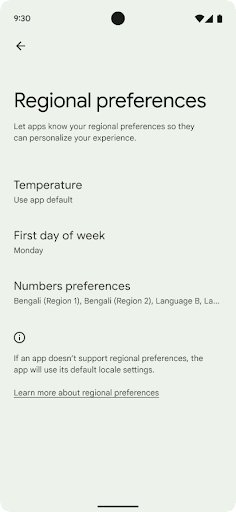
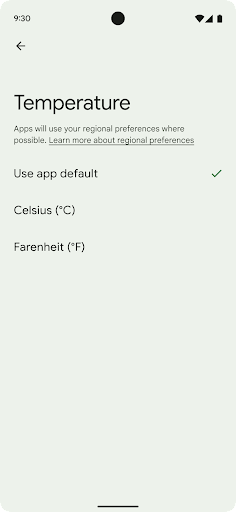
用户可通过地区偏好设置对温度单位、一周的第一天和编号系统进行个性化设置。居住在美国的欧洲用户可能更希望使用摄氏度,而不是华氏度,并且希望应用将星期一视为一周的开始,而不是像美国那样默认从星期日开始。
新 Android 设置菜单包含这些偏好设置,使用户能够在一个位置集中发现这些应用更改偏好设置。这些偏好设置在备份和恢复设备后也会保持不变。多个 API 和 intent(例如 getTemperatureUnit 和 getFirstDayOfWeek)会为您的应用授予读取权限来访问用户偏好设置,因此您的应用可以调整其显示信息的方式。您还可以在 ACTION_LOCALE_CHANGED 上注册 BroadcastReceiver,以便在地区偏好设置发生更改时处理语言区域配置更改。
如需找到这些设置,请打开“设置”应用,然后依次前往系统 > 语言和输入法 > 地区偏好设置。
Acessibilidade
Dimensionamento de fonte não linear para 200%
从 Android 14 开始,系统支持字体放大高达 200%,为用户提供了其他无障碍功能选项。
为防止屏幕上的大文本元素过于放大,系统会采用非线性放大曲线。这种放大策略意味着大号文本的放大比例不会与较小的文本相同。非线性字体放大有助于保持不同大小元素之间的比例层次结构,同时缓解高级别线性文本放大存在的问题(例如文本被截断或文本因非常大的显示大小而难以阅读)。
使用非线性字体放大测试应用
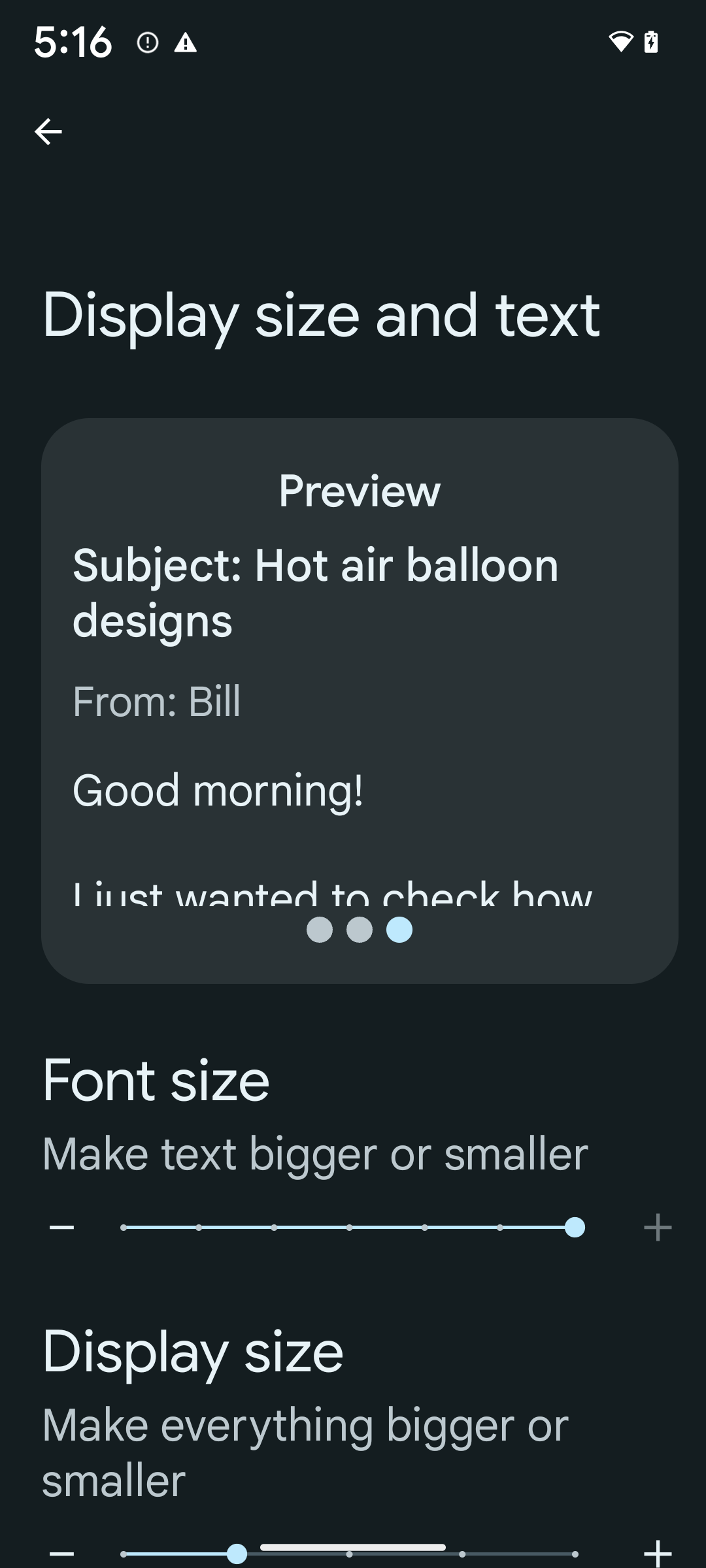
如果您已使用可缩放像素 (sp) 单位来定义文本大小,那么这些额外的选项和缩放改进会自动应用于应用中的文本。不过,您仍应在启用最大字体大小 (200%) 的情况下执行界面测试,以确保应用正确应用字体大小,并且可以容纳更大的字体大小,而不会影响易用性。
要启用 200% 字号,请按以下步骤操作:
- 打开“设置”应用,然后依次前往无障碍 > 显示大小和文字。
- 在字号选项中,点按加号 (+) 图标,直到启用最大字号设置,如本部分随附的图片所示。
针对文本大小使用放大像素 (sp) 单位
请务必始终以 sp 为单位指定文本大小。当应用使用 sp 单位时,Android 可以应用用户的首选文本大小,并相应地进行缩放。
不要为内边距使用 sp 单位,也不要定义假设存在隐式内边距的视图高度:使用非线性字体放大 sp 尺寸可能并不成比例,因此 4sp + 20sp 可能并不等于 24sp。
转换放大像素 (sp) 单位
使用 TypedValue.applyDimension() 从 sp 单位转换为像素,并使用 TypedValue.deriveDimension() 将像素转换为 sp。这些方法会自动应用适当的非线性放大曲线。
避免使用 Configuration.fontScale 或 DisplayMetrics.scaledDensity 对等式进行硬编码。由于字体放大是非线性的,因此 scaledDensity 字段不再准确。fontScale 字段应仅用于提供信息,因为字体不再使用单个标量值进行缩放。
针对 lineHeight 使用 sp 单位
请始终使用 sp 单位(而非 dp)定义 android:lineHeight,以便行高随文本一起缩放。否则,如果您的文字是 sp,但 lineHeight 是 dp 或像素,则文字不会缩放,看起来会很拥挤。
TextView 会自动更正 lineHeight,以便保留您预期的比例,但前提是 textSize 和 lineHeight 均以 sp 单位定义。
Câmera e mídia
Ultra HDR para imagens

Android 14 新增了对高动态范围 (HDR) 图片的支持,可在拍摄照片时保留更多来自传感器的信息,从而实现鲜艳的色彩和更高的对比度。Android 使用 Ultra HDR 格式,该格式与 JPEG 图片完全向后兼容,可让应用与 HDR 图片无缝互操作,并根据需要以标准动态范围 (SDR) 显示这些图片。
当您的应用选择为其 activity 窗口使用 HDR 界面(通过清单条目或通过在运行时调用 Window.setColorMode())时,框架会自动在界面中以 HDR 格式渲染这些图片。您还可以在受支持的设备上拍摄压缩的 Ultra HDR 静态图片。从传感器中恢复的颜色越多,后期编辑的灵活性就越高。与 Ultra HDR 图片关联的 Gainmap 可用于使用 OpenGL 或 Vulkan 渲染这些图片。
Zoom, foco, pós-visualização e muito mais nas extensões de câmera
Android 14 升级并改进了相机扩展程序,让应用能够处理更长的处理时间,从而支持在受支持的设备上使用计算密集型算法(例如弱光摄影)来改善图片。这些功能可让用户在使用相机扩展功能时获得更出色的体验。这些改进的示例包括:
- 动态静态拍摄处理延迟时间估算功能可根据当前场景和环境条件提供更准确的静态拍摄延迟时间估算值。调用
CameraExtensionSession.getRealtimeStillCaptureLatency()可获取具有两种延迟时间估算方法的StillCaptureLatency对象。getCaptureLatency()方法会返回onCaptureStarted和onCaptureProcessStarted()之间的估算延迟时间,而getProcessingLatency()方法会返回onCaptureProcessStarted()和可用的最终处理帧之间的估算延迟时间。 - 支持拍摄进度回调,以便应用可以显示长时间运行的静态拍摄处理操作的当前进度。您可以检查
CameraExtensionCharacteristics.isCaptureProcessProgressAvailable是否支持此功能,如果支持,则实现onCaptureProcessProgressed()回调,并将进度(从 0 到 100)作为参数传入。 扩展程序专用元数据,例如用于调节扩展程序效果(例如背景虚化程度)的
CaptureRequest.EXTENSION_STRENGTH和EXTENSION_BOKEH。相机扩展程序中的静态图片拍摄预览功能,该功能比最终图片更快地提供经过较少处理的图片。如果扩展程序的处理延迟时间增加,可以提供 postview 图片作为占位符以提升用户体验,并在稍后改用最终图片。您可以使用
CameraExtensionCharacteristics.isPostviewAvailable检查此功能是否可用。然后,您可以将OutputConfiguration传递给ExtensionSessionConfiguration.setPostviewOutputConfiguration。支持
SurfaceView,可实现更优化且能效更高的预览渲染路径。支持在使用扩展程序时点按对焦和缩放。
Zoom no sensor
Quando REQUEST_AVAILABLE_CAPABILITIES_STREAM_USE_CASE em
CameraCharacteristics contém
SCALER_AVAILABLE_STREAM_USE_CASES_CROPPED_RAW, o app
pode usar recursos avançados do sensor para fornecer a um fluxo RAW cortado os mesmos
pixels do campo de visão completo usando um CaptureRequest
com um destino RAW que tenha o caso de uso do fluxo definido como
CameraMetadata.SCALER_AVAILABLE_STREAM_USE_CASES_CROPPED_RAW.
Ao implementar os controles de substituição de solicitação, a câmera atualizada oferece aos usuários
o controle de zoom antes mesmo que outros controles da câmera estejam prontos.
Áudio USB sem perdas
Android 14 支持无损音频格式,可通过 USB 有线耳机提供发烧友级体验。您可以查询 USB 设备的首选混音器属性,注册监听器以监听首选混音器属性的更改,以及使用 AudioMixerAttributes 类配置混音器属性。此类表示音频混音器的格式,例如声道掩码、采样率和行为。该类允许直接发送音频,而无需混音、调节音量或处理效果。
Produtividade e ferramentas para desenvolvedores
Credential Manager
O Android 14 adiciona o Gerenciador de credenciais como uma API de plataforma, com suporte adicional para dispositivos Android 4.4 (nível 19 da API) e versões mais recentes por meio de uma biblioteca do Jetpack que usa o Google Play Services. O Gerenciador de credenciais tem como objetivo facilitar o login para os usuários com APIs que recuperam e armazenam credenciais com provedores de credenciais configurados pelo usuário. O Gerenciador de credenciais oferece suporte a vários métodos de login, incluindo nome de usuário e senha, chaves de acesso e soluções de login federadas (como o recurso Fazer login com o Google) em uma única API.
As chaves de acesso oferecem muitas vantagens. Por exemplo, as chaves de acesso são criadas com base em padrões do setor, podem funcionar em diferentes sistemas operacionais e ecossistemas de navegadores e podem ser usadas em sites e apps.
Para mais informações, consulte a documentação do Credential Manager e das chaves de acesso e a postagem do blog sobre o Credential Manager e as chaves de acesso.
Conexão Saúde
A Conexão Saúde é um repositório no dispositivo para dados de saúde e condicionamento físico do usuário. Ele permite que os usuários compartilhem dados entre os apps favoritos, com um único lugar para controlar quais dados eles querem compartilhar com esses apps.
Em dispositivos com versões anteriores ao Android 14, o app Conexão Saúde está disponível para download na Google Play Store. A partir do Android 14, a Conexão Saúde faz parte da plataforma e recebe atualizações por meio das atualizações do sistema do Google Play sem precisar de um download separado. Com isso, a Conexão Saúde pode ser atualizada com frequência, e seus apps podem contar com a Conexão Saúde disponível em dispositivos com o Android 14 ou mais recente. Os usuários podem acessar a Conexão Saúde nas configurações do dispositivo, com controles de privacidade integrados às configurações do sistema.
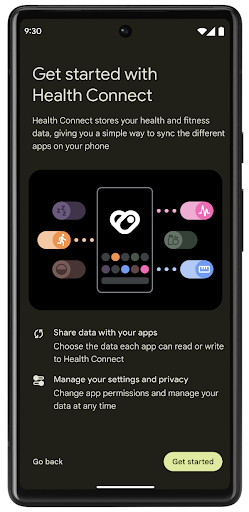
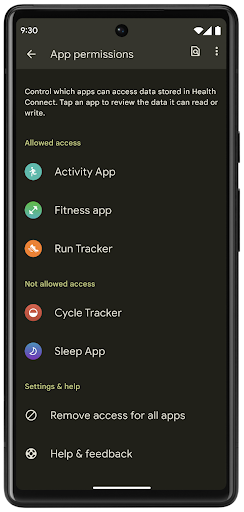
A Conexão Saúde inclui vários novos recursos no Android 14, como rotas de exercícios, permitindo que os usuários compartilhem uma rota do treino que pode ser visualizada em um mapa. Uma rota é definida como uma lista de locais salvos em um período de tempo, e o app pode inserir rotas em sessões de exercício, vinculando-as uma à outra. Para garantir que os usuários tenham controle total sobre esses dados sensíveis, eles precisam permitir o compartilhamento de rotas individuais com outros apps.
Para mais informações, consulte a documentação da Conexão Saúde e a postagem do blog Novidades no Android Health.
Atualizações do OpenJDK 17
O Android 14 continua o trabalho de atualizar as principais bibliotecas do Android para se alinhar aos recursos das versões mais recentes do LTS do OpenJDK, incluindo atualizações de bibliotecas e suporte à linguagem Java 17 para desenvolvedores de apps e plataformas.
Os seguintes recursos e melhorias estão incluídos:
- Aproximadamente 300 classes
java.baseforam atualizadas para oferecer suporte ao Java 17. - Blocos de texto, que introduzem literais de string de várias linhas à linguagem de programação Java.
- Correspondência de padrão para instanceof, que permite que um objeto
seja tratado como um tipo específico em uma
instanceofsem nenhuma outra variável. - Classes seladas, que permitem restringir quais classes e interfaces podem estender ou implementar essas classes.
Graças às atualizações do sistema do Google Play (Projeto Mainline), mais de 600 milhões de dispositivos podem receber as atualizações mais recentes do Android Runtime (ART), que incluem essas mudanças. Isso faz parte do nosso compromisso de oferecer aos apps um ambiente mais consistente e seguro em todos os dispositivos, com novos recursos para os usuários, independente da versão da plataforma.
Java e OpenJDK são marcas registradas da Oracle e/ou afiliadas.
Melhorias para app stores
Android 14 引入了多个 PackageInstaller API,可帮助应用商店改善其用户体验。
下载之前请求批准安装
安装或更新应用可能需要用户批准。例如,当使用 REQUEST_INSTALL_PACKAGES 权限的安装程序尝试安装新应用时。在之前的 Android 版本中,只有在将 APK 写入安装会话并且提交会话后,应用商店才能请求用户批准。
从 Android 14 开始,requestUserPreapproval() 方法可让安装程序在提交安装会话之前请求用户批准。此项改进可让应用商店将任何 APK 的下载操作推迟到用户批准安装之后。此外,用户批准安装后,应用商店可以在后台下载并安装应用,而不会干扰用户。
承担未来更新的责任
借助 setRequestUpdateOwnership() 方法,安装程序可以向系统表明它打算负责将被安装的应用未来的更新。此 capability 可实现更新所有权强制执行,即仅允许更新所有者为应用安装自动更新。更新所有权强制执行有助于确保用户仅收到来自预期应用商店的更新。
任何其他安装程序(包括使用 INSTALL_PACKAGES 权限的安装程序)都必须获得用户的明确批准,才能安装更新。如果用户决定继续从其他来源安装更新,则会失去更新所有权。
在干扰较少的时段更新应用
应用商店通常希望避免更新正在使用的应用,因为这会导致应用正在运行的进程被终止,而这可能会中断用户正在执行的操作。
从 Android 14 开始,InstallConstraints API 让安装程序可以确保其应用更新在适当的时机进行。例如,应用商店可以调用 commitSessionAfterInstallConstraintsAreMet() 方法来确保仅在用户不再与相应应用互动时才进行更新。
无缝安装可选拆分
借助拆分 APK,应用的功能可以通过单独的 APK 文件提供,而不是以单体式 APK 的形式提供。借助拆分 APK,应用商店可以优化不同应用组件的提供。例如,应用商店可能会根据目标设备的属性进行优化。自在 API 级别 22 中引入以来,PackageInstaller API 一直支持拆分。
在 Android 14 中,setDontKillApp() 方法可让安装程序指明在安装新的拆分项时应用的运行进程不应终止。应用商店可以使用此功能,在用户使用应用时无缝安装应用的新功能。
Pacotes de metadados do app
A partir do Android 14, o instalador do pacote do Android permite que você especifique os metadados do app, como práticas de segurança de dados, que serão incluídos em páginas de app stores, como o Google Play.
Detectar quando usuários fazem capturas de tela no dispositivo
Para criar uma experiência mais padronizada para detectar capturas de tela, o Android 14 apresenta uma API de detecção de capturas de tela que preserva a privacidade. Ela permite que os apps registrem callbacks por atividade. Esses callbacks são invocados, e o usuário é notificado quando faz uma captura de tela enquanto a atividade está visível.
Experiência do usuário
Ações personalizadas e melhoria na classificação do Sharesheet
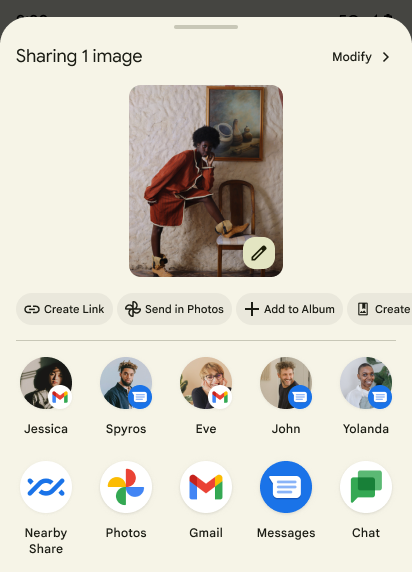
Android 14 更新了系统 Sharesheet,以便为用户提供自定义应用操作和信息更丰富的预览结果。
添加自定义操作
对于 Android 14,您的应用可以向其调用的系统 Sharesheet 添加自定义操作。
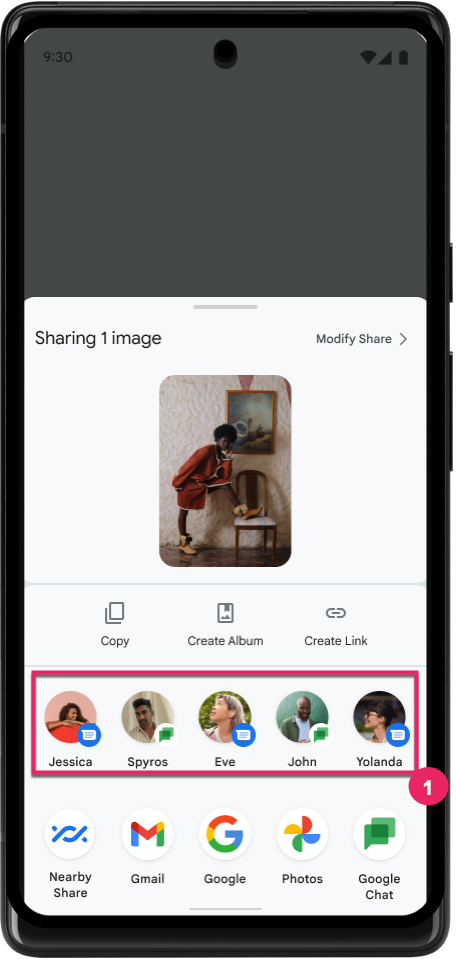
提高直接共享目标的排名
Android 14 根据来自应用的更多信号来确定直接共享目标的排名,以便为用户提供更实用的结果。为了提供最实用的排名信号,请遵循提高直接共享目标排名的准则。通讯应用还可以报告出站和入站消息的快捷方式使用情况。
Suporte a animações de voltas preditivas integradas e personalizadas
O Android 13 introduziu a animação de volta preditiva à tela inicial por trás de uma opção do desenvolvedor. Quando usada em um app com suporte para a opção para desenvolvedor ativada, deslizar para trás mostra uma animação indicando que o gesto de retorno sai do app de volta à tela inicial.
O Android 14 inclui várias melhorias e novas orientações para a volta preditiva:
- Você pode configurar
android:enableOnBackInvokedCallback=truepara ativar as animações do sistema de volta preditiva por atividade em vez de para todo o app. - Adicionamos novas animações do sistema para acompanhar a animação de retorno à tela inicial do Android 13. As novas animações do sistema são entre atividades e tarefas, que são recebidas automaticamente após a migração para a volta preditiva.
- Adicionamos novas animações do componente Material Design para páginas inferiores, páginas laterais e pesquisa.
- Desenvolvemos orientações de design para a criação de transições e animações personalizadas no app.
- Adicionamos novas APIs para oferecer suporte a animações de transição personalizadas no app:
handleOnBackStarted,handleOnBackProgressed,handleOnBackCancelledinOnBackPressedCallbackonBackStarted,onBackProgressed,onBackCancelledinOnBackAnimationCallback- Use
overrideActivityTransitionem vez deoverridePendingTransitionpara transições que respondem à medida que o usuário desliza de volta.
Com esta versão de pré-lançamento do Android 14, todos os recursos de volta preditiva permanecem por trás de uma opção para desenvolvedores. Consulte o guia do desenvolvedor para migrar seu app para a volta preditiva e o guia do desenvolvedor para criar transições personalizadas no app.
Substituições por app do fabricante de dispositivos de tela grande
As substituições por app permitem que os fabricantes mudem o comportamento dos apps em dispositivos de tela grande. Por exemplo, a substituição FORCE_RESIZE_APP instrui o sistema a redimensionar o app para que se ajuste às dimensões de exibição (evitando o modo de compatibilidade de tamanho), mesmo que resizeableActivity="false" esteja definido no manifesto do app.
As substituições têm como objetivo melhorar a experiência do usuário em telas grandes.
As novas propriedades do manifesto permitem desativar algumas substituições do fabricante do dispositivo para o app.
Substituições por app para usuários de telas grandes
As substituições por app mudam o comportamento dos apps em dispositivos de tela grande. Por exemplo, a substituição do fabricante do dispositivo OVERRIDE_MIN_ASPECT_RATIO_LARGE define a proporção do app como 16:9, independente da configuração dele.
O Android 14 QPR1 permite que os usuários apliquem substituições por app usando um novo menu de configurações em dispositivos de tela grande.
Compartilhamento de tela de app
O compartilhamento de tela de apps permite que os usuários compartilhem uma janela de app em vez de toda a tela do dispositivo durante a gravação do conteúdo da tela.
Com o compartilhamento de tela do app, a barra de status, a barra de navegação, as notificações e outros elementos da interface do sistema são excluídos da tela compartilhada. Somente o conteúdo do app selecionado é compartilhado.
O compartilhamento de tela de apps melhora a produtividade e a privacidade, permitindo que os usuários executem vários apps, mas limitem o compartilhamento de conteúdo a um único app.
Resposta inteligente com tecnologia de LLM no Gboard do Pixel 8 Pro
Em dispositivos Pixel 8 Pro com a versão de dezembro, os desenvolvedores podem testar respostas inteligentes de maior qualidade no Gboard com modelos de linguagem grandes (LLMs) no dispositivo em execução no Google Tensor.
Esse recurso está disponível como uma prévia limitada para o inglês dos EUA no WhatsApp, no Line e no KakaoTalk. É necessário usar um dispositivo Pixel 8 Pro com o Gboard como teclado.
Para testar, primeiro ative o recurso em Configurações > Opções do desenvolvedor > Configurações do AICore > Ativar o AICore persistente.
Em seguida, abra uma conversa em um app compatível para conferir a resposta inteligente com LLM na faixa de sugestões do Gboard em resposta às mensagens recebidas.
Gráficos
Os caminhos podem ser consultados e interpolados
Android 的 Path API 是一种强大且灵活的机制,可用于创建和渲染矢量图形,能够描边或填充路径、根据线段或二次曲线或立方曲线构建路径、执行布尔运算以获取更复杂的形状,或同时执行所有这些操作。但有一个限制是,您无法了解 Path 对象中实际包含的内容;该对象的内部信息在创建后对调用方是不透明的。
如需创建 Path,您可以调用 moveTo()、lineTo() 和 cubicTo() 等方法来添加路径段。但是,无法询问该路径有哪些片段,因此您必须在创建时保留该信息。
从 Android 14 开始,您可以查询路径以了解其内部内容。首先,您需要使用 Path.getPathIterator API 获取 PathIterator 对象:
Kotlin
val path = Path().apply {
    moveTo(1.0f, 1.0f)
    lineTo(2.0f, 2.0f)
    close()
}
val pathIterator = path.pathIterator
Java
Path path = new Path();
path.moveTo(1.0F, 1.0F);
path.lineTo(2.0F, 2.0F);
path.close();
PathIterator pathIterator = path.getPathIterator();
接下来,您可以调用 PathIterator 逐个遍历片段,并检索每个片段的所有必要数据。以下示例使用了 PathIterator.Segment 对象,它会为您打包数据:
Kotlin
for (segment in pathIterator) {
    println("segment: ${segment.verb}, ${segment.points}")
}
Java
while (pathIterator.hasNext()) {
    PathIterator.Segment segment = pathIterator.next();
    Log.i(LOG_TAG, "segment: " + segment.getVerb() + ", " + segment.getPoints());
}
PathIterator 还有一个非分配版 next(),您可以在其中传入缓冲区来保存点数据。
查询 Path 数据的一个重要用例是插值。例如,您可能想在两个不同的路径之间添加动画(或变形)。为了进一步简化该用例,Android 14 针对 Path 还包含 interpolate() 方法。假设两个路径具有相同的内部结构,interpolate() 方法会使用该插值结果创建一个新的 Path。以下示例返回了一个形状介于 path 和 otherPath 之间的一半(线性插值为 0.5)的路径:
Kotlin
val interpolatedResult = Path()
if (path.isInterpolatable(otherPath)) {
    path.interpolate(otherPath, .5f, interpolatedResult)
}
Java
Path interpolatedResult = new Path();
if (path.isInterpolatable(otherPath)) {
    path.interpolate(otherPath, 0.5F, interpolatedResult);
}
Jetpack graphics-path 库也为早期版本的 Android 启用了类似的 API。
Malhas personalizadas com shaders de vértice e fragmento
Android 长期以来一直支持使用自定义着色绘制三角网格,但输入网格格式仅限于一些预定义的属性组合。Android 14 增加了对自定义网格的支持,可将其定义为三角形或三角形条,并且可以选择是否编入索引。这些网格是使用自定义属性、顶点步长、可变以及使用 AGSL 编写的顶点着色器和片段着色器指定的。
顶点着色器定义了位置和颜色等变量,而片段着色器可以选择为像素定义颜色,通常是使用顶点着色器创建的变量。如果片段着色器提供颜色,则系统会使用绘制网格时选择的混合模式将其与当前 Paint 颜色混合。Uniform 可以传递到片段着色器和顶点着色器,以提高灵活性。
Renderizador de buffer de hardware para Canvas
Para ajudar no uso da API Canvas do Android para desenhar com
aceleração de hardware em um HardwareBuffer, Android 14
apresenta o HardwareBufferRenderer. Essa API é
particularmente útil quando seu caso de uso envolve a comunicação com o compositor
do sistema usando SurfaceControl para renderização
de baixa latência.