

Android 14 面向开发者引入了一些出色的功能和 API。以下内容可帮助您了解适用于您的应用的功能并开始使用相关 API。
如需详细了解已添加、修改和移除的 API,请参阅 API 差异 报告。如需详细了解已添加的 API,请访问 Android API 参考文档 - 对于 Android 14,请查找在 API 级别 34 中添加的 API。如需了解平台变更可能会在哪些方面影响您的应用,请务必查看 Android 14 行为变更 会影响以 Android 14 为目标平台的应用和所有应用。
国际化
单个应用语言设置
Android 14 expands on the per-app language features that were introduced in Android 13 (API level 33) with these additional capabilities:
Automatically generate an app's
localeConfig: Starting with Android Studio Giraffe Canary 7 and AGP 8.1.0-alpha07, you can configure your app to support per-app language preferences automatically. Based on your project resources, the Android Gradle plugin generates theLocaleConfigfile and adds a reference to it in the final manifest file, so you no longer have to create or update the file manually. AGP uses the resources in theresfolders of your app modules and any library module dependencies to determine the locales to include in theLocaleConfigfile.Dynamic updates for an app's
localeConfig: Use thesetOverrideLocaleConfig()andgetOverrideLocaleConfig()methods inLocaleManagerto dynamically update your app's list of supported languages in the device's system settings. Use this flexibility to customize the list of supported languages per region, run A/B experiments, or provide an updated list of locales if your app utilizes server-side pushes for localization.App language visibility for input method editors (IMEs): IMEs can utilize the
getApplicationLocales()method to check the language of the current app and match the IME language to that language.
Grammatical Inflection API
有 30 亿人在使用区分性别的语言,此类语言的语法类别(例如名词、动词、形容词和介词)会根据您交谈所涉及的人或物的性别而变化。传统上,许多区分性别的语言使用阳性语法性别作为默认或通用性别。
以错误的语法性别来称呼用户,例如以阳性语法性别来称呼女性,可能会对她们的表现和态度产生负面影响。相比之下,界面语言如果能正确反映用户的语法性别,就可以提高用户互动度,并提供更个性化、更自然的用户体验。
To help you build a user-centric UI for gendered languages, Android 14 introduces the Grammatical Inflection API, which lets you add support for grammatical gender without refactoring your app.
地区偏好设置
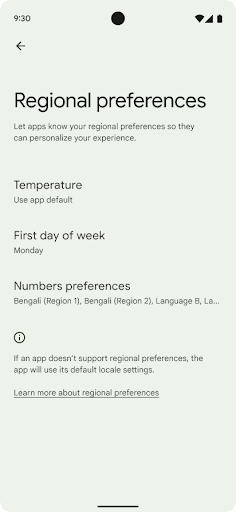
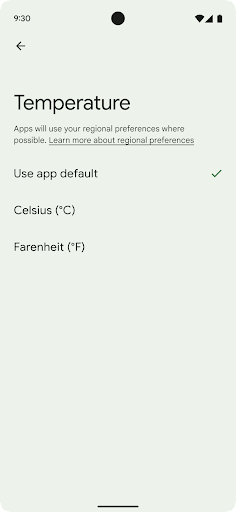
用户可通过地区偏好设置对温度单位、一周的第一天和编号系统进行个性化设置。居住在美国的欧洲用户可能更希望使用摄氏度,而不是华氏度,并且希望应用将星期一视为一周的开始,而不是像美国那样默认从星期日开始。
新 Android 设置菜单包含这些偏好设置,使用户能够在一个位置集中发现这些应用更改偏好设置。这些偏好设置在备份和恢复设备后也会保持不变。多个 API 和 intent(例如 getTemperatureUnit 和 getFirstDayOfWeek)会为您的应用授予读取权限来访问用户偏好设置,因此您的应用可以调整其显示信息的方式。您还可以在 ACTION_LOCALE_CHANGED 上注册 BroadcastReceiver,以便在地区偏好设置发生更改时处理语言区域配置更改。
如需找到这些设置,请打开“设置”应用,然后依次前往系统 > 语言和输入法 > 地区偏好设置。
无障碍
非线性字体放大至 200%
Starting in Android 14, the system supports font scaling up to 200%, providing users with additional accessibility options.
To prevent large text elements on screen from scaling too large, the system applies a nonlinear scaling curve. This scaling strategy means that large text doesn't scale at the same rate as smaller text. Nonlinear font scaling helps preserve the proportional hierarchy between elements of different sizes while mitigating issues with linear text scaling at high degrees (such as text being cut off or text that becomes harder to read due to an extremely large display sizes).
Test your app with nonlinear font scaling
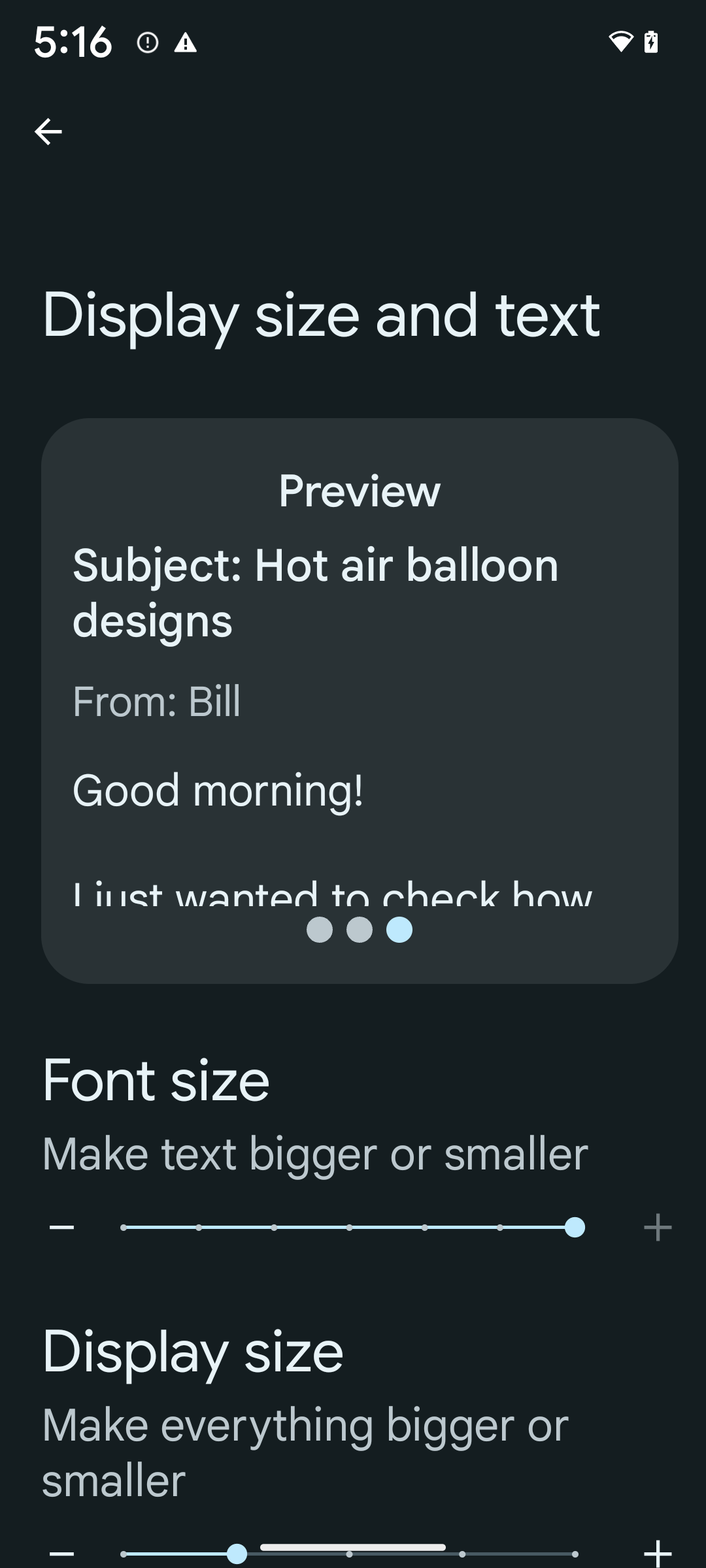
If you already use scaled pixels (sp) units to define text sizing, then these additional options and scaling improvements are applied automatically to the text in your app. However, you should still perform UI testing with the maximum font size enabled (200%) to ensure that your app applies the font sizes correctly and can accommodate larger font sizes without impacting usability.
To enable 200% font size, follow these steps:
- Open the Settings app and navigate to Accessibility > Display size and text.
- For the Font size option, tap the plus (+) icon until the maximum font size setting is enabled, as shown in the image that accompanies this section.
Use scaled pixel (sp) units for text-sizes
Remember to always specify text sizes in sp units. When your app uses sp units, Android can apply the user's preferred text size and scale it appropriately.
Don't use sp units for padding or define view heights assuming implicit padding: with nonlinear font scaling sp dimensions might not be proportional, so 4sp + 20sp might not equal 24sp.
Convert scaled pixel (sp) units
Use TypedValue.applyDimension() to convert from sp units
to pixels, and use TypedValue.deriveDimension() to
convert pixels to sp. These methods apply the appropriate nonlinear scaling
curve automatically.
Avoid hardcoding equations using
Configuration.fontScale or
DisplayMetrics.scaledDensity. Because font scaling is
nonlinear, the scaledDensity field is no longer accurate. The fontScale
field should be used for informational purposes only because fonts are no longer
scaled with a single scalar value.
Use sp units for lineHeight
Always define android:lineHeight using sp units instead
of dp, so the line height scales along with your text. Otherwise, if your text
is sp but your lineHeight is in dp or px, it doesn't scale and looks cramped.
TextView automatically corrects the lineHeight so that your intended
proportions are preserved, but only if both textSize and lineHeight are
defined in sp units.
摄像头和媒体
图片的 Ultra HDR

Android 14 adds support for High Dynamic Range (HDR) images that retain more of the information from the sensor when taking a photo, which enables vibrant colors and greater contrast. Android uses the Ultra HDR format, which is fully backward compatible with JPEG images, allowing apps to seamlessly interoperate with HDR images, displaying them in Standard Dynamic Range (SDR) as needed.
Rendering these images in the UI in HDR is done automatically by the framework
when your app opts in to using HDR UI for its Activity Window, either through a
manifest entry or at runtime by calling
Window.setColorMode(). You can also capture compressed Ultra
HDR still images on supported devices. With more colors recovered
from the sensor, editing in post can be more flexible. The
Gainmap associated with Ultra HDR images can be used to render
them using OpenGL or Vulkan.
相机扩展中的缩放、对焦、后视等功能
Android 14 升级并改进了相机扩展程序,让应用能够处理更长的处理时间,从而支持在受支持的设备上使用计算密集型算法(例如弱光摄影)来改善图片。这些功能可让用户在使用相机扩展功能时获得更出色的体验。这些改进的示例包括:
- 动态静态拍摄处理延迟时间估算功能可根据当前场景和环境条件提供更准确的静态拍摄延迟时间估算值。调用
CameraExtensionSession.getRealtimeStillCaptureLatency()可获取具有两种延迟时间估算方法的StillCaptureLatency对象。getCaptureLatency()方法会返回onCaptureStarted和onCaptureProcessStarted()之间的估算延迟时间,而getProcessingLatency()方法会返回onCaptureProcessStarted()和可用的最终处理帧之间的估算延迟时间。 - 支持拍摄进度回调,以便应用可以显示长时间运行的静态拍摄处理操作的当前进度。您可以检查
CameraExtensionCharacteristics.isCaptureProcessProgressAvailable是否支持此功能,如果支持,则实现onCaptureProcessProgressed()回调,并将进度(从 0 到 100)作为参数传入。 扩展程序专用元数据,例如用于调节扩展程序效果(例如背景虚化程度)的
CaptureRequest.EXTENSION_STRENGTH和EXTENSION_BOKEH。相机扩展程序中的静态图片拍摄预览功能,该功能比最终图片更快地提供经过较少处理的图片。如果扩展程序的处理延迟时间增加,可以提供 postview 图片作为占位符以提升用户体验,并在稍后改用最终图片。您可以使用
CameraExtensionCharacteristics.isPostviewAvailable检查此功能是否可用。然后,您可以将OutputConfiguration传递给ExtensionSessionConfiguration.setPostviewOutputConfiguration。支持
SurfaceView,可实现更优化且能效更高的预览渲染路径。支持在使用扩展程序时点按对焦和缩放。
传感器内缩放
When REQUEST_AVAILABLE_CAPABILITIES_STREAM_USE_CASE in
CameraCharacteristics contains
SCALER_AVAILABLE_STREAM_USE_CASES_CROPPED_RAW, your app
can use advanced sensor capabilities to give a cropped RAW stream the same
pixels as the full field of view by using a CaptureRequest
with a RAW target that has stream use case set to
CameraMetadata.SCALER_AVAILABLE_STREAM_USE_CASES_CROPPED_RAW.
By implementing the request override controls, the updated camera gives users
zoom control even before other camera controls are ready.
无损 USB 音频
Android 14 gains support for lossless audio formats for audiophile-level
experiences over USB wired headsets. You can query a USB device for its
preferred mixer attributes, register a listener for changes in preferred mixer
attributes, and configure mixer attributes using the
AudioMixerAttributes class. This class represents the
format, such as channel mask, sample rate, and behavior of the audio mixer. The
class allows for audio to be sent directly, without mixing,
volume adjustment, or processing effects.
开发者工作效率和工具
Credential Manager
Android 14 adds Credential Manager as a platform API, with additional support back to Android 4.4 (API level 19) devices through a Jetpack Library using Google Play services. Credential Manager aims to make sign-in easier for users with APIs that retrieve and store credentials with user-configured credential providers. Credential Manager supports multiple sign-in methods, including username and password, passkeys, and federated sign-in solutions (such as Sign-in with Google) in a single API.
Passkeys provide many advantages. For example, passkeys are built on industry standards, can work across different operating systems and browser ecosystems, and can be used with both websites and apps.
For more information, see the Credential Manager and passkeys documentation and the blogpost about Credential Manager and passkeys.
健康数据共享
Health Connect is an on-device repository for user health and fitness data. It allows users to share data between their favorite apps, with a single place to control what data they want to share with these apps.
On devices running Android versions prior to Android 14, Health Connect is available to download as an app on the Google Play store. Starting with Android 14, Health Connect is part of the platform and receives updates through Google Play system updates without requiring a separate download. With this, Health Connect can be updated frequently, and your apps can rely on Health Connect being available on devices running Android 14 or higher. Users can access Health Connect from the Settings in their device, with privacy controls integrated into the system settings.
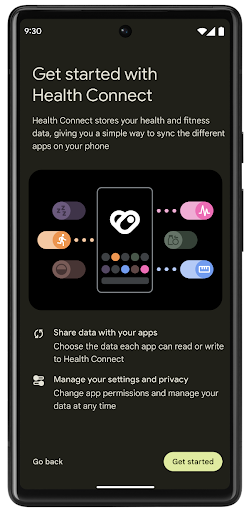
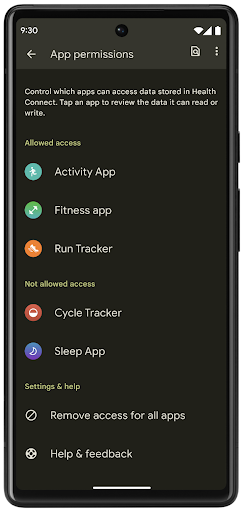
Health Connect includes several new features in Android 14, such as exercise routes, allowing users to share a route of their workout which can be visualized on a map. A route is defined as a list of locations saved within a window of time, and your app can insert routes into exercise sessions, tying them together. To ensure that users have complete control over this sensitive data, users must allow sharing individual routes with other apps.
For more information, see the Health Connection documentation and the blogpost on What's new in Android Health.
OpenJDK 17 更新
Android 14 continues the work of refreshing Android's core libraries to align with the features in the latest OpenJDK LTS releases, including both library updates and Java 17 language support for app and platform developers.
The following features and improvements are included:
- Updated approximately 300
java.baseclasses to Java 17 support. - Text Blocks, which introduce multi-line string literals to the Java programming language.
- Pattern Matching for instanceof, which allows an object to
be treated as having a specific type in an
instanceofwithout any additional variables. - Sealed classes, which allow you restrict which classes and interfaces can extend or implement them.
Thanks to Google Play system updates (Project Mainline), over 600 million devices are enabled to receive the latest Android Runtime (ART) updates that include these changes. This is part of our commitment to give apps a more consistent, secure environment across devices, and to deliver new features and capabilities to users independent of platform releases.
Java and OpenJDK are trademarks or registered trademarks of Oracle and/or its affiliates.
针对应用商店的改进
Android 14 引入了多个 PackageInstaller API,可帮助应用商店改善其用户体验。
下载之前请求批准安装
安装或更新应用可能需要用户批准。例如,当使用 REQUEST_INSTALL_PACKAGES 权限的安装程序尝试安装新应用时。在之前的 Android 版本中,只有在将 APK 写入安装会话并且提交会话后,应用商店才能请求用户批准。
从 Android 14 开始,requestUserPreapproval() 方法可让安装程序在提交安装会话之前请求用户批准。此项改进可让应用商店将任何 APK 的下载操作推迟到用户批准安装之后。此外,用户批准安装后,应用商店可以在后台下载并安装应用,而不会干扰用户。
承担未来更新的责任
借助 setRequestUpdateOwnership() 方法,安装程序可以向系统表明它打算负责将被安装的应用未来的更新。此 capability 可实现更新所有权强制执行,即仅允许更新所有者为应用安装自动更新。更新所有权强制执行有助于确保用户仅收到来自预期应用商店的更新。
任何其他安装程序(包括使用 INSTALL_PACKAGES 权限的安装程序)都必须获得用户的明确批准,才能安装更新。如果用户决定继续从其他来源安装更新,则会失去更新所有权。
在干扰较少的时段更新应用
应用商店通常希望避免更新正在使用的应用,因为这会导致应用正在运行的进程被终止,而这可能会中断用户正在执行的操作。
从 Android 14 开始,InstallConstraints API 让安装程序可以确保其应用更新在适当的时机进行。例如,应用商店可以调用 commitSessionAfterInstallConstraintsAreMet() 方法来确保仅在用户不再与相应应用互动时才进行更新。
无缝安装可选拆分
借助拆分 APK,应用的功能可以通过单独的 APK 文件提供,而不是以单体式 APK 的形式提供。借助拆分 APK,应用商店可以优化不同应用组件的提供。例如,应用商店可能会根据目标设备的属性进行优化。自在 API 级别 22 中引入以来,PackageInstaller API 一直支持拆分。
在 Android 14 中,setDontKillApp() 方法可让安装程序指明在安装新的拆分项时应用的运行进程不应终止。应用商店可以使用此功能,在用户使用应用时无缝安装应用的新功能。
应用元数据软件包
Starting in Android 14, the Android package installer lets you specify app metadata, such as data safety practices, to include on app store pages such as Google Play.
检测用户何时截取设备屏幕截图
To create a more standardized experience for detecting screenshots, Android 14 introduces a privacy-preserving screenshot detection API. This API lets apps register callbacks on a per-activity basis. These callbacks are invoked, and the user is notified, when the user takes a screenshot while that activity is visible.
用户体验
Sharesheet 自定义操作和经过改进的排名系统
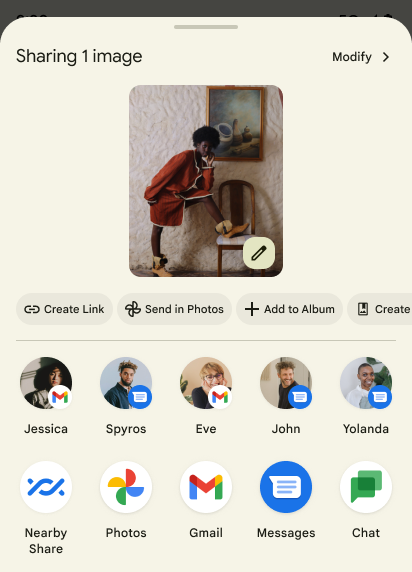
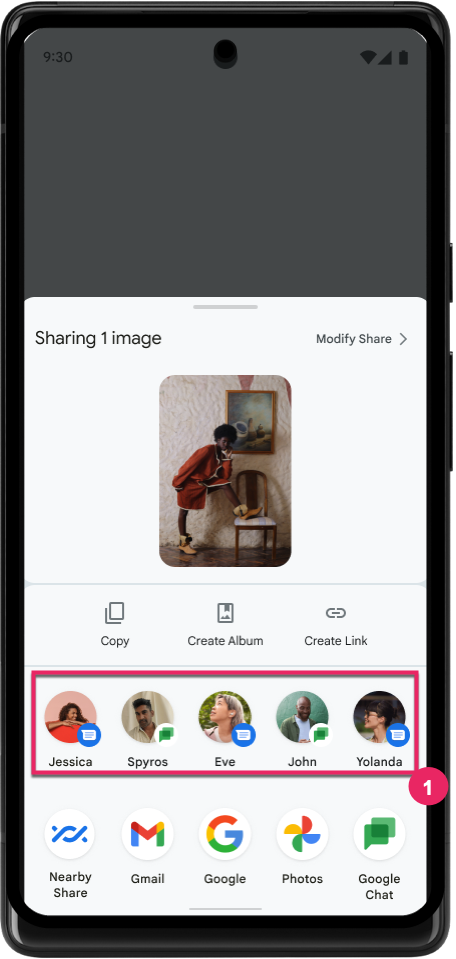
Android 14 updates the system sharesheet to support custom app actions and more informative preview results for users.
Add custom actions
With Android 14, your app can add custom actions to the system sharesheet it invokes.
Improve ranking of Direct Share targets
Android 14 uses more signals from apps to determine the ranking of the direct share targets to provide more helpful results for the user. To provide the most useful signal for ranking, follow the guidance for improving rankings of your Direct Share targets. Communication apps can also report shortcut usage for outgoing and incoming messages.
支持内置和自定义预测性返回动画
Android 13 introduced the predictive back-to-home animation behind a developer option. When used in a supported app with the developer option enabled, swiping back shows an animation indicating that the back gesture exits the app back to the home screen.
Android 14 includes multiple improvements and new guidance for Predictive Back:
- You can set
android:enableOnBackInvokedCallback=trueto opt in to predictive back system animations per-Activity instead of for the entire app. - We've added new system animations to accompany the back-to-home animation from Android 13. The new system animations are cross-activity and cross-task, which you get automatically after migrating to Predictive Back.
- We've added new Material Component animations for Bottom sheets, Side sheets, and Search.
- We've created design guidance for creating custom in-app animations and transitions.
- We've added new APIs to support custom in-app transition animations:
handleOnBackStarted,handleOnBackProgressed,handleOnBackCancelledinOnBackPressedCallbackonBackStarted,onBackProgressed,onBackCancelledinOnBackAnimationCallback- Use
overrideActivityTransitioninstead ofoverridePendingTransitionfor transitions that respond as the user swipes back.
With this Android 14 preview release, all features of Predictive Back remain behind a developer option. See the developer guide to migrate your app to predictive back, as well as the developer guide to creating custom in-app transitions.
大屏设备制造商按应用替换项
Per-app overrides enable device manufacturers to change the behavior of apps on large screen devices. For example, the FORCE_RESIZE_APP override instructs the system to resize the app to fit display dimensions (avoiding size compatibility mode) even if resizeableActivity="false" is set in the app manifest.
Overrides are intended to improve the user experience on large screens.
New manifest properties enable you to disable some device manufacturer overrides for your app.
大屏用户按应用替换项
Per-app overrides change the behavior of apps on large screen devices. For example, the OVERRIDE_MIN_ASPECT_RATIO_LARGE device manufacturer override sets the app aspect ratio to 16:9 regardless of the app's configuration.
Android 14 QPR1 enables users to apply per‑app overrides by means of a new settings menu on large screen devices.
应用屏幕共享
App screen sharing enables users to share an app window instead of the entire device screen during screen content recording.
With app screen sharing, the status bar, navigation bar, notifications, and other system UI elements are excluded from the shared display. Only the content of the selected app is shared.
App screen sharing improves productivity and privacy by enabling users to run multiple apps but limit content sharing to a single app.
Pixel 8 Pro 上 Gboard 中由 LLM 提供支持的智能回复功能
On Pixel 8 Pro devices with the December Feature Drop, developers can try out higher-quality smart replies in Gboard powered by on-device Large Language Models (LLMs) running on Google Tensor.
This feature is available as a limited preview for US English in WhatsApp, Line, and KakaoTalk. It requires using a Pixel 8 Pro device with Gboard as your keyboard.
To try it out, first enable the feature in Settings > Developer Options > AiCore Settings > Enable Aicore Persistent.
Next, open a conversation in a supported app to see LLM-powered Smart Reply in Gboard's suggestion strip in response to incoming messages.
图形
路径可查询和插值
Android 的 Path API 是一种强大且灵活的机制,可用于创建和渲染矢量图形,能够描边或填充路径、根据线段或二次曲线或立方曲线构建路径、执行布尔运算以获取更复杂的形状,或同时执行所有这些操作。但有一个限制是,您无法了解 Path 对象中实际包含的内容;该对象的内部信息在创建后对调用方是不透明的。
如需创建 Path,您可以调用 moveTo()、lineTo() 和 cubicTo() 等方法来添加路径段。但是,无法询问该路径有哪些片段,因此您必须在创建时保留该信息。
从 Android 14 开始,您可以查询路径以了解其内部内容。首先,您需要使用 Path.getPathIterator API 获取 PathIterator 对象:
Kotlin
val path = Path().apply {
    moveTo(1.0f, 1.0f)
    lineTo(2.0f, 2.0f)
    close()
}
val pathIterator = path.pathIterator
Java
Path path = new Path();
path.moveTo(1.0F, 1.0F);
path.lineTo(2.0F, 2.0F);
path.close();
PathIterator pathIterator = path.getPathIterator();
接下来,您可以调用 PathIterator 逐个遍历片段,并检索每个片段的所有必要数据。以下示例使用了 PathIterator.Segment 对象,它会为您打包数据:
Kotlin
for (segment in pathIterator) {
    println("segment: ${segment.verb}, ${segment.points}")
}
Java
while (pathIterator.hasNext()) {
    PathIterator.Segment segment = pathIterator.next();
    Log.i(LOG_TAG, "segment: " + segment.getVerb() + ", " + segment.getPoints());
}
PathIterator 还有一个非分配版 next(),您可以在其中传入缓冲区来保存点数据。
查询 Path 数据的一个重要用例是插值。例如,您可能想在两个不同的路径之间添加动画(或变形)。为了进一步简化该用例,Android 14 针对 Path 还包含 interpolate() 方法。假设两个路径具有相同的内部结构,interpolate() 方法会使用该插值结果创建一个新的 Path。以下示例返回了一个形状介于 path 和 otherPath 之间的一半(线性插值为 0.5)的路径:
Kotlin
val interpolatedResult = Path()
if (path.isInterpolatable(otherPath)) {
    path.interpolate(otherPath, .5f, interpolatedResult)
}
Java
Path interpolatedResult = new Path();
if (path.isInterpolatable(otherPath)) {
    path.interpolate(otherPath, 0.5F, interpolatedResult);
}
Jetpack graphics-path 库也为早期版本的 Android 启用了类似的 API。
具有顶点和片段着色器的自定义网格
Android has long supported drawing triangle meshes with custom shading, but the input mesh format has been limited to a few predefined attribute combinations. Android 14 adds support for custom meshes, which can be defined as triangles or triangle strips, and can, optionally, be indexed. These meshes are specified with custom attributes, vertex strides, varying, and vertex and fragment shaders written in AGSL.
The vertex shader defines the varyings, such as position and color, while the
fragment shader can optionally define the color for the pixel, typically by
using the varyings created by the vertex shader. If color is provided by the
fragment shader, it is then blended with the current Paint
color using the blend mode selected when
drawing the mesh. Uniforms can be passed
into the fragment and vertex shaders for additional flexibility.
画布的硬件缓冲区渲染器
协助使用 Android 的 Canvas API 通过
硬件加速至 HardwareBuffer、Android 14
引入了 HardwareBufferRenderer。如果您的用例涉及通过 SurfaceControl 与系统合成器通信以实现低延迟绘制,此 API 特别有用。