
Android 16 memperkenalkan fitur dan API baru yang hebat untuk para developer. Bagian berikut merangkum fitur ini untuk membantu Anda mulai menggunakan API terkait.
Untuk melihat daftar mendetail tentang API yang baru, diubah, dan dihapus, baca laporan perbedaan API. Untuk mengetahui detail tentang API baru, buka referensi API Android — API baru ditandai agar lebih mudah dilihat.Anda juga harus meninjau area tempat perubahan platform dapat memengaruhi aplikasi Anda. Untuk informasi selengkapnya, lihat halaman berikut:
- Perubahan perilaku yang memengaruhi aplikasi saat menargetkan Android 16
- Perubahan perilaku yang memengaruhi semua aplikasi terlepas dari
targetSdkVersion.
Fungsi inti
Android menyertakan API baru yang memperluas kemampuan inti sistem Android.
Dua rilis Android API pada tahun 2025
- This preview is for the next major release of Android with a planned launch in Q2 of 2025. This release is similar to all of our API releases in the past, where we can have planned behavior changes that are often tied to a targetSdkVersion.
- We're planning the major release a quarter earlier (Q2 rather than Q3 in prior years) to better align with the schedule of device launches across our ecosystem, so more devices can get the major release of Android sooner. With the major release coming in Q2, you'll need to do your annual compatibility testing a few months earlier than in previous years to make sure your apps are ready.
- We plan to have another release in Q4 of 2025 which also will include new developer APIs. The Q2 major release will be the only release in 2025 to include planned behavior changes that could affect apps.
In addition to new developer APIs, the Q4 minor release will pick up feature updates, optimizations, and bug fixes; it will not include any app-impacting behavior changes.

We'll continue to have quarterly Android releases. The Q1 and Q3 updates in-between the API releases will provide incremental updates to help ensure continuous quality. We're actively working with our device partners to bring the Q2 release to as many devices as possible.
Using new APIs with major and minor releases
Guarding a code block with a check for API level is done today using
the SDK_INT constant with
VERSION_CODES. This will continue
to be supported for major Android releases.
if (SDK_INT >= VERSION_CODES.BAKLAVA) {
  // Use APIs introduced in Android 16
}
The new SDK_INT_FULL
constant can be used for API checks against both major and minor versions with
the new VERSION_CODES_FULL
enumeration.
if (SDK_INT_FULL >= VERSION_CODES_FULL.[MAJOR or MINOR RELEASE]) {
  // Use APIs introduced in a major or minor release
}
You can also use the
Build.getMinorSdkVersion()
method to get just the minor SDK version.
val minorSdkVersion = Build.getMinorSdkVersion(VERSION_CODES_FULL.BAKLAVA)
These APIs have not yet been finalized and are subject to change, so please send us feedback if you have any concerns.
Pengalaman pengguna dan UI sistem
Android 16 memberi developer dan pengguna aplikasi kontrol dan fleksibilitas yang lebih besar untuk mengonfigurasi perangkat agar sesuai dengan kebutuhan mereka.
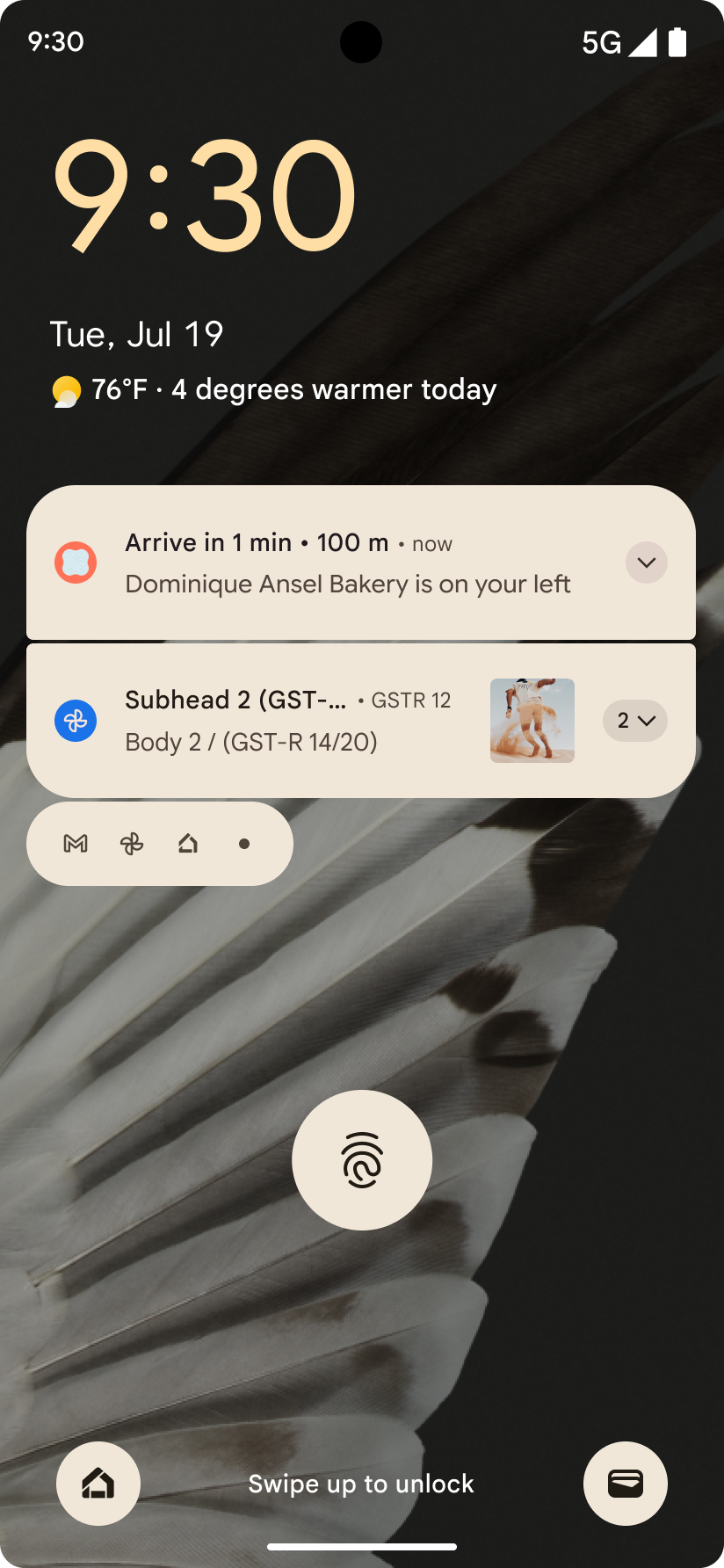
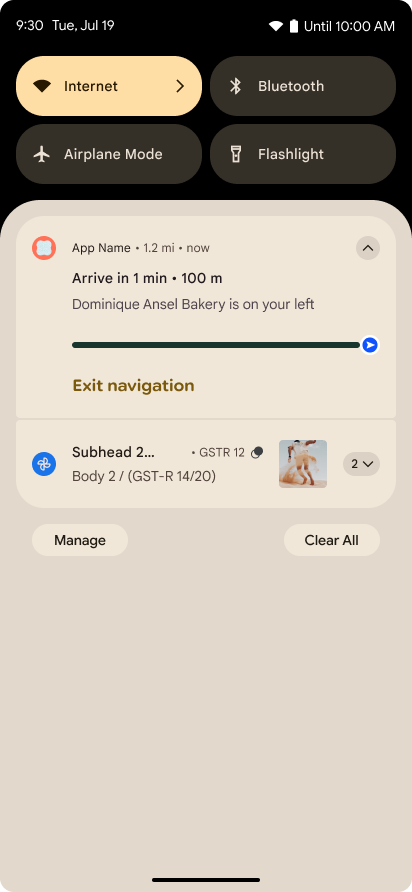
Notifikasi yang berfokus pada progres
Android 16 introduces progress-centric notifications to help users seamlessly track user-initiated, start-to-end journeys.
Notification.ProgressStyle is a new notification
style that lets you create progress-centric notifications. Key use cases include
rideshare, delivery, and navigation. Within the Notification.ProgressStyle
class, you can denote states and milestones in a user journey using
points and segments.
如需了解详情,请参阅以进度为中心的通知文档页面。
Pembaruan kembali prediktif
Android 16 adds new APIs to help you enable predictive back system animations in
gesture navigation such as the back-to-home animation. Registering the
onBackInvokedCallback with the new
PRIORITY_SYSTEM_NAVIGATION_OBSERVER allows your app to
receive the regular onBackInvoked call whenever the
system handles a back navigation without impacting the normal back navigation
flow.
Android 16 additionally adds the
finishAndRemoveTaskCallback() and
moveTaskToBackCallback. By registering these callbacks
with the OnBackInvokedDispatcher, the system can trigger
specific behaviors and play corresponding ahead-of-time animations when the back
gesture is invoked.
Haptik yang lebih kaya
自诞生之日起,Android 就提供了对触感反馈致动器的控制。
Android 11 添加了对更复杂的触感反馈效果的支持,更高级的致动器可以通过设备定义的语义基元 VibrationEffect.Compositions 支持这些效果。
Android 16 添加了触感反馈 API,让应用能够定义触感反馈效果的振幅和频率曲线,同时抽象出设备功能之间的差异。
Alat dan produktivitas developer
Meskipun sebagian besar upaya kami untuk meningkatkan produktivitas Anda berpusat pada alat seperti Android Studio, Jetpack Compose, dan library Android Jetpack, kami selalu mencari cara di platform untuk membantu Anda mewujudkan visi Anda.
Penanganan konten untuk wallpaper animasi
在 Android 16 中,动态壁纸框架将获得一个新的 content API,以应对由用户驱动的动态壁纸带来的挑战。目前,包含用户提供的内容的实时壁纸需要复杂的服务专用实现。Android 16 引入了 WallpaperDescription 和 WallpaperInstance。借助 WallpaperDescription,您可以识别同一服务中的动态壁纸的不同实例。例如,如果某张壁纸同时在主屏幕和锁定屏幕上显示,则这两种情况下显示的内容可能各不相同。壁纸选择器和 WallpaperManager 会使用此元数据更好地向用户呈现壁纸,从而简化创建多样化个性化动态壁纸体验的过程。
Performa dan baterai
Android 16 memperkenalkan API yang membantu mengumpulkan insight tentang aplikasi Anda.
Pembuatan profil yang dipicu sistem
ProfilingManager was
added in Android 15, giving apps the ability to
request profiling data collection using Perfetto on public devices in the field.
However, since this profiling must be started from the app, critical flows such
as startups or ANRs would be difficult or impossible for apps to capture.
To help with this, Android 16 introduces system-triggered profiling to
ProfilingManager. Apps can register interest in receiving traces for certain
triggers such as cold start reportFullyDrawn
or ANRs, and then the system starts and stops a trace on the app's behalf. After
the trace completes, the results are delivered to the app's data directory.
Komponen awal di ApplicationStartInfo
ApplicationStartInfo 在 Android 15 中添加,可让应用查看进程启动原因、启动类型、启动时间、节流和其他实用诊断数据。Android 16 添加了 getStartComponent(),用于区分触发启动的组件类型,这有助于优化应用的启动流程。
Introspeksi tugas yang lebih baik
The JobScheduler#getPendingJobReason() API returns a reason why a job
might be pending. However, a job might be pending for multiple reasons.
In Android 16, we are introducing a new API
JobScheduler#getPendingJobReasons(int jobId), which returns multiple
reasons why a job is pending, due to both explicit constraints set by the
developer and implicit constraints set by the system.
We're also introducing
JobScheduler#getPendingJobReasonsHistory(int jobId), which returns a list
of the most recent constraint changes.
We recommend using the API to help you debug why your jobs may not be executing, especially if you're seeing reduced success rates of certain tasks or have bugs around latency of certain job completion. For example, updating widgets in the background failed to occur or prefetch job failed to be called prior to app start.
This can also better help you understand if certain jobs are not completing due to system defined constraints versus explicitly set constraints.
Kecepatan refresh adaptif
Adaptive refresh rate (ARR), introduced in Android 15, enables the display refresh rate on supported hardware to adapt to the content frame rate using discrete VSync steps. This reduces power consumption while eliminating the need for potentially jank-inducing mode-switching.
Android 16 introduces hasArrSupport() and
getSuggestedFrameRate(int) while restoring
getSupportedRefreshRates() to make it easier for your apps to take
advantage of ARR. RecyclerView
1.4 internally supports ARR when it is settling from a fling or
smooth scroll, and we're continuing our work to add ARR
support into more Jetpack libraries. This frame rate article covers
many of the APIs you can use to set the frame rate so that your app can directly
use ARR.
API ruang kosong di ADPF
The SystemHealthManager introduces the
getCpuHeadroom and
getGpuHeadroom APIs, designed to provide games and
resource-intensive apps with estimates of available CPU and GPU resources. These
methods offer a way for you to gauge how your app or game can best improve
system health, particularly when used in conjunction with other Android Dynamic
Performance Framework (ADPF) APIs that detect thermal
throttling.
By using CpuHeadroomParams and
GpuHeadroomParams on supported devices, you can
customize the time window used to compute the headroom and select between
average or minimum resource availability. This can help you reduce your CPU or
GPU resource usage accordingly, leading to better user experiences and improved
battery life.
Aksesibilitas
Android 16 menambahkan API dan fitur aksesibilitas baru yang dapat membantu Anda menghadirkan aplikasi kepada setiap pengguna.
API aksesibilitas yang ditingkatkan
Android 16 添加了其他 API 来增强界面语义,这有助于为依赖于无障碍服务(例如 TalkBack)的用户提高一致性。
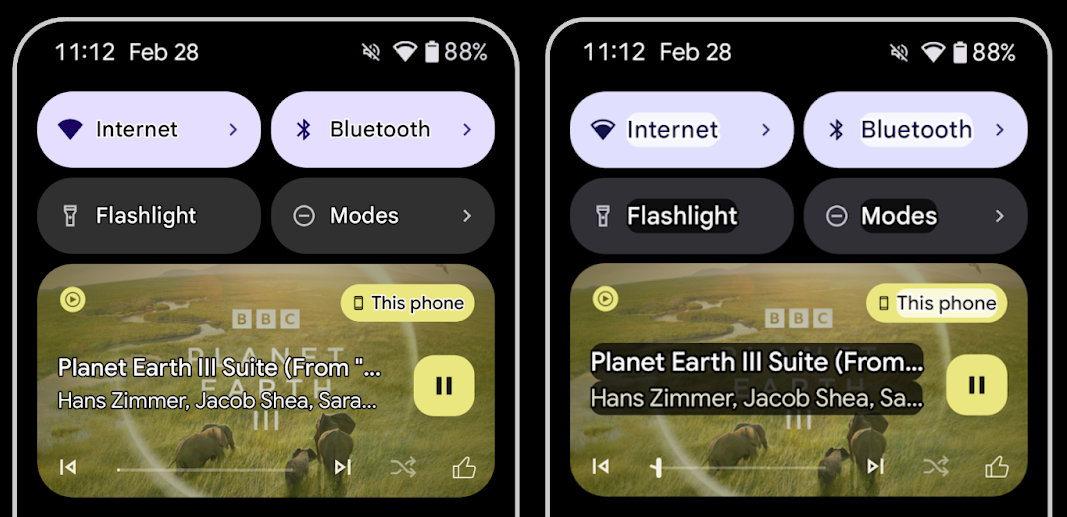
为文字添加轮廓,以最大限度地提高文字对比度
视力较低的用户对对比度的敏感度通常较低,因此很难将对象与背景区分开来。为了帮助这些用户,Android 16 引入了轮廓文本,取代了高对比度文本,后者会在文本周围绘制较大的对比度区域,以大大提高可辨性。
Android 16 包含新的 AccessibilityManager API,可让您的应用检查或注册监听器,以查看此模式是否已启用。这主要适用于 Compose 等界面工具包,以提供类似的视觉体验。如果您维护界面工具包库,或者您的应用执行绕过 android.text.Layout 类的自定义文本渲染,则可以使用此方法来了解何时启用轮廓文本。
向 TtsSpan 添加了时长
Android 16 使用 TYPE_DURATION 扩展了 TtsSpan,其中包含 ARG_HOURS、ARG_MINUTES 和 ARG_SECONDS。这样,您就可以直接为时长添加注释,确保通过 TalkBack 等服务获得准确且一致的文本转语音输出。
支持具有多个标签的元素
Android 目前允许界面元素从其他元素派生其无障碍功能标签,现在还支持关联多个标签,这是 Web 内容中常见的情况。通过在 AccessibilityNodeInfo 中引入基于列表的 API,Android 可以直接支持这些多标签关系。在进行这项更改的过程中,我们已弃用 AccessibilityNodeInfo#setLabeledBy 和 #getLabeledBy,改用 #addLabeledBy、#removeLabeledBy 和 #getLabeledByList。
改进了对可展开元素的支持
Android 16 添加了无障碍功能 API,可让您传达互动元素(例如菜单和展开式列表)的展开或收起状态。通过使用 setExpandedState 设置展开状态,并使用 CONTENT_CHANGE_TYPE_EXPANDED 内容更改类型调度 TYPE_WINDOW_CONTENT_CHANGED AccessibilityEvents,您可以确保 TalkBack 等屏幕阅读器会读出状态更改,从而提供更直观、更包容的用户体验。
不确定进度条
Android 16 添加了 RANGE_TYPE_INDETERMINATE,让您可以为确定性和不确定性 ProgressBar 微件公开 RangeInfo,从而让 TalkBack 等服务能够更一致地为进度指示器提供反馈。
三态复选框
Android 16 中的新 AccessibilityNodeInfo
getChecked 和 setChecked(int) 方法现在除了“已选中”和“未选中”之外,还支持“部分选中”状态。此字段取代了已废弃的布尔值 isChecked 和 setChecked(boolean)。
补充说明
如果无障碍服务提供关于 ViewGroup 的说明,则会将来自其子视图的内容标签合并在一起。如果您为 ViewGroup 提供 contentDescription,无障碍服务会假定您还要覆盖不可聚焦的子视图的说明。如果您想为下拉菜单等内容添加标签(例如“字体系列”),同时保留当前的无障碍功能选择(例如“Roboto”),这可能会造成问题。Android 16 添加了 setSupplementalDescription,以便您提供用于提供 ViewGroup 相关信息的文本,而不会覆盖其子项中的信息。
必填表单字段
Android 16 向 AccessibilityNodeInfo 添加了 setFieldRequired,以便应用可以告知无障碍服务需要输入表单字段。对于填写各种类型表单的用户而言,这是一个重要的场景,即使是简单的必填条款及条件复选框,也能帮助用户始终如一地识别必填字段并在必填字段之间快速导航。
Ponsel sebagai input mikrofon untuk panggilan suara dengan alat bantu dengar LEA
Android 16 adds the capability for users of LE Audio hearing aids to switch between the built-in microphones on the hearing aids and the microphone on their phone for voice calls. This can be helpful in noisy environments or other situations where the hearing aid's microphones might not perform well.
Kontrol volume sekitar untuk alat bantu dengar LEA
Android 16 adds the capability for users of LE Audio hearing aids to adjust the volume of ambient sound that is picked up by the hearing aid's microphones. This can be helpful in situations where background noise is too loud or too quiet.
Kamera
Android 16 meningkatkan dukungan untuk pengguna kamera profesional, sehingga memungkinkan eksposur otomatis hybrid bersama dengan penyesuaian suhu warna dan tint yang akurat. Indikator mode malam baru membantu aplikasi Anda mengetahui kapan harus beralih ke dan dari sesi kamera mode malam. Tindakan Intent baru mempermudah pengambilan foto bergerak, dan kami terus meningkatkan kualitas gambar UltraHDR dengan dukungan untuk encoding HEIC dan parameter baru dari draf standar ISO 21496-1.
Eksposur otomatis hybrid
Android 16 adds new hybrid auto-exposure modes to Camera2, allowing you to manually control specific aspects of exposure while letting the auto-exposure (AE) algorithm handle the rest. You can control ISO + AE, and exposure time + AE, providing greater flexibility compared to the current approach where you either have full manual control or rely entirely on auto-exposure.
fun setISOPriority() {
    // ... (Your existing code before the snippet) ...

    val availablePriorityModes = mStaticInfo.characteristics.get(
        CameraCharacteristics.CONTROL_AE_AVAILABLE_PRIORITY_MODES
    )

    // ... (Your existing code between the snippets) ...

    // Turn on AE mode to set priority mode
    reqBuilder.set(
        CaptureRequest.CONTROL_AE_MODE,
        CameraMetadata.CONTROL_AE_MODE_ON
    )
    reqBuilder.set(
        CaptureRequest.CONTROL_AE_PRIORITY_MODE,
        CameraMetadata.CONTROL_AE_PRIORITY_MODE_SENSOR_SENSITIVITY_PRIORITY
    )
    reqBuilder.set(
        CaptureRequest.SENSOR_SENSITIVITY,
        TEST_SENSITIVITY_VALUE
    )
    val request: CaptureRequest = reqBuilder.build()

    // ... (Your existing code after the snippet) ...
}
Penyesuaian tint dan color temperature yang presisi
Android 16 menambahkan dukungan kamera untuk penyesuaian tint dan suhu warna yang halus
untuk mendukung aplikasi perekaman video profesional dengan lebih baik. Di versi Android
sebelumnya, Anda dapat mengontrol setelan white balance melalui
CONTROL_AWB_MODE, yang berisi opsi yang terbatas pada
daftar preset, seperti Incandescent,
Cloudy, dan Twilight. COLOR_CORRECTION_MODE_CCT memungkinkan penggunaan
COLOR_CORRECTION_COLOR_TEMPERATURE dan
COLOR_CORRECTION_COLOR_TINT untuk penyesuaian
white balance yang akurat berdasarkan color temperature yang berkorelasi.
fun setCCT() {
    // ... (Your existing code before this point) ...

    val colorTemperatureRange: Range<Int> =
        mStaticInfo.characteristics[CameraCharacteristics.COLOR_CORRECTION_COLOR_TEMPERATURE_RANGE]

    // Set to manual mode to enable CCT mode
    reqBuilder[CaptureRequest.CONTROL_AWB_MODE] = CameraMetadata.CONTROL_AWB_MODE_OFF
    reqBuilder[CaptureRequest.COLOR_CORRECTION_MODE] = CameraMetadata.COLOR_CORRECTION_MODE_CCT
    reqBuilder[CaptureRequest.COLOR_CORRECTION_COLOR_TEMPERATURE] = 5000
    reqBuilder[CaptureRequest.COLOR_CORRECTION_COLOR_TINT] = 30

    val request: CaptureRequest = reqBuilder.build()

    // ... (Your existing code after this point) ...
}
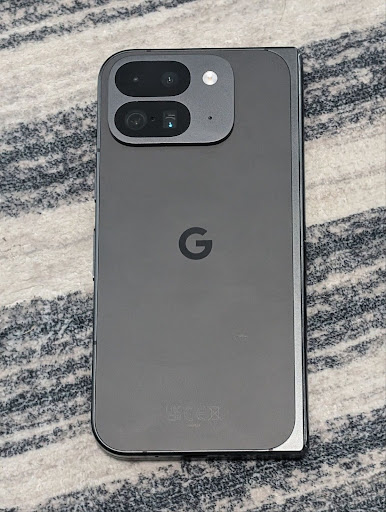
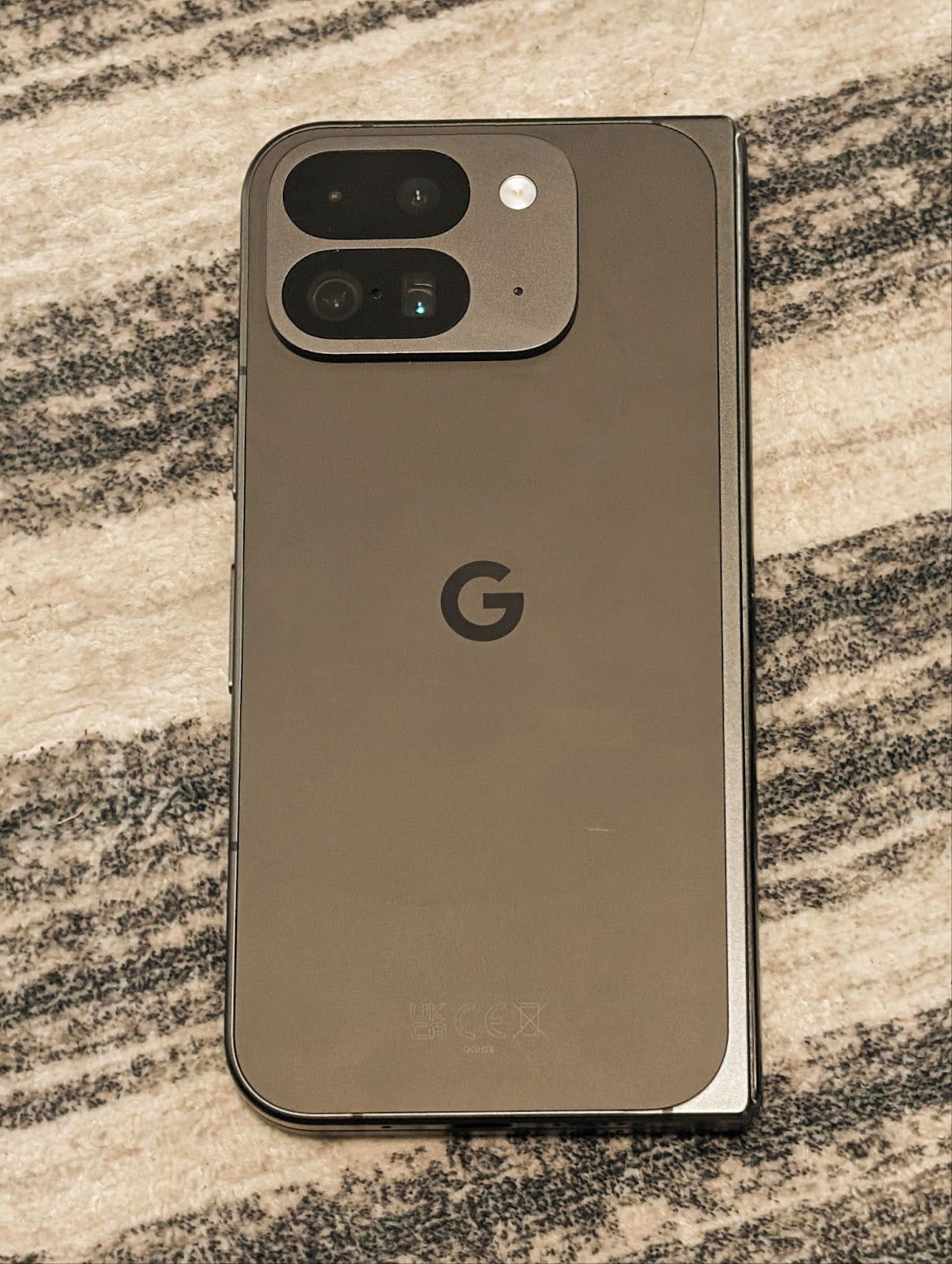
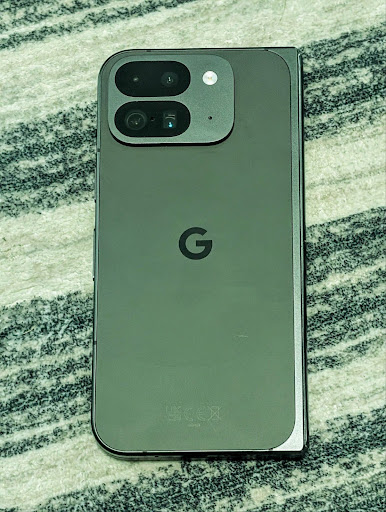
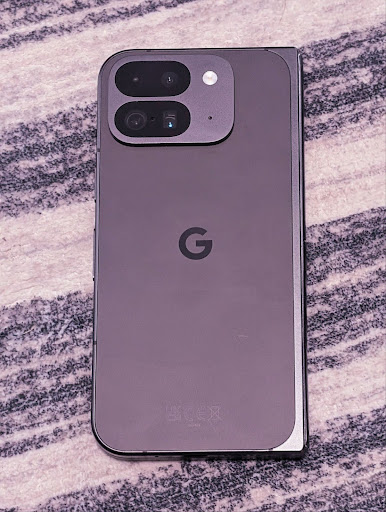
Contoh berikut menunjukkan tampilan foto setelah menerapkan penyesuaian suhu warna dan tint yang berbeda:

Deteksi adegan mode malam kamera
To help your app know when to switch to and from a night mode camera session,
Android 16 adds EXTENSION_NIGHT_MODE_INDICATOR. If
supported, it's available in the CaptureResult within
Camera2.
This is the API we briefly mentioned as coming soon in the How Instagram enabled users to take stunning low light photos blog post. That post is a practical guide on how to implement night mode together with a case study that links higher-quality in-app night mode photos with an increase in the number of photos shared from the in-app camera.
Tindakan intent pengambilan foto motion
Android 16 添加了标准 intent 操作 ACTION_MOTION_PHOTO_CAPTURE 和 ACTION_MOTION_PHOTO_CAPTURE_SECURE,用于请求相机应用拍摄动态照片并将其返回。
您必须传递额外的 EXTRA_OUTPUT 来控制将图片写入的位置,或者通过 Intent.setClipData(ClipData) 传递 Uri。如果您未设置 ClipData,系统会在调用 Context.startActivity(Intent) 时将其复制到该位置。
Peningkatan gambar UltraHDR
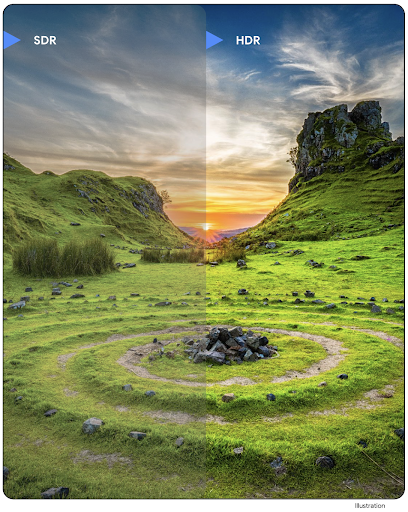
Android 16 merupakan lanjutan upaya kami untuk menghadirkan kualitas gambar yang memukau dengan gambar
UltraHDR. Versi ini menambahkan dukungan untuk gambar UltraHDR dalam format file
HEIC. Gambar ini akan mendapatkan jenis ImageFormat
HEIC_ULTRAHDR dan akan berisi peta gain tersemat yang mirip
dengan format JPEG UltraHDR yang ada. Kami juga sedang mengerjakan dukungan AVIF untuk UltraHDR, jadi nantikan kabar terbarunya.
Selain itu, Android 16 menerapkan parameter tambahan di UltraHDR dari standar draf ISO 21496-1, termasuk kemampuan untuk mendapatkan dan menetapkan ruang warna tempat matematika gainmap harus diterapkan, serta dukungan untuk gambar dasar yang dienkode HDR dengan gainmap SDR.
Grafik
Android 16 menyertakan peningkatan grafis terbaru, seperti efek grafis kustom dengan AGSL.
Efek grafis kustom dengan AGSL
Android 16 adds RuntimeColorFilter and
RuntimeXfermode, allowing you to author complex effects like
Threshold, Sepia, and Hue Saturation and apply them to draw calls. Since Android
13, you've been able to use AGSL to create custom
RuntimeShaders that extend Shader. The new API
mirrors this, adding an AGSL-powered RuntimeColorFilter that
extends ColorFilter, and a Xfermode effect that
lets you implement AGSL-based custom compositing and blending between source and
destination pixels.
private val thresholdEffectString = """
    uniform half threshold;

    half4 main(half4 c) {
        half luminosity = dot(c.rgb, half3(0.2126, 0.7152, 0.0722));
        half bw = step(threshold, luminosity);
        return bw.xxx1 * c.a;
    }"""

fun setCustomColorFilter(paint: Paint) {
   val filter = RuntimeColorFilter(thresholdEffectString)
   filter.setFloatUniform(0.5);
   paint.colorFilter = filter
}
Konektivitas
Android 16 mengupdate platform untuk memberi aplikasi Anda akses ke kemajuan terbaru dalam teknologi nirkabel dan komunikasi.
Pengukuran jarak dengan keamanan yang ditingkatkan
Android 16 在搭载 Wi-Fi 6 的 802.11az 的受支持设备上为 Wi-Fi 位置信息添加了对强大的安全功能的支持,让应用能够将该协议的更高精确性、更高可伸缩性和动态调度与安全增强功能(包括基于 AES-256 的加密和防范中间人攻击)相结合。这样,在近距离使用情形(例如解锁笔记本电脑或车门)时,便可更安全地使用该功能。802.11az 与 Wi-Fi 6 标准集成,可利用其基础架构和功能实现更广泛的采用和更轻松的部署。
API pengukuran jarak generik
Android 16 包含新的 RangingManager,它提供了在受支持的硬件上确定本地设备与远程设备之间的距离和角度的方法。RangingManager 支持使用各种测距技术,例如 BLE 信道声音探测、基于 BLE RSSI 的测距、超宽带和 Wi-Fi 往返时间。
Kehadiran perangkat pengelola perangkat pendamping
In Android 16, new APIs are being introduced for binding your companion app
service. Service will be bound when BLE is in range and Bluetooth is connected
and service will be unbound when BLE is out of range or Bluetooth is
disconnected. App will receives a new
'onDevicePresenceEvent()' callback based on various
of DevicePresenceEvent.
More details can be found in
'startObservingDevicePresence(ObservingDevicePresenceRequest)'.
Media
Android 16 menyertakan berbagai fitur yang meningkatkan pengalaman media.
Peningkatan pemilih foto
The photo picker provides a safe, built-in way for users to grant your app access to selected images and videos from both local and cloud storage, instead of their entire media library. Using a combination of Modular System Components through Google System Updates and Google Play services, it's supported back to Android 4.4 (API level 19). Integration requires just a few lines of code with the associated Android Jetpack library.
Android 16 includes the following improvements to the photo picker:
- Embedded photo picker: New APIs that enable apps to embed the photo picker into their view hierarchy. This allows it to feel like a more integrated part of the app while still leveraging the process isolation that allows users to select media without the app needing overly broad permissions. To maximize compatibility across platform versions and simplify your integration, you'll want to use the forthcoming Android Jetpack library if you want to integrate the embedded photo picker.
- Cloud search in photo picker: New APIs that enable searching from the cloud media provider for the Android photo picker. Search functionality in the photo picker is coming soon.
Video Profesional Lanjutan
Android 16 introduces support for the Advanced Professional Video (APV) codec which is designed to be used for professional level high quality video recording and post production.
The APV codec standard has the following features:
- Perceptually lossless video quality (close to raw video quality)
- Low complexity and high throughput intra-frame-only coding (without pixel domain prediction) to better support editing workflows
- Support for high bit-rate range up to a few Gbps for 2K, 4K and 8K resolution content, enabled by a lightweight entropy coding scheme
- Frame tiling for immersive content and for enabling parallel encoding and decoding
- Support for various chroma sampling formats and bit-depths
- Support for multiple decoding and re-encoding without severe visual quality degradation
- Support multi-view video and auxiliary video like depth, alpha, and preview
- Support for HDR10/10+ and user-defined metadata
A reference implementation of APV is provided through the OpenAPV project. Android 16 will implement support for the APV 422-10 Profile that provides YUV 422 color sampling along with 10-bit encoding and for target bitrates of up to 2Gbps.
Privasi
Android 16 menyertakan berbagai fitur yang membantu developer aplikasi melindungi privasi pengguna.
Update Health Connect
Health Connect menambahkan ACTIVITY_INTENSITY, jenis data yang ditentukan sesuai dengan pedoman
Organisasi Kesehatan Dunia terkait aktivitas sedang dan berat. Setiap
data memerlukan waktu mulai, waktu berakhir, dan apakah intensitas aktivitas
sedang atau berat.
Health Connect juga berisi API yang diperbarui yang mendukung rekam medis. Hal ini memungkinkan aplikasi membaca dan menulis catatan medis dalam format FHIR dengan izin pengguna yang eksplisit.
Privacy Sandbox di Android
Android 16 incorporates the latest version of the Privacy Sandbox on Android, part of our ongoing work to develop technologies where users know their privacy is protected. Our website has more about the Privacy Sandbox on Android developer beta program to help you get started. Check out the SDK Runtime which allows SDKs to run in a dedicated runtime environment separate from the app they are serving, providing stronger safeguards around user data collection and sharing.
Keamanan
Android 16 menyertakan fitur yang membantu Anda meningkatkan keamanan aplikasi dan melindungi data aplikasi Anda.
API berbagi kunci
Android 16 adds APIs that support sharing access to
Android Keystore keys with other apps. The new
KeyStoreManager class supports
granting and revoking access to keys
by app uid, and includes an API for apps to access shared
keys.
Faktor bentuk perangkat
Android 16 memberikan dukungan bagi aplikasi Anda untuk mendapatkan manfaat maksimal dari faktor bentuk Android.
Framework kualitas gambar dan audio standar untuk TV
Android 16 中的新 MediaQuality 软件包公开了一组标准化 API,用于访问音频和图片配置文件以及与硬件相关的设置。这样,在线播放应用就可以查询配置文件并将其动态应用于媒体:
- 使用更大动态范围进行母版制作的电影需要更高的色彩准确度,才能看清阴影中的细微细节并根据环境光线进行调整,因此,最好使用色彩准确度优先于亮度的配置文件。
- 体育赛事直播通常采用较窄的动态范围进行母版制作,但通常是在白天观看,因此偏向亮度而非色彩准确度的配置文件可以获得更好的效果。
- 完全交互式内容需要尽可能减少处理以缩短延迟时间,并且需要更高的帧速率,因此许多电视都附带游戏配置文件。
借助此 API,应用可以在个人资料之间切换,用户可以享受调整支持的电视,以便尽可能适合其内容。
Internasionalisasi
Android 16 menambahkan fitur dan kemampuan yang melengkapi pengalaman pengguna saat perangkat digunakan dalam bahasa yang berbeda.
Teks vertikal
Android 16 adds low-level support for rendering and measuring text vertically to
provide foundational vertical writing support for library developers. This is
particularly useful for languages like Japanese that commonly use vertical
writing systems. A new flag,
VERTICAL_TEXT_FLAG,
has been added to the Paint class. When
this flag is set using
Paint.setFlags, Paint's
text measurement APIs will report vertical advances instead of horizontal
advances, and Canvas will draw text
vertically.
val text = "「春は、曙。」"
Box(
    Modifier.padding(innerPadding).background(Color.White).fillMaxSize().drawWithContent {
        drawIntoCanvas { canvas ->
            val paint = Paint().apply { textSize = 64.sp.toPx() }
            // Draw text vertically
            paint.flags = paint.flags or VERTICAL_TEXT_FLAG
            val height = paint.measureText(text)
            canvas.nativeCanvas.drawText(
                text,
                0,
                text.length,
                size.width / 2,
                (size.height - height) / 2,
                paint
            )
        }
    }
) {}
Penyesuaian sistem pengukuran
Users can now customize their measurement system in regional preferences within
Settings. The user preference is included as part of the locale code, so you can
register a BroadcastReceiver on
ACTION_LOCALE_CHANGED to handle locale configuration changes when
regional preferences change.
Using formatters can help match the local experience. For example, "0.5 in" in English (United States), is "12,7 mm" for a user who has set their phone to English (Denmark) or who uses their phone in English (United States) with the metric system as the measurement system preference.
To find these settings, open the Settings app and navigate to System > Languages & region.