

Android 16 bietet viele neue Funktionen und APIs für Entwickler. In den folgenden Abschnitten werden diese Funktionen zusammengefasst, um Ihnen den Einstieg in die entsprechenden APIs zu erleichtern.
Eine detaillierte Liste der neuen, geänderten und entfernten APIs finden Sie im API-Vergleichsbericht. Details zu neuen APIs finden Sie in der Android API-Refer1enz. Neue APIs sind zur besseren Sichtbarkeit hervorgehoben.Sie sollten sich auch die Bereiche ansehen, in denen sich Plattformänderungen auf Ihre Apps auswirken könnten. Weitere Informationen finden Sie auf den folgenden Seiten:
- Verhaltensänderungen, die sich auf Apps auswirken, wenn sie auf Android 16 ausgerichtet sind
- Verhaltensänderungen, die sich auf alle Apps auswirken, unabhängig von
targetSdkVersion.
Hauptfunktion
Android enthält neue APIs, die die Kernfunktionen des Android-Systems erweitern.
Zwei Android API-Releases im Jahr 2025
- Diese Vorabversion bezieht sich auf die nächste Hauptversion von Android, die voraussichtlich im 2. Quartal 2025 veröffentlicht wird. Diese Version ähnelt allen unseren API-Releases in der Vergangenheit, bei denen geplante Verhaltensänderungen häufig an eine targetSdkVersion gebunden sind.
- Wir planen die Hauptversion ein Quartal früher (im 2. Quartal statt im 3. Quartal in den Vorjahren), um sie besser an den Zeitplan der Geräteveröffentlichungen in unserem Ökosystem anzupassen. So können mehr Geräte die Hauptversion von Android früher erhalten. Da die Hauptversion im 2. Quartal veröffentlicht wird, müssen Sie die jährlichen Kompatibilitätstests einige Monate früher als in den Vorjahren durchführen, um sicherzustellen, dass Ihre Apps bereit sind.
- Im 4. Quartal 2025 planen wir einen weiteren Release, der auch neue Entwickler-APIs enthalten wird. Die Hauptversion des 2. Quartals ist die einzige Version im Jahr 2025, die geplante Verhaltensänderungen enthält, die sich auf Apps auswirken könnten.
Neben neuen Entwickler-APIs enthält die Nebenversion für das 4. Quartal Funktionsupdates, Optimierungen und Fehlerkorrekturen. Es gibt keine Verhaltensänderungen, die sich auf Apps auswirken.
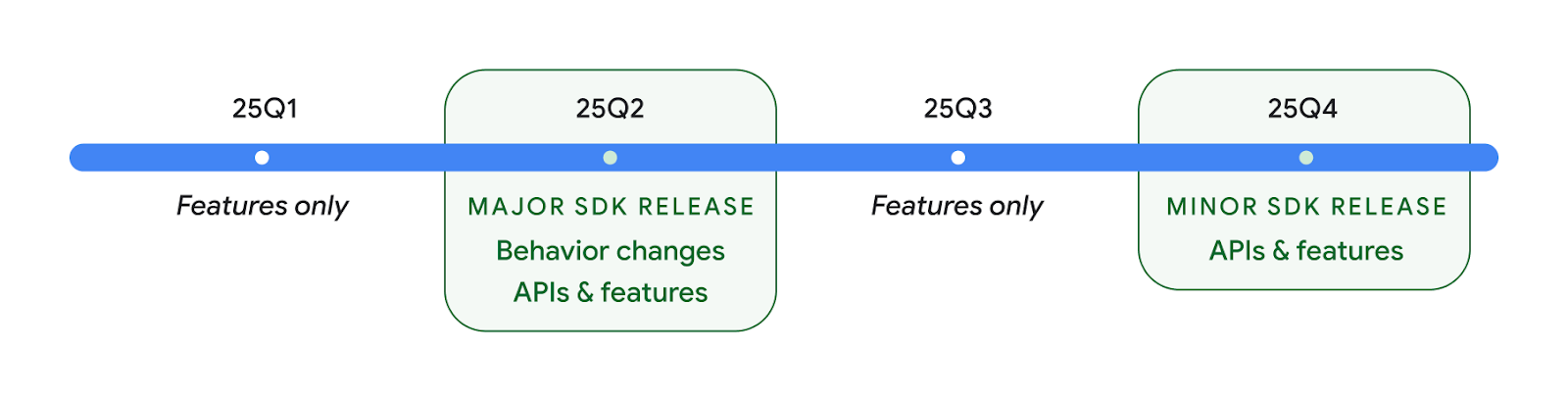
Es wird weiterhin vierteljährliche Android-Releases geben. Die Updates in den ersten und dritten Quartalen zwischen den API-Releases dienen der kontinuierlichen Qualitätssicherung. Wir arbeiten aktiv mit unseren Gerätepartnern zusammen, um die Version für das zweite Quartal auf möglichst vielen Geräten verfügbar zu machen.
Neue APIs mit Haupt- und Nebenversionen verwenden
Derzeit wird ein Codeblock mit einer Prüfung auf die API-Ebene mit der Konstante SDK_INT und VERSION_CODES geschützt. Diese Funktion wird weiterhin für wichtige Android-Releases unterstützt.
if (SDK_INT >= VERSION_CODES.BAKLAVA) {
  // Use APIs introduced in Android 16
}
Die neue Konstante SDK_INT_FULL kann für API-Prüfungen sowohl für Haupt- als auch Nebenversionen mit der neuen Aufzählung VERSION_CODES_FULL verwendet werden.
if (SDK_INT_FULL >= VERSION_CODES_FULL.[MAJOR or MINOR RELEASE]) {
  // Use APIs introduced in a major or minor release
}
Sie können auch die Methode Build.getMinorSdkVersion() verwenden, um nur die Nebenversion des SDK abzurufen.
val minorSdkVersion = Build.getMinorSdkVersion(VERSION_CODES_FULL.BAKLAVA)
Diese APIs sind noch nicht fertiggestellt und können sich ändern. Bitte senden Sie uns Feedback, wenn Sie Bedenken haben.
Nutzererfahrung und System-UI
Android 16 bietet App-Entwicklern und Nutzern mehr Kontrolle und Flexibilität bei der Konfiguration ihrer Geräte.
Fortschrittsbasierte Benachrichtigungen
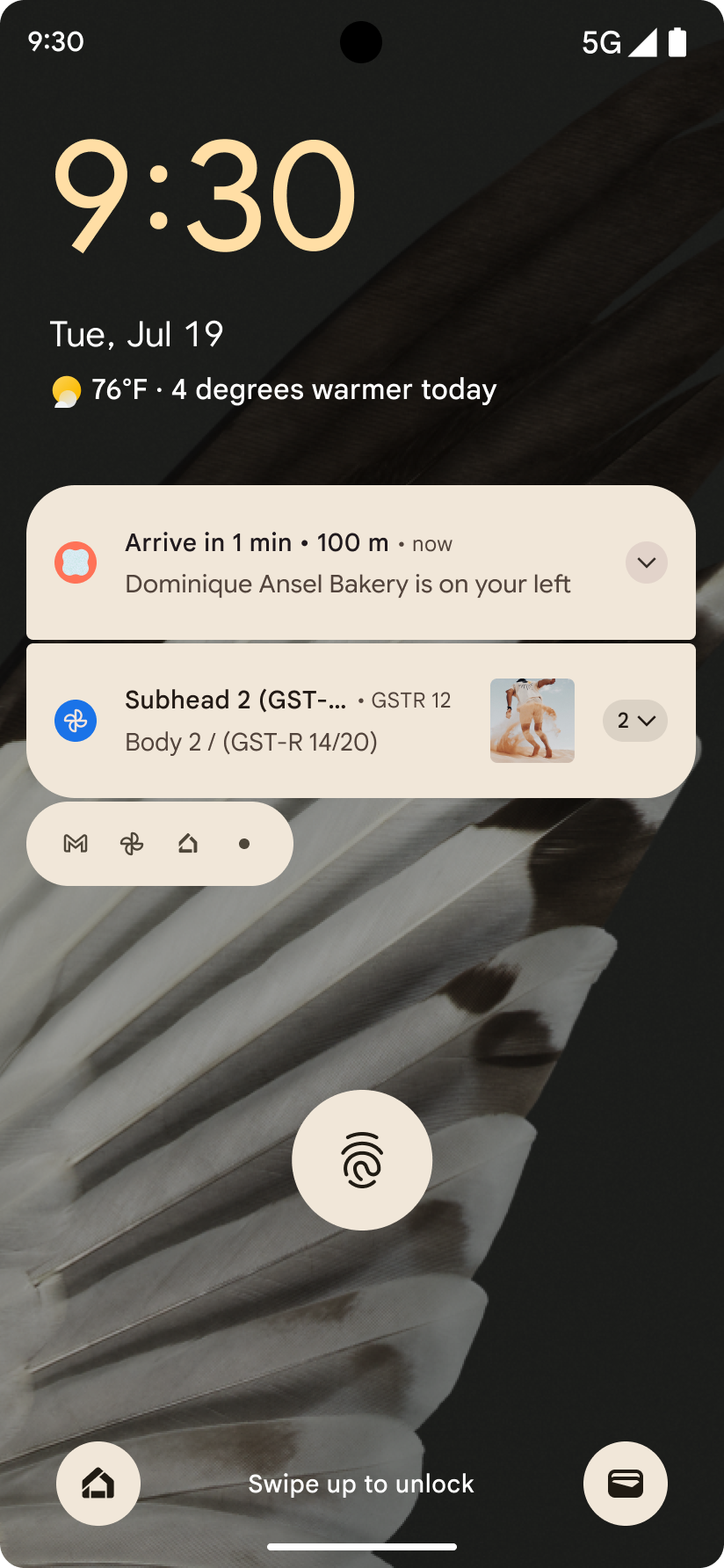
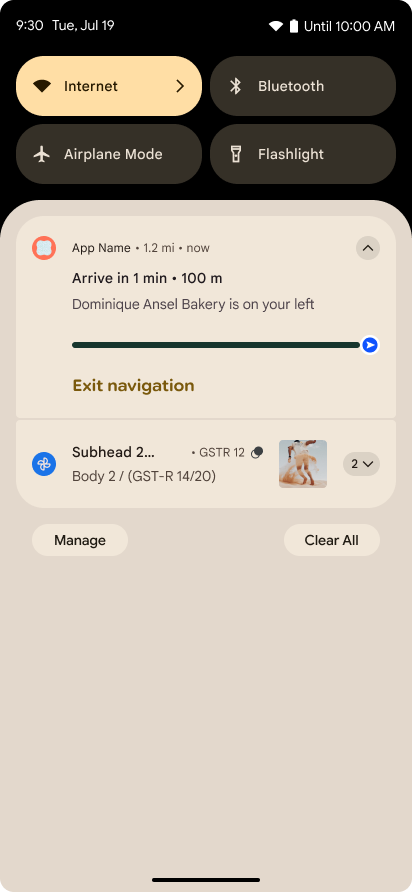
In Android 16 werden nutzungsorientierte Benachrichtigungen eingeführt, mit denen Nutzer den Fortschritt von von ihnen initiierten Abläufen von Anfang bis Ende verfolgen können.
Notification.ProgressStyle ist ein neuer Benachrichtigungsstil, mit dem Sie fortschrittsorientierte Benachrichtigungen erstellen können. Zu den wichtigsten Anwendungsfällen gehören Ridesharing, Lieferservice und Navigation. Innerhalb der Klasse Notification.ProgressStyle können Sie Zustände und Meilensteine in einer User Journey mithilfe von Punkten und Segmenten angeben.
Weitere Informationen finden Sie auf der Dokumentationsseite zu fortschrittsorientierten Benachrichtigungen.
Updates für die intelligente „Zurück“-Geste
Android 16 enthält neue APIs, mit denen Sie intelligente „Zurück“-Gesten für die Systemanimation bei der Navigation per Geste aktivieren können, z. B. die Animation für die Rückkehr zum Startbildschirm. Wenn Sie onBackInvokedCallback mit der neuen PRIORITY_SYSTEM_NAVIGATION_OBSERVER registrieren, erhält Ihre App den regulären onBackInvoked-Aufruf, wenn das System eine Zurücknavigation verarbeitet, ohne dass sich dies auf den normalen Ablauf der Zurücknavigation auswirkt.
In Android 16 werden zusätzlich
finishAndRemoveTaskCallback() und
moveTaskToBackCallback hinzugefügt. Wenn Sie diese Callbacks mit der OnBackInvokedDispatcher registrieren, kann das System bestimmte Verhaltensweisen auslösen und entsprechende vorab erstellte Animationen abspielen, wenn die Zurück-Geste aufgerufen wird.
Bessere Haptik
Android bietet seit seiner Einführung die Möglichkeit, den haptischen Aktor zu steuern.
Android 11 unterstützt komplexere haptische Effekte, die durch VibrationEffect.Compositions von gerätedefinierten semantischen Primitiven unterstützt werden können.
Android 16 bietet Haptik-APIs, mit denen Apps die Amplituden- und Frequenzkurven eines haptischen Effekts definieren können, während Unterschiede zwischen den Gerätefunktionen abstrahiert werden.
Produktivität und Tools für Entwickler
Die meisten unserer Bemühungen zur Verbesserung Ihrer Produktivität konzentrieren sich auf Tools wie Android Studio, Jetpack Compose und die Android Jetpack-Bibliotheken. Wir suchen aber auch immer nach Möglichkeiten, Ihnen auf der Plattform dabei zu helfen, Ihre Vision zu verwirklichen.
Inhaltsverarbeitung für Live-Hintergründe
In Android 16 wird das Live-Hintergrund-Framework um eine neue Content API erweitert, um die Herausforderungen dynamischer, von Nutzern erstellter Hintergründe zu meistern. Derzeit erfordern Live-Hintergründe mit von Nutzern bereitgestellten Inhalten komplexe, dienstspezifische Implementierungen. Mit Android 16 werden WallpaperDescription und WallpaperInstance eingeführt. Mit „WallpaperDescription“ können Sie verschiedene Instanzen eines Live-Hintergrunds aus demselben Dienst identifizieren. Ein Hintergrund, der sowohl auf dem Startbildschirm als auch auf dem Sperrbildschirm verwendet wird, kann beispielsweise an beiden Stellen unterschiedliche Inhalte haben. Die Hintergrundauswahl und WallpaperManager verwenden diese Metadaten, um Nutzern Hintergründe besser zu präsentieren. So können Sie ganz einfach vielfältige und personalisierte Live-Hintergründe erstellen.
Leistung und Akku
Android 16 führt APIs ein, mit denen Sie Informationen zu Ihren Apps erhalten können.
Systemgesteuerte Profilerstellung
ProfilingManager wurde in Android 15 hinzugefügt. Damit können Apps die Erhebung von Profilierungsdaten mit Perfetto auf öffentlichen Geräten vor Ort anfordern.
Da dieses Profiling jedoch von der App gestartet werden muss, können kritische Abläufe wie Starts oder ANRs von Apps nur schwer oder gar nicht erfasst werden.
Dazu wird in Android 16 das systemgetriggerte Profiling für ProfilingManager eingeführt. Apps können angeben, dass sie Protokolle für bestimmte Trigger wie Kaltstarts reportFullyDrawn oder ANRs erhalten möchten. Das System startet und beendet dann im Namen der App ein Protokoll. Nach Abschluss der Aufzeichnung werden die Ergebnisse an das Datenverzeichnis der App gesendet.
Startkomponente in ApplicationStartInfo
ApplicationStartInfo wurde in Android 15 hinzugefügt. Damit können Apps Gründe für den Prozessstart, den Starttyp, Startzeiten, Drosselungen und andere nützliche Diagnosedaten sehen. In Android 16 wird getStartComponent() hinzugefügt, um zu unterscheiden, welcher Komponententyp den Start ausgelöst hat. Das kann hilfreich sein, um den Startvorgang Ihrer App zu optimieren.
Bessere Auftragsprüfung
Die JobScheduler#getPendingJobReason() API gibt einen Grund zurück, warum ein Job möglicherweise ausstehend ist. Es kann jedoch mehrere Gründe dafür geben, dass ein Job ausstehend ist.
In Android 16 führen wir die neue API JobScheduler#getPendingJobReasons(int jobId) ein, die mehrere Gründe zurückgibt, warum ein Job aussteht, sowohl aufgrund expliziter Einschränkungen, die vom Entwickler festgelegt wurden, als auch aufgrund impliziter Einschränkungen, die vom System festgelegt wurden.
Außerdem führen wir JobScheduler#getPendingJobReasonsHistory(int jobId) ein, mit dem eine Liste der letzten Änderungen an Einschränkungen zurückgegeben wird.
Wir empfehlen, die API zu verwenden, um herauszufinden, warum Ihre Jobs möglicherweise nicht ausgeführt werden. Das gilt insbesondere, wenn die Erfolgsrate bestimmter Aufgaben sinkt oder es Probleme mit der Latenz bei der Ausführung bestimmter Jobs gibt. Beispielsweise wurde die Aktualisierung von Widgets im Hintergrund nicht durchgeführt oder der Prefetch-Job wurde vor dem Start der App nicht aufgerufen.
So können Sie besser nachvollziehen, ob bestimmte Jobs aufgrund von systemdefinierten oder explizit festgelegten Einschränkungen nicht abgeschlossen werden.
Adaptive Aktualisierungsrate
Die adaptive Bildwiederholrate (ARR), die in Android 15 eingeführt wurde, ermöglicht es, die Bildwiederholrate des Displays auf unterstützter Hardware mithilfe diskreter VSync-Schritte an die Framerate des Inhalts anzupassen. Dadurch wird der Stromverbrauch reduziert und der Moduswechsel, der zu Rucklern führen kann, entfällt.
In Android 16 werden hasArrSupport() und getSuggestedFrameRate(int) eingeführt und getSupportedRefreshRates() wiederhergestellt, damit Ihre Apps ARR leichter nutzen können. RecyclerView 1.4 unterstützt ARR intern, wenn es nach einem Wisch oder einem flüssigen Scrollen stabil ist. Wir arbeiten daran, ARR-Unterstützung in weitere Jetpack-Bibliotheken aufzunehmen. In diesem Artikel zur Framerate werden viele der APIs beschrieben, mit denen Sie die Framerate so festlegen können, dass Ihre App die ARR direkt verwenden kann.
Headroom-APIs in ADPF
Die SystemHealthManager führt die APIs getCpuHeadroom und getGpuHeadroom ein, die Spiele und ressourcenintensive Apps mit Schätzungen der verfügbaren CPU- und GPU-Ressourcen versorgen. Mit diesen Methoden können Sie feststellen, wie Sie die Systemintegrität mit Ihrer App oder Ihrem Spiel am besten verbessern können. Dies gilt insbesondere, wenn sie in Kombination mit anderen APIs des Android Dynamic Performance Framework (ADPF) verwendet werden, die thermisches Drosseln erkennen.
Mit CpuHeadroomParams und GpuHeadroomParams auf unterstützten Geräten können Sie das Zeitfenster anpassen, das zum Berechnen des Puffers verwendet wird, und zwischen durchschnittlicher oder minimaler Ressourcenverfügbarkeit wählen. So können Sie die CPU- oder GPU-Ressourcennutzung entsprechend reduzieren, was zu einer besseren Nutzererfahrung und einer längeren Akkulaufzeit führt.
Bedienungshilfen
Android 16 bietet neue APIs und Funktionen für Bedienungshilfen, mit denen Sie Ihre App für alle Nutzer zugänglich machen können.
Verbesserte APIs für Bedienungshilfen
Android 16 bietet zusätzliche APIs zur Verbesserung der UI-Semantik, die die Konsistenz für Nutzer mit Bedienungshilfen wie TalkBack verbessern.
Textkontur hinzufügen, um den Textkontrast zu maximieren
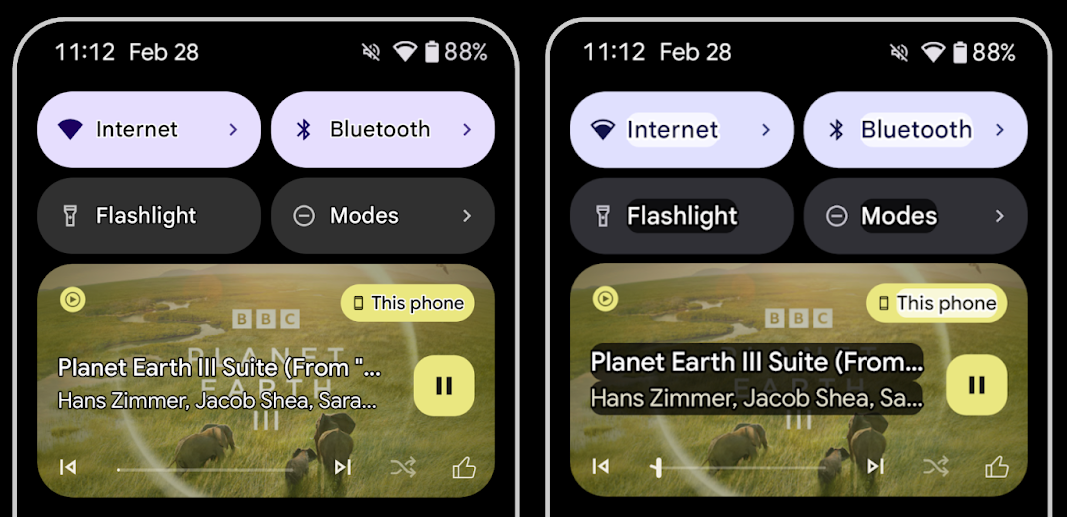
Nutzer mit Sehschwäche haben oft eine verminderte Kontrastwahrnehmung, was es schwierig macht, Objekte von ihrem Hintergrund zu unterscheiden. Um diesen Nutzern zu helfen, wird in Android 16 Text mit Umriss eingeführt, der Text mit hohem Kontrast ersetzt. Dadurch wird ein größerer Kontrastbereich um den Text herum gezeichnet, um die Lesbarkeit erheblich zu verbessern.
Android 16 enthält neue AccessibilityManager APIs, mit denen Ihre Apps prüfen oder einen Listener registrieren können, um festzustellen, ob dieser Modus aktiviert ist. Dies gilt hauptsächlich für UI-Toolkits wie Compose, um eine ähnliche visuelle Darstellung zu bieten. Wenn Sie eine UI Toolkit-Bibliothek verwalten oder Ihre App benutzerdefiniertes Text-Rendering durchführt, das die Klasse android.text.Layout umgeht, können Sie so feststellen, ob der Outline-Text aktiviert ist.
Dauer zu „TtsSpan“ hinzugefügt
Android 16 erweitert TtsSpan um ein TYPE_DURATION, das aus ARG_HOURS, ARG_MINUTES und ARG_SECONDS besteht. So können Sie die Zeitdauer direkt angeben und eine korrekte und konsistente Text-to-Speech-Ausgabe mit Diensten wie TalkBack sicherstellen.
Unterstützung für Elemente mit mehreren Labels
Auf Android-Geräten können UI-Elemente derzeit ihr Label für Barrierefreiheit von einem anderen ableiten. Jetzt können mehrere Labels verknüpft werden, was bei Webinhalten häufig vorkommt. Durch die Einführung einer listenbasierten API in AccessibilityNodeInfo kann Android diese Mehrfachlabelbeziehungen direkt unterstützen. Im Rahmen dieser Änderung werden AccessibilityNodeInfo#setLabeledBy und #getLabeledBy eingestellt. Stattdessen werden #addLabeledBy, #removeLabeledBy und #getLabeledByList verwendet.
Verbesserte Unterstützung für ausblendbare Elemente
Android 16 bietet APIs für Bedienungshilfen, mit denen Sie den maximierten oder minimierten Zustand interaktiver Elemente wie Menüs und erweiterbarer Listen angeben können. Wenn Sie den maximierten Zustand mit setExpandedState festlegen und TYPE_WINDOW_CONTENT_CHANGED-Bedienungshilfenereignisse mit einem Inhaltsänderungstyp CONTENT_CHANGE_TYPE_EXPANDED senden, können Sie dafür sorgen, dass Screenreader wie TalkBack Statusänderungen ansagen, was eine intuitivere und inklusivere Nutzererfahrung ermöglicht.
Unbestimmte Fortschrittsbalken
In Android 16 wird RANGE_TYPE_INDETERMINATE hinzugefügt. So können Sie RangeInfo sowohl für bestimmte als auch für unbestimmte ProgressBar-Widgets anzeigen lassen. Dienste wie TalkBack können dann konsistenter Feedback zu Fortschrittsanzeigen geben.
Drei-Status-Kästchen
Die neuen Methoden AccessibilityNodeInfo, getChecked und setChecked(int) in Android 16 unterstützen jetzt zusätzlich zu „angeklickt“ und „deaktiviert“ den Status „teilweise angeklickt“. Dieser Wert ersetzt die verworfenen Booleschen Werte isChecked und setChecked(boolean).
Zusätzliche Beschreibungen
Wenn ein Bedienungshilfendienst eine ViewGroup beschreibt, werden Inhaltslabels der untergeordneten Ansichten kombiniert. Wenn Sie eine contentDescription für die ViewGroup angeben, gehen Bedienungshilfen davon aus, dass Sie auch die Beschreibung der nicht fokussierbaren untergeordneten Ansichten überschreiben. Das kann problematisch sein, wenn Sie beispielsweise ein Drop-down-Menü (z. B. „Schriftfamilie“) beschriften und gleichzeitig die aktuelle Auswahl für die Barrierefreiheit beibehalten möchten (z. B. „Roboto“). In Android 16 wird setSupplementalDescription hinzugefügt, damit Sie Text mit Informationen zu einer ViewGroup angeben können, ohne Informationen ihrer untergeordneten Elemente zu überschreiben.
Pflichtfelder im Formular
In Android 16 wird setFieldRequired zu AccessibilityNodeInfo hinzugefügt, damit Apps einem Bedienungshilfendienst mitteilen können, dass Eingaben in einem Formularfeld erforderlich sind. Das ist ein wichtiges Szenario für Nutzer, die viele Arten von Formularen ausfüllen, selbst wenn es sich nur um ein Kästchen für die Nutzungsbedingungen handelt. So können Nutzer die Pflichtfelder immer wieder erkennen und schnell zwischen ihnen wechseln.
Smartphone als Mikrofoneingabe für Sprachanrufe mit LEA-Hörgeräten
Mit Android 16 können Nutzer von LE Audio-Hörgeräten für Sprachanrufe zwischen den integrierten Mikrofonen der Hörgeräte und dem Mikrofon auf ihrem Smartphone wechseln. Das kann in lauten Umgebungen oder anderen Situationen hilfreich sein, in denen die Mikrofone des Hörgeräts möglicherweise nicht optimal funktionieren.
Umgebungsabhängige Lautstärkeregelung für LEA-Hörgeräte
Mit Android 16 können Nutzer von LE Audio-Hörgeräten die Lautstärke der Umgebungsgeräusche anpassen, die von den Mikrofonen des Hörgeräts aufgenommen werden. Das kann hilfreich sein, wenn Hintergrundgeräusche zu laut oder zu leise sind.
Kamera
Android 16 bietet eine verbesserte Unterstützung für professionelle Kameranutzer. So ist jetzt eine hybride automatische Belichtung sowie eine präzise Anpassung der Farbtemperatur und des Farbtons möglich. Ein neuer Nachtmodus-Indikator hilft Ihrer App zu erkennen, wann sie zu einer Nachtmodus-Kamerasitzung wechseln muss. Neue Intent-Aktionen erleichtern das Aufnehmen von Fotos mit Bewegtbild. Außerdem verbessern wir UltraHDR-Bilder weiter, indem wir die HEIC-Codierung und neue Parameter aus dem Entwurf des ISO 21496-1-Standards unterstützen.
Hybride automatische Belichtung
Android 16 fügt Camera2 neue hybride Autofokusmodi hinzu, mit denen Sie bestimmte Aspekte der Belichtung manuell steuern können, während der Autofokusalgorithmus (AE) den Rest übernimmt. Sie können ISO + AE und Belichtungszeit + AE steuern. Das bietet mehr Flexibilität als der aktuelle Ansatz, bei dem Sie entweder die volle manuelle Kontrolle haben oder sich vollständig auf die automatische Belichtung verlassen.
fun setISOPriority() {
    // ... (Your existing code before the snippet) ...

    val availablePriorityModes = mStaticInfo.characteristics.get(
        CameraCharacteristics.CONTROL_AE_AVAILABLE_PRIORITY_MODES
    )

    // ... (Your existing code between the snippets) ...

    // Turn on AE mode to set priority mode
    reqBuilder.set(
        CaptureRequest.CONTROL_AE_MODE,
        CameraMetadata.CONTROL_AE_MODE_ON
    )
    reqBuilder.set(
        CaptureRequest.CONTROL_AE_PRIORITY_MODE,
        CameraMetadata.CONTROL_AE_PRIORITY_MODE_SENSOR_SENSITIVITY_PRIORITY
    )
    reqBuilder.set(
        CaptureRequest.SENSOR_SENSITIVITY,
        TEST_SENSITIVITY_VALUE
    )
    val request: CaptureRequest = reqBuilder.build()

    // ... (Your existing code after the snippet) ...
}
Präzise Anpassung der Farbtemperatur und des Farbtons
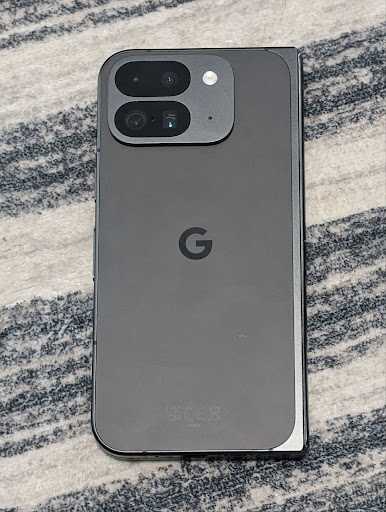
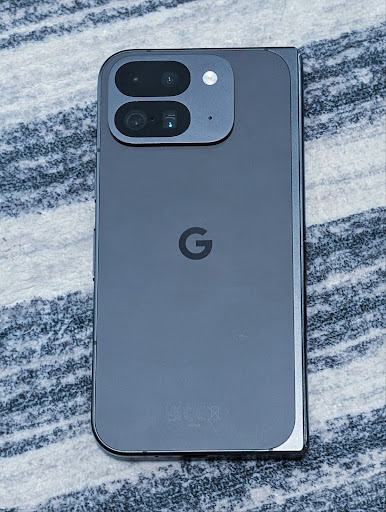
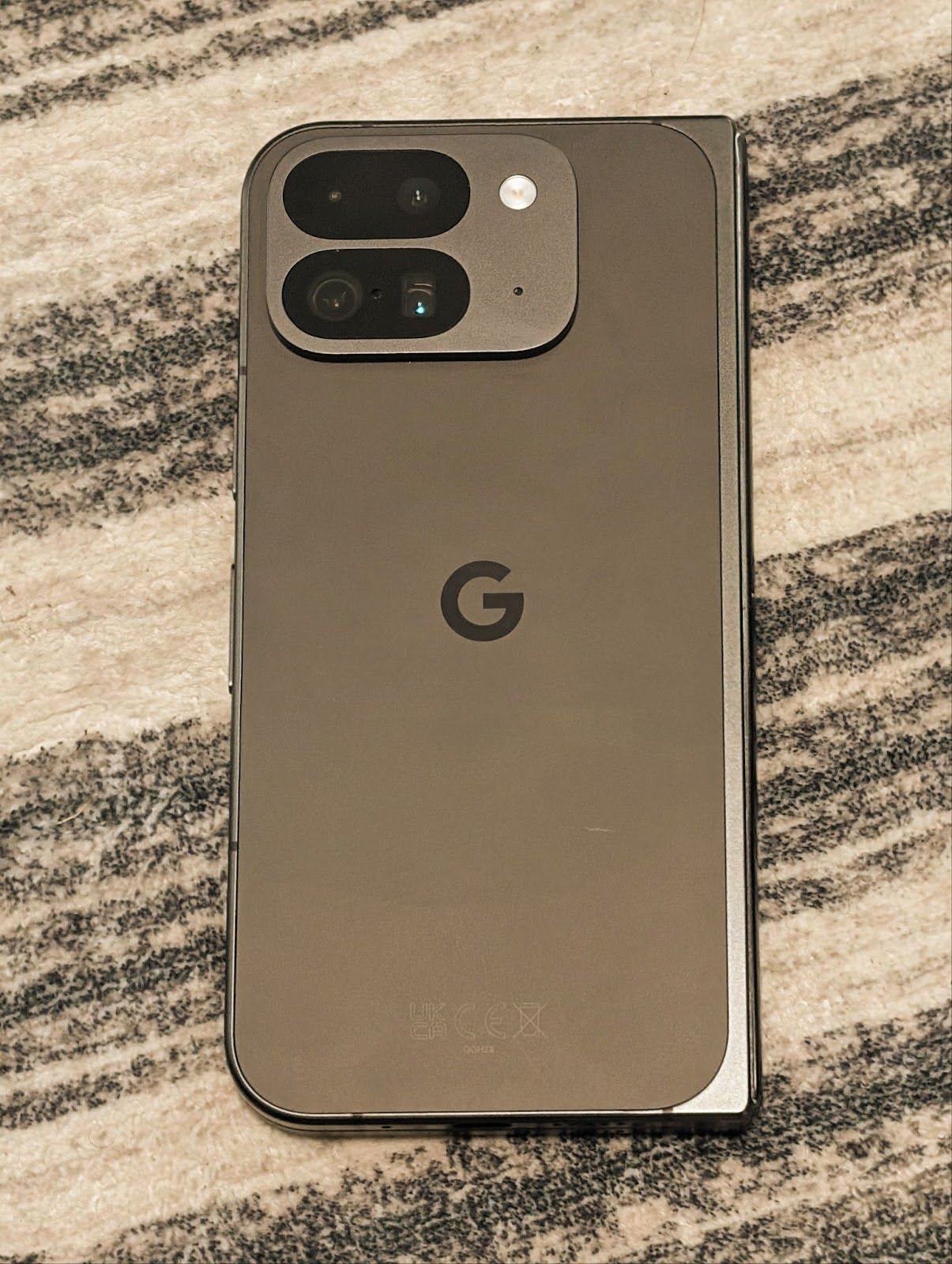
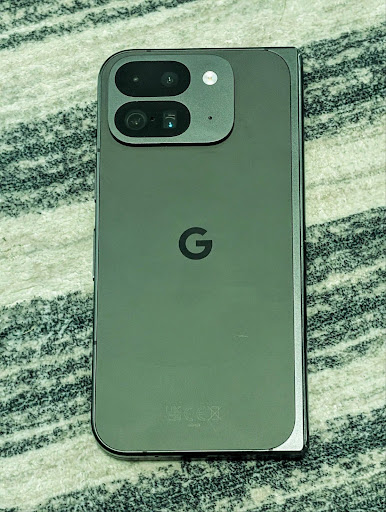
Android 16 bietet Kameraunterstützung für die Feinabstimmung von Farbtemperatur und Farbton, um professionelle Videoaufnahmeanwendungen besser zu unterstützen. In früheren Android-Versionen konnten Sie die Weißabgleichseinstellungen über CONTROL_AWB_MODE steuern. Diese Optionen waren auf eine vordefinierte Liste beschränkt, z. B. Glühlampen, Bedeckt und Dämmerung. Mit der Taste COLOR_CORRECTION_MODE_CCT können Sie COLOR_CORRECTION_COLOR_TEMPERATURE und COLOR_CORRECTION_COLOR_TINT verwenden, um den Weißabgleich basierend auf der korrespondierenden Farbtemperatur präzise anzupassen.
fun setCCT() {
    // ... (Your existing code before this point) ...

    val colorTemperatureRange: Range<Int> =
        mStaticInfo.characteristics[CameraCharacteristics.COLOR_CORRECTION_COLOR_TEMPERATURE_RANGE]

    // Set to manual mode to enable CCT mode
    reqBuilder[CaptureRequest.CONTROL_AWB_MODE] = CameraMetadata.CONTROL_AWB_MODE_OFF
    reqBuilder[CaptureRequest.COLOR_CORRECTION_MODE] = CameraMetadata.COLOR_CORRECTION_MODE_CCT
    reqBuilder[CaptureRequest.COLOR_CORRECTION_COLOR_TEMPERATURE] = 5000
    reqBuilder[CaptureRequest.COLOR_CORRECTION_COLOR_TINT] = 30

    val request: CaptureRequest = reqBuilder.build()

    // ... (Your existing code after this point) ...
}
Die folgenden Beispiele zeigen, wie ein Foto aussehen würde, nachdem verschiedene Anpassungen der Farbtemperatur und des Farbtons vorgenommen wurden:

Szenenerkennung im Nachtmodus der Kamera
Damit Ihre App weiß, wann sie zu einer Kamerasitzung im Nachtmodus wechseln und wieder davon zurückwechseln soll, wird in Android 16 EXTENSION_NIGHT_MODE_INDICATOR hinzugefügt. Wenn unterstützt, ist sie in Camera2 unter CaptureResult verfügbar.
Das ist die API, die wir im Blogpost So ermöglicht Instagram Nutzern atemberaubende Fotos bei wenig Licht kurz als bald verfügbar erwähnt haben. Dieser Beitrag enthält eine praktische Anleitung zur Implementierung des Nachtmodus sowie eine Fallstudie, in der eine höhere Qualität der In-App-Fotos im Nachtmodus mit einer Steigerung der Anzahl der über die In-App-Kamera geteilten Fotos in Verbindung gebracht wird.
Intent-Aktionen zum Aufnehmen von Fotos mit Bewegtbild
Android 16 fügt Standard-Intent-Aktionen hinzu: ACTION_MOTION_PHOTO_CAPTURE und ACTION_MOTION_PHOTO_CAPTURE_SECURE. Sie fordern die Kameraanwendung auf, ein Action-Foto aufzunehmen und zurückzugeben.
Sie müssen entweder ein zusätzliches EXTRA_OUTPUT übergeben, um zu steuern, wo das Bild geschrieben wird, oder ein Uri über Intent.setClipData(ClipData). Wenn Sie ClipData nicht festlegen, wird sie beim Aufrufen von Context.startActivity(Intent) dort für Sie kopiert.
Bildoptimierung für UltraHDR
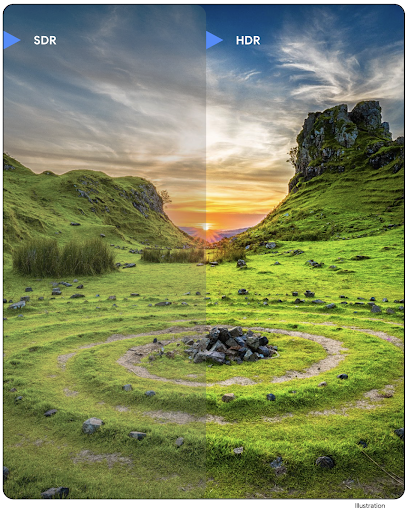
Mit Android 16 setzen wir unsere Bemühungen fort, mit Ultra-HDR-Bildern eine beeindruckende Bildqualität zu bieten. Es wird die Unterstützung für Ultra-HDR-Bilder im HEIC-Dateiformat hinzugefügt. Diese Bilder erhalten den Typ ImageFormat HEIC_ULTRAHDR und enthalten eine eingebettete Verstärkungskarte, ähnlich wie das vorhandene UltraHDR-JPEG-Format. Wir arbeiten auch an der AVIF-Unterstützung für UltraHDR. Mehr dazu demnächst.
Außerdem werden in Android 16 zusätzliche Parameter in UltraHDR aus dem ISO 21496-1-Entwurfsstandard implementiert. Dazu gehören die Möglichkeit, den Farbraum abzurufen und festzulegen, in dem die Gainmap-Berechnung angewendet werden soll, sowie die Unterstützung für HDR-codierte Basisbilder mit SDR-Gainmaps.
Grafik
Android 16 enthält die neuesten Grafikverbesserungen, z. B. benutzerdefinierte Grafikeffekte mit AGSL.
Benutzerdefinierte Grafikeffekte mit AGSL
In Android 16 wurden RuntimeColorFilter und RuntimeXfermode hinzugefügt. Damit können Sie komplexe Effekte wie „Schwellenwert“, „Sepia“ und „Farbtonsättigung“ erstellen und auf Zeichnenaufrufe anwenden. Seit Android 13 können Sie mit AGSL benutzerdefinierte Runtime-Shader erstellen, die Shader erweitern. Die neue API spiegelt dies wider und fügt einen AGSL-basierten RuntimeColorFilter hinzu, der ColorFilter erweitert, und einen Xfermode-Effekt, mit dem du AGSL-basiertes benutzerdefiniertes Compositing und Blending zwischen Quell- und Zielpixeln implementieren kannst.
private val thresholdEffectString = """
    uniform half threshold;

    half4 main(half4 c) {
        half luminosity = dot(c.rgb, half3(0.2126, 0.7152, 0.0722));
        half bw = step(threshold, luminosity);
        return bw.xxx1 * c.a;
    }"""

fun setCustomColorFilter(paint: Paint) {
   val filter = RuntimeColorFilter(thresholdEffectString)
   filter.setFloatUniform(0.5);
   paint.colorFilter = filter
}
Konnektivität
Android 16 aktualisiert die Plattform, damit Ihre App Zugriff auf die neuesten Fortschritte in der Kommunikations- und Funktechnologie hat.
Entfernungsmessung mit erweiterten Sicherheitsfunktionen
Android 16 unterstützt robuste Sicherheitsfunktionen für die WLAN-Standortermittlung auf unterstützten Geräten mit 802.11az von Wi‑Fi 6. So können Apps die höhere Genauigkeit, die größere Skalierbarkeit und die dynamische Planung des Protokolls mit Sicherheitsverbesserungen wie AES-256-basierter Verschlüsselung und Schutz vor MITM-Angriffen kombinieren. So kann es sicherer in Anwendungsfällen mit Näherungserkennung verwendet werden, z. B. zum Entsperren eines Laptops oder einer Fahrzeugtür. 802.11az ist in den Wi‑Fi 6-Standard integriert und nutzt dessen Infrastruktur und Funktionen für eine breitere Akzeptanz und einfachere Bereitstellung.
Allgemeine APIs für die Entfernungsmessung
Android 16 enthält das neue Symbol RangingManager, mit dem sich auf unterstützter Hardware die Entfernung und der Winkel zwischen dem lokalen Gerät und einem Remote-Gerät bestimmen lassen. RangingManager unterstützt die Verwendung verschiedener Technologien zur Entfernungsmessung wie BLE-Kanalabfrage, BLE-RSSI-basierte Entfernungsmessung, Ultrabreitband und WLAN-Rücklaufzeit.
Präsenz von Begleitgeräten im Begleitgerätemanager
In Android 16 werden neue APIs für die Bindung Ihres Companion-App-Dienstes eingeführt. Der Dienst wird gebunden, wenn BLE in Reichweite ist und Bluetooth verbunden ist. Er wird getrennt, wenn BLE nicht in Reichweite ist oder Bluetooth getrennt ist. Die App erhält einen neuen Callback vom Typ onDevicePresenceEvent(), der auf verschiedenen DevicePresenceEvent-Werten basiert.
Weitere Informationen finden Sie unter startObservingDevicePresence(ObservingDevicePresenceRequest).
Medien
Android 16 enthält eine Vielzahl von Funktionen, die die Mediennutzung verbessern.
Verbesserungen bei der Bildauswahl
Mit der Bildauswahl können Nutzer Ihrer App sicher und direkt Zugriff auf ausgewählte Bilder und Videos aus dem lokalen Speicher und der Cloud gewähren, anstatt auf die gesamte Mediathek. Mit einer Kombination aus modularen Systemkomponenten über Google-Systemupdates und Google Play-Diensten wird sie bis zu Android 4.4 (API-Level 19) unterstützt. Für die Integration sind nur wenige Codezeilen mit der zugehörigen Android Jetpack-Bibliothek erforderlich.
Android 16 enthält die folgenden Verbesserungen an der Bildauswahl:
- Eingebettete Bildauswahl: Neue APIs, mit denen Entwickler die Bildauswahl in die Ansichtshierarchie ihrer App einbetten können. So wirkt es wie ein besser integrierter Teil der App, während gleichzeitig die Prozessisolierung genutzt wird, die es Nutzern ermöglicht, Medien auszuwählen, ohne dass die App übermäßig weitreichende Berechtigungen benötigt. Wenn Sie die Einbettung der Bildauswahl maximieren und die Integration vereinfachen möchten, sollten Sie die bevorstehende Android Jetpack-Bibliothek verwenden.
- Cloud-Suche in der Fotoauswahl: Mit neuen APIs können Sie in der Android-Fotoauswahl über den Cloud-Medienanbieter suchen. Die Suchfunktion in der Bildauswahl wird demnächst eingeführt.
Erweiterte professionelle Videoeinstellungen
Android 16 unterstützt den Advanced Professional Video (APV)-Codec, der für die professionelle Videoaufzeichnung und -nachbearbeitung entwickelt wurde.
Der APV-Codecstandard hat folgende Funktionen:
- Perzeptionsverlustfreie Videoqualität (nahe an der Rohvideoqualität)
- Nur-Intraframe-Codierung mit niedriger Komplexität und hohem Durchsatz (ohne Pixelbereichsvorhersage) zur besseren Unterstützung von Bearbeitungsabläufen
- Unterstützung hoher Bitrate bis zu einigen Gbit/s für Inhalte mit 2K-, 4K- und 8K-Auflösung, ermöglicht durch ein schlankes Entropiecodierungsschema
- Frame-Kachelung für immersive Inhalte und parallele Codierung und Dekodierung
- Unterstützung verschiedener Chroma-Sampling-Formate und Bittiefen
- Unterstützung für mehrere Dekodierungen und erneute Codierungen ohne erhebliche Beeinträchtigung der Bildqualität
- Unterstützung von Multiview-Videos und zusätzlichen Videos wie Tiefen-, Alpha- und Vorschauvideos
- Unterstützung für HDR10/10+ und benutzerdefinierte Metadaten
Eine Referenzimplementierung von APV wird über das OpenAPV-Projekt bereitgestellt. Android 16 unterstützt das APV 422-10-Profil, das YUV 422-Farbstichproben mit 10-Bit-Codierung und Zielbitraten von bis zu 2 Gbit/s bietet.
Datenschutz
Android 16 enthält eine Vielzahl von Funktionen, die App-Entwicklern helfen, den Datenschutz der Nutzer zu gewährleisten.
Health Connect-Updates
Health Connect fügt ACTIVITY_INTENSITY hinzu, einen Datentyp, der gemäß den Richtlinien der Weltgesundheitsorganisation für moderate und intensive Aktivitäten definiert ist. Für jeden Datensatz sind die Start- und Endzeit sowie die Angabe erforderlich, ob die Aktivitätsintensität mäßig oder intensiv ist.
Health Connect enthält auch aktualisierte APIs, die Medikationspläne unterstützen. So können Apps mit ausdrücklicher Nutzereinwilligung Patientenakten im FHIR-Format lesen und schreiben.
Privacy Sandbox für Android
Android 16 enthält die neueste Version der Privacy Sandbox für Android. Diese Technologie ist Teil unserer laufenden Bemühungen, Technologien zu entwickeln, bei denen Nutzer wissen, dass ihre Daten geschützt sind. Auf unserer Website finden Sie weitere Informationen zum Privacy Sandbox-Entwickler-Betaprogramm für Android. Sehen Sie sich die SDK Runtime an. Damit können SDKs in einer separaten Laufzeitumgebung ausgeführt werden, die von der App getrennt ist, in der sie bereitgestellt werden. So werden die Erhebung und Weitergabe von Nutzerdaten besser geschützt.
Sicherheit
Android 16 enthält Funktionen, mit denen Sie die Sicherheit Ihrer App verbessern und die Daten Ihrer App schützen können.
API zum Teilen von Schlüsseln
Android 16 bietet APIs, mit denen der Zugriff auf Schlüssel des Android Keystore für andere Apps freigegeben werden kann. Die neue Klasse KeyStoreManager unterstützt das Gewähren und Widerrufen des Zugriffs auf Schlüssel nach App-uid und enthält eine API, über die Apps auf freigegebene Schlüssel zugreifen können.
Formfaktoren von Geräten
Android 16 bietet Ihren Apps die Unterstützung, die sie benötigen, um die Formfaktoren von Android optimal zu nutzen.
Standardisiertes Framework für Bild- und Audioqualität für Fernseher
Das neue MediaQuality-Paket in Android 16 stellt eine Reihe standardisierter APIs für den Zugriff auf Audio- und Bildprofile sowie hardwarebezogene Einstellungen bereit. So können Streaming-Apps Profile abfragen und dynamisch auf Medien anwenden:
- Filme, die mit einem größeren dynamischen Bereich gemastert wurden, erfordern eine höhere Farbgenauigkeit, um feine Details in Schatten zu erkennen und sich an das Umgebungslicht anzupassen. Daher kann ein Profil geeignet sein, bei dem die Farbgenauigkeit der Helligkeit vorgezogen wird.
- Live-Sportveranstaltungen werden oft mit einem schmalen dynamischen Bereich gemastert, werden aber häufig bei Tageslicht angesehen. Daher kann ein Profil, bei dem die Helligkeit gegenüber der Farbrichtigkeit bevorzugt wird, bessere Ergebnisse liefern.
- Für vollständig interaktive Inhalte ist eine minimale Verarbeitung erforderlich, um die Latenz zu reduzieren, und es werden höhere Frameraten benötigt. Aus diesem Grund sind viele Fernseher mit einem Spielprofil ausgestattet.
Mit der API können Apps zwischen Profilen wechseln und Nutzer können unterstützte Fernseher so einstellen, dass sie am besten zu ihren Inhalten passen.
Internationalisierung
Android 16 bietet Funktionen und Möglichkeiten, die die Nutzererfahrung verbessern, wenn ein Gerät in verschiedenen Sprachen verwendet wird.
Vertikaler Text
Android 16 bietet Unterstützung auf niedriger Ebene für das vertikale Rendern und Messen von Text, um Bibliotheksentwicklern eine grundlegende Unterstützung für die vertikale Schrift zu bieten. Das ist besonders für Sprachen wie Japanisch nützlich, bei denen häufig vertikale Schriftsysteme verwendet werden. Der Klasse Paint wurde das neue Flag VERTICAL_TEXT_FLAG hinzugefügt. Wenn dieses Flag mit Paint.setFlags festgelegt wird, melden die Textmess-APIs von Paint vertikale statt horizontale Vorgänge und Canvas zeichnet Text vertikal.
val text = "「春は、曙。」"
Box(
    Modifier.padding(innerPadding).background(Color.White).fillMaxSize().drawWithContent {
        drawIntoCanvas { canvas ->
            val paint = Paint().apply { textSize = 64.sp.toPx() }
            // Draw text vertically
            paint.flags = paint.flags or VERTICAL_TEXT_FLAG
            val height = paint.measureText(text)
            canvas.nativeCanvas.drawText(
                text,
                0,
                text.length,
                size.width / 2,
                (size.height - height) / 2,
                paint
            )
        }
    }
) {}
Anpassung des Einheitensystems
Nutzer können das Maßsystem jetzt in den regionalen Einstellungen unter „Einstellungen“ anpassen. Die Nutzereinstellung ist Teil des Gebietscodes. Sie können also eine BroadcastReceiver unter ACTION_LOCALE_CHANGED registrieren, um Änderungen an der Gebietskonfiguration zu verarbeiten, wenn sich die regionalen Einstellungen ändern.
Mit Formatierungsoptionen können Sie die Inhalte an die jeweilige Region anpassen. „0,5 in“ auf Englisch (USA) entspricht beispielsweise „12,7 mm“ für einen Nutzer,der sein Smartphone auf Englisch (Dänemark) eingestellt hat oder sein Smartphone auf Englisch (USA) mit dem metrischen System als bevorzugtem Maßsystem verwendet.
Öffnen Sie dazu die Einstellungen und gehen Sie zu System > Sprache und Region.