

หน้านี้จะอธิบายวิธีจัดการปัญหาเกี่ยวกับการตัดสินความสมบูรณ์
หลังจากขอโทเค็นความสมบูรณ์แล้ว คุณจะมีตัวเลือกในการแสดงกล่องโต้ตอบ Google Play แก่ผู้ใช้ คุณสามารถแสดงกล่องโต้ตอบเมื่อมีปัญหาอย่างน้อย 1 รายการเกี่ยวกับการตัดสินความสมบูรณ์ หรือหากมีข้อยกเว้นเกิดขึ้นระหว่างคำขอ Integrity API เมื่อปิดกล่องโต้ตอบแล้ว คุณสามารถยืนยันว่าปัญหาได้รับการแก้ไขแล้วด้วยคำขอโทเค็นความสมบูรณ์อีกรายการหนึ่ง หากคุณส่งคำขอแบบมาตรฐาน คุณจะต้องเตรียมความพร้อมผู้ให้บริการโทเค็นอีกครั้งเพื่อรับคำตัดสินใหม่
ขอให้แสดงกล่องโต้ตอบความสมบูรณ์เพื่อแก้ไขปัญหาเกี่ยวกับการตัดสิน
เมื่อไคลเอ็นต์ขอโทเค็นความสมบูรณ์ คุณสามารถใช้วิธีการที่ระบุไว้ใน StandardIntegrityToken (API มาตรฐาน) และ IntegrityTokenResponse (API แบบคลาสสิก) ดังนี้
showDialog(Activity activity, int integrityDialogTypeCode)
ขั้นตอนต่อไปนี้จะอธิบายวิธีใช้ Play Integrity API เพื่อแสดงกล่องโต้ตอบการแก้ไขโดยใช้รหัสกล่องโต้ตอบ GET_LICENSED
รหัสกล่องโต้ตอบอื่นๆ ที่แอปของคุณขอได้จะแสดงอยู่หลังส่วนนี้
ขอโทเค็นความสมบูรณ์จากแอป แล้วส่งโทเค็นไปยังเซิร์ฟเวอร์ คุณสามารถใช้คำขอแบบมาตรฐานหรือแบบคลาสสิกก็ได้
Kotlin
// Request an integrity token
val tokenResponse: StandardIntegrityToken = requestIntegrityToken()
// Send token to app server and get response on what to do next
val yourServerResponse: YourServerResponse = sendToServer(tokenResponse.token())
Java
// Request an integrity token
StandardIntegrityToken tokenResponse = requestIntegrityToken();
// Send token to app server and get response on what to do next
YourServerResponse yourServerResponse = sendToServer(tokenResponse.token());
Unity
// Request an integrity token
StandardIntegrityToken tokenResponse = RequestIntegrityToken();
// Send token to app server and get response on what to do next
YourServerResponse yourServerResponse = sendToServer(tokenResponse.Token);
Unreal Engine
// Request an integrity token
StandardIntegrityToken* Response = RequestIntegrityToken();
// Send token to app server and get response on what to do next
YourServerResponse YourServerResponse = SendToServer(Response->Token);
เนทีฟ
/// Request an integrity token
StandardIntegrityToken* response = requestIntegrityToken();
/// Send token to app server and get response on what to do next
YourServerResponse yourServerResponse = sendToServer(StandardIntegrityToken_getToken(response));
ถอดรหัสโทเค็นความสมบูรณ์ในเซิร์ฟเวอร์และตรวจสอบช่อง
appLicensingVerdictซึ่งอาจมีลักษณะดังนี้// Licensing issue { ... "accountDetails": { "appLicensingVerdict": "UNLICENSED" } }หากโทเค็นมี
appLicensingVerdict: "UNLICENSED"ให้ตอบกลับไคลเอ็นต์แอปของคุณเพื่อขอให้แสดงกล่องโต้ตอบการอนุญาตให้ใช้สิทธิ ดังนี้Kotlin
private fun getDialogTypeCode(integrityToken: String): Int{
    // Get licensing verdict from decrypted and verified integritytoken
    val licensingVerdict: String = getLicensingVerdictFromDecryptedToken(integrityToken)

    return if (licensingVerdict == "UNLICENSED") {
            1 // GET_LICENSED
        } else 0
}
Java
private int getDialogTypeCode(String integrityToken) {
    // Get licensing verdict from decrypted and verified integrityToken
    String licensingVerdict = getLicensingVerdictFromDecryptedToken(integrityToken);

    if (licensingVerdict.equals("UNLICENSED")) {
      return 1; // GET_LICENSED
    }
    return 0;
}
Unity
private int GetDialogTypeCode(string IntegrityToken) {
    // Get licensing verdict from decrypted and verified integrityToken
    string licensingVerdict = GetLicensingVerdictFromDecryptedToken(IntegrityToken);

    if (licensingVerdict == "UNLICENSED") {
      return 1; // GET_LICENSED
    }
    return 0;
}
Unreal Engine
private int GetDialogTypeCode(FString IntegrityToken) {
    // Get licensing verdict from decrypted and verified integrityToken
    FString LicensingVerdict = GetLicensingVerdictFromDecryptedToken(IntegrityToken);

    if (LicensingVerdict == "UNLICENSED") {
      return 1; // GET_LICENSED
    }
    return 0;
}
เนทีฟ
private int getDialogTypeCode(string integrity_token) {
    /// Get licensing verdict from decrypted and verified integrityToken
    string licensing_verdict = getLicensingVerdictFromDecryptedToken(integrity_token);

    if (licensing_verdict == "UNLICENSED") {
      return 1; // GET_LICENSED
    }
    return 0;
}
ในแอป ให้เรียกใช้
showDialogด้วยรหัสที่ขอซึ่งดึงมาจากเซิร์ฟเวอร์ของคุณ ดังนี้Kotlin
// Show dialog as indicated by the server
val showDialogType: Int? = yourServerResponse.integrityDialogTypeCode()
if (showDialogType == null) {
     return
}

// Create dialog request
val dialogRequest = StandardIntegrityDialogRequest.builder()
          .setActivity(activity)
          .setTypeCode(showDialogType)
          .setStandardIntegrityResponse(StandardIntegrityResponse.TokenResponse(token))
          .build()

// Call showDialog, the dialog will be shown on top of the provided activity
// and the task will complete when the dialog is closed.
val result: Task<Int> = standardIntegrityManager.showDialog(dialogRequest)

// Handle response code, call the Integrity API again to confirm that the
// verdict issue has been resolved.
Java
// Show dialog as indicated by the server
@Nullable Integer showDialogType = yourServerResponse.integrityDialogTypeCode();
if (showDialogType == null) {
     return;
}

// Create dialog request
StandardIntegrityDialogRequest dialogRequest =
      StandardIntegrityDialogRequest.builder()
          .setActivity(getActivity())
          .setTypeCode(showDialogTypeCode)
          .setStandardIntegrityResponse(new StandardIntegrityResponse.TokenResponse(token))
          .build();

// Call showDialog, the dialog will be shown on top of the provided activity
// and the task will complete when the dialog is closed.
Task<Integer> result = standardIntegrityManager.showDialog(dialogRequest);

// Handle response code, call the Integrity API again to confirm that the
// verdict issue has been resolved.
Unity
// Initialize the V2 manager. Requires Play Integrity Unity Plugin v2.0.0 or
// higher.
var standardIntegrityManager = new StandardIntegrityManagerV2();
IEnumerator ShowDialogCoroutine() {
    int showDialogType = yourServerResponse.IntegrityDialogTypeCode();

    PlayAsyncOperation<IntegrityDialogResponseCode, StandardIntegrityError> showDialogTask;

    using (var activity = UnityPlayerHelper.GetCurrentActivity())
    {
        // Create a dialog request
        var dialogRequest = new StandardIntegrityDialogRequest(tokenResponse, activity, showDialogType);

        // Call showDialog with the request, the dialog will be shown on top of the
        // provided activity and complete when the dialog is closed.
        showDialogTask = standardIntegrityManager.ShowDialog(dialogRequest);
    }

    // Wait for PlayAsyncOperation to complete.
    yield return showDialogTask;

    // Handle response code, call the Integrity API again to confirm that the
    // verdict issue been resolved.
}
Unreal Engine
// .h
void MyClass::OnShowDialogCompleted(
    EStandardIntegrityErrorCode Error,
    EIntegrityDialogResponseCode Response)
{
    // Handle response code, call the Integrity API again to confirm that the
    // verdict issue has been resolved.
}

// .cpp
void MyClass::RequestIntegrityToken()
{
    UStandardIntegrityToken* Response = ...
    int TypeCode = YourServerResponse.integrityDialogTypeCode();

    // Create a delegate to bind the callback function.
    FShowDialogStandardOperationCompletedDelegate Delegate;

    // Bind the completion handler (OnShowDialogCompleted) to the delegate.
    Delegate.BindDynamic(this, &MyClass::OnShowDialogCompleted);

    // Call ShowDialog with TypeCode which completes when the dialog is closed.
    Response->ShowDialog(TypeCode, Delegate);
}
เนทีฟ
// Show dialog as indicated by the server
int show_dialog_type = yourServerResponse.integrityDialogTypeCode();
if(show_dialog_type == 0){
  return;
}

/// Create dialog request
StandardIntegrityDialogRequest* dialog_request;
StandardIntegrityDialogRequest_create(&dialog_request);
StandardIntegrityDialogRequest_setTypeCode(dialog_request, show_dialog_type);
StandardIntegrityDialogRequest_setActivity(dialog_request, activity);
StandardIntegrityDialogRequest_setStandardIntegrityToken(dialog_request,
                                                token_response);

/// Call showDialog with the dialog request. The dialog will be shown on top
/// of the provided activity and complete when the dialog is closed by the
/// user.
StandardIntegrityDialogResponse* dialog_response;
StandardIntegrityErrorCode error_code =
    StandardIntegrityManager_showDialog(dialog_request, &dialog_response);

/// Use polling to wait for the async operation to complete. Note, the polling
/// shouldn't block the thread where the StandardIntegrityManager is running.
IntegrityDialogResponseCode response_code = INTEGRITY_DIALOG_RESPONSE_UNKNOWN;
while (error_code == STANDARD_INTEGRITY_NO_ERROR) {
    error_code = StandardIntegrityDialogResponse_getResponseCode(dialog_response, &response_code);
    if(response_code != INTEGRITY_DIALOG_RESPONSE_UNKNOWN){
      break;
    }
}

/// Free memory
StandardIntegrityDialogRequest_destroy(dialog_request);
StandardIntegrityDialogResponse_destroy(dialog_response);

/// Handle response code, call the Integrity API again to confirm that the
/// verdict issues have been resolved.
กล่องโต้ตอบจะแสดงที่ด้านบนของกิจกรรมที่ระบุ เมื่อผู้ใช้ปิดกล่องโต้ตอบ งานจะเสร็จสมบูรณ์พร้อมโค้ดตอบกลับ
(ไม่บังคับ) ขอโทเค็นอื่นเพื่อแสดงกล่องโต้ตอบเพิ่มเติม หากคุณส่งคำขอแบบมาตรฐาน คุณจะต้องเตรียมความพร้อมผู้ให้บริการโทเค็นอีกครั้งเพื่อรับคำตัดสินใหม่
ขอให้แสดงกล่องโต้ตอบความสมบูรณ์เพื่อแก้ไขข้อยกเว้นฝั่งไคลเอ็นต์
หากคำขอ Integrity API ไม่สำเร็จโดยมีข้อผิดพลาด StandardIntegrityException (API มาตรฐาน) หรือ IntegrityServiceException (API แบบคลาสสิก) และข้อยกเว้นนั้นแก้ไขได้ คุณสามารถใช้กล่องโต้ตอบ GET_INTEGRITY หรือ GET_STRONG_INTEGRITY เพื่อแก้ไขข้อผิดพลาดได้
ขั้นตอนต่อไปนี้จะอธิบายวิธีใช้กล่องโต้ตอบ GET_INTEGRITY เพื่อแก้ไขข้อผิดพลาดฝั่งไคลเอ็นต์ที่แก้ไขได้ซึ่งรายงานโดย Integrity API
ตรวจสอบว่าข้อยกเว้นที่แสดงผลจากคำขอ Integrity API สามารถแก้ไขได้
Kotlin
private fun isExceptionRemediable(exception: ExecutionException): Boolean {
    val cause = exception.cause
    if (cause is StandardIntegrityException && cause.isRemediable) {
        return true
    }
    return false
}
Java
private boolean isExceptionRemediable(ExecutionException exception) {
    Throwable cause = exception.getCause();
    if (cause instanceof StandardIntegrityException integrityException
&& integrityException.isRemediable()) {
        return true;
    }
    return false;
}
Unity
private bool IsExceptionRemediable(StandardIntegrityError error) {
    // Check if the operation resulted in a remediable error
    if (error != null && error.ErrorCode != StandardIntegrityErrorCode.NoError && error.IsRemediable) {
        return true;
    }
    return false;
}
เนทีฟ
bool IsErrorRemediable(StandardIntegrityToken* token) {
    /// Check if the error associated with the token is remediable
    bool isRemediable = false;
    if(StandardIntegrityToken_getIsRemediable(response, &isRemediable) == STANDARD_INTEGRITY_NO_ERROR){
      return isRemediable;
    }
    return false;
}
หากข้อยกเว้นแก้ไขได้ ให้ขอใช้กล่องโต้ตอบ
GET_INTEGRITYโดยใช้ข้อยกเว้นที่แสดงผล กล่องโต้ตอบจะแสดงเหนือกิจกรรมที่ระบุ และ Task ที่แสดงผลจะเสร็จสมบูรณ์พร้อมโค้ดตอบกลับหลังจากที่ผู้ใช้ปิดกล่องโต้ตอบKotlin
  private fun showDialog(exception: StandardIntegrityException) {
      // Create a dialog request
      val standardIntegrityDialogRequest =
          StandardIntegrityDialogRequest.builder()
              .setActivity(activity)
              .setType(IntegrityDialogTypeCode.GET_INTEGRITY)
              .setStandardIntegrityResponse(ExceptionDetails(exception))
              .build()

      // Request dialog
      val responseCode: Task<Int> =
            standardIntegrityManager.showDialog(standardIntegrityDialogRequest)
}
Java
  private void showDialog(StandardIntegrityException exception) {
      // Create a dialog request
      StandardIntegrityDialogRequest standardIntegrityDialogRequest =
          StandardIntegrityDialogRequest.builder()
              .setActivity(this.activity)
              .setType(IntegrityDialogTypeCode.GET_INTEGRITY)
              .setStandardIntegrityResponse(new ExceptionDetails(exception))
              .build();

      // Request dialog
      Task<Integer> responseCode =
            standardIntegrityManager.showDialog(standardIntegrityDialogRequest);
}
Unity
// Initialize the V2 manager. Requires Play Integrity Unity Plugin v2.0.0 or
// higher.
var standardIntegrityManager = new StandardIntegrityManagerV2();
IEnumerator ShowDialogToFixError(StandardIntegrityError error) {
    PlayAsyncOperation<IntegrityDialogResponseCode, StandardIntegrityError> showDialogTask;

    using (var activity = UnityPlayerHelper.GetCurrentActivity())
    {
        // Create a dialog request using the error
        var dialogRequest = new StandardIntegrityDialogRequest(error, activity, GET_INTEGRITY_DIALOG);

        // Request dialog
        showDialogTask = standardIntegrityManager.ShowDialog(dialogRequest);
    }

    // Wait for PlayAsyncOperation to complete.
    yield return showDialogTask;
}
เนทีฟ
private void showDialogToFixError(StandardIntegrityToken* token) {
    /// If the token request failed, and the underlying error is not fixable
    /// then return early
    if(isErrorRemediable(token)) {
      return;
    }

    /// Create dialog request
    StandardIntegrityDialogRequest* dialog_request;
    StandardIntegrityDialogRequest_create(&dialog_request);
    StandardIntegrityDialogRequest_setTypeCode(dialog_request,
                                       kGetIntegrityDialogTypeCode);
    StandardIntegrityDialogRequest_setActivity(dialog_request, activity);
    StandardIntegrityDialogRequest_setStandardIntegrityToken(dialog_request,
                                                    token_response);

    /// Call showDialog with the dialog request. The dialog will be shown on
    /// top of the provided activity and complete when the dialog is closed by
    /// the user.
    StandardIntegrityDialogResponse* dialog_response;
    StandardIntegrityErrorCode error_code =
        StandardIntegrityManager_showDialog(dialog_request, &dialog_response);

    /// Use polling to wait for the async operation to complete.
    /// Note, the polling shouldn't block the thread where the
    /// StandardIntegrityManager is running.
    IntegrityDialogResponseCode response_code = INTEGRITY_DIALOG_RESPONSE_UNKNOWN;
    while (error_code == STANDARD_INTEGRITY_NO_ERROR) {
        error_code = StandardIntegrityDialogResponse_getResponseCode(response, &response_code);
        if(response_code != INTEGRITY_DIALOG_RESPONSE_UNKNOWN){
          break;
        }
    }

    /// Free memory
    StandardIntegrityDialogRequest_destroy(dialog_request);
    StandardIntegrityDialogResponse_destroy(dialog_response);

}
หากโค้ดตอบกลับที่แสดงผลระบุว่าสำเร็จ คำขอถัดไปสำหรับโทเค็นความสมบูรณ์ควรสำเร็จโดยไม่มีข้อยกเว้น หากส่งคำขอแบบมาตรฐาน คุณจะต้องเตรียมความพร้อมผู้ให้บริการโทเค็นอีกครั้งเพื่อรับคำตัดสินใหม่
รหัสกล่องโต้ตอบความสมบูรณ์
GET_LICENSED (รหัสประเภท 1)
ปัญหาเกี่ยวกับคำตัดสิน
กล่องโต้ตอบนี้เหมาะสำหรับปัญหา 2 อย่างต่อไปนี้
- การเข้าถึงที่ไม่ได้รับอนุญาต:
appLicensingVerdict: "UNLICENSED"ซึ่งหมายความว่าบัญชีผู้ใช้ไม่มีสิทธิ์เข้าถึงแอปของคุณ ซึ่งอาจเกิดขึ้นได้หากผู้ใช้ไซด์โหลดแอปหรือได้แอปมาจาก App Store อื่นที่ไม่ใช่ Google Play - แอปที่ถูกปลอมแปลง:
appRecognitionVerdict: "UNRECOGNIZED_VERSION"ซึ่งหมายความว่าไบนารีของแอปได้รับการแก้ไขหรือไม่ได้เป็นเวอร์ชันที่ Google Play รู้จัก
การแก้ไข
คุณสามารถแสดงกล่องโต้ตอบ GET_LICENSED เพื่อแจ้งให้ผู้ใช้ดาวน์โหลดแอปของแท้จาก Google Play กล่องโต้ตอบเดียวนี้จะจัดการทั้ง 2 สถานการณ์ ดังนี้
- สำหรับผู้ใช้ที่ไม่มีใบอนุญาต ระบบจะให้สิทธิ์ใบอนุญาต Play แก่ผู้ใช้ ซึ่งจะช่วยให้ผู้ใช้ได้รับการอัปเดตแอปจาก Google Play
- สำหรับผู้ใช้ที่มีแอปเวอร์ชันถูกปลอมแปลง ระบบจะแนะนำให้ติดตั้งแอปที่ไม่มีการแก้ไขจาก Google Play
เมื่อผู้ใช้ดำเนินการในกล่องโต้ตอบเสร็จแล้ว การตรวจสอบความสมบูรณ์ครั้งต่อๆ ไปจะแสดงผลเป็น appLicensingVerdict: "LICENSED" และ appRecognitionVerdict: "PLAY_RECOGNIZED"
ตัวอย่าง UX

CLOSE_UNKNOWN_ACCESS_RISK (รหัสประเภท 2)
ปัญหาเกี่ยวกับคำตัดสิน
เมื่อ environmentDetails.appAccessRiskVerdict.appsDetected มี "UNKNOWN_CAPTURING" หรือ "UNKNOWN_CONTROLLING" หมายความว่ามีแอปอื่นๆ (ที่ไม่ได้ติดตั้งโดย Google Play หรือโหลดไว้ล่วงหน้าในพาร์ติชันระบบโดยผู้ผลิตอุปกรณ์) ทำงานอยู่ในอุปกรณ์ซึ่งอาจจับภาพหน้าจอหรือควบคุมอุปกรณ์อยู่
การแก้ไข
คุณสามารถแสดงกล่องโต้ตอบ CLOSE_UNKNOWN_ACCESS_RISK เพื่อแจ้งให้ผู้ใช้ปิดแอปที่ไม่รู้จักทั้งหมดซึ่งอาจกำลังจับภาพหน้าจอหรือควบคุมอุปกรณ์อยู่
หากผู้ใช้แตะปุ่มClose all แอปทั้งหมดดังกล่าวจะปิดลง
ตัวอย่าง UX

CLOSE_ALL_ACCESS_RISK (รหัสประเภท 3)
ปัญหาเกี่ยวกับคำตัดสิน
เมื่อ environmentDetails.appAccessRiskVerdict.appsDetected มี "KNOWN_CAPTURING", "KNOWN_CONTROLLING", "UNKNOWN_CAPTURING" หรือ "UNKNOWN_CONTROLLING" หมายความว่ามีแอปที่ทำงานอยู่ในอุปกรณ์ซึ่งอาจจับภาพหน้าจอหรือควบคุมอุปกรณ์ได้
การแก้ไข
คุณสามารถแสดงกล่องโต้ตอบ CLOSE_ALL_ACCESS_RISK เพื่อแจ้งให้ผู้ใช้ปิดแอปทั้งหมดที่อาจจับภาพหน้าจอหรือควบคุมอุปกรณ์อยู่ หากผู้ใช้แตะปุ่ม Close all ระบบจะปิดแอปทั้งหมดดังกล่าวในอุปกรณ์
ตัวอย่าง UX
GET_INTEGRITY (รหัสประเภท 4)
ปัญหาเกี่ยวกับคำตัดสิน
กล่องโต้ตอบนี้เหมาะสำหรับปัญหาต่อไปนี้
ความสมบูรณ์ของอุปกรณ์ต่ำ: เมื่อ
deviceRecognitionVerdictไม่มีMEETS_DEVICE_INTEGRITYอุปกรณ์อาจไม่ใช่อุปกรณ์ที่ทำงานด้วยระบบ Android ของแท้และผ่านการรับรอง ตัวอย่างเช่น กรณีนี้อาจเกิดขึ้นหาก Bootloader ของอุปกรณ์ปลดล็อกอยู่ หรือระบบปฏิบัติการ Android ที่โหลดไม่ใช่รูปภาพของผู้ผลิตที่ได้รับการรับรองการเข้าถึงที่ไม่ได้รับอนุญาต:
appLicensingVerdict: "UNLICENSED"ซึ่งหมายความว่าบัญชีผู้ใช้ไม่มีสิทธิ์เข้าถึงแอปของคุณ ซึ่งอาจเกิดขึ้นได้หากผู้ใช้ไซด์โหลดแอปหรือได้แอปมาจาก App Store อื่นที่ไม่ใช่ Google Playแอปที่ถูกปลอมแปลง:
appRecognitionVerdict: "UNRECOGNIZED_VERSION"ซึ่งหมายความว่าไบนารีของแอปได้รับการแก้ไขหรือเป็นเวอร์ชันที่ Google Play ไม่รู้จักข้อยกเว้นฝั่งไคลเอ็นต์: เมื่อเกิดข้อยกเว้นที่แก้ไขได้ระหว่างคำขอ Integrity API ข้อยกเว้นที่แก้ไขได้คือข้อยกเว้นของ Integrity API ที่มีรหัสข้อผิดพลาด เช่น
PLAY_SERVICES_VERSION_OUTDATED,NETWORK_ERROR,PLAY_SERVICES_NOT_FOUNDเป็นต้น คุณสามารถใช้เมธอดexception.isRemediable()เพื่อตรวจสอบว่าข้อยกเว้นแก้ไขได้ด้วยกล่องโต้ตอบหรือไม่
การแก้ไข
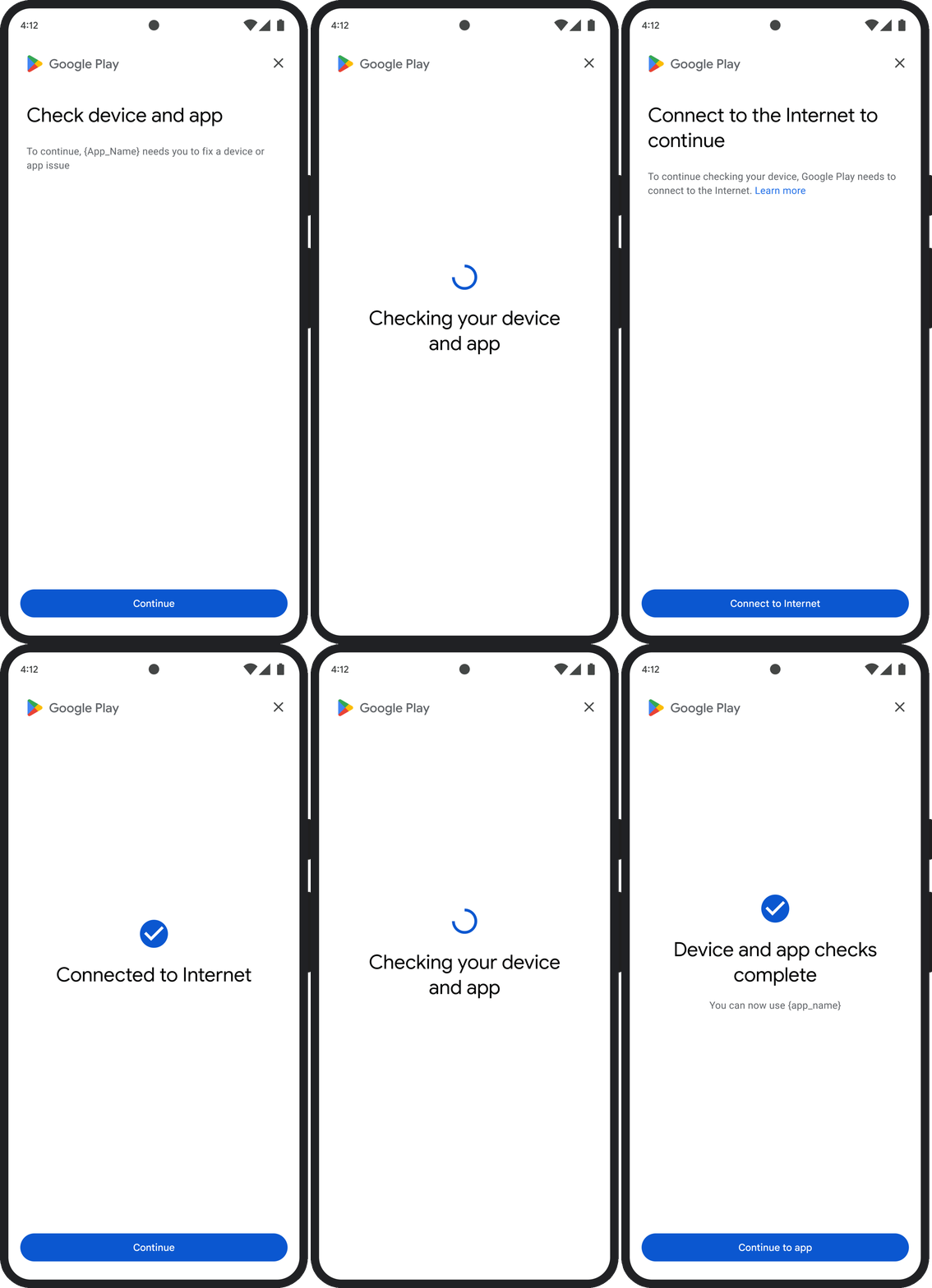
กล่องโต้ตอบ GET_INTEGRITY ออกแบบมาเพื่อปรับปรุงประสบการณ์ของผู้ใช้โดยจัดการขั้นตอนการแก้ไขหลายขั้นตอนภายในขั้นตอนเดียวที่ต่อเนื่อง วิธีนี้ช่วยป้องกันไม่ให้ผู้ใช้ต้องโต้ตอบกับกล่องโต้ตอบแยกกันหลายรายการเพื่อแก้ไขปัญหาต่างๆ
เมื่อคุณขอให้แสดงกล่องโต้ตอบ ระบบจะตรวจหาโดยอัตโนมัติว่ามีปัญหาเกี่ยวกับคำตัดสินที่กำหนดเป้าหมายหรือไม่ และแสดงขั้นตอนการแก้ไขที่เหมาะสม ซึ่งหมายความว่าคำขอกล่องโต้ตอบเดียวสามารถแก้ไขปัญหาหลายอย่างได้พร้อมกัน ซึ่งรวมถึงปัญหาต่อไปนี้
- ความสมบูรณ์ของอุปกรณ์: หากตรวจพบปัญหาเกี่ยวกับความสมบูรณ์ของอุปกรณ์ กล่องโต้ตอบจะแนะนำผู้ใช้ให้ปรับปรุงสถานะความปลอดภัยของอุปกรณ์เพื่อให้เป็นไปตามข้อกำหนดสำหรับการพิจารณา
MEETS_DEVICE_INTEGRITY - ความสมบูรณ์ของแอป: หากตรวจพบปัญหา เช่น การเข้าถึงโดยไม่ได้รับอนุญาตหรือการปลอมแปลงแอป กล่องโต้ตอบจะนำผู้ใช้ไปยัง Play Store เพื่อดาวน์โหลดแอปเพื่อแก้ไขปัญหา
- ข้อยกเว้นฝั่งไคลเอ็นต์: กล่องโต้ตอบจะตรวจสอบและพยายามแก้ไขปัญหาที่ทำให้เกิดข้อยกเว้นของ Integrity API เช่น อาจแจ้งให้ผู้ใช้อัปเดตบริการ Google Play เวอร์ชันที่ล้าสมัย
ตัวอย่าง UX
GET_STRONG_INTEGRITY (รหัสประเภท 5)
ปัญหาเกี่ยวกับคำตัดสิน
กล่องโต้ตอบนี้ออกแบบมาเพื่อแก้ไขปัญหาเดียวกันทั้งหมดที่ GET_INTEGRITY แก้ไข โดยมีความสามารถเพิ่มเติมในการแก้ไขปัญหาที่ทำให้อุปกรณ์ไม่ได้รับคำตัดสิน MEETS_STRONG_INTEGRITY และแก้ไขปัญหาคำตัดสินของ Play Protect
การแก้ไข
GET_STRONG_INTEGRITY ออกแบบมาเพื่อปรับปรุงประสบการณ์ของผู้ใช้โดยจัดการขั้นตอนการแก้ไขหลายขั้นตอนภายในขั้นตอนเดียวที่ต่อเนื่องกัน กล่องโต้ตอบจะตรวจสอบปัญหาด้านความสมบูรณ์ที่เกี่ยวข้องกับที่อยู่โดยอัตโนมัติ ซึ่งรวมถึงปัญหาต่อไปนี้
- ความสมบูรณ์ของอุปกรณ์: หากตรวจพบปัญหาเกี่ยวกับความสมบูรณ์ของอุปกรณ์ กล่องโต้ตอบจะแนะนำผู้ใช้ให้ปรับปรุงสถานะความปลอดภัยของอุปกรณ์เพื่อให้เป็นไปตามข้อกำหนดสำหรับการพิจารณา
MEETS_STRONG_INTEGRITY สถานะ Play Protect: หาก
playProtectVerdictบ่งชี้ถึงปัญหา กล่องโต้ตอบจะแนะนำผู้ใช้ให้แก้ไขปัญหา ดังนี้- หากปิดใช้ Play Protect (
playProtectVerdict == POSSIBLE_RISK) กล่องโต้ตอบจะแจ้งให้ผู้ใช้เปิดใช้และสแกนแอปทั้งหมดในอุปกรณ์ - หากตรวจพบแอปที่เป็นอันตราย (
playProtectVerdict == MEDIUM_RISKหรือHIGH_RISK) กล่องโต้ตอบจะแนะนำให้ผู้ใช้ถอนการติดตั้งแอปดังกล่าวโดยใช้ Google Play Protect
- หากปิดใช้ Play Protect (
ความสมบูรณ์ของแอป: หากตรวจพบปัญหา เช่น การเข้าถึงโดยไม่ได้รับอนุญาตหรือการปลอมแปลงแอป กล่องโต้ตอบจะแจ้งให้ผู้ใช้ดาวน์โหลดแอปจาก Play Store เพื่อแก้ไขปัญหา
ข้อยกเว้นฝั่งไคลเอ็นต์: กล่องโต้ตอบยังพยายามแก้ไขปัญหาเบื้องหลังที่ทำให้เกิดข้อยกเว้นของ Integrity API ด้วย เช่น อาจแจ้งให้ผู้ใช้เปิดใช้บริการ Google Play หากพบว่าปิดใช้อยู่ ข้อยกเว้นที่แก้ไขได้คือข้อยกเว้นของ Integrity API ที่มีรหัสข้อผิดพลาด เช่น
PLAY_SERVICES_VERSION_OUTDATED,NETWORK_ERRORหรือPLAY_SERVICES_NOT_FOUNDคุณสามารถใช้เมธอดexception.isRemediable()เพื่อตรวจสอบว่าข้อผิดพลาดแก้ไขได้ด้วยกล่องโต้ตอบหรือไม่
ตัวอย่าง UX
