

O Android 14 introduz ótimos recursos e APIs para desenvolvedores. As seções a seguir ajudam você a conhecer os recursos disponíveis para os apps e a começar a usar as APIs relacionadas.
Para uma lista detalhada das APIs adicionadas, modificadas e removidas, leia o Relatório de diferenças da API. Para detalhes sobre as APIs adicionadas, acesse a Referência da API do Android. No Android 14, procure APIs que foram adicionadas no nível 34 da API. Para saber mais sobre as áreas em que as mudanças na plataforma podem afetar seus apps, confira as mudanças de comportamento do Android 14 para apps destinados ao Android 14 e para todos os apps.
Internacionalização
Seleção de idioma por app
Android 14 expands on the per-app language features that were introduced in Android 13 (API level 33) with these additional capabilities:
Automatically generate an app's
localeConfig: Starting with Android Studio Giraffe Canary 7 and AGP 8.1.0-alpha07, you can configure your app to support per-app language preferences automatically. Based on your project resources, the Android Gradle plugin generates theLocaleConfigfile and adds a reference to it in the final manifest file, so you no longer have to create or update the file manually. AGP uses the resources in theresfolders of your app modules and any library module dependencies to determine the locales to include in theLocaleConfigfile.Dynamic updates for an app's
localeConfig: Use thesetOverrideLocaleConfig()andgetOverrideLocaleConfig()methods inLocaleManagerto dynamically update your app's list of supported languages in the device's system settings. Use this flexibility to customize the list of supported languages per region, run A/B experiments, or provide an updated list of locales if your app utilizes server-side pushes for localization.App language visibility for input method editors (IMEs): IMEs can utilize the
getApplicationLocales()method to check the language of the current app and match the IME language to that language.
API Grammatical Inflection
Três bilhões de pessoas falam idiomas com marcação de gênero: idiomas em que categorias gramaticais, como substantivos, verbos, adjetivos e preposições, mudam de acordo com o gênero das pessoas e os objetos sobre os quais elas falam. Tradicionalmente, vários idiomas com marcação de gênero usam o gênero gramatical masculino como padrão ou genérico.
Referir-se a usuários no gênero gramatical errado, como falar com uma mulher no gênero gramatical masculino, pode afetar negativamente o desempenho e a atitude dela. Por outro lado, uma interface com linguagem que reflete corretamente o gênero gramatical do usuário pode melhorar o engajamento e fornecer uma experiência do usuário mais personalizada e natural.
为帮助您针对区分性别的语言构建以用户为中心的界面,Android 14 引入了 Grammatical Inflection API,让您无需重构应用便能添加对语法性别的支持。
Preferências regionais
Regional preferences enable users to personalize temperature units, the first day of the week, and numbering systems. A European living in the United States might prefer temperature units to be in Celsius rather than Fahrenheit and for apps to treat Monday as the beginning of the week instead of the US default of Sunday.
New Android Settings menus for these preferences provide users with a
discoverable and centralized location to change app preferences. These
preferences also persist through backup and restore. Several APIs and
intents—such as
getTemperatureUnit
and
getFirstDayOfWeek—
grant your app read access to user preferences, so your app can adjust how it
displays information. You can also register a
BroadcastReceiver on
ACTION_LOCALE_CHANGED
to handle locale configuration changes when regional preferences change.
To find these settings, open the Settings app and navigate to System > Languages & input > Regional preferences.


Acessibilidade
Dimensionamento de fonte não linear para 200%
从 Android 14 开始,系统支持字体放大高达 200%,为用户提供了其他无障碍功能选项。
为防止屏幕上的大文本元素过于放大,系统会采用非线性放大曲线。这种放大策略意味着大号文本的放大比例不会与较小的文本相同。非线性字体放大有助于保持不同大小元素之间的比例层次结构,同时缓解高级别线性文本放大存在的问题(例如文本被截断或文本因非常大的显示大小而难以阅读)。
使用非线性字体放大测试应用
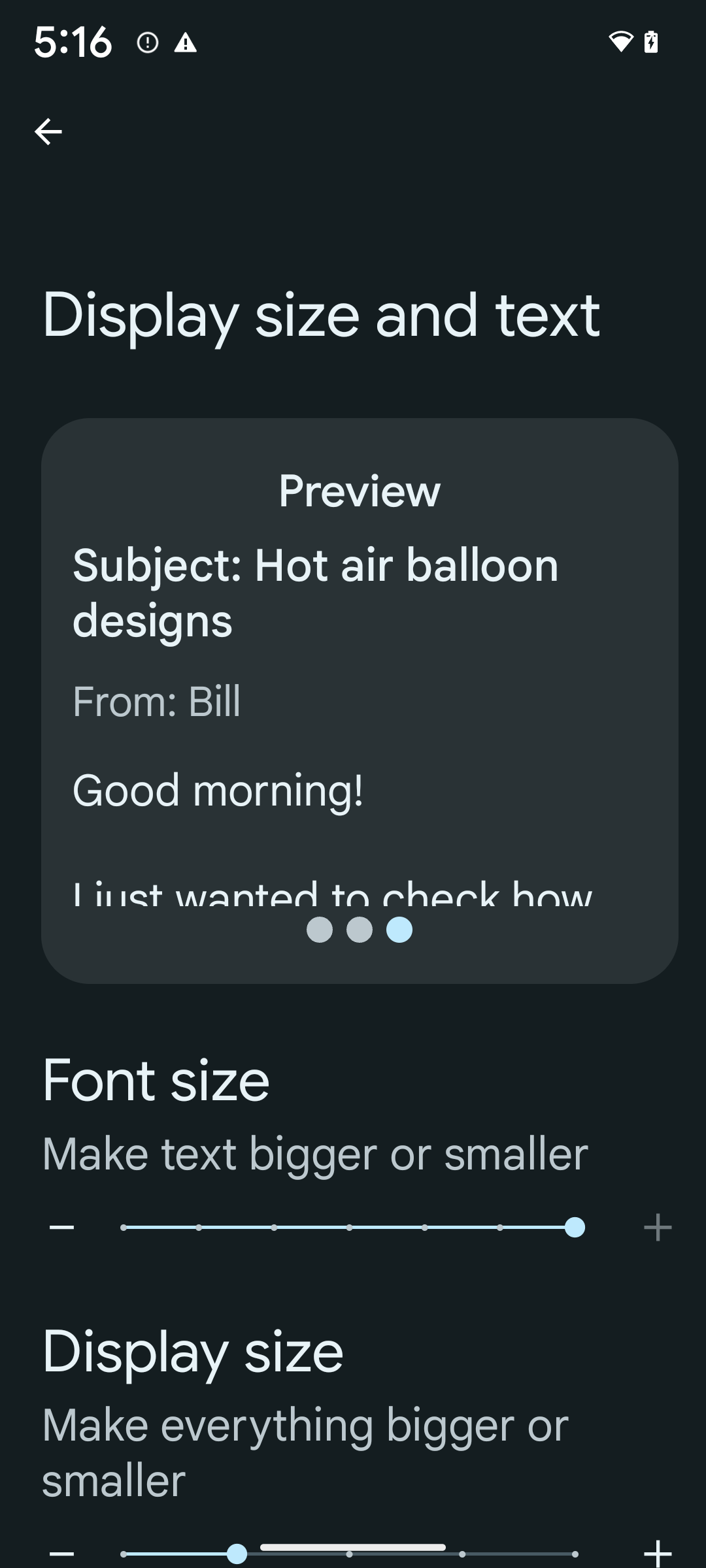
如果您已使用可缩放像素 (sp) 单位来定义文本大小,那么这些额外的选项和缩放改进会自动应用于应用中的文本。不过,您仍应在启用最大字体大小 (200%) 的情况下执行界面测试,以确保应用正确应用字体大小,并且可以容纳更大的字体大小,而不会影响易用性。
要启用 200% 字号,请按以下步骤操作:
- 打开“设置”应用,然后依次前往无障碍 > 显示大小和文字。
- 在字号选项中,点按加号 (+) 图标,直到启用最大字号设置,如本部分随附的图片所示。
针对文本大小使用放大像素 (sp) 单位
请务必始终以 sp 为单位指定文本大小。当应用使用 sp 单位时,Android 可以应用用户的首选文本大小,并相应地进行缩放。
不要为内边距使用 sp 单位,也不要定义假设存在隐式内边距的视图高度:使用非线性字体放大 sp 尺寸可能并不成比例,因此 4sp + 20sp 可能并不等于 24sp。
转换放大像素 (sp) 单位
使用 TypedValue.applyDimension() 从 sp 单位转换为像素,并使用 TypedValue.deriveDimension() 将像素转换为 sp。这些方法会自动应用适当的非线性放大曲线。
避免使用 Configuration.fontScale 或 DisplayMetrics.scaledDensity 对等式进行硬编码。由于字体放大是非线性的,因此 scaledDensity 字段不再准确。fontScale 字段应仅用于提供信息,因为字体不再使用单个标量值进行缩放。
针对 lineHeight 使用 sp 单位
请始终使用 sp 单位(而非 dp)定义 android:lineHeight,以便行高随文本一起缩放。否则,如果您的文字是 sp,但 lineHeight 是 dp 或像素,则文字不会缩放,看起来会很拥挤。
TextView 会自动更正 lineHeight,以便保留您预期的比例,但前提是 textSize 和 lineHeight 均以 sp 单位定义。
Câmera e mídia
Ultra HDR para imagens

O Android 14 adiciona suporte a imagens de High Dynamic Range (HDR) que retêm mais informações do sensor ao tirar uma foto, o que permite cores vibrantes e maior contraste. O Android usa o formato Ultra HDR, que é totalmente compatível com versões anteriores de imagens JPEG, permitindo que os apps interajam perfeitamente com imagens HDR, exibindo-as no intervalo dinâmico padrão (SDR, na sigla em inglês) conforme necessário.
A renderização dessas imagens na interface em HDR é feita automaticamente pelo framework
quando o app opta por usar a interface HDR para a janela de atividade, seja por uma
entrada de manifesto ou no momento da execução, chamando
Window.setColorMode(). Também é possível capturar imagens estáticas Ultra
HDR compactadas em dispositivos compatíveis. Com mais cores recuperadas
do sensor, a edição na pós-produção pode ser mais flexível. O
Gainmap associado a imagens Ultra HDR pode ser usado para renderizá-las
usando OpenGL ou Vulkan.
Zoom, foco, pós-visualização e muito mais nas extensões de câmera
Android 14 升级并改进了相机扩展程序,让应用能够处理更长的处理时间,从而支持在受支持的设备上使用计算密集型算法(例如弱光摄影)来改善图片。这些功能可让用户在使用相机扩展功能时获得更出色的体验。这些改进的示例包括:
- 动态静态拍摄处理延迟时间估算功能可根据当前场景和环境条件提供更准确的静态拍摄延迟时间估算值。调用
CameraExtensionSession.getRealtimeStillCaptureLatency()可获取具有两种延迟时间估算方法的StillCaptureLatency对象。getCaptureLatency()方法会返回onCaptureStarted和onCaptureProcessStarted()之间的估算延迟时间,而getProcessingLatency()方法会返回onCaptureProcessStarted()和可用的最终处理帧之间的估算延迟时间。 - 支持拍摄进度回调,以便应用可以显示长时间运行的静态拍摄处理操作的当前进度。您可以检查
CameraExtensionCharacteristics.isCaptureProcessProgressAvailable是否支持此功能,如果支持,则实现onCaptureProcessProgressed()回调,并将进度(从 0 到 100)作为参数传入。 扩展程序专用元数据,例如用于调节扩展程序效果(例如背景虚化程度)的
CaptureRequest.EXTENSION_STRENGTH和EXTENSION_BOKEH。相机扩展程序中的静态图片拍摄预览功能,该功能比最终图片更快地提供经过较少处理的图片。如果扩展程序的处理延迟时间增加,可以提供 postview 图片作为占位符以提升用户体验,并在稍后改用最终图片。您可以使用
CameraExtensionCharacteristics.isPostviewAvailable检查此功能是否可用。然后,您可以将OutputConfiguration传递给ExtensionSessionConfiguration.setPostviewOutputConfiguration。支持
SurfaceView,可实现更优化且能效更高的预览渲染路径。支持在使用扩展程序时点按对焦和缩放。
Zoom no sensor
Quando REQUEST_AVAILABLE_CAPABILITIES_STREAM_USE_CASE em
CameraCharacteristics contém
SCALER_AVAILABLE_STREAM_USE_CASES_CROPPED_RAW, o app
pode usar recursos avançados do sensor para fornecer a um fluxo RAW cortado os mesmos
pixels do campo de visão completo usando um CaptureRequest
com um destino RAW que tenha o caso de uso do fluxo definido como
CameraMetadata.SCALER_AVAILABLE_STREAM_USE_CASES_CROPPED_RAW.
Ao implementar os controles de substituição de solicitação, a câmera atualizada oferece aos usuários
o controle de zoom antes mesmo que outros controles da câmera estejam prontos.
Áudio USB sem perdas
O Android 14 oferece suporte a formatos de áudio sem perda para experiências
de áudio de alta qualidade com fones de ouvido com fio USB. É possível consultar um dispositivo USB para saber os
atributos de mixer preferidos, registrar um listener para mudanças nos atributos
de mixer preferidos e configurar atributos de mixer usando a
classe AudioMixerAttributes. Essa classe representa o
formato, como máscara de canal, taxa de amostragem e comportamento do mixer de áudio. A
classe permite que o áudio seja enviado diretamente, sem mixagem,
ajuste de volume ou efeitos de processamento.
Produtividade e ferramentas para desenvolvedores
Credential Manager
Android 14 adds Credential Manager as a platform API, with additional support back to Android 4.4 (API level 19) devices through a Jetpack Library using Google Play services. Credential Manager aims to make sign-in easier for users with APIs that retrieve and store credentials with user-configured credential providers. Credential Manager supports multiple sign-in methods, including username and password, passkeys, and federated sign-in solutions (such as Sign-in with Google) in a single API.
Passkeys provide many advantages. For example, passkeys are built on industry standards, can work across different operating systems and browser ecosystems, and can be used with both websites and apps.
For more information, see the Credential Manager and passkeys documentation and the blogpost about Credential Manager and passkeys.
Conexão Saúde
Health Connect is an on-device repository for user health and fitness data. It allows users to share data between their favorite apps, with a single place to control what data they want to share with these apps.
On devices running Android versions prior to Android 14, Health Connect is available to download as an app on the Google Play store. Starting with Android 14, Health Connect is part of the platform and receives updates through Google Play system updates without requiring a separate download. With this, Health Connect can be updated frequently, and your apps can rely on Health Connect being available on devices running Android 14 or higher. Users can access Health Connect from the Settings in their device, with privacy controls integrated into the system settings.


Health Connect includes several new features in Android 14, such as exercise routes, allowing users to share a route of their workout which can be visualized on a map. A route is defined as a list of locations saved within a window of time, and your app can insert routes into exercise sessions, tying them together. To ensure that users have complete control over this sensitive data, users must allow sharing individual routes with other apps.
For more information, see the Health Connection documentation and the blogpost on What's new in Android Health.
Atualizações do OpenJDK 17
Android 14 continues the work of refreshing Android's core libraries to align with the features in the latest OpenJDK LTS releases, including both library updates and Java 17 language support for app and platform developers.
The following features and improvements are included:
- Updated approximately 300
java.baseclasses to Java 17 support. - Text Blocks, which introduce multi-line string literals to the Java programming language.
- Pattern Matching for instanceof, which allows an object to
be treated as having a specific type in an
instanceofwithout any additional variables. - Sealed classes, which allow you restrict which classes and interfaces can extend or implement them.
Thanks to Google Play system updates (Project Mainline), over 600 million devices are enabled to receive the latest Android Runtime (ART) updates that include these changes. This is part of our commitment to give apps a more consistent, secure environment across devices, and to deliver new features and capabilities to users independent of platform releases.
Java and OpenJDK are trademarks or registered trademarks of Oracle and/or its affiliates.
Melhorias para app stores
Android 14 引入了多个 PackageInstaller API,可帮助应用商店改善其用户体验。
下载之前请求批准安装
安装或更新应用可能需要用户批准。例如,当使用 REQUEST_INSTALL_PACKAGES 权限的安装程序尝试安装新应用时。在之前的 Android 版本中,只有在将 APK 写入安装会话并且提交会话后,应用商店才能请求用户批准。
从 Android 14 开始,requestUserPreapproval() 方法可让安装程序在提交安装会话之前请求用户批准。此项改进可让应用商店将任何 APK 的下载操作推迟到用户批准安装之后。此外,用户批准安装后,应用商店可以在后台下载并安装应用,而不会干扰用户。
承担未来更新的责任
借助 setRequestUpdateOwnership() 方法,安装程序可以向系统表明它打算负责将被安装的应用未来的更新。此 capability 可实现更新所有权强制执行,即仅允许更新所有者为应用安装自动更新。更新所有权强制执行有助于确保用户仅收到来自预期应用商店的更新。
任何其他安装程序(包括使用 INSTALL_PACKAGES 权限的安装程序)都必须获得用户的明确批准,才能安装更新。如果用户决定继续从其他来源安装更新,则会失去更新所有权。
在干扰较少的时段更新应用
应用商店通常希望避免更新正在使用的应用,因为这会导致应用正在运行的进程被终止,而这可能会中断用户正在执行的操作。
从 Android 14 开始,InstallConstraints API 让安装程序可以确保其应用更新在适当的时机进行。例如,应用商店可以调用 commitSessionAfterInstallConstraintsAreMet() 方法来确保仅在用户不再与相应应用互动时才进行更新。
无缝安装可选拆分
借助拆分 APK,应用的功能可以通过单独的 APK 文件提供,而不是以单体式 APK 的形式提供。借助拆分 APK,应用商店可以优化不同应用组件的提供。例如,应用商店可能会根据目标设备的属性进行优化。自在 API 级别 22 中引入以来,PackageInstaller API 一直支持拆分。
在 Android 14 中,setDontKillApp() 方法可让安装程序指明在安装新的拆分项时应用的运行进程不应终止。应用商店可以使用此功能,在用户使用应用时无缝安装应用的新功能。
Pacotes de metadados do app
Starting in Android 14, the Android package installer lets you specify app metadata, such as data safety practices, to include on app store pages such as Google Play.
Detectar quando usuários fazem capturas de tela no dispositivo
To create a more standardized experience for detecting screenshots, Android 14 introduces a privacy-preserving screenshot detection API. This API lets apps register callbacks on a per-activity basis. These callbacks are invoked, and the user is notified, when the user takes a screenshot while that activity is visible.
Experiência do usuário
Ações personalizadas e melhoria na classificação do Sharesheet
Android 14 updates the system sharesheet to support custom app actions and more informative preview results for users.
Add custom actions
With Android 14, your app can add custom actions to the system sharesheet it invokes.

Improve ranking of Direct Share targets
Android 14 uses more signals from apps to determine the ranking of the direct share targets to provide more helpful results for the user. To provide the most useful signal for ranking, follow the guidance for improving rankings of your Direct Share targets. Communication apps can also report shortcut usage for outgoing and incoming messages.

Suporte a animações de voltas preditivas integradas e personalizadas
Android 13 在开发者选项背后引入了预测性“返回主屏幕”动画。在已启用开发者选项的受支持应用中使用时,滑回手势会显示动画,表明返回手势会使应用退回到主屏幕。
Android 14 包含针对“预测性返回”的多项改进和新指南:
- 您可设置
android:enableOnBackInvokedCallback=true,以便为每个 activity 选择启用预测性返回系统动画,而不是为整个应用选择启用。 - 我们添加了新的系统动画,以配合 Android 13 中的“返回主屏幕”动画。新的系统动画是跨 activity 和跨任务的,您可在迁移到预测性返回后自动获得该动画。
- 我们为底部动作条、侧边动作条和搜索添加了新的 Material 组件动画。
- 我们制作了有关如何创建自定义应用内动画和转换的设计指南。
- 我们添加了许多新 API 来支持自定义的应用内转换动画:
在此 Android 14 预览版中,所有预测性返回功能都是位于开发者选项背后。请参阅与将您的应用迁移到预测性返回有关的开发者指南,以及与创建自定义应用内转换有关的开发者指南。
Substituições por app do fabricante de dispositivos de tela grande
As substituições por app permitem que os fabricantes mudem o comportamento dos apps em dispositivos de tela grande. Por exemplo, a substituição FORCE_RESIZE_APP instrui o sistema a redimensionar o app para que se ajuste às dimensões de exibição (evitando o modo de compatibilidade de tamanho), mesmo que resizeableActivity="false" esteja definido no manifesto do app.
As substituições têm como objetivo melhorar a experiência do usuário em telas grandes.
As novas propriedades do manifesto permitem desativar algumas substituições do fabricante do dispositivo para o app.
Substituições por app para usuários de telas grandes
As substituições por app mudam o comportamento dos apps em dispositivos de tela grande. Por exemplo, a substituição do fabricante do dispositivo OVERRIDE_MIN_ASPECT_RATIO_LARGE define a proporção do app como 16:9, independente da configuração dele.
O Android 14 QPR1 permite que os usuários apliquem substituições por app usando um novo menu de configurações em dispositivos de tela grande.
Compartilhamento de tela de app
O compartilhamento de tela de apps permite que os usuários compartilhem uma janela de app em vez de toda a tela do dispositivo durante a gravação do conteúdo da tela.
Com o compartilhamento de tela do app, a barra de status, a barra de navegação, as notificações e outros elementos da interface do sistema são excluídos da tela compartilhada. Somente o conteúdo do app selecionado é compartilhado.
O compartilhamento de tela de apps melhora a produtividade e a privacidade, permitindo que os usuários executem vários apps, mas limitem o compartilhamento de conteúdo a um único app.
Resposta inteligente com tecnologia de LLM no Gboard do Pixel 8 Pro
Em dispositivos Pixel 8 Pro com a versão de dezembro, os desenvolvedores podem testar respostas inteligentes de maior qualidade no Gboard com modelos de linguagem grandes (LLMs) no dispositivo em execução no Google Tensor.
Esse recurso está disponível como uma prévia limitada para o inglês dos EUA no WhatsApp, no Line e no KakaoTalk. É necessário usar um dispositivo Pixel 8 Pro com o Gboard como teclado.
Para testar, primeiro ative o recurso em Configurações > Opções do desenvolvedor > Configurações do AICore > Ativar o AICore persistente.
Em seguida, abra uma conversa em um app compatível para conferir a resposta inteligente com LLM na faixa de sugestões do Gboard em resposta às mensagens recebidas.
Gráficos
Os caminhos podem ser consultados e interpolados
A API Path do Android é um mecanismo avançado e flexível para
criar e renderizar gráficos vetoriais, com a capacidade de traçar ou preencher um
caminho, construir um caminho a partir de segmentos de linha ou curvas quadráticas ou cúbicas, realizar
operações booleanas para conseguir formas ainda mais complexas ou todas essas
formas simultaneamente. Uma limitação é a capacidade de descobrir o que está
presente em um objeto de caminho. Os componentes internos do objeto são opacos para autores de chamadas
após a criação.
Para criar um Path, chame métodos como
moveTo(), lineTo() e
cubicTo() para adicionar segmentos de caminho. Mas não há uma maneira de perguntar a esse caminho quais são os segmentos. Portanto, você precisa manter essas informações no momento da criação.
A partir do Android 14, é possível consultar caminhos para descobrir o que há dentro deles.
Primeiro, você precisa conseguir um objeto PathIterator usando a API Path.getPathIterator:
Kotlin
val path = Path().apply {
    moveTo(1.0f, 1.0f)
    lineTo(2.0f, 2.0f)
    close()
}
val pathIterator = path.pathIterator
Java
Path path = new Path();
path.moveTo(1.0F, 1.0F);
path.lineTo(2.0F, 2.0F);
path.close();
PathIterator pathIterator = path.getPathIterator();
Em seguida, chame PathIterator para iterar os segmentos um por um, recuperando todos os dados necessários para cada segmento. Este exemplo
usa objetos PathIterator.Segment, que empacotam os dados
para você:
Kotlin
for (segment in pathIterator) {
    println("segment: ${segment.verb}, ${segment.points}")
}
Java
while (pathIterator.hasNext()) {
    PathIterator.Segment segment = pathIterator.next();
    Log.i(LOG_TAG, "segment: " + segment.getVerb() + ", " + segment.getPoints());
}
O PathIterator também tem uma versão não alocada de next(), em que é possível transmitir
um buffer para armazenar os dados dos pontos.
Um dos casos de uso importantes para consultar os dados Path é a interpolação. Por
exemplo, você pode querer animar (ou transformar) entre dois caminhos diferentes. Para
simplificar ainda mais esse caso de uso, o Android 14 também inclui o
método interpolate() em Path. Supondo que os dois caminhos tenham
a mesma estrutura interna, o método interpolate() cria um novo Path
com esse resultado interpolado. Este exemplo retorna um caminho com um formato que está
na metade do caminho (uma interpolação linear de 0,5) entre path e otherPath:
Kotlin
val interpolatedResult = Path()
if (path.isInterpolatable(otherPath)) {
    path.interpolate(otherPath, .5f, interpolatedResult)
}
Java
Path interpolatedResult = new Path();
if (path.isInterpolatable(otherPath)) {
    path.interpolate(otherPath, 0.5F, interpolatedResult);
}
A biblioteca graphics-path do Jetpack também permite APIs semelhantes em versões anteriores do Android.
Malhas personalizadas com shaders de vértice e fragmento
Android has long supported drawing triangle meshes with custom shading, but the input mesh format has been limited to a few predefined attribute combinations. Android 14 adds support for custom meshes, which can be defined as triangles or triangle strips, and can, optionally, be indexed. These meshes are specified with custom attributes, vertex strides, varying, and vertex and fragment shaders written in AGSL.
The vertex shader defines the varyings, such as position and color, while the
fragment shader can optionally define the color for the pixel, typically by
using the varyings created by the vertex shader. If color is provided by the
fragment shader, it is then blended with the current Paint
color using the blend mode selected when
drawing the mesh. Uniforms can be passed
into the fragment and vertex shaders for additional flexibility.
Renderizador de buffer de hardware para Canvas
Para ajudar no uso da API Canvas do Android para desenhar com
aceleração de hardware em um HardwareBuffer, Android 14
apresenta o HardwareBufferRenderer. Essa API é
particularmente útil quando seu caso de uso envolve a comunicação com o compositor
do sistema usando SurfaceControl para renderização
de baixa latência.