

پلتفرم اندروید ۱۶ شامل تغییرات رفتاری است که ممکن است بر برنامه شما تأثیر بگذارد. تغییرات رفتاری زیر برای همه برنامهها هنگام اجرا در اندروید ۱۶، صرف نظر از targetSdkVersion ، اعمال میشود. شما باید برنامه خود را آزمایش کنید و سپس در صورت لزوم، آن را برای پشتیبانی از این تغییرات، در صورت لزوم، اصلاح کنید.
حتماً فهرست تغییرات رفتاری که فقط بر برنامههای اندروید ۱۶ تأثیر میگذارند را نیز بررسی کنید.
عملکرد اصلی
اندروید ۱۶ (سطح API ۳۶) شامل تغییرات زیر است که قابلیتهای اصلی مختلف سیستم اندروید را اصلاح یا گسترش میدهد.
بهینهسازی سهمیهبندی JobScheduler
از Android 16 شروع میکنیم، ما سهمیه زمان اجرای کار را به طور منظم و سریع بر اساس عوامل زیر تنظیم میکنیم:
- برنامه در کدام سطل آماده به کار برنامه قرار دارد : در Android 16، سطل های آماده به کار فعال با یک سهمیه زمان اجرا سخاوتمندانه شروع به اجرا می کنند.
- اگر کار در حالی که برنامه در بالاترین وضعیت است اجرا شود : در Android 16، Jobs زمانی که برنامه برای کاربر قابل مشاهده است شروع می شود و پس از نامرئی شدن برنامه ادامه می یابد، به سهمیه زمان اجرای کار پایبند خواهد بود.
- اگر کار هنگام اجرای یک سرویس پیشزمینه اجرا میشود : در Android 16، کارهایی که همزمان با یک سرویس پیشزمینه اجرا میشوند، به سهمیه زمان اجرای کار پایبند هستند. اگر از کارهایی برای انتقال داده توسط کاربر استفاده می کنید، به جای آن از کارهای انتقال داده توسط کاربر استفاده کنید.
این تغییر بر وظایف برنامه ریزی شده با استفاده از WorkManager، JobScheduler و DownloadManager تأثیر می گذارد. برای رفع اشکال چرایی توقف کار، توصیه میکنیم با فراخوانی WorkInfo.getStopReason() ثبت کنید که چرا کارتان متوقف شده است (برای کارهای JobScheduler، با JobParameters.getStopReason() ) تماس بگیرید.
برای اطلاعات در مورد اینکه چگونه وضعیت برنامه شما بر منابعی که میتواند استفاده کند تأثیر میگذارد، به محدودیتهای منابع مدیریت نیرو مراجعه کنید. برای اطلاعات بیشتر در مورد بهترین شیوه های باتری بهینه، به راهنمای بهینه سازی استفاده از باتری برای API های زمان بندی کار مراجعه کنید.
همچنین توصیه میکنیم از API جدید JobScheduler#getPendingJobReasonsHistory که در اندروید 16 معرفی شده است استفاده کنید تا بفهمید چرا یک کار اجرا نشده است.
تست کردن
برای آزمایش رفتار برنامهتان، میتوانید تا زمانی که برنامه روی دستگاه Android 16 اجرا میشود، برخی بهینهسازیهای سهمیه شغلی را لغو کنید.
برای غیرفعال کردن اجرای "نقطه بالا به سهمیه زمان اجرا پایبند خواهد بود"، دستور adb زیر را اجرا کنید:
adb shell am compat enable OVERRIDE_QUOTA_ENFORCEMENT_TO_TOP_STARTED_JOBS APP_PACKAGE_NAME
برای غیرفعال کردن اجرای «کارهایی که همزمان با یک سرویس پیشزمینه اجرا میشوند، به سهمیه زمان اجرای کار پایبند هستند»، دستور adb زیر را اجرا کنید:
adb shell am compat enable OVERRIDE_QUOTA_ENFORCEMENT_TO_FGS_JOBS APP_PACKAGE_NAME
برای آزمایش رفتار سطل آماده به کار برنامه خاص، می توانید با استفاده از دستور adb زیر، سطل استندبای برنامه برنامه خود را تنظیم کنید:
adb shell am set-standby-bucket APP_PACKAGE_NAME active|working_set|frequent|rare|restricted
برای درک سطل استندبای برنامه که برنامه شما در آن قرار دارد، میتوانید با استفاده از دستور adb زیر، سطل استندبای برنامه برنامه خود را دریافت کنید:
adb shell am get-standby-bucket APP_PACKAGE_NAME
دلیل توقف مشاغل خالی رها شده
یک کار رها شده زمانی اتفاق میافتد که شی JobParameters مرتبط با کار زباله جمعآوری شده باشد، اما JobService#jobFinished(JobParameters, boolean) برای علامت دادن به اتمام کار فراخوانی نشده است. این نشان میدهد که کار ممکن است بدون اطلاع برنامه در حال اجرا و زمانبندی مجدد باشد.
برنامههایی که به JobScheduler متکی هستند، ارجاع قوی به شی JobParameters ندارند، و به جای STOP_REASON_TIMEOUT ، به دلیل توقف کار جدید STOP_REASON_TIMEOUT_ABANDONED اعطا میشود.
اگر موارد مکرر دلیل توقف رها شده جدید وجود داشته باشد، سیستم اقدامات کاهشی را برای کاهش فراوانی کار انجام خواهد داد.
برنامهها باید از دلیل توقف جدید برای شناسایی و کاهش مشاغل رها شده استفاده کنند.
اگر از WorkManager، AsyncTask یا DownloadManager استفاده میکنید، تحت تأثیر قرار نمیگیرید زیرا این APIها چرخه عمر کار را از طرف برنامه شما مدیریت میکنند.
JobInfo#setImportantWhileForeground کاملاً منسوخ شده است
روش JobInfo.Builder#setImportantWhileForeground(boolean) اهمیت یک کار را در زمانی که برنامه زمانبندی در پیشزمینه است یا به طور موقت از محدودیتهای پسزمینه معاف است، نشان میدهد.
این روش از اندروید 12 (سطح API 31) منسوخ شده است. با شروع اندروید 16، دیگر به طور موثر عمل نمی کند و فراخوانی این روش نادیده گرفته می شود.
این حذف عملکرد برای JobInfo#isImportantWhileForeground() نیز اعمال می شود. با شروع در اندروید 16، اگر متد فراخوانی شود، متد false برمیگرداند.
محدوده اولویت پخش مرتبشده دیگر سراسری نیست
برنامههای اندرویدی مجاز به تعریف اولویتها در گیرندههای پخش برای کنترل ترتیب دریافت و پردازش پخش توسط گیرندهها هستند. برای گیرندههای اعلامشده با مانیفست، برنامهها میتوانند از ویژگی android:priority برای تعریف اولویت و برای گیرندههای ثبت شده در متن، برنامهها میتوانند از API IntentFilter#setPriority() برای تعریف اولویت استفاده کنند. هنگامی که یک پخش ارسال می شود، سیستم آن را به ترتیب اولویت، از بالاترین به پایین ترین، به گیرنده ها تحویل می دهد.
در Android 16، سفارش تحویل پخش با استفاده از ویژگی android:priority یا IntentFilter#setPriority() در فرآیندهای مختلف تضمین نمی شود. اولویتهای پخش فقط در همان فرآیند درخواست رعایت میشوند و نه در همه فرآیندها.
همچنین، اولویتهای پخش بهطور خودکار به محدوده ( SYSTEM_LOW_PRIORITY + 1، SYSTEM_HIGH_PRIORITY - 1) محدود میشوند. فقط اجزای سیستم مجاز به تنظیم SYSTEM_LOW_PRIORITY ، SYSTEM_HIGH_PRIORITY به عنوان اولویت پخش خواهند بود.
اگر برنامه شما یکی از موارد زیر را انجام دهد ممکن است تحت تأثیر قرار گیرد:
- برنامه شما چندین فرآیند را با هدف پخش یکسان اعلام کرده است و انتظاراتی در مورد دریافت آن مقاصد با ترتیب خاصی بر اساس اولویت دارد.
- فرآیند درخواست شما با سایر فرآیندها در تعامل است و انتظاراتی در مورد دریافت هدف پخش با ترتیب خاصی دارد.
اگر فرآیندها نیاز به هماهنگی با یکدیگر دارند، باید با استفاده از کانال های هماهنگی دیگر ارتباط برقرار کنند.
تغییرات داخلی ART
Android 16 شامل آخرین بهروزرسانیهای Android Runtime (ART) است که عملکرد Android Runtime (ART's) را بهبود میبخشد و از ویژگیهای اضافی جاوا پشتیبانی میکند. از طریق بهروزرسانیهای سیستم Google Play، این بهبودها برای بیش از یک میلیارد دستگاه دارای Android 12 (سطح API 31) و بالاتر نیز در دسترس است.
با انتشار این تغییرات، کتابخانهها و کد برنامههایی که به ساختارهای داخلی ART متکی هستند ممکن است در دستگاههای دارای Android 16 به درستی کار نکنند، همراه با نسخههای قبلی اندروید که ماژول ART را از طریق بهروزرسانیهای سیستم Google Play بهروزرسانی میکنند.
اتکا به ساختارهای داخلی (مانند رابطهای غیر SDK ) همیشه میتواند منجر به مشکلات سازگاری شود، اما بسیار مهم است که از تکیه بر کد (یا کتابخانههای حاوی کد) که از ساختارهای داخلی ART استفاده میکنند، اجتناب کنید، زیرا تغییرات ART به پلتفرم مرتبط نیست. نسخه ای که دستگاه در حال اجرا است و آنها از طریق به روز رسانی سیستم Google Play به بیش از یک میلیارد دستگاه می روند.
همه برنامهنویسها باید با آزمایش کامل برنامههایشان در Android 16 بررسی کنند که آیا برنامهشان تحت تأثیر قرار گرفته است یا خیر. علاوه بر این، مسائل شناختهشده را بررسی کنید تا ببینید آیا برنامه شما به کتابخانههایی وابسته است که ما شناسایی کردهایم که به ساختارهای ART داخلی متکی هستند یا خیر. اگر کد برنامه یا وابستگیهای کتابخانهای دارید که تحت تأثیر قرار گرفتهاند، در صورت امکان به دنبال جایگزینهای API عمومی باشید و با ایجاد یک درخواست ویژگی در ردیاب مشکل ما، APIهای عمومی را برای موارد استفاده جدید درخواست کنید.
حالت سازگاری با اندازه صفحه ۱۶ کیلوبایت
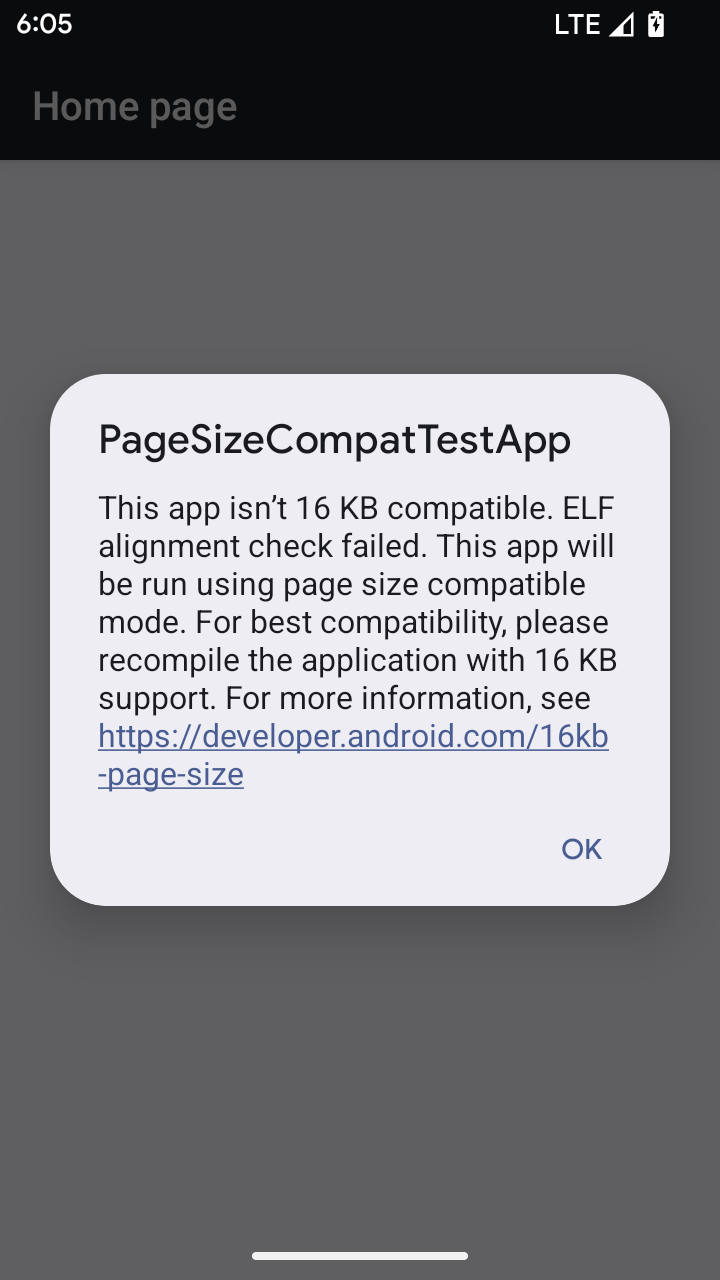
اندروید 15 برای بهینه سازی عملکرد پلتفرم، پشتیبانی از صفحات حافظه 16 کیلوبایتی را معرفی کرد. Android 16 یک حالت سازگاری اضافه می کند که به برخی از برنامه های ساخته شده برای صفحات حافظه 4 کیلوبایتی اجازه می دهد روی دستگاهی که برای صفحات حافظه 16 کیلوبایتی پیکربندی شده است اجرا شوند.
وقتی برنامه شما روی دستگاهی با Android 16 یا بالاتر اجرا می شود، اگر Android تشخیص دهد که برنامه شما دارای صفحات حافظه تراز شده 4 کیلوبایتی است، به طور خودکار از حالت سازگاری استفاده می کند و یک گفتگوی اعلان را به کاربر نمایش می دهد. تنظیم ویژگی android:pageSizeCompat در AndroidManifest.xml برای فعال کردن حالت سازگاری به عقب، از نمایش دیالوگ هنگام راهاندازی برنامه شما جلوگیری میکند. برای استفاده از ویژگی android:pageSizeCompat ، برنامه خود را با استفاده از Android 16 SDK کامپایل کنید.
برای بهترین عملکرد، قابلیت اطمینان و پایداری، برنامه شما همچنان باید 16 کیلوبایت تراز باشد. برای جزئیات بیشتر، پست وبلاگ اخیر ما را در مورد به روز رسانی برنامه های خود برای پشتیبانی از صفحات حافظه 16 کیلوبایتی بررسی کنید.
تجربه کاربری و رابط کاربری سیستم
اندروید ۱۶ (سطح API ۳۶) شامل تغییرات زیر است که برای ایجاد یک تجربه کاربری سازگارتر و شهودیتر در نظر گرفته شدهاند.
بیاعتبار کردن اعلانهای اختلال در دسترسیپذیری
Android 16 اعلامیههای دسترسپذیری را که با استفاده از announceForAccessibility یا ارسال رویدادهای دسترسپذیری TYPE_ANNOUNCEMENT مشخص میشود، منسوخ میکند. اینها میتوانند تجربیات کاربری متناقضی را برای کاربران TalkBack و صفحهخوان Android ایجاد کنند، و جایگزینها بهتر طیف وسیعتری از نیازهای کاربر را در انواع فناوریهای کمکی Android برآورده میکنند.
نمونه هایی از جایگزین ها:
- برای تغییرات مهم رابط کاربری مانند تغییرات پنجره، از
Activity.setTitle(CharSequence)وsetAccessibilityPaneTitle(java.lang.CharSequence)استفاده کنید. در Compose، ازModifier.semantics { paneTitle = "paneTitle" }استفاده کنید - برای اطلاع کاربر از تغییرات در رابط کاربری حیاتی، از
setAccessibilityLiveRegion(int)استفاده کنید. در Compose، ازModifier.semantics { liveRegion = LiveRegionMode.[Polite|Assertive]}استفاده کنید. از این موارد باید به اندازه کافی استفاده شود زیرا ممکن است هر بار که یک View به روز می شود، اعلان ایجاد کند. - برای اطلاع دادن به کاربران در مورد خطاها،
AccessibilityEventاز نوعAccessibilityEvent#CONTENT_CHANGE_TYPE_ERRORارسال کنید وAccessibilityNodeInfo#setError(CharSequence)تنظیم کنید، یاTextView#setError(CharSequence)استفاده کنید.
اسناد مرجع برای announceForAccessibility API منسوخ شده شامل جزئیات بیشتری در مورد جایگزین های پیشنهادی است.
پشتیبانی از ناوبری سه دکمهای
Android 16 پشتیبانی پیشبینیکننده را برای پیمایش 3 دکمهای برای برنامههایی که به درستی به بازگشت پیشبینی مهاجرت کردهاند، به ارمغان میآورد. با فشار دادن طولانی دکمه برگشت، یک انیمیشن پیشبینیکننده به عقب آغاز میشود و به شما پیشنمایشی از جایی که سوایپ به عقب شما را میبرد میدهد.
این رفتار در تمام قسمتهای سیستم که از انیمیشنهای پیشبینیکننده پشتیبان پشتیبانی میکنند، اعمال میشود، از جمله انیمیشنهای سیستم (بازگشت به خانه، کار متقابل و فعالیت متقابل).
آیکونهای برنامه با تم خودکار
با شروع Android 16 QPR 2، Android به طور خودکار تم ها را روی نمادهای برنامه اعمال می کند تا یک تجربه منسجم از صفحه اصلی ایجاد کند. اگر برنامه ای نماد برنامه مضمون خود را ارائه نکند، این اتفاق می افتد. برنامهها میتوانند طراحی نماد برنامه مضمون خود را با قرار دادن یک لایه تک رنگ در نماد تطبیقی خود و پیشنمایش اینکه نماد برنامه آنها در Android Studio چگونه به نظر میرسد، کنترل کنند.
فاکتورهای شکل دستگاه
اندروید ۱۶ (سطح API ۳۶) شامل تغییرات زیر برای برنامهها هنگام نمایش روی نمایشگرها توسط دارندگان دستگاههای مجازی است.
مالک دستگاه مجازی لغو میکند
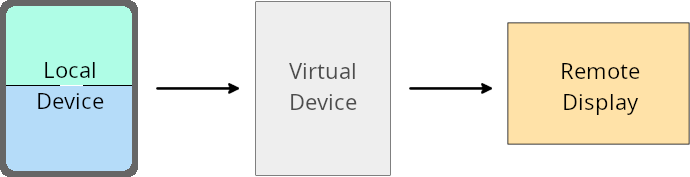
مالک دستگاه مجازی، یک برنامهی قابل اعتماد یا دارای امتیاز است که یک دستگاه مجازی را ایجاد و مدیریت میکند. مالکین دستگاه مجازی، برنامهها را روی یک دستگاه مجازی اجرا میکنند و سپس برنامهها را روی صفحه نمایش یک دستگاه از راه دور، مانند رایانه شخصی، دستگاه واقعیت مجازی یا سیستم سرگرمی خودرو، نمایش میدهند. مالک دستگاه مجازی روی یک دستگاه محلی مانند تلفن همراه قرار دارد.
لغوهای هر برنامه
در دستگاههایی که اندروید ۱۶ (سطح API ۳۶) را اجرا میکنند، صاحبان دستگاههای مجازی میتوانند تنظیمات برنامه را در دستگاههای مجازی منتخب که توسط صاحبان دستگاههای مجازی مدیریت میشوند، لغو کنند. به عنوان مثال، برای بهبود طرحبندی برنامه، صاحب دستگاه مجازی میتواند هنگام نمایش برنامهها روی یک صفحه نمایش خارجی، محدودیتهای جهتگیری، نسبت ابعاد و تغییر اندازه را نادیده بگیرد.
تغییرات رایج در شکستن قفل
رفتار اندروید ۱۶ ممکن است بر رابط کاربری برنامه شما در فرم فاکتورهای صفحه نمایش بزرگ مانند نمایشگرهای خودرو یا کرومبوکها، به ویژه طرحبندیهایی که برای نمایشگرهای کوچک در جهت عمودی طراحی شدهاند، تأثیر بگذارد. برای یادگیری نحوه تطبیق برنامه خود با همه فرم فاکتورهای دستگاه، به «درباره طرحبندیهای تطبیقی» مراجعه کنید.
منابع
امنیت
اندروید ۱۶ (سطح API ۳۶) شامل تغییراتی است که امنیت سیستم را ارتقا میدهد تا به محافظت از برنامهها و کاربران در برابر برنامههای مخرب کمک کند.
امنیت بهبود یافته در برابر حملات تغییر مسیر Intent
اندروید ۱۶ امنیت پیشفرض را در برابر حملات عمومی تغییر مسیر Intent فراهم میکند، با حداقل سازگاری و تغییرات مورد نیاز توسعهدهنده.
ما در حال معرفی راهحلهای امنیتی پیشفرض برای مقابله با سوءاستفادههای تغییر مسیر Intent هستیم. در بیشتر موارد، برنامههایی که از Intentها استفاده میکنند، معمولاً هیچ مشکل سازگاری را تجربه نمیکنند؛ ما در طول فرآیند توسعه خود معیارهایی را جمعآوری کردهایم تا نظارت کنیم که کدام برنامهها ممکن است دچار مشکل شوند.
تغییر مسیر هدف در اندروید زمانی اتفاق میافتد که یک مهاجم بتواند تا حدی یا کاملاً محتوای یک هدف مورد استفاده برای راهاندازی یک مؤلفه جدید را در چارچوب یک برنامه آسیبپذیر کنترل کند، در حالی که برنامه قربانی یک هدف فرعی غیرقابل اعتماد را در یک فیلد اضافی از یک هدف ("سطح بالا") راهاندازی میکند. این میتواند منجر به راهاندازی مؤلفههای خصوصی توسط برنامه مهاجم در چارچوب برنامه قربانی، راهاندازی اقدامات دارای امتیاز یا دسترسی به URI به دادههای حساس شود که به طور بالقوه منجر به سرقت دادهها و اجرای کد دلخواه میشود.
انصراف از مدیریت تغییر مسیر Intent
اندروید ۱۶ یک API جدید معرفی میکند که به برنامهها اجازه میدهد از محافظتهای امنیتی هنگام راهاندازی صرفنظر کنند. این ممکن است در موارد خاصی که رفتار امنیتی پیشفرض با موارد استفاده مشروع برنامه تداخل دارد، ضروری باشد.
برای کامپایل برنامههای کاربردی روی اندروید ۱۶ (سطح API ۳۶) SDK یا بالاتر
شما میتوانید مستقیماً از متد removeLaunchSecurityProtection() روی شیء Intent استفاده کنید.
val i = intent
val iSublevel: Intent? = i.getParcelableExtra("sub_intent")
iSublevel?.removeLaunchSecurityProtection() // Opt out from hardening
iSublevel?.let { startActivity(it) }
برای برنامههایی که برای اندروید ۱۵ (سطح API ۳۵) یا پایینتر کامپایل میشوند
اگرچه توصیه نمیشود، میتوانید از reflection برای دسترسی به متد removeLaunchSecurityProtection() استفاده کنید.
val i = intent
val iSublevel: Intent? = i.getParcelableExtra("sub_intent", Intent::class.java)
try {
    val removeLaunchSecurityProtection = Intent::class.java.getDeclaredMethod("removeLaunchSecurityProtection")
    removeLaunchSecurityProtection.invoke(iSublevel)
} catch (e: Exception) {
    // Handle the exception, e.g., log it
} // Opt-out from the security hardening using reflection
iSublevel?.let { startActivity(it) }
برنامههای همراه دیگر از زمانهای کشف مطلع نمیشوند
اندروید 16 رفتار جدیدی را در جریان جفت شدن دستگاه همراه معرفی می کند تا از حریم خصوصی مکان کاربر در برابر برنامه های مخرب محافظت کند. همه برنامههای همراهی که در Android 16 اجرا میشوند، دیگر مستقیماً با استفاده از RESULT_DISCOVERY_TIMEOUT از مهلت زمانی کشف مطلع نمیشوند. در عوض، کاربر از رویدادهای وقفه با یک گفتگوی بصری مطلع می شود. هنگامی که کاربر گفتگو را رد می کند، برنامه از شکست ارتباط با RESULT_USER_REJECTED آگاه می شود.
مدت زمان جستجو نیز از 20 ثانیه اولیه افزایش یافته است و کاربر در هر نقطه از جستجو می تواند کشف دستگاه را متوقف کند. اگر حداقل یک دستگاه در 20 ثانیه اول شروع جستجو کشف شود، CDM جستجو برای دستگاه های اضافی را متوقف می کند.
اتصال
اندروید ۱۶ (سطح API ۳۶) شامل تغییرات زیر در پشته بلوتوث برای بهبود اتصال با دستگاههای جانبی است.
بهبود مدیریت ضرر اوراق قرضه
با شروع اندروید 16، پشته بلوتوث برای بهبود امنیت و تجربه کاربری در هنگام شناسایی از دست دادن اوراق قرضه از راه دور، به روز شده است. قبلاً، سیستم به طور خودکار پیوند را حذف می کرد و یک فرآیند جفت سازی جدید را آغاز می کرد که می تواند منجر به جفت شدن مجدد ناخواسته شود. ما در بسیاری از موارد دیدهایم که اپلیکیشنها از رویداد از دست دادن اوراق قرضه به روشی ثابت مراقبت نمیکنند.
برای یکسان سازی این تجربه، اندروید 16 مدیریت از دست دادن اوراق قرضه را برای سیستم بهبود بخشید. اگر دستگاه بلوتوثی که قبلاً متصل شده بود، پس از اتصال مجدد تأیید اعتبار نشد، سیستم پیوند را قطع میکند، اطلاعات پیوند محلی را حفظ میکند و یک گفتگوی سیستمی را نمایش میدهد که کاربران را از گم شدن پیوند مطلع میکند و آنها را برای جفت کردن مجدد راهنمایی میکند.
،با شروع اندروید 16، پشته بلوتوث برای بهبود امنیت و تجربه کاربری در هنگام شناسایی از دست دادن اوراق قرضه از راه دور، به روز شده است. قبلاً، سیستم به طور خودکار پیوند را حذف می کرد و یک فرآیند جفت سازی جدید را آغاز می کرد که می تواند منجر به جفت شدن مجدد ناخواسته شود. ما در بسیاری از موارد دیدهایم که اپلیکیشنها از رویداد از دست دادن اوراق قرضه به روشی ثابت مراقبت نمیکنند.
برای یکسان سازی این تجربه، اندروید 16 مدیریت از دست دادن اوراق قرضه را برای سیستم بهبود بخشید. اگر دستگاه بلوتوثی که قبلاً متصل شده بود، پس از اتصال مجدد تأیید اعتبار نشد، سیستم پیوند را قطع میکند، اطلاعات پیوند محلی را حفظ میکند و یک گفتگوی سیستمی را نمایش میدهد که کاربران را از گم شدن پیوند مطلع میکند و آنها را برای جفت کردن مجدد راهنمایی میکند.
،با شروع اندروید 16، پشته بلوتوث برای بهبود امنیت و تجربه کاربری در هنگام شناسایی از دست دادن اوراق قرضه از راه دور، به روز شده است. قبلاً، سیستم به طور خودکار پیوند را حذف می کرد و یک فرآیند جفت سازی جدید را آغاز می کرد که می تواند منجر به جفت شدن مجدد ناخواسته شود. ما در بسیاری از موارد دیدهایم که اپلیکیشنها از رویداد از دست دادن اوراق قرضه به روشی ثابت مراقبت نمیکنند.
برای یکسان سازی این تجربه، اندروید 16 مدیریت از دست دادن اوراق قرضه را در سیستم بهبود بخشید. اگر دستگاه بلوتوثی که قبلاً متصل شده بود، پس از اتصال مجدد تأیید اعتبار نشد، سیستم پیوند را قطع میکند، اطلاعات پیوند محلی را حفظ میکند و یک گفتگوی سیستمی را نمایش میدهد که کاربران را از گم شدن پیوند مطلع میکند و آنها را برای جفت کردن مجدد راهنمایی میکند.