

این صفحه نحوه رسیدگی به مشکلات مربوط به حکمهای یکپارچگی را شرح میدهد.
پساز درخواست کردن یک توکن تمامیت، این گزینه را دارید که یک کادر گفتگوی Google Play به کاربر نمایش دهید. وقتی یک یا چند مشکل در حکم یکپارچگی وجود داشته باشد یا اگر استثنایی درطول درخواست Integrity API رخ دهد، میتوانید کادر گفتگو را نمایش دهید. وقتی کادر گفتگو بسته شد، میتوانید با درخواست دیگری برای دریافت یک توکن یکپارچگی، بررسی کنید که مشکل برطرف شده است یا نه. اگر درخواستهای استاندارد ارسال میکنید، باید ارائهدهنده دادهواحد (توکن) را دوباره گرم کنید تا حکم جدیدی دریافت کنید.
درخواست کادر گفتگوی تمامیت برای رفع مشکل حکم
وقتی کارخواه درخواست یک توکن تمامیت میکند، میتوانید از روش ارائهشده در
StandardIntegrityToken (Standard API) و
IntegrityTokenResponse (Classic API) استفاده کنید:
showDialog(Activity activity, int integrityDialogTypeCode).
مراحل زیر نحوه استفاده از Play Integrity API را برای نشان دادن
گفتگوی اصلاح بااستفاده از کد گفتگوی GET_LICENSED نشان میدهد.
کدهای کادر گفتگوی دیگری که برنامهتان میتواند درخواست کند بعداز این بخش فهرست شده است.
از برنامهتان کد تمامیت درخواست کنید و کد را به سرورتان ارسال کنید. میتوانید از درخواست «استاندارد» یا «قدیمی» استفاده کنید.
کاتلین
// Request an integrity token
val tokenResponse: StandardIntegrityToken = requestIntegrityToken()
// Send token to app server and get response on what to do next
val yourServerResponse: YourServerResponse = sendToServer(tokenResponse.token())
جاوا
// Request an integrity token
StandardIntegrityToken tokenResponse = requestIntegrityToken();
// Send token to app server and get response on what to do next
YourServerResponse yourServerResponse = sendToServer(tokenResponse.token());
Unity
// Request an integrity token
StandardIntegrityToken tokenResponse = RequestIntegrityToken();
// Send token to app server and get response on what to do next
YourServerResponse yourServerResponse = sendToServer(tokenResponse.Token);
Unreal Engine
// Request an integrity token
StandardIntegrityToken* Response = RequestIntegrityToken();
// Send token to app server and get response on what to do next
YourServerResponse YourServerResponse = SendToServer(Response->Token);
بومی
/// Request an integrity token
StandardIntegrityToken* response = requestIntegrityToken();
/// Send token to app server and get response on what to do next
YourServerResponse yourServerResponse = sendToServer(StandardIntegrityToken_getToken(response));
در سرورتان، کد تمامیت را رمزگشایی کنید و فیلد
appLicensingVerdictرا بررسی کنید. ممکن است چیزی شبیه این باشد:// Licensing issue { ... "accountDetails": { "appLicensingVerdict": "UNLICENSED" } }
اگر توکن حاوی
appLicensingVerdict: "UNLICENSED"است، به کارخواه برنامهتان پاسخ دهید و از آن بخواهید کادر گفتگوی صدور پروانه را نشان دهد:کاتلین
private fun getDialogTypeCode(integrityToken: String): Int{
  // Get licensing verdict from decrypted and verified integritytoken
  val licensingVerdict: String = getLicensingVerdictFromDecryptedToken(integrityToken)

  return if (licensingVerdict == "UNLICENSED") {
          1 // GET_LICENSED
      } else 0
}
جاوا
private int getDialogTypeCode(String integrityToken) {
  // Get licensing verdict from decrypted and verified integrityToken
  String licensingVerdict = getLicensingVerdictFromDecryptedToken(integrityToken);

  if (licensingVerdict.equals("UNLICENSED")) {
    return 1; // GET_LICENSED
  }
  return 0;
}
Unity
private int GetDialogTypeCode(string IntegrityToken) {
  // Get licensing verdict from decrypted and verified integrityToken
  string licensingVerdict = GetLicensingVerdictFromDecryptedToken(IntegrityToken);

  if (licensingVerdict == "UNLICENSED") {
    return 1; // GET_LICENSED
  }
  return 0;
}
Unreal Engine
private int GetDialogTypeCode(FString IntegrityToken) {
  // Get licensing verdict from decrypted and verified integrityToken
  FString LicensingVerdict = GetLicensingVerdictFromDecryptedToken(IntegrityToken);

  if (LicensingVerdict == "UNLICENSED") {
    return 1; // GET_LICENSED
  }
  return 0;
}
بومی
private int getDialogTypeCode(string integrity_token) {
  /// Get licensing verdict from decrypted and verified integrityToken
  string licensing_verdict = getLicensingVerdictFromDecryptedToken(integrity_token);

  if (licensing_verdict == "UNLICENSED") {
    return 1; // GET_LICENSED
  }
  return 0;
}
در برنامهتان،
showDialogرا با کد درخواستی بازیابیشده از سرورتان فراخوانی کنید:کاتلین
// Show dialog as indicated by the server
val showDialogType: Int? = yourServerResponse.integrityDialogTypeCode()
if (showDialogType == null) {
   return
}

// Create dialog request
val dialogRequest = StandardIntegrityDialogRequest.builder()
        .setActivity(activity)
        .setTypeCode(showDialogType)
        .setStandardIntegrityResponse(StandardIntegrityResponse.TokenResponse(token))
        .build()

// Call showDialog, the dialog will be shown on top of the provided activity
// and the task will complete when the dialog is closed.
val result: Task<Int> = standardIntegrityManager.showDialog(dialogRequest)

// Handle response code, call the Integrity API again to confirm that the
// verdict issue has been resolved.
جاوا
// Show dialog as indicated by the server
@Nullable Integer showDialogType = yourServerResponse.integrityDialogTypeCode();
if (showDialogType == null) {
   return;
}

// Create dialog request
StandardIntegrityDialogRequest dialogRequest =
    StandardIntegrityDialogRequest.builder()
        .setActivity(getActivity())
        .setTypeCode(showDialogTypeCode)
        .setStandardIntegrityResponse(new StandardIntegrityResponse.TokenResponse(token))
        .build();

// Call showDialog, the dialog will be shown on top of the provided activity
// and the task will complete when the dialog is closed.
Task<Integer> result = standardIntegrityManager.showDialog(dialogRequest);

// Handle response code, call the Integrity API again to confirm that the
// verdict issue has been resolved.
Unity
// Initialize the V2 manager. Requires Play Integrity Unity Plugin v2.0.0 or
// higher.
var standardIntegrityManager = new StandardIntegrityManagerV2();
IEnumerator ShowDialogCoroutine() {
  int showDialogType = yourServerResponse.IntegrityDialogTypeCode();

  PlayAsyncOperation<IntegrityDialogResponseCode, StandardIntegrityError> showDialogTask;

  using (var activity = UnityPlayerHelper.GetCurrentActivity())
  {
      // Create a dialog request
      var dialogRequest = new StandardIntegrityDialogRequest(tokenResponse, activity, showDialogType);

      // Call showDialog with the request, the dialog will be shown on top of the
      // provided activity and complete when the dialog is closed.
      showDialogTask = standardIntegrityManager.ShowDialog(dialogRequest);
  }

  // Wait for PlayAsyncOperation to complete.
  yield return showDialogTask;

  // Handle response code, call the Integrity API again to confirm that the
  // verdict issue been resolved.
}
Unreal Engine
// .h
void MyClass::OnShowDialogCompleted(
  EStandardIntegrityErrorCode Error,
  EIntegrityDialogResponseCode Response)
{
  // Handle response code, call the Integrity API again to confirm that the
  // verdict issue has been resolved.
}

// .cpp
void MyClass::RequestIntegrityToken()
{
  UStandardIntegrityToken* Response = ...
  int TypeCode = YourServerResponse.integrityDialogTypeCode();

  // Create a delegate to bind the callback function.
  FShowDialogStandardOperationCompletedDelegate Delegate;

  // Bind the completion handler (OnShowDialogCompleted) to the delegate.
  Delegate.BindDynamic(this, &MyClass::OnShowDialogCompleted);

  // Call ShowDialog with TypeCode which completes when the dialog is closed.
  Response->ShowDialog(TypeCode, Delegate);
}
بومی
// Show dialog as indicated by the server
int show_dialog_type = yourServerResponse.integrityDialogTypeCode();
if(show_dialog_type == 0){
return;
}

/// Create dialog request
StandardIntegrityDialogRequest* dialog_request;
StandardIntegrityDialogRequest_create(&dialog_request);
StandardIntegrityDialogRequest_setTypeCode(dialog_request, show_dialog_type);
StandardIntegrityDialogRequest_setActivity(dialog_request, activity);
StandardIntegrityDialogRequest_setStandardIntegrityToken(dialog_request,
                                              token_response);

/// Call showDialog with the dialog request. The dialog will be shown on top
/// of the provided activity and complete when the dialog is closed by the
/// user.
StandardIntegrityDialogResponse* dialog_response;
StandardIntegrityErrorCode error_code =
  StandardIntegrityManager_showDialog(dialog_request, &dialog_response);

/// Use polling to wait for the async operation to complete. Note, the polling
/// shouldn't block the thread where the StandardIntegrityManager is running.
IntegrityDialogResponseCode response_code = INTEGRITY_DIALOG_RESPONSE_UNKNOWN;
while (error_code == STANDARD_INTEGRITY_NO_ERROR) {
  error_code = StandardIntegrityDialogResponse_getResponseCode(dialog_response, &response_code);
  if(response_code != INTEGRITY_DIALOG_RESPONSE_UNKNOWN){
    break;
  }
}

/// Free memory
StandardIntegrityDialogRequest_destroy(dialog_request);
StandardIntegrityDialogResponse_destroy(dialog_response);

/// Handle response code, call the Integrity API again to confirm that the
/// verdict issues have been resolved.
کادر گفتگو در بالای فعالیت ارائهشده نمایش داده میشود. وقتی کاربر کادر گفتگو را بسته باشد، «تکلیف» با کد پاسخ تکمیل میشود.
(اختیاری) برای نمایش هرگونه کادر گفتگوی بیشتر، کد دیگری درخواست کنید. اگر درخواستهای استاندارد ارسال میکنید، باید ارائهدهنده دادهواحد را دوباره گرم کنید تا حکم جدیدی دریافت کنید.
درخواست کادر گفتگوی یکپارچگی برای رفع استثنای سمت کارخواه
اگر درخواست Integrity API با StandardIntegrityException (Standard API) یا IntegrityServiceException (Classic API) ناموفق باشد و استثنا قابلاصلاح باشد، میتوانید از کادرهای گفتگوی GET_INTEGRITY یا GET_STRONG_INTEGRITY برای رفع خطا استفاده کنید.
مراحل زیر نحوه استفاده از کادر گفتگوی GET_INTEGRITY را برای رفع خطای قابلاصلاح سمت کارخواه که توسط Integrity API گزارش شده است نشان میدهد.
بررسی کنید که استثنای برگرداندهشده از درخواست Integrity API قابلاصلاح باشد.
کاتلین
private fun isExceptionRemediable(exception: ExecutionException): Boolean {
  val cause = exception.cause
  if (cause is StandardIntegrityException && cause.isRemediable) {
      return true
  }
  return false
}
جاوا
private boolean isExceptionRemediable(ExecutionException exception) {
  Throwable cause = exception.getCause();
  if (cause instanceof StandardIntegrityException integrityException
&& integrityException.isRemediable()) {
      return true;
  }
  return false;
}
Unity
private bool IsExceptionRemediable(StandardIntegrityError error) {
  // Check if the operation resulted in a remediable error
  if (error != null && error.ErrorCode != StandardIntegrityErrorCode.NoError && error.IsRemediable) {
      return true;
  }
  return false;
}
بومی
bool IsErrorRemediable(StandardIntegrityToken* token) {
  /// Check if the error associated with the token is remediable
  bool isRemediable = false;
  if(StandardIntegrityToken_getIsRemediable(response, &isRemediable) == STANDARD_INTEGRITY_NO_ERROR){
    return isRemediable;
  }
  return false;
}
اگر استثنا قابلاصلاح است، بااستفاده از استثنای برگرداندهشده، کادر گفتگوی
GET_INTEGRITYرا درخواست کنید. کادر گفتگو روی فعالیت ارائهشده نمایش داده میشود و «تکلیف» برگرداندهشده با کد پاسخ پساز اینکه کاربر کادر گفتگو را میبندد تکمیل میشود.کاتلین
private fun showDialog(exception: StandardIntegrityException) {
  // Create a dialog request
  val standardIntegrityDialogRequest =
      StandardIntegrityDialogRequest.builder()
          .setActivity(activity)
          .setType(IntegrityDialogTypeCode.GET_INTEGRITY)
          .setStandardIntegrityResponse(ExceptionDetails(exception))
          .build()

  // Request dialog
  val responseCode: Task<Int> =
        standardIntegrityManager.showDialog(standardIntegrityDialogRequest)
}
جاوا
private void showDialog(StandardIntegrityException exception) {
  // Create a dialog request
  StandardIntegrityDialogRequest standardIntegrityDialogRequest =
      StandardIntegrityDialogRequest.builder()
          .setActivity(this.activity)
          .setType(IntegrityDialogTypeCode.GET_INTEGRITY)
          .setStandardIntegrityResponse(new ExceptionDetails(exception))
          .build();

  // Request dialog
  Task<Integer> responseCode =
        standardIntegrityManager.showDialog(standardIntegrityDialogRequest);
}
Unity
// Initialize the V2 manager. Requires Play Integrity Unity Plugin v2.0.0 or
// higher.
var standardIntegrityManager = new StandardIntegrityManagerV2();
IEnumerator ShowDialogToFixError(StandardIntegrityError error) {
  PlayAsyncOperation<IntegrityDialogResponseCode, StandardIntegrityError> showDialogTask;

  using (var activity = UnityPlayerHelper.GetCurrentActivity())
  {
      // Create a dialog request using the error
      var dialogRequest = new StandardIntegrityDialogRequest(error, activity, GET_INTEGRITY_DIALOG);

      // Request dialog
      showDialogTask = standardIntegrityManager.ShowDialog(dialogRequest);
  }

  // Wait for PlayAsyncOperation to complete.
  yield return showDialogTask;
}
بومی
private void showDialogToFixError(StandardIntegrityToken* token) {
  /// If the token request failed, and the underlying error is not fixable
  /// then return early
  if(isErrorRemediable(token)) {
    return;
  }

  /// Create dialog request
  StandardIntegrityDialogRequest* dialog_request;
  StandardIntegrityDialogRequest_create(&dialog_request);
  StandardIntegrityDialogRequest_setTypeCode(dialog_request,
                                     kGetIntegrityDialogTypeCode);
  StandardIntegrityDialogRequest_setActivity(dialog_request, activity);
  StandardIntegrityDialogRequest_setStandardIntegrityToken(dialog_request,
                                                  token_response);

  /// Call showDialog with the dialog request. The dialog will be shown on
  /// top of the provided activity and complete when the dialog is closed by
  /// the user.
  StandardIntegrityDialogResponse* dialog_response;
  StandardIntegrityErrorCode error_code =
      StandardIntegrityManager_showDialog(dialog_request, &dialog_response);

  /// Use polling to wait for the async operation to complete.
  /// Note, the polling shouldn't block the thread where the
  /// StandardIntegrityManager is running.
  IntegrityDialogResponseCode response_code = INTEGRITY_DIALOG_RESPONSE_UNKNOWN;
  while (error_code == STANDARD_INTEGRITY_NO_ERROR) {
      error_code = StandardIntegrityDialogResponse_getResponseCode(response, &response_code);
      if(response_code != INTEGRITY_DIALOG_RESPONSE_UNKNOWN){
        break;
      }
  }

  /// Free memory
  StandardIntegrityDialogRequest_destroy(dialog_request);
  StandardIntegrityDialogResponse_destroy(dialog_response);

}
اگر کد پاسخ برگرداندهشده نشاندهنده موفقیت باشد، درخواست بعدی برای توکن تمامیت باید بدون هیچ استثنایی موفقیتآمیز باشد. اگر درخواستهای استاندارد ارسال میکنید، باید ارائهدهنده کد را دوباره گرم کنید تا حکم جدیدی دریافت کنید.
کدهای کادر گفتگوی تمامیت
GET_LICENSED (کد نوع ۱)
مشکل حکم
این کادر گفتگو برای دو مشکل مناسب است:
- دسترسی غیرمجاز:
appLicensingVerdict: "UNLICENSED". این یعنی حساب کاربری حق استفاده از برنامه شما را ندارد، که این اتفاق زمانی میافتد که کاربر برنامه را جانبی بار کرده باشد یا آن را از فروشگاه برنامهای غیراز Google Play دریافت کرده باشد. - برنامه دستکاریشده:
appRecognitionVerdict: "UNRECOGNIZED_VERSION". این یعنی دودویی برنامهتان اصلاح شده است یا نسخهای نیست که Google Play آن را تشخیص دهد.
اصلاح
میتوانید کادر گفتگوی GET_LICENSED را نشان دهید تا از کاربر بخواهید برنامه اصلی را از Google Play دریافت کند. این کادر گفتگوی واحد هر دو سناریو را پوشش میدهد:
- برای کاربر بدون پروانه، پروانه Play به او اعطا میکند. این کار به کاربر امکان میدهد بهروزرسانیهای برنامه را از Google Play دریافت کند.
- برای کاربری که نسخه برنامه دستکاریشده دارد، او را راهنمایی میکند تا برنامه تغییرنیافته را از Google Play نصب کند.
وقتی کاربر کادر گفتگو را تکمیل میکند، بررسیهای تمامیت بعدی
appLicensingVerdict: "LICENSED" و appRecognitionVerdict: "PLAY_RECOGNIZED" را برمیگرداند.
تجربه کاربری نمونه

CLOSE_UNKNOWN_ACCESS_RISK (کد نوع ۲)
مشکل حکم
وقتی environmentDetails.appAccessRiskVerdict.appsDetected حاوی
"UNKNOWN_CAPTURING" یا "UNKNOWN_CONTROLLING" باشد، یعنی برنامههای دیگری
(که توسط Google Play نصب نشدهاند یا توسط سازنده دستگاه در پارتیشن سیستم پیشبار نشدهاند)
در دستگاه درحال اجرا هستند که ممکن است درحال ضبط صفحهنمایش یا
کنترل دستگاه باشند.
اصلاح
میتوانید کادر گفتگوی CLOSE_UNKNOWN_ACCESS_RISK را نشان دهید تا از کاربر خواسته شود
همه برنامههای ناشناخته را که ممکن است درحال ضبط کردن صفحهنمایش یا کنترل کردن دستگاه باشند ببندد.
اگر کاربر روی دکمه Close all تکضرب بزند، همه این برنامهها بسته میشوند.
تجربه کاربری نمونه

CLOSE_ALL_ACCESS_RISK (کد نوع ۳)
مشکل حکم
وقتی environmentDetails.appAccessRiskVerdict.appsDetected حاوی هرکدام از
"KNOWN_CAPTURING"، "KNOWN_CONTROLLING"، "UNKNOWN_CAPTURING"، یا
"UNKNOWN_CONTROLLING" باشد، یعنی برنامههایی در دستگاه درحال اجرا هستند که
میتوانند محتوای صفحهنمایش را ضبط کنند یا دستگاه را کنترل کنند.
اصلاح
میتوانید کادر گفتگوی CLOSE_ALL_ACCESS_RISK را نشان دهید تا از کاربر بخواهید همه برنامههایی را که ممکن است درحال ضبط کردن صفحهنمایش یا کنترل کردن دستگاه باشند ببندد. اگر کاربر روی دکمه Close all تکضرب بزند، همه این برنامهها در دستگاه بسته میشوند.
تجربه کاربری نمونه
GET_INTEGRITY (کد نوع ۴)
مشکل حکم
این کادر گفتگو برای هریک از مشکلات زیر مناسب است:
یکپارچگی ضعیف دستگاه: وقتی
deviceRecognitionVerdictحاویMEETS_DEVICE_INTEGRITYنباشد، ممکن است دستگاه Android اصلی و گواهیشده نباشد. برای مثال، اگر بوتلودر دستگاه باز باشد یا سیستمعامل Android بارشده در آن تصویر سازنده تأییدشده نباشد، ممکن است این اتفاق بیفتد.دسترسی غیرمجاز:
appLicensingVerdict: "UNLICENSED". این یعنی حساب کاربر حق استفاده از برنامه شما را ندارد، که این اتفاق زمانی میافتد که کاربر برنامه را جانبی بار کرده باشد یا آن را از فروشگاه برنامهای غیراز Google Play دریافت کرده باشد.برنامه دستکاریشده:
appRecognitionVerdict: "UNRECOGNIZED_VERSION". این یعنی دودویی برنامهتان اصلاح شده است یا نسخهای نیست که Google Play آن را تشخیص دهد.استثناهای سمت کارخواه: وقتی استثنای قابلاصلاحی درطول درخواست Integrity API رخ میدهد. استثناهای قابلاصلاح استثناهای Integrity API با کدهای خطایی مثل
PLAY_SERVICES_VERSION_OUTDATED،NETWORK_ERROR،PLAY_SERVICES_NOT_FOUND، و غیره هستند. میتوانید از روشexception.isRemediable()برای بررسی اینکه آیا استثنا با کادر گفتوگو قابلاصلاح است یا نه استفاده کنید.
اصلاح
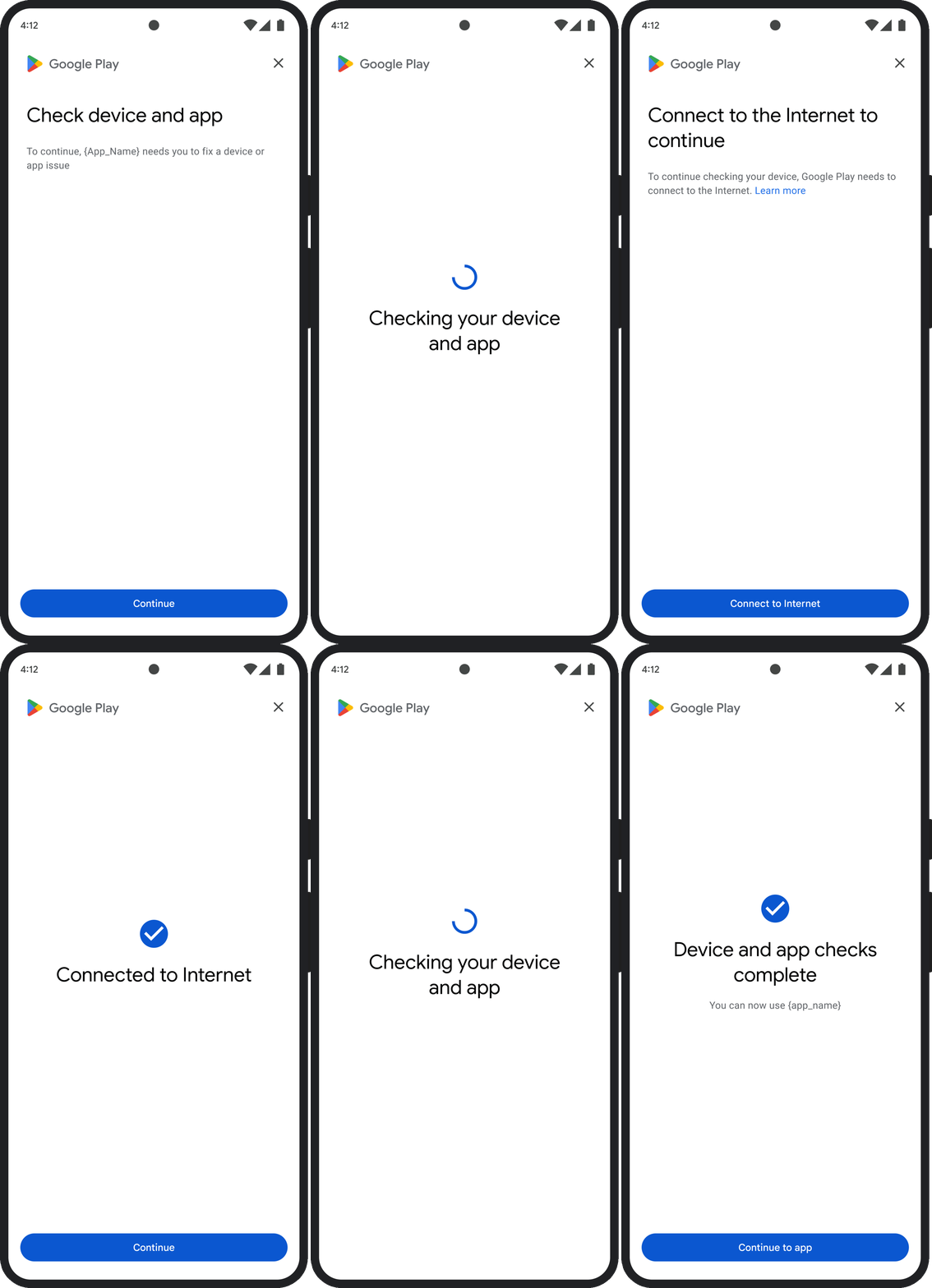
کادر گفتگوی GET_INTEGRITY برای سادهسازی تجربه کاربر ازطریق
مدیریت چندین مرحله اصلاح در یک جریان واحد و پیوسته طراحی شده است. این کار
مانع از این میشود که کاربر برای رفع مشکلات مختلف مجبور شود با چندین کادر گفتگوی جداگانه
تعامل داشته باشد.
وقتی کادر گفتوگو را درخواست میکنید، بهطور خودکار تشخیص میدهد که کدامیک از مشکلات هدفگذاریشده در رأی وجود دارد و مراحل اصلاح مناسب را ارائه میدهد. این یعنی یک درخواست کادر گفتگوی واحد میتواند چندین مشکل را بهطور همزمان برطرف کند، ازجمله:
- تمامیت دستگاه: اگر مشکل تمامیت دستگاه شناسایی شود، کادر گفتگو کاربر را راهنمایی میکند تا وضعیت امنیتی دستگاه را بهبود بخشد تا الزامات حکم
MEETS_DEVICE_INTEGRITYبرآورده شود. - تمامیت برنامه: اگر مشکلاتی مانند دسترسی غیرمجاز یا دستکاری برنامه شناسایی شود، کادر گفتوگو کاربران را راهنمایی میکند تا برنامه را از «فروشگاه Play» دریافت کنند تا مشکل برطرف شود.
- استثناهای سمت کارخواه: کادر گفتوگو هرگونه مشکل زمینهای را که باعث استثنای Integrity API شده است بررسی میکند و سعی میکند آن را حل کند. برای مثال، ممکن است از کاربر بخواهد نسخه قدیمی «خدمات Google Play» را بهروز کند.
تجربه کاربری نمونه
GET_STRONG_INTEGRITY (کد نوع ۵)
مشکل حکم
این کادر گفتگو برای رفع همه مشکلاتی طراحی شده است که
GET_INTEGRITY
به آنها میپردازد، با این قابلیت اضافه که مشکلاتی را که مانع دریافت حکم MEETS_STRONG_INTEGRITY توسط دستگاه میشود
و مشکلات مربوط به حکم «سپر ایمنی Play» را رفع میکند.
اصلاح
GET_STRONG_INTEGRITY برای سادهسازی تجربه کاربر با انجام چندین مرحله اصلاح در یک جریان پیوسته طراحی شده است. کادر گفتگو
بهطور خودکار مشکلات یکپارچگی قابلاعمال برای نشانی را بررسی میکند، ازجمله:
- تمامیت دستگاه: اگر مشکل تمامیت دستگاه شناسایی شود، کادر گفتوگو
کاربر را راهنمایی میکند تا وضعیت امنیتی دستگاه را بهبود بخشد تا
الزامات حکم
MEETS_STRONG_INTEGRITYبرآورده شود. وضعیت «سپر ایمنی Play»: اگر
playProtectVerdictنشاندهنده مشکلی باشد، کادر گفتوگو کاربر را برای رفع آن راهنمایی میکند:- اگر «سپر ایمنی Play» غیرفعال باشد (
playProtectVerdict == POSSIBLE_RISK)، کادر گفتگویی از کاربر میخواهد آن را فعال کند و همه برنامههای دستگاه را اسکن کند. - اگر برنامههای مضر (
playProtectVerdict == MEDIUM_RISKیاHIGH_RISK) شناسایی شود، کادر گفتوگو کاربر را راهنمایی میکند تا آنها را بااستفاده از «سپر ایمنی Google Play» حذف نصب کند.
- اگر «سپر ایمنی Play» غیرفعال باشد (
تمامیت برنامه: اگر مشکلاتی مانند دسترسی غیرمجاز یا دستکاری برنامه شناسایی شود، کادر گفتگو از کاربر درخواست میکند برای رفع مشکل، برنامه را از «فروشگاه Play» دریافت کند.
استثناهای سمت کارخواه: این کادر گفتگو همچنین تلاش میکند هرگونه مشکل زمینهای را که باعث ایجاد استثنای Integrity API شده است حل کند. برای مثال، اگر «خدمات Google Play» غیرفعال باشد، ممکن است از کاربر بخواهد آن را فعال کند. استثناهای قابلاصلاح، استثناهای Integrity API با کدهای خطایی مثل
PLAY_SERVICES_VERSION_OUTDATED،NETWORK_ERROR، یاPLAY_SERVICES_NOT_FOUNDهستند. میتوانید از روشexception.isRemediable()استفاده کنید تا بررسی کنید آیا خطا توسط کادر گفتگو قابلرفع است یا نه.
تجربه کاربری نمونه
