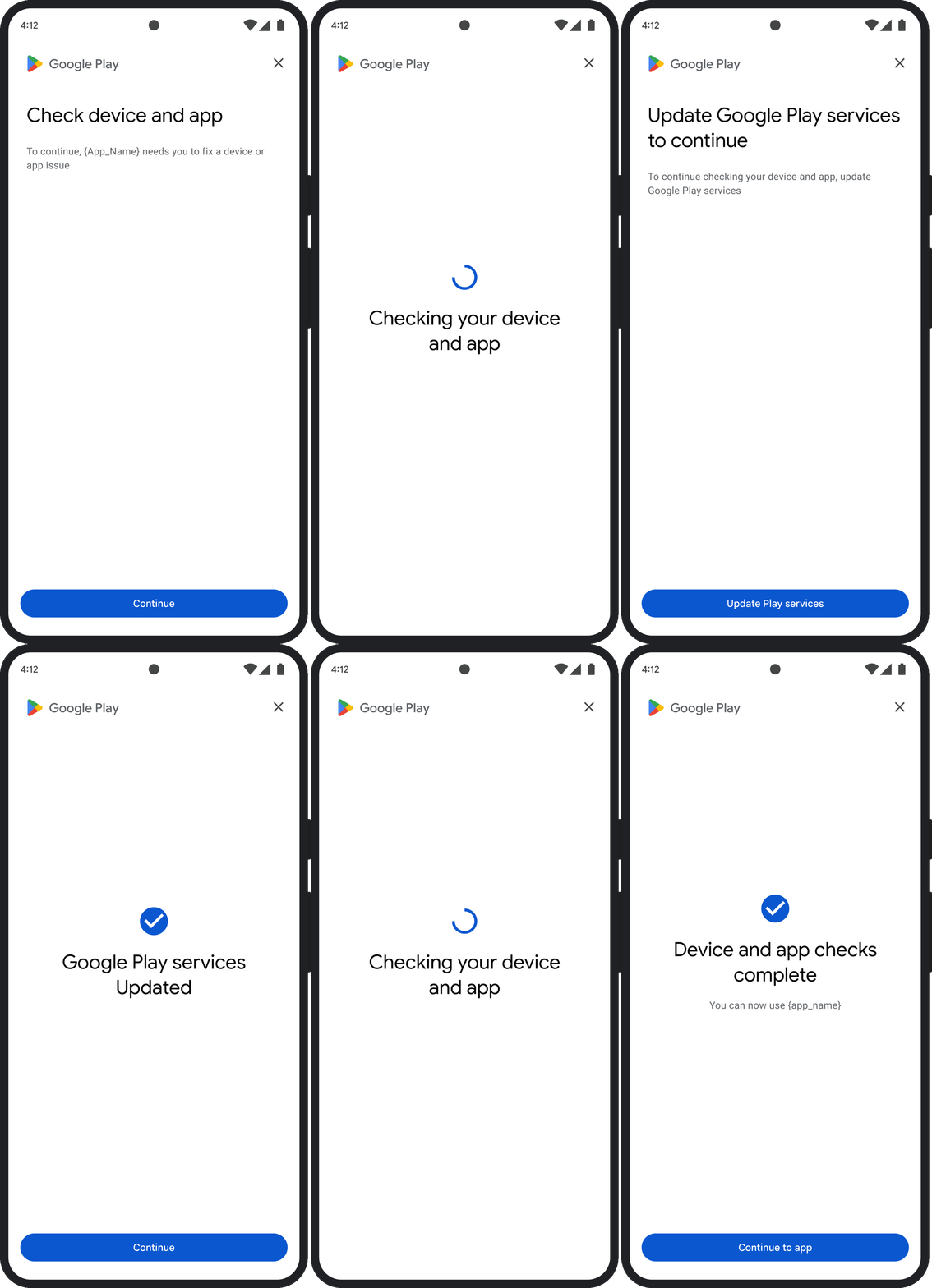
本页介绍了如何处理完整性判定方面的问题。
请求完整性令牌后,您可以选择向用户显示 Google Play 对话框。当存在一个或多个完整性判定方面的问题时,或者在 Integrity API 请求期间发生异常时,您可以显示该对话框。该对话框关闭后,您可以再发出一个完整性令牌请求来验证问题是否已解决。如果您发出的是标准请求,则需要再次预热令牌提供程序以获取新的判定结果。
请求完整性对话框以解决判定问题
当客户端请求完整性令牌时,您可以使用 StandardIntegrityToken(标准 API)和 IntegrityTokenResponse(传统 API)中提供的方法:showDialog(Activity activity, int integrityDialogTypeCode)。
以下步骤列出了使用 Play Integrity API 通过 GET_LICENSED 对话框代码显示修复对话框的方法。
本部分后面列出了您的应用可以请求的其他对话框代码。
从您的应用请求完整性令牌,并将该令牌发送到您的服务器。您可以使用标准请求或传统请求。
Kotlin
// Request an integrity token
val tokenResponse: StandardIntegrityToken = requestIntegrityToken()
// Send token to app server and get response on what to do next
val yourServerResponse: YourServerResponse = sendToServer(tokenResponse.token())
Java
// Request an integrity token
StandardIntegrityToken tokenResponse = requestIntegrityToken();
// Send token to app server and get response on what to do next
YourServerResponse yourServerResponse = sendToServer(tokenResponse.token());
Unity
// Request an integrity token
StandardIntegrityToken tokenResponse = RequestIntegrityToken();
// Send token to app server and get response on what to do next
YourServerResponse yourServerResponse = sendToServer(tokenResponse.Token);
Unreal Engine
// Request an integrity token
StandardIntegrityToken* Response = RequestIntegrityToken();
// Send token to app server and get response on what to do next
YourServerResponse YourServerResponse = SendToServer(Response->Token);
原生
/// Request an integrity token
StandardIntegrityToken* response = requestIntegrityToken();
/// Send token to app server and get response on what to do next
YourServerResponse yourServerResponse = sendToServer(StandardIntegrityToken_getToken(response));
在您的服务器上,解密完整性令牌并检查
appLicensingVerdict字段。结果可能如下所示:// Licensing issue { ... "accountDetails": { "appLicensingVerdict": "UNLICENSED" } }如果令牌包含
appLicensingVerdict: "UNLICENSED",则回复您的应用客户端,请求其显示许可对话框:Kotlin
private fun getDialogTypeCode(integrityToken: String): Int{
    // Get licensing verdict from decrypted and verified integritytoken
    val licensingVerdict: String = getLicensingVerdictFromDecryptedToken(integrityToken)

    return if (licensingVerdict == "UNLICENSED") {
            1 // GET_LICENSED
        } else 0
}
Java
private int getDialogTypeCode(String integrityToken) {
    // Get licensing verdict from decrypted and verified integrityToken
    String licensingVerdict = getLicensingVerdictFromDecryptedToken(integrityToken);

    if (licensingVerdict.equals("UNLICENSED")) {
      return 1; // GET_LICENSED
    }
    return 0;
}
Unity
private int GetDialogTypeCode(string IntegrityToken) {
    // Get licensing verdict from decrypted and verified integrityToken
    string licensingVerdict = GetLicensingVerdictFromDecryptedToken(IntegrityToken);

    if (licensingVerdict == "UNLICENSED") {
      return 1; // GET_LICENSED
    }
    return 0;
}
Unreal Engine
private int GetDialogTypeCode(FString IntegrityToken) {
    // Get licensing verdict from decrypted and verified integrityToken
    FString LicensingVerdict = GetLicensingVerdictFromDecryptedToken(IntegrityToken);

    if (LicensingVerdict == "UNLICENSED") {
      return 1; // GET_LICENSED
    }
    return 0;
}
原生
private int getDialogTypeCode(string integrity_token) {
    /// Get licensing verdict from decrypted and verified integrityToken
    string licensing_verdict = getLicensingVerdictFromDecryptedToken(integrity_token);

    if (licensing_verdict == "UNLICENSED") {
      return 1; // GET_LICENSED
    }
    return 0;
}
在应用中,使用从服务器检索到的请求的代码调用
showDialog:Kotlin
// Show dialog as indicated by the server
val showDialogType: Int? = yourServerResponse.integrityDialogTypeCode()
if (showDialogType == null) {
     return
}

// Create dialog request
val dialogRequest = StandardIntegrityDialogRequest.builder()
          .setActivity(activity)
          .setTypeCode(showDialogType)
          .setStandardIntegrityResponse(StandardIntegrityResponse.TokenResponse(token))
          .build()

// Call showDialog, the dialog will be shown on top of the provided activity
// and the task will complete when the dialog is closed.
val result: Task<Int> = standardIntegrityManager.showDialog(dialogRequest)

// Handle response code, call the Integrity API again to confirm that the
// verdict issue has been resolved.
Java
// Show dialog as indicated by the server
@Nullable Integer showDialogType = yourServerResponse.integrityDialogTypeCode();
if (showDialogType == null) {
     return;
}

// Create dialog request
StandardIntegrityDialogRequest dialogRequest =
      StandardIntegrityDialogRequest.builder()
          .setActivity(getActivity())
          .setTypeCode(showDialogTypeCode)
          .setStandardIntegrityResponse(new StandardIntegrityResponse.TokenResponse(token))
          .build();

// Call showDialog, the dialog will be shown on top of the provided activity
// and the task will complete when the dialog is closed.
Task<Integer> result = standardIntegrityManager.showDialog(dialogRequest);

// Handle response code, call the Integrity API again to confirm that the
// verdict issue has been resolved.
Unity
// Initialize the V2 manager. Requires Play Integrity Unity Plugin v2.0.0 or
// higher.
var standardIntegrityManager = new StandardIntegrityManagerV2();
IEnumerator ShowDialogCoroutine() {
    int showDialogType = yourServerResponse.IntegrityDialogTypeCode();

    PlayAsyncOperation<IntegrityDialogResponseCode, StandardIntegrityError> showDialogTask;

    using (var activity = UnityPlayerHelper.GetCurrentActivity())
    {
        // Create a dialog request
        var dialogRequest = new StandardIntegrityDialogRequest(tokenResponse, activity, showDialogType);

        // Call showDialog with the request, the dialog will be shown on top of the
        // provided activity and complete when the dialog is closed.
        showDialogTask = standardIntegrityManager.ShowDialog(dialogRequest);
    }

    // Wait for PlayAsyncOperation to complete.
    yield return showDialogTask;

    // Handle response code, call the Integrity API again to confirm that the
    // verdict issue been resolved.
}
Unreal Engine
// .h
void MyClass::OnShowDialogCompleted(
    EStandardIntegrityErrorCode Error,
    EIntegrityDialogResponseCode Response)
{
    // Handle response code, call the Integrity API again to confirm that the
    // verdict issue has been resolved.
}

// .cpp
void MyClass::RequestIntegrityToken()
{
    UStandardIntegrityToken* Response = ...
    int TypeCode = YourServerResponse.integrityDialogTypeCode();

    // Create a delegate to bind the callback function.
    FShowDialogStandardOperationCompletedDelegate Delegate;

    // Bind the completion handler (OnShowDialogCompleted) to the delegate.
    Delegate.BindDynamic(this, &MyClass::OnShowDialogCompleted);

    // Call ShowDialog with TypeCode which completes when the dialog is closed.
    Response->ShowDialog(TypeCode, Delegate);
}
原生
// Show dialog as indicated by the server
int show_dialog_type = yourServerResponse.integrityDialogTypeCode();
if(show_dialog_type == 0){
  return;
}

/// Create dialog request
StandardIntegrityDialogRequest* dialog_request;
StandardIntegrityDialogRequest_create(&dialog_request);
StandardIntegrityDialogRequest_setTypeCode(dialog_request, show_dialog_type);
StandardIntegrityDialogRequest_setActivity(dialog_request, activity);
StandardIntegrityDialogRequest_setStandardIntegrityToken(dialog_request,
                                                token_response);

/// Call showDialog with the dialog request. The dialog will be shown on top
/// of the provided activity and complete when the dialog is closed by the
/// user.
StandardIntegrityDialogResponse* dialog_response;
StandardIntegrityErrorCode error_code =
    StandardIntegrityManager_showDialog(dialog_request, &dialog_response);

/// Use polling to wait for the async operation to complete. Note, the polling
/// shouldn't block the thread where the StandardIntegrityManager is running.
IntegrityDialogResponseCode response_code = INTEGRITY_DIALOG_RESPONSE_UNKNOWN;
while (error_code == STANDARD_INTEGRITY_NO_ERROR) {
    error_code = StandardIntegrityDialogResponse_getResponseCode(dialog_response, &response_code);
    if(response_code != INTEGRITY_DIALOG_RESPONSE_UNKNOWN){
      break;
    }
}

/// Free memory
StandardIntegrityDialogRequest_destroy(dialog_request);
StandardIntegrityDialogResponse_destroy(dialog_response);

/// Handle response code, call the Integrity API again to confirm that the
/// verdict issues have been resolved.
对话框会显示在提供的 activity 之上。用户关闭对话框后,使用响应代码完成 Task。
(可选)请求另一个令牌以显示任何其他对话框。如果您发出的是标准请求,则需要再次预热令牌提供程序以获取新的判定结果。
请求完整性对话框以修复客户端异常
如果 Integrity API 请求失败并显示 StandardIntegrityException(标准 API)或 IntegrityServiceException(传统 API),并且异常可修复,您可以使用 GET_INTEGRITY 或 GET_STRONG_INTEGRITY 对话框来修复错误。
以下步骤概述了如何使用 GET_INTEGRITY 对话框来修复 Integrity API 报告的可修复客户端错误。
检查 Integrity API 请求返回的异常是否可修复。
Kotlin
private fun isExceptionRemediable(exception: ExecutionException): Boolean {
    val cause = exception.cause
    if (cause is StandardIntegrityException && cause.isRemediable) {
        return true
    }
    return false
}
Java
private boolean isExceptionRemediable(ExecutionException exception) {
    Throwable cause = exception.getCause();
    if (cause instanceof StandardIntegrityException integrityException
&& integrityException.isRemediable()) {
        return true;
    }
    return false;
}
Unity
private bool IsExceptionRemediable(StandardIntegrityError error) {
    // Check if the operation resulted in a remediable error
    if (error != null && error.ErrorCode != StandardIntegrityErrorCode.NoError && error.IsRemediable) {
        return true;
    }
    return false;
}
原生
bool IsErrorRemediable(StandardIntegrityToken* token) {
    /// Check if the error associated with the token is remediable
    bool isRemediable = false;
    if(StandardIntegrityToken_getIsRemediable(response, &isRemediable) == STANDARD_INTEGRITY_NO_ERROR){
      return isRemediable;
    }
    return false;
}
如果异常可修复,请使用返回的异常请求
GET_INTEGRITY对话框。对话框将显示在提供的 activity 之上,并且在用户关闭对话框后,返回的 Task 会使用响应代码完成。Kotlin
  private fun showDialog(exception: StandardIntegrityException) {
      // Create a dialog request
      val standardIntegrityDialogRequest =
          StandardIntegrityDialogRequest.builder()
              .setActivity(activity)
              .setType(IntegrityDialogTypeCode.GET_INTEGRITY)
              .setStandardIntegrityResponse(ExceptionDetails(exception))
              .build()

      // Request dialog
      val responseCode: Task<Int> =
            standardIntegrityManager.showDialog(standardIntegrityDialogRequest)
}
Java
  private void showDialog(StandardIntegrityException exception) {
      // Create a dialog request
      StandardIntegrityDialogRequest standardIntegrityDialogRequest =
          StandardIntegrityDialogRequest.builder()
              .setActivity(this.activity)
              .setType(IntegrityDialogTypeCode.GET_INTEGRITY)
              .setStandardIntegrityResponse(new ExceptionDetails(exception))
              .build();

      // Request dialog
      Task<Integer> responseCode =
            standardIntegrityManager.showDialog(standardIntegrityDialogRequest);
}
Unity
// Initialize the V2 manager. Requires Play Integrity Unity Plugin v2.0.0 or
// higher.
var standardIntegrityManager = new StandardIntegrityManagerV2();
IEnumerator ShowDialogToFixError(StandardIntegrityError error) {
    PlayAsyncOperation<IntegrityDialogResponseCode, StandardIntegrityError> showDialogTask;

    using (var activity = UnityPlayerHelper.GetCurrentActivity())
    {
        // Create a dialog request using the error
        var dialogRequest = new StandardIntegrityDialogRequest(error, activity, GET_INTEGRITY_DIALOG);

        // Request dialog
        showDialogTask = standardIntegrityManager.ShowDialog(dialogRequest);
    }

    // Wait for PlayAsyncOperation to complete.
    yield return showDialogTask;
}
原生
private void showDialogToFixError(StandardIntegrityToken* token) {
    /// If the token request failed, and the underlying error is not fixable
    /// then return early
    if(isErrorRemediable(token)) {
      return;
    }

    /// Create dialog request
    StandardIntegrityDialogRequest* dialog_request;
    StandardIntegrityDialogRequest_create(&dialog_request);
    StandardIntegrityDialogRequest_setTypeCode(dialog_request,
                                       kGetIntegrityDialogTypeCode);
    StandardIntegrityDialogRequest_setActivity(dialog_request, activity);
    StandardIntegrityDialogRequest_setStandardIntegrityToken(dialog_request,
                                                    token_response);

    /// Call showDialog with the dialog request. The dialog will be shown on
    /// top of the provided activity and complete when the dialog is closed by
    /// the user.
    StandardIntegrityDialogResponse* dialog_response;
    StandardIntegrityErrorCode error_code =
        StandardIntegrityManager_showDialog(dialog_request, &dialog_response);

    /// Use polling to wait for the async operation to complete.
    /// Note, the polling shouldn't block the thread where the
    /// StandardIntegrityManager is running.
    IntegrityDialogResponseCode response_code = INTEGRITY_DIALOG_RESPONSE_UNKNOWN;
    while (error_code == STANDARD_INTEGRITY_NO_ERROR) {
        error_code = StandardIntegrityDialogResponse_getResponseCode(response, &response_code);
        if(response_code != INTEGRITY_DIALOG_RESPONSE_UNKNOWN){
          break;
        }
    }

    /// Free memory
    StandardIntegrityDialogRequest_destroy(dialog_request);
    StandardIntegrityDialogResponse_destroy(dialog_response);

}
如果返回的响应代码表示成功,则下一次完整性令牌请求应该会成功,而不会出现任何异常。如果您发出的是标准请求,则需要再次预热令牌提供程序以获取新的判定结果。
完整性对话框代码
GET_LICENSED(类型代码 1)
判定问题
此对话框适用于以下两种情况:
- 未经授权的访问:
appLicensingVerdict: "UNLICENSED"。这意味着用户账号没有您应用的使用权,如果用户旁加载了该应用或从 Google Play 以外的其他应用商店获取了该应用,就可能会发生这种情况。 - 被篡改的应用:
appRecognitionVerdict: "UNRECOGNIZED_VERSION"。这意味着,您的应用二进制文件已被修改,或者不是 Google Play 认可的版本。
补救措施
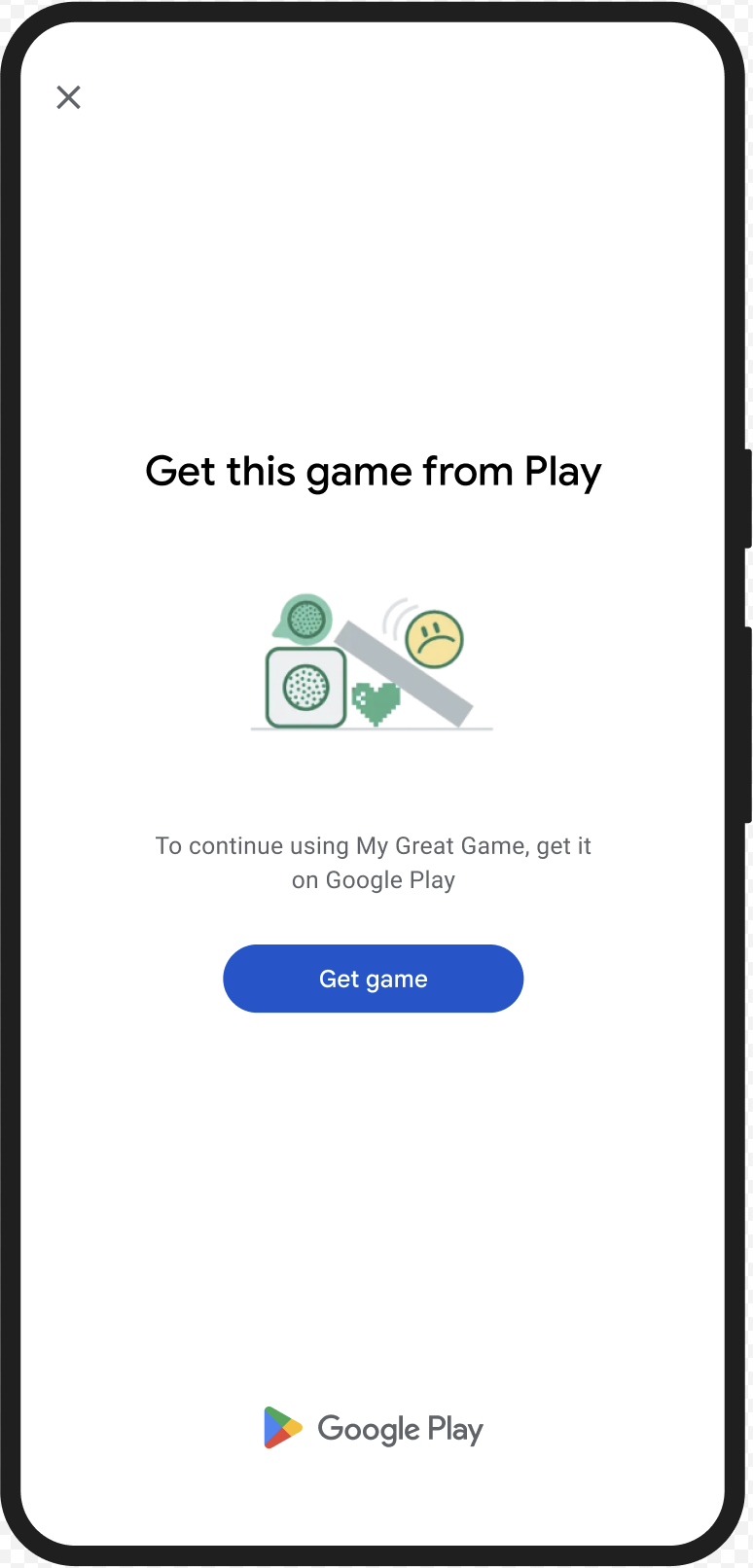
您可以显示 GET_LICENSED 对话框,提示用户从 Google Play 获取正版应用。此单一对话框可应对以下两种情况:
- 对于未获得许可的用户,此操作会向其授予 Play 许可。这样,用户就可以从 Google Play 接收应用更新。
- 对于使用篡改应用版本的用户,它会引导他们从 Google Play 安装未经修改的应用。
当用户完成对话框中的操作后,后续完整性检查会返回 appLicensingVerdict: "LICENSED" 和 appRecognitionVerdict: "PLAY_RECOGNIZED"。
用户体验示例
CLOSE_UNKNOWN_ACCESS_RISK(类型代码 2)
判定问题
当 environmentDetails.appAccessRiskVerdict.appsDetected 包含 "UNKNOWN_CAPTURING" 或 "UNKNOWN_CONTROLLING" 时,表示设备上运行的其他应用(并非由 Google Play 安装或由设备制造商预加载到系统分区)可能正在捕获屏幕内容或控制设备。
补救措施
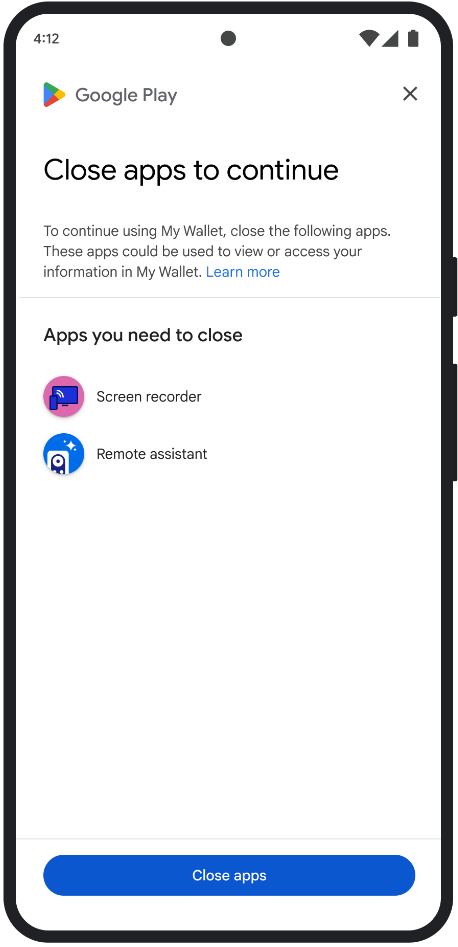
您可以显示 CLOSE_UNKNOWN_ACCESS_RISK 对话框,提示用户关闭可能正在截屏或控制设备的所有未知应用。如果用户点按 Close all 按钮,所有此类应用都会关闭。
用户体验示例
CLOSE_ALL_ACCESS_RISK(类型代码 3)
判定问题
如果 environmentDetails.appAccessRiskVerdict.appsDetected 包含 "KNOWN_CAPTURING"、"KNOWN_CONTROLLING"、"UNKNOWN_CAPTURING" 或 "UNKNOWN_CONTROLLING" 中的任何一个,则表示设备上运行的应用可能正在截屏或控制设备。
补救措施
您可以显示 CLOSE_ALL_ACCESS_RISK 对话框,提示用户关闭可能正在截屏或控制设备的所有应用。如果用户点按 Close all 按钮,设备上的所有此类应用都会关闭。
用户体验示例
GET_INTEGRITY(类型代码 4)
判定问题
此对话框适用于以下任何问题:
设备完整性较弱:如果
deviceRecognitionVerdict不包含MEETS_DEVICE_INTEGRITY,则设备可能不是正版且经过认证的 Android 设备。例如,如果设备的引导加载程序已解锁,或者其加载的 Android OS 不是经过认证的制造商映像,就可能会发生这种情况。未经授权的访问:
appLicensingVerdict: "UNLICENSED"。这意味着用户账号没有您应用的使用权,如果用户旁加载了该应用或从 Google Play 以外的其他应用商店获取了该应用,就可能会发生这种情况。被篡改的应用:
appRecognitionVerdict: "UNRECOGNIZED_VERSION"。这意味着,您的应用二进制文件已被修改,或者不是 Google Play 认可的版本。客户端异常:在 Integrity API 请求期间发生可修复的异常。可修复的异常是指错误代码为
PLAY_SERVICES_VERSION_OUTDATED、NETWORK_ERROR、PLAY_SERVICES_NOT_FOUND等的 Integrity API 异常。您可以使用exception.isRemediable()方法检查异常是否可通过对话框修复。
补救措施
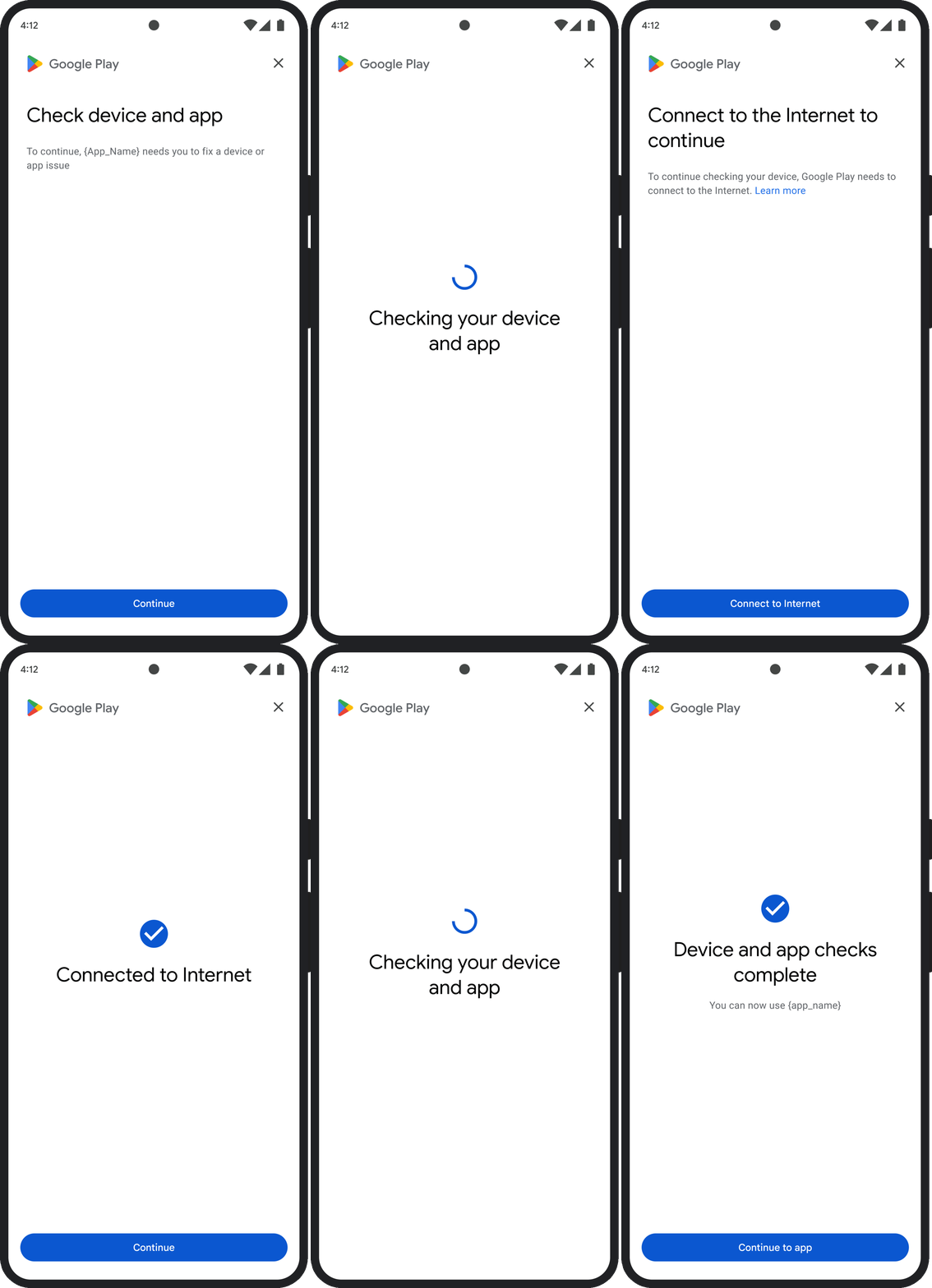
GET_INTEGRITY 对话框旨在通过在单个连续流程中处理多个修复步骤来简化用户体验。这样可以避免用户必须与多个单独的对话框互动才能解决不同的问题。
当您请求对话框时,它会自动检测存在哪些目标判定问题,并提供适当的修复步骤。 这意味着,单个对话请求可以同时解决多个问题,包括:
- 设备完整性:如果检测到设备完整性问题,对话框会引导用户提升设备的安全状态,以满足
MEETS_DEVICE_INTEGRITY判定结果的要求。 - 应用完整性:如果检测到未经授权的访问或应用篡改等问题,对话框会引导用户从 Play 商店获取应用,以解决这些问题。
- 客户端异常:对话框会检查并尝试解决导致 Integrity API 异常的任何底层问题。例如,它可能会提示用户更新过时的 Google Play 服务版本。
用户体验示例
GET_STRONG_INTEGRITY(类型代码 5)
判定问题
此对话框旨在解决 GET_INTEGRITY 解决的所有相同问题,并新增了解决导致设备无法收到 MEETS_STRONG_INTEGRITY 判定结果的问题以及解决 Play 保护机制判定结果问题的功能。
补救措施
GET_STRONG_INTEGRITY 旨在通过在单个连续流程中处理多个修复步骤来简化用户体验。该对话框会自动检查地址是否存在适用的完整性问题,包括:
- 设备完整性:如果检测到设备完整性问题,对话框会引导用户提升设备的安全状态,以满足
MEETS_STRONG_INTEGRITY判定结果的要求。 Play 保护机制状态:如果
playProtectVerdict指示存在问题,对话框将引导用户解决问题:- 如果 Play 保护机制处于停用状态 (
playProtectVerdict == POSSIBLE_RISK),对话框会提示用户启用该机制并对设备上的所有应用执行扫描。 - 如果检测到有害应用(
playProtectVerdict == MEDIUM_RISK或HIGH_RISK),对话框会引导用户使用 Google Play 保护机制卸载这些应用。
- 如果 Play 保护机制处于停用状态 (
应用完整性:如果检测到未经授权的访问或应用篡改等问题,对话框会提示用户从 Play 商店获取应用,以解决问题。
客户端异常:对话框还会尝试解决导致 Integrity API 异常的任何底层问题。例如,如果发现 Google Play 服务处于停用状态,它可能会提示用户启用该服务。可修复的异常是指具有
PLAY_SERVICES_VERSION_OUTDATED、NETWORK_ERROR或PLAY_SERVICES_NOT_FOUND等错误代码的 Integrity API 异常。您可以使用exception.isRemediable()方法检查错误是否可以通过对话框修复。
用户体验示例