The AI agent in Android Studio can generate comprehensive, compilable unit tests
for your Kotlin and Java code. Powered by the model of your choice, the
agent analyzes your source code to identify constructor dependencies, business
logic branches, and edge cases, and then automatically creates a complete test
class. This includes the generation of setUp methods, mock initialization,
and individual test cases tailored to your project's specific architecture and
coding style.
The agent detects your project's existing configuration and uses the appropriate frameworks and mocking libraries. This helps you bootstrap test classes, saving you time on repetitive setup.
Generate unit tests from the editor
To generate unit tests from the Android Studio editor, do the following:
- Open a Kotlin or Java source file in the Android Studio editor.
- Right-click a class name or a specific method, or select a block of code, and then select AI > Generate Unit Tests.
Generate unit tests from the tool window
To ask the agent directly to generate unit tests, do the following:
- Click Agent in the tool window bar.
- Enter a request such as "Generate unit tests for this file" or "Write unit tests for MyClass".
Generate unit test scenarios
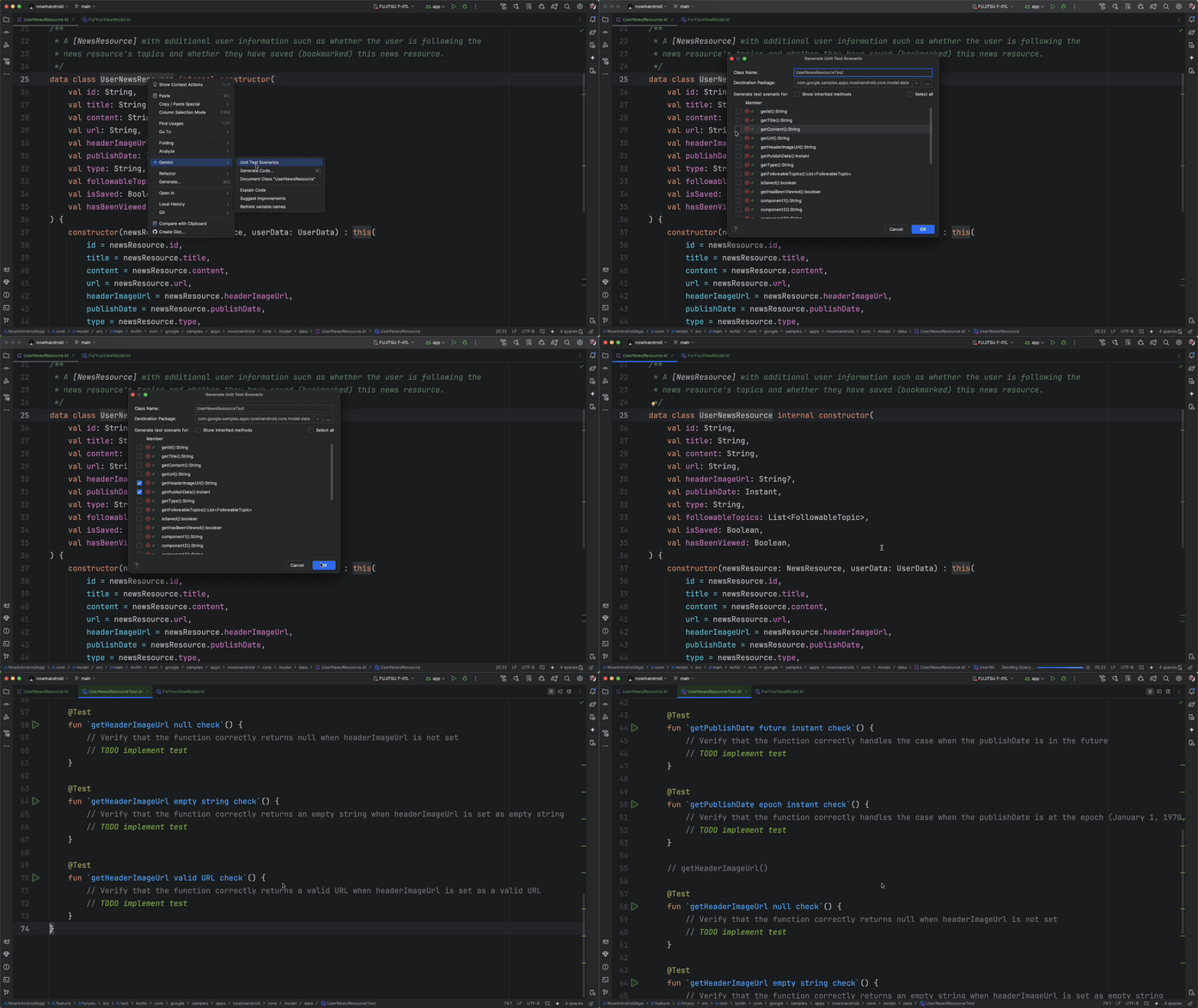
When writing unit tests for your app, Gemini can suggest test scenarios using the context of the code you want to test. When generating unit test scenarios, Gemini includes detailed names and descriptions for your tests, so that you better understand the intention for each suggested test. You need to implement the body of each test yourself.
To generate unit test scenarios, do the following:
- Navigate to the class you want to generate unit test scenarios for.
- Right-click on the class name and select AI > Generate Unit Test Scenarios from the context menu.
- In the dialog that appears, select the methods of the class that you want to generate scenarios for, and set the destination package for the tests.
- Click OK.
- Confirm the destination directory for your tests and click OK.
- If the test class already exists, confirm whether you want Gemini to suggest updates to the existing file.
After Gemini processes the request, you should see either a new file with the suggested unit tests or a diff for you to accept recommended changes to an existing file.