

与之前的版本一样,Android 16 包含一些可能会影响应用的行为变更。以下行为变更仅影响以 Android 16 或更高版本为目标平台的应用。如果您的应用以 Android 16 或更高版本为目标平台,您应该修改自己的应用以适当地支持这些行为(如果适用)。
无论应用的 targetSdkVersion 为何,都请务必查看对 Android 16 上运行的所有应用都有影响的行为变更列表。
用户体验和系统界面
Android 16(API 级别 36)包含以下变更,旨在打造更一致、更直观的用户体验。
无边框设计选择退出选项即将移除
Android 15 强制要求以 Android 15(API 级别 35)为目标平台的应用采用边到边模式,但您的应用可以通过将 R.attr#windowOptOutEdgeToEdgeEnforcement 设置为 true 来选择退出此模式。对于以 Android 16(API 级别 36)为目标平台的应用,R.attr#windowOptOutEdgeToEdgeEnforcement 已废弃并停用,并且您的应用无法选择停用边到边模式。
- 如果您的应用以 Android 16(API 级别 36)为目标平台,并且在 Android 15 设备上运行,
R.attr#windowOptOutEdgeToEdgeEnforcement会继续运行。 - 如果您的应用以 Android 16(API 级别 36)为目标平台,并且在 Android 16 设备上运行,则
R.attr#windowOptOutEdgeToEdgeEnforcement会处于停用状态。
如需在 Android 16 中进行测试,请确保您的应用支持无边框,并移除对 R.attr#windowOptOutEdgeToEdgeEnforcement 的任何使用,以便您的应用在 Android 15 设备上也支持无边框。如需支持边到边,请参阅 Compose 和视图指南。
必须迁移或选择退出预测性返回
对于以 Android 16(API 级别 36)或更高版本为目标平台且在搭载 Android 16 或更高版本的设备上运行的应用,系统会默认启用预测性返回系统动画(返回主屏幕、跨任务和跨 activity)。此外,系统不会调用 onBackPressed,也不会再分派 KeyEvent.KEYCODE_BACK。
如果您的应用会拦截返回事件,而您尚未迁移到预测性返回,请更新应用以使用受支持的返回导航 API,或在应用的 AndroidManifest.xml 文件的 <application> 或 <activity> 标记中将 android:enableOnBackInvokedCallback 属性设置为 false,以暂时停用预测性返回。
优雅字体 API 已弃用并停用
以 Android 15(API 级别 35)为目标平台的应用默认将 elegantTextHeight
TextView 属性设置为 true,从而将紧凑型字体替换为可读性更高的字体。您可以通过将 elegantTextHeight 属性设置为 false 来替换此设置。
Android 16 弃用了 elegantTextHeight 属性,当您的应用以 Android 16 为目标平台后,系统会忽略该属性。由这些 API 控制的“界面字体”即将停用,因此您应调整所有布局,以确保阿拉伯语、老挝语、缅甸语、泰米尔语、古吉拉特语、卡纳达语、马拉雅拉姆语、奥里亚语、泰卢固语或泰语文本的呈现效果一致且不受未来变化的影响。
elegantTextHeight 属性设置为 false 替换默认值的应用,
elegantTextHeight 行为。elegantTextHeight 属性设置为 false 来替换默认值的应用,其 elegantTextHeight 行为。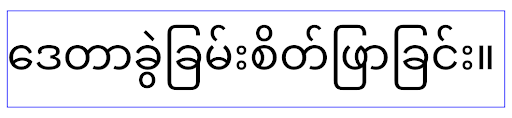
核心功能
Android 16(API 级别 36)包含以下变更,这些变更会修改或扩展 Android 系统的各种核心功能。
固定费率工作调度优化
Prior to targeting Android 16, when scheduleAtFixedRate
missed a task execution due to being outside a valid
process lifecycle, all missed executions immediately
execute when the app returns to a valid lifecycle.
When targeting Android 16, at most one missed execution of
scheduleAtFixedRate is immediately executed when the app
returns to a valid lifecycle. This behavior change is expected to improve app
performance. Test this behavior in your app to check if your app is impacted.
You can also test by using the app compatibility framework
and enabling the STPE_SKIP_MULTIPLE_MISSED_PERIODIC_TASKS compat flag.
设备规格
Android 16(API 级别 36)包含以下针对应用在大屏设备上显示时的变更。
自适应布局
With Android apps now running on a variety of devices (such as phones, tablets, foldables, desktops, cars, and TVs) and windowing modes on large screens (such as split screen and desktop windowing), developers should build Android apps that adapt to any screen and window size, regardless of device orientation. Paradigms like restricting orientation and resizability are too restrictive in today's multidevice world.
Ignore orientation, resizability, and aspect ratio restrictions
For apps targeting Android 16 (API level 36), orientation, resizability, and aspect ratio restrictions no longer apply on displays with smallest width >= 600dp. Apps fill the entire display window, regardless of aspect ratio or a user's preferred orientation, and pillarboxing isn't used.
This change introduces a new standard platform behavior. Android is moving toward a model where apps are expected to adapt to various orientations, display sizes, and aspect ratios. Restrictions like fixed orientation or limited resizability hinder app adaptability. Make your app adaptive to deliver the best possible user experience.
You can also test this behavior by using the
app compatibility framework and enabling the
UNIVERSAL_RESIZABLE_BY_DEFAULT compat flag.
Common breaking changes
Ignoring orientation, resizability, and aspect ratio restrictions might impact your app's UI on some devices, especially elements that were designed for small layouts locked in portrait orientation: for example, issues like stretched layouts and off-screen animations and components. Any assumptions about aspect ratio or orientation can cause visual issues with your app. Learn more about how to avoid them and improve your app's adaptive behaviour.
Allowing device rotation results in more activity re-creation, which can result in losing user state if not properly preserved. Learn how to correctly save UI state in Save UI states.
Implementation details
The following manifest attributes and runtime APIs are ignored across large screen devices in full-screen and multi-window modes:
screenOrientationresizableActivityminAspectRatiomaxAspectRatiosetRequestedOrientation()getRequestedOrientation()
The following values for screenOrientation, setRequestedOrientation(), and
getRequestedOrientation() are ignored:
portraitreversePortraitsensorPortraituserPortraitlandscapereverseLandscapesensorLandscapeuserLandscape
Regarding display resizability, android:resizeableActivity="false",
android:minAspectRatio, and android:maxAspectRatio have no effect.
For apps targeting Android 16 (API level 36), app orientation, resizability, and aspect ratio constraints are ignored on large screens by default. Every app that isn't fully ready can temporarily override this behavior by opting out, which results in the previous behavior of being placed in compatibility mode.
Exceptions
The Android 16 orientation, resizability, and aspect ratio restrictions don't apply in the following situations:
- Games (based on the
android:appCategoryflag) - Users explicitly opting in to the app's default behavior in aspect ratio settings of the device
- Screens that are smaller than
sw600dp
Opt out temporarily
To opt out a specific activity, declare the
PROPERTY_COMPAT_ALLOW_RESTRICTED_RESIZABILITY manifest property:
<activity ...>
  <property android:name="android.window.PROPERTY_COMPAT_ALLOW_RESTRICTED_RESIZABILITY" android:value="true" />
  ...
</activity>
If too many parts of your app aren't ready for Android 16, you can opt out completely by applying the same property at the application level:
<application ...>
  <property android:name="android.window.PROPERTY_COMPAT_ALLOW_RESTRICTED_RESIZABILITY" android:value="true" />
</application>
健康与健身
Android 16(API 级别 36)包含以下与健康与健身数据相关的变更。
健康与健身权限
对于以 Android 16(API 级别 36)或更高版本为目标平台的应用,BODY_SENSORS 权限会使用 android.permissions.health 下更精细的权限,Health Connect 也会使用这些权限。从 Android 16 开始,凡是以前需要具有 BODY_SENSORS 或 BODY_SENSORS_BACKGROUND 权限的 API,现在都需要获取相应的 android.permissions.health 权限。这会影响以下数据类型、API 和前台服务类型:
- Wear OS 上的健康服务中的
HEART_RATE_BPM Sensor.TYPE_HEART_RATE(来自 Android 传感器管理器)- Wear OS 上的
heartRateAccuracy和heartRateBpm(来自ProtoLayout) FOREGROUND_SERVICE_TYPE_HEALTH,其中需要相应的android.permission.health权限,而不是BODY_SENSORS
如果您的应用使用这些 API,则应请求相应的精细权限:
- 如需在使用期间监测心率、血氧饱和度或体表温度,请请求
android.permissions.health下的精细权限,例如READ_HEART_RATE,而不是BODY_SENSORS。 - 对于后台传感器访问权限:请求
READ_HEALTH_DATA_IN_BACKGROUND,而不是BODY_SENSORS_BACKGROUND。
这些权限与保护对健康数据共享(用于存储健康、健身和身心状态数据的 Android 数据存储区)中读取数据的访问权限相同。
移动应用
迁移到使用 READ_HEART_RATE 和其他精细权限的移动应用还必须声明一个 activity,以显示应用的隐私权政策。此要求与健康数据共享相同。
连接
Android 16(API 级别 36)在蓝牙堆栈中包含以下更改,以改进与外围设备的连接。
用于处理绑定丢失和加密更改的新 intent
As part of the Improved bond loss handling, Android 16 also introduces 2 new intents to provide apps with greater awareness of bond loss and encryption changes.
Apps targeting Android 16 can now:
- Receive an
ACTION_KEY_MISSINGintent when remote bond loss is detected, allowing them to provide more informative user feedback and take appropriate actions. - Receive an
ACTION_ENCRYPTION_CHANGEintent whenever encryption status of the link changes. This includes encryption status change, encryption algorithm change, and encryption key size change. Apps must consider the bond restored if the link is successfully encrypted upon receivingACTION_ENCRYPTION_CHANGEintent later.
Adapting to varying OEM implementations
While Android 16 introduces these new intents, their implementation and broadcasting can vary across different device manufacturers (OEMs). To ensure your app provides a consistent and reliable experience across all devices, developers should design their bond loss handling to gracefully adapt to these potential variations.
We recommend the following app behaviors:
If the
ACTION_KEY_MISSINGintent is broadcast:The ACL (Asynchronous Connection-Less) link will be disconnected by the system, but the bond information for the device will be retained (as described here).
Your app should use this intent as the primary signal for bond loss detection and guiding the user to confirm the remote device is in range before initiating device forgetting or re-pairing.
If a device disconnects after
ACTION_KEY_MISSINGis received, your app should be cautious about reconnecting, as the device may no longer be bonded with the system.If the
ACTION_KEY_MISSINGintent is NOT broadcast:The ACL link will remain connected, and the bond information for the device will be removed by the system, same to behavior in Android 15.
In this scenario, your app should continue its existing bond loss handling mechanisms as in previous Android releases, to detect and manage bond loss events.
解除蓝牙绑定的新方法
现在,以 Android 16 为目标平台的所有应用都可以使用 CompanionDeviceManager 中的公共 API 解除蓝牙设备配对。如果配套设备作为 CDM 关联进行管理,则应用可以在关联的设备上使用新的 removeBond(int) API 触发蓝牙配对的移除。该应用可以通过监听蓝牙设备广播事件 ACTION_BOND_STATE_CHANGED 来监控配对状态变化。
安全
Android 16(API 级别 36)包含以下安全变更。
MediaStore 版本锁定
对于以 Android 16 或更高版本为目标平台的应用,MediaStore#getVersion() 现在将是每个应用的唯一标识。这会从版本字符串中移除标识属性,以防止滥用和用于指纹识别技术。应用不应对此版本的格式做出任何假设。在使用此 API 时,应用应已处理版本变更,并且在大多数情况下无需更改其当前行为,除非开发者尝试推断超出此 API 预期范围的其他信息。
更安全的 intent
The Safer Intents feature is a multi-phase security initiative designed to improve the security of Android's intent resolution mechanism. The goal is to protect apps from malicious actions by adding checks during intent processing and filtering intents that don't meet specific criteria.
In Android 15 the feature focused on the sending app. Now with Android 16, control shifts to the receiving app, allowing developers to opt-in to strict intent resolution using their app manifest.
Two key changes are being implemented:
Explicit Intents Must Match the Target Component's Intent Filter: If an intent explicitly targets a component, it should match that component's intent filter.
Intents Without an Action Cannot Match any Intent Filter: Intents that don't have an action specified shouldn't be resolved to any intent filter.
These changes only apply when multiple apps are involved and don't affect intent handling within a single app.
Impact
The opt-in nature means that developers must explicitly enable it in their app manifest for it to take effect. As a result, the feature's impact will be limited to apps whose developers:
- Are aware of the Safer Intents feature and its benefits.
- Actively choose to incorporate stricter intent handling practices into their apps.
This opt-in approach minimizes the risk of breaking existing apps that may rely on the current less-secure intent resolution behavior.
While the initial impact in Android 16 may be limited, the Safer Intents initiative has a roadmap for broader impact in future Android releases. The plan is to eventually make strict intent resolution the default behavior.
The Safer Intents feature has the potential to significantly enhance the security of the Android ecosystem by making it more difficult for malicious apps to exploit vulnerabilities in the intent resolution mechanism.
However, the transition to opt-out and mandatory enforcement must be carefully managed to address potential compatibility issues with existing apps.
Implementation
Developers need to explicitly enable stricter intent matching using the
intentMatchingFlags attribute in their app manifest.
Here is an example where the feature is opt-in for the entire app,
but disabled/opt-out on a receiver:
<application android:intentMatchingFlags="enforceIntentFilter">
    <receiver android:name=".MyBroadcastReceiver" android:exported="true" android:intentMatchingFlags="none">
        <intent-filter>
            <action android:name="com.example.MY_CUSTOM_ACTION" />
        </intent-filter>
        <intent-filter>
            <action android:name="com.example.MY_ANOTHER_CUSTOM_ACTION" />
        </intent-filter>
    </receiver>
</application>
More on the supported flags:
| Flag Name | Description |
|---|---|
| enforceIntentFilter | Enforces stricter matching for incoming intents |
| none | Disables all special matching rules for incoming intents. When specifying multiple flags, conflicting values are resolved by giving precedence to the "none" flag |
| allowNullAction | Relaxes the matching rules to allow intents without an action to match. This flag to be used in conjunction with "enforceIntentFilter" to achieve a specific behavior |
Testing and Debugging
When the enforcement is active, apps should function correctly if the intent
caller has properly populated the intent.
However, blocked intents will trigger warning log messages like
"Intent does not match component's intent filter:" and "Access blocked:"
with the tag "PackageManager."
This indicates a potential issue that could impact the app and requires
attention.
Logcat filter:
tag=:PackageManager & (message:"Intent does not match component's intent filter:" | message: "Access blocked:")
GPU 系统调用过滤
To harden the Mali GPU surface, Mali GPU IOCTLs that have been deprecated or are intended solely for GPU development have been blocked in production builds. Additionally, IOCTLs used for GPU profiling have been restricted to the shell process or debuggable applications. Refer to the SAC update for more details on the platform-level policy.
This change takes place on Pixel devices using the Mali GPU (Pixel 6-9). Arm
has provided official categorization of their IOCTLs in
Documentation/ioctl-categories.rst of their r54p2 release. This
list will continue to be maintained in future driver releases.
This change does not impact supported graphics APIs (including Vulkan and OpenGL), and is not expected to impact developers or existing applications. GPU profiling tools such as the Streamline Performance Analyzer and the Android GPU Inspector won't be affected.
Testing
If you see a SELinux denial similar to the following, it is likely your application has been impacted by this change:
06-30 10:47:18.617 20360 20360 W roidJUnitRunner: type=1400 audit(0.0:85): avc:  denied  { ioctl }
for  path="/dev/mali0" dev="tmpfs" ino=1188 ioctlcmd=0x8023
scontext=u:r:untrusted_app_25:s0:c512,c768 tcontext=u:object_r:gpu_device:s0 tclass=chr_file
permissive=0 app=com.google.android.selinux.pts
If your application needs to use blocked IOCTLs, please file a bug and assign it to android-partner-security@google.com.
FAQ
Does this policy change apply to all OEMs? This change will be opt-in, but available to any OEMs who would like to use this hardening method. Instructions for implementing the change can be found in the implementation documentation.
Is it mandatory to make changes in the OEM codebase to implement this, or does it come with a new AOSP release by default? The platform-level change will come with a new AOSP release by default. Vendors may opt-in to this change in their codebase if they would like to apply it.
Are SoCs responsible for keeping the IOCTL list up to date? For example, if my device uses an ARM Mali GPU, would I need to reach out to ARM for any of the changes? Individual SoCs must update their IOCTL lists per device upon driver release. For example, ARM will update their published IOCTL list upon driver updates. However, OEMs should make sure that they incorporate the updates in their SEPolicy, and add any selected custom IOCTLs to the lists as needed.
Does this change apply to all Pixel in-market devices automatically, or is a user action required to toggle something to apply this change? This change applies to all Pixel in-market devices using the Mali GPU (Pixel 6-9). No user action is required to apply this change.
Will use of this policy impact the performance of the kernel driver? This policy was tested on the Mali GPU using GFXBench, and no measurable change to GPU performance was observed.
Is it necessary for the IOCTL list to align with the current userspace and kernel driver versions? Yes, the list of allowed IOCTLs must be synchronized with the IOCTLs supported by both the userspace and kernel drivers. If the IOCTLs in the user space or kernel driver are updated, the SEPolicy IOCTL list must be updated to match.
ARM has categorized IOCTLs as 'restricted' / 'instrumentation', but we want to use some of them in production use-cases, and/or deny others. Individual OEMs/SoCs are responsible for deciding on how to categorize the IOCTLs they use, based on the configuration of their userspace Mali libraries. ARM's list can be used to help decide on these, but each OEM/SoC's use-case may be different.
隐私权
Android 16(API 级别 36)包含以下隐私权变更。
本地网络权限
任何拥有 INTERNET 权限的应用都可以访问 LAN 中的设备。
这让应用可以轻松连接到本地设备,但也会带来隐私问题,例如生成用户指纹,以及推断出位置信息。
本地网络保护项目旨在通过新的运行时权限控制对本地网络的访问,从而保护用户隐私。
发布计划
此项变更将在 25Q2 和 26Q2 这两个版本之间部署。 开发者必须在 25Q2 遵循此指南并分享反馈,因为这些保护措施将在后续 Android 版本中强制执行。 此外,他们还需要根据以下指南更新依赖于隐式本地网络访问权限的场景,并为用户拒绝和撤消新权限做好准备。
影响
在当前阶段,LNP 是一项选择性启用的功能,这意味着只有选择启用该功能的应用才会受到影响。选择启用阶段的目标是让应用开发者了解其应用的哪些部分依赖于隐式本地网络访问,以便他们可以准备在下一个版本中为其设置权限保护。
如果应用使用以下方式访问用户的本地网络,则会受到影响:
- 在本地网络地址上直接或通过库使用原始套接字(例如 mDNS 或 SSDP 服务发现协议)
- 使用访问本地网络的框架级类(例如 NsdManager)
发往和来自本地网络地址的流量需要本地网络访问权限。下表列出了一些常见情况:
| 应用底层网络操作 | 需要本地网络权限 |
|---|---|
| 建立传出 TCP 连接 | 是 |
| 接受传入的 TCP 连接 | 是 |
| 发送 UDP 单播、多播、广播 | 是 |
| 接收传入的 UDP 单播、多播、广播 | 是 |
这些限制在网络栈深处实现,因此适用于所有网络 API。这包括在原生或托管代码中创建的套接字、Cronet 和 OkHttp 等网络库,以及在这些库之上实现的任何 API。尝试解析本地网络上的服务(即带有 .local 后缀的服务)需要本地网络权限。
上述规则的例外情况:
- 如果设备的 DNS 服务器位于本地网络中,则进出该服务器(通过端口 53)的流量不需要本地网络访问权限。
- 使用输出切换器作为应用内选择器的应用不需要本地网络权限(更多指南将于 2025 年第 4 季度发布)。
开发者指南(选择启用)
如需选择启用本地网络限制,请执行以下操作:
- 将设备刷写到搭载 25Q2 Beta 3 或更高版本的 build。
- 安装要测试的应用。
在 adb 中切换 Appcompat 标志:
adb shell am compat enable RESTRICT_LOCAL_NETWORK <package_name>重启设备
现在,您的应用对本地网络的访问权限受到限制,任何访问本地网络的尝试都会导致套接字错误。如果您使用的 API 在应用进程之外执行本地网络操作(例如 NsdManager),则在选择启用阶段不会受到影响。
如需恢复访问权限,您必须向应用授予NEARBY_WIFI_DEVICES权限。
- 确保应用在其清单中声明
NEARBY_WIFI_DEVICES权限。 - 依次前往设置 > 应用 > [应用名称] > 权限 > 附近的设备 > 允许。
现在,您的应用对本地网络的访问权限应该已恢复,并且所有场景都应该像选择启用该应用之前一样正常运行。
本地网络保护强制执行后,应用网络流量将受到以下影响。
| 权限 | 出站 LAN 请求 | 出站/入站互联网请求 | 入站 LAN 请求 |
|---|---|---|---|
| 已授予 | Works | Works | Works |
| 未授予 | 最差排行榜 | Works | 最差排行榜 |
使用以下命令关闭应用兼容性标志
adb shell am compat disable RESTRICT_LOCAL_NETWORK <package_name>
错误
每当调用套接字调用 send 或 send 变体到本地网络地址时,这些限制引起的错误都会返回给调用套接字。
错误示例:
sendto failed: EPERM (Operation not permitted)

sendto failed: ECONNABORTED (Operation not permitted)
本地网络定义
此项目中的本地网络是指利用支持广播的网络接口(例如 Wi-Fi 或以太网)的 IP 网络,但不包括移动网络 (WWAN) 或 VPN 连接。
以下网络被视为本地网络:
IPv4:
- 169.254.0.0/16 // 链路本地
- 100.64.0.0/10 // CGNAT
- 10.0.0.0/8 // RFC1918
- 172.16.0.0/12 // RFC1918
- 192.168.0.0/16 // RFC1918
IPv6:
- 链路本地
- 直接连接的路由
- 桩网络(例如 Thread)
- 多个子网(待定)
此外,多播地址(224.0.0.0/4、ff00::/8)和 IPv4 广播地址 (255.255.255.255) 也被归类为本地网络地址。
应用拥有的照片
当面向 SDK 36 或更高版本的应用在搭载 Android 16 或更高版本的设备上提示用户授予照片和视频权限时,如果用户选择限制对所选媒体的访问权限,则会在照片选择器中看到该应用拥有的所有照片。用户可以取消选择任何这些预选项,这会撤消该应用对这些照片和视频的访问权限。