

Android 16 プラットフォームには、アプリに影響を与える可能性のある動作変更が含まれています。
下記の動作変更は、Android 16 上で稼働するすべてのアプリに適用されます。
targetSdkVersionに関係なく。該当する場合は、アプリをテストし、必要に応じて修正して、適切に対応する必要があります。
Android 16 をターゲットとするアプリにのみ影響する動作変更のリストも必ずご確認ください 。
コア機能
Android 16(API レベル 36)には、Android システムのさまざまなコア機能を変更または拡張する次の変更が含まれています。
JobScheduler の割り当ての最適化
Starting in Android 16, we're adjusting regular and expedited job execution runtime quota based on the following factors:
- Which app standby bucket the application is in: in Android 16, active standby buckets will start being enforced by a generous runtime quota.
- If the job starts execution while the app is in a top state: in Android 16, Jobs started while the app is visible to the user and continues after the app becomes invisible, will adhere to the job runtime quota.
- If the job is executing while running a Foreground Service: in Android 16, jobs that are executing concurrently with a foreground service will adhere to the job runtime quota. If you're leveraging jobs for user initiated data transfer, consider using user initiated data transfer jobs instead.
This change impacts tasks scheduled using WorkManager, JobScheduler, and
DownloadManager. To debug why a job was stopped, we recommend logging why your
job was stopped by calling WorkInfo.getStopReason() (for
JobScheduler jobs, call JobParameters.getStopReason()).
For information about how your app's state affects the resources it can use, see Power management resource limits. For more information on battery-optimal best practices, refer to guidance on optimize battery use for task scheduling APIs.
We also recommend leveraging the new
JobScheduler#getPendingJobReasonsHistory API introduced in
Android 16 to understand why a job has not executed.
Testing
To test your app's behavior, you can enable override of certain job quota optimizations as long as the app is running on an Android 16 device.
To disable enforcement of "top state will adhere to job runtime quota", run the
following adb command:
adb shell am compat enable OVERRIDE_QUOTA_ENFORCEMENT_TO_TOP_STARTED_JOBS APP_PACKAGE_NAME
To disable enforcement of "jobs that are executing while concurrently with a
foreground service will adhere to the job runtime quota", run the following
adb command:
adb shell am compat enable OVERRIDE_QUOTA_ENFORCEMENT_TO_FGS_JOBS APP_PACKAGE_NAME
To test certain app standby bucket behavior, you can set the app standby bucket
of your app using the following adb command:
adb shell am set-standby-bucket APP_PACKAGE_NAME active|working_set|frequent|rare|restricted
To understand the app standby bucket your app is in, you can get the app standby
bucket of your app using the following adb command:
adb shell am get-standby-bucket APP_PACKAGE_NAME
空のジョブが破棄された場合の停止理由
An abandoned job occurs when the JobParameters object associated with the job
has been garbage collected, but JobService#jobFinished(JobParameters,
boolean) has not been called to signal job completion. This indicates that
the job may be running and being rescheduled without the app's awareness.
Apps that rely on JobScheduler, don't maintain a strong reference to the
JobParameters object, and timeout will now be granted the new job stop reason
STOP_REASON_TIMEOUT_ABANDONED, instead of STOP_REASON_TIMEOUT.
If there are frequent occurrences of the new abandoned stop reason, the system will take mitigation steps to reduce job frequency.
Apps should use the new stop reason to detect and reduce abandoned jobs.
If you're using WorkManager, AsyncTask, or DownloadManager, you aren't impacted because these APIs manage the job lifecycle on your app's behalf.
JobInfo#setImportantWhileForeground のサポートの完全終了
The JobInfo.Builder#setImportantWhileForeground(boolean)
method indicates the importance of a job while the scheduling app is in the
foreground or when temporarily exempted from background restrictions.
This method has been deprecated since Android 12 (API level 31). Starting in Android 16, it no longer functions effectively and calling this method will be ignored.
This removal of functionality also applies to
JobInfo#isImportantWhileForeground(). Starting in Android
16, if the method is called, the method returns false.
順序付きブロードキャストの優先度のスコープがグローバルではなくなった
Android apps are allowed to define priorities on broadcast receivers to control
the order in which the receivers receive and process the broadcast. For
manifest-declared receivers, apps can use the
android:priority attribute to define the priority and for
context-registered receivers, apps can use the
IntentFilter#setPriority() API to define the priority. When
a broadcast is sent, the system delivers it to receivers in order of their
priority, from highest to lowest.
In Android 16, broadcast delivery order using the android:priority attribute
or IntentFilter#setPriority() across different processes will not be
guaranteed. Broadcast priorities will only be respected within the same
application process rather than across all processes.
Also, broadcast priorities will be automatically confined to the range
(SYSTEM_LOW_PRIORITY + 1,
SYSTEM_HIGH_PRIORITY - 1). Only system components will be
allowed to set SYSTEM_LOW_PRIORITY, SYSTEM_HIGH_PRIORITY as broadcast
priority.
Your app might be impacted if it does either of the following:
- Your application has declared multiple processes with the same broadcast intent, and has expectations around receiving those intents in a certain order based on the priority.
- Your application process interacts with other processes and has expectations around receiving a broadcast intent in a certain order.
If the processes need to coordinate with each other, they should communicate using other coordination channels.
ART の内部変更
Android 16 包含 Android 运行时 (ART) 的最新更新,这些更新可提升 Android 运行时 (ART) 的性能,并支持更多 Java 功能。通过 Google Play 系统更新,搭载 Android 12(API 级别 31)及更高版本的 10 亿多部设备也将受益于这些改进。
发布这些变更后,依赖于 ART 内部结构的库和应用代码在搭载 Android 16 的设备以及通过 Google Play 系统更新来更新 ART 模块的较低 Android 版本上可能无法正常运行。
依赖于内部结构(例如非 SDK 接口)始终会导致兼容性问题,但避免依赖于利用内部 ART 结构的代码(或包含代码的库)尤为重要,因为 ART 更改与设备所运行的平台版本无关,并且会通过 Google Play 系统更新推送到超过 10 亿部设备。
所有开发者都应在 Android 16 上对其应用进行全面测试,以检查其应用是否受到影响。此外,请查看已知问题,了解您的应用是否依赖于我们发现的任何依赖于内部 ART 结构的库。如果您的应用代码或库依赖项受到影响,请尽可能寻找公共 API 替代方案,并在问题跟踪器中创建功能请求,为新用例请求公共 API。
16 KB ページサイズの互換モード
Android 15 では、プラットフォームのパフォーマンスを最適化するために、16 KB メモリページのサポートが導入されました。Android 16 では互換モードが追加され、4 KB メモリページ用にビルドされた一部のアプリを、16 KB メモリページ用に構成されたデバイスで実行できるようになりました。
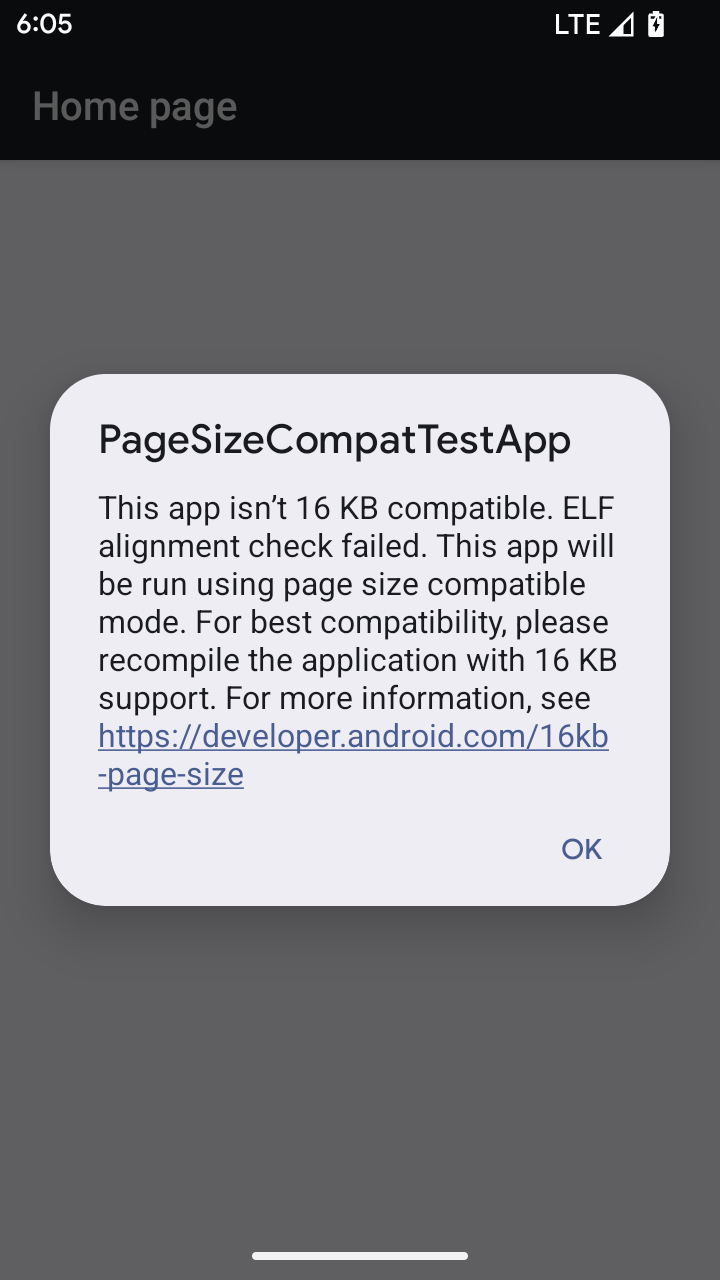
Android 16 以降を搭載したデバイスでアプリが実行されているときに、アプリに 4 KB アライメントのメモリページがあることが検出されると、Android は自動的に互換モードを使用し、ユーザーに通知ダイアログを表示します。AndroidManifest.xml で android:pageSizeCompat プロパティを設定して後方互換モードを有効にすると、アプリの起動時にダイアログが表示されなくなります。android:pageSizeCompat プロパティを使用するには、Android 16 SDK を使用してアプリをコンパイルします。
パフォーマンス、信頼性、安定性を最大限に高めるには、アプリを 16 KB アライメントにする必要があります。詳しくは、16 KB メモリページをサポートするようにアプリを更新する方法に関する最新のブログ投稿をご覧ください。
ユーザー エクスペリエンスとシステム UI
Android 16(API レベル 36)には、より一貫性のある直感的なユーザー エクスペリエンスを実現するための次の変更が含まれています。
ユーザー補助の妨げとなるアナウンスのサポート終了
Android 16 deprecates accessibility announcements, characterized by the use of
announceForAccessibility or the dispatch of
TYPE_ANNOUNCEMENT accessibility events. These can create
inconsistent user experiences for users of TalkBack and Android's screen reader,
and alternatives better serve a broader range of user needs across a variety of
Android's assistive technologies.
Examples of alternatives:
- For significant UI changes like window changes, use
Activity.setTitle(CharSequence)andsetAccessibilityPaneTitle(java.lang.CharSequence). In Compose, useModifier.semantics { paneTitle = "paneTitle" } - To inform the user of changes to critical UI, use
setAccessibilityLiveRegion(int). In Compose, useModifier.semantics { liveRegion = LiveRegionMode.[Polite|Assertive]}. These should be used sparingly as they may generate announcements every time a View is updated. - To notify users about errors, send an
AccessibilityEventof typeAccessibilityEvent#CONTENT_CHANGE_TYPE_ERRORand setAccessibilityNodeInfo#setError(CharSequence), or useTextView#setError(CharSequence).
The reference documentation for the deprecated
announceForAccessibility API includes more details about
suggested alternatives.
3 ボタン ナビゲーションのサポート
Android 16 brings predictive back support to the 3-button navigation for apps that have properly migrated to predictive back. Long-pressing the back button initiates a predictive back animation, giving you a preview of where the back swipe takes you.
This behavior applies across all areas of the system that support predictive back animations, including the system animations (back-to-home, cross-task, and cross-activity).
テーマ別アプリアイコンの自動設定
从 Android 16 QPR 2 开始,Android 会自动将主题应用于应用图标,以打造一致的主屏幕体验。如果应用未提供自己的带主题的应用图标,就会发生这种情况。应用可以通过在自适应图标中添加单色图层来控制主题化应用图标的设计,并在 Android Studio 中预览应用图标的外观。
デバイス フォーム ファクタ
Android 16(API レベル 36)には、仮想デバイスの所有者がディスプレイに投影するアプリに対して次の変更が含まれています。
仮想デバイスの所有者によるオーバーライド
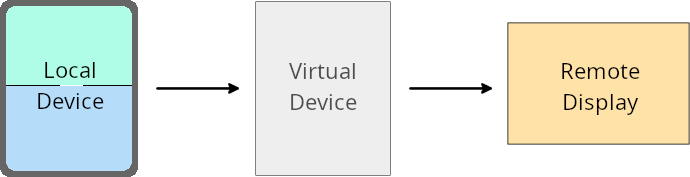
A virtual device owner is a trusted or privileged app that creates and manages a virtual device. Virtual device owners run apps on a virtual device and then project the apps to the display of a remote device, such as a personal computer, virtual reality device, or car infotainment system. The virtual device owner is on a local device, such as a mobile phone.
Per-app overrides
On devices running Android 16 (API level 36), virtual device owners can override app settings on select virtual devices that the virtual device owners manage. For example, to improve app layout, a virtual device owner can ignore orientation, aspect ratio, and resizability restrictions when projecting apps onto an external display.
Common breaking changes
The Android 16 behavior might impact your app's UI on large screen form factors such as car displays or Chromebooks, especially layouts that were designed for small displays in portrait orientation. To learn how to make your app adaptive for all device form factors, see About adaptive layouts.
References
セキュリティ
Android 16(API レベル 36)には、システム セキュリティを強化して、悪意のあるアプリからアプリとユーザーを保護するための変更が含まれています。
Intent リダイレクト攻撃に対するセキュリティの強化
Android 16 针对一般的 Intent 重定向攻击提供了默认安全性,并且只需要最低限度的兼容性和开发者更改。
我们引入了默认安全加固解决方案,以应对 Intent 重定向漏洞。在大多数情况下,正常使用 intent 的应用不会遇到任何兼容性问题;我们在整个开发过程中收集了指标,以监控哪些应用可能会出现中断。
Intent 重定向在 Android 中出现,当攻击者可以部分或完全 控制用于在存在漏洞的应用上下文中启动新组件的 intent 内容时,而受害应用会在 intent 的 extra 字段中启动不受信任的子级 intent。这可能会导致攻击者应用在受害应用的上下文中启动私有组件、触发特权操作或获取对敏感数据的 URI 访问权限,从而可能导致数据窃取和任意代码执行。
选择停用 intent 重定向处理
Android 16 引入了一个新 API,允许应用选择停用启动安全保护。在默认安全行为会干扰合法应用用例的特定情况下,这可能是必要的。
对于针对 Android 16(API 级别 36)SDK 或更高版本进行编译的应用
您可以直接对 Intent 对象使用 removeLaunchSecurityProtection() 方法。
val i = intent
val iSublevel: Intent? = i.getParcelableExtra("sub_intent")
iSublevel?.removeLaunchSecurityProtection() // Opt out from hardening
iSublevel?.let { startActivity(it) }
对于针对 Android 15(API 级别 35)或更低版本进行编译的应用
虽然不建议这样做,但您可以使用反射来访问 removeLaunchSecurityProtection() 方法。
val i = intent
val iSublevel: Intent? = i.getParcelableExtra("sub_intent", Intent::class.java)
try {
    val removeLaunchSecurityProtection = Intent::class.java.getDeclaredMethod("removeLaunchSecurityProtection")
    removeLaunchSecurityProtection.invoke(iSublevel)
} catch (e: Exception) {
    // Handle the exception, e.g., log it
} // Opt-out from the security hardening using reflection
iSublevel?.let { startActivity(it) }
コンパニオン アプリに検出タイムアウトが通知されなくなった
Android 16 introduces a new behavior during
companion device pairing flow to protect the user's location
privacy from malicious apps. All companion apps running on Android 16 are no
longer directly notified of discovery timeout using
RESULT_DISCOVERY_TIMEOUT. Instead, the user is
notified of timeout events with a visual dialog. When the user dismisses
the dialog, the app is alerted of the association failure with
RESULT_USER_REJECTED.
The search duration has also been extended from the original 20 seconds, and the device discovery can be stopped by the user at any point during the search. If at least one device was discovered within the first 20 seconds of starting the search, the CDM stops searching for additional devices.
接続
Android 16(API レベル 36)には、周辺機器との接続を改善するために Bluetooth スタックに次の変更が含まれています。
ペア設定の解除処理の改善
Android 16 以降、Bluetooth スタックが更新され、リモート ボンディングの損失が検出されたときのセキュリティとユーザー エクスペリエンスが改善されました。以前は、システムが自動的にボンディングを削除し、新しいペア設定プロセスを開始していたため、意図しない再ペア設定が発生する可能性がありました。多くのアプリで、債券の損失イベントが一貫した方法で処理されていないことが確認されています。
エクスペリエンスを統一するため、Android 16 ではシステムへのボンディング損失の処理が改善されました。以前にペア設定した Bluetooth デバイスを再接続時に認証できなかった場合、システムはリンクを切断し、ローカルのペア設定情報を保持します。また、ペア設定が解除されたことをユーザーに通知し、ペア設定をやり直すよう求めるシステム ダイアログを表示します。