

Die Android 16-Plattform enthält Verhaltensänderungen, die sich auf deine App auswirken können.
Die folgenden Verhaltensänderungen gelten für alle Apps , wenn sie unter Android 16 ausgeführt werden,
unabhängig von targetSdkVersion. Du solltest deine App testen und sie dann gegebenenfalls an diese Änderungen anpassen.
Sieh dir auch die Liste der Verhaltensänderungen an, die sich nur auf Apps auswirken, die auf Android 16 ausgerichtet sind.
Hauptfunktion
Android 16 (API‑Level 36) enthält die folgenden Änderungen, die verschiedene Kernfunktionen des Android-Systems ändern oder erweitern.
Optimierungen des JobScheduler-Kontingents
Ab Android 16 passen wir das Laufzeitkontingent für die reguläre und beschleunigte Ausführung von Jobs basierend auf den folgenden Faktoren an:
- In welchem App-Standby-Bucket sich die Anwendung befindet: In Android 16 werden aktive Standby-Buckets durch ein großzügiges Laufzeitkontingent erzwungen.
- Wenn der Job ausgeführt wird, während sich die App im Vordergrund befindet: In Android 16 werden Jobs, die gestartet werden, während die App für den Nutzer sichtbar ist, und die fortgesetzt werden, nachdem die App nicht mehr sichtbar ist, an das Job-Laufzeitkontingent gehalten.
- Wenn der Job während der Ausführung eines Dienstes im Vordergrund ausgeführt wird: In Android 16 wird das Joblaufzeitkontingent für Jobs, die gleichzeitig mit einem Dienst im Vordergrund ausgeführt werden, eingehalten. Wenn Sie Jobs für vom Nutzer initiierte Datenübertragungen verwenden, sollten Sie stattdessen vom Nutzer initiierte Datenübertragungsjobs verwenden.
Diese Änderung wirkt sich auf Aufgaben aus, die mit WorkManager, JobScheduler und DownloadManager geplant werden. Wenn Sie herausfinden möchten, warum ein Job angehalten wurde, empfehlen wir, den Grund dafür zu protokollieren, indem Sie WorkInfo.getStopReason() aufrufen (für JobScheduler-Jobs rufen Sie JobParameters.getStopReason() auf).
Informationen dazu, wie sich der Status Ihrer App auf die Ressourcen auswirkt, die sie verwenden kann, finden Sie unter Ressourcenbeschränkungen für die Energieverwaltung. Weitere Informationen zu Best Practices für die Akkuoptimierung finden Sie im Leitfaden zum Optimieren der Akkunutzung für APIs zur Aufgabenplanung.
Wir empfehlen außerdem, die neue JobScheduler#getPendingJobReasonsHistory API zu verwenden, die in Android 16 eingeführt wurde, um zu verstehen, warum ein Job nicht ausgeführt wurde.
Testen
Wenn Sie das Verhalten Ihrer App testen möchten, können Sie bestimmte Optimierungen des Jobkontingents überschreiben, solange die App auf einem Android 16-Gerät ausgeführt wird.
Führen Sie den folgenden adb-Befehl aus, um die Erzwingung von „Der oberste Status entspricht dem Kontingent für die Joblaufzeit“ zu deaktivieren:
adb shell am compat enable OVERRIDE_QUOTA_ENFORCEMENT_TO_TOP_STARTED_JOBS APP_PACKAGE_NAME
Führen Sie den folgenden adb-Befehl aus, um die Erzwingung von „Jobs, die gleichzeitig mit einem Vordergrunddienst ausgeführt werden, halten sich an das Job-Laufzeitkontingent“ zu deaktivieren:
adb shell am compat enable OVERRIDE_QUOTA_ENFORCEMENT_TO_FGS_JOBS APP_PACKAGE_NAME
Wenn Sie das Verhalten bestimmter App-Stand-by-Buckets testen möchten, können Sie den App-Stand-by-Bucket Ihrer App mit dem folgenden adb-Befehl festlegen:
adb shell am set-standby-bucket APP_PACKAGE_NAME active|working_set|frequent|rare|restricted
Mit dem folgenden adb-Befehl können Sie den App-Standby-Bucket Ihrer App abrufen:
adb shell am get-standby-bucket APP_PACKAGE_NAME
Grund für das Beenden leerer Jobs
Ein abgebrochener Job tritt auf, wenn das mit dem Job verknüpfte JobParameters-Objekt durch den Garbage Collector gelöscht wurde, JobService#jobFinished(JobParameters,
boolean) aber nicht aufgerufen wurde, um den Jobabschluss zu signalisieren. Dies bedeutet, dass der Job möglicherweise ausgeführt und ohne Wissen der App neu geplant wird.
Apps, die auf JobScheduler angewiesen sind, pflegen keine starke Referenz zum JobParameters-Objekt. Bei Zeitüberschreitungen wird jetzt der neue Jobstoppgrund STOP_REASON_TIMEOUT_ABANDONED statt STOP_REASON_TIMEOUT zugewiesen.
Wenn der neue Grund für die Fahrtbeendigung häufig auftritt, ergreift das System Maßnahmen zur Behebung des Problems, um die Häufigkeit der Jobs zu reduzieren.
Apps sollten den neuen Grund für das Beenden verwenden, um abgebrochene Jobs zu erkennen und zu reduzieren.
Wenn Sie WorkManager, AsyncTask oder DownloadManager verwenden, sind Sie nicht betroffen, da diese APIs den Job-Lebenszyklus im Namen Ihrer App verwalten.
Vollständige Einstellung von JobInfo#setImportantWhileForeground
Die Methode JobInfo.Builder#setImportantWhileForeground(boolean) gibt an, wie wichtig ein Job ist, wenn sich die Planungs-App im Vordergrund befindet oder vorübergehend von Einschränkungen im Hintergrund ausgenommen ist.
Diese Methode ist seit Android 12 (API-Level 31) nicht mehr unterstützt. Ab Android 16 funktioniert sie nicht mehr effektiv und der Aufruf dieser Methode wird ignoriert.
Das Entfernen der Funktion gilt auch für JobInfo#isImportantWhileForeground(). Ab Android 16 gibt die Methode bei einem Aufruf false zurück.
Der Bereich für die Priorität geordneter Broadcasts ist nicht mehr global
Android-Apps dürfen Prioritäten für Broadcastempfänger festlegen, um die Reihenfolge zu steuern, in der die Empfänger die Übertragung empfangen und verarbeiten. Für im Manifest deklarierte Empfänger können Apps das Attribut android:priority verwenden, um die Priorität zu definieren. Für im Kontext registrierte Empfänger können Apps die IntentFilter#setPriority() API verwenden, um die Priorität zu definieren. Wenn eine Übertragung gesendet wird, liefert das System sie an Empfänger in der Reihenfolge ihrer Priorität, von der höchsten zur niedrigsten.
Unter Android 16 kann die Reihenfolge der Übermittlung von Nachrichten mit dem Attribut android:priority oder IntentFilter#setPriority() in verschiedenen Prozessen nicht garantiert werden. Broadcastprioritäten werden nur innerhalb desselben Anwendungsvorgangs und nicht für alle Prozesse berücksichtigt.
Außerdem werden die Übertragungsprioritäten automatisch auf den Bereich (SYSTEM_LOW_PRIORITY + 1, SYSTEM_HIGH_PRIORITY − 1) beschränkt. Nur Systemkomponenten dürfen SYSTEM_LOW_PRIORITY oder SYSTEM_HIGH_PRIORITY als Übertragungspriorität festlegen.
Ihre App ist möglicherweise betroffen, wenn sie
- Ihre Anwendung hat mehrere Prozesse mit demselben Broadcast-Intent deklariert und erwartet, dass diese Intents in einer bestimmten Reihenfolge basierend auf der Priorität empfangen werden.
- Ihr Anwendungsvorgang interagiert mit anderen Prozessen und erwartet, dass eine Broadcastabsicht in einer bestimmten Reihenfolge empfangen wird.
Wenn die Prozesse miteinander koordiniert werden müssen, sollten sie über andere Koordinationskanäle kommunizieren.
Interne Änderungen an ART
Android 16 enthält die neuesten Updates für die Android Runtime (ART), die die Leistung der Android Runtime (ART) verbessern und Unterstützung für zusätzliche Java-Funktionen bieten. Über Google Play-Systemupdates sind diese Verbesserungen auch für über eine Milliarde Geräte mit Android 12 (API-Level 31) und höher verfügbar.
Wenn diese Änderungen veröffentlicht werden, funktionieren Bibliotheken und App-Code, die auf internen Strukturen von ART basieren, möglicherweise nicht richtig auf Geräten mit Android 16 und früheren Android-Versionen, bei denen das ART-Modul über Google Play-Systemupdates aktualisiert wird.
Die Verwendung interner Strukturen (z. B. nicht SDK-Schnittstellen) kann immer zu Kompatibilitätsproblemen führen. Es ist jedoch besonders wichtig, Code (oder Bibliotheken mit Code) zu vermeiden, der interne ART-Strukturen nutzt, da ART-Änderungen nicht an die Plattformversion gebunden sind, auf der das Gerät ausgeführt wird, und über Google Play-Systemupdates auf über eine Milliarde Geräte angewendet werden.
Alle Entwickler sollten prüfen, ob ihre App betroffen ist, indem sie ihre Apps gründlich unter Android 16 testen. Sehen Sie sich außerdem die bekannten Probleme an, um herauszufinden, ob Ihre App von Bibliotheken abhängt, die wir als abhängig von internen ART-Strukturen identifiziert haben. Wenn Sie App-Code oder Bibliotheksabhängigkeiten haben, die betroffen sind, suchen Sie nach öffentlichen API-Alternativen und fordern Sie öffentliche APIs für neue Anwendungsfälle an, indem Sie eine Funktionsanfrage in unserem Issue Tracker erstellen.
Kompatibilitätsmodus für die Seitengröße von 16 KB
Mit Android 15 wurde die Unterstützung von 16‑KB-Speicherseiten eingeführt, um die Leistung der Plattform zu optimieren. Android 16 bietet einen Kompatibilitätsmodus, mit dem einige Apps, die für Arbeitsspeicherseiten mit 4 KB entwickelt wurden, auf einem Gerät ausgeführt werden können, das für Arbeitsspeicherseiten mit 16 KB konfiguriert ist.
Wenn Ihre App auf einem Gerät mit Android 16 oder höher ausgeführt wird und Android erkennt, dass Ihre App 4‑KB-ausgerichtete Arbeitsspeicherseiten hat, wird automatisch der Kompatibilitätsmodus verwendet und dem Nutzer ein Benachrichtigungsdialogfeld angezeigt. Wenn Sie die android:pageSizeCompat-Eigenschaft in der AndroidManifest.xml so festlegen, dass der Abwärtskompatibilitätsmodus aktiviert wird, wird das Dialogfeld beim Starten Ihrer App nicht angezeigt. Wenn Sie das Attribut android:pageSizeCompat verwenden möchten, kompilieren Sie Ihre App mit dem Android 16 SDK.
Für eine optimale Leistung, Zuverlässigkeit und Stabilität sollte Ihre App weiterhin auf 16 KB ausgerichtet sein. Weitere Informationen finden Sie in unserem aktuellen Blogpost zum Aktualisieren Ihrer Apps, damit sie Speicherseiten mit 16 KB unterstützen.

Nutzererfahrung und System-UI
Android 16 (API‑Level 36) enthält die folgenden Änderungen, die eine einheitlichere und intuitivere Nutzererfahrung schaffen sollen.
Einstellung störender Bedienungshilfen-Ansagen
Unter Android 16 werden Ansagen für Bedienungshilfen nicht mehr unterstützt. Sie werden durch die Verwendung von announceForAccessibility oder das Senden von Bedienungshilfenereignissen vom Typ TYPE_ANNOUNCEMENT gekennzeichnet. Dies kann zu inkonsistenten Nutzererfahrungen für Nutzer von TalkBack und dem Android-Screenreader führen. Alternativen können die Anforderungen einer größeren Anzahl von Nutzern in einer Vielzahl von Hilfstechnologien von Android besser erfüllen.
Beispiele für Alternativen:
- Verwenden Sie für erhebliche Änderungen an der Benutzeroberfläche, z. B. Fensteränderungen,
Activity.setTitle(CharSequence)undsetAccessibilityPaneTitle(java.lang.CharSequence). Verwenden Sie in der Funktion „Schreiben“ die TasteModifier.semantics { paneTitle = "paneTitle" }. - Verwenden Sie
setAccessibilityLiveRegion(int), um Nutzer über Änderungen an wichtigen UI-Elementen zu informieren. Verwenden Sie in der ZeichenansichtModifier.semantics { liveRegion = LiveRegionMode.[Polite|Assertive]}. Sie sollten sparsam verwendet werden, da sonst jedes Mal, wenn eine Ansicht aktualisiert wird, eine Benachrichtigung generiert wird. - Wenn du Nutzer über Fehler informieren möchtest, sende eine
AccessibilityEventvom TypAccessibilityEvent#CONTENT_CHANGE_TYPE_ERRORund setzeAccessibilityNodeInfo#setError(CharSequence)oder verwendeTextView#setError(CharSequence).
Weitere Informationen zu den empfohlenen Alternativen finden Sie in der Referenzdokumentation zur eingestellten announceForAccessibility API.
Unterstützung für die Bedienung über 3 Buttons
In Android 16 wird die Navigation mit drei Schaltflächen für Apps, die ordnungsgemäß zur vorausschauenden Navigation migriert wurden, um die Unterstützung der vorausschauenden Navigation erweitert. Wenn Sie lange auf die Schaltfläche „Zurück“ drücken, wird eine intelligente „Zurück“-Geste für die Systemanimation gestartet. Sie sehen dann eine Vorschau, zu welcher Seite Sie durch Wischen nach hinten gelangen.
Dieses Verhalten gilt für alle Bereiche des Systems, die intelligente „Zurück“-Gesten unterstützen, einschließlich der Systemanimationen (Zurück zum Startbildschirm, zwischen Aufgaben und zwischen Aktivitäten wechseln).
Automatische Designs für App-Symbole
Ab Android 16 QPR2 werden App-Symbole automatisch mit Designs versehen, um einen einheitlichen Startbildschirm zu schaffen. Das passiert, wenn eine App kein eigenes thematisiertes App-Symbol bereitstellt. Apps können das Design ihres thematischen App-Symbols steuern, indem sie eine monochrome Ebene in ihr adaptives Symbol einfügen und in Android Studio eine Vorschau des App-Symbols anzeigen lassen.
Formfaktoren von Geräten
Android 16 (API‑Level 36) enthält die folgenden Änderungen für Apps, wenn sie von Besitzern virtueller Geräte auf Displays projiziert werden.
Überschreibungen durch Besitzer virtueller Geräte
Ein virtueller Geräteinhaber ist eine vertrauenswürdige oder privilegierte App, die ein virtuelles Gerät erstellt und verwaltet. Besitzer virtueller Geräte führen Apps auf einem virtuellen Gerät aus und übertragen sie dann auf das Display eines Remote-Geräts, z. B. eines PCs, eines Virtual-Reality-Geräts oder eines Infotainmentsystems im Auto. Der Inhaber des virtuellen Geräts verwendet ein lokales Gerät, z. B. ein Smartphone.
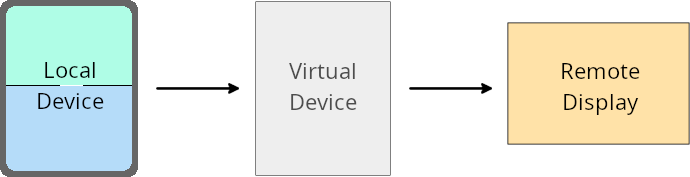
App-spezifische Überschreibungen
Auf Geräten mit Android 16 (API-Level 36) können Besitzer virtueller Geräte App-Einstellungen auf ausgewählten virtuellen Geräten überschreiben, die sie verwalten. Um beispielsweise das App-Layout zu verbessern, kann der Inhaber eines virtuellen Geräts Einschränkungen für Ausrichtung, Seitenverhältnis und Größe ignorieren, wenn Apps auf einen externen Bildschirm projiziert werden.
Häufige wichtige Änderungen
Das Verhalten von Android 16 kann sich auf die Benutzeroberfläche Ihrer App auf Geräten mit großen Bildschirmen wie Autodisplays oder Chromebooks auswirken, insbesondere auf Layouts, die für kleine Displays im Hochformat entwickelt wurden. Informationen dazu, wie Sie Ihre App für alle Geräteformfaktoren anpassen, finden Sie unter Adaptive Layouts.
Verweise
Sicherheit
Android 16 (API‑Level 36) enthält Änderungen, die die Systemsicherheit verbessern, um Apps und Nutzer vor schädlichen Apps zu schützen.
Verbesserter Schutz vor Angriffen durch Intent-Umleitung
Android 16 bietet Standardsicherheit gegen allgemeine Intent-Umleitungsangriffe. Es sind nur minimale Kompatibilitäts- und Entwickleränderungen erforderlich.
Wir führen standardmäßig Lösungen zur Sicherheitshärtung ein, um Intent-Umleitungsangriffe zu verhindern. In den meisten Fällen treten bei Apps, die Intents verwenden, keine Kompatibilitätsprobleme auf. Wir haben während des gesamten Entwicklungsprozesses Messwerte erfasst, um zu ermitteln, bei welchen Apps es zu Problemen kommen könnte.
Intent-Umleitung in Android tritt auf, wenn ein Angreifer den Inhalt eines Intents, der zum Starten einer neuen Komponente im Kontext einer anfälligen App verwendet wird, teilweise oder vollständig kontrollieren kann, während die Opfer-App einen nicht vertrauenswürdigen Intent auf untergeordneter Ebene in einem Extras-Feld eines Intents der obersten Ebene startet. Dies kann dazu führen, dass die Angreifer-App private Komponenten im Kontext der Opfer-App startet, privilegierte Aktionen auslöst oder URI-Zugriff auf vertrauliche Daten erhält, was möglicherweise zu Datendiebstahl und beliebiger Codeausführung führt.
Intent-Umleitungsbehandlung deaktivieren
Android 16 führt eine neue API ein, mit der Apps die Sicherheitsmaßnahmen für den Start deaktivieren können. Dies kann in bestimmten Fällen erforderlich sein, in denen das Standardsicherheitsverhalten mit legitimen Anwendungsfällen der App in Konflikt steht.
Für Anwendungen, die mit dem Android 16 SDK (API-Level 36) oder höher kompiliert werden
Sie können die Methode removeLaunchSecurityProtection() direkt für das Intent-Objekt verwenden.
val i = intent
val iSublevel: Intent? = i.getParcelableExtra("sub_intent")
iSublevel?.removeLaunchSecurityProtection() // Opt out from hardening
iSublevel?.let { startActivity(it) }
Für Anwendungen, die mit dem Android 15 SDK (API-Level 35) oder niedriger kompiliert werden
Obwohl nicht empfohlen, können Sie die Methode removeLaunchSecurityProtection() mithilfe der Reflektion aufrufen.
val i = intent
val iSublevel: Intent? = i.getParcelableExtra("sub_intent", Intent::class.java)
try {
    val removeLaunchSecurityProtection = Intent::class.java.getDeclaredMethod("removeLaunchSecurityProtection")
    removeLaunchSecurityProtection.invoke(iSublevel)
} catch (e: Exception) {
    // Handle the exception, e.g., log it
} // Opt-out from the security hardening using reflection
iSublevel?.let { startActivity(it) }
Companion-Apps werden nicht mehr über Time-outs bei der Suche benachrichtigt
In Android 16 wird beim Verknüpfen von Geräten ein neues Verhalten eingeführt, um den Standortdatenschutz der Nutzer vor schädlichen Apps zu schützen. Alle Companion-Apps, die unter Android 16 ausgeführt werden, werden nicht mehr direkt über RESULT_DISCOVERY_TIMEOUT über das Zeitlimit für die Suche informiert. Stattdessen wird der Nutzer über ein visuelles Dialogfeld über Zeitüberschreitungen informiert. Wenn der Nutzer das Dialogfeld schließt, wird die App über den Zuordnungsfehler mit RESULT_USER_REJECTED informiert.
Außerdem wurde die Suchdauer von ursprünglich 20 Sekunden auf 60 Sekunden verlängert. Die Gerätesuche kann vom Nutzer jederzeit beendet werden. Wenn innerhalb der ersten 20 Sekunden nach Beginn der Suche mindestens ein Gerät gefunden wurde, sucht die CDM nicht mehr nach weiteren Geräten.
Konnektivität
Android 16 (API‑Level 36) enthält die folgenden Änderungen am Bluetooth-Stack, um die Konnektivität mit Peripheriegeräten zu verbessern.
Verbesserte Verarbeitung von Verbindungsverlusten
Ab Android 16 wurde der Bluetooth-Stack aktualisiert, um die Sicherheit und Nutzerfreundlichkeit zu verbessern, wenn ein Verlust der Remote-Bindung erkannt wird. Bisher entfernte das System die Verknüpfung automatisch und startete einen neuen Kopplungsvorgang, was zu einer unbeabsichtigten erneuten Kopplung führen konnte. Wir haben in vielen Fällen festgestellt, dass Apps das Ereignis „Verlust der Bindung“ nicht einheitlich behandeln.
Um die Nutzung zu vereinheitlichen, wurde in Android 16 die Verarbeitung von Verbindungsverlusten für das System verbessert. Wenn ein zuvor gekoppeltes Bluetooth-Gerät bei der erneuten Verbindung nicht authentifiziert werden konnte, trennt das System die Verbindung, behält lokale Kopplungsinformationen bei und zeigt ein Systemdialogfeld an, in dem Nutzer über den Verbindungsverlust informiert und aufgefordert werden, eine neue Kopplung vorzunehmen.