

Android 16 представляет множество новых функций и API для разработчиков. В следующих разделах приведено краткое описание этих функций, которое поможет вам начать работу с соответствующими API.
Подробный список новых, измененных и удаленных API см. в отчете об изменениях API . Подробную информацию о новых API см. в справочнике Android API — новые API выделены для большей наглядности.Также следует проанализировать области, где изменения платформы могут повлиять на ваши приложения. Для получения дополнительной информации см. следующие страницы:
- Изменения в поведении, влияющие на приложения при использовании Android 16.
- Изменения в поведении, затрагивающие все приложения независимо от
targetSdkVersion.
Основная функциональность
Android включает в себя новые API, расширяющие основные возможности системы Android.
Два релиза Android API в 2025 году
- Эта предварительная версия предназначена для следующего основного выпуска Android, запуск которого запланирован на второй квартал 2025 года. Этот выпуск похож на все наши предыдущие выпуски API, в которых мы можем планировать изменения поведения, которые часто привязаны к targetSdkVersion.
- Мы планируем выпуск основного выпуска на квартал раньше (второй квартал, а не третий квартал в предыдущие годы), чтобы лучше согласовываться с графиком запуска устройств в нашей экосистеме, чтобы больше устройств могли получить основной выпуск Android раньше. Поскольку основной выпуск выйдет во втором квартале, вам нужно будет проводить ежегодное тестирование совместимости на несколько месяцев раньше, чем в предыдущие годы, чтобы убедиться, что ваши приложения готовы.
- Мы планируем выпустить еще один выпуск в четвертом квартале 2025 года, который также будет включать новые API для разработчиков. Основной выпуск второго квартала станет единственным выпуском в 2025 году, включающим запланированные изменения в поведении, которые могут повлиять на приложения.
Помимо новых API-интерфейсов для разработчиков, второстепенный выпуск четвертого квартала будет содержать обновления функций, оптимизации и исправления ошибок; он не будет включать никаких изменений в поведении, влияющих на приложение.
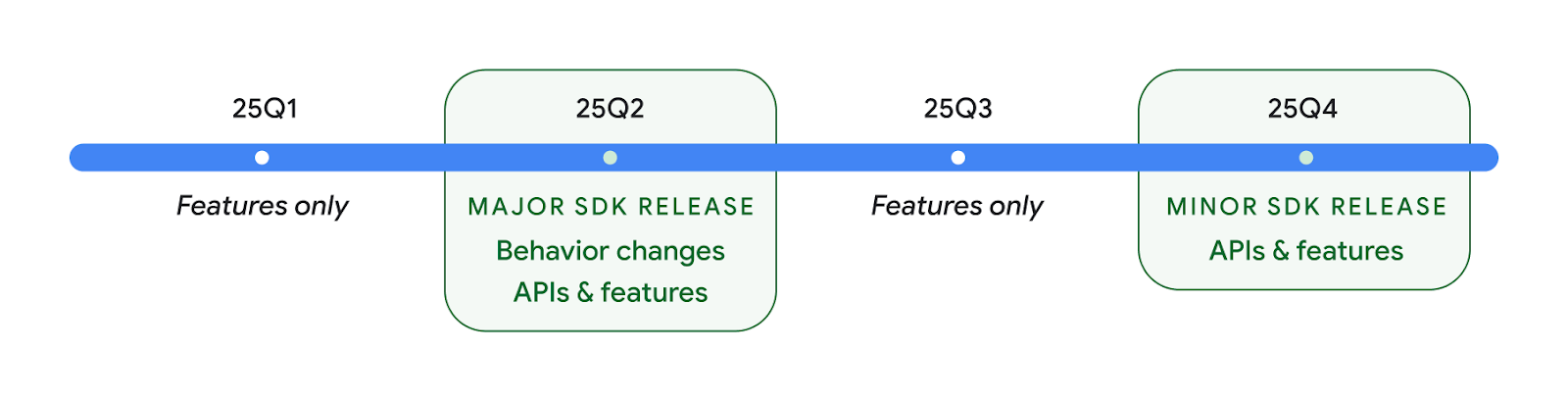
Мы продолжим выпускать ежеквартальные выпуски Android. Обновления Q1 и Q3 между выпусками API будут предоставлять дополнительные обновления, которые помогут обеспечить постоянное качество. Мы активно работаем с нашими партнерами по устройствам, чтобы сделать выпуск Q2 доступным как можно большему количеству устройств.
Использование новых API с основными и второстепенными выпусками
Защита блока кода с помощью проверки уровня API сегодня осуществляется с использованием константы SDK_INT с помощью VERSION_CODES . Это будет по-прежнему поддерживаться в основных выпусках Android.
if (SDK_INT >= VERSION_CODES.BAKLAVA) {
  // Use APIs introduced in Android 16
}
Новую константу SDK_INT_FULL можно использовать для проверки API как на основные, так и на второстепенные версии с помощью нового перечисления VERSION_CODES_FULL .
if (SDK_INT_FULL >= VERSION_CODES_FULL.[MAJOR or MINOR RELEASE]) {
  // Use APIs introduced in a major or minor release
}
Вы также можете использовать метод Build.getMinorSdkVersion() чтобы получить только второстепенную версию SDK.
val minorSdkVersion = Build.getMinorSdkVersion(VERSION_CODES_FULL.BAKLAVA)
Эти API еще не доработаны и могут быть изменены, поэтому, если у вас есть какие-либо вопросы, отправьте нам свой отзыв .
Пользовательский опыт и пользовательский интерфейс системы
Android 16 предоставляет разработчикам приложений и пользователям больше контроля и гибкости в настройке своих устройств в соответствии с их потребностями.
Уведомления, отслеживающие ход выполнения
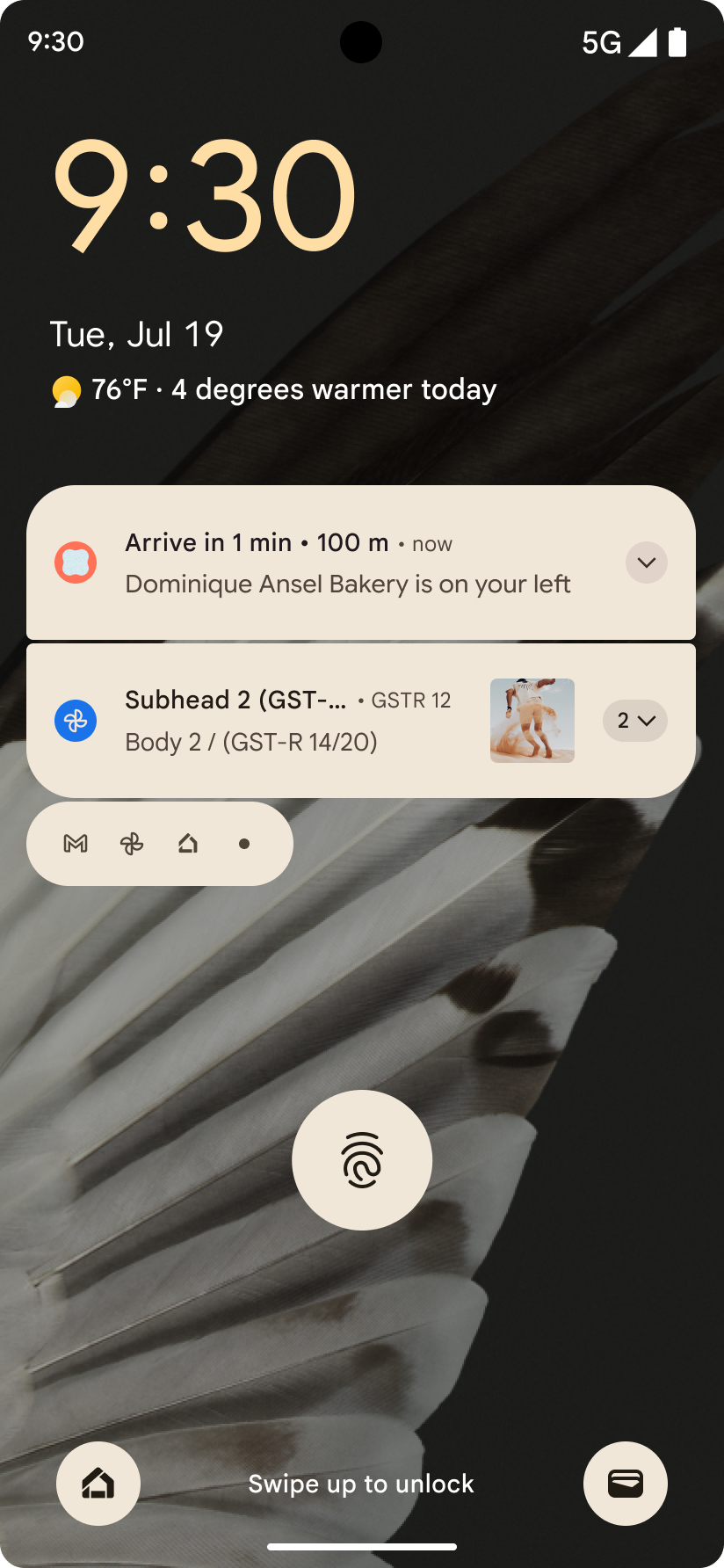
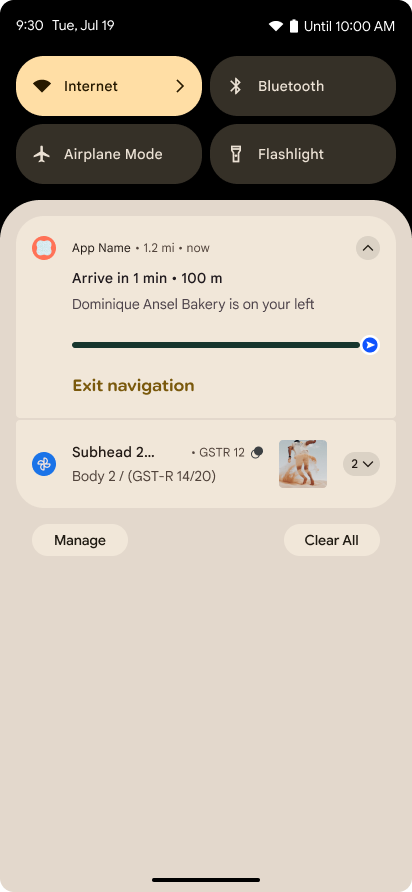
В Android 16 представлены уведомления, ориентированные на прогресс, которые помогают пользователям беспрепятственно отслеживать инициированные пользователем поездки от начала до конца.
Notification.ProgressStyle — это новый стиль уведомлений, который позволяет создавать уведомления, ориентированные на прогресс. Ключевые варианты использования включают совместную поездку, доставку и навигацию. В классе Notification.ProgressStyle вы можете обозначать состояния и этапы пути пользователя с помощью точек и сегментов .
Дополнительную информацию см. на странице документации по уведомлениям, ориентированным на прогресс .
Прогнозируемые обновления задней панели
В Android 16 добавлены новые API, которые помогут вам включить прогнозируемую системную анимацию при навигации по жестам, например анимацию возвращения домой. Регистрация onBackInvokedCallback с новым PRIORITY_SYSTEM_NAVIGATION_OBSERVER позволяет вашему приложению получать обычный вызов onBackInvoked всякий раз, когда система обрабатывает обратную навигацию, не влияя на обычный поток обратной навигации.
В Android 16 дополнительно добавлены finishAndRemoveTaskCallback() и moveTaskToBackCallback . Регистрируя эти обратные вызовы с помощью OnBackInvokedDispatcher , система может запускать определенные действия и воспроизводить соответствующие анимации заранее при вызове жеста возврата.
Более насыщенные тактильные ощущения
Android предоставляет контроль над тактильным приводом с момента его создания.
В Android 11 добавлена поддержка более сложных тактильных эффектов, которые могут поддерживать более продвинутые приводы с помощью VibrationEffect.Compositions семантических примитивов, определяемых устройством.
В Android 16 добавлены тактильные API , которые позволяют приложениям определять кривые амплитуды и частоты тактильного эффекта, абстрагируя при этом различия между возможностями устройств.
Инструменты и средства повышения производительности разработчиков
Хотя большая часть нашей работы по повышению вашей производительности сосредоточена на таких инструментах, как Android Studio , Jetpack Compose и библиотеки Android Jetpack , мы всегда ищем способы в рамках платформы помочь вам реализовать ваши замыслы.
Обработка контента для живых обоев
В Android 16 платформа живых обоев получила новый API контента для решения проблем, связанных с динамическими обоями, управляемыми пользователем. В настоящее время живые обои, включающие пользовательский контент, требуют сложной реализации, ориентированной на конкретные услуги. В Android 16 представлены WallpaperDescription и WallpaperInstance . WallpaperDescription позволяет идентифицировать отдельные экземпляры живых обоев из одного и того же сервиса. Например, обои, экземпляры которых есть как на главном экране, так и на экране блокировки, могут иметь уникальное содержимое в обоих местах. Средство выбора обоев и WallpaperManager используют эти метаданные, чтобы лучше представлять обои пользователям, упрощая процесс создания разнообразных и персонализированных живых обоев.
Производительность и батарея
В Android 16 представлены API, которые помогают собирать информацию о ваших приложениях.
Профилирование, запускаемое системой
ProfilingManager был добавлен в Android 15 , что дает приложениям возможность запрашивать сбор данных профилирования с помощью Perfetto на общедоступных устройствах в полевых условиях. Однако, поскольку это профилирование должно быть запущено из приложения, приложениям будет сложно или невозможно захватить критические потоки, такие как запуски или ANR.
Чтобы помочь в этом, в Android 16 реализовано системное профилирование в ProfilingManager . Приложения могут регистрировать заинтересованность в получении трассировок для определенных триггеров, таких как reportFullyDrawn о холодном стартеFullyDrawn или ANR, а затем система запускает и останавливает трассировку от имени приложения. После завершения трассировки результаты доставляются в каталог данных приложения.
Компонент запуска в ApplicationStartInfo
ApplicationStartInfo был добавлен в Android 15 , что позволяет приложению видеть причины запуска процесса, тип запуска, время запуска, регулирование и другие полезные диагностические данные. В Android 16 добавлен getStartComponent() чтобы определить, какой тип компонента вызвал запуск, что может быть полезно для оптимизации процесса запуска вашего приложения.
Более глубокий самоанализ своей работы
API JobScheduler#getPendingJobReason() возвращает причину, по которой задание может быть ожидающим. Однако задание может быть отложено по нескольким причинам.
В Android 16 мы представляем новый API JobScheduler#getPendingJobReasons(int jobId) , который возвращает несколько причин, по которым задание находится в состоянии ожидания, из-за как явных ограничений, установленных разработчиком, так и неявных ограничений, установленных системой.
Мы также представляем JobScheduler#getPendingJobReasonsHistory(int jobId) , который возвращает список последних изменений ограничений.
Мы рекомендуем использовать API, чтобы помочь вам разобраться, почему ваши задания могут не выполняться, особенно если вы наблюдаете снижение показателей успеха определенных задач или имеете ошибки, связанные с задержкой выполнения определенных заданий. Например, не удалось обновить виджеты в фоновом режиме или не удалось вызвать задание предварительной выборки перед запуском приложения.
Это также может помочь вам лучше понять, не выполняются ли определенные задания из-за ограничений, определенных системой, а не из-за явно установленных ограничений.
Адаптивная частота обновления
Адаптивная частота обновления (ARR), представленная в Android 15, позволяет частоте обновления дисплея на поддерживаемом оборудовании адаптироваться к частоте кадров контента с помощью дискретных шагов VSync. Это снижает энергопотребление, устраняя при этом необходимость в переключении режимов, которое может привести к рывкам.
В Android 16 представлены hasArrSupport() и getSuggestedFrameRate(int) при восстановлении getSupportedRefreshRates() , чтобы вашим приложениям было проще использовать преимущества ARR. RecyclerView 1.4 внутренне поддерживает ARR, когда он устанавливается при прокрутке или плавной прокрутке , и мы продолжаем работу по добавлению поддержки ARR в другие библиотеки Jetpack. В этой статье о частоте кадров рассматриваются многие API-интерфейсы, которые вы можете использовать для установки частоты кадров, чтобы ваше приложение могло напрямую использовать ARR.
API-интерфейсы для измерения запаса высоты в ADPF
SystemHealthManager представляет API-интерфейсы getCpuHeadroom и getGpuHeadroom , предназначенные для предоставления играм и ресурсоемким приложениям оценок доступных ресурсов ЦП и графического процессора. Эти методы позволяют вам оценить, как ваше приложение или игра могут наилучшим образом улучшить работоспособность системы, особенно при использовании в сочетании с другими API-интерфейсами Android Dynamic Performance Framework (ADPF), которые обнаруживают температурное регулирование .
Используя CpuHeadroomParams и GpuHeadroomParams на поддерживаемых устройствах, вы можете настроить временной интервал, используемый для расчета запаса, и выбрать среднюю или минимальную доступность ресурсов. Это может помочь вам соответственно сократить использование ресурсов ЦП или графического процессора, что приведет к улучшению пользовательского опыта и увеличению времени автономной работы.
Доступность
В Android 16 добавлены новые API и функции для обеспечения доступности, которые помогут вам сделать ваше приложение доступным для каждого пользователя.
Улучшены API для обеспечения доступности.
В Android 16 добавлены дополнительные API для улучшения семантики пользовательского интерфейса, которые помогают улучшить согласованность для пользователей, которые полагаются на службы специальных возможностей, такие как TalkBack .
Контурный текст для максимальной контрастности текста
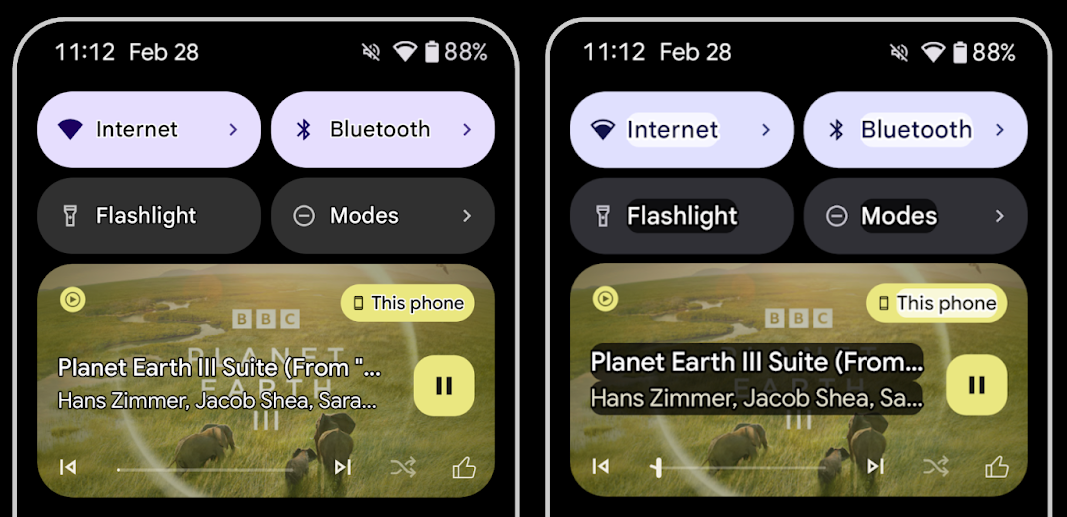
У пользователей со слабым зрением часто снижена контрастная чувствительность, что затрудняет различение объектов на фоне. Чтобы помочь этим пользователям, в Android 16 вводится контурный текст, заменяющий высококонтрастный текст, который рисует вокруг текста более крупную контрастную область, что значительно улучшает читаемость.
Android 16 содержит новые API-интерфейсы AccessibilityManager , позволяющие вашим приложениям проверять или регистрировать прослушиватель, чтобы узнать, включен ли этот режим. В первую очередь это касается наборов UI Toolkit, таких как Compose, которые предлагают аналогичный визуальный опыт. Если вы поддерживаете библиотеку UI Toolkit или ваше приложение выполняет настраиваемую отрисовку текста в обход класса android.text.Layout , вы можете использовать это, чтобы узнать, включен ли контурный текст.
Длительность добавлена в TtsSpan
Android 16 расширяет TtsSpan с помощью TYPE_DURATION , состоящего из ARG_HOURS , ARG_MINUTES и ARG_SECONDS . Это позволяет напрямую комментировать продолжительность времени, обеспечивая точное и согласованное преобразование текста в речь с помощью таких сервисов, как TalkBack .
Поддержка элементов с несколькими метками
В настоящее время Android позволяет элементам пользовательского интерфейса получать свою метку доступности из другой, а также теперь предлагает возможность связывания нескольких меток, что является распространенным сценарием в веб-контенте. Введя API на основе списков в AccessibilityNodeInfo , Android может напрямую поддерживать эти отношения с несколькими метками. В рамках этого изменения мы отказались от использования AccessibilityNodeInfo#setLabeledBy и #getLabeledBy в пользу #addLabeledBy , #removeLabeledBy и #getLabeledByList .
Улучшенная поддержка расширяемых элементов.
В Android 16 добавлены API специальных возможностей, которые позволяют передавать развернутое или свернутое состояние интерактивных элементов, таких как меню и расширяемые списки. Установив расширенное состояние с помощью setExpandedState и отправив TYPE_WINDOW_CONTENT_CHANGED AccessibilityEvents с типом изменения контента CONTENT_CHANGE_TYPE_EXPANDED , вы можете гарантировать, что программы чтения с экрана, такие как TalkBack , сообщают об изменениях состояния, обеспечивая более интуитивно понятный и инклюзивный пользовательский интерфейс.
Неопределенные индикаторы прогресса
В Android 16 добавлен RANGE_TYPE_INDETERMINATE , что дает вам возможность предоставлять RangeInfo как для определенных, так и для неопределенных виджетов ProgressBar , что позволяет таким сервисам, как TalkBack , более последовательно предоставлять обратную связь для индикаторов прогресса.
Флажок с тремя состояниями
Новые методы AccessibilityNodeInfo getChecked и setChecked(int) в Android 16 теперь поддерживают состояние «частично проверено» в дополнение к состояниям «проверено» и «не проверено». Это заменяет устаревшие логические значения isChecked и setChecked(boolean) .
Дополнительные описания
Когда служба доступности описывает ViewGroup , она объединяет метки контента из своих дочерних представлений. Если вы предоставляете contentDescription для ViewGroup , службы специальных возможностей предполагают, что вы также переопределяете описание нефокусируемых дочерних представлений. Это может быть проблематично, если вы хотите пометить элементы как раскрывающийся список (например, «Семейство шрифтов»), сохраняя при этом текущий выбор для доступности (например, «Робото»). В Android 16 добавлен setSupplementalDescription , чтобы вы могли предоставлять текст, предоставляющий информацию о ViewGroup , не переопределяя информацию от ее дочерних элементов.
Обязательные поля формы
В Android 16 добавлен setFieldRequired в AccessibilityNodeInfo , чтобы приложения могли сообщать службе специальных возможностей, что требуется ввести данные в поле формы. Это важный сценарий для пользователей, заполняющих многие типы форм, даже такие простые, как флажок «Обязательные положения и условия», помогающий пользователям последовательно идентифицировать и быстро перемещаться между необходимыми полями.
Использование телефона в качестве микрофона для голосовых вызовов при использовании слуховых аппаратов LEA.
В Android 16 пользователям слуховых аппаратов LE Audio добавлена возможность переключаться между встроенными микрофонами слуховых аппаратов и микрофоном телефона для голосовых вызовов. Это может быть полезно в шумной обстановке или в других ситуациях, когда микрофоны слухового аппарата могут работать некорректно.
Регуляторы окружающего звука для слуховых аппаратов LEA
В Android 16 пользователи слуховых аппаратов LE Audio получают возможность регулировать громкость окружающего звука, улавливаемого микрофонами слухового аппарата. Это может быть полезно в ситуациях, когда фоновый шум слишком громкий или слишком тихий.
Камера
Android 16 расширяет поддержку профессиональных пользователей камер, позволяя использовать гибридную автоматическую экспозицию, а также точно настраивать цветовую температуру и оттенок. Новый индикатор ночного режима помогает приложению определять, когда следует переключаться между ночным и ночным режимами съемки. Новые действия Intent упрощают съемку движущихся изображений, и мы продолжаем улучшать изображения UltraHDR, добавляя поддержку кодирования HEIC и новых параметров из проекта стандарта ISO 21496-1.
Гибридная автоэкспозиция
В Android 16 в Camera2 добавлены новые гибридные режимы автоэкспозиции, позволяющие вручную контролировать определенные аспекты экспозиции, а алгоритм автоэкспозиции (AE) позаботится обо всем остальном. Вы можете управлять ISO + AE и временем экспозиции + AE , что обеспечивает большую гибкость по сравнению с текущим подходом, при котором вы либо имеете полное ручное управление, либо полностью полагаетесь на автоматическую экспозицию.
fun setISOPriority() {
    // ... (Your existing code before the snippet) ...

    val availablePriorityModes = mStaticInfo.characteristics.get(
        CameraCharacteristics.CONTROL_AE_AVAILABLE_PRIORITY_MODES
    )

    // ... (Your existing code between the snippets) ...

    // Turn on AE mode to set priority mode
    reqBuilder.set(
        CaptureRequest.CONTROL_AE_MODE,
        CameraMetadata.CONTROL_AE_MODE_ON
    )
    reqBuilder.set(
        CaptureRequest.CONTROL_AE_PRIORITY_MODE,
        CameraMetadata.CONTROL_AE_PRIORITY_MODE_SENSOR_SENSITIVITY_PRIORITY
    )
    reqBuilder.set(
        CaptureRequest.SENSOR_SENSITIVITY,
        TEST_SENSITIVITY_VALUE
    )
    val request: CaptureRequest = reqBuilder.build()

    // ... (Your existing code after the snippet) ...
}
Точная настройка цветовой температуры и оттенка.
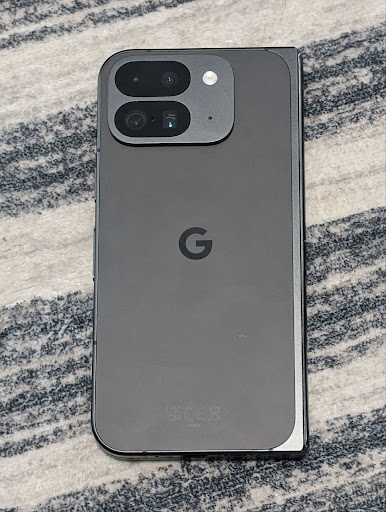
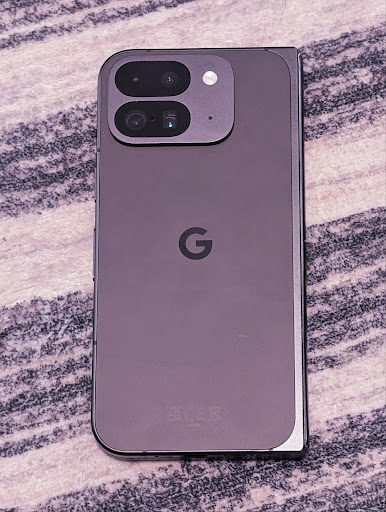
В Android 16 добавлена поддержка камеры для точной настройки цветовой температуры и оттенков для лучшей поддержки профессиональных приложений для записи видео. В предыдущих версиях Android вы могли управлять настройками баланса белого с помощью CONTROL_AWB_MODE , который содержит параметры, ограниченные списком предустановок, таких как «Лампа накаливания» , «Облачно » и «Сумерки» . COLOR_CORRECTION_MODE_CCT позволяет использовать COLOR_CORRECTION_COLOR_TEMPERATURE и COLOR_CORRECTION_COLOR_TINT для точной настройки баланса белого на основе коррелированной цветовой температуры.
fun setCCT() {
    // ... (Your existing code before this point) ...

    val colorTemperatureRange: Range<Int> =
        mStaticInfo.characteristics[CameraCharacteristics.COLOR_CORRECTION_COLOR_TEMPERATURE_RANGE]

    // Set to manual mode to enable CCT mode
    reqBuilder[CaptureRequest.CONTROL_AWB_MODE] = CameraMetadata.CONTROL_AWB_MODE_OFF
    reqBuilder[CaptureRequest.COLOR_CORRECTION_MODE] = CameraMetadata.COLOR_CORRECTION_MODE_CCT
    reqBuilder[CaptureRequest.COLOR_CORRECTION_COLOR_TEMPERATURE] = 5000
    reqBuilder[CaptureRequest.COLOR_CORRECTION_COLOR_TINT] = 30

    val request: CaptureRequest = reqBuilder.build()

    // ... (Your existing code after this point) ...
}
В следующих примерах показано, как будет выглядеть фотография после применения различных настроек цветовой температуры и оттенка:



Обнаружение сцены в ночном режиме камеры
Чтобы ваше приложение знало, когда переключаться на сеанс камеры в ночном режиме и обратно, в Android 16 добавлен EXTENSION_NIGHT_MODE_INDICATOR . Если поддерживается, он доступен в CaptureResult в Camera2.
Это API, о котором мы кратко упомянули в блоге «Как Instagram позволяет пользователям делать потрясающие фотографии при слабом освещении» . Этот пост представляет собой практическое руководство по реализации ночного режима вместе с практическим примером, который связывает более качественные фотографии в ночном режиме в приложении с увеличением количества фотографий, публикуемых с камеры в приложении.
Действия, направленные на захват движущихся фотографий
В Android 16 добавлены стандартные действия Intent — ACTION_MOTION_PHOTO_CAPTURE и ACTION_MOTION_PHOTO_CAPTURE_SECURE , которые запрашивают у приложения камеры захват движущейся фотографии и возврат ее.
Вы должны либо передать дополнительный EXTRA_OUTPUT , чтобы контролировать, куда будет записано изображение, либо Uri через Intent.setClipData(ClipData) . Если вы не установили ClipData , он будет скопирован туда при вызове Context.startActivity(Intent) .
Улучшение изображения UltraHDR
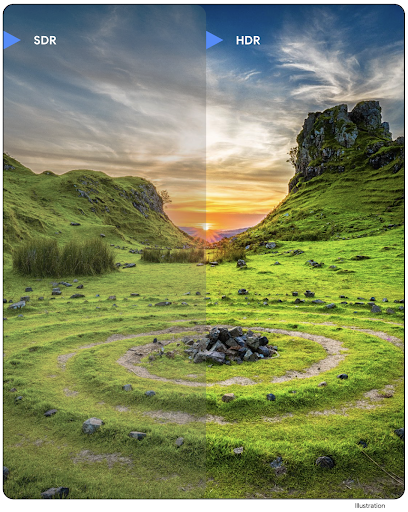
Android 16 продолжает нашу работу по обеспечению потрясающего качества изображения с помощью UltraHDR. Он добавляет поддержку изображений UltraHDR в формате файлов HEIC. Эти изображения получат тип ImageFormat HEIC_ULTRAHDR и будут содержать встроенную карту усиления, аналогичную существующему формату UltraHDR JPEG. Мы также работаем над поддержкой AVIF для UltraHDR, так что следите за обновлениями.
Кроме того, в Android 16 реализованы дополнительные параметры UltraHDR из проекта стандарта ISO 21496-1 , включая возможность получать и устанавливать цветовое пространство, в котором следует применять математические вычисления карты усиления, а также поддержку базовых изображений в кодировке HDR с картами усиления SDR.
Графика
Android 16 включает в себя последние улучшения графики, такие как пользовательские графические эффекты с использованием AGSL.
Пользовательские графические эффекты с помощью AGSL
В Android 16 добавлены RuntimeColorFilter и RuntimeXfermode , позволяющие создавать сложные эффекты, такие как «Порог», «Сепия» и «Насыщенность оттенка», и применять их для рисования вызовов. Начиная с Android 13, вы можете использовать AGSL для создания пользовательских RuntimeShaders , расширяющих Shader . Новый API отражает это, добавляя RuntimeColorFilter на базе AGSL, который расширяет ColorFilter , и эффект Xfermode , который позволяет реализовать настраиваемую компоновку и смешивание на основе AGSL между исходными и целевыми пикселями.
private val thresholdEffectString = """
    uniform half threshold;

    half4 main(half4 c) {
        half luminosity = dot(c.rgb, half3(0.2126, 0.7152, 0.0722));
        half bw = step(threshold, luminosity);
        return bw.xxx1 * c.a;
    }"""

fun setCustomColorFilter(paint: Paint) {
   val filter = RuntimeColorFilter(thresholdEffectString)
   filter.setFloatUniform(0.5);
   paint.colorFilter = filter
}
Подключение
Обновление Android 16 предоставляет вашему приложению доступ к новейшим достижениям в области коммуникационных и беспроводных технологий.
Расширение зоны действия с повышенной безопасностью
В Android 16 добавлена поддержка надежных функций безопасности при определении местоположения Wi-Fi на поддерживаемых устройствах с Wi-Fi 6 802.11az, что позволяет приложениям сочетать более высокую точность, большую масштабируемость и динамическое планирование протокола с улучшениями безопасности, включая AES-256. шифрование и защита от атак MITM. Это позволяет более безопасно использовать его в случаях, когда устройство находится вблизи, например, для разблокировки ноутбука или двери автомобиля. 802.11az интегрирован со стандартом Wi-Fi 6, используя его инфраструктуру и возможности для более широкого внедрения и упрощения развертывания.
Универсальные API для определения расстояния
Android 16 включает новый RangingManager , который позволяет определять расстояние и угол на поддерживаемом оборудовании между локальным и удаленным устройством. RangingManager поддерживает использование различных технологий определения дальности, таких как зондирование каналов BLE, ранжирование на основе BLE RSSI, сверхширокополосный диапазон и время прохождения сигнала Wi-Fi в оба конца.
Сопутствующий менеджер устройств: наличие устройства
В Android 16 вводятся новые API для привязки службы вашего сопутствующего приложения. Служба будет привязана, когда BLE находится в зоне действия и Bluetooth подключен, и служба будет отвязана, когда BLE находится вне зоны действия или Bluetooth отключен. Приложение получит новый обратный вызов 'onDevicePresenceEvent()' на основе различных DevicePresenceEvent . Более подробную информацию можно найти в 'startObservingDevicePresence(ObservingDevicePresenceRequest)' .
СМИ
Android 16 включает в себя множество функций, улучшающих работу с мультимедиа.
Улучшения в инструменте выбора фотографий.
Средство выбора фотографий предоставляет пользователям безопасный встроенный способ предоставить вашему приложению доступ к выбранным изображениям и видео как из локального, так и из облачного хранилища, а не ко всей медиатеке. Используя комбинацию модульных системных компонентов через обновления системы Google и службы Google Play , он поддерживается до Android 4.4 (уровень API 19) . Для интеграции требуется всего несколько строк кода с соответствующей библиотекой Android Jetpack .
Android 16 включает следующие улучшения средства выбора фотографий:
- Встроенное средство выбора фотографий : новые API , которые позволяют приложениям встраивать средство выбора фотографий в свою иерархию представлений. Это позволяет ему чувствовать себя более интегрированной частью приложения, сохраняя при этом изоляцию процесса, которая позволяет пользователям выбирать медиафайлы, не требуя приложению слишком широких разрешений. Чтобы максимизировать совместимость между версиями платформы и упростить интеграцию, вам нужно будет использовать будущую библиотеку Android Jetpack, если вы хотите интегрировать встроенный инструмент выбора фотографий.
- Облачный поиск в средстве выбора фотографий : новые API, которые позволяют выполнять поиск у поставщика облачных носителей для средства выбора фотографий Android. Функция поиска в средстве выбора фотографий появится в ближайшее время.
Продвинутое профессиональное видео
В Android 16 появилась поддержка кодека Advanced Professional Video (APV), который предназначен для использования для записи видео высокого качества профессионального уровня и постобработки.
Стандарт кодека APV имеет следующие особенности:
- Качество видео без потерь (близкое к качеству необработанного видео)
- Низкая сложность и высокая пропускная способность внутрикадрового кодирования (без прогнозирования области пикселей) для лучшей поддержки рабочих процессов редактирования.
- Поддержка диапазона высоких скоростей передачи данных до нескольких Гбит/с для контента с разрешением 2K, 4K и 8K, обеспечиваемая облегченной схемой энтропийного кодирования.
- Мозаичное разделение кадров для иммерсивного контента и включения параллельного кодирования и декодирования.
- Поддержка различных форматов выборки цветности и битовой глубины.
- Поддержка многократного декодирования и перекодирования без серьезного ухудшения качества изображения.
- Поддержка многопросмотрового видео и вспомогательного видео, такого как глубина, альфа и предварительный просмотр.
- Поддержка HDR10/10+ и пользовательских метаданных.
Эталонная реализация APV предоставляется в рамках проекта OpenAPV . В Android 16 будет реализована поддержка профиля APV 422-10, который обеспечивает выборку цвета YUV 422 вместе с 10-битным кодированием и целевым битрейтом до 2 Гбит/с.
Конфиденциальность
Android 16 включает в себя множество функций, которые помогают разработчикам приложений защищать конфиденциальность пользователей.
Обновления Health Connect
Health Connect добавляет ACTIVITY_INTENSITY — тип данных, определенный в соответствии с рекомендациями Всемирной организации здравоохранения относительно умеренной и интенсивной активности. Для каждой записи требуется время начала, время окончания и то, является ли интенсивность активности умеренной или интенсивной.
Health Connect также содержит обновленные API, поддерживающие медицинские записи . Это позволяет приложениям читать и записывать медицинские записи в формате FHIR с явного согласия пользователя.
«Песочница конфиденциальности» на Android
Android 16 включает в себя последнюю версию Privacy Sandbox для Android , что является частью нашей постоянной работы по разработке технологий, позволяющих пользователям знать, что их конфиденциальность защищена. На нашем веб-сайте вы найдете дополнительную информацию о бета-программе Privacy Sandbox для разработчиков Android, которая поможет вам начать работу. Ознакомьтесь со средой выполнения SDK , которая позволяет SDK запускаться в выделенной среде выполнения отдельно от приложения, которое они обслуживают, обеспечивая более надежную защиту при сборе и обмене пользовательскими данными.
Безопасность
Android 16 включает в себя функции, которые помогут вам повысить безопасность вашего приложения и защитить его данные.
API для обмена ключами
В Android 16 добавлены API, которые поддерживают общий доступ к ключам хранилища ключей Android с другими приложениями. Новый класс KeyStoreManager поддерживает предоставление и отзыв доступа к ключам с помощью uid приложения и включает API для доступа приложений к общим ключам.
форм-факторы устройств
Android 16 обеспечивает вашим приложениям поддержку, позволяющую максимально эффективно использовать возможности форм-факторов Android.
Стандартизированная система оценки качества изображения и звука для телевизоров.
Новый пакет MediaQuality в Android 16 предоставляет набор стандартизированных API-интерфейсов для доступа к профилям звука и изображения, а также настройкам, связанным с оборудованием. Это позволяет потоковым приложениям запрашивать профили и динамически применять их к мультимедиа:
- Фильмы, снятые с более широким динамическим диапазоном, требуют большей точности цветопередачи, чтобы увидеть тонкие детали в тенях и адаптироваться к окружающему освещению, поэтому может подойти профиль, который предпочитает точность цветопередачи яркости.
- Прямые трансляции спортивных событий часто создаются с узким динамическим диапазоном, но их часто смотрят при дневном свете, поэтому профиль, в котором яркость предпочтительнее точности цветопередачи, может дать лучшие результаты.
- Полностью интерактивный контент требует минимальной обработки для уменьшения задержки и более высокой частоты кадров, поэтому многие телевизоры поставляются с игровым профилем.
API позволяет приложениям переключаться между профилями, а пользователи могут наслаждаться настройкой поддерживаемых телевизоров в соответствии с их контентом.
Интернационализация
Android 16 добавляет функции и возможности, которые улучшают пользовательский опыт при использовании устройства на разных языках.
Вертикальный текст
В Android 16 добавлена низкоуровневая поддержка вертикального рендеринга и измерения текста, чтобы обеспечить базовую поддержку вертикального письма для разработчиков библиотек. Это особенно полезно для таких языков, как японский, в которых обычно используются вертикальные системы письма. В класс Paint добавлен новый флаг VERTICAL_TEXT_FLAG . Когда этот флаг установлен с помощью Paint.setFlags , API измерения текста Paint будут сообщать о вертикальном перемещении вместо горизонтального, а Canvas будет рисовать текст вертикально.
val text = "「春は、曙。」"
Box(
    Modifier.padding(innerPadding).background(Color.White).fillMaxSize().drawWithContent {
        drawIntoCanvas { canvas ->
            val paint = Paint().apply { textSize = 64.sp.toPx() }
            // Draw text vertically
            paint.flags = paint.flags or VERTICAL_TEXT_FLAG
            val height = paint.measureText(text)
            canvas.nativeCanvas.drawText(
                text,
                0,
                text.length,
                size.width / 2,
                (size.height - height) / 2,
                paint
            )
        }
    }
) {}
Настройка измерительной системы
Теперь пользователи могут настроить свою систему измерения в региональных настройках в настройках. Предпочтения пользователя включены как часть кода локали, поэтому вы можете зарегистрировать BroadcastReceiver в ACTION_LOCALE_CHANGED для обработки изменений конфигурации локали при изменении региональных предпочтений.
Использование форматтеров может помочь адаптироваться к местным условиям. Например, «0,5 дюйма» на английском языке (США) равно «12,7 мм» для пользователя, который настроил свой телефон на английский язык (Дания) или использует свой телефон на английском языке (США) с метрической системой в качестве предпочтительной системы измерения.
Чтобы найти эти настройки, откройте приложение «Настройки» и выберите «Система» > «Языки и регион» .