

Android 16 incluye excelentes funciones y APIs para desarrolladores. En las siguientes secciones, se resumen estas funciones para ayudarte a comenzar a usar las APIs relacionadas.
Para obtener una lista detallada de las APIs nuevas, modificadas y quitadas, consulta el informe de diferencias de la API. Para obtener detalles sobre las nuevas APIs, consulta la referencia de la API de Android. Las nuevas APIs están destacadas para que sea más fácil identificarlas.También debes revisar las áreas en las que los cambios en la plataforma podrían afectar tus apps. Si deseas obtener más información, consulta las siguientes páginas:
- Cambios de comportamiento que afectan a las apps cuando se segmentan para Android 16
- Cambios de comportamiento que afectan a todas las apps, independientemente de
targetSdkVersion.
Funcionalidad principal
Android incluye nuevas APIs que expanden las capacidades principales del sistema Android.
Dos versiones de la API de Android en 2025
- Esta versión preliminar es para la próxima versión importante de Android, con un lanzamiento planificado para el segundo trimestre de 2025. Esta versión es similar a todas las versiones de API anteriores, en las que podemos tener cambios de comportamiento planificados que, a menudo, están vinculados a una targetSdkVersion.
- Planeamos el lanzamiento principal un trimestre antes (segundo trimestre en lugar del tercer trimestre de años anteriores) para alinearnos mejor con el programa de lanzamientos de dispositivos en nuestro ecosistema, de modo que más dispositivos puedan obtener la versión principal de Android antes. Con el lanzamiento principal que se lanzará en el segundo trimestre, deberás realizar las pruebas de compatibilidad anuales unos meses antes que en años anteriores para asegurarte de que tus apps estén listas.
- Planeamos tener otro lanzamiento en el cuarto trimestre de 2025, que también incluirá nuevas APIs para desarrolladores. La versión principal del segundo trimestre será la única de 2025 que incluirá cambios de comportamiento planificados que podrían afectar a las apps.
Además de las nuevas APIs para desarrolladores, la versión secundaria del cuarto trimestre incluirá actualizaciones de funciones, optimizaciones y correcciones de errores, pero no cambios de comportamiento que afecten a las apps.
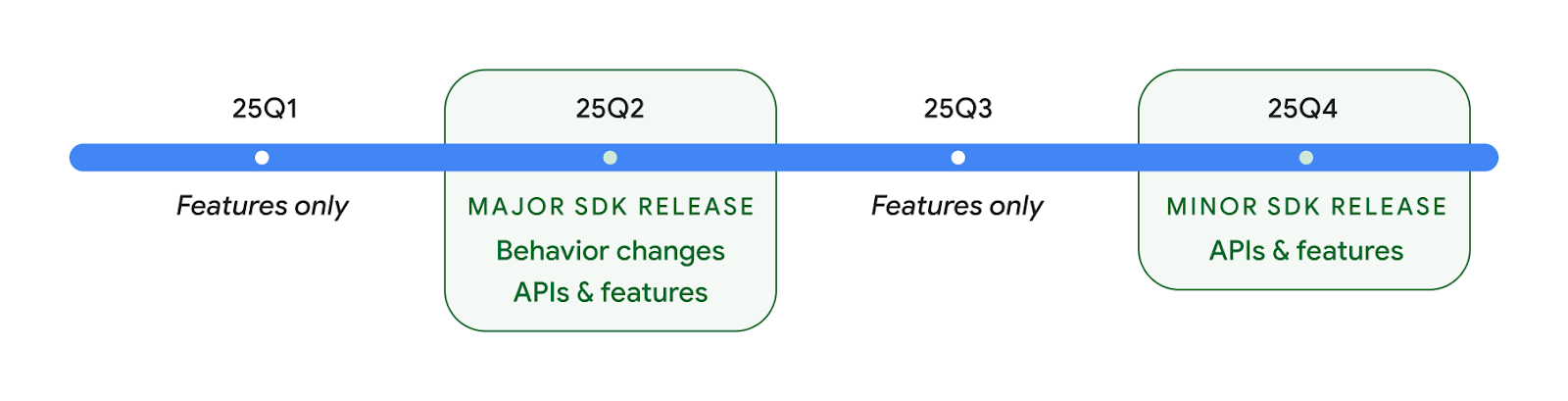
Seguiremos lanzando versiones trimestrales de Android. Las actualizaciones del 1ᵉʳ y 3ᵉʳ trim. entre los lanzamientos de la API proporcionarán actualizaciones incrementales para ayudar a garantizar una calidad continua. Estamos trabajando de forma activa con nuestros socios de dispositivos para llevar la versión del segundo trimestre a la mayor cantidad de dispositivos posible.
Cómo usar APIs nuevas con versiones principales y secundarias
Hoy en día, la protección de un bloque de código con una verificación del nivel de API se realiza con la constante SDK_INT con VERSION_CODES. Esto seguirá siendo compatible con las versiones principales de Android.
if (SDK_INT >= VERSION_CODES.BAKLAVA) {
  // Use APIs introduced in Android 16
}
La nueva constante SDK_INT_FULL se puede usar para las verificaciones de API en versiones principales y secundarias con la nueva enumeración VERSION_CODES_FULL.
if (SDK_INT_FULL >= VERSION_CODES_FULL.[MAJOR or MINOR RELEASE]) {
  // Use APIs introduced in a major or minor release
}
También puedes usar el método Build.getMinorSdkVersion() para obtener solo la versión secundaria del SDK.
val minorSdkVersion = Build.getMinorSdkVersion(VERSION_CODES_FULL.BAKLAVA)
Estas APIs aún no están finalizadas y están sujetas a cambios, por lo que, si tienes alguna inquietud, envíanos comentarios.
Experiencia del usuario y la IU del sistema
Android 16 brinda a los desarrolladores de apps y a los usuarios más control y flexibilidad para configurar sus dispositivos según sus necesidades.
Notificaciones centradas en el progreso
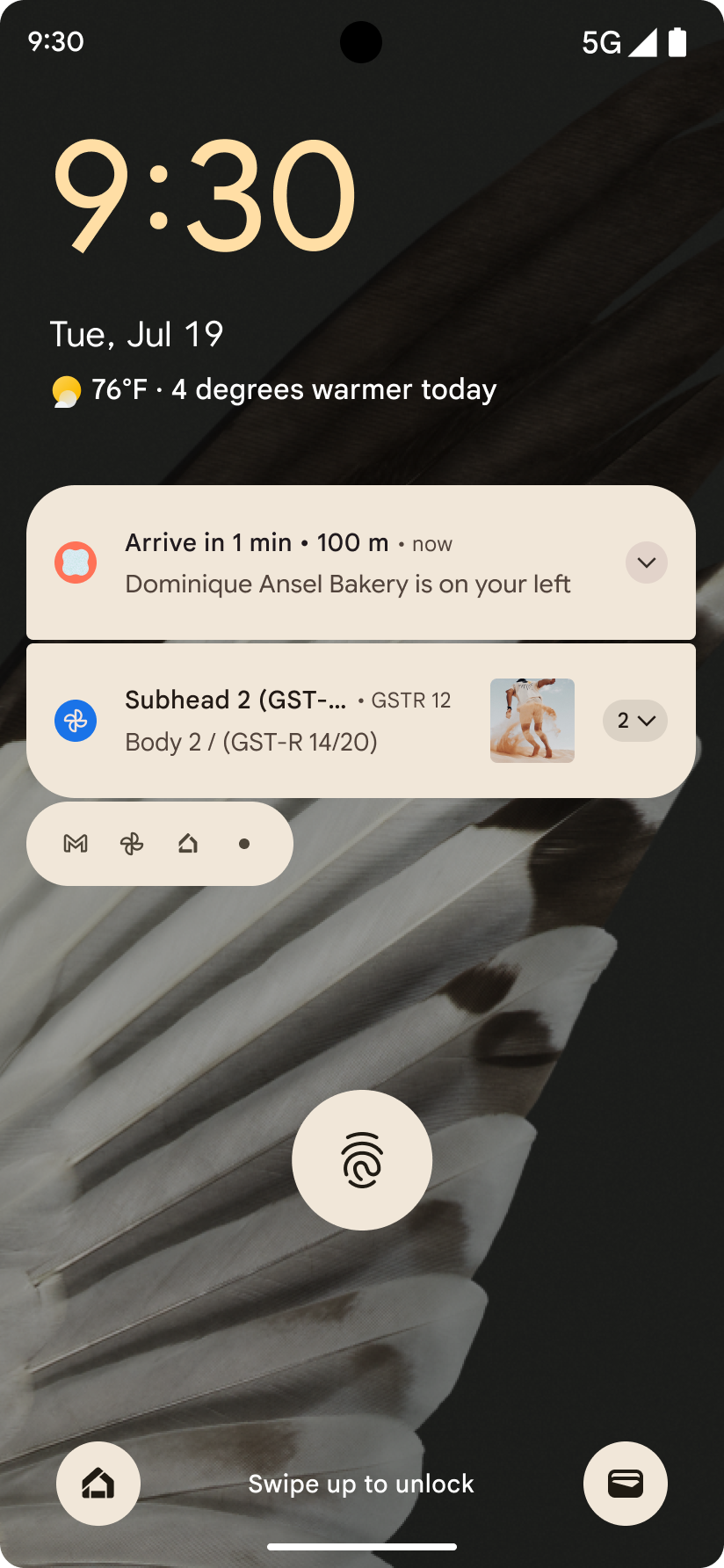
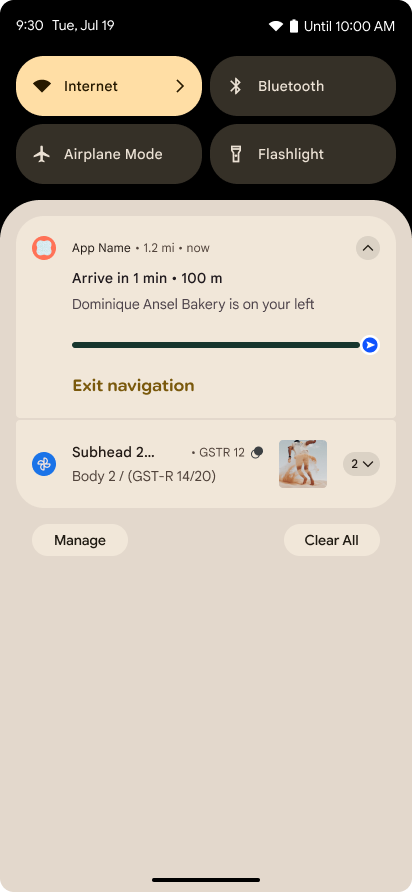
Android 16 presenta notificaciones centradas en el progreso para ayudar a los usuarios a hacer un seguimiento sin problemas de los recorridos de principio a fin que inician.
Notification.ProgressStyle es un nuevo estilo de notificación que te permite crear notificaciones centradas en el progreso. Entre los casos de uso clave, se incluyen el transporte privado con conductor, la entrega y la navegación. Dentro de la clase Notification.ProgressStyle, puedes denotar estados y eventos importantes en el recorrido del usuario con
puntos y segmentos.
Para obtener más información, consulta la página de documentación sobre las notificaciones centradas en el progreso.
Actualizaciones del gesto atrás predictivo
Android 16 agrega nuevas APIs para ayudarte a habilitar animaciones del sistema de gesto atrás predictivo en la navegación por gestos, como la animación de volver a la pantalla principal. Registrar el onBackInvokedCallback con el nuevo PRIORITY_SYSTEM_NAVIGATION_OBSERVER permite que tu app reciba la llamada normal de onBackInvoked cada vez que el sistema controla una navegación hacia atrás sin afectar el flujo normal de navegación hacia atrás.
Además, Android 16 agrega finishAndRemoveTaskCallback() y moveTaskToBackCallback. Cuando se registran estas devoluciones de llamada con OnBackInvokedDispatcher, el sistema puede activar comportamientos específicos y reproducir las animaciones correspondientes con anticipación cuando se invoca el gesto atrás.
Tecnología táctil más enriquecida
Android expuso el control sobre el actuador táctil desde su creación.
Android 11 agregó compatibilidad con efectos táctiles más complejos que los actuadores más avanzados podrían admitir a través de VibrationEffect.Compositions de primitivas semánticas definidas por el dispositivo.
Android 16 agrega APIs táctiles que permiten que las apps definan las curvas de amplitud y frecuencia de un efecto táctil y, al mismo tiempo, abstraigan las diferencias entre las capacidades del dispositivo.
Productividad y herramientas para desarrolladores
Si bien la mayor parte de nuestro trabajo para mejorar tu productividad se centra en herramientas como Android Studio, Jetpack Compose y las bibliotecas de Android Jetpack, siempre buscamos formas de ayudarte a concretar tu visión en la plataforma.
Control de contenido para fondos animados
En Android 16, el framework de fondos de pantalla animados obtiene una nueva API de contenido para abordar los desafíos de los fondos de pantalla dinámicos controlados por el usuario. Actualmente, los fondos de pantalla en vivo que incorporan contenido proporcionado por el usuario requieren implementaciones complejas y específicas del servicio. Android 16 presenta WallpaperDescription y WallpaperInstance. WallpaperDescription te permite identificar instancias distintas de un fondo animado del mismo servicio. Por ejemplo, un fondo de pantalla que tiene instancias en la pantalla principal y en la pantalla de bloqueo puede tener contenido único en ambos lugares. El selector de fondo de pantalla y WallpaperManager usan estos metadatos para presentar mejor los fondos de pantalla a los usuarios, lo que optimiza el proceso para que crees experiencias de fondo de pantalla en vivo diversas y personalizadas.
Rendimiento y batería
Android 16 introduce APIs que ayudan a recopilar estadísticas sobre tus apps.
Generación de perfiles activada por el sistema
ProfilingManager se agregó en Android 15, lo que les permite a las apps solicitar la recopilación de datos de perfiles con Perfetto en dispositivos públicos en el campo.
Sin embargo, como esta generación de perfiles debe iniciarse desde la app, sería difícil o imposible que las apps capturaran flujos críticos, como inicios o errores de ANR.
Para ayudar con esto, Android 16 presenta la generación de perfiles activada por el sistema en ProfilingManager. Las apps pueden registrar interés en recibir registros de ciertos activadores, como el inicio en frío reportFullyDrawn o los errores de ANR, y, luego, el sistema inicia y detiene un registro en nombre de la app. Una vez que se completa el seguimiento, los resultados se envían al directorio de datos de la app.
Componente de inicio en ApplicationStartInfo
ApplicationStartInfo se agregó en Android 15, lo que permite que una app vea los motivos del inicio del proceso, el tipo de inicio, los horarios de inicio, la limitación y otros datos de diagnóstico útiles. Android 16 agrega getStartComponent() para distinguir qué tipo de componente activó el inicio, lo que puede ser útil para optimizar el flujo de inicio de tu app.
Mejor introspección de los trabajos
La API de JobScheduler#getPendingJobReason() muestra un motivo por el que un trabajo podría estar pendiente. Sin embargo, un trabajo puede estar pendiente por varios motivos.
En Android 16, presentamos una nueva API JobScheduler#getPendingJobReasons(int jobId), que muestra varios motivos por los que una tarea está pendiente, debido a las restricciones explícitas que establece el desarrollador y las implícitas que establece el sistema.
También presentamos JobScheduler#getPendingJobReasonsHistory(int jobId), que muestra una lista de los cambios de restricción más recientes.
Te recomendamos que uses la API para depurar por qué es posible que no se ejecuten tus trabajos, sobre todo si observas tasas de éxito reducidas en ciertas tareas o tienes errores en la latencia de la finalización de ciertos trabajos. Por ejemplo, no se pudo actualizar los widgets en segundo plano o no se pudo llamar a la tarea de precarga antes de iniciar la app.
Esto también puede ayudarte a comprender mejor si ciertas tareas no se completan debido a restricciones definidas por el sistema en comparación con las restricciones establecidas de forma explícita.
Frecuencia de actualización adaptativa
La frecuencia de actualización adaptativa (ARR), que se introdujo en Android 15, permite que la frecuencia de actualización de la pantalla en el hardware compatible se adapte a la velocidad de fotogramas del contenido mediante pasos discretos de VSync. Esto reduce el consumo de energía y, al mismo tiempo, elimina la necesidad de cambiar de modo, lo que podría generar fallas.
Android 16 presenta hasArrSupport() y getSuggestedFrameRate(int) mientras restablece getSupportedRefreshRates() para que tus apps aprovechen el ARR con mayor facilidad. RecyclerView 1.4 admite ARR de forma interna cuando se establece desde un deslizamiento o un desplazamiento suave, y seguimos trabajando para agregar compatibilidad con ARR a más bibliotecas de Jetpack. En este artículo sobre la velocidad de fotogramas, se describen muchas de las APIs que puedes usar para establecer la velocidad de fotogramas de modo que tu app pueda usar directamente la ARR.
APIs de Headroom en ADPF
SystemHealthManager presenta las APIs de getCpuHeadroom y getGpuHeadroom, diseñadas para proporcionar a los juegos y las apps con gran consumo de recursos estimaciones de los recursos de CPU y GPU disponibles. Estos métodos te ofrecen una forma de evaluar cómo tu app o juego puede mejorar mejor el estado del sistema, en particular, cuando se usan junto con otras APIs de Android Dynamic Performance Framework (ADPF) que detectan el estrangulamiento térmico.
Si usas CpuHeadroomParams y GpuHeadroomParams en dispositivos compatibles, puedes personalizar el período que se usa para calcular el margen y seleccionar entre la disponibilidad de recursos promedio o mínima. Esto puede ayudarte a reducir el uso de recursos de la CPU o la GPU según corresponda, lo que genera mejores experiencias del usuario y una mayor duración de batería.
Accesibilidad
Android 16 agrega nuevas APIs y funciones de accesibilidad que pueden ayudarte a llevar tu app a todos los usuarios.
Se mejoraron las APIs de accesibilidad
Android 16 agrega APIs adicionales para mejorar la semántica de la IU que ayuda a mejorar la coherencia para los usuarios que dependen de servicios de accesibilidad, como TalkBack.
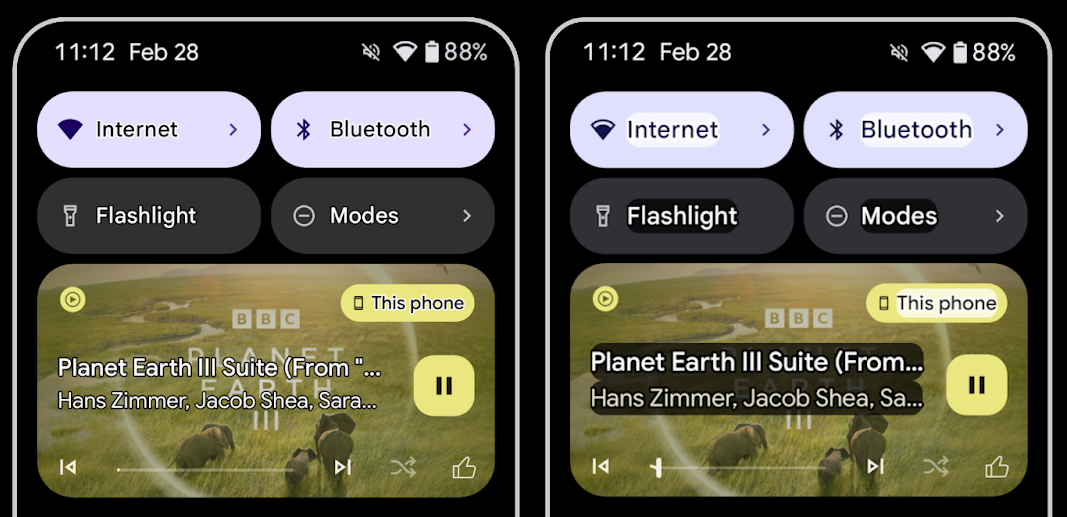
Contorno del texto para obtener el máximo contraste
Los usuarios con visión reducida suelen tener una sensibilidad de contraste reducida, lo que dificulta distinguir los objetos de sus fondos. Para ayudar a estos usuarios, Android 16 presenta el texto con contorno, que reemplaza el texto de alto contraste, que dibuja un área de contraste más grande alrededor del texto para mejorar en gran medida la legibilidad.
Android 16 contiene nuevas APIs de AccessibilityManager para permitir que tus apps verifiquen o registren un objeto de escucha para ver si este modo está habilitado. Esto se hace principalmente para que los kits de herramientas de IU, como Compose, ofrezcan una experiencia visual similar. Si mantienes una biblioteca de UI Toolkit o tu app realiza una renderización de texto personalizada que pasa por alto la clase android.text.Layout, puedes usar esto para saber cuándo se habilita el texto de contorno.
Se agregó la duración a TtsSpan
Android 16 extiende TtsSpan con un TYPE_DURATION, que consta de ARG_HOURS, ARG_MINUTES y ARG_SECONDS. Esto te permite anotar directamente la duración, lo que garantiza un resultado de texto a voz preciso y coherente con servicios como TalkBack.
Cómo admitir elementos con varias etiquetas
Actualmente, Android permite que los elementos de la IU deriven su etiqueta de accesibilidad de otra y ahora ofrece la posibilidad de asociar varias etiquetas, una situación común en el contenido web. Con la introducción de una API basada en listas en AccessibilityNodeInfo, Android puede admitir directamente estas relaciones de varias etiquetas. Como parte de este cambio, se dieron de baja AccessibilityNodeInfo#setLabeledBy y #getLabeledBy en favor de #addLabeledBy, #removeLabeledBy y #getLabeledByList.
Se mejoró la compatibilidad con los elementos expandibles
Android 16 agrega APIs de accesibilidad que te permiten transmitir el estado expandido o colapsado de los elementos interactivos, como menús y listas expandibles. Si configuras el estado expandido con setExpandedState y envías TYPE_WINDOW_CONTENT_CHANGED AccessibilityEvents con un tipo de cambio de contenido CONTENT_CHANGE_TYPE_EXPANDED, puedes asegurarte de que los lectores de pantalla, como TalkBack, anuncien los cambios de estado, lo que proporciona una experiencia del usuario más intuitiva y inclusiva.
Barras de progreso indeterminadas
Android 16 agrega RANGE_TYPE_INDETERMINATE, lo que te brinda una forma de exponer RangeInfo para widgets ProgressBar determinados e indeterminados, lo que permite que servicios como TalkBack proporcionen comentarios de forma más coherente para los indicadores de progreso.
CheckBox de tres estados
Los nuevos métodos AccessibilityNodeInfo
getChecked y setChecked(int) de Android 16 ahora admiten un estado "parcialmente marcado", además de "marcado" y "sin marcar". Esto reemplaza los valores booleanos isChecked y setChecked(boolean) obsoletos.
Descripciones complementarias
Cuando un servicio de accesibilidad describe un ViewGroup, combina etiquetas de contenido de sus vistas secundarias. Si proporcionas un contentDescription para el ViewGroup, los servicios de accesibilidad suponen que también estás anulando la descripción de las vistas secundarias no enfocables. Esto puede ser problemático si deseas etiquetar elementos como un menú desplegable (por ejemplo, "Familia de fuentes") y, al mismo tiempo, conservar la selección actual para la accesibilidad (por ejemplo, "Roboto"). Android 16 agrega setSupplementalDescription para que puedas proporcionar texto que proporcione información sobre un ViewGroup sin anular la información de sus elementos secundarios.
Campos obligatorios del formulario
Android 16 agrega setFieldRequired a AccessibilityNodeInfo para que las apps puedan indicarle a un servicio de accesibilidad que se requiere la entrada en un campo de formulario. Esta es una situación importante para los usuarios que completan muchos tipos de formularios, incluso elementos tan simples como una casilla de verificación de los términos y condiciones obligatorios, que los ayuda a identificar y navegar de forma coherente y rápida entre los campos obligatorios.
El teléfono como entrada de micrófono para llamadas de voz con audífonos LEA
Android 16 agrega la capacidad para que los usuarios de audífonos LE Audio cambien entre los micrófonos integrados en los audífonos y el micrófono del teléfono para las llamadas de voz. Esto puede ser útil en entornos ruidosos o en otras situaciones en las que los micrófonos del audífono no funcionen bien.
Controles de volumen ambiental para audífonos LEA
Android 16 agrega la capacidad para que los usuarios de audífonos LE Audio ajusten el volumen del sonido ambiental que captan los micrófonos de los audífonos. Esto puede ser útil en situaciones en las que el ruido de fondo es demasiado alto o demasiado bajo.
Cámara
Android 16 mejora la compatibilidad para los usuarios de cámaras profesionales, lo que permite la exposición automática híbrida junto con ajustes precisos de la temperatura de color y el tono. Un nuevo indicador de modo nocturno ayuda a tu app a saber cuándo cambiar a una sesión de cámara en modo nocturno y cuándo salir de ella. Las nuevas acciones de Intent facilitan la captura de fotos en movimiento, y seguimos mejorando las imágenes UltraHDR con compatibilidad para la codificación HEIC y nuevos parámetros del borrador del estándar ISO 21496-1.
Exposición automática híbrida
Android 16 agrega nuevos modos de exposición automática híbridos a Camera2, lo que te permite controlar manualmente aspectos específicos de la exposición y, al mismo tiempo, permitir que el algoritmo de exposición automática (AE) controle el resto. Puedes controlar ISO + AE y tiempo de exposición + AE, lo que proporciona una mayor flexibilidad en comparación con el enfoque actual en el que tienes control manual completo o dependes por completo de la exposición automática.
fun setISOPriority() {
    // ... (Your existing code before the snippet) ...

    val availablePriorityModes = mStaticInfo.characteristics.get(
        CameraCharacteristics.CONTROL_AE_AVAILABLE_PRIORITY_MODES
    )

    // ... (Your existing code between the snippets) ...

    // Turn on AE mode to set priority mode
    reqBuilder.set(
        CaptureRequest.CONTROL_AE_MODE,
        CameraMetadata.CONTROL_AE_MODE_ON
    )
    reqBuilder.set(
        CaptureRequest.CONTROL_AE_PRIORITY_MODE,
        CameraMetadata.CONTROL_AE_PRIORITY_MODE_SENSOR_SENSITIVITY_PRIORITY
    )
    reqBuilder.set(
        CaptureRequest.SENSOR_SENSITIVITY,
        TEST_SENSITIVITY_VALUE
    )
    val request: CaptureRequest = reqBuilder.build()

    // ... (Your existing code after the snippet) ...
}
Ajustes precisos de temperatura y tono de color
Android 16 agrega compatibilidad con la cámara para realizar ajustes precisos de temperatura y tono de color para brindar una mejor compatibilidad con aplicaciones de grabación de video profesionales. En versiones anteriores de Android, podías controlar la configuración del balance de blancos a través de CONTROL_AWB_MODE, que contiene opciones limitadas a una lista predeterminada, como Incandescente, Nublado y Crepúsculo. COLOR_CORRECTION_MODE_CCT permite el uso de COLOR_CORRECTION_COLOR_TEMPERATURE y COLOR_CORRECTION_COLOR_TINT para realizar ajustes precisos del balance de blancos en función de la temperatura de color correlacionada.
fun setCCT() {
    // ... (Your existing code before this point) ...

    val colorTemperatureRange: Range<Int> =
        mStaticInfo.characteristics[CameraCharacteristics.COLOR_CORRECTION_COLOR_TEMPERATURE_RANGE]

    // Set to manual mode to enable CCT mode
    reqBuilder[CaptureRequest.CONTROL_AWB_MODE] = CameraMetadata.CONTROL_AWB_MODE_OFF
    reqBuilder[CaptureRequest.COLOR_CORRECTION_MODE] = CameraMetadata.COLOR_CORRECTION_MODE_CCT
    reqBuilder[CaptureRequest.COLOR_CORRECTION_COLOR_TEMPERATURE] = 5000
    reqBuilder[CaptureRequest.COLOR_CORRECTION_COLOR_TINT] = 30

    val request: CaptureRequest = reqBuilder.build()

    // ... (Your existing code after this point) ...
}
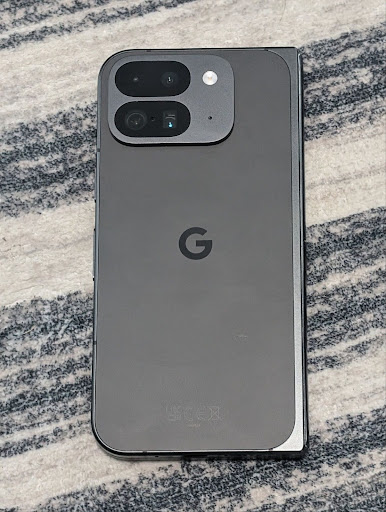
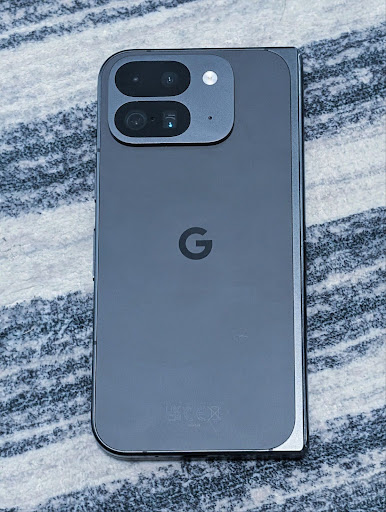
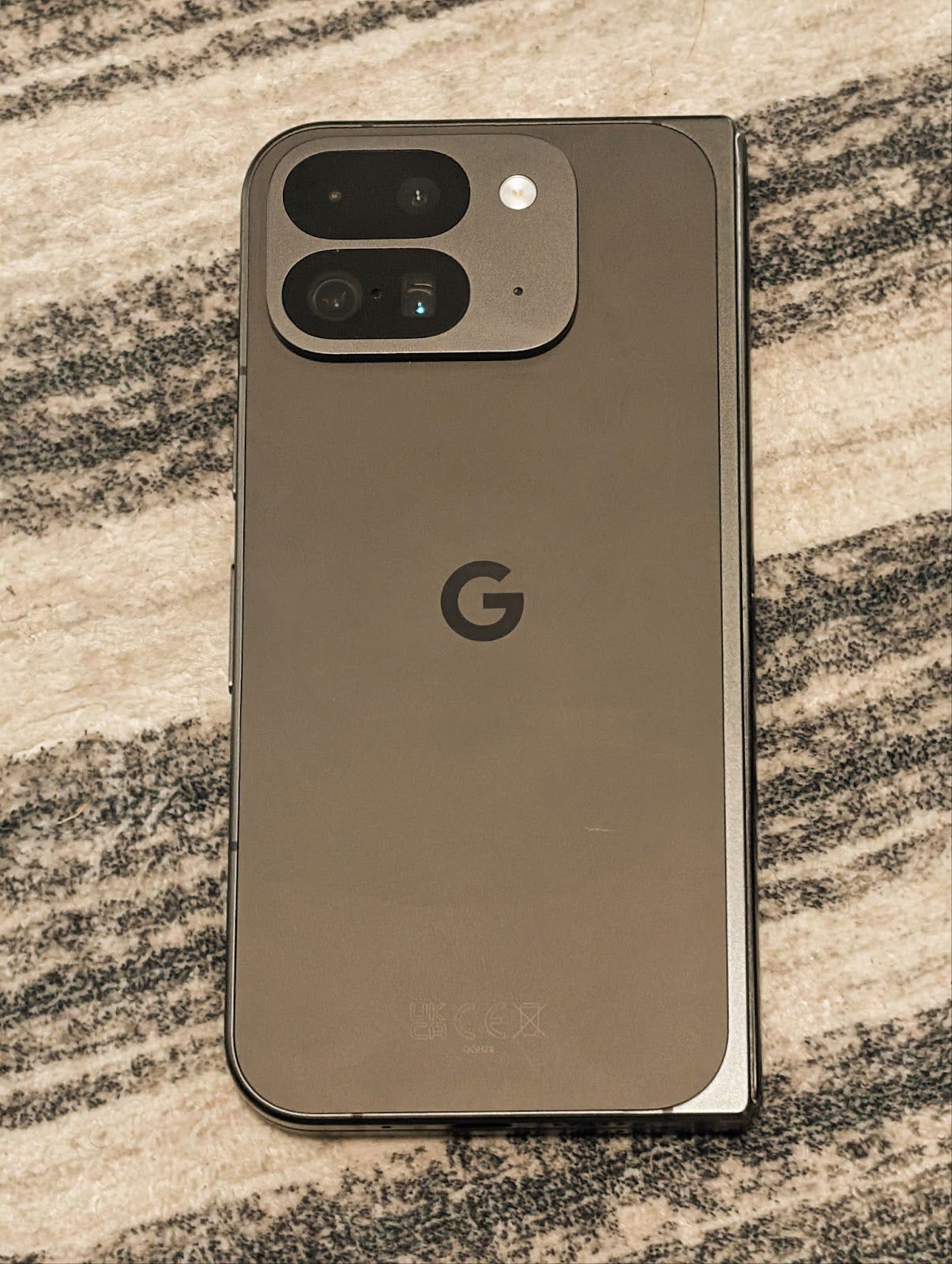
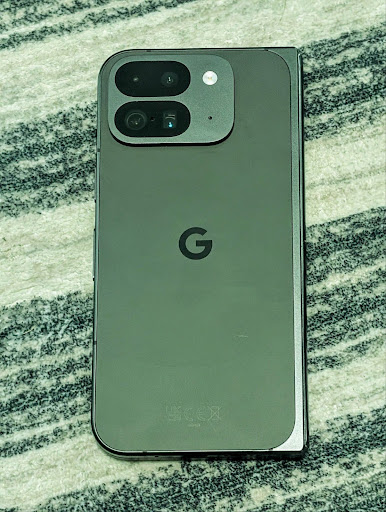
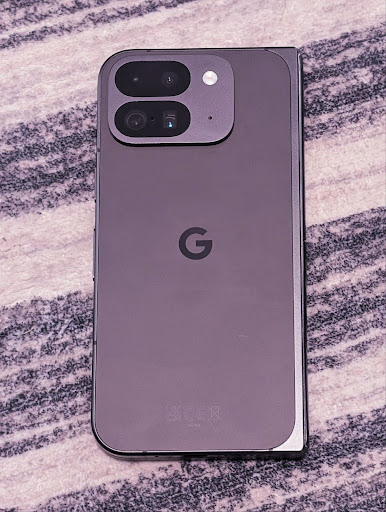
En los siguientes ejemplos, se muestra cómo se vería una foto después de aplicar diferentes ajustes de temperatura de color y tono:
Detección de escenas en el modo nocturno de la cámara
Para ayudar a tu app a saber cuándo cambiar de una sesión de cámara con modo nocturno a una normal y viceversa, Android 16 agrega EXTENSION_NIGHT_MODE_INDICATOR. Si es compatible, está disponible en CaptureResult dentro de Camera2.
Esta es la API que mencionamos brevemente como próximamente disponible en la entrada de blog Cómo Instagram permitió a los usuarios tomar fotos increíbles con poca luz. Esa publicación es una guía práctica sobre cómo implementar el modo nocturno junto con un caso de éxito que vincula fotos de mayor calidad del modo nocturno integrado en la app con un aumento en la cantidad de fotos compartidas desde la cámara integrada en la app.
Acciones de intent de captura de fotos en movimiento
Android 16 agrega acciones de intent estándar (ACTION_MOTION_PHOTO_CAPTURE y ACTION_MOTION_PHOTO_CAPTURE_SECURE) que solicitan que la aplicación de la cámara capture una foto en movimiento y la devuelva.
Debes pasar un EXTRA_OUTPUT adicional para controlar dónde se escribirá la imagen o un Uri a través de Intent.setClipData(ClipData). Si no configuras un ClipData, se copiará allí cuando llames a Context.startActivity(Intent).
Mejoras de imagen Ultra HDR
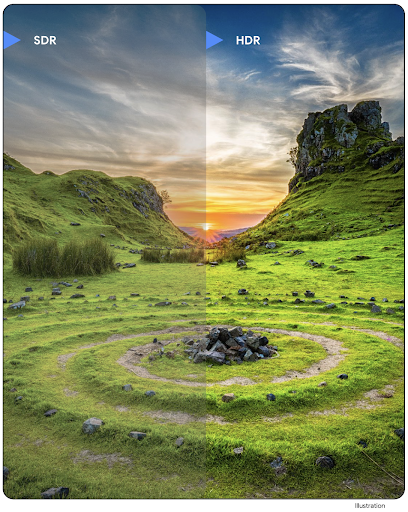
En Android 16, continuamos trabajando para ofrecer una calidad de imagen deslumbrante con imágenes UltraHDR. Se agregó compatibilidad con imágenes UltraHDR en el formato de archivo HEIC. Estas imágenes tendrán el tipo ImageFormat HEIC_ULTRAHDR y contendrán un mapa de ganancia incorporado similar al formato JPEG UltraHDR existente. También estamos trabajando en la compatibilidad con AVIF para UltraHDR, así que no te pierdas las novedades.
Además, Android 16 implementa parámetros adicionales en UltraHDR del borrador del estándar ISO 21496-1, incluida la capacidad de obtener y configurar el espacio de color en el que se debe aplicar la matemática del mapa de ganancia, así como la compatibilidad con imágenes base codificadas en HDR con mapas de ganancia SDR.
Gráficos
Android 16 incluye las mejoras gráficas más recientes, como efectos gráficos personalizados con AGSL.
Efectos gráficos personalizados con AGSL
Android 16 agrega RuntimeColorFilter y RuntimeXfermode, lo que te permite crear efectos complejos, como Umbral, Sepia y Saturación de tono, y aplicarlos a las llamadas de dibujo. Desde Android 13, puedes usar AGSL para crear RuntimeShaders personalizados que extiendan Shader. La nueva API refleja esto, y agrega un RuntimeColorFilter potenciado por AGSL que extiende ColorFilter y un efecto Xfermode que te permite implementar la composición y la combinación personalizadas basadas en AGSL entre píxeles de origen y de destino.
private val thresholdEffectString = """
    uniform half threshold;

    half4 main(half4 c) {
        half luminosity = dot(c.rgb, half3(0.2126, 0.7152, 0.0722));
        half bw = step(threshold, luminosity);
        return bw.xxx1 * c.a;
    }"""

fun setCustomColorFilter(paint: Paint) {
   val filter = RuntimeColorFilter(thresholdEffectString)
   filter.setFloatUniform(0.5);
   paint.colorFilter = filter
}
Conectividad
Android 16 actualiza la plataforma para que tu app tenga acceso a los avances más recientes en tecnologías inalámbricas y de comunicación.
Medición de distancia con seguridad mejorada
Android 16 agrega compatibilidad con funciones de seguridad sólidas en la ubicación Wi-Fi en dispositivos compatibles con 802.11az de Wi-Fi 6, lo que permite que las apps combinen la mayor precisión, la mayor escalabilidad y la programación dinámica del protocolo con mejoras de seguridad, como la encriptación basada en AES-256 y la protección contra ataques de intermediarios. Esto permite que se use de forma más segura en casos de uso de proximidad, como destrabar una laptop o la puerta de un vehículo. 802.11az está integrado en el estándar Wi-Fi 6, lo que aprovecha su infraestructura y sus capacidades para una adopción más amplia y una implementación más sencilla.
APIs de rango genéricas
Android 16 incluye el nuevo RangingManager, que proporciona formas de determinar la distancia y el ángulo en el hardware compatible entre el dispositivo local y un dispositivo remoto. RangingManager admite el uso de una variedad de tecnologías de medición de rango, como el sondeo de canales BLE, la medición de rango basada en RSSI BLE, la banda ultraancha y el tiempo de ida y vuelta de Wi-Fi.
Presencia del dispositivo del administrador de dispositivo complementario
En Android 16, se presentan nuevas APIs para vincular el servicio de tu app complementaria. El servicio se vinculará cuando el BLE esté dentro del alcance y el Bluetooth esté conectado, y se desvinculará cuando el BLE esté fuera del alcance o el Bluetooth esté desconectado. La app recibirá una nueva devolución de llamada 'onDevicePresenceEvent()' según varios DevicePresenceEvent.
Puedes encontrar más detalles en 'startObservingDevicePresence(ObservingDevicePresenceRequest)'.
Medios
Android 16 incluye una variedad de funciones que mejoran la experiencia multimedia.
Mejoras en el selector de fotos
El selector de fotos proporciona una forma integrada y segura para que los usuarios otorguen a tu app acceso a imágenes y videos seleccionados desde el almacenamiento local y en la nube, en lugar de a toda su biblioteca multimedia. Con una combinación de Componentes Modulares del Sistema a través de las Actualizaciones del Sistema de Google y los Servicios de Google Play, es compatible con Android 4.4 (nivel de API 19). La integración requiere solo algunas líneas de código con la biblioteca de Android Jetpack asociada.
Android 16 incluye las siguientes mejoras en el selector de fotos:
- Selector de fotos incorporado: Nuevas APIs que permiten que las apps incorporen el selector de fotos en su jerarquía de vistas. Esto le permite sentirse como una parte más integrada de la app y, al mismo tiempo, aprovechar el aislamiento de procesos que permite a los usuarios seleccionar contenido multimedia sin que la app necesite permisos demasiado amplios. Para maximizar la compatibilidad entre las versiones de la plataforma y simplificar tu integración, te recomendamos que uses la próxima biblioteca de Android Jetpack si deseas integrar el selector de fotos incorporado.
- Búsqueda en la nube en el selector de fotos: Nuevas APIs que habilitan la búsqueda desde el proveedor de contenido multimedia en la nube para el selector de fotos de Android. La función de búsqueda en el selector de fotos estará disponible próximamente.
Video profesional avanzado
Android 16 introduce la compatibilidad con el códec de video profesional avanzado (APV), que está diseñado para usarse en la grabación y postproducción de video de alta calidad a nivel profesional.
El estándar de códec APV tiene las siguientes características:
- Calidad de video sin pérdida perceptiva (cercana a la calidad de video sin procesar)
- Codificación solo dentro de la trama de baja complejidad y alta capacidad de procesamiento (sin predicción de dominio de píxeles) para admitir mejor los flujos de trabajo de edición
- Compatibilidad con un rango de tasa de bits alto de hasta unos pocos Gbps para contenido de resolución 2K, 4K y 8K, habilitado por un esquema de codificación de entropía ligero
- Recorte de fotogramas para contenido envolvente y para habilitar la codificación y decodificación en paralelo
- Compatibilidad con varios formatos de muestreo de crominancia y profundidades de bits
- Compatibilidad con varias decodificaciones y recodificaciones sin degradación severa de la calidad visual
- Compatibilidad con videos multivista y auxiliares, como profundidad, alfa y vista previa
- Compatibilidad con HDR10/10+ y metadatos definidos por el usuario
Se proporciona una implementación de referencia de APV a través del proyecto OpenAPV. Android 16 implementará la compatibilidad con el perfil APV 422-10 que proporciona muestreo de color YUV 422 junto con codificación de 10 bits y para tasas de bits objetivo de hasta 2 Gbps.
Privacidad
Android 16 incluye una variedad de funciones que ayudan a los desarrolladores de apps a proteger la privacidad del usuario.
Actualizaciones de Health Connect
Health Connect agrega ACTIVITY_INTENSITY, un tipo de datos definido según los lineamientos de la Organización Mundial de la Salud sobre la actividad moderada y vigorosa. Cada registro requiere la hora de inicio, la hora de finalización y si la intensidad de la actividad es moderada o vigorosa.
Health Connect también contiene APIs actualizadas que admiten registros médicos. Esto permite que las apps lean y escriban registros médicos en formato FHIR con el consentimiento explícito del usuario.
Privacy Sandbox en Android
Android 16 incorpora la versión más reciente de Privacy Sandbox en Android, que forma parte de nuestro trabajo continuo para desarrollar tecnologías en las que los usuarios sepan que se protege su privacidad. En nuestro sitio web, encontrarás más información sobre el programa de versión beta para desarrolladores de Privacy Sandbox en Android para ayudarte a comenzar. Consulta el entorno de ejecución de SDK, que permite que los SDKs se ejecuten en un entorno de ejecución dedicado independiente de la app que se entrega, lo que proporciona protecciones más sólidas en torno a la recopilación y el uso compartido de los datos del usuario.
Seguridad
Android 16 incluye funciones que te ayudan a mejorar la seguridad de tu app y a proteger sus datos.
API de uso compartido de claves
Android 16 agrega APIs que admiten el uso compartido del acceso a las claves de Android Keystore con otras apps. La nueva clase KeyStoreManager admite otorgar y revocar el acceso a las claves por uid de la app, y también incluye una API para que las apps accedan a las claves compartidas.
Factores de forma del dispositivo
Android 16 brinda a tus apps la compatibilidad necesaria para aprovechar al máximo los factores de forma de Android.
Marco de trabajo estandarizado de calidad de imagen y audio para TVs
El nuevo paquete MediaQuality en Android 16 expone un conjunto de APIs estandarizadas para acceder a perfiles de audio y de imagen, y a la configuración relacionada con el hardware. Esto permite que las apps de transmisión consulten perfiles y los apliquen al contenido multimedia de forma dinámica:
- Las películas masterizadas con un rango dinámico más amplio requieren una mayor precisión de color para ver detalles sutiles en las sombras y adaptarse a la luz ambiental, por lo que puede ser apropiado un perfil que prefiera la precisión del color en lugar del brillo.
- Los eventos deportivos en vivo suelen masterizarse con un rango dinámico estrecho, pero a menudo se miran a la luz del día, por lo que un perfil que prefiera el brillo sobre la precisión del color puede brindar mejores resultados.
- El contenido totalmente interactivo requiere un procesamiento mínimo para reducir la latencia y tasas de fotogramas más altas, por lo que muchas TVs se envían con un perfil de juego.
La API permite que las apps cambien entre perfiles y que los usuarios disfruten de la sintonización de TVs compatibles para que se adapten mejor a su contenido.
Internacionalización
Android 16 agrega funciones y capacidades que complementan la experiencia del usuario cuando un dispositivo se usa en diferentes idiomas.
Texto vertical
Android 16 agrega compatibilidad de bajo nivel para renderizar y medir texto verticalmente para proporcionar compatibilidad básica con la escritura vertical para desarrolladores de bibliotecas. Esto es útil, en particular, para idiomas como el japonés, que suelen usar sistemas de escritura vertical. Se agregó una marca nueva, VERTICAL_TEXT_FLAG, a la clase Paint. Cuando
esta marca se establece con
Paint.setFlags, las APIs de medición de texto de Paint
informarán avances verticales en lugar de horizontales, y Canvas dibujará texto
verticalmente.
val text = "「春は、曙。」"
Box(
    Modifier.padding(innerPadding).background(Color.White).fillMaxSize().drawWithContent {
        drawIntoCanvas { canvas ->
            val paint = Paint().apply { textSize = 64.sp.toPx() }
            // Draw text vertically
            paint.flags = paint.flags or VERTICAL_TEXT_FLAG
            val height = paint.measureText(text)
            canvas.nativeCanvas.drawText(
                text,
                0,
                text.length,
                size.width / 2,
                (size.height - height) / 2,
                paint
            )
        }
    }
) {}
Personalización del sistema de medición
Los usuarios ahora pueden personalizar su sistema de medición en las preferencias regionales de la configuración. La preferencia del usuario se incluye como parte del código de configuración regional, por lo que puedes registrar un BroadcastReceiver en ACTION_LOCALE_CHANGED para controlar los cambios de configuración regional cuando cambien las preferencias regionales.
El uso de formatos puede ayudar a que coincidan con la experiencia local. Por ejemplo, "0.5 in" en inglés (Estados Unidos) es "12.7 mm" para un usuario que configuró su teléfono en inglés (Dinamarca) o que usa su teléfono en inglés (Estados Unidos) con el sistema métrico como preferencia de sistema de medición.
Para encontrar esta configuración, abre la app de Configuración y dirígete a Sistema > Idiomas y región.