

Android 16 面向开发者引入了一些出色的新功能和 API。以下各部分总结了这些功能,可帮助您开始使用相关 API。
有关新增、修改和移除的 API 的详细列表,请参阅 API 差异报告。如需详细了解新的 API,请访问 Android API 参考文档,新 API 会突出显示以方便查看。您还应查看平台变更可能会在哪些方面影响您的应用。如需了解详情,请参阅以下页面:
核心功能
Android 包含一些新的 API,可扩展 Android 系统的核心功能。
2025 年发布了两个 Android API
- 此预览版适用于 Android 的下一个主要版本,计划于 2025 年第 2 季度发布。此版本与我们过去的所有 API 版本类似,我们可以进行计划性的行为更改,这些更改通常与 targetSdkVersion 相关联。
- 我们计划提前一个季度(2021 年第 2 季度,而非之前的第 3 季度)发布主要版本,以便更好地与整个生态系统中的设备发布时间表保持一致,让更多设备能够更早地搭载 Android 主要版本。由于主要版本将于第 2 季度发布,因此您需要比往年提前几个月进行年度兼容性测试,以确保您的应用已做好准备。
- 我们计划在 2025 年第 4 季度再发布一次,届时还将推出新的开发者 API。2025 年只有第二季度的主要版本包含可能影响应用的计划行为变更。
除了新的开发者 API 之外,第 4 季度次要版本还将包含功能更新、优化和 bug 修复;其中不会包含任何会影响应用的行为变更。
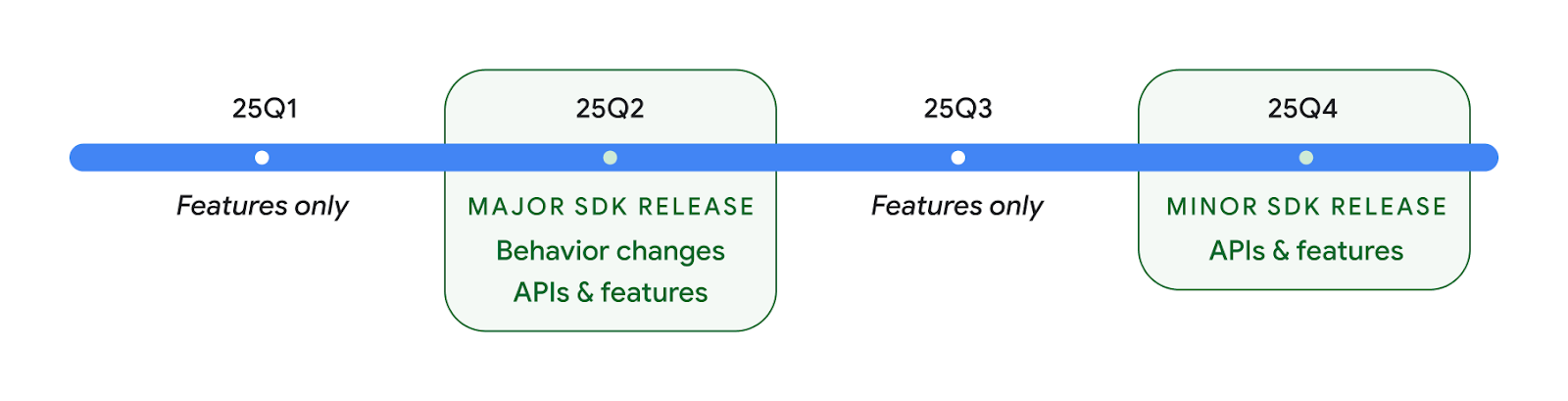
我们将继续每季度发布 Android 版本。在 API 版本之间,第 1 季度和第 3 季度的更新将提供增量更新,以帮助确保持续提供高质量的服务。我们正积极与设备合作伙伴合作,将 Q2 版本推广到尽可能多的设备。
在主要版本和次要版本中使用新 API
目前,使用 SDK_INT 常量与 VERSION_CODES 结合使用,即可通过检查 API 级别来保护代码块。我们将继续支持主要 Android 版本。
if (SDK_INT >= VERSION_CODES.BAKLAVA) {
  // Use APIs introduced in Android 16
}
新的 SDK_INT_FULL 常量可用于针对主要版本和次要版本进行 API 检查,并使用新的 VERSION_CODES_FULL 枚举。
if (SDK_INT_FULL >= VERSION_CODES_FULL.[MAJOR or MINOR RELEASE]) {
  // Use APIs introduced in a major or minor release
}
您还可以使用 Build.getMinorSdkVersion() 方法仅获取 SDK 次要版本。
val minorSdkVersion = Build.getMinorSdkVersion(VERSION_CODES_FULL.BAKLAVA)
这些 API 尚未最终确定,可能会发生变化,因此如果您有任何疑虑,请向我们发送反馈。
用户体验和系统界面
Android 16 为应用开发者和用户提供了更多控制权和灵活性,以便他们根据自己的需求配置设备。
以进度为中心的通知
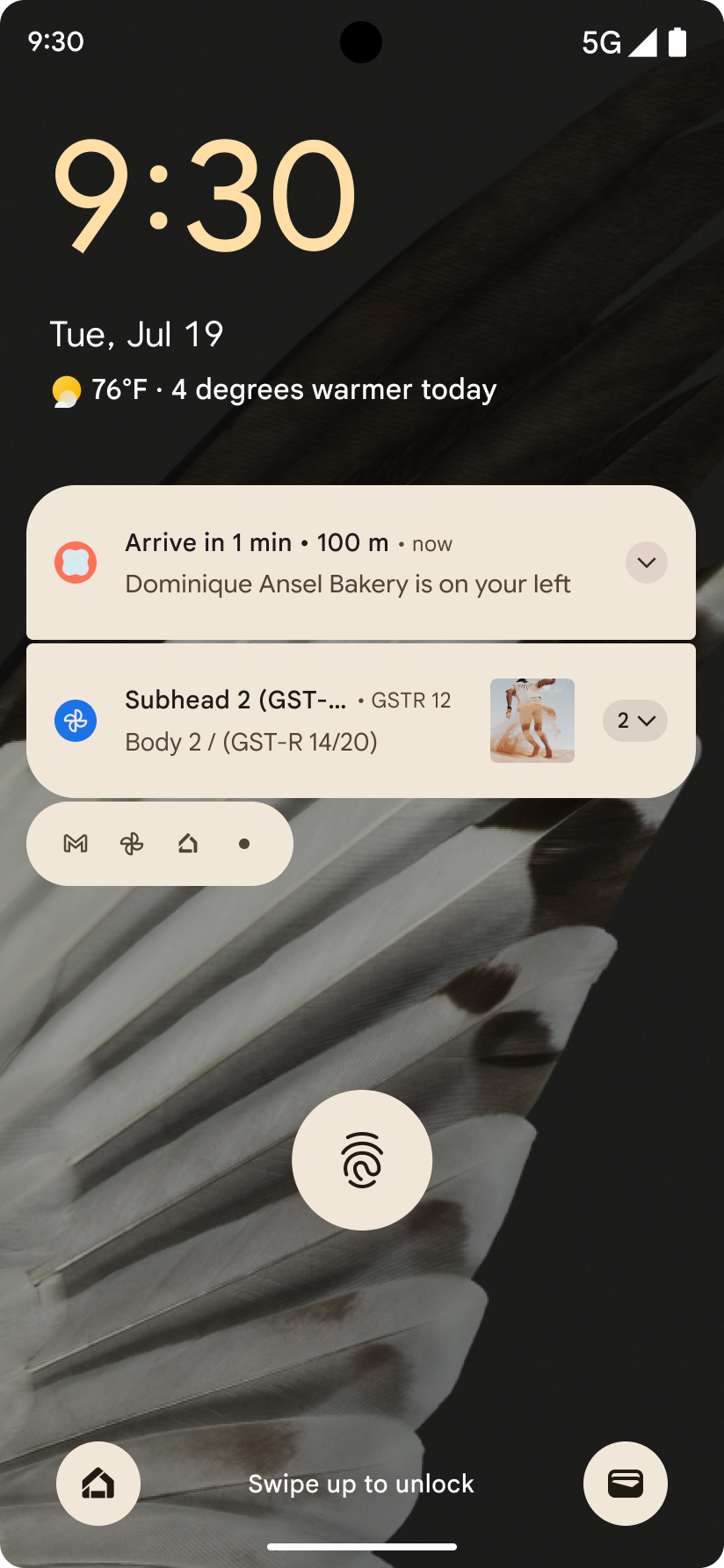
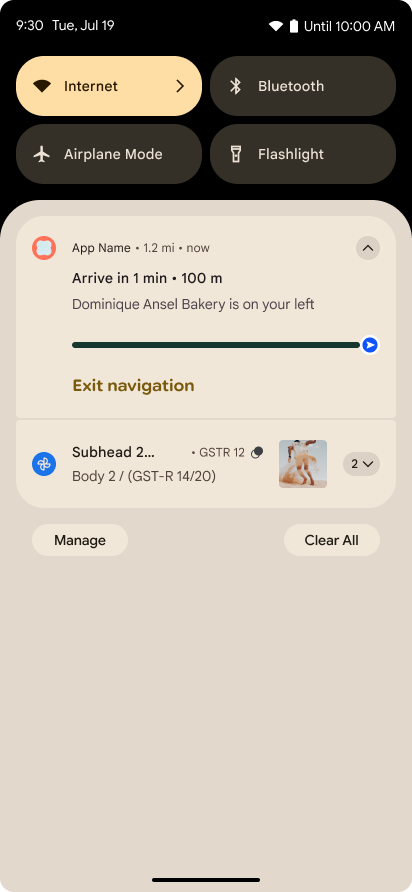
Android 16 引入了以进度为中心的通知,可帮助用户顺畅地跟踪用户发起的端到端历程。
Notification.ProgressStyle 是一种新的通知样式,可让您创建以进度为中心的通知。主要用例包括共享车辆、送货和导航。在 Notification.ProgressStyle 类中,您可以使用点和细分来表示用户体验历程中的状态和里程碑。
To learn more, see the Progress-centric notifications documentation page.
预测性返回更新
Android 16 添加了新 API,可帮助您在手势导航中启用预测性返回系统动画,例如“返回主屏幕”动画。通过使用新的 PRIORITY_SYSTEM_NAVIGATION_OBSERVER 注册 onBackInvokedCallback,您的应用可以在系统处理返回导航时接收常规的 onBackInvoked 调用,而不会影响正常的返回导航流程。
Android 16 还添加了 finishAndRemoveTaskCallback() 和 moveTaskToBackCallback。通过向 OnBackInvokedDispatcher 注册这些回调,系统可以在调用返回手势时触发特定行为并播放相应的提前动画。
更丰富的触感反馈
Android has exposed control over the haptic actuator ever since its inception.
Android 11 added support for more complex haptic effects that more advanced
actuators could support through
VibrationEffect.Compositions of device-defined semantic
primitives.
Android 16 adds haptic APIs that let apps define the amplitude and frequency curves of a haptic effect while abstracting away differences between device capabilities.
开发者工作效率和工具
虽然我们的大部分工作都是围绕 Android Studio、Jetpack Compose 和 Android Jetpack 库等工具来提高您的工作效率,但我们始终在寻找平台中可帮助您实现愿景的方法。
动态壁纸的内容处理
在 Android 16 中,动态壁纸框架将获得一个新的 content API,以应对由用户驱动的动态壁纸带来的挑战。目前,包含用户提供的内容的实时壁纸需要复杂的服务专用实现。Android 16 引入了 WallpaperDescription 和 WallpaperInstance。借助 WallpaperDescription,您可以识别同一服务中的动态壁纸的不同实例。例如,如果某张壁纸同时在主屏幕和锁定屏幕上显示,则这两种情况下显示的内容可能各不相同。壁纸选择器和 WallpaperManager 会使用此元数据更好地向用户呈现壁纸,从而简化创建多样化个性化动态壁纸体验的过程。
性能和电池
Android 16 引入了可帮助您收集应用相关数据分析的 API。
系统触发的性能分析
ProfilingManager was
added in Android 15, giving apps the ability to
request profiling data collection using Perfetto on public devices in the field.
However, since this profiling must be started from the app, critical flows such
as startups or ANRs would be difficult or impossible for apps to capture.
To help with this, Android 16 introduces system-triggered profiling to
ProfilingManager. Apps can register interest in receiving traces for certain
triggers such as cold start reportFullyDrawn
or ANRs, and then the system starts and stops a trace on the app's behalf. After
the trace completes, the results are delivered to the app's data directory.
ApplicationStartInfo 中的启动组件
ApplicationStartInfo was added in Android
15, allowing an app to see reasons
for process start, start type, start times, throttling, and other useful
diagnostic data. Android 16 adds
getStartComponent()
to distinguish what component type triggered the start, which can be helpful for
optimizing the startup flow of your app.
更好的作业内省
The JobScheduler#getPendingJobReason() API returns a reason why a job
might be pending. However, a job might be pending for multiple reasons.
In Android 16, we are introducing a new API
JobScheduler#getPendingJobReasons(int jobId), which returns multiple
reasons why a job is pending, due to both explicit constraints set by the
developer and implicit constraints set by the system.
We're also introducing
JobScheduler#getPendingJobReasonsHistory(int jobId), which returns a list
of the most recent constraint changes.
We recommend using the API to help you debug why your jobs may not be executing, especially if you're seeing reduced success rates of certain tasks or have bugs around latency of certain job completion. For example, updating widgets in the background failed to occur or prefetch job failed to be called prior to app start.
This can also better help you understand if certain jobs are not completing due to system defined constraints versus explicitly set constraints.
自动调节刷新率
Adaptive refresh rate (ARR), introduced in Android 15, enables the display refresh rate on supported hardware to adapt to the content frame rate using discrete VSync steps. This reduces power consumption while eliminating the need for potentially jank-inducing mode-switching.
Android 16 introduces hasArrSupport() and
getSuggestedFrameRate(int) while restoring
getSupportedRefreshRates() to make it easier for your apps to take
advantage of ARR. RecyclerView
1.4 internally supports ARR when it is settling from a fling or
smooth scroll, and we're continuing our work to add ARR
support into more Jetpack libraries. This frame rate article covers
many of the APIs you can use to set the frame rate so that your app can directly
use ARR.
ADPF 中的裕度 API
The SystemHealthManager introduces the
getCpuHeadroom and
getGpuHeadroom APIs, designed to provide games and
resource-intensive apps with estimates of available CPU and GPU resources. These
methods offer a way for you to gauge how your app or game can best improve
system health, particularly when used in conjunction with other Android Dynamic
Performance Framework (ADPF) APIs that detect thermal
throttling.
By using CpuHeadroomParams and
GpuHeadroomParams on supported devices, you can
customize the time window used to compute the headroom and select between
average or minimum resource availability. This can help you reduce your CPU or
GPU resource usage accordingly, leading to better user experiences and improved
battery life.
无障碍
Android 16 新增了无障碍功能 API 和功能,可帮助您让所有用户都能使用您的应用。
改进了无障碍功能 API
Android 16 adds additional APIs to enhance UI semantics that help improve consistency for users that rely on accessibility services, such as TalkBack.
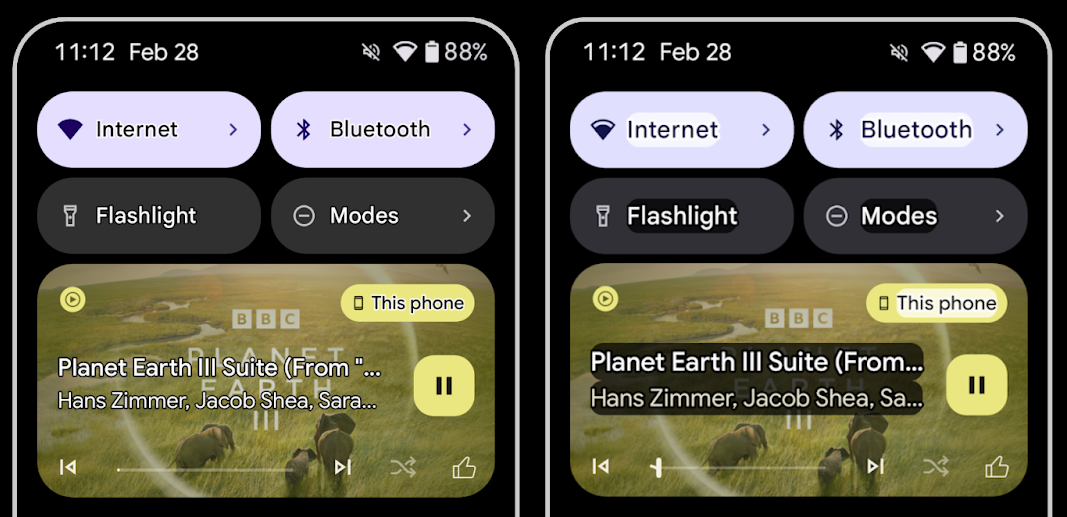
Outline text for maximum text contrast
Users with low vision often have reduced contrast sensitivity, making it challenging to distinguish objects from their backgrounds. To help these users, Android 16 introduces outline text, replacing high contrast text, which draws a larger contrasting area around text to greatly improve legibility.
Android 16 contains new AccessibilityManager APIs to let
your apps check or register a listener to
see if this mode is enabled. This is primarily for UI Toolkits like Compose to
offer a similar visual experience. If you maintain a UI Toolkit library or your
app performs custom text rendering that bypasses the
android.text.Layout class then you can use this to know
when outline text is enabled.
Duration added to TtsSpan
Android 16 extends TtsSpan with a TYPE_DURATION,
consisting of ARG_HOURS, ARG_MINUTES,
and ARG_SECONDS. This lets you directly annotate time
duration, ensuring accurate and consistent text-to-speech output with services
like TalkBack.
Support elements with multiple labels
Android currently allows UI elements to derive their accessibility label from
another, and now offers the ability for multiple labels to be associated, a
common scenario in web content. By introducing a list-based API within
AccessibilityNodeInfo, Android can directly support these
multi-label relationships. As part of this change, we've deprecated
AccessibilityNodeInfo#setLabeledBy and
#getLabeledBy in favor of
#addLabeledBy, #removeLabeledBy, and
#getLabeledByList.
Improved support for expandable elements
Android 16 adds accessibility APIs that allow you to convey the expanded or
collapsed state of interactive elements, such as menus and expandable lists. By
setting the expanded state using setExpandedState and
dispatching TYPE_WINDOW_CONTENT_CHANGED AccessibilityEvents
with a CONTENT_CHANGE_TYPE_EXPANDED content change type,
you can ensure that screen readers like TalkBack announce
state changes, providing a more intuitive and inclusive user experience.
Indeterminate ProgressBars
Android 16 adds RANGE_TYPE_INDETERMINATE, giving a way for
you to expose RangeInfo for both determinate and
indeterminate ProgressBar widgets, allowing services like
TalkBack to more consistently provide feedback for progress
indicators.
Tri-state CheckBox
The new AccessibilityNodeInfo
getChecked and setChecked(int)
methods in Android 16 now support a "partially checked" state in addition to
"checked" and "unchecked." This replaces the deprecated boolean
isChecked and setChecked(boolean).
Supplemental descriptions
When an accessibility service describes a ViewGroup, it
combines content labels from its child views. If you provide a
contentDescription for the ViewGroup, accessibility services assume you are
also overriding the description of non-focusable child views. This can be
problematic if you want to label things like a drop-down (for example, "Font
Family") while preserving the current selection for accessibility (for example,
"Roboto"). Android 16 adds setSupplementalDescription so
you can provide text that provides information about a ViewGroup without
overriding information from its children.
Required form fields
Android 16 adds setFieldRequired to
AccessibilityNodeInfo so apps can tell an accessibility
service that input to a form field is required. This is an important scenario
for users filling out many types of forms, even things as simple as a required
terms and conditions checkbox, helping users to consistently identify and
quickly navigate between required fields.
将手机作为 LEA 助听器的语音通话麦克风输入源
Android 16 adds the capability for users of LE Audio hearing aids to switch between the built-in microphones on the hearing aids and the microphone on their phone for voice calls. This can be helpful in noisy environments or other situations where the hearing aid's microphones might not perform well.
LEA 助听器的环境音量控制
Android 16 新增了一项功能,可让 LE Audio 助听器用户调节助听器麦克风接收的环境声音的音量。在背景噪音过大或过小的情况下,这可能会很有用。
相机
Android 16 增强了对专业相机用户的支持,允许进行混合自动曝光以及精确的色温和色调调整。新的夜间模式指示器可帮助应用了解何时切换到夜间模式相机会议,以及何时从夜间模式相机会议切换回来。借助新的 Intent 操作,您可以更轻松地拍摄动态照片;我们还不断改进 UltraHDR 图片,支持 HEIC 编码和 ISO 21496-1 草稿标准中的新参数。
混合自动曝光
Android 16 adds new hybrid auto-exposure modes to Camera2, allowing you to manually control specific aspects of exposure while letting the auto-exposure (AE) algorithm handle the rest. You can control ISO + AE, and exposure time + AE, providing greater flexibility compared to the current approach where you either have full manual control or rely entirely on auto-exposure.
fun setISOPriority() {
    // ... (Your existing code before the snippet) ...

    val availablePriorityModes = mStaticInfo.characteristics.get(
        CameraCharacteristics.CONTROL_AE_AVAILABLE_PRIORITY_MODES
    )

    // ... (Your existing code between the snippets) ...

    // Turn on AE mode to set priority mode
    reqBuilder.set(
        CaptureRequest.CONTROL_AE_MODE,
        CameraMetadata.CONTROL_AE_MODE_ON
    )
    reqBuilder.set(
        CaptureRequest.CONTROL_AE_PRIORITY_MODE,
        CameraMetadata.CONTROL_AE_PRIORITY_MODE_SENSOR_SENSITIVITY_PRIORITY
    )
    reqBuilder.set(
        CaptureRequest.SENSOR_SENSITIVITY,
        TEST_SENSITIVITY_VALUE
    )
    val request: CaptureRequest = reqBuilder.build()

    // ... (Your existing code after the snippet) ...
}
精确的色温和色调调整
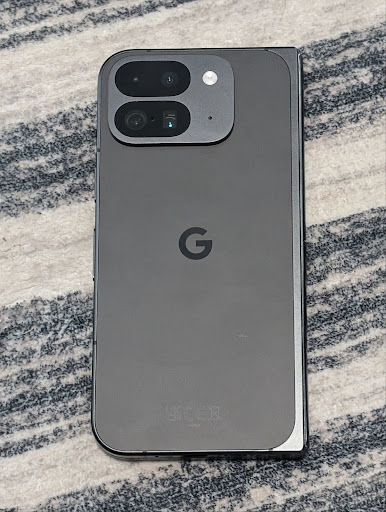
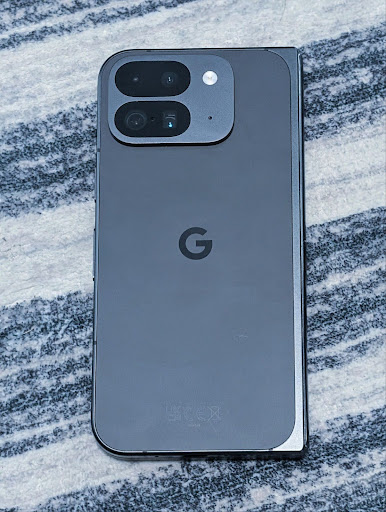
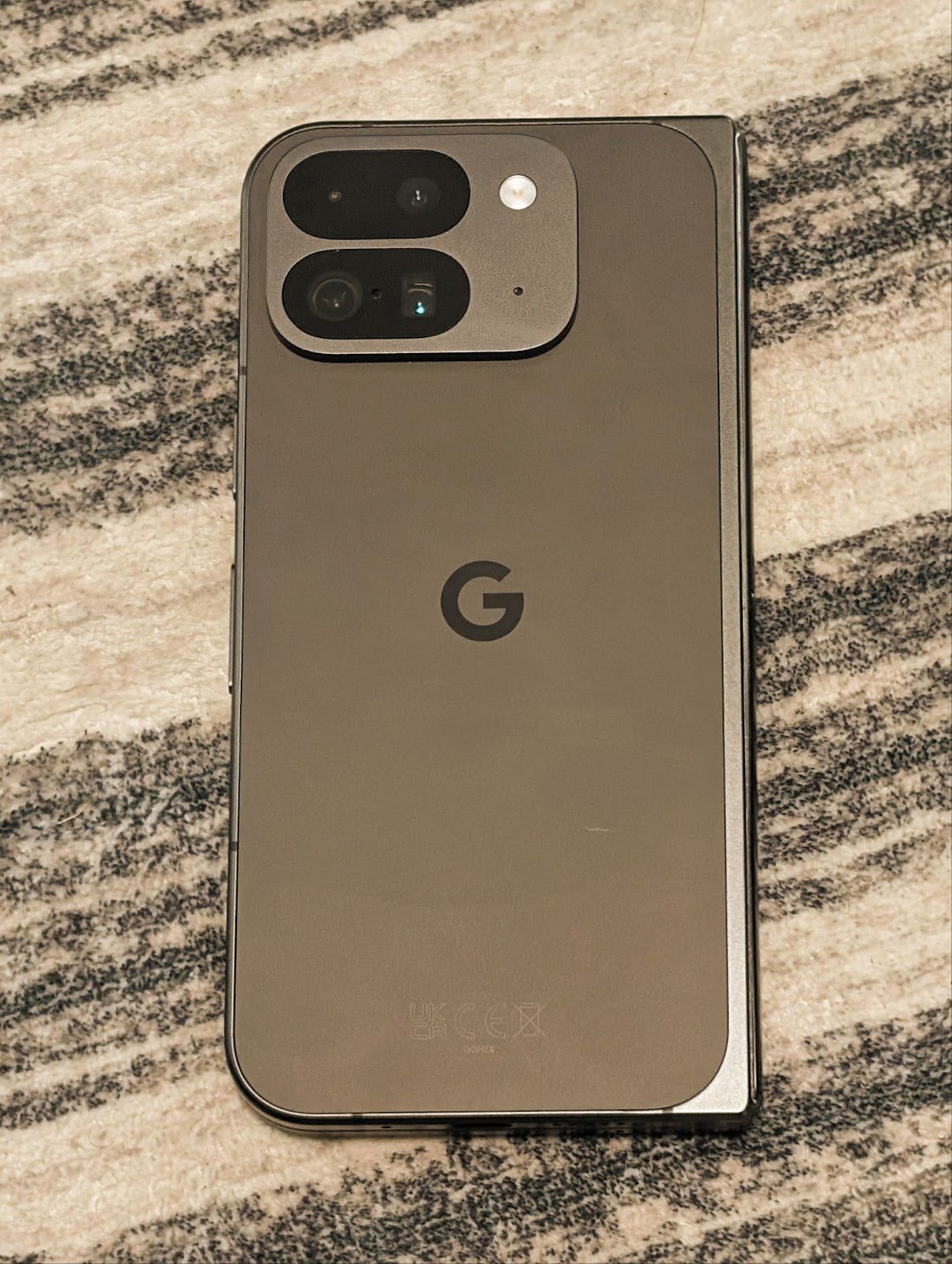
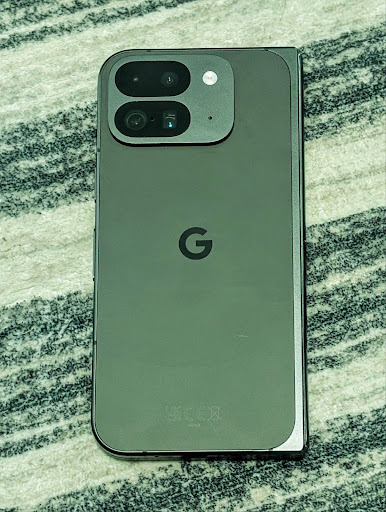
Android 16 adds camera support for fine color temperature and tint adjustments
to better support professional video recording applications. In previous Android
versions, you could control white balance settings through
CONTROL_AWB_MODE, which contains options limited to a
preset list, such as Incandescent,
Cloudy, and Twilight. The
COLOR_CORRECTION_MODE_CCT enables the use of
COLOR_CORRECTION_COLOR_TEMPERATURE and
COLOR_CORRECTION_COLOR_TINT for precise adjustments of
white balance based on the correlated color temperature.
fun setCCT() {
    // ... (Your existing code before this point) ...

    val colorTemperatureRange: Range<Int> =
        mStaticInfo.characteristics[CameraCharacteristics.COLOR_CORRECTION_COLOR_TEMPERATURE_RANGE]

    // Set to manual mode to enable CCT mode
    reqBuilder[CaptureRequest.CONTROL_AWB_MODE] = CameraMetadata.CONTROL_AWB_MODE_OFF
    reqBuilder[CaptureRequest.COLOR_CORRECTION_MODE] = CameraMetadata.COLOR_CORRECTION_MODE_CCT
    reqBuilder[CaptureRequest.COLOR_CORRECTION_COLOR_TEMPERATURE] = 5000
    reqBuilder[CaptureRequest.COLOR_CORRECTION_COLOR_TINT] = 30

    val request: CaptureRequest = reqBuilder.build()

    // ... (Your existing code after this point) ...
}
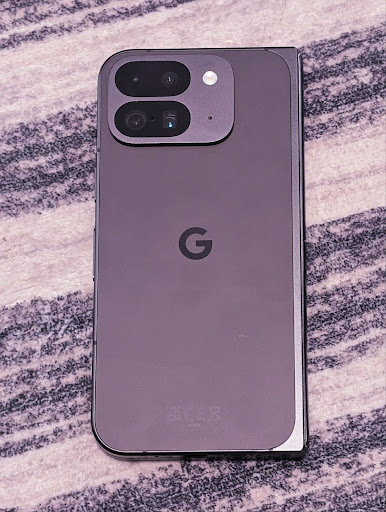
The following examples show how a photo would look after applying different color temperature and tint adjustments:
相机夜间模式场景检测
To help your app know when to switch to and from a night mode camera session,
Android 16 adds EXTENSION_NIGHT_MODE_INDICATOR. If
supported, it's available in the CaptureResult within
Camera2.
This is the API we briefly mentioned as coming soon in the How Instagram enabled users to take stunning low light photos blog post. That post is a practical guide on how to implement night mode together with a case study that links higher-quality in-app night mode photos with an increase in the number of photos shared from the in-app camera.
动态照片拍摄 intent 操作
Android 16 添加了标准 intent 操作 ACTION_MOTION_PHOTO_CAPTURE 和 ACTION_MOTION_PHOTO_CAPTURE_SECURE,用于请求相机应用拍摄动态照片并将其返回。
您必须传递额外的 EXTRA_OUTPUT 来控制将图片写入的位置,或者通过 Intent.setClipData(ClipData) 传递 Uri。如果您未设置 ClipData,系统会在调用 Context.startActivity(Intent) 时将其复制到该位置。
UltraHDR 图片增强功能
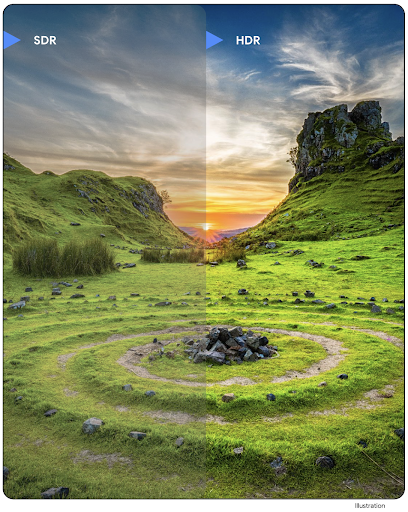
Android 16 continues our work to deliver dazzling image quality with UltraHDR
images. It adds support for UltraHDR images in the HEIC file
format. These images will get ImageFormat type
HEIC_ULTRAHDR and will contain an embedded gainmap similar
to the existing UltraHDR JPEG format. We're working on AVIF support for UltraHDR
as well, so stay tuned.
In addition, Android 16 implements additional parameters in UltraHDR from the ISO 21496-1 draft standard, including the ability to get and set the colorspace that gainmap math should be applied in, as well as support for HDR encoded base images with SDR gainmaps.
图形
Android 16 包含最新的图形改进,例如使用 AGSL 实现自定义图形效果。
使用 AGSL 实现自定义图形效果
Android 16 adds RuntimeColorFilter and
RuntimeXfermode, allowing you to author complex effects like
Threshold, Sepia, and Hue Saturation and apply them to draw calls. Since Android
13, you've been able to use AGSL to create custom
RuntimeShaders that extend Shader. The new API
mirrors this, adding an AGSL-powered RuntimeColorFilter that
extends ColorFilter, and a Xfermode effect that
lets you implement AGSL-based custom compositing and blending between source and
destination pixels.
private val thresholdEffectString = """
    uniform half threshold;

    half4 main(half4 c) {
        half luminosity = dot(c.rgb, half3(0.2126, 0.7152, 0.0722));
        half bw = step(threshold, luminosity);
        return bw.xxx1 * c.a;
    }"""

fun setCustomColorFilter(paint: Paint) {
   val filter = RuntimeColorFilter(thresholdEffectString)
   filter.setFloatUniform(0.5);
   paint.colorFilter = filter
}
连接
Android 16 更新了平台,让您的应用能够使用通信和无线技术方面的最新进展。
测距(安全性增强)
Android 16 在搭载 Wi-Fi 6 的 802.11az 的受支持设备上为 Wi-Fi 位置信息添加了对强大的安全功能的支持,让应用能够将该协议的更高精确性、更高可伸缩性和动态调度与安全增强功能(包括基于 AES-256 的加密和防范中间人攻击)相结合。这样,在近距离使用情形(例如解锁笔记本电脑或车门)时,便可更安全地使用该功能。802.11az 与 Wi-Fi 6 标准集成,可利用其基础架构和功能实现更广泛的采用和更轻松的部署。
通用测距 API
Android 16 includes the new RangingManager, which provides
ways to determine the distance and angle on supported hardware between the local
device and a remote device. RangingManager supports the usage of a variety of
ranging technologies such as BLE channel sounding, BLE RSSI-based ranging, Ultra
Wideband, and Wi-Fi round trip time.
配套设备管理器设备存在情况
In Android 16, new APIs are being introduced for binding your companion app
service. Service will be bound when BLE is in range and Bluetooth is connected
and service will be unbound when BLE is out of range or Bluetooth is
disconnected. App will receives a new
'onDevicePresenceEvent()' callback based on various
of DevicePresenceEvent.
More details can be found in
'startObservingDevicePresence(ObservingDevicePresenceRequest)'.
媒体
Android 16 包含多种可提升媒体体验的功能。
改进了照片选择器
照片选择器为用户提供了一种安全的内置授权方式,让用户可以向应用授予对本地存储空间和云端存储空间中所选图片和视频的访问权限,而不是对整个媒体库的访问权限。通过 Google 系统更新和 Google Play 服务组合使用模块化系统组件,该工具向后支持到 Android 4.4(API 级别 19)。只需几行代码即可与相关的 Android Jetpack 库集成。
Android 16 对照片选择器进行了以下改进:
- 嵌入式照片选择器:新 API,可让应用将照片选择器嵌入其视图层次结构中。这样,它就感觉像是应用中更为集成的一部分,同时仍可利用进程隔离功能,让用户能够选择媒体,而无需应用拥有过于宽泛的权限。为了最大限度地提高跨平台版本的兼容性并简化集成,如果您想集成嵌入式照片选择器,则需要使用即将推出的 Android Jetpack 库。
- 照片选择器中的云搜索:新的 API 可让 Android 照片选择器从云端媒体提供商中进行搜索。照片选择器中的搜索功能即将推出。
高级专业视频
Android 16 introduces support for the Advanced Professional Video (APV) codec which is designed to be used for professional level high quality video recording and post production.
The APV codec standard has the following features:
- Perceptually lossless video quality (close to raw video quality)
- Low complexity and high throughput intra-frame-only coding (without pixel domain prediction) to better support editing workflows
- Support for high bit-rate range up to a few Gbps for 2K, 4K and 8K resolution content, enabled by a lightweight entropy coding scheme
- Frame tiling for immersive content and for enabling parallel encoding and decoding
- Support for various chroma sampling formats and bit-depths
- Support for multiple decoding and re-encoding without severe visual quality degradation
- Support multi-view video and auxiliary video like depth, alpha, and preview
- Support for HDR10/10+ and user-defined metadata
A reference implementation of APV is provided through the OpenAPV project. Android 16 will implement support for the APV 422-10 Profile that provides YUV 422 color sampling along with 10-bit encoding and for target bitrates of up to 2Gbps.
隐私权
Android 16 包含多种有助于应用开发者保护用户隐私的功能。
健康数据共享更新
Health Connect 添加了 ACTIVITY_INTENSITY,这是一种根据世界卫生组织关于中等强度和剧烈强度活动的指南定义的数据类型。每个记录都需要提供开始时间、结束时间以及活动强度(中等或剧烈)。
Health Connect 还包含支持医疗记录的更新版 API。这样一来,应用便可在征得用户明确同意的情况下,读取和写入 FHIR 格式的医疗记录。
Privacy Sandbox on Android
Android 16 中集成了最新版本的 Privacy Sandbox on Android,这是我们持续致力于开发可让用户放心地知道其隐私受到保护的技术的一部分。您可以访问我们的网站,详细了解 Privacy Sandbox on Android 开发者 Beta 版计划,以便顺利上手。不妨了解 SDK 运行时,它可让 SDK 在与其所服务的应用分离的专用运行时环境中运行,从而为用户数据收集和共享提供更强的保护措施。
安全
Android 16 包含有助于增强应用安全性和保护应用数据的功能。
密钥共享 API
Android 16 adds APIs that support sharing access to
Android Keystore keys with other apps. The new
KeyStoreManager class supports
granting and revoking access to keys
by app uid, and includes an API for apps to access shared
keys.
设备规格
Android 16 为您的应用提供支持,让您充分利用 Android 的设备类型。
电视的标准化画质和音质框架
Android 16 中的新 MediaQuality 软件包公开了一组标准化 API,用于访问音频和图片配置文件以及与硬件相关的设置。这样,在线播放应用就可以查询配置文件并将其动态应用于媒体:
- 使用更大动态范围进行母版制作的电影需要更高的色彩准确度,才能看清阴影中的细微细节并根据环境光线进行调整,因此,最好使用色彩准确度优先于亮度的配置文件。
- 体育赛事直播通常采用较窄的动态范围进行母版制作,但通常是在白天观看,因此偏向亮度而非色彩准确度的配置文件可以获得更好的效果。
- 完全交互式内容需要尽可能减少处理以缩短延迟时间,并且需要更高的帧速率,因此许多电视都附带游戏配置文件。
借助此 API,应用可以在个人资料之间切换,用户可以享受调整支持的电视,以便尽可能适合其内容。
国际化
Android 16 添加了多项功能,可在设备以不同语言使用时提升用户体验。
竖排文字
Android 16 adds low-level support for rendering and measuring text vertically to
provide foundational vertical writing support for library developers. This is
particularly useful for languages like Japanese that commonly use vertical
writing systems. A new flag,
VERTICAL_TEXT_FLAG,
has been added to the Paint class. When
this flag is set using
Paint.setFlags, Paint's
text measurement APIs will report vertical advances instead of horizontal
advances, and Canvas will draw text
vertically.
val text = "「春は、曙。」"
Box(
    Modifier.padding(innerPadding).background(Color.White).fillMaxSize().drawWithContent {
        drawIntoCanvas { canvas ->
            val paint = Paint().apply { textSize = 64.sp.toPx() }
            // Draw text vertically
            paint.flags = paint.flags or VERTICAL_TEXT_FLAG
            val height = paint.measureText(text)
            canvas.nativeCanvas.drawText(
                text,
                0,
                text.length,
                size.width / 2,
                (size.height - height) / 2,
                paint
            )
        }
    }
) {}
自定义度量衡制
Users can now customize their measurement system in regional preferences within
Settings. The user preference is included as part of the locale code, so you can
register a BroadcastReceiver on
ACTION_LOCALE_CHANGED to handle locale configuration changes when
regional preferences change.
Using formatters can help match the local experience. For example, "0.5 in" in English (United States), is "12,7 mm" for a user who has set their phone to English (Denmark) or who uses their phone in English (United States) with the metric system as the measurement system preference.
To find these settings, open the Settings app and navigate to System > Languages & region.