

Android 16, geliştiriciler için harika yeni özellikler ve API'ler sunuyor. Aşağıdaki bölümlerde, ilgili API'leri kullanmaya başlamanıza yardımcı olmak için bu özellikler özetlenmiştir.
Yeni, değiştirilmiş ve kaldırılmış API'lerin ayrıntılı listesi için API farklılıkları raporunu inceleyin. Yeni API'lerle ilgili ayrıntılar için Android API referansını ziyaret edin. Yeni API'ler görünürlük için vurgulanmıştır.Platform değişikliklerinin uygulamalarınızı etkileyebileceği alanları da incelemeniz gerekir. Daha fazla bilgi için aşağıdaki sayfalara göz atın:
- Uygulamalar Android 16'yı hedeflediğinde etkileyen davranış değişiklikleri
targetSdkVersiondeğerinden bağımsız olarak tüm uygulamaları etkileyen davranış değişiklikleri.
Temel işlevler
Android, Android sisteminin temel özelliklerini genişleten yeni API'ler içerir.
2025'te iki Android API sürümü
- This preview is for the next major release of Android with a planned launch in Q2 of 2025. This release is similar to all of our API releases in the past, where we can have planned behavior changes that are often tied to a targetSdkVersion.
- We're planning the major release a quarter earlier (Q2 rather than Q3 in prior years) to better align with the schedule of device launches across our ecosystem, so more devices can get the major release of Android sooner. With the major release coming in Q2, you'll need to do your annual compatibility testing a few months earlier than in previous years to make sure your apps are ready.
- We plan to have another release in Q4 of 2025 which also will include new developer APIs. The Q2 major release will be the only release in 2025 to include planned behavior changes that could affect apps.
In addition to new developer APIs, the Q4 minor release will pick up feature updates, optimizations, and bug fixes; it will not include any app-impacting behavior changes.
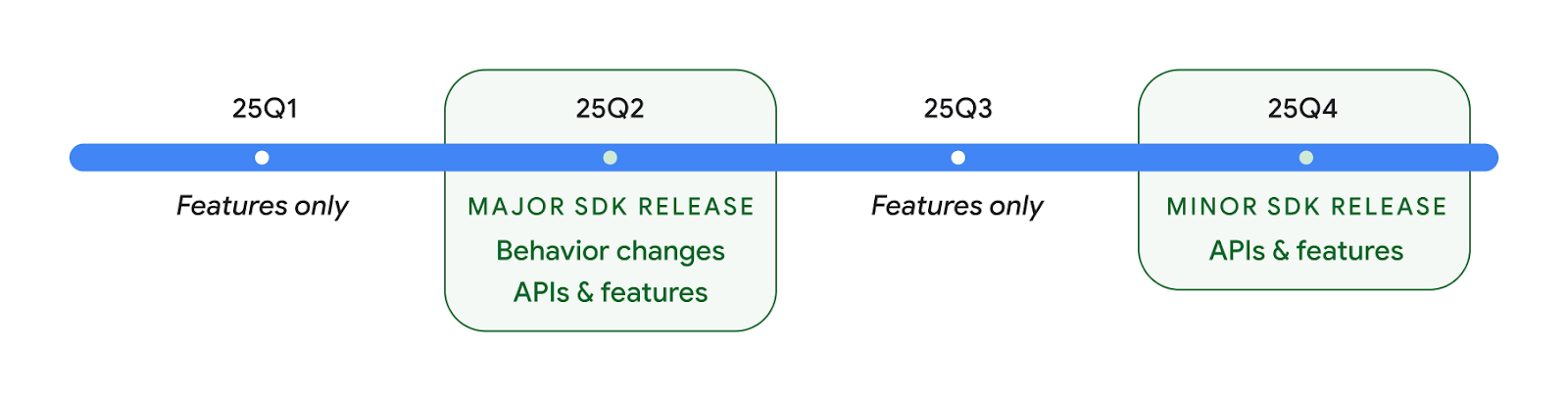
We'll continue to have quarterly Android releases. The Q1 and Q3 updates in-between the API releases will provide incremental updates to help ensure continuous quality. We're actively working with our device partners to bring the Q2 release to as many devices as possible.
Using new APIs with major and minor releases
Guarding a code block with a check for API level is done today using
the SDK_INT constant with
VERSION_CODES. This will continue
to be supported for major Android releases.
if (SDK_INT >= VERSION_CODES.BAKLAVA) {
  // Use APIs introduced in Android 16
}
The new SDK_INT_FULL
constant can be used for API checks against both major and minor versions with
the new VERSION_CODES_FULL
enumeration.
if (SDK_INT_FULL >= VERSION_CODES_FULL.[MAJOR or MINOR RELEASE]) {
  // Use APIs introduced in a major or minor release
}
You can also use the
Build.getMinorSdkVersion()
method to get just the minor SDK version.
val minorSdkVersion = Build.getMinorSdkVersion(VERSION_CODES_FULL.BAKLAVA)
These APIs have not yet been finalized and are subject to change, so please send us feedback if you have any concerns.
Kullanıcı deneyimi ve sistem arayüzü
Android 16, uygulama geliştiricilere ve kullanıcılara cihazlarını ihtiyaçlarına göre yapılandırma konusunda daha fazla kontrol ve esneklik sunar.
İlerleme odaklı bildirimler
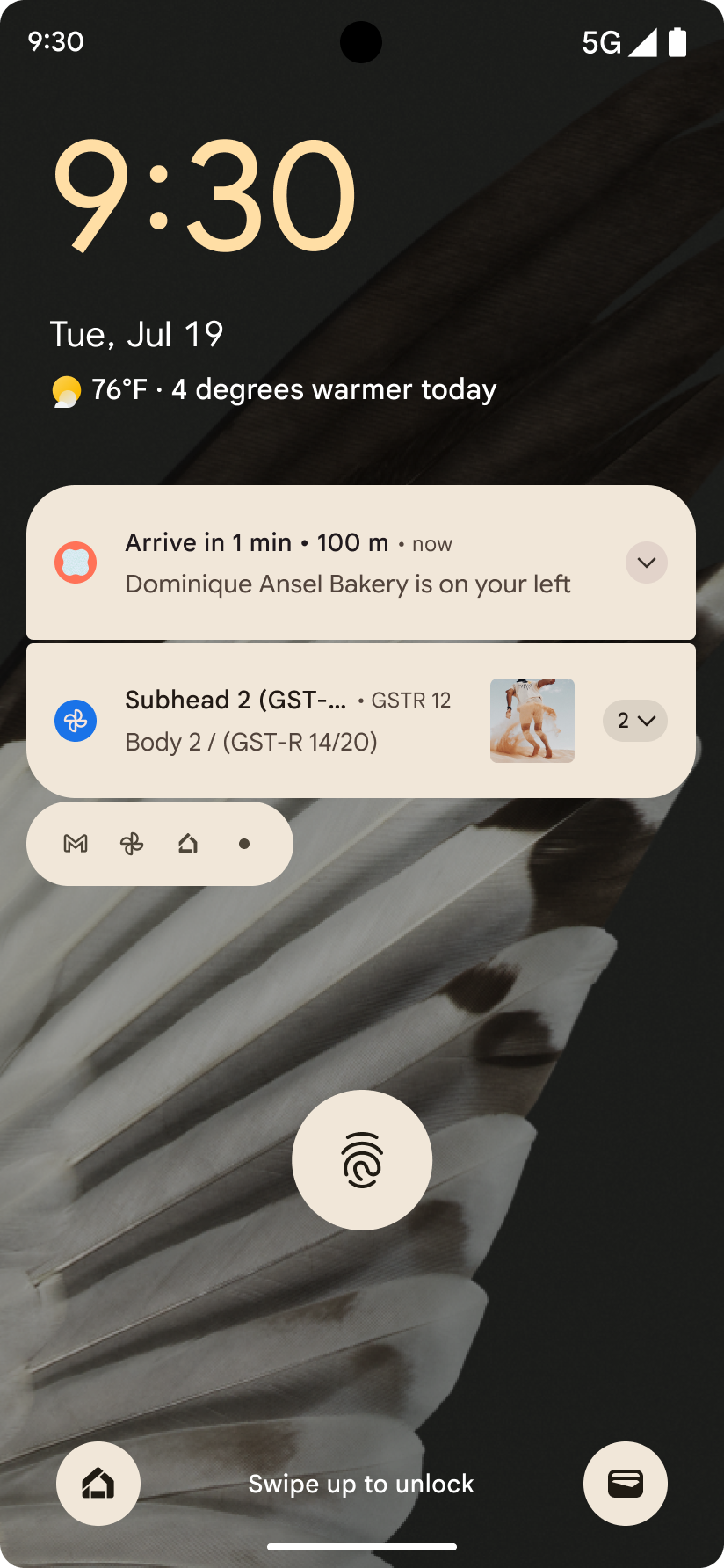
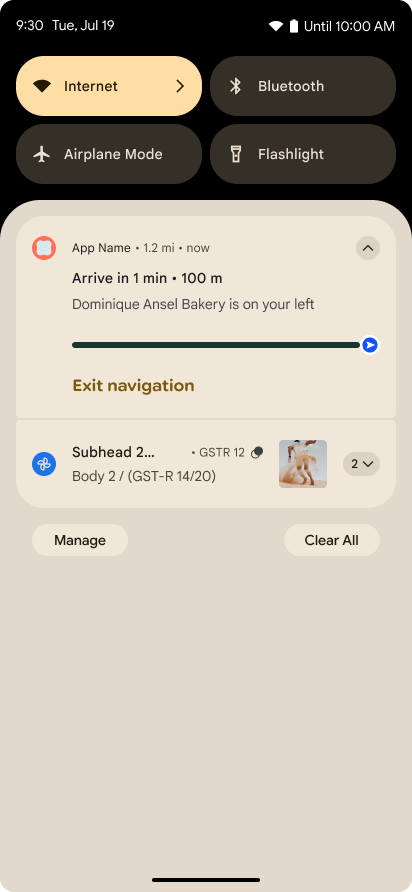
Android 16 引入了以进度为中心的通知,可帮助用户顺畅地跟踪用户发起的端到端历程。
Notification.ProgressStyle 是一种新的通知样式,可让您创建以进度为中心的通知。主要用例包括共享车辆、送货和导航。在 Notification.ProgressStyle 类中,您可以使用点和细分来表示用户体验历程中的状态和里程碑。
To learn more, see the Progress-centric notifications documentation page.
Tahmin edilen geri gitme güncellemeleri
Android 16 adds new APIs to help you enable predictive back system animations in
gesture navigation such as the back-to-home animation. Registering the
onBackInvokedCallback with the new
PRIORITY_SYSTEM_NAVIGATION_OBSERVER allows your app to
receive the regular onBackInvoked call whenever the
system handles a back navigation without impacting the normal back navigation
flow.
Android 16 additionally adds the
finishAndRemoveTaskCallback() and
moveTaskToBackCallback. By registering these callbacks
with the OnBackInvokedDispatcher, the system can trigger
specific behaviors and play corresponding ahead-of-time animations when the back
gesture is invoked.
Daha zengin dokunma teknolojisi
Android has exposed control over the haptic actuator ever since its inception.
Android 11 added support for more complex haptic effects that more advanced
actuators could support through
VibrationEffect.Compositions of device-defined semantic
primitives.
Android 16 adds haptic APIs that let apps define the amplitude and frequency curves of a haptic effect while abstracting away differences between device capabilities.
Geliştirici üretkenliği ve araçları
Üretkenliğinizi artırmaya yönelik çalışmalarımızın çoğu Android Studio, Jetpack Compose ve Android Jetpack kitaplıkları gibi araçlara odaklanırken platformda vizyonunuzu gerçekleştirmenize yardımcı olacak yollar aramaya devam ediyoruz.
Animasyonlu duvar kağıtları için içerik işleme
In Android 16, the live wallpaper framework is gaining a new content API to
address the challenges of dynamic, user-driven wallpapers. Currently, live
wallpapers incorporating user-provided content require complex, service-specific
implementations. Android 16 introduces
WallpaperDescription and
WallpaperInstance. WallpaperDescription lets you
identify distinct instances of a live wallpaper from the same service. For
example, a wallpaper that has instances on both the home screen and on the lock
screen may have unique content in both places. The wallpaper picker and
WallpaperManager use this metadata to better present
wallpapers to users, streamlining the process for you to create diverse and
personalized live wallpaper experiences.
Performans ve pil
Android 16, uygulamalarınız hakkında bilgi toplamanıza yardımcı olan API'ler sunar.
Sistem tarafından tetiklenen profil oluşturma
ProfilingManager, Android 15'e eklendi. Bu sayede uygulamalar, sahadaki herkese açık cihazlarda Perfetto'yu kullanarak profil oluşturma amacıyla veri toplama isteğinde bulunabilir.
Ancak bu profil oluşturma işlemi uygulamadan başlatılması gerektiğinden, uygulamaların başlatma veya ANR gibi kritik akışları yakalaması zor veya imkansız olur.
Android 16, bu konuda yardımcı olmak için ProfilingManager'te sistem tarafından tetiklenen profil oluşturma özelliğini kullanıma sunar. Uygulamalar, sıfırdan başlatma reportFullyDrawn veya ANR'ler gibi belirli tetikleyiciler için izleme alma isteğini kaydedebilir. Ardından sistem, uygulama adına bir izlemeyi başlatır ve durdurur. İzleme tamamlandıktan sonra sonuçlar uygulamanın veri dizine gönderilir.
ApplicationStartInfo'da bileşeni başlatma
ApplicationStartInfo was added in Android
15, allowing an app to see reasons
for process start, start type, start times, throttling, and other useful
diagnostic data. Android 16 adds
getStartComponent()
to distinguish what component type triggered the start, which can be helpful for
optimizing the startup flow of your app.
Daha iyi iş incelemesi
The JobScheduler#getPendingJobReason() API returns a reason why a job
might be pending. However, a job might be pending for multiple reasons.
In Android 16, we are introducing a new API
JobScheduler#getPendingJobReasons(int jobId), which returns multiple
reasons why a job is pending, due to both explicit constraints set by the
developer and implicit constraints set by the system.
We're also introducing
JobScheduler#getPendingJobReasonsHistory(int jobId), which returns a list
of the most recent constraint changes.
We recommend using the API to help you debug why your jobs may not be executing, especially if you're seeing reduced success rates of certain tasks or have bugs around latency of certain job completion. For example, updating widgets in the background failed to occur or prefetch job failed to be called prior to app start.
This can also better help you understand if certain jobs are not completing due to system defined constraints versus explicitly set constraints.
Uyarlanabilir yenileme oranı
Adaptive refresh rate (ARR), introduced in Android 15, enables the display refresh rate on supported hardware to adapt to the content frame rate using discrete VSync steps. This reduces power consumption while eliminating the need for potentially jank-inducing mode-switching.
Android 16 introduces hasArrSupport() and
getSuggestedFrameRate(int) while restoring
getSupportedRefreshRates() to make it easier for your apps to take
advantage of ARR. RecyclerView
1.4 internally supports ARR when it is settling from a fling or
smooth scroll, and we're continuing our work to add ARR
support into more Jetpack libraries. This frame rate article covers
many of the APIs you can use to set the frame rate so that your app can directly
use ARR.
ADPF'deki Headroom API'leri
The SystemHealthManager introduces the
getCpuHeadroom and
getGpuHeadroom APIs, designed to provide games and
resource-intensive apps with estimates of available CPU and GPU resources. These
methods offer a way for you to gauge how your app or game can best improve
system health, particularly when used in conjunction with other Android Dynamic
Performance Framework (ADPF) APIs that detect thermal
throttling.
By using CpuHeadroomParams and
GpuHeadroomParams on supported devices, you can
customize the time window used to compute the headroom and select between
average or minimum resource availability. This can help you reduce your CPU or
GPU resource usage accordingly, leading to better user experiences and improved
battery life.
Erişilebilirlik
Android 16, uygulamanızı her kullanıcıya ulaştırmanıza yardımcı olabilecek yeni erişilebilirlik API'leri ve özellikleri ekliyor.
Geliştirilmiş erişilebilirlik API'leri
Android 16, kullanıcı arayüzü anlamlarını iyileştirmek için ek API'ler ekleyerek TalkBack gibi erişilebilirlik hizmetlerini kullanan kullanıcılar için tutarlılığı artırmaya yardımcı olur.
Maksimum metin kontrastı için metnin dış çizgisini kalınlaştırma
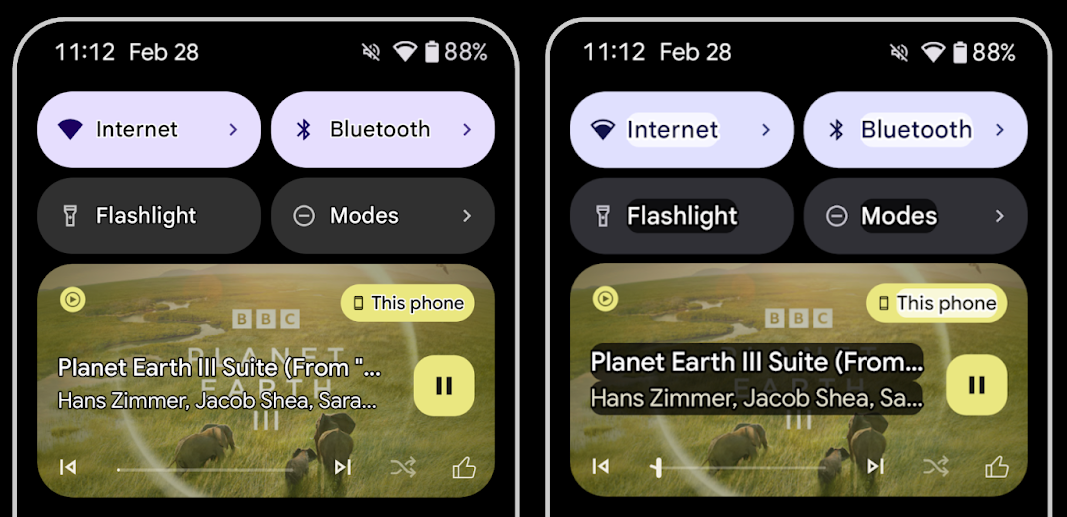
Görme bozukluğu olan kullanıcıların kontrast hassasiyeti genellikle düşüktür. Bu durum, nesneleri arka planlarından ayırt etmeyi zorlaştırır. Bu kullanıcılara yardımcı olmak için Android 16, yüksek kontrastlı metnin yerini alan ana hat metnini kullanıma sunar. Bu metin, okunabilirliği büyük ölçüde artırmak için metnin etrafında daha büyük bir kontrast alanı çizer.
Android 16, bu modun etkin olup olmadığını görmek için uygulamalarınızın kontrol etmesine veya dinleyici kaydetmesine olanak tanıyan yeni AccessibilityManager API'leri içerir. Bu, öncelikle benzer bir görsel deneyim sunmak için Oluştur gibi kullanıcı arayüzü araç takımları içindir. Bir kullanıcı arayüzü araç seti kitaplığınız varsa veya uygulamanız android.text.Layout sınıfını atlayan özel metin oluşturma işlemi gerçekleştiriyorsa ana hat metninin ne zaman etkinleştirildiğini öğrenmek için bunu kullanabilirsiniz.
TtsSpan'a süre eklendi
Android 16, TtsSpan'yi ARG_HOURS, ARG_MINUTES ve ARG_SECONDS'den oluşan bir TYPE_DURATION ile genişletir. Bu sayede, süreyi doğrudan not edebilirsiniz. Böylece TalkBack gibi hizmetlerde metin okuma özelliğini doğru ve tutarlı bir şekilde kullanabilirsiniz.
Birden fazla etikete sahip öğeleri destekleme
Android şu anda kullanıcı arayüzü öğelerinin erişilebilirlik etiketlerini başka bir öğeden almasına izin veriyor. Ayrıca, web içeriklerinde yaygın bir durum olan birden fazla etiketin ilişkilendirilmesine olanak tanıyor. Android, AccessibilityNodeInfo içinde liste tabanlı bir API tanıtarak bu çok etiketli ilişkileri doğrudan destekleyebilir. Bu değişiklik kapsamında, AccessibilityNodeInfo#setLabeledBy ve #getLabeledBy için desteği sonlandırdık. Bunun yerine #addLabeledBy, #removeLabeledBy ve #getLabeledByList'yi kullanmanızı öneririz.
Genişletilebilir öğeler için iyileştirilmiş destek
Android 16, menü ve genişletilebilir listeler gibi etkileşimli öğelerin genişletilmiş veya daraltılmış durumunu iletmenize olanak tanıyan erişilebilirlik API'leri ekler. setExpandedState kullanarak genişletilmiş durumu ayarlayarak ve CONTENT_CHANGE_TYPE_EXPANDED içerik değişikliği türüyle TYPE_WINDOW_CONTENT_CHANGED AccessibilityEvents göndererek TalkBack gibi ekran okuyucuların durum değişikliklerini duyurmasını sağlayabilir, böylece daha sezgisel ve kapsayıcı bir kullanıcı deneyimi sunabilirsiniz.
Belirsiz ilerleme çubukları
Android 16'da RANGE_TYPE_INDETERMINATE eklendi. Bu sayede, hem belirli hem de belirsiz ProgressBar widget'ları için RangeInfo'i gösterebilirsiniz. Böylece TalkBack gibi hizmetler, ilerleme göstergeleri için daha tutarlı geri bildirim sağlayabilir.
Üç durumlu onay kutusu
Android 16'daki yeni AccessibilityNodeInfo
getChecked ve setChecked(int)
yöntemleri artık "işaretli" ve "işaretsiz" seçeneklerine ek olarak "kısmen işaretli" durumu da destekliyor. Bu, desteği sonlandırılan isChecked ve setChecked(boolean) doğru/yanlış değerlerinin yerini almıştır.
Ek açıklamalar
Erişilebilirlik hizmetleri, bir ViewGroup tanımlarken alt görünümlerindeki içerik etiketlerini birleştirir. ViewGroup için bir contentDescription sağlarsanız erişilebilirlik hizmetleri, odaklanılabilir olmayan alt görünümlerin açıklamasını da geçersiz kıldığınızı varsayar. Erişilebilirlik için mevcut seçimi (ör. "Roboto") korurken açılır menü gibi öğeleri (ör. "Yazı Tipi Ailesi") etiketlemek isterseniz bu durum soruna yol açabilir. Android 16, ViewGroup öğelerinin bilgilerini geçersiz kılmadan ViewGroup hakkında bilgi veren metin sağlayabilmeniz için setSupplementalDescription öğesini ekler.
Zorunlu form alanları
Android 16, uygulamaların bir erişilebilirlik hizmetine form alanına giriş yapılması gerektiğini bildirebilmesi için AccessibilityNodeInfo değerine setFieldRequired değerini ekler. Bu, zorunlu hükümler ve koşullar onay kutusu gibi basit şeyler de dahil olmak üzere birçok form türü dolduran kullanıcılar için önemli bir senaryodur. Kullanıcıların zorunlu alanları tutarlı bir şekilde tanımlamasına ve bunlar arasında hızlıca gezinmesine yardımcı olur.
LEA işitme cihazlarıyla sesli aramalar için mikrofon girişi olarak telefon
Android 16 adds the capability for users of LE Audio hearing aids to switch between the built-in microphones on the hearing aids and the microphone on their phone for voice calls. This can be helpful in noisy environments or other situations where the hearing aid's microphones might not perform well.
LEA işitme cihazları için ortam ses seviyesi kontrolleri
Android 16 adds the capability for users of LE Audio hearing aids to adjust the volume of ambient sound that is picked up by the hearing aid's microphones. This can be helpful in situations where background noise is too loud or too quiet.
Kamera
Android 16, profesyonel kamera kullanıcıları için desteği geliştirerek hassas renk sıcaklığı ve renk tonu ayarlamalarının yanı sıra karma otomatik pozlamaya olanak tanır. Yeni bir gece modu göstergesi, uygulamanızın gece modu kamera oturumuna ne zaman geçeceğini ve bu oturumdan ne zaman çıkacağını bilmesine yardımcı olur. Yeni Intent işlemler, hareketli fotoğraflar çekmeyi kolaylaştırıyor. Ayrıca, HEIC kodlama desteği ve ISO 21496-1 taslak standardındaki yeni parametrelerle Ultra HDR görüntüleri iyileştirmeye devam ediyoruz.
Karma otomatik pozlama
Android 16 向 Camera2 添加了新的混合自动曝光模式,让您可以手动控制曝光的特定方面,同时让自动曝光 (AE) 算法处理其余部分。您可以控制 ISO + AE 和曝光时间 + AE,与当前方法(您要么完全手动控制,要么完全依赖自动曝光)相比,可提供更大的灵活性。
fun setISOPriority() {
    // ... (Your existing code before the snippet) ...

    val availablePriorityModes = mStaticInfo.characteristics.get(
        CameraCharacteristics.CONTROL_AE_AVAILABLE_PRIORITY_MODES
    )

    // ... (Your existing code between the snippets) ...

    // Turn on AE mode to set priority mode
    reqBuilder.set(
        CaptureRequest.CONTROL_AE_MODE,
        CameraMetadata.CONTROL_AE_MODE_ON
    )
    reqBuilder.set(
        CaptureRequest.CONTROL_AE_PRIORITY_MODE,
        CameraMetadata.CONTROL_AE_PRIORITY_MODE_SENSOR_SENSITIVITY_PRIORITY
    )
    reqBuilder.set(
        CaptureRequest.SENSOR_SENSITIVITY,
        TEST_SENSITIVITY_VALUE
    )
    val request: CaptureRequest = reqBuilder.build()

    // ... (Your existing code after the snippet) ...
}
Hassas renk sıcaklığı ve renk tonu ayarlamaları
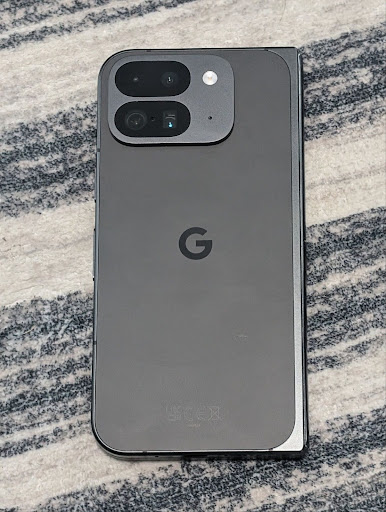
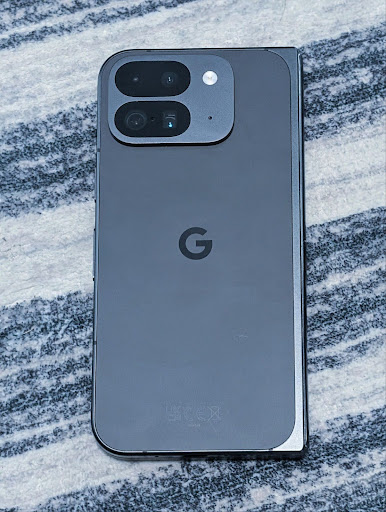
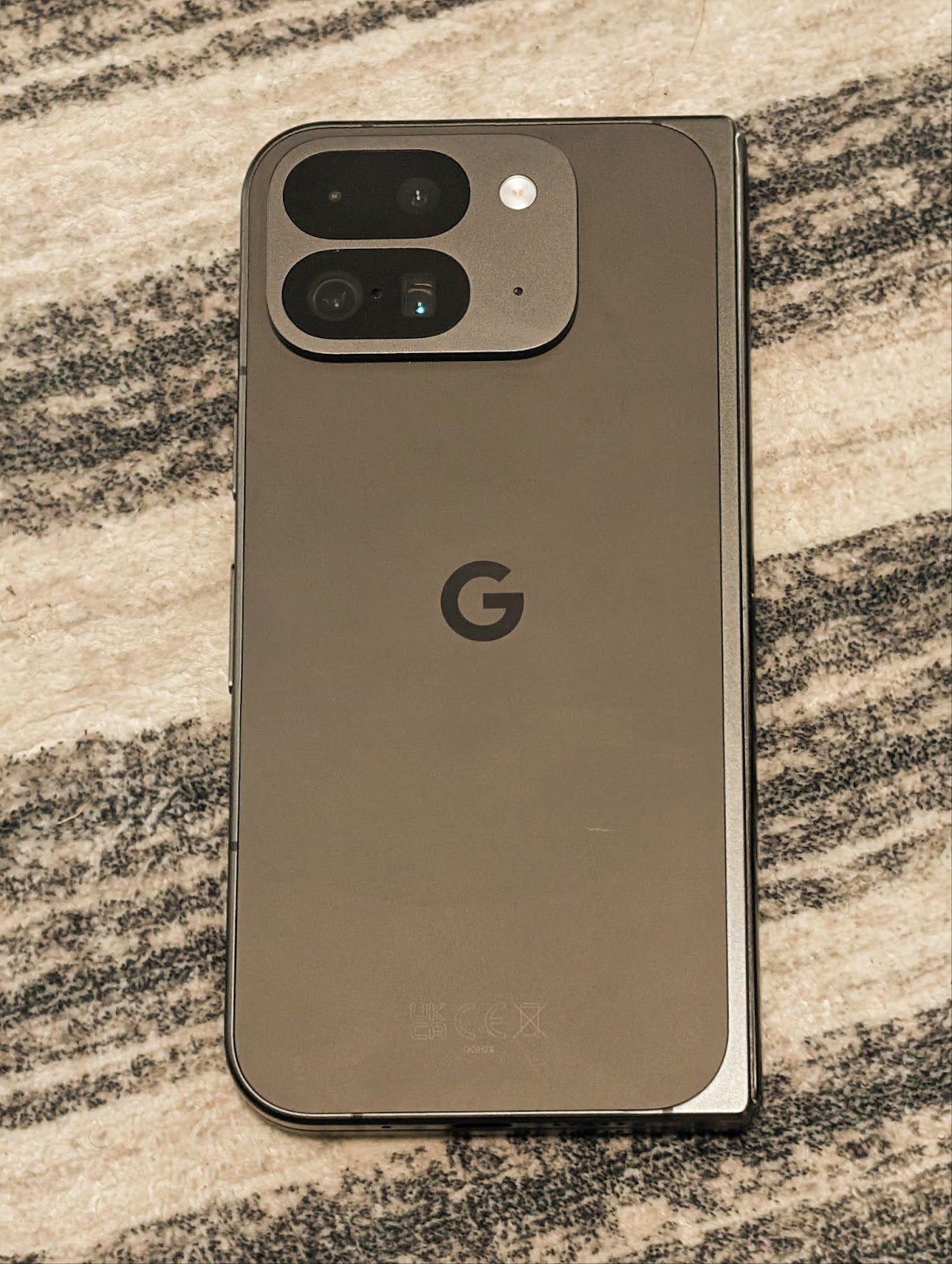
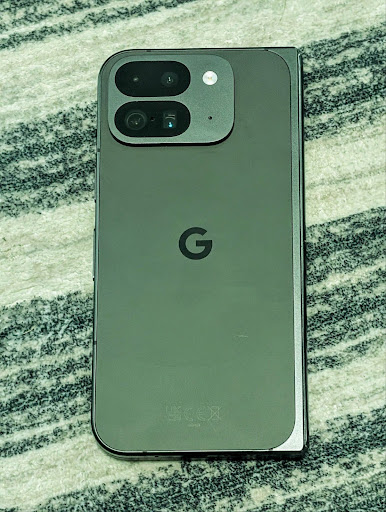
Android 16 增加了对相机的精细色温和色调调整的支持,以更好地支持专业视频录制应用。在较低版本的 Android 中,您可以通过 CONTROL_AWB_MODE 控制白平衡设置,其中包含仅限于预设列表的选项,例如白炽灯、多云和黄昏。COLOR_CORRECTION_MODE_CCT 可让您使用 COLOR_CORRECTION_COLOR_TEMPERATURE 和 COLOR_CORRECTION_COLOR_TINT 根据相关色温精确调整白平衡。
fun setCCT() {
    // ... (Your existing code before this point) ...

    val colorTemperatureRange: Range<Int> =
        mStaticInfo.characteristics[CameraCharacteristics.COLOR_CORRECTION_COLOR_TEMPERATURE_RANGE]

    // Set to manual mode to enable CCT mode
    reqBuilder[CaptureRequest.CONTROL_AWB_MODE] = CameraMetadata.CONTROL_AWB_MODE_OFF
    reqBuilder[CaptureRequest.COLOR_CORRECTION_MODE] = CameraMetadata.COLOR_CORRECTION_MODE_CCT
    reqBuilder[CaptureRequest.COLOR_CORRECTION_COLOR_TEMPERATURE] = 5000
    reqBuilder[CaptureRequest.COLOR_CORRECTION_COLOR_TINT] = 30

    val request: CaptureRequest = reqBuilder.build()

    // ... (Your existing code after this point) ...
}
以下示例展示了应用不同色温和色调调整后的照片效果:
Kamerada gece modu sahne algılama
To help your app know when to switch to and from a night mode camera session,
Android 16 adds EXTENSION_NIGHT_MODE_INDICATOR. If
supported, it's available in the CaptureResult within
Camera2.
This is the API we briefly mentioned as coming soon in the How Instagram enabled users to take stunning low light photos blog post. That post is a practical guide on how to implement night mode together with a case study that links higher-quality in-app night mode photos with an increase in the number of photos shared from the in-app camera.
Hareketli fotoğraf yakalama amaçlı intent işlemleri
Android 16 adds standard Intent actions —
ACTION_MOTION_PHOTO_CAPTURE, and
ACTION_MOTION_PHOTO_CAPTURE_SECURE — which request that
the camera application capture a motion photo and return
it.
You must either pass an extra EXTRA_OUTPUT to control
where the image will be written, or a Uri through
Intent.setClipData(ClipData). If you don't set a
ClipData, it will be copied there for you when calling
Context.startActivity(Intent).
Ultra HDR görsel iyileştirmeleri
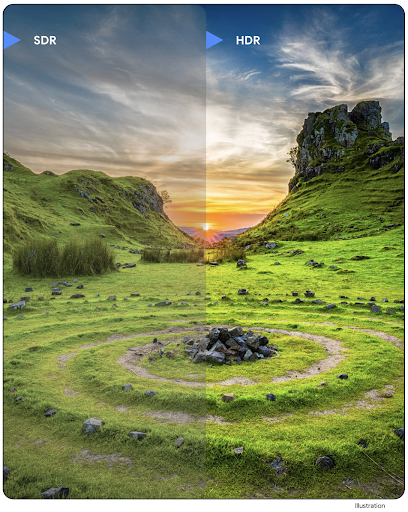
Android 16 continues our work to deliver dazzling image quality with UltraHDR
images. It adds support for UltraHDR images in the HEIC file
format. These images will get ImageFormat type
HEIC_ULTRAHDR and will contain an embedded gainmap similar
to the existing UltraHDR JPEG format. We're working on AVIF support for UltraHDR
as well, so stay tuned.
In addition, Android 16 implements additional parameters in UltraHDR from the ISO 21496-1 draft standard, including the ability to get and set the colorspace that gainmap math should be applied in, as well as support for HDR encoded base images with SDR gainmaps.
Grafik
Android 16, AGSL ile özel grafik efektleri gibi en yeni grafik iyileştirmelerini içerir.
AGSL ile özel grafik efektleri
Android 16'da RuntimeColorFilter ve RuntimeXfermode eklendi. Bu sayede, Eşik, Sepya ve Ton Doygunluğu gibi karmaşık efektler oluşturabilir ve bunları çizim çağrılarına uygulayabilirsiniz. Android 13'ten beri Shader'i genişleten özel RuntimeShaders oluşturmak için AGSL'yi kullanabilirsiniz. Yeni API, ColorFilter'i genişleten AGSL destekli bir RuntimeColorFilter ve kaynak ile hedef pikseller arasında AGSL tabanlı özel birleştirme ve karıştırma uygulamanıza olanak tanıyan bir Xfermode efekti ekleyerek bunu yansıtır.
private val thresholdEffectString = """
    uniform half threshold;

    half4 main(half4 c) {
        half luminosity = dot(c.rgb, half3(0.2126, 0.7152, 0.0722));
        half bw = step(threshold, luminosity);
        return bw.xxx1 * c.a;
    }"""

fun setCustomColorFilter(paint: Paint) {
   val filter = RuntimeColorFilter(thresholdEffectString)
   filter.setFloatUniform(0.5);
   paint.colorFilter = filter
}
Bağlantı
Android 16, platformu güncelleyerek uygulamanızın iletişim ve kablosuz teknolojilerdeki en son gelişmelere erişmesini sağlar.
Gelişmiş güvenlik ile aralık belirleme
Android 16 在搭载 Wi-Fi 6 的 802.11az 的受支持设备上为 Wi-Fi 位置信息添加了对强大的安全功能的支持,让应用能够将该协议的更高精确性、更高可伸缩性和动态调度与安全增强功能(包括基于 AES-256 的加密和防范中间人攻击)相结合。这样,在近距离使用情形(例如解锁笔记本电脑或车门)时,便可更安全地使用该功能。802.11az 与 Wi-Fi 6 标准集成,可利用其基础架构和功能实现更广泛的采用和更轻松的部署。
Genel mesafe API'leri
Android 16 包含新的 RangingManager,它提供了在受支持的硬件上确定本地设备与远程设备之间的距离和角度的方法。RangingManager 支持使用各种测距技术,例如 BLE 信道声音探测、基于 BLE RSSI 的测距、超宽带和 Wi-Fi 往返时间。
Companion Device Manager cihaz varlığı
In Android 16, new APIs are being introduced for binding your companion app
service. Service will be bound when BLE is in range and Bluetooth is connected
and service will be unbound when BLE is out of range or Bluetooth is
disconnected. App will receives a new
'onDevicePresenceEvent()' callback based on various
of DevicePresenceEvent.
More details can be found in
'startObservingDevicePresence(ObservingDevicePresenceRequest)'.
Medya
Android 16, medya deneyimini iyileştiren çeşitli özellikler içerir.
Fotoğraf seçiciyle ilgili iyileştirmeler
Fotoğraf seçici, kullanıcıların uygulamanızın tüm medya kitaplıkları yerine hem yerel hem de bulut depolama alanlarındaki seçili resimlere ve videolara erişmesine izin vermesi için güvenli ve yerleşik bir yöntem sunar. Google sistem güncellemeleri ve Google Play Hizmetleri aracılığıyla modüler sistem bileşenleri kombinasyonu kullanılarak Android 4.4 (API düzeyi 19)'e kadar desteklenir. Entegrasyon için ilişkili Android Jetpack kitaplığı ile yalnızca birkaç satır kod yeterlidir.
Android 16'da fotoğraf seçicide aşağıdaki iyileştirmeler yapılmıştır:
- Yerleştirilmiş fotoğraf seçici: Uygulamaların fotoğraf seçiciyi görünüm hiyerarşisine yerleştirmesini sağlayan yeni API'ler. Bu sayede, kullanıcıların uygulamanın çok geniş izinlere ihtiyaç duymadan medya seçmesine olanak tanıyan işlem izolasyonundan yararlanırken, uygulamanın daha entegre bir parçası gibi görünmesini sağlar. Platform sürümleri arasında uyumluluğu en üst düzeye çıkarmak ve entegrasyonunuzu basitleştirmek için yerleşik fotoğraf seçiciyi entegre etmek istiyorsanız yakında kullanıma sunulacak Android Jetpack kitaplığını kullanmanız gerekir.
- Fotoğraf seçicide Cloud Search: Android fotoğraf seçici için bulut medya sağlayıcısından arama yapmayı sağlayan yeni API'ler. Fotoğraf seçicide arama işlevi yakında kullanıma sunulacaktır.
Gelişmiş Profesyonel Video
Android 16, profesyonel düzeyde yüksek kaliteli video kaydı ve post prodüksiyon için tasarlanmış Gelişmiş Profesyonel Video (APV) codec'i desteğini kullanıma sunar.
APV codec standardı aşağıdaki özelliklere sahiptir:
- Görsel açıdan kayıpsız video kalitesi (ham video kalitesine yakın)
- Düzenleme iş akışlarını daha iyi desteklemek için düşük karmaşıklığa ve yüksek veri hızına sahip yalnızca kare içi kodlama (piksel alanı tahmini olmadan)
- Hafif bir entropi kodlama şemasıyla etkinleştirilen 2K, 4K ve 8K çözünürlüklü içerikler için birkaç Gb/sn'ye kadar yüksek bit hızı aralığı desteği
- Immersive içerikler ve paralel kodlama ve kod çözme için kare tarama
- Çeşitli renk örnekleme biçimleri ve bit derinlikleri için destek
- Görsel kalitede ciddi bozulma olmadan birden fazla kod çözme ve yeniden kodlama desteği
- Çoklu izlemeli video ve yardımcı video (derinlik, alfa ve önizleme gibi) desteği
- HDR10/10+ ve kullanıcı tanımlı meta veriler için destek
APV'nin referans uygulaması, OpenAPV projesi aracılığıyla sağlanır. Android 16, 10 bit kodlamanın yanı sıra YUV 422 renk örnekleme sağlayan ve 2 Gbps'ye kadar hedef bit hızları için APV 422-10 Profili'ne destek sunacaktır.
Gizlilik
Android 16, uygulama geliştiricilerin kullanıcı gizliliğini korumasına yardımcı olan çeşitli özellikler içerir.
Health Connect güncellemeleri
Health Connect adds ACTIVITY_INTENSITY, a data type defined according to World
Health Organization guidelines around moderate and vigorous activity. Each
record requires the start time, the end time, and whether the activity intensity
is moderate or vigorous.
Health Connect also contains updated APIs supporting medical records. This allows apps to read and write medical records in FHIR format with explicit user consent.
Android'de Özel Korumalı Alan
Android 16 incorporates the latest version of the Privacy Sandbox on Android, part of our ongoing work to develop technologies where users know their privacy is protected. Our website has more about the Privacy Sandbox on Android developer beta program to help you get started. Check out the SDK Runtime which allows SDKs to run in a dedicated runtime environment separate from the app they are serving, providing stronger safeguards around user data collection and sharing.
Güvenlik
Android 16, uygulamanızın güvenliğini artırmanıza ve uygulamanızın verilerini korumanıza yardımcı olan özellikler içerir.
Key Sharing API
Android 16 adds APIs that support sharing access to
Android Keystore keys with other apps. The new
KeyStoreManager class supports
granting and revoking access to keys
by app uid, and includes an API for apps to access shared
keys.
Cihaz form faktörleri
Android 16, uygulamalarınızın Android'in form faktörlerinden en iyi şekilde yararlanmasını sağlar.
TV'ler için standartlaştırılmış görüntü ve ses kalitesi çerçevesi
The new MediaQuality
package in Android 16 exposes
a set of standardized APIs for access to audio and picture profiles and
hardware-related settings. This allows streaming apps to query profiles and
apply them to media dynamically:
- Movies mastered with a wider dynamic range require greater color accuracy to see subtle details in shadows and adjust to ambient light, so a profile that prefers color accuracy over brightness may be appropriate.
- Live sporting events are often mastered with a narrow dynamic range, but are often watched in daylight, so a profile that preferences brightness over color accuracy can give better results.
- Fully interactive content wants minimal processing to reduce latency, and wants higher frame rates, which is why many TV's ship with a game profile.
The API allows apps to switch between profiles and users to enjoy tuning supported TVs to best suit their content.
Uluslararası hale getirme
Android 16, cihaz farklı dillerde kullanılırken kullanıcı deneyimini tamamlayan özellikler ve işlevler ekler.
Dikey metin
Android 16 adds low-level support for rendering and measuring text vertically to
provide foundational vertical writing support for library developers. This is
particularly useful for languages like Japanese that commonly use vertical
writing systems. A new flag,
VERTICAL_TEXT_FLAG,
has been added to the Paint class. When
this flag is set using
Paint.setFlags, Paint's
text measurement APIs will report vertical advances instead of horizontal
advances, and Canvas will draw text
vertically.
val text = "「春は、曙。」"
Box(
    Modifier.padding(innerPadding).background(Color.White).fillMaxSize().drawWithContent {
        drawIntoCanvas { canvas ->
            val paint = Paint().apply { textSize = 64.sp.toPx() }
            // Draw text vertically
            paint.flags = paint.flags or VERTICAL_TEXT_FLAG
            val height = paint.measureText(text)
            canvas.nativeCanvas.drawText(
                text,
                0,
                text.length,
                size.width / 2,
                (size.height - height) / 2,
                paint
            )
        }
    }
) {}
Ölçü sistemi özelleştirme
Users can now customize their measurement system in regional preferences within
Settings. The user preference is included as part of the locale code, so you can
register a BroadcastReceiver on
ACTION_LOCALE_CHANGED to handle locale configuration changes when
regional preferences change.
Using formatters can help match the local experience. For example, "0.5 in" in English (United States), is "12,7 mm" for a user who has set their phone to English (Denmark) or who uses their phone in English (United States) with the metric system as the measurement system preference.
To find these settings, open the Settings app and navigate to System > Languages & region.