

これまでのリリースと同様、Android 16 には、アプリに影響する可能性がある動作変更が含まれています。下記の動作変更は、Android 16 以上をターゲットとするアプリにのみ適用されます。アプリが Android 16 以上をターゲットとする場合は、必要に応じてアプリを変更し、下記の動作に適切に対応できるようにしてください。
アプリの targetSdkVersion に関係なく、Android 16 で実行されるすべてのアプリに影響する動作変更のリストも必ずご確認ください。
ユーザー エクスペリエンスとシステム UI
Android 16(API レベル 36)には、より一貫性のある直感的なユーザー エクスペリエンスを実現するための以下の変更が含まれています。
エッジ ツー エッジのオプトアウトの廃止
Android 15 では、Android 15(API レベル 35)をターゲットとするアプリに対してエッジ ツー エッジが強制適用されましたが、R.attr#windowOptOutEdgeToEdgeEnforcement を true に設定することで、アプリはエッジ ツー エッジを無効にできます。Android 16(API レベル 36)をターゲットとするアプリの場合、R.attr#windowOptOutEdgeToEdgeEnforcement は非推奨となり無効化されます。アプリでエッジ ツー エッジ モードを無効にすることはできません。
- アプリが Android 16(API レベル 36)をターゲットとしており、Android 15 デバイスで実行されている場合、
R.attr#windowOptOutEdgeToEdgeEnforcementは引き続き動作します。 - アプリが Android 16(API レベル 36)をターゲットとしており、Android 16 デバイスで実行されている場合、
R.attr#windowOptOutEdgeToEdgeEnforcementは無効になります。
Android 16 でテストする場合は、アプリがエッジ ツー エッジに対応していることを確認し、R.attr#windowOptOutEdgeToEdgeEnforcement の使用をすべて削除して、Android 15 デバイスでもエッジ ツー エッジに対応するようにします。エッジ ツー エッジをサポートするには、Compose と Views のガイダンスをご覧ください。
予測型「戻る」には移行またはオプトアウトが必要
Android 16(API レベル 36)以降をターゲットとし、Android 16 以降のデバイスで実行されるアプリでは、予測型「戻る」システム アニメーション(ホームに戻る、タスク間、アクティビティ間)がデフォルトで有効になります。
また、onBackPressed が呼び出されなくなり、
KeyEvent.KEYCODE_BACK がディスパッチされなくなります。
アプリが「戻る」イベントをインターセプトしていて、まだ予測型
「戻る」に移行していない場合は、サポートされている「戻る」ナビゲーション API を使用するようにアプリを更新するか、または
アプリの
<application> タグまたは <activity> タグで
android:enableOnBackInvokedCallback 属性を false に設定して、一時的にオプトアウトします。AndroidManifest.xml ファイル。
Elegant フォント API のサポート終了と無効化
Android 15(API レベル 35)をターゲットとするアプリでは、elegantTextHeight
TextView 属性がデフォルトで true に設定され、コンパクトなフォントが可読性の高いフォントに置き換えられます。elegantTextHeight 属性を false に設定することで、この動作をオーバーライドできます。
Android 16 では elegantTextHeight 属性が非推奨となり、アプリのターゲットが Android 16 になると、この属性は無視されます。これらの API で制御される「UI フォント」は廃止されるため、アラビア語、ラオス語、ミャンマー語、タミル語、グジャラート語、カンナダ語、マラヤーラム語、オディア語、テルグ語、タイ語でテキストが常に正しくレンダリングされるように、レイアウトを調整する必要があります。
elegantTextHeight 属性を false に設定してデフォルトをオーバーライドした Android 15(API レベル 35)をターゲットとするアプリの elegantTextHeight の動作。
elegantTextHeight 属性を false に設定してデフォルトをオーバーライドしていない Android 15(API レベル 35)をターゲットとするアプリの elegantTextHeight の動作。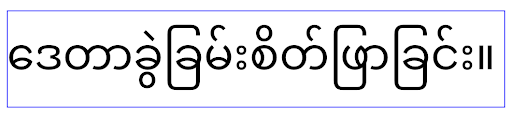
コア機能
Android 16(API レベル 36)には、Android システムのさまざまなコア機能を変更または拡張する以下の変更が含まれています。
固定レートの作業スケジュールの最適化
Android 16 をターゲットとする前は、scheduleAtFixedRate が有効なプロセス ライフサイクルの外部にあるためにタスクの実行を逃した場合、アプリが有効なライフサイクルに戻ると、逃した実行がすべて直ちに実行されました。
Android 16 をターゲットとしている場合、アプリが有効なライフサイクルに戻ると、scheduleAtFixedRate の実行が最大 1 回スキップされた場合、その実行が直ちに実行されます。この動作変更により、アプリのパフォーマンスが向上することが期待されます。アプリでこの動作をテストして、アプリが影響を受けているかどうかを確認します。アプリ互換性フレームワークを使用して STPE_SKIP_MULTIPLE_MISSED_PERIODIC_TASKS 互換性フラグを有効にしてテストすることもできます。
デバイスのフォーム ファクタ
Android 16(API レベル 36)では、大画面デバイスに表示されるアプリに対して次の変更が加えられています。
アダプティブ レイアウト
Android アプリは、スマートフォン、タブレット、折りたたみ式デバイス、デスクトップ、自動車、テレビなど、さまざまなデバイスで動作するようになり、大画面のウィンドウ モード(分割画面やデスクトップ ウィンドウなど)も利用できるようになりました。そのため、デベロッパーは、デバイスの向きにかかわらず、あらゆる画面サイズやウィンドウ サイズに対応できる Android アプリを構築する必要があります。画面の向きやサイズ変更を制限するなどのパラダイムは、今日のマルチデバイスの世界では制限が厳しすぎます。
向き、サイズ変更の可能性、アスペクト比の制限を無視する
Android 16(API レベル 36)をターゲットとするアプリでは、最小幅が 600 dp 以上のディスプレイで、画面の向き、サイズ変更、アスペクト比の制限が適用されなくなります。アスペクト比やユーザーが指定した画面の向きにかかわらず、アプリはディスプレイ ウィンドウ全体に表示され、ピラーボックス表示は使用されません。
この変更により、新しい標準プラットフォームの動作が導入されます。Android は、アプリがさまざまな向き、表示サイズ、アスペクト比に対応することを想定したモデルに移行しています。画面の向きの固定やサイズ変更の制限などの制約は、アプリの適応性を妨げます。アプリをアダプティブにすることで、最高のユーザー エクスペリエンスを提供します。
この動作は、アプリ互換性フレームワークを使用して UNIVERSAL_RESIZABLE_BY_DEFAULT 互換性フラグを有効にすることでもテストできます。
一般的な互換性を破る変更
向き、サイズ変更、アスペクト比の制限を無視すると、一部のデバイスでアプリの UI に影響する可能性があります。特に、縦向きに固定された小さなレイアウト用に設計された要素では、レイアウトの引き伸ばしや画面外のアニメーションやコンポーネントなどの問題が発生する可能性があります。アスペクト比や画面の向きに関する想定は、アプリの視覚的な問題を引き起こす可能性があります。詳細をご確認のうえ、問題を回避し、アプリの適応動作を改善してください。
デバイスの回転を許可すると、アクティビティの再作成が増え、適切に保存されていない場合はユーザーの状態が失われる可能性があります。UI の状態を正しく保存する方法については、UI の状態を保存するをご覧ください。
実装の詳細
次のマニフェスト属性とランタイム API は、大画面デバイスの全画面モードとマルチウィンドウ モードでは無視されます。
screenOrientationresizableActivityminAspectRatiomaxAspectRatiosetRequestedOrientation()getRequestedOrientation()
screenOrientation、setRequestedOrientation()、getRequestedOrientation() の次の値は無視されます。
portraitreversePortraitsensorPortraituserPortraitlandscapereverseLandscapesensorLandscapeuserLandscape
ディスプレイのサイズ変更については、android:resizeableActivity="false"、android:minAspectRatio、android:maxAspectRatio は影響しません。
Android 16(API レベル 36)をターゲットとするアプリの場合、アプリの画面の向き、サイズ変更、アスペクト比の制約は、デフォルトで大画面では無視されます。完全に対応していないアプリは、オプトアウトすることでこの動作を一時的にオーバーライドできます。これにより、互換モードで配置されるという以前の動作に戻ります。
例外
Android 16 の画面の向き、サイズ変更、アスペクト比の制限は、次の場合には適用されません。
- ゲーム(
android:appCategoryフラグに基づく) - デバイスのアスペクト比設定でアプリのデフォルトの動作を明示的に選択しているユーザー
sw600dpより小さい画面
一時的にオプトアウトする
特定のアクティビティをオプトアウトするには、PROPERTY_COMPAT_ALLOW_RESTRICTED_RESIZABILITY マニフェスト プロパティを宣言します。
<activity ...>
  <property android:name="android.window.PROPERTY_COMPAT_ALLOW_RESTRICTED_RESIZABILITY" android:value="true" />
  ...
</activity>
アプリの多くの部分が Android 16 に対応していない場合は、アプリケーション レベルで同じプロパティを適用することで、完全にオプトアウトできます。
<application ...>
  <property android:name="android.window.PROPERTY_COMPAT_ALLOW_RESTRICTED_RESIZABILITY" android:value="true" />
</application>
健康、フィットネス
Android 16(API レベル 36)では、健康とフィットネスに関するデータについて以下の変更が加えられています。
健康とフィットネスの権限
对于以 Android 16(API 级别 36)或更高版本为目标平台的应用,
BODY_SENSORS 权限使用更精细的权限
under android.permissions.health,which Health Connect
also uses。从 Android 16 开始,凡是以前需要具有 BODY_SENSORS
或 BODY_SENSORS_BACKGROUND 权限的 API,现在都需要获取相应的
android.permissions.health 权限。这会影响以下数据类型、API 和前台服务类型:
HEART_RATE_BPMWear OS 上的健康服务Sensor.TYPE_HEART_RATE来自 Android Sensor ManagerheartRateAccuracy和heartRateBpm(来自 Wear OS 上的ProtoLayout)FOREGROUND_SERVICE_TYPE_HEALTH,其中需要使用相应的android.permission.health权限来代替BODY_SENSORS
如果您的应用使用这些 API,则应请求相应的精细权限:
- 如需在使用期间监测心率、血氧饱和度或体表温度:
请请求
android.permissions.health下的精细权限,例如READ_HEART_RATE,而不是BODY_SENSORS。 - 如需访问后台传感器,请请求
READ_HEALTH_DATA_IN_BACKGROUND,而不是BODY_SENSORS_BACKGROUND。
这些权限与保护对 Health Connect(用于存储健康、 健身和保健数据的 Android 数据存储区)中数据的读取访问权限的权限相同。
移动应用
迁移为使用 READ_HEART_RATE 和其他精细权限的移动应用还必须 声明一项 activity 以显示应用的隐私权政策。这与健康数据共享的要求相同。
接続
Android 16(API レベル 36)では、周辺機器との接続性を改善するために、Bluetooth スタックに次の変更が加えられています。
ボンドの損失と暗号化の変更を処理する新しいインテント
ボンドの損失処理の改善の一環として、Android 16 では、ボンドの損失と暗号化の変更をアプリがより認識できるように、2 つの新しいインテントを導入しています。
Android 16 をターゲットとするアプリは、次のことができます。
- リモート ボンドの損失が検出されたときに
ACTION_KEY_MISSINGインテントを受け取り、より有益なユーザー フィードバックを提供するとともに、適切なアクションを実行できます。 - リンクの暗号化ステータスが変更されるたびに
ACTION_ENCRYPTION_CHANGEインテントを受け取ります。これには、暗号化ステータスの変更、暗号化アルゴリズムの変更、暗号鍵サイズの変更が含まれます。後でACTION_ENCRYPTION_CHANGEインテントを受け取った際にリンクが正常に暗号化された場合、アプリはボンディングが復元されたと見なす必要があります。
さまざまな OEM 実装への適応
Android 16 ではこれらの新しいインテントを導入していますが、その実装とブロードキャスト方法はデバイス メーカー(OEM)によって異なる場合があります。すべてのデバイスでアプリが一貫した信頼性の高いエクスペリエンスを提供できるようにするには、デベロッパーは、このような潜在的な変化に適切に対応するように、ボンディングの損失処理を設計する必要があります。
アプリの動作は次のとおりにすることをおすすめします。
ACTION_KEY_MISSINGインテントがブロードキャストされた場合:ACL(非同期接続レス)リンクはシステムによって切断されますが、デバイスのボンディング情報は保持されます(こちらを参照)。
アプリでは、このインテントを結合喪失の検出の主要なシグナルとして使用し、デバイスの消去や再ペア設定を開始する前に、リモート デバイスが範囲内にあることを確認するようユーザーに案内する必要があります。
ACTION_KEY_MISSINGの受信後にデバイスが切断された場合、デバイスがシステムとボンディングされていない可能性があるため、アプリは再接続に注意する必要があります。ACTION_KEY_MISSINGインテントがブロードキャストされていない場合:ACL リンクは接続されたままになり、デバイスのボンディング情報は Android 15 の場合と同じようにシステムによって削除されます。
このシナリオでは、アプリは以前の Android リリースと同様に既存のボンディング損失処理メカニズムを継続して、ボンディング損失イベントを検出して管理する必要があります。
Bluetooth のペア設定を削除する新しい方法
Android 16 をターゲットとするすべてのアプリで、CompanionDeviceManager の公開 API を使用して Bluetooth デバイスのペア設定を解除できるようになりました。コンパニオン デバイスが CDM の関連付けとして管理されている場合、アプリは、関連付けられたデバイスで新しい removeBond(int) API を使用して、Bluetooth の接続解除をトリガーできます。アプリは、Bluetooth デバイスのブロードキャスト イベント ACTION_BOND_STATE_CHANGED をリッスンすることで、ボンディング状態の変化をモニタリングできます。
セキュリティ
Android 16(API レベル 36)では、セキュリティが次のように変更されています。
MediaStore バージョンのロックダウン
Android 16 以降をターゲットとするアプリの場合、MediaStore#getVersion() はアプリごとに一意になります。これにより、バージョン文字列から識別プロパティが削除され、フィンガープリント手法の不正使用と使用が防止されます。アプリでは、このバージョンの形式について前提条件を設定しないでください。アプリは、この API を使用する際にバージョンの変更をすでに処理している必要があります。ほとんどの場合、デベロッパーがこの API の対象範囲を超える追加情報を推測しようとしない限り、現在の動作を変更する必要はありません。
Safer Intents
“更安全的 intent”功能是一项多阶段安全计划,旨在提高 Android 的 intent 解析机制的安全性。目标是在 intent 处理期间添加检查,并过滤不符合特定条件的 intent,从而保护应用免受恶意操作的侵害。
在 Android 15 中,该功能侧重于发送应用。现在,在 Android 16 中,控制权转移到了接收应用,开发者可以使用其应用清单选择启用严格的 intent 解析。
我们正在实施两项关键变更:
显式 intent 必须与目标组件的 intent 过滤器匹配:如果 intent 显式定位到某个组件,则应与该组件的 intent 过滤器匹配。
没有操作的 intent 无法匹配任何 intent 过滤器:未指定操作的 intent 不应解析为任何 intent 过滤器。
这些变更仅在涉及多个应用时适用,不会影响单个应用内的 intent 处理。
影响
选择启用性质意味着,开发者必须在应用清单中明确启用它,才能使其生效。 因此,此功能的影响将仅限于以下应用:
- 了解“更安全的 intent”功能及其优势。
- 主动选择在应用中采用更严格的 intent 处理实践。
这种选择性采用的方法可最大限度地降低破坏可能依赖于当前不太安全的 intent 解析行为的现有应用的风险。
虽然 Safer Intents 计划在 Android 16 中的初始影响可能有限,但其路线图表明,该计划将在未来的 Android 版本中产生更广泛的影响。我们计划最终将严格的意图解析设为默认行为。
通过使恶意应用更难利用 intent 解析机制中的漏洞,“更安全的 intent”功能有望显著提升 Android 生态系统的安全性。
不过,向选择停用和强制执行的过渡必须谨慎管理,以解决现有应用可能存在的兼容性问题。
实现
开发者需要在应用清单中使用 intentMatchingFlags 属性明确启用更严格的 intent 匹配。以下示例展示了如何为整个应用选择启用该功能,但在接收器上停用/选择停用该功能:
<application android:intentMatchingFlags="enforceIntentFilter">
    <receiver android:name=".MyBroadcastReceiver" android:exported="true" android:intentMatchingFlags="none">
        <intent-filter>
            <action android:name="com.example.MY_CUSTOM_ACTION" />
        </intent-filter>
        <intent-filter>
            <action android:name="com.example.MY_ANOTHER_CUSTOM_ACTION" />
        </intent-filter>
    </receiver>
</application>
有关支持的标志的更多信息:
| 标志名称 | 说明 |
|---|---|
| enforceIntentFilter | 对传入的 intent 强制执行更严格的匹配 |
| 无 | 针对传入 intent 停用所有特殊匹配规则。指定多个标志时,系统会优先考虑“无”标志,以解决值冲突问题 |
| allowNullAction | 放宽匹配规则,以允许匹配没有操作的 intent。此标志应与“enforceIntentFilter”结合使用,以实现特定行为 |
测试和调试
在强制执行处于有效状态时,如果 intent 调用方已正确填充 intent,应用应能正常运行。
不过,被屏蔽的 intent 会触发警告日志消息(例如 "Intent does not match component's intent filter:" 和 "Access blocked:"),并带有标记 "PackageManager."。这表示存在可能会影响应用的潜在问题,需要引起注意。
Logcat 过滤条件:
tag=:PackageManager & (message:"Intent does not match component's intent filter:" | message: "Access blocked:")
GPU システムコール フィルタリング
为了加固 Mali GPU Surface,我们已在生产版本中屏蔽了已废弃或仅用于 GPU 开发的 Mali GPU IOCTL。 此外,用于 GPU 性能剖析的 IOCTL 已限制为 shell 进程或可调试的应用。如需详细了解平台级政策,请参阅 SAC 更新。
此项变更适用于使用 Mali GPU 的 Pixel 设备(Pixel 6-9)。Arm
已在其 r54p2 release 版本的
Documentation/ioctl-categories.rst 中提供了 IOCTL 的官方分类。此列表将在未来的驱动程序版本中继续维护。
此项变更不会影响受支持的图形 API(包括 Vulkan 和 OpenGL),预计也不会影响开发者或现有应用。 Streamline Performance Analyzer 和 Android GPU 检查器等 GPU 性能剖析工具不会受到影响。
测试
如果您看到类似以下内容的 SELinux 拒绝,则您的应用很可能受到了此项变更的影响:
06-30 10:47:18.617 20360 20360 W roidJUnitRunner: type=1400 audit(0.0:85): avc:  denied  { ioctl }
for  path="/dev/mali0" dev="tmpfs" ino=1188 ioctlcmd=0x8023
scontext=u:r:untrusted_app_25:s0:c512,c768 tcontext=u:object_r:gpu_device:s0 tclass=chr_file
permissive=0 app=com.google.android.selinux.pts
如果您的应用需要使用被屏蔽的 IOCTL,请提交 bug 并将其分配给 android-partner-security@google.com。
常见问题解答
此项政策变更是否适用于所有 OEM? 此项变更将采用选择启用模式,但任何想要使用此加固方法的原始设备制造商(OEM)都可以使用。如需了解如何实现此项变更,请参阅实现文档。
是否必须在 OEM 代码库中进行更改才能实现此项变更,还是默认随新的 AOSP 版本提供? 平台级变更将默认随新的 AOSP 版本提供。供应商可以选择在其代码库中启用此项变更,以便应用此项变更。
SoC 是否负责让 IOCTL 列表保持最新状态?例如,如果我的设备使用 ARM Mali GPU,我是否需要就任何变更与 ARM 联系? 各个 SoC 必须在驱动程序发布后根据设备更新其 IOCTL 列表。 例如,ARM 会在驱动程序更新后更新其发布的 IOCTL 列表。 不过,OEM 应确保将更新纳入其 SEPolicy,并根据需要将任何选定的自定义 IOCTL 添加到列表中。
此项变更是否会自动应用于所有在售 Pixel 设备,还是需要用户执行操作来切换某些内容以应用此项变更? 此项变更适用于所有使用 Mali GPU 的在售 Pixel 设备(Pixel 6-9)。无需用户执行任何操作即可应用此项变更。
使用此政策是否会影响内核驱动程序的性能? 我们已使用 GFXBench 在 Mali GPU 上对此政策进行了测试,未观察到 GPU 性能发生任何可衡量的变化。
IOCTL 列表是否需要与当前的用户空间和内核驱动程序版本保持一致?是,允许的 IOCTL 列表必须与用户空间和内核驱动程序支持的 IOCTL 同步。如果用户空间或内核驱动程序中的 IOCTL 发生更新,则必须更新 SEPolicy IOCTL 列表以进行匹配。
ARM 已将 IOCTL 分类为“受限”/“检测”,但我们希望在生产用例中使用其中的一些 IOCTL,并/或拒绝其他 IOCTL。 各个 OEM/SoC 负责根据其用户空间 Mali 库的配置,决定如何对其使用的 IOCTL 进行分类。 ARM 的列表可用于帮助决定这些内容,但每个 OEM/SoC 的用例可能有所不同。
プライバシー
Android 16(API レベル 36)では、プライバシーが次のように変更されています。
ローカル ネットワークの権限
具有 INTERNET 权限的任何应用都可以访问局域网中的设备。
这使得应用可以轻松连接到本地设备,但也存在隐私方面的影响,例如形成用户指纹,以及成为位置信息的代理。
本地网络保护项目旨在通过在新的运行时权限后限制对本地网络的访问,来保护用户的隐私。
发布计划
这项变更将分别在 25Q2 和 26Q2 这两个版本之间部署。 开发者必须遵循 25Q2 的相关指南并分享反馈,因为这些保护措施将在后续 Android 版本中强制执行。此外,他们还需要按照以下指南更新依赖于隐式本地网络访问权限的场景,并为用户拒绝和撤消新权限做好准备。
影响
在当前阶段,LNP 是一项选择启用功能,这意味着只有选择启用的应用会受到影响。选择启用阶段的目标是让应用开发者了解应用的哪些部分依赖于隐式本地网络访问权限,以便他们为下一个版本做好权限保护准备。
如果应用使用以下方式访问用户的本地网络,则会受到影响:
- 直接或通过库使用本地网络地址(例如 mDNS 或 SSDP 服务发现协议)上的原始套接字
- 使用可访问本地网络的框架级类(例如 NsdManager)
向本地网络地址发送流量和从本地网络地址接收流量需要本地网络访问权限。下表列出了一些常见情况:
| 应用低级层网络操作 | 需要本地网络权限 |
|---|---|
| 建立出站 TCP 连接 | 是 |
| 接受传入的 TCP 连接 | 是 |
| 发送 UDP 单播、多播、广播 | 是 |
| 接收传入的 UDP 单播、多播、广播 | 是 |
这些限制是在网络堆栈深处实现的,因此适用于所有网络 API。这包括在原生代码或受管理代码中创建的套接字、Cronet 和 OkHttp 等网络库,以及基于这些库实现的任何 API。尝试解析本地网络上的服务(即带有 .local 后缀的服务)将需要本地网络权限。
上述规则的例外情况:
- 如果设备的 DNS 服务器位于本地网络上,则进出该服务器(位于端口 53)的流量不需要本地网络访问权限。
- 使用输出切换器作为其应用内选择器的应用将不需要本地网络权限(更多指南将在 2025 年第 4 季度发布)。
开发者指南(选择启用)
如需选择启用本地网络限制,请执行以下操作:
- 将设备刷写到 25Q2 Beta 3 或更高版本的 build。
- 安装要测试的应用。
在 adb 中切换 Appcompat 标志:
adb shell am compat enable RESTRICT_LOCAL_NETWORK <package_name>重启设备
现在,您的应用对本地网络的访问受到限制,任何访问本地网络的尝试都会导致套接字错误。如果您使用的 API 在应用进程之外执行本地网络操作(例如:NsdManager),在选择启用阶段,这些 API 不会受到影响。
如需恢复访问权限,您必须向应用授予 NEARBY_WIFI_DEVICES 权限。
- 确保应用在其清单中声明了
NEARBY_WIFI_DEVICES权限。 - 依次前往设置 > 应用 > [应用名称] > 权限 > 附近的设备 > 允许。
现在,应用对本地网络的访问权限应该已恢复,并且所有场景都应像选择启用应用之前一样正常运行。
本地网络保护功能开始强制执行后,应用的网络流量将受到以下影响。
| 权限 | 出站 LAN 请求 | 出站/入站互联网请求 | 入站 LAN 请求 |
|---|---|---|---|
| 已授予 | Works | Works | Works |
| 未授予 | 最差排行榜 | Works | 最差排行榜 |
使用以下命令关闭应用兼容性标志
adb shell am compat disable RESTRICT_LOCAL_NETWORK <package_name>
错误
每当调用套接字调用 send 或 send 变体向本地网络地址发送数据时,系统都会向该套接字返回因这些限制而产生的错误。
错误示例:
sendto failed: EPERM (Operation not permitted)

sendto failed: ECONNABORTED (Operation not permitted)
本地网络定义
此项目中的本地网络是指使用支持广播的网络接口(例如 Wi-Fi 或以太网)的 IP 网络,但不包括移动网络 (WWAN) 或 VPN 连接。
以下网络被视为本地网络:
IPv4:
- 169.254.0.0/16 // 链路本地
- 100.64.0.0/10 // CGNAT
- 10.0.0.0/8 // RFC1918
- 172.16.0.0/12 // RFC1918
- 192.168.0.0/16 // RFC1918
IPv6:
- 链路本地
- 直接连接的路线
- Thread 等桩网络
- 多子网(待定)
此外,多播地址 (224.0.0.0/4、ff00::/8) 和 IPv4 广播地址 (255.255.255.255) 也被归类为本地网络地址。
アプリ所有の写真
Android 16 以降を搭載したデバイスで、SDK 36 以降をターゲットとするアプリから写真と動画の権限を求めるメッセージが表示された場合、選択したメディアへのアクセスを制限することを選択したユーザーには、アプリが所有する写真が写真選択ツールで事前選択された状態で表示されます。ユーザーは、これらの事前選択された項目の選択を解除できます。これにより、それらの写真と動画へのアプリのアクセス権が取り消されます。