

Android 16 平台包含一些行为变更,这些变更可能会影响您的应用。
以下行为变更将影响在 Android 16 上运行的 所有应用,
无论其采用哪种 targetSdkVersion 都不例外。您应该测试您的应用,然后根据需要酌情修改,以便支持这些变更。
此外,请务必查看仅影响以 Android 16 为目标平台的应用的行为变更列表 。
核心功能
Android 16(API 级别 36)包含以下变更,这些变更会修改或扩展 Android 系统的各种核心功能。
JobScheduler 配额优化
从 Android 16 开始,我们将根据以下因素调整常规作业和加急作业的执行运行时配额:
- 应用所处的应用待机存储分区:在 Android 16 中,活跃待机存储分区将开始通过宽松的运行时配额强制执行。
- 如果作业在应用处于前台状态时开始执行:在 Android 16 中,如果作业在应用对用户可见时开始执行,并在应用变为不可见后继续执行,则会遵守作业运行时配额。
- 如果作业在运行前台服务时执行:在 Android 16 中,与前台服务同时执行的作业将遵守作业运行时配额。如果您利用作业进行用户发起的数据传输,请考虑改用用户发起的数据传输作业。
此变更会影响使用 WorkManager、JobScheduler 和 DownloadManager 调度的任务。如需调试作业停止的原因,我们建议您通过调用 WorkInfo.getStopReason()(对于 JobScheduler 作业,请调用 JobParameters.getStopReason())来记录作业停止的原因。
如需了解应用的状态如何影响其可使用的资源,请参阅电源管理资源限制。 如需详细了解电池优化方面的最佳实践,请参阅有关针对任务调度 API 优化电池使用的指南。
我们还建议利用 Android 16 中引入的新 JobScheduler#getPendingJobReasonsHistory API 来了解作业未执行的原因。
测试
如需测试应用的行为,只要应用在 Android 16 设备上运行,您就可以启用对某些作业配额优化功能的替换。
如需停用“顶级状态将遵守作业运行时配额”的强制执行,请运行以下 adb 命令:
adb shell am compat enable OVERRIDE_QUOTA_ENFORCEMENT_TO_TOP_STARTED_JOBS APP_PACKAGE_NAME
如需停用“在与前台服务同时执行时,作业将遵守作业运行时配额”的强制执行,请运行以下 adb 命令:
adb shell am compat enable OVERRIDE_QUOTA_ENFORCEMENT_TO_FGS_JOBS APP_PACKAGE_NAME
如需测试特定应用待机分桶行为,您可以使用以下 adb 命令设置应用的应用待机分桶:
adb shell am set-standby-bucket APP_PACKAGE_NAME active|working_set|frequent|rare|restricted
如需了解应用所在的待机分桶,您可以使用以下 adb 命令获取应用的待机分桶:
adb shell am get-standby-bucket APP_PACKAGE_NAME
废弃的空作业停止原因
An abandoned job occurs when the JobParameters object associated with the job
has been garbage collected, but JobService#jobFinished(JobParameters,
boolean) has not been called to signal job completion. This indicates that
the job may be running and being rescheduled without the app's awareness.
Apps that rely on JobScheduler, don't maintain a strong reference to the
JobParameters object, and timeout will now be granted the new job stop reason
STOP_REASON_TIMEOUT_ABANDONED, instead of STOP_REASON_TIMEOUT.
If there are frequent occurrences of the new abandoned stop reason, the system will take mitigation steps to reduce job frequency.
Apps should use the new stop reason to detect and reduce abandoned jobs.
If you're using WorkManager, AsyncTask, or DownloadManager, you aren't impacted because these APIs manage the job lifecycle on your app's behalf.
完全弃用 JobInfo#setImportantWhileForeground
The JobInfo.Builder#setImportantWhileForeground(boolean)
method indicates the importance of a job while the scheduling app is in the
foreground or when temporarily exempted from background restrictions.
This method has been deprecated since Android 12 (API level 31). Starting in Android 16, it no longer functions effectively and calling this method will be ignored.
This removal of functionality also applies to
JobInfo#isImportantWhileForeground(). Starting in Android
16, if the method is called, the method returns false.
有序广播优先级范围不再是全局范围
Android 应用可以为广播接收器定义优先级,以控制接收器接收和处理广播的顺序。对于清单声明的接收器,应用可以使用 android:priority 属性来定义优先级;对于上下文注册的接收器,应用可以使用 IntentFilter#setPriority() API 来定义优先级。发送广播时,系统会按接收器的优先级(从高到低)将其传送给接收器。
在 Android 16 中,无法保证使用 android:priority 属性或 IntentFilter#setPriority() 在不同进程中传送广播的顺序。广播优先级仅在同一应用进程内有效,而不会跨所有进程有效。
此外,广播优先级将自动限制在 (SYSTEM_LOW_PRIORITY + 1, SYSTEM_HIGH_PRIORITY - 1) 的范围内。只有系统组件才能将 SYSTEM_LOW_PRIORITY、SYSTEM_HIGH_PRIORITY 设置为广播优先级。
如果您的应用执行以下任一操作,可能会受到影响:
- 您的应用声明了具有相同广播 intent 的多个进程,并且希望根据优先级以特定顺序接收这些 intent。
- 您的应用进程与其他进程交互,并期望以特定顺序接收广播 intent。
如果进程需要相互协调,则应使用其他协调渠道进行通信。
ART 内部变更
Android 16 includes the latest updates to the Android Runtime (ART) that improve the Android Runtime's (ART's) performance and provide support for additional Java features. Through Google Play System updates, these improvements are also available to over a billion devices running Android 12 (API level 31) and higher.
As these changes are released, libraries and app code that rely on internal structures of ART might not work correctly on devices running Android 16, along with earlier Android versions that update the ART module through Google Play system updates.
Relying on internal structures (such as non-SDK interfaces) can always lead to compatibility problems, but it's particularly important to avoid relying on code (or libraries containing code) that leverages internal ART structures, since ART changes aren't tied to the platform version the device is running on and they go out to over a billion devices through Google Play system updates.
All developers should check whether their app is impacted by testing their apps thoroughly on Android 16. In addition, check the known issues to see if your app depends on any libraries that we've identified that rely on internal ART structures. If you do have app code or library dependencies that are affected, seek public API alternatives whenever possible and request public APIs for new use cases by creating a feature request in our issue tracker.
16 KB 页面大小兼容模式
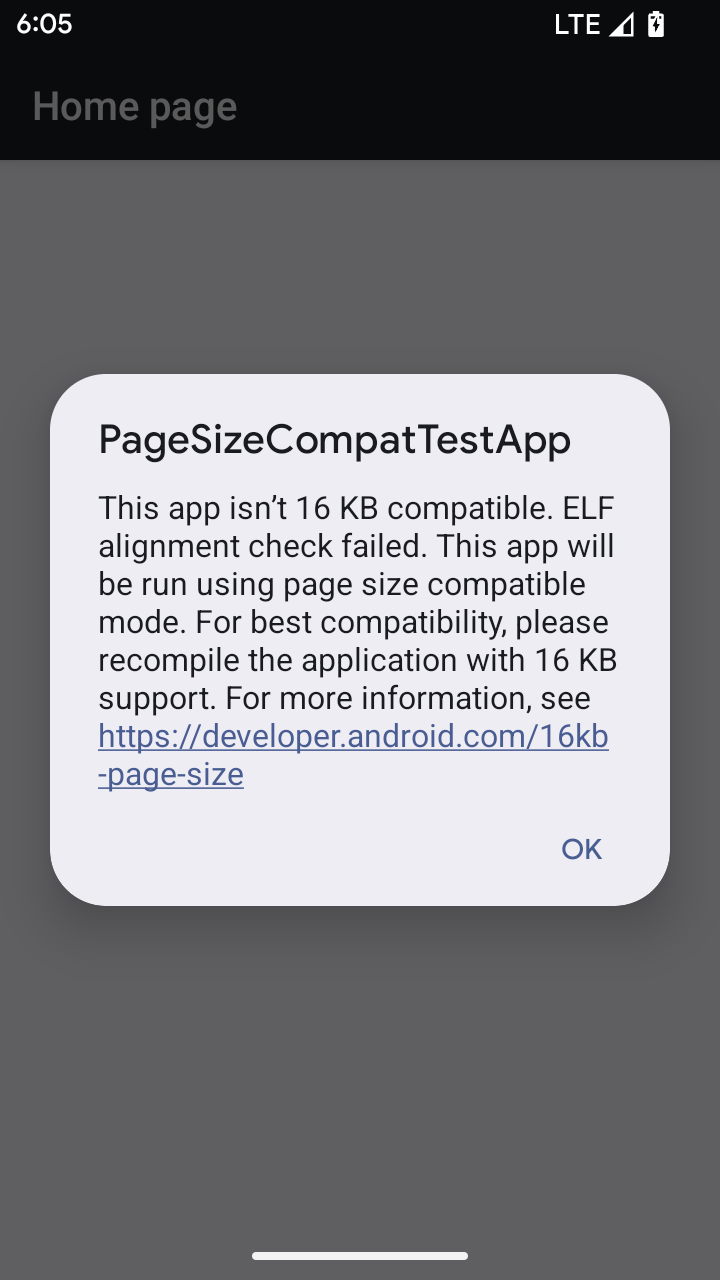
Android 15 introduced support for 16 KB memory pages to optimize performance of the platform. Android 16 adds a compatibility mode, allowing some apps built for 4 KB memory pages to run on a device configured for 16 KB memory pages.
When your app is running on a device with Android 16 or higher, if Android
detects that your app has 4 KB aligned memory pages, it automatically uses
compatibility mode and display a notification dialog to the user. Setting the
android:pageSizeCompat property in the AndroidManifest.xml to enable the
backwards compatibility mode will prevent the display of the dialog when your
app launches. To use the android:pageSizeCompat property, compile your app
using the Android 16 SDK.
For best performance, reliability, and stability, your app should still be 16 KB aligned. Check out our recent blog post on updating your apps to support 16 KB memory pages for more details.
用户体验和系统界面
Android 16(API 级别 36)包含以下变更,旨在打造更加一致、直观的用户体验。
弃用干扰性无障碍功能公告
Android 16 deprecates accessibility announcements, characterized by the use of
announceForAccessibility or the dispatch of
TYPE_ANNOUNCEMENT accessibility events. These can create
inconsistent user experiences for users of TalkBack and Android's screen reader,
and alternatives better serve a broader range of user needs across a variety of
Android's assistive technologies.
Examples of alternatives:
- For significant UI changes like window changes, use
Activity.setTitle(CharSequence)andsetAccessibilityPaneTitle(java.lang.CharSequence). In Compose, useModifier.semantics { paneTitle = "paneTitle" } - To inform the user of changes to critical UI, use
setAccessibilityLiveRegion(int). In Compose, useModifier.semantics { liveRegion = LiveRegionMode.[Polite|Assertive]}. These should be used sparingly as they may generate announcements every time a View is updated. - To notify users about errors, send an
AccessibilityEventof typeAccessibilityEvent#CONTENT_CHANGE_TYPE_ERRORand setAccessibilityNodeInfo#setError(CharSequence), or useTextView#setError(CharSequence).
The reference documentation for the deprecated
announceForAccessibility API includes more details about
suggested alternatives.
支持“三按钮”导航
Android 16 brings predictive back support to the 3-button navigation for apps that have properly migrated to predictive back. Long-pressing the back button initiates a predictive back animation, giving you a preview of where the back swipe takes you.
This behavior applies across all areas of the system that support predictive back animations, including the system animations (back-to-home, cross-task, and cross-activity).
自动带主题的应用图标
Beginning with Android 16 QPR 2, Android automatically applies themes to app icons to create a cohesive home screen experience. This occurs if an app does not provide its own themed app icon. Apps can control the design of their themed app icon by including a monochrome layer within their adaptive icon and previewing what their app icon will look like in Android Studio.
设备类型
Android 16(API 级别 36)包含以下变更,适用于虚拟设备所有者将应用投影到显示屏时。
虚拟设备所有者替换
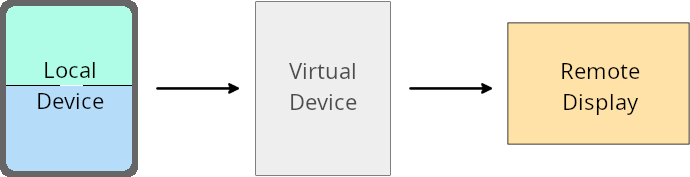
虚拟设备所有者是创建和管理虚拟设备的可信应用或特权应用。虚拟设备所有者在虚拟设备上运行应用,然后将应用投影到远程设备的显示屏上,例如个人电脑、虚拟现实设备或车载信息娱乐系统。虚拟设备所有者使用的是本地设备,例如手机。
按应用替换项
在搭载 Android 16(API 级别 36)的设备上,虚拟设备所有者可以替换其管理的特定虚拟设备上的应用设置。例如,为了改进应用布局,虚拟设备所有者在将应用投影到外部显示屏上时,可以忽略屏幕方向、宽高比和可调整大小性限制。
常见的重大更改
Android 16 的行为可能会影响应用在汽车显示屏或 Chromebook 等大屏幕设备规格上的界面,尤其是那些专为竖屏小显示屏设计的布局。如需了解如何让应用适应所有设备类型,请参阅关于自适应布局。
参考
安全
Android 16(API 级别 36)包含一些变更,旨在提升系统安全性,以帮助保护应用和用户免受恶意应用的侵害。
提升了针对 intent 重定向攻击的安全性
Android 16 针对一般的 Intent 重定向攻击提供了默认安全性,并且只需要最低限度的兼容性和开发者更改。
我们引入了默认安全加固解决方案,以应对 Intent 重定向漏洞。在大多数情况下,正常使用 intent 的应用不会遇到任何兼容性问题;我们在整个开发过程中收集了指标,以监控哪些应用可能会出现中断。
Intent 重定向在 Android 中出现,当攻击者可以部分或完全 控制用于在存在漏洞的应用上下文中启动新组件的 intent 内容时,而受害应用会在 intent 的 extra 字段中启动不受信任的子级 intent。这可能会导致攻击者应用在受害应用的上下文中启动私有组件、触发特权操作或获取对敏感数据的 URI 访问权限,从而可能导致数据窃取和任意代码执行。
选择停用 intent 重定向处理
Android 16 引入了一个新 API,允许应用选择停用启动安全保护。在默认安全行为会干扰合法应用用例的特定情况下,这可能是必要的。
对于针对 Android 16(API 级别 36)SDK 或更高版本进行编译的应用
您可以直接对 Intent 对象使用 removeLaunchSecurityProtection() 方法。
val i = intent
val iSublevel: Intent? = i.getParcelableExtra("sub_intent")
iSublevel?.removeLaunchSecurityProtection() // Opt out from hardening
iSublevel?.let { startActivity(it) }
对于针对 Android 15(API 级别 35)或更低版本进行编译的应用
虽然不建议这样做,但您可以使用反射来访问 removeLaunchSecurityProtection() 方法。
val i = intent
val iSublevel: Intent? = i.getParcelableExtra("sub_intent", Intent::class.java)
try {
    val removeLaunchSecurityProtection = Intent::class.java.getDeclaredMethod("removeLaunchSecurityProtection")
    removeLaunchSecurityProtection.invoke(iSublevel)
} catch (e: Exception) {
    // Handle the exception, e.g., log it
} // Opt-out from the security hardening using reflection
iSublevel?.let { startActivity(it) }
不再向配套应用通知发现超时
Android 16 introduces a new behavior during
companion device pairing flow to protect the user's location
privacy from malicious apps. All companion apps running on Android 16 are no
longer directly notified of discovery timeout using
RESULT_DISCOVERY_TIMEOUT. Instead, the user is
notified of timeout events with a visual dialog. When the user dismisses
the dialog, the app is alerted of the association failure with
RESULT_USER_REJECTED.
The search duration has also been extended from the original 20 seconds, and the device discovery can be stopped by the user at any point during the search. If at least one device was discovered within the first 20 seconds of starting the search, the CDM stops searching for additional devices.
连接
Android 16(API 级别 36)包含蓝牙堆栈方面的以下变更,旨在提升与外围设备的连接。
改进了配对丢失处理
Starting in Android 16, the Bluetooth stack has been updated to improve security and user experience when a remote bond loss is detected. Previously, the system would automatically remove the bond and initiate a new pairing process, which could lead to unintentional re-pairing. We have seen in many instances apps not taking care of the bond loss event in a consistent way.
To unify the experience, Android 16 improved the bond loss handling to the system. If a previously bonded Bluetooth device could not be authenticated upon reconnection, the system will disconnect the link, retain local bond information, and display a system dialog informing users of the bond loss and directing them to re-pair.