

La piattaforma Android 16 include modifiche al comportamento che potrebbero influire sulla tua app.
Le seguenti modifiche al comportamento si applicano a tutte le app quando vengono eseguite su Android 16,
indipendentemente da targetSdkVersion. Devi testare la tua app e poi modificarla in base alle necessità per supportare queste modifiche, ove applicabile.
Assicurati di esaminare anche l'elenco delle modifiche al comportamento che interessano solo le app che hanno come target Android 16.
Funzionalità di base
Android 16 (livello API 36) include le seguenti modifiche che modificano o espandono varie funzionalità di base del sistema Android.
Ottimizzazioni della quota di JobScheduler
A partire da Android 16, stiamo modificando la quota di runtime per l'esecuzione di job regolari e rapidi in base ai seguenti fattori:
- In quale bucket standby app si trova l'applicazione: in Android 16, i bucket standby attivi inizieranno a essere applicati da una generosa quota di runtime.
- Se l'esecuzione del job inizia mentre l'app è in primo piano: in Android 16, i job avviati mentre l'app è visibile all'utente e continuano dopo che l'app diventa invisibile, rispettano la quota di runtime del job.
- Se il job viene eseguito durante l'esecuzione di un servizio in primo piano: in Android 16, i job eseguiti contemporaneamente a un servizio in primo piano rispettano la quota di runtime del job. Se utilizzi i job per il trasferimento di dati avviato dall'utente, valuta la possibilità di utilizzare i job di trasferimento di dati avviato dall'utente.
Questa modifica influisce sulle attività pianificate utilizzando WorkManager, JobScheduler e
DownloadManager. Per eseguire il debug del motivo per cui un job è stato interrotto, ti consigliamo di registrare il motivo per cui il job è stato interrotto chiamando WorkInfo.getStopReason() (per i job JobScheduler, chiama JobParameters.getStopReason()).
Per informazioni su come lo stato dell'app influisce sulle risorse che può utilizzare, consulta Limiti delle risorse di gestione dell'alimentazione. Per ulteriori informazioni sulle best practice per l'ottimizzazione della batteria, consulta le indicazioni su come ottimizzare l'utilizzo della batteria per le API di pianificazione delle attività.
Ti consigliamo inoltre di utilizzare la nuova API
JobScheduler#getPendingJobReasonsHistory introdotta in
Android 16 per capire perché un job non è stato eseguito.
Test
Per testare il comportamento della tua app, puoi attivare l'override di alcune ottimizzazioni della quota di job purché l'app sia in esecuzione su un dispositivo Android 16.
Per disattivare l'applicazione di "top state will adhere to job runtime quota", esegui il seguente comando adb:
adb shell am compat enable OVERRIDE_QUOTA_ENFORCEMENT_TO_TOP_STARTED_JOBS APP_PACKAGE_NAME
Per disattivare l'applicazione di "i job in esecuzione contemporaneamente a un servizio in primo piano rispetteranno la quota di runtime del job", esegui questo comando adb:
adb shell am compat enable OVERRIDE_QUOTA_ENFORCEMENT_TO_FGS_JOBS APP_PACKAGE_NAME
Per testare il comportamento di determinati bucket di standby delle app, puoi impostare il bucket di standby delle app
della tua app utilizzando il seguente comando adb:
adb shell am set-standby-bucket APP_PACKAGE_NAME active|working_set|frequent|rare|restricted
Per capire in quale bucket di standby dell'app si trova la tua app, puoi recuperare il bucket di standby dell'app utilizzando il seguente comando adb:
adb shell am get-standby-bucket APP_PACKAGE_NAME
Motivo di interruzione dei job vuoti abbandonati
Un job abbandonato si verifica quando l'oggetto JobParameters associato al job è stato sottoposto a garbage collection, ma JobService#jobFinished(JobParameters,
boolean) non è stato chiamato per segnalare il completamento del job. Ciò indica che il job potrebbe essere in esecuzione e essere riprogrammato senza che l'app lo sappia.
Le app che si basano su JobScheduler non mantengono un riferimento forte all'oggettoJobParameters e ora al timeout verrà concesso il nuovo motivo di interruzione del jobSTOP_REASON_TIMEOUT_ABANDONED, anziché STOP_REASON_TIMEOUT.
Se si verificano spesso casi del nuovo motivo di interruzione dell'abbandono, il sistema prenderà provvedimenti per ridurre la frequenza dei job.
Le app devono utilizzare il nuovo motivo di interruzione per rilevare e ridurre i job abbandonati.
Se utilizzi WorkManager, AsyncTask o DownloadManager, non sono interessati perché queste API gestiscono il ciclo di vita dei job per conto della tua app.
Deprecazione completa di JobInfo#setImportantWhileForeground
Il metodo JobInfo.Builder#setImportantWhileForeground(boolean) indica l'importanza di un job quando l'app di pianificazione è in primo piano o quando è temporaneamente esente dalle limitazioni in background.
Questo metodo è stato ritirato da Android 12 (livello API 31). A partire da Android 16, non funziona più in modo efficace e la chiamata di questo metodo verrà ignorata.
Questa rimozione di funzionalità si applica anche a
JobInfo#isImportantWhileForeground(). A partire da Android
16, se il metodo viene chiamato, restituisce false.
L'ambito di priorità della trasmissione ordinata non è più globale
Android 应用可以为广播接收器定义优先级,以控制接收器接收和处理广播的顺序。对于清单声明的接收器,应用可以使用 android:priority 属性来定义优先级;对于上下文注册的接收器,应用可以使用 IntentFilter#setPriority() API 来定义优先级。发送广播时,系统会按接收器的优先级(从高到低)将其传送给接收器。
在 Android 16 中,无法保证使用 android:priority 属性或 IntentFilter#setPriority() 在不同进程中传送广播的顺序。广播优先级仅在同一应用进程内有效,而不会跨所有进程有效。
此外,广播优先级将自动限制在 (SYSTEM_LOW_PRIORITY + 1, SYSTEM_HIGH_PRIORITY - 1) 的范围内。只有系统组件才能将 SYSTEM_LOW_PRIORITY、SYSTEM_HIGH_PRIORITY 设置为广播优先级。
如果您的应用执行以下任一操作,可能会受到影响:
- 您的应用声明了具有相同广播 intent 的多个进程,并且希望根据优先级以特定顺序接收这些 intent。
- 您的应用进程与其他进程交互,并期望以特定顺序接收广播 intent。
如果进程需要相互协调,则应使用其他协调渠道进行通信。
Modifiche interne di ART
Android 16 include gli aggiornamenti più recenti all'ambiente di runtime Android (ART) che migliorano le prestazioni dell'ambiente di runtime Android (ART) e forniscono il supporto di funzionalità Java aggiuntive. Tramite gli aggiornamenti di sistema di Google Play, questi miglioramenti sono disponibili anche per oltre un miliardo di dispositivi con Android 12 (livello API 31) e versioni successive.
Man mano che queste modifiche vengono rilasciate, le librerie e il codice delle app che si basano sulle strutture interne di ART potrebbero non funzionare correttamente sui dispositivi con Android 16 e sulle versioni precedenti di Android che aggiornano il modulo ART tramite gli aggiornamenti di sistema di Google Play.
Fare affidamento su strutture interne (ad esempio interfacce non SDK) può sempre portare a problemi di compatibilità, ma è particolarmente importante evitare di fare affidamento su codice (o librerie contenenti codice) che sfrutta strutture ART interne, poiché le modifiche ART non sono legate alla versione della piattaforma su cui è in esecuzione il dispositivo e vengono rilasciate su oltre un miliardo di dispositivi tramite gli aggiornamenti di sistema di Google Play.
Tutti gli sviluppatori devono verificare se la loro app è interessata testando le proprie app in modo approfondito su Android 16. Inoltre, controlla i problemi noti per verificare se la tua app dipende da librerie che abbiamo identificato come basate su strutture ART interne. Se hai dipendenze di codice dell'app o della libreria che sono interessate, cerca alternative API pubbliche, se possibile, e richiedi API pubbliche per nuovi casi d'uso creando una richiesta di funzionalità nel nostro issue tracker.
Modalità di compatibilità con le dimensioni pagina di 16 kB
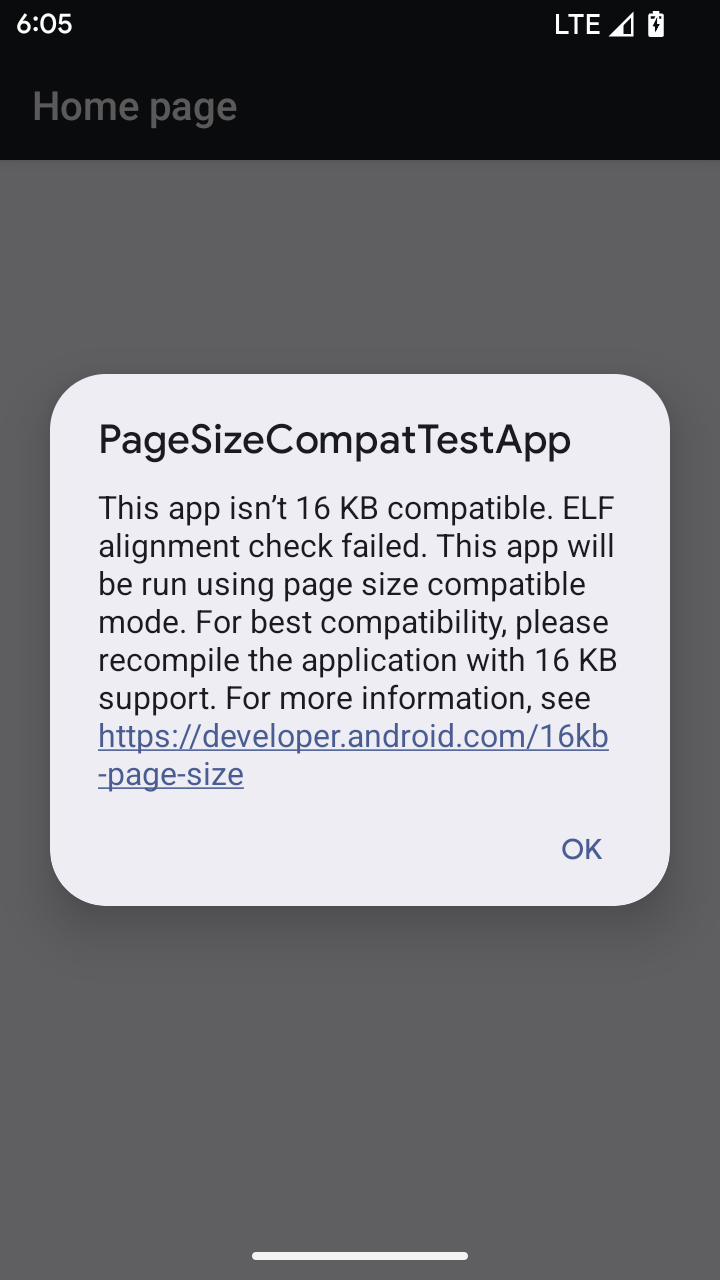
Android 15 ha introdotto il supporto per le pagine di memoria da 16 KB per ottimizzare le prestazioni della piattaforma. Android 16 aggiunge una modalità di compatibilità, che consente ad alcune app create per pagine di memoria da 4 KB di essere eseguite su un dispositivo configurato per pagine di memoria da 16 KB.
Quando la tua app viene eseguita su un dispositivo con Android 16 o versioni successive, se Android rileva che la tua app ha pagine di memoria allineate a 4 KB, utilizza automaticamente la modalità di compatibilità e mostra una finestra di dialogo di notifica all'utente. L'impostazione della proprietà android:pageSizeCompat in AndroidManifest.xml per attivare la modalità di compatibilità con le versioni precedenti impedisce la visualizzazione della finestra di dialogo al momento dell'avvio dell'app. Per utilizzare la proprietà android:pageSizeCompat, compila l'app
utilizzando l'SDK Android 16.
Per ottenere le migliori prestazioni, affidabilità e stabilità, la tua app deve comunque essere allineata a 16 KB. Per ulteriori dettagli, consulta il nostro recente post del blog sull'aggiornamento delle app per supportare le pagine di memoria di 16 KB.
Esperienza utente e UI di sistema
Android 16 (livello API 36) include le seguenti modifiche volte a creare un'esperienza utente più coerente e intuitiva.
Deprecazione degli annunci di accessibilità che causano interruzioni
Android 16 废弃了无障碍功能通告,其特征是使用 announceForAccessibility 或调度 TYPE_ANNOUNCEMENT 无障碍功能事件。这可能会给 TalkBack 和 Android 屏幕阅读器用户带来不一致的用户体验,而替代方案可以更好地满足各种 Android 辅助技术的用户需求。
替代方案示例:
- 对于窗口更改等重大界面更改,请使用
Activity.setTitle(CharSequence)和setAccessibilityPaneTitle(java.lang.CharSequence)。在 Compose 中,使用Modifier.semantics { paneTitle = "paneTitle" } - 如需向用户告知关键界面的更改,请使用
setAccessibilityLiveRegion(int)。在 Compose 中,请使用Modifier.semantics { liveRegion = LiveRegionMode.[Polite|Assertive]}。应谨慎使用这些事件,因为它们可能会在每次更新视图时生成通知。 - 如需向用户发送错误通知,请发送类型为
AccessibilityEvent#CONTENT_CHANGE_TYPE_ERROR的AccessibilityEvent并设置AccessibilityNodeInfo#setError(CharSequence),或使用TextView#setError(CharSequence)。
已废弃的 announceForAccessibility API 的参考文档中包含有关建议替代方案的更多详细信息。
Supporto della navigazione con tre pulsanti
Android 16 为已正确迁移到预测性返回的应用的三按钮导航栏引入了预测性返回支持。长按返回按钮会启动预测性返回动画,让您预览返回滑动手势会打开的界面。
此行为适用于系统中支持预测性返回动画的所有区域,包括系统动画(返回主屏幕、跨任务和跨 activity)。
Icone delle app a tema automatiche
A partire da Android 16 QPR 2, Android applica automaticamente i temi alle icone delle app per creare un'esperienza coerente nella schermata Home. Ciò si verifica se un'app non fornisce la propria icona dell'app a tema. Le app possono controllare il design dell'icona dell'app a tema includendo un livello monocromatico nell'icona adattiva e visualizzando l'aspetto dell'icona dell'app in Android Studio.
Fattori di forma del dispositivo
Android 16 (livello API 36) include le seguenti modifiche per le app quando vengono proiettate sui display dai proprietari di dispositivi virtuali.
Override del proprietario del dispositivo virtuale
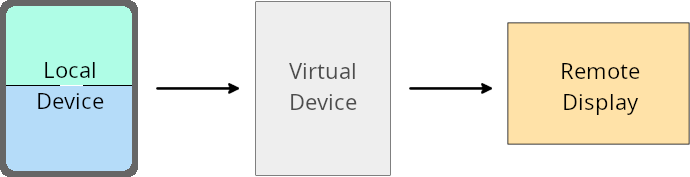
虚拟设备所有者是创建和管理虚拟设备的可信应用或特权应用。虚拟设备所有者在虚拟设备上运行应用,然后将应用投影到远程设备的显示屏上,例如个人电脑、虚拟现实设备或车载信息娱乐系统。虚拟设备所有者使用的是本地设备,例如手机。
按应用替换项
在搭载 Android 16(API 级别 36)的设备上,虚拟设备所有者可以替换其管理的特定虚拟设备上的应用设置。例如,为了改进应用布局,虚拟设备所有者在将应用投影到外部显示屏上时,可以忽略屏幕方向、宽高比和可调整大小性限制。
常见的重大更改
Android 16 的行为可能会影响应用在汽车显示屏或 Chromebook 等大屏幕设备规格上的界面,尤其是那些专为竖屏小显示屏设计的布局。如需了解如何让应用适应所有设备类型,请参阅关于自适应布局。
参考
Sicurezza
Android 16 (livello API 36) include modifiche che promuovono la sicurezza del sistema per proteggere app e utenti da app dannose.
Maggiore sicurezza contro gli attacchi di reindirizzamento degli intent
Android 16 针对一般的 Intent 重定向攻击提供了默认安全性,并且只需要最低限度的兼容性和开发者更改。
我们引入了默认安全加固解决方案,以应对 Intent 重定向漏洞。在大多数情况下,正常使用 intent 的应用不会遇到任何兼容性问题;我们在整个开发过程中收集了指标,以监控哪些应用可能会出现中断。
Intent 重定向在 Android 中出现,当攻击者可以部分或完全 控制用于在存在漏洞的应用上下文中启动新组件的 intent 内容时,而受害应用会在 intent 的 extra 字段中启动不受信任的子级 intent。这可能会导致攻击者应用在受害应用的上下文中启动私有组件、触发特权操作或获取对敏感数据的 URI 访问权限,从而可能导致数据窃取和任意代码执行。
选择停用 intent 重定向处理
Android 16 引入了一个新 API,允许应用选择停用启动安全保护。在默认安全行为会干扰合法应用用例的特定情况下,这可能是必要的。
对于针对 Android 16(API 级别 36)SDK 或更高版本进行编译的应用
您可以直接对 Intent 对象使用 removeLaunchSecurityProtection() 方法。
val i = intent
val iSublevel: Intent? = i.getParcelableExtra("sub_intent")
iSublevel?.removeLaunchSecurityProtection() // Opt out from hardening
iSublevel?.let { startActivity(it) }
对于针对 Android 15(API 级别 35)或更低版本进行编译的应用
虽然不建议这样做,但您可以使用反射来访问 removeLaunchSecurityProtection() 方法。
val i = intent
val iSublevel: Intent? = i.getParcelableExtra("sub_intent", Intent::class.java)
try {
    val removeLaunchSecurityProtection = Intent::class.java.getDeclaredMethod("removeLaunchSecurityProtection")
    removeLaunchSecurityProtection.invoke(iSublevel)
} catch (e: Exception) {
    // Handle the exception, e.g., log it
} // Opt-out from the security hardening using reflection
iSublevel?.let { startActivity(it) }
Le app complementari non ricevono più notifiche relative ai timeout di rilevamento
Android 16 在配套设备配对流程期间引入了一种新行为,以防恶意应用侵犯用户的位置信息隐私。在 Android 16 上运行的所有配套应用都不再直接通过 RESULT_DISCOVERY_TIMEOUT 收到发现超时通知。而是通过可视对话框通知用户超时事件。当用户关闭对话框时,系统会通过 RESULT_USER_REJECTED 提醒应用关联失败。
搜索时长也从原来的 20 秒延长到了 30 秒,并且用户可以在搜索期间的任何时间停止设备发现。如果在开始搜索的前 20 秒内发现了至少 1 部设备,CDM 会停止搜索其他设备。
Connettività
Android 16 (livello API 36) include le seguenti modifiche nello stack Bluetooth per migliorare la connettività con i dispositivi periferici.
Gestione migliorata della perdita di associazione
从 Android 16 开始,蓝牙堆栈已更新,以便在检测到远程配对丢失时提高安全性和用户体验。以前,系统会自动解除配对并启动新的配对流程,这可能会导致意外重新配对。在许多情况下,我们发现应用未以一致的方式处理债券损失事件。
为了统一体验,Android 16 改进了系统的绑定丢失处理。如果之前配对的蓝牙设备在重新连接时无法进行身份验证,系统会断开关联,保留本地配对信息,并显示系统对话框,告知用户配对已断开并指示他们重新配对。