

แพลตฟอร์ม Android 16 มีการเปลี่ยนแปลงลักษณะการทำงานที่อาจส่งผลต่อแอปของคุณ
การเปลี่ยนแปลงลักษณะการทำงานต่อไปนี้จะมีผลกับแอปทั้งหมดเมื่อแอปทำงานบน Android 16
โดยไม่คำนึงถึง targetSdkVersion คุณควรทดสอบแอป แล้วแก้ไข
ตามที่จำเป็นเพื่อรองรับการเปลี่ยนแปลงเหล่านี้ หากเกี่ยวข้อง
อย่าลืมตรวจสอบรายการการเปลี่ยนแปลงลักษณะการทำงานที่มีผลกับแอปที่กำหนดเป้าหมายเป็น Android 16 เท่านั้นด้วย
ฟังก์ชันหลัก
Android 16 (API ระดับ 36) มีการเปลี่ยนแปลงต่อไปนี้ซึ่งจะแก้ไขหรือ ขยายความสามารถหลักต่างๆ ของระบบ Android
การเพิ่มประสิทธิภาพโควต้า JobScheduler
ตั้งแต่ Android 16 เป็นต้นไป เราจะปรับโควต้าเวลาทำงานปกติและโควต้าเวลาทำงานแบบเร่งด่วน โดยอิงตามปัจจัยต่อไปนี้
- ถังพักแอปที่แอปพลิเคชันอยู่: ใน Android 16 ระบบจะเริ่มบังคับใช้ถังพักที่ใช้งานอยู่โดยมีโควต้าเวลาเรียกใช้ที่มาก
- หากงานเริ่มดำเนินการขณะที่แอปอยู่ในสถานะบนสุด: ใน Android 16 งานที่เริ่มขณะที่แอปแสดงต่อผู้ใช้และดำเนินการต่อหลังจาก แอปไม่แสดงแล้ว จะเป็นไปตามโควต้าเวลาทำงานของงาน
- หากงานกำลังดำเนินการขณะที่บริการที่ทำงานอยู่เบื้องหน้าทำงาน: ใน Android 16 งานที่ดำเนินการพร้อมกันกับบริการที่ทำงานอยู่เบื้องหน้า จะยึดตามโควต้าเวลาทำงานของงาน หากคุณใช้ประโยชน์จากงานสำหรับการโอนข้อมูลที่เริ่มต้นโดยผู้ใช้ ให้พิจารณาใช้งานการโอนข้อมูลที่เริ่มต้นโดยผู้ใช้แทน
การเปลี่ยนแปลงนี้ส่งผลต่องานที่กำหนดเวลาโดยใช้ WorkManager, JobScheduler และ DownloadManager หากต้องการแก้ไขข้อบกพร่องว่าเหตุใดงานจึงหยุดทำงาน เราขอแนะนำให้บันทึกเหตุผลที่งานหยุดทำงานโดยเรียกใช้ WorkInfo.getStopReason() (สำหรับงาน JobScheduler ให้เรียกใช้ JobParameters.getStopReason())
ดูข้อมูลเกี่ยวกับสถานะของแอปที่ส่งผลต่อทรัพยากรที่แอปใช้ได้ที่ขีดจำกัดของทรัพยากรการจัดการพลังงาน ดูข้อมูลเพิ่มเติมเกี่ยวกับแนวทางปฏิบัติแนะนำในการเพิ่มประสิทธิภาพแบตเตอรี่ได้ที่คำแนะนำเกี่ยวกับการเพิ่มประสิทธิภาพการใช้แบตเตอรี่สำหรับ API การตั้งเวลางาน
นอกจากนี้ เราขอแนะนำให้ใช้ประโยชน์จาก API JobScheduler#getPendingJobReasonsHistory ใหม่ที่เปิดตัวใน Android 16 เพื่อทำความเข้าใจว่าเหตุใดจึงไม่มีการเรียกใช้ Job
การทดสอบ
หากต้องการทดสอบลักษณะการทำงานของแอป คุณสามารถเปิดใช้การลบล้างการเพิ่มประสิทธิภาพโควต้าของงานบางอย่างได้ ตราบใดที่แอปทำงานบนอุปกรณ์ Android 16
หากต้องการปิดใช้การบังคับใช้ "สถานะสูงสุดจะยึดตามโควต้าเวลาทำงานของงาน" ให้เรียกใช้คำสั่งadbต่อไปนี้
adb shell am compat enable OVERRIDE_QUOTA_ENFORCEMENT_TO_TOP_STARTED_JOBS APP_PACKAGE_NAME
หากต้องการปิดใช้การบังคับใช้ "งานที่ดำเนินการพร้อมกับบริการที่ทำงานอยู่เบื้องหน้าจะยึดตามโควต้าเวลาทำงานของงาน" ให้เรียกใช้adbคำสั่งต่อไปนี้
adb shell am compat enable OVERRIDE_QUOTA_ENFORCEMENT_TO_FGS_JOBS APP_PACKAGE_NAME
หากต้องการทดสอบลักษณะการทำงานของ App Standby Bucket บางอย่าง คุณสามารถตั้งค่า App Standby Bucket
ของแอปได้โดยใช้adbคำสั่งต่อไปนี้
adb shell am set-standby-bucket APP_PACKAGE_NAME active|working_set|frequent|rare|restricted
หากต้องการทำความเข้าใจที่เก็บข้อมูลสแตนด์บายแอปที่แอปของคุณอยู่ คุณสามารถรับที่เก็บข้อมูลสแตนด์บายแอปของแอปได้โดยใช้คำสั่ง adb ต่อไปนี้
adb shell am get-standby-bucket APP_PACKAGE_NAME
เหตุผลที่หยุดงานที่ว่างเปล่าซึ่งถูกละทิ้ง
งานที่ถูกทิ้งจะเกิดขึ้นเมื่อมีการรวบรวมขยะจากออบเจ็กต์ JobParameters ที่เชื่อมโยงกับงาน แต่ไม่มีการเรียกใช้ JobService#jobFinished(JobParameters,
boolean) เพื่อส่งสัญญาณว่างานเสร็จสมบูรณ์ ซึ่งหมายความว่างานอาจกำลังทำงานและกำลังกำหนดเวลาใหม่โดยที่แอปไม่รู้
แอปที่อาศัย JobScheduler จะไม่เก็บการอ้างอิงแบบ Strong กับออบเจ็กต์ JobParameters และตอนนี้การหมดเวลาจะได้รับเหตุผลใหม่ในการหยุดงาน STOP_REASON_TIMEOUT_ABANDONED แทน STOP_REASON_TIMEOUT
หากมีสาเหตุใหม่ของการหยุดกลางคันเกิดขึ้นบ่อยครั้ง ระบบจะดำเนินการตามขั้นตอนเพื่อลดความถี่ของงาน
แอปควรใช้เหตุผลในการหยุดใหม่เพื่อตรวจหาและลดงานที่หยุดกลางคัน
หากคุณใช้ WorkManager, AsyncTask หรือ DownloadManager คุณจะได้รับผลกระทบเนื่องจาก API เหล่านี้จัดการวงจรงานในนามของแอป
เลิกใช้งาน JobInfo#setImportantWhileForeground อย่างสมบูรณ์
วิธีการ JobInfo.Builder#setImportantWhileForeground(boolean) จะระบุความสำคัญของงานขณะที่แอปกำหนดเวลาอยู่เบื้องหน้าหรือเมื่อได้รับการยกเว้นจากข้อจำกัดของเบื้องหลังชั่วคราว
เราเลิกใช้งานเมธอดนี้ตั้งแต่ Android 12 (API ระดับ 31) ตั้งแต่ Android 16 เป็นต้นไป วิธีการนี้จะใช้งานไม่ได้อีกต่อไป และระบบจะไม่สนใจการเรียกใช้เมธอดนี้
การนําฟังก์ชันการทำงานนี้ออกจะมีผลกับJobInfo#isImportantWhileForeground() ด้วย ตั้งแต่ Android 16 เป็นต้นไป หากมีการเรียกใช้เมธอด เมธอดจะแสดงผลลัพธ์เป็น false
ขอบเขตลำดับความสำคัญของการออกอากาศที่สั่งซื้อแล้วไม่ใช่แบบทั่วโลกอีกต่อไป
แอป Android ได้รับอนุญาตให้กำหนดลำดับความสำคัญในเครื่องรับการออกอากาศเพื่อควบคุมลำดับที่เครื่องรับจะรับและประมวลผลการออกอากาศ สําหรับตัวรับที่ประกาศในไฟล์ Manifest แอปสามารถใช้แอตทริบิวต์ android:priority เพื่อกําหนดลําดับความสําคัญ และสำหรับตัวรับที่ลงทะเบียนตามบริบท แอปสามารถใช้ IntentFilter#setPriority() API เพื่อกําหนดลําดับความสําคัญ เมื่อส่งการออกอากาศ ระบบจะส่งการออกอากาศไปยังผู้รับตามลําดับความสําคัญจากสูงไปต่ำ
ใน Android 16 ระบบจะไม่รับประกันลำดับการนำส่งแบบออกอากาศที่ใช้แอตทริบิวต์ android:priority หรือ IntentFilter#setPriority() ในกระบวนการต่างๆ ระบบจะพิจารณาลำดับความสำคัญของการออกอากาศภายในกระบวนการสมัครเดียวกันเท่านั้น ไม่ใช่ในทุกกระบวนการ
นอกจากนี้ ระบบจะจำกัดลําดับความสําคัญของรายการออกอากาศให้อยู่ในช่วง (SYSTEM_LOW_PRIORITY + 1,
SYSTEM_HIGH_PRIORITY - 1) โดยอัตโนมัติ เฉพาะคอมโพเนนต์ของระบบเท่านั้นที่จะได้รับอนุญาตให้ตั้งค่า SYSTEM_LOW_PRIORITY, SYSTEM_HIGH_PRIORITY เป็นลำดับความสำคัญของการออกอากาศ
แอปของคุณอาจได้รับผลกระทบหากมีลักษณะการทำงานอย่างใดอย่างหนึ่งต่อไปนี้
- แอปพลิเคชันของคุณประกาศกระบวนการหลายรายการที่มี Intent การออกอากาศเดียวกัน และคาดหวังที่จะได้รับการส่ง Intent เหล่านั้นตามลำดับที่แน่นอนโดยอิงตามลําดับความสําคัญ
- กระบวนการสมัครของคุณจะโต้ตอบกับกระบวนการอื่นๆ และมีสิ่งที่คาดหวังเกี่ยวกับการรับ Intent การออกอากาศตามลําดับที่กําหนด
หากกระบวนการต่างๆ จำเป็นต้องประสานงานกัน ทีมควรสื่อสารโดยใช้ช่องทางประสานงานอื่นๆ
การเปลี่ยนแปลงภายในของ ART
Android 16 มีการอัปเดตล่าสุดสำหรับรันไทม์ Android (ART) ซึ่งจะปรับปรุงประสิทธิภาพของรันไทม์ Android (ART) และรองรับฟีเจอร์ Java เพิ่มเติม การอัปเดตระบบ Google Play ยังช่วยให้อุปกรณ์กว่า 1 พันล้านเครื่องที่ใช้ Android 12 (API ระดับ 31) ขึ้นไปได้รับประโยชน์จากการปรับปรุงเหล่านี้ด้วย
เมื่อมีการเผยแพร่การเปลี่ยนแปลงเหล่านี้ ไลบรารีและโค้ดแอปที่อาศัยโครงสร้างภายในของ ART อาจทํางานไม่ถูกต้องในอุปกรณ์ที่ใช้ Android 16 รวมถึง Android เวอร์ชันเก่าที่อัปเดตข้อบังคับของ ART ผ่านการอัปเดตระบบของ Google Play
การใช้โครงสร้างภายใน (เช่น อินเทอร์เฟซที่ไม่ใช่ SDK) อาจทำให้เกิดปัญหาความเข้ากันได้เสมอ แต่สิ่งสําคัญอย่างยิ่งคือหลีกเลี่ยงการใช้โค้ด (หรือไลบรารีที่มีโค้ด) ที่ใช้โครงสร้างภายในของ ART เนื่องจากการเปลี่ยนแปลง ART ไม่ได้เชื่อมโยงกับเวอร์ชันแพลตฟอร์มที่อุปกรณ์ใช้อยู่ และการเปลี่ยนแปลงดังกล่าวจะเผยแพร่ไปยังอุปกรณ์กว่า 1 พันล้านเครื่องผ่านการอัปเดตระบบของ Google Play
นักพัฒนาแอปทุกรายควรตรวจสอบว่าแอปของตนได้รับผลกระทบหรือไม่โดยการทดสอบแอปอย่างละเอียดใน Android 16 นอกจากนี้ ให้ตรวจสอบปัญหาที่ทราบเพื่อดูว่าแอปของคุณใช้ไลบรารีที่เราพบว่าใช้โครงสร้าง ART ภายในหรือไม่ หากคุณมีโค้ดแอปหรือไลบรารีที่ส่งผลต่อการใช้งาน ให้หา API สาธารณะทางเลือกทุกครั้งที่เป็นไปได้ และขอ API สาธารณะสำหรับ Use Case ใหม่โดยสร้างคำขอฟีเจอร์ในเครื่องมือติดตามปัญหา
โหมดความเข้ากันได้กับขนาดหน้า 16 KB
Android 15 รองรับหน้าหน่วยความจำขนาด 16 KB เพื่อเพิ่มประสิทธิภาพแพลตฟอร์ม Android 16 เพิ่มโหมดความเข้ากันได้ ซึ่งช่วยให้แอปบางแอปที่สร้างขึ้นสำหรับหน้าหน่วยความจำขนาด 4 KB ทำงานในอุปกรณ์ที่กำหนดค่าไว้สำหรับหน้าหน่วยความจำขนาด 16 KB ได้
เมื่อแอปทำงานในอุปกรณ์ที่ใช้ Android 16 ขึ้นไป หาก Android ตรวจพบว่าแอปของคุณมีหน้าหน่วยความจำที่ปรับแนวขนาด 4 KB ระบบจะใช้โหมดเข้ากันได้โดยอัตโนมัติและแสดงกล่องโต้ตอบการแจ้งเตือนต่อผู้ใช้ การตั้งค่าพร็อพเพอร์ตี้ android:pageSizeCompat ใน AndroidManifest.xml เพื่อเปิดใช้โหมดความเข้ากันได้แบบย้อนหลังจะป้องกันไม่ให้กล่องโต้ตอบแสดงเมื่อแอปเปิดขึ้น หากต้องการใช้พร็อพเพอร์ตี้ android:pageSizeCompat ให้คอมไพล์แอปโดยใช้ Android 16 SDK
แอปของคุณควรยังคงมีขนาด 16 KB เพื่อให้มีประสิทธิภาพ ความน่าเชื่อถือ และความเสถียรที่ดีที่สุด ดูรายละเอียดเพิ่มเติมได้ในบล็อกโพสต์ล่าสุดเกี่ยวกับการอัปเดตแอปให้รองรับหน้าหน่วยความจำ 16 KB

ประสบการณ์ของผู้ใช้และ UI ของระบบ
Android 16 (ระดับ API 36) มีการเปลี่ยนแปลงต่อไปนี้ซึ่งมีจุดประสงค์ เพื่อสร้างประสบการณ์ของผู้ใช้ที่สอดคล้องกันและใช้งานง่ายยิ่งขึ้น
การเลิกใช้งานการประกาศการช่วยเหลือพิเศษที่รบกวนผู้ใช้
Android 16 เลิกใช้งานการประกาศการช่วยเหลือพิเศษ ซึ่งมีลักษณะการใช้งาน announceForAccessibility หรือการส่งเหตุการณ์การช่วยเหลือพิเศษ TYPE_ANNOUNCEMENT การดำเนินการเหล่านี้อาจทำให้ผู้ใช้ TalkBack และโปรแกรมอ่านหน้าจอของ Android ได้รับประสบการณ์การใช้งานที่ไม่สอดคล้องกัน และทางเลือกอื่นๆ จะตอบสนองความต้องการของผู้ใช้ได้หลากหลายมากขึ้นในเทคโนโลยีความช่วยเหลือพิเศษต่างๆ ของ Android
ตัวอย่างทางเลือกมีดังนี้
- สำหรับการเปลี่ยนแปลง UI ที่สำคัญ เช่น การเปลี่ยนแปลงหน้าต่าง ให้ใช้
Activity.setTitle(CharSequence)และsetAccessibilityPaneTitle(java.lang.CharSequence)ในโหมดเขียน ให้ใช้Modifier.semantics { paneTitle = "paneTitle" } - หากต้องการแจ้งให้ผู้ใช้ทราบถึงการเปลี่ยนแปลง UI ที่สำคัญ ให้ใช้
setAccessibilityLiveRegion(int)ในโหมดเขียน ให้ใช้Modifier.semantics { liveRegion = LiveRegionMode.[Polite|Assertive]}คุณควรใช้ฟีเจอร์เหล่านี้อย่างจำกัดเนื่องจากอาจสร้างประกาศทุกครั้งที่มีการอัปเดตมุมมอง - หากต้องการแจ้งให้ผู้ใช้ทราบเกี่ยวกับข้อผิดพลาด ให้ส่ง
AccessibilityEventประเภทAccessibilityEvent#CONTENT_CHANGE_TYPE_ERRORและตั้งค่าAccessibilityNodeInfo#setError(CharSequence)หรือใช้TextView#setError(CharSequence)
เอกสารอ้างอิงสําหรับ announceForAccessibility API ที่เลิกใช้งานแล้วมีรายละเอียดเพิ่มเติมเกี่ยวกับทางเลือกที่แนะนํา
รองรับการไปยังส่วนต่างๆ แบบ 3 ปุ่ม
Android 16 รองรับการกดย้อนกลับแบบคาดการณ์ในการนําทางด้วยปุ่ม 3 ปุ่มสําหรับแอปที่ย้ายข้อมูลไปยังการกดย้อนกลับแบบคาดการณ์อย่างถูกต้อง การกดปุ่มย้อนกลับค้างไว้จะเป็นการเริ่มภาพเคลื่อนไหวย้อนกลับแบบคาดเดา ซึ่งจะแสดงตัวอย่างตำแหน่งที่คุณจะไปเมื่อปัดกลับ
ลักษณะการทำงานนี้มีผลกับทุกส่วนของระบบที่รองรับภาพเคลื่อนไหวแบบคาดเดาของการย้อนกลับ รวมถึงภาพเคลื่อนไหวของระบบ (การย้อนกลับไปยังหน้าจอหลัก การข้ามงาน และการทำงานข้ามแอป)
ไอคอนแอปแบบมีธีมอัตโนมัติ
ตั้งแต่ Android 16 QPR 2 เป็นต้นไป Android จะใช้ธีมกับไอคอนแอปโดยอัตโนมัติเพื่อสร้างประสบการณ์หน้าจอหลักที่สอดคล้องกัน กรณีนี้จะเกิดขึ้นหากแอปไม่ได้ระบุไอคอนแอปตามธีมของแอปเอง แอปสามารถควบคุมการออกแบบไอคอนแอปที่เข้าชุดกันได้โดยใส่เลเยอร์ขาวดำไว้ในไอคอนแบบปรับอัตโนมัติ และดูตัวอย่างลักษณะไอคอนแอปใน Android Studio
รูปแบบของอุปกรณ์
Android 16 (ระดับ API 36) มีการเปลี่ยนแปลงต่อไปนี้สำหรับแอปเมื่อเจ้าของอุปกรณ์เสมือนจริงฉายภาพไปยังจอแสดงผล
การลบล้างเจ้าของอุปกรณ์เสมือนจริง
เจ้าของอุปกรณ์เสมือนจริงคือแอปที่เชื่อถือได้หรือได้รับสิทธิ์ซึ่งสร้างและจัดการอุปกรณ์เสมือนจริง โดยเจ้าของอุปกรณ์เสมือนจริงจะเรียกใช้แอปในอุปกรณ์เสมือนจริง แล้วฉายแอปไปยังจอแสดงผลของอุปกรณ์ระยะไกล เช่น คอมพิวเตอร์ส่วนบุคคล เทคโนโลยีความจริงเสมือน (VR) หรือระบบสาระบันเทิงในรถยนต์ เจ้าของอุปกรณ์เสมือนจะอยู่ในอุปกรณ์ในเครื่อง เช่น โทรศัพท์มือถือ
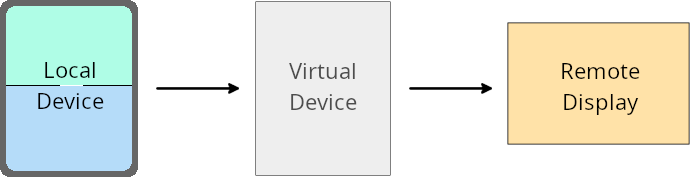
การลบล้างต่อแอป
ในอุปกรณ์ที่ใช้ Android 16 (ระดับ API 36) เจ้าของอุปกรณ์เสมือนสามารถลบล้างการตั้งค่าแอปในอุปกรณ์เสมือนบางเครื่องที่เจ้าของอุปกรณ์เสมือนจัดการได้ ตัวอย่างเช่น เจ้าของอุปกรณ์เสมือนจริงสามารถละเว้นข้อจำกัดด้านการวางแนว สัดส่วนภาพ และการปรับขนาดได้เมื่อฉายแอปไปยังจอแสดงผลภายนอก เพื่อปรับปรุงเลย์เอาต์ของแอป
การเปลี่ยนแปลงที่ส่งผลกับส่วนอื่นในระบบที่พบได้ทั่วไป
ลักษณะการทำงานของ Android 16 อาจส่งผลต่อ UI ของแอปในรูปแบบของอุปกรณ์หน้าจอขนาดใหญ่ เช่น จอแสดงผลในรถยนต์หรือ Chromebook โดยเฉพาะเลย์เอาต์ที่ออกแบบมาสำหรับจอแสดงผลขนาดเล็กในแนวตั้ง ดูวิธีทำให้แอปปรับเปลี่ยนได้สำหรับฟอร์มแฟกเตอร์ของอุปกรณ์ทุกประเภทที่หัวข้อเกี่ยวกับเลย์เอาต์ที่ปรับเปลี่ยนได้
ข้อมูลอ้างอิง
ความปลอดภัย
Android 16 (ระดับ API 36) มีการเปลี่ยนแปลงที่ส่งเสริมความปลอดภัยของระบบเพื่อช่วยปกป้องแอปและผู้ใช้จากแอปที่เป็นอันตราย
ปรับปรุงความปลอดภัยเพื่อป้องกันการโจมตีโดยการเปลี่ยนเส้นทาง Intent
Android 16 มีระบบรักษาความปลอดภัยเริ่มต้นเพื่อป้องกันการโจมตีแบบเปลี่ยนเส้นทาง Intent ทั่วไป โดยกำหนดให้มีการเปลี่ยนแปลงความเข้ากันได้และนักพัฒนาแอปน้อยที่สุด
เราขอแนะนำโซลูชันการเสริมความปลอดภัยเริ่มต้นเพื่อป้องกันการโจมตีแบบเปลี่ยนเส้นทาง Intent ในกรณีส่วนใหญ่ แอปที่ใช้ Intent ตามปกติจะไม่พบปัญหาความเข้ากันได้ เราได้รวบรวมเมตริกตลอดกระบวนการพัฒนาเพื่อตรวจสอบว่าแอปใดอาจพบปัญหา
การเปลี่ยนเส้นทาง Intent ใน Android เกิดขึ้นเมื่อผู้โจมตีสามารถควบคุมเนื้อหาของ Intent ที่ใช้เปิดใช้คอมโพเนนต์ใหม่ในบริบท ของแอปที่มีช่องโหว่ได้บางส่วนหรือทั้งหมด ขณะที่แอปของเหยื่อเปิดใช้ Intent ระดับย่อยที่ไม่น่าเชื่อถือ ในช่องส่วนเพิ่มเติมของ Intent ("ระดับบนสุด") ซึ่งอาจทำให้แอปของผู้โจมตีเปิดใช้คอมโพเนนต์ส่วนตัวในบริบทของแอปของเหยื่อ เรียกใช้การดำเนินการที่มีสิทธิ์ หรือเข้าถึง URI ของข้อมูลที่ละเอียดอ่อน ซึ่งอาจนำไปสู่การขโมยข้อมูลและการดำเนินการโค้ดโดยพลการ
เลือกไม่ใช้การจัดการการเปลี่ยนเส้นทาง Intent
Android 16 ขอแนะนำ API ใหม่ที่ช่วยให้แอปเลือกไม่ใช้การป้องกันความปลอดภัยในการเปิดใช้ได้ ซึ่งอาจจำเป็นในบางกรณีที่ลักษณะการทำงานด้านความปลอดภัยเริ่มต้นรบกวนกรณีการใช้งานแอปที่ถูกต้อง
สำหรับแอปพลิเคชันที่คอมไพล์กับ Android 16 (API ระดับ 36) SDK ขึ้นไป
คุณสามารถใช้วิธี removeLaunchSecurityProtection() ในออบเจ็กต์ Intent ได้โดยตรง
val i = intent
val iSublevel: Intent? = i.getParcelableExtra("sub_intent")
iSublevel?.removeLaunchSecurityProtection() // Opt out from hardening
iSublevel?.let { startActivity(it) }
สำหรับแอปพลิเคชันที่คอมไพล์กับ Android 15 (API ระดับ 35) ลงไป
แม้จะไม่แนะนำ แต่คุณสามารถใช้การสะท้อนเพื่อเข้าถึงวิธี removeLaunchSecurityProtection() ได้
val i = intent
val iSublevel: Intent? = i.getParcelableExtra("sub_intent", Intent::class.java)
try {
    val removeLaunchSecurityProtection = Intent::class.java.getDeclaredMethod("removeLaunchSecurityProtection")
    removeLaunchSecurityProtection.invoke(iSublevel)
} catch (e: Exception) {
    // Handle the exception, e.g., log it
} // Opt-out from the security hardening using reflection
iSublevel?.let { startActivity(it) }
แอปที่ใช้ร่วมกันจะไม่ได้รับการแจ้งเตือนเกี่ยวกับการหมดเวลาการค้นพบอีกต่อไป
Android 16 เปิดตัวลักษณะการทำงานใหม่ในขั้นตอนการจับคู่อุปกรณ์เสริมเพื่อปกป้องความเป็นส่วนตัวของตำแหน่งของผู้ใช้จากแอปที่เป็นอันตราย แอปที่ใช้ร่วมกันทั้งหมดที่ทำงานบน Android 16 จะไม่ได้รับการแจ้งเตือนโดยตรงอีกต่อไปเมื่อหมดเวลาในการค้นหาโดยใช้ RESULT_DISCOVERY_TIMEOUT แต่ผู้ใช้จะได้รับการแจ้งเตือนเกี่ยวกับเหตุการณ์หมดเวลาด้วยกล่องโต้ตอบแบบภาพแทน เมื่อผู้ใช้ปิดกล่องโต้ตอบ แอปจะได้รับการแจ้งเตือนเกี่ยวกับการเชื่อมโยงกับ RESULT_USER_REJECTED ไม่สำเร็จ
นอกจากนี้ ระยะเวลาการค้นหายังเพิ่มขึ้นจากเดิม 20 วินาที และผู้ใช้สามารถหยุดการค้นหาอุปกรณ์ได้ทุกเมื่อในระหว่างการค้นหา หากพบอุปกรณ์อย่างน้อย 1 เครื่องภายใน 20 วินาทีแรกของการเริ่มค้นหา CDM จะหยุดค้นหาอุปกรณ์เพิ่มเติม
การเชื่อมต่อ
Android 16 (ระดับ API 36) มีการเปลี่ยนแปลงต่อไปนี้ในสแต็กบลูทูธ เพื่อปรับปรุงการเชื่อมต่อกับอุปกรณ์ต่อพ่วง
การจัดการการสูญเสียพันธบัตรที่ดีขึ้น
ตั้งแต่ Android 16 เป็นต้นไป สแต็กบลูทูธได้รับการอัปเดตเพื่อปรับปรุงความปลอดภัยและประสบการณ์ของผู้ใช้เมื่อตรวจพบการสูญเสียการเชื่อมโยงระยะไกล ก่อนหน้านี้ ระบบจะนำการจับคู่ออกโดยอัตโนมัติและเริ่มกระบวนการจับคู่ใหม่ ซึ่งอาจนำไปสู่การจับคู่อีกครั้งโดยไม่ตั้งใจ เราพบว่ามีหลายครั้งที่แอปไม่ได้จัดการเหตุการณ์การสูญเสียพันธบัตรอย่างสม่ำเสมอ
Android 16 ได้ปรับปรุงการจัดการการสูญเสียการเชื่อมโยงกับระบบเพื่อรวมประสบการณ์การใช้งาน หากไม่สามารถตรวจสอบสิทธิ์อุปกรณ์บลูทูธที่จับคู่ไว้ก่อนหน้านี้เมื่อเชื่อมต่ออีกครั้ง ระบบจะยกเลิกการเชื่อมต่อ เก็บข้อมูลการจับคู่ในเครื่อง และแสดงกล่องโต้ตอบของระบบเพื่อแจ้งให้ผู้ใช้ทราบถึงการสูญเสียการจับคู่และนำผู้ใช้ไปยังการจับคู่อีกครั้ง