

La piattaforma Android 16 include modifiche al comportamento che potrebbero influire sulla tua app.
Le seguenti modifiche al comportamento si applicano a tutte le app quando vengono eseguite su Android 16,
indipendentemente da targetSdkVersion. Devi testare la tua app e poi modificarla in base alle necessità per supportare queste modifiche, ove applicabile.
Assicurati di esaminare anche l'elenco delle modifiche al comportamento che interessano solo le app che hanno come target Android 16.
Funzionalità di base
Android 16 (livello API 36) include le seguenti modifiche che modificano o espandono varie funzionalità di base del sistema Android.
Ottimizzazioni della quota di JobScheduler
Starting in Android 16, we're adjusting regular and expedited job execution runtime quota based on the following factors:
- Which app standby bucket the application is in: in Android 16, active standby buckets will start being enforced by a generous runtime quota.
- If the job starts execution while the app is in a top state: in Android 16, Jobs started while the app is visible to the user and continues after the app becomes invisible, will adhere to the job runtime quota.
- If the job is executing while running a Foreground Service: in Android 16, jobs that are executing concurrently with a foreground service will adhere to the job runtime quota. If you're leveraging jobs for user initiated data transfer, consider using user initiated data transfer jobs instead.
This change impacts tasks scheduled using WorkManager, JobScheduler, and
DownloadManager. To debug why a job was stopped, we recommend logging why your
job was stopped by calling WorkInfo.getStopReason() (for
JobScheduler jobs, call JobParameters.getStopReason()).
For information about how your app's state affects the resources it can use, see Power management resource limits. For more information on battery-optimal best practices, refer to guidance on optimize battery use for task scheduling APIs.
We also recommend leveraging the new
JobScheduler#getPendingJobReasonsHistory API introduced in
Android 16 to understand why a job has not executed.
Testing
To test your app's behavior, you can enable override of certain job quota optimizations as long as the app is running on an Android 16 device.
To disable enforcement of "top state will adhere to job runtime quota", run the
following adb command:
adb shell am compat enable OVERRIDE_QUOTA_ENFORCEMENT_TO_TOP_STARTED_JOBS APP_PACKAGE_NAME
To disable enforcement of "jobs that are executing while concurrently with a
foreground service will adhere to the job runtime quota", run the following
adb command:
adb shell am compat enable OVERRIDE_QUOTA_ENFORCEMENT_TO_FGS_JOBS APP_PACKAGE_NAME
To test certain app standby bucket behavior, you can set the app standby bucket
of your app using the following adb command:
adb shell am set-standby-bucket APP_PACKAGE_NAME active|working_set|frequent|rare|restricted
To understand the app standby bucket your app is in, you can get the app standby
bucket of your app using the following adb command:
adb shell am get-standby-bucket APP_PACKAGE_NAME
Motivo di interruzione dei job vuoti abbandonati
Un job abbandonato si verifica quando l'oggetto JobParameters associato al job è stato sottoposto a garbage collection, ma JobService#jobFinished(JobParameters,
boolean) non è stato chiamato per segnalare il completamento del job. Ciò indica che il job potrebbe essere in esecuzione e essere riprogrammato senza che l'app lo sappia.
Le app che si basano su JobScheduler non mantengono un riferimento forte all'oggettoJobParameters e ora al timeout verrà concesso il nuovo motivo di interruzione del jobSTOP_REASON_TIMEOUT_ABANDONED, anziché STOP_REASON_TIMEOUT.
Se si verificano spesso casi del nuovo motivo di interruzione dell'abbandono, il sistema prenderà provvedimenti per ridurre la frequenza dei job.
Le app devono utilizzare il nuovo motivo di interruzione per rilevare e ridurre i job abbandonati.
Se utilizzi WorkManager, AsyncTask o DownloadManager, non sono interessati perché queste API gestiscono il ciclo di vita dei job per conto della tua app.
Deprecazione completa di JobInfo#setImportantWhileForeground
Il metodo JobInfo.Builder#setImportantWhileForeground(boolean) indica l'importanza di un job quando l'app di pianificazione è in primo piano o quando è temporaneamente esente dalle limitazioni in background.
Questo metodo è stato ritirato da Android 12 (livello API 31). A partire da Android 16, non funziona più in modo efficace e la chiamata di questo metodo verrà ignorata.
Questa rimozione di funzionalità si applica anche a
JobInfo#isImportantWhileForeground(). A partire da Android
16, se il metodo viene chiamato, restituisce false.
L'ambito di priorità della trasmissione ordinata non è più globale
Le app per Android possono definire le priorità per i ricevitori di trasmissione per controllare
l'ordine in cui i ricevitori ricevono ed elaborano la trasmissione. Per i gestori dichiarati nel file manifest, le app possono utilizzare l'attributo android:priority per definire la priorità e per i gestori registrati nel contesto, le app possono utilizzare l'API IntentFilter#setPriority() per definire la priorità. Quando viene inviata una trasmissione, il sistema la consegna ai ricevitori in ordine di priorità, dalla più alta alla più bassa.
In Android 16, l'ordine di invio delle trasmissioni che utilizzano l'attributo android:priority o IntentFilter#setPriority() in diversi processi non sarà garantito. Le priorità di trasmissione verranno rispettate solo all'interno della stessa procedura di applicazione e non in tutte le procedure.
Inoltre, le priorità di trasmissione verranno automaticamente limitate all'intervallo
(SYSTEM_LOW_PRIORITY + 1,
SYSTEM_HIGH_PRIORITY - 1). Solo i componenti di sistema potranno impostare SYSTEM_LOW_PRIORITY, SYSTEM_HIGH_PRIORITY come priorità di trasmissione.
La tua app potrebbe essere interessata se esegue una delle seguenti azioni:
- La tua applicazione ha dichiarato più processi con lo stesso intento di trasmissione e si aspetta di ricevere questi intent in un determinato ordine in base alla priorità.
- La procedura di applicazione interagisce con altri processi e ha aspettative sulla ricezione di un'intenzione di trasmissione in un determinato ordine.
Se le procedure devono coordinarsi tra loro, devono comunicare utilizzando altri canali di coordinamento.
Modifiche interne di ART
Android 16 包含 Android 运行时 (ART) 的最新更新,这些更新可提升 Android 运行时 (ART) 的性能,并支持更多 Java 功能。通过 Google Play 系统更新,搭载 Android 12(API 级别 31)及更高版本的 10 亿多部设备也将受益于这些改进。
发布这些变更后,依赖于 ART 内部结构的库和应用代码在搭载 Android 16 的设备以及通过 Google Play 系统更新来更新 ART 模块的较低 Android 版本上可能无法正常运行。
依赖于内部结构(例如非 SDK 接口)始终会导致兼容性问题,但避免依赖于利用内部 ART 结构的代码(或包含代码的库)尤为重要,因为 ART 更改与设备所运行的平台版本无关,并且会通过 Google Play 系统更新推送到超过 10 亿部设备。
所有开发者都应在 Android 16 上对其应用进行全面测试,以检查其应用是否受到影响。此外,请查看已知问题,了解您的应用是否依赖于我们发现的任何依赖于内部 ART 结构的库。如果您的应用代码或库依赖项受到影响,请尽可能寻找公共 API 替代方案,并在问题跟踪器中创建功能请求,为新用例请求公共 API。
Modalità di compatibilità con dimensioni pagina di 16 kB
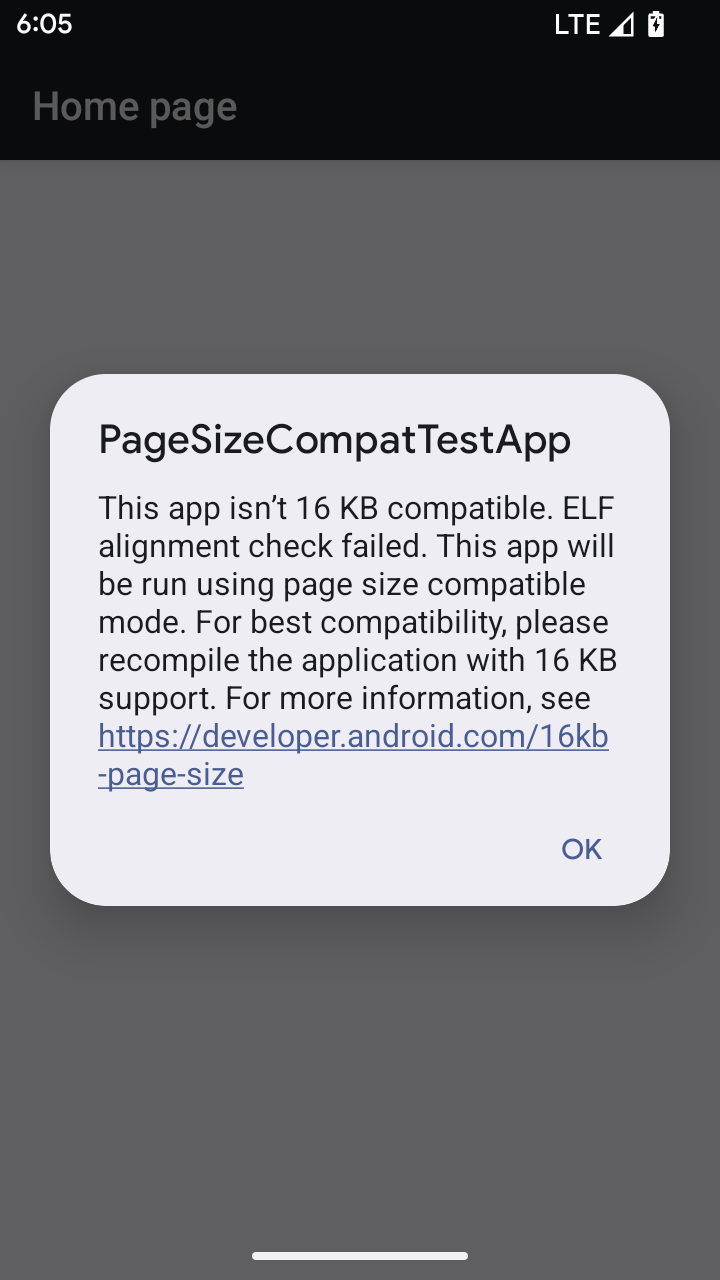
Android 15 introduced support for 16 KB memory pages to optimize performance of the platform. Android 16 adds a compatibility mode, allowing some apps built for 4 KB memory pages to run on a device configured for 16 KB memory pages.
When your app is running on a device with Android 16 or higher, if Android
detects that your app has 4 KB aligned memory pages, it automatically uses
compatibility mode and display a notification dialog to the user. Setting the
android:pageSizeCompat property in the AndroidManifest.xml to enable the
backwards compatibility mode will prevent the display of the dialog when your
app launches. To use the android:pageSizeCompat property, compile your app
using the Android 16 SDK.
For best performance, reliability, and stability, your app should still be 16 KB aligned. Check out our recent blog post on updating your apps to support 16 KB memory pages for more details.
Esperienza utente e UI di sistema
Android 16 (livello API 36) include le seguenti modifiche volte a creare un'esperienza utente più coerente e intuitiva.
Deprecazione degli annunci di accessibilità che causano interruzioni
Android 16 废弃了无障碍功能通告,其特征是使用 announceForAccessibility 或调度 TYPE_ANNOUNCEMENT 无障碍功能事件。这可能会给 TalkBack 和 Android 屏幕阅读器用户带来不一致的用户体验,而替代方案可以更好地满足各种 Android 辅助技术的用户需求。
替代方案示例:
- 对于窗口更改等重大界面更改,请使用
Activity.setTitle(CharSequence)和setAccessibilityPaneTitle(java.lang.CharSequence)。在 Compose 中,使用Modifier.semantics { paneTitle = "paneTitle" } - 如需向用户告知关键界面的更改,请使用
setAccessibilityLiveRegion(int)。在 Compose 中,请使用Modifier.semantics { liveRegion = LiveRegionMode.[Polite|Assertive]}。应谨慎使用这些事件,因为它们可能会在每次更新视图时生成通知。 - 如需向用户发送错误通知,请发送类型为
AccessibilityEvent#CONTENT_CHANGE_TYPE_ERROR的AccessibilityEvent并设置AccessibilityNodeInfo#setError(CharSequence),或使用TextView#setError(CharSequence)。
已废弃的 announceForAccessibility API 的参考文档中包含有关建议替代方案的更多详细信息。
Supporto della navigazione con tre pulsanti
Android 16 brings predictive back support to the 3-button navigation for apps that have properly migrated to predictive back. Long-pressing the back button initiates a predictive back animation, giving you a preview of where the back swipe takes you.
This behavior applies across all areas of the system that support predictive back animations, including the system animations (back-to-home, cross-task, and cross-activity).
Icone delle app a tema automatiche
A partire da Android 16 QPR 2, Android applica automaticamente i temi alle icone delle app per creare un'esperienza coerente nella schermata Home. Ciò si verifica se un'app non fornisce la propria icona dell'app a tema. Le app possono controllare il design dell'icona dell'app a tema includendo un livello monocromatico nell'icona adattiva e visualizzando l'aspetto dell'icona dell'app in Android Studio.
Fattori di forma del dispositivo
Android 16 (livello API 36) include le seguenti modifiche per le app quando vengono proiettate sui display dai proprietari di dispositivi virtuali.
Override del proprietario del dispositivo virtuale
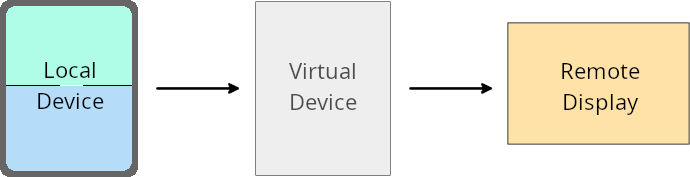
虚拟设备所有者是创建和管理虚拟设备的可信应用或特权应用。虚拟设备所有者在虚拟设备上运行应用,然后将应用投影到远程设备的显示屏上,例如个人电脑、虚拟现实设备或车载信息娱乐系统。虚拟设备所有者使用的是本地设备,例如手机。
按应用替换项
在搭载 Android 16(API 级别 36)的设备上,虚拟设备所有者可以替换其管理的特定虚拟设备上的应用设置。例如,为了改进应用布局,虚拟设备所有者在将应用投影到外部显示屏上时,可以忽略屏幕方向、宽高比和可调整大小性限制。
常见的重大更改
Android 16 的行为可能会影响应用在汽车显示屏或 Chromebook 等大屏幕设备规格上的界面,尤其是那些专为竖屏小显示屏设计的布局。如需了解如何让应用适应所有设备类型,请参阅关于自适应布局。
参考
Sicurezza
Android 16 (livello API 36) include modifiche che promuovono la sicurezza del sistema per proteggere app e utenti da app dannose.
Maggiore sicurezza contro gli attacchi di reindirizzamento degli intent
Android 16 针对一般的 Intent 重定向攻击提供了默认安全性,并且只需要最低限度的兼容性和开发者更改。
我们引入了默认安全加固解决方案,以应对 Intent 重定向漏洞。在大多数情况下,正常使用 intent 的应用不会遇到任何兼容性问题;我们在整个开发过程中收集了指标,以监控哪些应用可能会出现中断。
Intent 重定向在 Android 中出现,当攻击者可以部分或完全 控制用于在存在漏洞的应用上下文中启动新组件的 intent 内容时,而受害应用会在 intent 的 extra 字段中启动不受信任的子级 intent。这可能会导致攻击者应用在受害应用的上下文中启动私有组件、触发特权操作或获取对敏感数据的 URI 访问权限,从而可能导致数据窃取和任意代码执行。
选择停用 intent 重定向处理
Android 16 引入了一个新 API,允许应用选择停用启动安全保护。在默认安全行为会干扰合法应用用例的特定情况下,这可能是必要的。
对于针对 Android 16(API 级别 36)SDK 或更高版本进行编译的应用
您可以直接对 Intent 对象使用 removeLaunchSecurityProtection() 方法。
val i = intent
val iSublevel: Intent? = i.getParcelableExtra("sub_intent")
iSublevel?.removeLaunchSecurityProtection() // Opt out from hardening
iSublevel?.let { startActivity(it) }
对于针对 Android 15(API 级别 35)或更低版本进行编译的应用
虽然不建议这样做,但您可以使用反射来访问 removeLaunchSecurityProtection() 方法。
val i = intent
val iSublevel: Intent? = i.getParcelableExtra("sub_intent", Intent::class.java)
try {
    val removeLaunchSecurityProtection = Intent::class.java.getDeclaredMethod("removeLaunchSecurityProtection")
    removeLaunchSecurityProtection.invoke(iSublevel)
} catch (e: Exception) {
    // Handle the exception, e.g., log it
} // Opt-out from the security hardening using reflection
iSublevel?.let { startActivity(it) }
Le app complementari non ricevono più notifiche relative ai timeout di rilevamento
Android 16 introduces a new behavior during
companion device pairing flow to protect the user's location
privacy from malicious apps. All companion apps running on Android 16 are no
longer directly notified of discovery timeout using
RESULT_DISCOVERY_TIMEOUT. Instead, the user is
notified of timeout events with a visual dialog. When the user dismisses
the dialog, the app is alerted of the association failure with
RESULT_USER_REJECTED.
The search duration has also been extended from the original 20 seconds, and the device discovery can be stopped by the user at any point during the search. If at least one device was discovered within the first 20 seconds of starting the search, the CDM stops searching for additional devices.
Connettività
Android 16 (livello API 36) include le seguenti modifiche nello stack Bluetooth per migliorare la connettività con i dispositivi periferici.
Gestione migliorata della perdita di associazione
从 Android 16 开始,蓝牙堆栈已更新,以便在检测到远程配对丢失时提高安全性和用户体验。以前,系统会自动解除配对并启动新的配对流程,这可能会导致意外重新配对。在许多情况下,我们发现应用未以一致的方式处理债券损失事件。
为了统一体验,Android 16 改进了系统的绑定丢失处理。如果之前配对的蓝牙设备在重新连接时无法进行身份验证,系统会断开关联,保留本地配对信息,并显示系统对话框,告知用户配对已断开并指示他们重新配对。