
升级依赖项可能是一项复杂且耗时的任务。
Android 应用依赖于各种外部库依赖项来实现联网、图片加载和界面组件等功能。这些库在不断发展,新版本会提供 bug 修复、性能改进和新功能。
Android Studio 中的 Gemini 可自动执行并简化依赖项更新流程,从而消除繁琐的工作并提高项目可维护性。
Android Studio 中的 Gemini 如何为您提供帮助
智能体模式可可靠地自动执行依赖项管理,让您的项目保持最新状态,从而让您专注于构建高质量的应用。只需点击一下,您就可以无缝更新所有依赖项,并享受最新版本带来的好处。
此更新的运作方式
Android Studio 中的 Gemini 会智能地处理更新流程,如下所示:
- 识别并更新依赖项:自动识别可更新的依赖项,并将其更新为最新的兼容版本。
- 解决构建错误:遍历构建流程,解决因更新而产生的任何构建错误。
- 验证项目:运行测试以验证更新后的项目是否仍能按预期运行。
- 生成更新报告:流程完成后,Android Studio 中的 Gemini 会提供一份包含所有变更的详细报告。您可以从宏观层面查看这些更改,也可以在接受之前深入了解各个文件级别的差异。
您可以通过从 Refactor 菜单中选择 Update Dependencies 来启动更新流程:

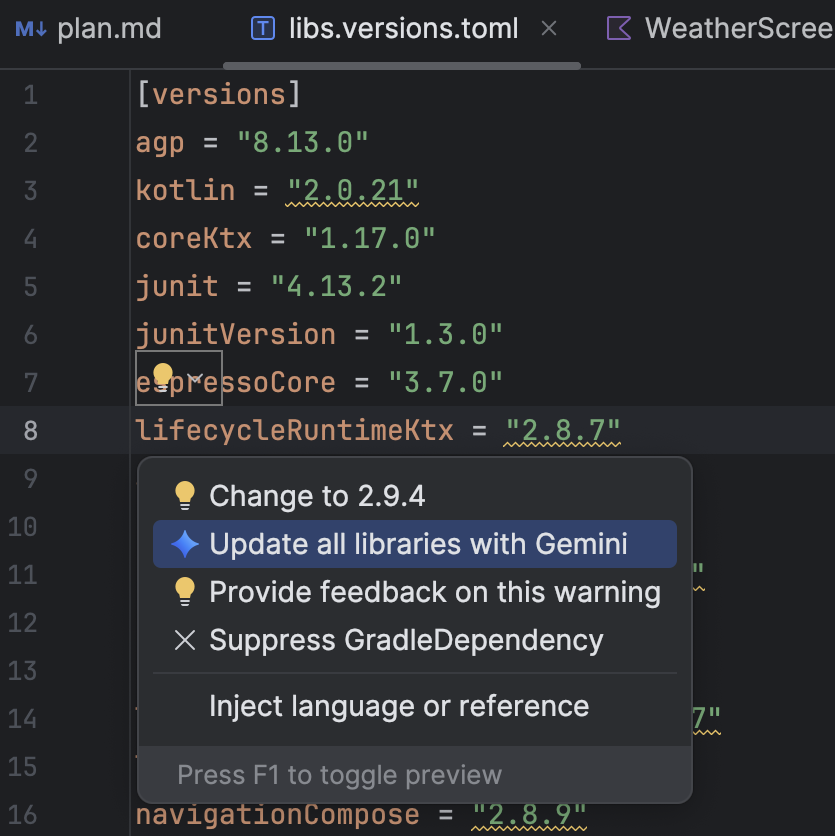
或者,在 libs.versions.toml 文件中:将光标悬停在带下划线的版本上,点击随即显示的 Show Context Actions(显示上下文操作) 菜单,然后点击 Update all libraries with Gemini(使用 Gemini 更新所有库)。
无论您以哪种方式开始该流程,Android Studio 中的 Gemini 都会提供更新计划的概览,以便您调整计划、逐步监控进度,并在应用所有更改之前查看所有更改:

您可以随时查看、接受或回滚更改,也可以随时停止该流程。