

Android 15 面向开发者引入了一些出色的功能和 API。以下部分总结了这些功能,可帮助您开始使用相关 API。
有关新增、修改和移除的 API 的详细列表,请参阅 API 差异报告。如需详细了解新增的 API,请访问 Android API 参考文档 - 对于 Android 15,请查找在 API 级别 35 中添加的 API。如需了解平台变更可能会在哪些方面影响您的应用,请务必查看会影响以 Android 15 为目标平台的应用和所有应用的 Android 15 行为变更。
摄像头和媒体
Android 15 包含各种功能,可提升相机和媒体体验,并让您能够使用各种工具和硬件,从而支持创作者在 Android 上实现其愿景。
如需详细了解 Android 媒体和相机的最新功能和开发者解决方案,请观看 Google I/O 大会上的打造现代 Android 媒体和相机体验演讲。
弱光增强
Android 15 introduces Low Light Boost, an auto-exposure mode available to both Camera 2 and the night mode camera extension. Low Light Boost adjusts the exposure of the Preview stream in low-light conditions. This is different from how the night mode camera extension creates still images, because night mode combines a burst of photos to create a single, enhanced image. While night mode works very well for creating a still image, it can't create a continuous stream of frames, but Low Light Boost can. Thus, Low Light Boost enables camera capabilities, such as:
- Providing an enhanced image preview, so users are better able to frame their low-light pictures
- Scanning QR codes in low light
If you enable Low Light Boost, it automatically turns on when there's a low light level, and turns off when there's more light.
Apps can record off the Preview stream in low-light conditions to save a brightened video.
For more information, see Low Light Boost.
应用内相机控件
Android 15 adds an extension for more control over the camera hardware and its algorithms on supported devices:
- Advanced flash strength adjustments enabling precise control of flash
intensity in both
SINGLEandTORCHmodes while capturing images.
HDR 余量控制
Android 15 chooses HDR headroom that is appropriate for the underlying device
capabilities and bit-depth of the panel. For pages that have lots of SDR
content, such as a messaging app displaying a single HDR thumbnail, this
behavior can end up adversely influencing the perceived brightness of the SDR
content. Android 15 lets you control the HDR headroom with
setDesiredHdrHeadroom to strike a balance between SDR
and HDR content.

响度控制

Android 15 introduces support for the CTA-2075 loudness standard to help you avoid audio loudness inconsistencies and ensure users don't have to constantly adjust volume when switching between content. The system leverages known characteristics of the output devices (headphones and speaker) along with loudness metadata available in AAC audio content to intelligently adjust the audio loudness and dynamic range compression levels.
To enable this feature, you need to ensure loudness metadata is available in
your AAC content and enable the platform feature in your app. For this, you
instantiate a LoudnessCodecController object by
calling its create factory method with the audio
session ID from the associated AudioTrack; this
automatically starts applying audio updates. You can pass an
OnLoudnessCodecUpdateListener to modify or filter
loudness parameters before they are applied on the
MediaCodec.
// Media contains metadata of type MPEG_4 OR MPEG_D
val mediaCodec = …
val audioTrack = AudioTrack.Builder()
                                .setSessionId(sessionId)
                                .build()
...
// Create new loudness controller that applies the parameters to the MediaCodec
try {
   val lcController = LoudnessCodecController.create(mSessionId)
   // Starts applying audio updates for each added MediaCodec
}
AndroidX media3 ExoPlayer will also be updated to use the
LoudnessCodecController APIs for a seamless app integration.
虚拟 MIDI 2.0 设备
Android 13 added support for connecting to MIDI 2.0 devices using USB, which communicate using Universal MIDI Packets (UMP). Android 15 extends UMP support to virtual MIDI apps, enabling composition apps to control synthesizer apps as a virtual MIDI 2.0 device just like they would with an USB MIDI 2.0 device.
更高效的 AV1 软件解码

dav1d, the popular AV1 software decoder from VideoLAN is available for Android devices that don't support AV1 decode in hardware. dav1d is up to 3x more performant than the legacy AV1 software decoder, enabling HD AV1 playback for more users, including some low and mid tier devices.
Your app needs to opt-in to using dav1d by invoking it by name
"c2.android.av1-dav1d.decoder". dav1d will be made the default AV1 software
decoder in a subsequent update. This support is standardized and backported to
Android 11 devices that receive Google Play system updates.
开发者工作效率和工具
虽然我们为提高您的工作效率而开展的大部分工作都围绕 Android Studio、Jetpack Compose 和 Android Jetpack 库等工具展开,但我们一直在寻找各种方法,以便在平台中帮助您更轻松地实现愿景。
OpenJDK 17 更新
Android 15 continues the work of refreshing Android's core libraries to align with the features in the latest OpenJDK LTS releases.
The following key features and improvements are included:
- Quality-of-life improvements around NIO buffers
- Streams
- Additional
mathandstrictmathmethods utilpackage updates including sequencedcollection,map, andsetByteBuffersupport inDeflater- Security updates such as
X500PrivateCredentialand security key updates
These APIs are updated on over a billion devices running Android 12 (API level 31) and higher through Google Play System updates, so you can target the latest programming features.
PDF 改进
Android 15 includes substantial improvements to the PdfRenderer
APIs. Apps can incorporate advanced features such as rendering
password-protected files, annotations, form editing,
searching, and selection with copy. Linearized PDF
optimizations are supported to speed local PDF viewing and reduce resource use.
The Jetpack PDF library uses these APIs to simplify adding PDF
viewing capabilities to your app.

The PdfRenderer has been moved to a module that can be updated using Google
Play system updates independent of the platform release, and we're supporting
these changes back to Android 11 (API level 30) by creating a compatible
pre-Android 15 version of the API surface, called
PdfRendererPreV.
自动语言切换优化
Android 14 在音频中添加了设备端多语言识别功能,并支持在语言之间自动切换,但这可能会导致丢失字词,尤其是当两次语音之间语言切换的间隔时间较短时。Android 15 添加了其他控件,以帮助应用根据其用例调整此切换。EXTRA_LANGUAGE_SWITCH_INITIAL_ACTIVE_DURATION_TIME_MILLIS 会将自动切换限制在音频会话开始时,而 EXTRA_LANGUAGE_SWITCH_MATCH_SWITCHES 会在发生指定次数的切换后停用语言切换。如果您预计会话期间只会使用一种语言,并且该语言应被自动检测到,这些选项会特别有用。
改进的 OpenType Variable Font API
Android 15 提高了 OpenType 可变字体的易用性。您可以创建
来自可变字体的 FontFamily 实例,而不指定粗细轴
使用 buildVariableFamily API。文本渲染程序会替换 wght 轴的值,以匹配显示的文本。
使用该 API 可以大大简化创建 Typeface 的代码:
Kotlin
val newTypeface = Typeface.CustomFallbackBuilder(
            FontFamily.Builder(
                Font.Builder(assets, "RobotoFlex.ttf").build())
                    .buildVariableFamily())
    .build()
Java
Typeface newTypeface = Typeface.CustomFallbackBuilder(
            new FontFamily.Builder(
                new Font.Builder(assets, "RobotoFlex.ttf").build())
                    .buildVariableFamily())
    .build();
以前,如需创建相同的 Typeface,您需要更多代码:
Kotlin
val oldTypeface = Typeface.CustomFallbackBuilder(
            FontFamily.Builder(
                Font.Builder(assets, "RobotoFlex.ttf")
                    .setFontVariationSettings("'wght' 400")
                    .setWeight(400)
                    .build())
                .addFont(
                    Font.Builder(assets, "RobotoFlex.ttf")
                        .setFontVariationSettings("'wght' 100")
                        .setWeight(100)
                        .build()
                )
                .addFont(
                    Font.Builder(assets, "RobotoFlex.ttf")
                        .setFontVariationSettings("'wght' 200")
                        .setWeight(200)
                        .build()
                )
                .addFont(
                    Font.Builder(assets, "RobotoFlex.ttf")
                        .setFontVariationSettings("'wght' 300")
                        .setWeight(300)
                        .build()
                )
                .addFont(
                    Font.Builder(assets, "RobotoFlex.ttf")
                        .setFontVariationSettings("'wght' 500")
                        .setWeight(500)
                        .build()
                )
                .addFont(
                    Font.Builder(assets, "RobotoFlex.ttf")
                        .setFontVariationSettings("'wght' 600")
                        .setWeight(600)
                        .build()
                )
                .addFont(
                    Font.Builder(assets, "RobotoFlex.ttf")
                        .setFontVariationSettings("'wght' 700")
                        .setWeight(700)
                        .build()
                )
                .addFont(
                    Font.Builder(assets, "RobotoFlex.ttf")
                        .setFontVariationSettings("'wght' 800")
                        .setWeight(800)
                        .build()
                )
                .addFont(
                    Font.Builder(assets, "RobotoFlex.ttf")
                        .setFontVariationSettings("'wght' 900")
                        .setWeight(900)
                        .build()
                ).build()
        ).build()
Java
Typeface oldTypeface = new Typeface.CustomFallbackBuilder(
    new FontFamily.Builder(
        new Font.Builder(assets, "RobotoFlex.ttf")
            .setFontVariationSettings("'wght' 400")
            .setWeight(400)
            .build()
    )
    .addFont(
        new Font.Builder(assets, "RobotoFlex.ttf")
            .setFontVariationSettings("'wght' 100")
            .setWeight(100)
            .build()
    )
    .addFont(
        new Font.Builder(assets, "RobotoFlex.ttf")
            .setFontVariationSettings("'wght' 200")
            .setWeight(200)
            .build()
    )
    .addFont(
        new Font.Builder(assets, "RobotoFlex.ttf")
            .setFontVariationSettings("'wght' 300")
            .setWeight(300)
            .build()
    )
    .addFont(
        new Font.Builder(assets, "RobotoFlex.ttf")
            .setFontVariationSettings("'wght' 500")
            .setWeight(500)
            .build()
    )
    .addFont(
        new Font.Builder(assets, "RobotoFlex.ttf")
            .setFontVariationSettings("'wght' 600")
            .setWeight(600)
            .build()
    )
    .addFont(
        new Font.Builder(assets, "RobotoFlex.ttf")
            .setFontVariationSettings("'wght' 700")
            .setWeight(700)
            .build()
    )
    .addFont(
        new Font.Builder(assets, "RobotoFlex.ttf")
            .setFontVariationSettings("'wght' 800")
            .setWeight(800)
            .build()
    )
    .addFont(
        new Font.Builder(assets, "RobotoFlex.ttf")
            .setFontVariationSettings("'wght' 900")
            .setWeight(900)
            .build()
    )
    .build()
).build();
以下示例展示了同时使用旧版和新版 API 创建的 Typeface 的呈现方式:
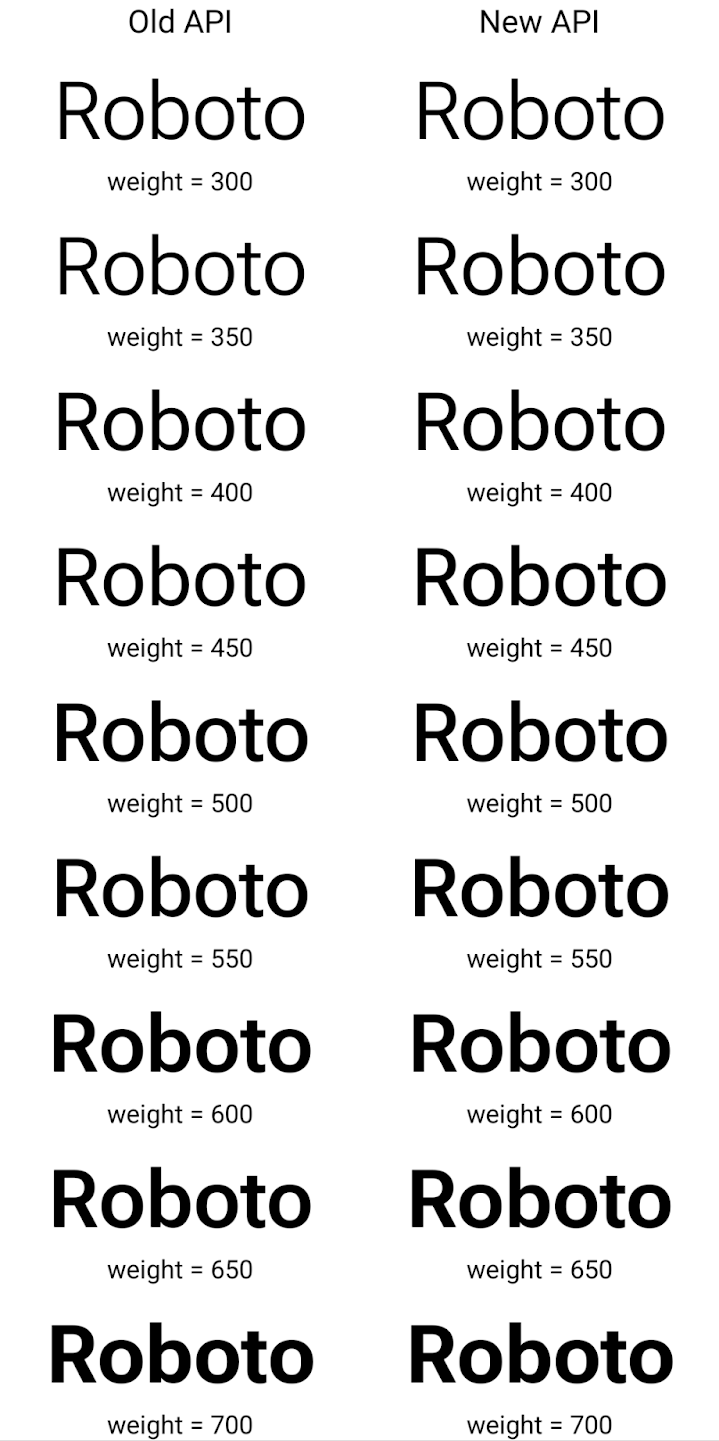
在此示例中,使用旧 API 创建的 Typeface 不包含
为 350、450、550 和 650 创建准确的字体粗细
Font 实例,因此渲染程序会回退到最接近的权重。在
在此示例中,系统会渲染 300 而不是 350,渲染 400 而不是 450,
依此类推。相比之下,使用新 API 创建的 Typeface 会为给定重量动态创建 Font 实例,因此系统也会为 350、450、550 和 650 呈现准确的重量。
精细的换行控制
从 Android 15 开始,TextView 和底层行断开符可以将给定部分文本保留在同一行中,以提高可读性。您可以通过在字符串资源或 createNoBreakSpan 中使用 <nobreak> 标记来充分利用此换行符自定义功能。同样,您可以使用 <nohyphen> 标记或 createNoHyphenationSpan 来防止对字词进行分词。
例如,以下字符串资源不包含换行符,在呈现时,文本“Pixel 8 Pro”会在不合适的位置换行:
<resources>
    <string name="pixel8pro">The power and brains behind Pixel 8 Pro.</string>
</resources>
相比之下,此字符串资源包含 <nobreak> 标记,该标记会将字词“Pixel 8 Pro”换行,并防止换行:
<resources>
    <string name="pixel8pro">The power and brains behind <nobreak>Pixel 8 Pro.</nobreak></string>
</resources>
以下图片展示了这些字符串呈现方式的差异:

<nobreak> 标记换行。
<nobreak> 标记封装“Pixel 8 Pro.”短语的同一行文本的布局。应用归档
Android and Google Play announced support for app archiving last year, allowing users to free up space by partially removing infrequently used apps from the device that were published using Android App Bundle on Google Play. Android 15 includes OS level support for app archiving and unarchiving, making it easier for all app stores to implement it.
Apps with the REQUEST_DELETE_PACKAGES permission can call the
PackageInstaller requestArchive method to request archiving an
installed app package, which removes the APK and any cached files, but persists
user data. Archived apps are returned as displayable apps through the
LauncherApps APIs; users will see a UI treatment to highlight that those
apps are archived. If a user taps on an archived app, the responsible installer
will get a request to unarchive it, and the restoration process can be
monitored by the ACTION_PACKAGE_ADDED broadcast.
Enable 16 KB mode on a device using developer options

Toggle the Boot with 16KB page size developer option to boot a device in 16 KB mode.
In QPR versions of Android 15, you can use the developer option that's available on certain devices to boot the device in 16 KB mode and perform on-device testing. Before using the developer option, go to Settings > System > Software updates and apply any updates that are available.
This developer option is available on the following devices:
Pixel 8 and 8 Pro (with Android 15 QPR1 or higher)
Pixel 8a (with Android 15 QPR1 or higher)
Pixel 9, 9 Pro, and 9 Pro XL (with Android 15 QPR2 or higher)
Pixel 9a (with Android 16 or higher)
图形
Android 15 带来了最新的图形改进,包括 ANGLE 和 Canvas 图形系统的增强功能。
现代化 Android 的 GPU 访问

Android hardware has evolved quite a bit from the early days where the core OS would run on a single CPU and GPUs were accessed using APIs based on fixed-function pipelines. The Vulkan® graphics API has been available in the NDK since Android 7.0 (API level 24) with a lower-level abstraction that better reflects modern GPU hardware, scales better to support multiple CPU cores, and offers reduced CPU driver overhead — leading to improved app performance. Vulkan is supported by all modern game engines.
Vulkan is Android's preferred interface to the GPU. Therefore, Android 15 includes ANGLE as an optional layer for running OpenGL® ES on top of Vulkan. Moving to ANGLE will standardize the Android OpenGL implementation for improved compatibility, and, in some cases, improved performance. You can test out your OpenGL ES app stability and performance with ANGLE by enabling the developer option in Settings -> System -> Developer Options -> Experimental: Enable ANGLE on Android 15.
The Android ANGLE on Vulkan roadmap

As part of streamlining our GPU stack, going forward we will be shipping ANGLE as the GL system driver on more new devices, with the future expectation that OpenGL/ES will be only available through ANGLE. That being said, we plan to continue support for OpenGL ES on all devices.
Recommended next steps
Use the developer options to select the ANGLE driver for OpenGL ES and test your app. For new projects, we strongly encourage using Vulkan for C/C++.
Canvas 方面的改进
Android 15 continues our modernization of Android's Canvas graphics system with additional capabilities:
Matrix44provides a 4x4 matrix for transforming coordinates that should be used when you want to manipulate the canvas in 3D.clipShaderintersects the current clip with the specified shader, whileclipOutShadersets the clip to the difference of the current clip and the shader, each treating the shader as an alpha mask. This supports the drawing of complex shapes efficiently.
性能和电池
Android 持续专注于帮助您提升应用的性能和质量。Android 15 引入了一些 API,可帮助您更高效地执行应用中的任务、优化应用性能,以及收集有关应用的分析数据。
如需了解电池高效最佳实践、调试网络和耗电量,以及详细了解我们如何在 Android 15 和近期 Android 版本中提高后台工作的电池效率,请观看 Google I/O 大会上的提高 Android 后台工作的电池效率演讲。
ApplicationStartInfo API
In previous versions of Android, app startup has been a bit of a mystery. It was
challenging to determine within your app whether it started from a cold, warm,
or hot state. It was also difficult to know how long your app spent during the
various launch phases: forking the process, calling onCreate, drawing the
first frame, and more. When your Application class was instantiated, you had no
way of knowing whether the app started from a broadcast, a content provider, a
job, a backup, boot complete, an alarm, or an Activity.
The ApplicationStartInfo API on Android 15 provides
all of this and more. You can even choose to add your own timestamps into the
flow to help collect timing data in one place. In addition to collecting
metrics, you can use ApplicationStartInfo to help directly optimize app
startup; for example, you can eliminate the costly instantiation of UI-related
libraries within your Application class when your app is starting up due to a
broadcast.
详细的应用大小信息
Since Android 8.0 (API level 26), Android has included the
StorageStats.getAppBytes API that summarizes the installed
size of an app as a single number of bytes, which is a sum of the APK size, the
size of files extracted from the APK, and files that were generated on the
device such as ahead-of-time (AOT) compiled code. This number is not very
insightful in terms of how your app is using storage.
Android 15 adds the
StorageStats.getAppBytesByDataType([type]) API, which lets
you get insight into how your app is using up all that space, including APK file
splits, AOT and speedup related code, dex metadata, libraries, and guided
profiles.
由应用管理的性能分析
Android 15 includes the ProfilingManager class,
which lets you collect profiling information from within your app such as heap
dumps, heap profiles, stack sampling, and more. It provides a callback to your
app with a supplied tag to identify the output file, which is delivered to your
app's files directory. The API does rate limiting to minimize the performance
impact.
To simplify constructing profiling requests in your app, we recommend using the
corresponding Profiling AndroidX API, available
in Core 1.15.0-rc01 or higher.
SQLite 数据库方面的改进
Android 15 introduces SQLite APIs that expose advanced features from the underlying SQLite engine that target specific performance issues that can manifest in apps. These APIs are included with the update of SQLite to version 3.44.3.
Developers should consult best practices for SQLite performance to get the most out of their SQLite database, especially when working with large databases or when running latency-sensitive queries.
- Read-only deferred transactions: when issuing transactions that are
read-only (don't include write statements), use
beginTransactionReadOnly()andbeginTransactionWithListenerReadOnly(SQLiteTransactionListener)to issue read-onlyDEFERREDtransactions. Such transactions can run concurrently with each other, and if the database is in WAL mode, they can run concurrently withIMMEDIATEorEXCLUSIVEtransactions. - Row counts and IDs: APIs were added to retrieve the count of changed
rows or the last inserted row ID without issuing an additional query.
getLastChangedRowCount()returns the number of rows that were inserted, updated, or deleted by the most recent SQL statement within the current transaction, whilegetTotalChangedRowCount()returns the count on the current connection.getLastInsertRowId()returns therowidof the last row to be inserted on the current connection. - Raw statements: issue a raw SQlite statement, bypassing convenience wrappers and any additional processing overhead that they may incur.
Android 动态性能框架更新
Android 15 继续投资于 Android 动态性能框架 (ADPF),这是一组 API,可让游戏和性能密集型应用更为直接地与 Android 设备的电源和散热系统进行互动。在受支持的设备上,Android 15 添加了 ADPF 功能:
- 针对提示会话的节能模式,用于指明其关联的线程应优先节能而非性能,非常适合长时间运行的后台工作负载。
- 系统可以在提示会话中报告 GPU 和 CPU 工作时长,以便同时调整 CPU 和 GPU 频率,以最佳方式满足工作负载需求。
- 热余量阈值,用于根据余量预测来解读可能的热节流状态。
如需详细了解如何在应用和游戏中使用 ADPF,请参阅相关文档。
隐私权
Android 15 包含各种可帮助应用开发者保护用户隐私的功能。
屏幕录制检测
Android 15 增加了对应用的支持,以检测 正在录制。每当应用转换时,系统都会调用回调 在屏幕录制内容中处于可见与隐藏状态之间。如果正在记录注册进程的 UID 拥有的 activity,则系统会将应用视为可见。这样一来,如果您的应用执行敏感操作,您就可以告知用户正在录制他们的操作。
val mCallback = Consumer<Int> { state ->
  if (state == SCREEN_RECORDING_STATE_VISIBLE) {
    // We're being recorded
  } else {
    // We're not being recorded
  }
}

override fun onStart() {
   super.onStart()
   val initialState =
      windowManager.addScreenRecordingCallback(mainExecutor, mCallback)
   mCallback.accept(initialState)
}

override fun onStop() {
    super.onStop()
    windowManager.removeScreenRecordingCallback(mCallback)
}
扩展的 IntentFilter 功能
Android 15 通过 UriRelativeFilterGroup 支持更精确的 Intent 解析,UriRelativeFilterGroup 包含一组 UriRelativeFilter 对象,这些对象构成一组必须满足的 Intent 匹配规则,包括网址查询参数、网址片段以及屏蔽或排除规则。
您可以在 AndroidManifest XML 文件中使用 <uri-relative-filter-group> 标记来定义这些规则,该标记可以包含 android:allow 标记。这些代码可以包含使用现有数据代码属性以及 android:query 和 android:fragment 属性的 <data> 代码。
下面是一个 AndroidManifest 语法示例:
<intent-filter android:autoVerify="true">
  <action android:name="android.intent.action.VIEW" />
  <category android:name="android.intent.category.BROWSABLE" />
  <category android:name="android.intent.category.DEFAULT" />
  <data android:scheme="http" />
  <data android:scheme="https" />
  <data android:host="astore.com" />
  <uri-relative-filter-group>
    <data android:pathPrefix="/auth" />
    <data android:query="region=na" />
  </uri-relative-filter-group>
  <uri-relative-filter-group android:allow="false">
    <data android:pathPrefix="/auth" />
    <data android:query="mobileoptout=true" />
  </uri-relative-filter-group>
  <uri-relative-filter-group android:allow="false">
    <data android:pathPrefix="/auth" />
    <data android:fragmentPrefix="faq" />
  </uri-relative-filter-group>
</intent-filter>
私密空间
Private space lets users create a separate space on their device where they can keep sensitive apps away from prying eyes, under an additional layer of authentication. The private space uses a separate user profile. The user can choose to use the device lock or a separate lock factor for the private space.
Apps in the private space show up in a separate container in the launcher, and are hidden from the recents view, notifications, settings, and from other apps when the private space is locked. User-generated and downloaded content (such as media or files) and accounts are separated between the private space and the main space. The system sharesheet and the photo picker can be used to give apps access to content across spaces when the private space is unlocked.
Users can't move existing apps and their data into the private space. Instead, users select an install option in the private space to install an app using whichever app store they prefer. Apps in the private space are installed as separate copies from any apps in the main space (new copies of the same app).
When a user locks the private space, the profile is stopped. While the profile is stopped, apps in the private space are no longer active and can't perform foreground or background activities, including showing notifications.
We recommend that you test your app with private space to make sure your app works as expected, especially if your app falls into one of the following categories:
- Apps with logic for work profiles that assumes that any installed copies of their app that aren't in the main profile are in the work profile.
- Medical apps
- Launcher apps
- App store apps
查询用户最近一次选择的“所选照片访问权限”
现在,如果应用获得了部分访问权限,则只能突出显示最近选择的照片和视频。此功能可以改善频繁请求访问照片和视频的应用的用户体验。如需在应用中使用此功能,请在通过 ContentResolver 查询 MediaStore 时启用 QUERY_ARG_LATEST_SELECTION_ONLY 参数。
Kotlin
val externalContentUri = MediaStore.Files.getContentUri("external")

val mediaColumns = arrayOf(
   FileColumns._ID,
   FileColumns.DISPLAY_NAME,
   FileColumns.MIME_TYPE,
)

val queryArgs = bundleOf(
   // Return only items from the last selection (selected photos access)
   QUERY_ARG_LATEST_SELECTION_ONLY to true,
   // Sort returned items chronologically based on when they were added to the device's storage
   QUERY_ARG_SQL_SORT_ORDER to "${FileColumns.DATE_ADDED} DESC",
   QUERY_ARG_SQL_SELECTION to "${FileColumns.MEDIA_TYPE} = ? OR ${FileColumns.MEDIA_TYPE} = ?",
   QUERY_ARG_SQL_SELECTION_ARGS to arrayOf(
       FileColumns.MEDIA_TYPE_IMAGE.toString(),
       FileColumns.MEDIA_TYPE_VIDEO.toString()
   )
)
Java
Uri externalContentUri = MediaStore.Files.getContentUri("external");

String[] mediaColumns = {
    FileColumns._ID,
    FileColumns.DISPLAY_NAME,
    FileColumns.MIME_TYPE
};

Bundle queryArgs = new Bundle();
queryArgs.putBoolean(MediaStore.QUERY_ARG_LATEST_SELECTION_ONLY, true);
queryArgs.putString(MediaStore.QUERY_ARG_SQL_SORT_ORDER, FileColumns.DATE_ADDED + " DESC");
queryArgs.putString(MediaStore.QUERY_ARG_SQL_SELECTION, FileColumns.MEDIA_TYPE + " = ? OR " + FileColumns.MEDIA_TYPE + " = ?");
queryArgs.putStringArray(MediaStore.QUERY_ARG_SQL_SELECTION_ARGS, new String[] {
    String.valueOf(FileColumns.MEDIA_TYPE_IMAGE),
    String.valueOf(FileColumns.MEDIA_TYPE_VIDEO)
});
Privacy Sandbox on Android
Android 15 includes the latest Android Ad Services extensions, incorporating the latest version of the Privacy Sandbox on Android. This addition is part of our work to develop technologies that improve user privacy and enable effective, personalized advertising experiences for mobile apps. Our privacy sandbox page has more information about the Privacy Sandbox on Android developer preview and beta programs to help you get started.
健康数据共享
Android 15 integrates the latest extensions around Health Connect by Android, a secure and centralized platform to manage and share app-collected health and fitness data. This update adds support for additional data types across fitness, nutrition, skin temperature, training plans, and more.
Skin temperature tracking allows users to store and share more accurate temperature data from a wearable or other tracking device.
Training plans are structured workout plans to help a user achieve their fitness goals. Training plans support includes a variety of completion and performance goals:
- Completion goals around calories burned, distance, duration, repetition, and steps.
- Performance goals around as many repetitions as possible (AMRAP), cadence, heart rate, power, perceived rate of exertion, and speed.
Learn more about the latest updates to Health Connect in Android in the Building adaptable experiences with Android Health talk from Google I/O.
应用屏幕共享
Android 15 supports app screen sharing so users can share or record just an
app window rather than the entire device screen. This feature, first enabled in
Android 14 QPR2, includes
MediaProjection callbacks that allow your app
to customize the app screen sharing experience. Note that for apps targeting
Android 14 (API level 34) or higher,
user consent is required for each
MediaProjection capture session.
用户体验和系统界面
Android 15 为应用开发者和用户提供了更多控制权和灵活性,以便他们根据自己的需求配置设备。
如需详细了解如何利用 Android 15 中的最新改进来提升应用的用户体验,请观看 Google I/O 大会上的提升 Android 应用的用户体验演讲。
借助 Generated Previews API 提供更丰富的小组件预览
Before Android 15, the only way to provide widget picker previews was to specify a static image or layout resource. These previews often differ significantly from the look of the actual widget when it is placed on the home screen. Also, static resources can't be created with Jetpack Glance, so a Glance developer had to screenshot their widget or create an XML layout to have a widget preview.
Android 15 adds support for generated previews. This means that app widget
providers can generate RemoteViews to use as the picker preview, instead
of a static resource.

Push API
Apps can provide generated previews through a push API. Apps can provide
previews at any point in their lifecycle, and don't receive an explicit request
from the host to provide previews. Previews are persisted in AppWidgetService,
and hosts can request them on-demand. The following example loads an XML widget
layout resource and sets it as the preview:
AppWidgetManager.getInstance(appContext).setWidgetPreview(
   ComponentName(
       appContext,
       SociaLiteAppWidgetReceiver::class.java
   ),
   AppWidgetProviderInfo.WIDGET_CATEGORY_HOME_SCREEN,
   RemoteViews("com.example", R.layout.widget_preview)
)
The expected flow is:
- At any time, the widget provider calls
setWidgetPreview. The provided previews are persisted inAppWidgetServicewith other provider info. setWidgetPreviewnotifies hosts of an updated preview through theAppWidgetHost.onProvidersChangedcallback. In response, the widget host reloads all of its provider information.- When displaying a widget preview, the host checks
AppWidgetProviderInfo.generatedPreviewCategories, and if the chosen category is available, callsAppWidgetManager.getWidgetPreviewto return the saved preview for this provider.
When to call setWidgetPreview
Because there is no callback to provide previews, apps can choose to send previews at any point when they are running. How often to update the preview depends on the widget's use case.
The following list describes the two main categories of preview use cases:
- Providers that show real data in their widget previews, such as personalized or recent information. These providers can set the preview once the user has signed in or has done initial configuration in their app. After this, they can set up a periodic task to update the previews at their chosen cadence. Examples of this type of widget could be a photo, calendar, weather or news widget.
- Providers that show static information in previews or quick-action widgets that don't display any data. These providers can set previews once, when the app first launches. Examples of this type of widget include a drive quick actions widget or chrome shortcuts widget.
Some providers might show static previews on the hub mode picker, but real information on the homescreen picker. These providers should follow the guidance for both of these use cases to set previews.
画中画
Android 15 引入了画中画 (PiP) 方面的变更,确保实现 更流畅的过渡效果。对于在主界面上叠加界面元素的应用,这将非常有用,因为这些界面元素会进入 PiP。
开发者使用 onPictureInPictureModeChanged 回调来定义逻辑
用于切换叠加界面元素的可见性。此回调是
在画中画进入或退出动画播放完毕时触发。距离开始还有
Android 15 中,PictureInPictureUiState 类包含另一种状态。
在此界面状态下,以 Android 15(API 级别 35)为目标平台的应用将遵守
使用以下参数调用 Activity#onPictureInPictureUiStateChanged 回调:
isTransitioningToPip()。还有
在画中画模式下,有很多与应用无关的界面元素,
包含建议、
评分和标题当应用进入画中画模式时,请使用
onPictureInPictureUiStateChanged 回调以隐藏这些界面元素。当
应用从画中画窗口进入全屏模式,使用
onPictureInPictureModeChanged 回调以取消隐藏这些元素,如
请参阅以下示例:
override fun onPictureInPictureUiStateChanged(pipState: PictureInPictureUiState) {
        if (pipState.isTransitioningToPip()) {
          // Hide UI elements
        }
    }
override fun onPictureInPictureModeChanged(isInPictureInPictureMode: Boolean) {
        if (isInPictureInPictureMode) {
          // Unhide UI elements
        }
    }
不相关界面元素的快速可见性切换(适用于画中画窗口)有助于 确保画中画播放动画更流畅、无闪烁。
改进了“勿扰”规则
AutomaticZenRule lets apps customize Attention
Management (Do Not Disturb) rules and decide when to activate or deactivate
them. Android 15 greatly enhances these rules with the goal of improving the
user experience. The following enhancements are included:
- Adding types to
AutomaticZenRule, allowing the system to apply special treatment to some rules. - Adding an icon to
AutomaticZenRule, helping to make the modes be more recognizable. - Adding a
triggerDescriptionstring toAutomaticZenRulethat describes the conditions on which the rule should become active for the user. - Added
ZenDeviceEffectstoAutomaticZenRule, allowing rules to trigger things like grayscale display, night mode, or dimming the wallpaper.
为通知渠道设置 VibrationEffect
Android 15 支持为传入的通知设置丰富的振动,方法是
频道使用的是NotificationChannel.setVibrationEffect,因此
您的用户可以区分不同类型的通知
不需要看他们的设备
媒体投屏状态栏条状标签和自动停止
媒体投放可能会泄露用户的私密信息。一个醒目的新状态栏条状标签可让用户了解任何正在进行的屏幕投影。用户可以点按该条状标签停止投屏、共享或录制屏幕。此外,为了提供更直观的用户体验,当设备屏幕锁定后,所有正在进行的屏幕投影都会自动停止。

大屏设备和设备规格
Android 15 为您的应用提供支持,使其能够充分利用 Android 的各种外形规格,包括大屏设备、翻盖式设备和可折叠设备。
改进了大屏设备上的多任务处理
Android 15 gives users better ways to multitask on large screen devices. For example, users can save their favorite split-screen app combinations for quick access and pin the taskbar on screen to quickly switch between apps. This means that making sure your app is adaptive is more important than ever.
Google I/O has sessions on Building adaptive Android apps and Building UI with the Material 3 adaptive library that can help, and our documentation has more to help you Design for large screens.
外屏支持
您的应用可以声明一个属性,Android 15 会使用该属性来允许您的 Application 或 Activity 显示在受支持的可翻转设备的小封面屏幕上。这些屏幕太小,无法被视为适合运行 Android 应用的兼容目标平台,但您的应用可以选择支持它们,从而让您的应用在更多平台上可用。
连接
Android 15 更新了平台,让您的应用能够利用通信和无线技术方面的最新进展。
卫星支持
Android 15 continues to extend platform support for satellite connectivity and includes some UI elements to ensure a consistent user experience across the satellite connectivity landscape.
Apps can use ServiceState.isUsingNonTerrestrialNetwork() to
detect when a device is connected to a satellite, giving them more awareness of
why full network services might be unavailable. Additionally, Android 15
provides support for SMS and MMS apps as well as preloaded RCS apps to use
satellite connectivity for sending and receiving messages.

更顺畅的 NFC 体验
Android 15 正在努力打造更顺畅、更可靠的感应式付款体验,同时继续支持 Android 强大的 NFC 应用生态系统。在受支持的设备上,应用可以请求 NfcAdapter 进入观察模式,在该模式下,设备会监听但不会响应 NFC 读卡器,并将应用的 NFC 服务 PollingFrame
对象发送以进行处理。PollingFrame 对象可用于在与 NFC 读卡器进行首次通信之前进行身份验证,在许多情况下,这支持一触式交易。
此外,应用可以在受支持的设备上注册过滤器,以便在有轮询循环活动时收到通知,从而能够与多个感知 NFC 的应用顺畅运行。
钱包角色
Android 15 引入了钱包角色,可与用户的首选钱包应用更紧密地集成。此角色会取代 NFC 默认的感应式付款设置。用户可以前往设置 > 应用 > 默认应用,管理钱包角色持有者。
在为在付款类别中注册的 AID 路由 NFC 感应式付款时,系统会使用钱包角色。点按操作始终会转到 Google 钱包角色持有者,除非有已注册相同 AID 的其他应用在前台运行。
此角色还用于确定“Google 钱包”快速访问功能块在启用后应显示在何处。将角色设为“无”时,“快速访问”功能块不可用,并且支付类别 NFC 点按仅传送到前台应用。
安全
Android 15 可帮助您增强应用的安全性、保护应用的数据,并让用户能够更清楚地了解和控制自己的数据。请观看 Google I/O 大会上的在 Android 上保障用户安全演讲,详细了解我们为改进用户安全保障和保护您的应用免受新威胁而采取的措施。
将 Credential Manager 与自动填充功能集成
从 Android 15 开始,开发者可以将用户名或密码字段等特定视图与 Credential Manager 请求相关联,从而更轻松地在登录过程中提供量身定制的用户体验。当用户聚焦于其中一个视图时,系统会向 Credential Manager 发送相应请求。系统会汇总来自各个提供商的凭据,并在自动填充后备界面(例如内嵌建议或下拉菜单建议)中显示这些凭据。Jetpack androidx.credentials 库是开发者首选的端点,很快将在 Android 15 及更高版本中推出,以进一步增强此功能。
将一键注册和登录与生物识别提示集成
Credential Manager integrates biometric prompts into the credential creation and sign-in processes, eliminating the need for providers to manage biometric prompts. As a result, credential providers only need to focus on the results of the create and get flows, augmented with the biometric flow result. This simplified process creates a more efficient and streamlined credential creation and retrieval process.
端到端加密的密钥管理
We are introducing the E2eeContactKeysManager in Android 15, which
facilitates end-to-end encryption (E2EE) in your Android apps by providing an
OS-level API for the storage of cryptographic public keys.
The E2eeContactKeysManager is designed to integrate with the platform
contacts app to give users a centralized way to manage and verify their
contacts' public keys.
对内容 URI 的权限检查
Android 15 introduces a set of APIs that perform permission checks on content URIs:
Context.checkContentUriPermissionFull: This performs a full permission check on content URIs.Activitymanifest attributerequireContentUriPermissionFromCaller: This enforces specified permissions on the provided content URIs at activity launch.ComponentCallerclass forActivitycallers: This represents the app that launched the activity.
无障碍
Android 15 添加了可提升用户无障碍体验的功能。
更出色的盲文功能
在 Android 15 中,我们让 TalkBack 能够支持通过 USB 和安全蓝牙使用 HID 标准的盲文显示屏。
此标准与鼠标和键盘使用的标准非常相似,将有助于 Android 随着时间的推移支持更多类型的盲文显示屏。
国际化
Android 15 添加了一些功能,可在设备使用不同语言时提升用户体验。
CJK 可变字体
Starting with Android 15, the font file for Chinese, Japanese, and Korean (CJK) languages, NotoSansCJK, is now a variable font. Variable fonts open up possibilities for creative typography in CJK languages. Designers can explore a broader range of styles and create visually striking layouts that were previously difficult or impossible to achieve.

字符间两端对齐
Starting with Android 15, text can be justified utilizing letter spacing by
using JUSTIFICATION_MODE_INTER_CHARACTER. Inter-word justification was
first introduced in Android 8.0 (API level 26), and inter-character
justification provides similar capabilities for languages that use the
whitespace character for segmentation, such as Chinese, Japanese, and others.

JUSTIFICATION_MODE_NONE.
JUSTIFICATION_MODE_NONE.
JUSTIFICATION_MODE_INTER_WORD.
JUSTIFICATION_MODE_INTER_WORD.
JUSTIFICATION_MODE_INTER_CHARACTER.
JUSTIFICATION_MODE_INTER_CHARACTER.自动换行配置
Android started supporting phrase-based line breaks for Japanese and Korean in
Android 13 (API level 33). However, while phrase-based line breaks improve the
readability of short lines of text, they don't work well for long lines of text.
In Android 15, apps can apply phrase-based line breaks only for short lines
of text, using the LINE_BREAK_WORD_STYLE_AUTO
option. This option selects the best word style option for the text.
For short lines of text, phrase-based line breaks are used, functioning the same
as LINE_BREAK_WORD_STYLE_PHRASE, as shown in the
following image:

LINE_BREAK_WORD_STYLE_AUTO
applies phrase-based line breaks to improve the readability of the text.
This is the same as applying
LINE_BREAK_WORD_STYLE_PHRASE.For longer lines of text, LINE_BREAK_WORD_STYLE_AUTO uses a no
line-break word style, functioning the same as
LINE_BREAK_WORD_STYLE_NONE, as shown in the
following image:

LINE_BREAK_WORD_STYLE_AUTO
applies no line-break word style to improve the readability of the text.
This is the same as applying
LINE_BREAK_WORD_STYLE_NONE.其他日语变体假名字体
在 Android 15 中,旧版日语平假名(也称为 Hentaigana)字体文件 捆绑在一起半形人物的独特形状可以增加 风格或设计独特的风格 传播和理解古代日本文件的能力。

VideoLAN cone Copyright (c) 1996-2010 VideoLAN. This logo or a modified version may be used or modified by anyone to refer to the VideoLAN project or any product developed by the VideoLAN team, but does not indicate endorsement by the project.
Vulkan and the Vulkan logo are registered trademarks of the Khronos Group Inc.
OpenGL is a registered trademark and the OpenGL ES logo is a trademark of Hewlett Packard Enterprise used by permission by Khronos.