

Android 16 引入了测距模块,该模块可为设备之间的精确测距提供统一且标准化的接口。您可以使用此 API 表面来测量对等设备的距离和位置,而无需单独处理每种测距技术。
测距模块支持以下技术:
- 超宽带
- 蓝牙信道探测
- Wi-Fi NAN RTT
- 蓝牙 RSSI 测距
测距功能和可用性
RangingManager 类可为应用提供有关本地设备支持的测距技术的信息,以及每种技术的可用性和功能。应用可以注册 Callback,以接收有关任何受支持技术可用性或功能发生变化的更新。
设备角色
参与测距会话的设备必须是发起方或响应方。发起方设备会与一个或多个响应方设备开始测距会话。响应器设备一次只能响应来自一个发起方的测距请求。您可以使用 RangingPreference 类在测距会话中为给定设备指定角色。
测距会话类型
在设备之间开始测距会话时,通常需要建立带外 (OOB) 数据传输来交换会话参数。
测距模块可以为您处理 OOB 协商,但它也支持自定义 OOB 实现。
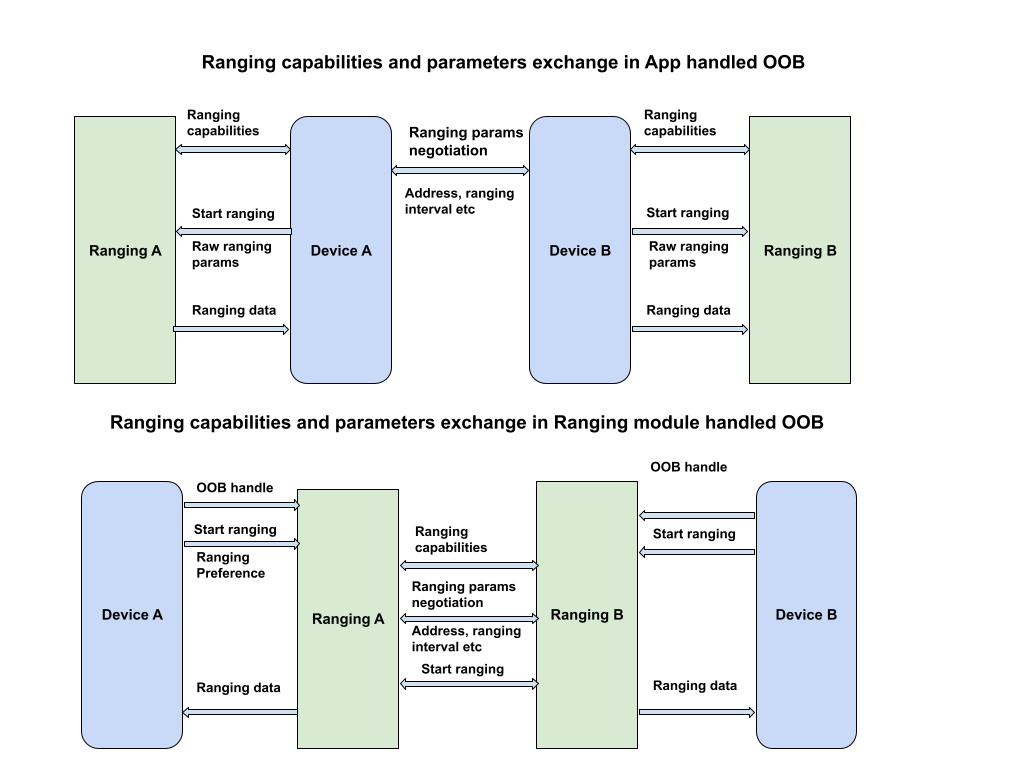
默认 OOB 实现
在此会话类型 (RANGING_SESSION_OOB) 中,测距模块会处理 OOB 协商,以启动测距会话。它会根据应用提供的测距偏好设置选择合适的形参,并根据两款设备都支持的技术来使用相应的技术。此会话类型使用标准化的 OOB specification。
测距模块仅定义用于与对等设备交互的 OOB 数据格式和序列。它不处理对等设备发现或连接建立。
自定义 OOB 实现
在此会话类型 (RANGING_SESSION_RAW) 中,应用会绕过测距模块的 OOB 流程,并处理自己的 OOB 协商和参数。这意味着应用必须确定对等设备支持哪些技术、协商测距参数,然后开始测距会话。
测距偏好设置
使用 RangingPreference 对象指定测距会话的所选参数。您可以执行以下操作:
- 设备角色。这表示设备将是发起方还是响应方。
- 测距配置。
RangingConfig对象用于指定测距会话类型以及启动测距会话所需的其他参数。 - 会话配置。
SessionConfig对象用于指定要对测距会话强制执行的参数,例如测量限制、传感器融合、地理围栏配置等。
测距权限
测距模块需要新的统一权限 (android.permission.RANGING) 才能访问当前和未来的所有测距技术。此权限位于 NEARBY_DEVICES_PERMISSIONS 列表中。
<uses-permission android:name="android.permission.RANGING" />
限制和局限
测距模块可能会因多种原因(包括以下原因)而限制测距:
- 第三方应用只能使用超宽带在后台进行测距,且只能在支持的设备上进行。不允许在后台与其他技术一起进行测距。
- 当设备已达到并发测距会话数量上限时,不允许进行测距。
- 由于电池、性能或内存等系统健康问题,测距功能可能会受到限制。
测距模块还存在以下已知限制:
- 测距模块仅支持将测距数据传递给超宽带的对等设备。对于其他技术,测距模块仅向发起方设备传送测距数据。
- 测距模块仅支持在原始测距模式下动态添加设备,且仅适用于超宽带。
- 对于默认 OOB 实现,测距模块不支持一对多超宽带会话。如果您传入多个设备句柄,模块会为每个支持超宽带的对等设备创建一个一对一会话。
执行测距会话
如需使用测距模块进行测距会话,请按以下步骤操作:
- 验证所有设备是否搭载 Android 16 或更高版本。
- 在应用清单中请求
android.permission.RANGING权限。 - 评估测距技术的功能和可用性。
- 发现用于测距操作的对等设备。
- 使用测距会话类型中所述的任一会话类型,建立用于带外交换的连接。
- 启动测距并持续获取测距数据。
- 终止测距会话。
以下代码示例演示了发起者角色和响应者角色的相应步骤。
Kotlin
class RangingApp {

    // Starts a ranging session on the initiator side.
    fun startRangingInitiator(
        context: Context,
        deviceHandle: DeviceHandle,
        executor: Executor,
        callback: RangingSessionCallback
    ) {

        // Get the RangingManager which is the entry point for ranging module.
        val manager = context.getSystemService(RangingManager::class.java)

        // Create a new RangingSession using the provided executor and callback.
        val session = manager.createRangingSession(executor, callback)

        // Create an OobInitiatorRangingConfig, which specifies the ranging parameters for
        // the initiator role.
        val config = OobInitiatorRangingConfig.Builder()
            .setFastestRangingInterval(Duration.ofMillis(100))
            .setSlowestRangingInterval(Duration.ofMillis(5000))
            .setRangingMode(RANGING_MODE_AUTO)
            .setSecurityLevel(SECURITY_LEVEL_BASIC)
            .addDeviceHandle(deviceHandle)
            .build()

        // Create a RangingPreference, which specifies the role (initiator) and
        // configuration for the ranging session.
        val preference =
            RangingPreference.Builder(DEVICE_ROLE_INITIATOR, config).build()

        // Start ranging session.
        session.start(preference)

        // If successful, the ranging data will be sent through callback#onResults

        // Stop ranging session
        session.stop()
    }

    // Starts a ranging session on the responder side.
    fun startRangingResponder(
        context: Context,
        deviceHandle: DeviceHandle,
        executor: Executor,
        callback: RangingSessionCallback
    ) {

        // Get the RangingManager which is the entry point for ranging module.
        val manager = context.getSystemService(RangingManager::class.java)

        // Create a new RangingSession using the provided executor and callback.
        val session = manager.createRangingSession(executor, callback)

        // Create an OobResponderRangingConfig, which specifies the ranging parameters for
        // the responder role.
        val config = OobResponderRangingConfig.Builder(deviceHandle).build()

        // Create a RangingPreference, which specifies the role (responder) and
        // configuration for the ranging session.
        val preference =
            RangingPreference.Builder(DEVICE_ROLE_RESPONDER, config).build()

        // Start the ranging session.
        session.start(preference)

        // Stop the ranging session
        session.stop()
    }
}
Java
public class RangingApp {

    // Starts a ranging session on the initiator side.
    void startRangingInitiator(Context context, DeviceHandle deviceHandle, Executor executor, RangingSessionCallback callback) {

        // Get the RangingManager which is the entry point for ranging module.
        RangingManager manager = context.getSystemService(RangingManager.class);

        // Create a new RangingSession using the provided executor and callback.
        RangingSession session = manager.createRangingSession(executor, callback);

        // Create an OobInitiatorRangingConfig, which specifies the ranging parameters for
        // the initiator role.
        OobInitiatorRangingConfig config = new OobInitiatorRangingConfig.Builder()
                .setFastestRangingInterval(Duration.ofMillis(100))
                .setSlowestRangingInterval(Duration.ofMillis(5000))
                .setRangingMode(RANGING_MODE_AUTO)
                .setSecurityLevel(SECURITY_LEVEL_BASIC)
                .addDeviceHandle(deviceHandle)
                .build();

        // Create a RangingPreference, which specifies the role (initiator) and
        // configuration for the ranging session.
        RangingPreference preference =
                new RangingPreference.Builder(DEVICE_ROLE_INITIATOR, config).build();

        // Start ranging session.
        session.start(preference);

        // If successful, the ranging data will be sent through callback#onResults

        // Stop ranging session
        session.stop();

    }

    // Starts a ranging session on the responder side.
    void startRangingResponder(Context context,  DeviceHandle deviceHandle, Executor executor, RangingSessionCallback callback) {

        // Get the RangingManager which is the entry point for ranging module.
        RangingManager manager = context.getSystemService(RangingManager.class);

        // Create a new RangingSession using the provided executor and callback.
        RangingSession session = manager.createRangingSession(executor, callback);

        // Create an OobResponderRangingConfig, which specifies the ranging parameters for
        // the responder role.
        OobResponderRangingConfig config = new OobResponderRangingConfig.Builder(  deviceHandle).build();

        // Create a RangingPreference, which specifies the role (responder) and
        // configuration for the ranging session.
        RangingPreference preference =
                new RangingPreference.Builder(DEVICE_ROLE_RESPONDER, config).build();

        // Start the ranging session.
        session.start(preference);

        // Stop the ranging session
        session.stop();
    }
}
UWB 与 iOS 设备的互操作性
测距模块支持使用超宽带 (UWB) 与 iOS 设备进行互操作。如需使用 iOS 设备进行测距,您必须使用自定义 OOB 实现,并使用与 Apple Nearby Interaction Accessory Protocol 相匹配的特定参数来配置测距会话。如需查看参考信息,请参阅示例应用。
创建 RangingPreference 时,请使用 RawRangingDevice 和 UwbRangingParams 指定配置。以下参数对于实现 iOS 互操作性至关重要:
- 配置 ID:使用
UwbRangingParams.CONFIG_UNICAST_DS_TWR。 - 会话密钥信息:提供包含供应商 ID 和静态 STS IV 的字节数组。
- 复杂信道:设置信道号和前导码索引,以与 iOS 设备的配置相匹配。
以下代码段演示了如何为与 iOS 响应方测距的发起方设备创建 RangingPreference:
Kotlin
// Create UwbRangingParams with iOS-specific configuration
val uwbRangingParams = UwbRangingParams.Builder(
    sessionId,
    UwbRangingParams.CONFIG_UNICAST_DS_TWR,
    sourceAddress,
    destinationAddress
)
    .setComplexChannel(
        UwbComplexChannel.Builder()
            .setChannel(channelNumber)
            .setPreambleIndex(preambleIndex)
            .build()
    )
    .setRangingUpdateRate(updateRate)
    .setSessionKeyInfo(sessionKeyInfo) // Vendor ID + STS IV
    .setSlotDuration(slotDuration)
    .build()

// Create RawRangingDevice
val rawRangingDevice = RawRangingDevice.Builder()
    .setRangingDevice(RangingDevice.Builder().build())
    .setUwbRangingParams(uwbRangingParams)
    .build()

// Create SessionConfig
val sessionConfig = SessionConfig.Builder()
    .setAngleOfArrivalNeeded(true)
    .setDataNotificationConfig(DataNotificationConfig.Builder()
        .setNotificationConfigType(DataNotificationConfig.NOTIFICATION_CONFIG_ENABLE)
        .build())
    .build()

// Create RangingPreference for the initiator
val preference = RangingPreference.Builder(
    RangingPreference.DEVICE_ROLE_INITIATOR,
    RawInitiatorRangingConfig.Builder()
        .addRawRangingDevice(rawRangingDevice)
        .build()
)
    .setSessionConfig(sessionConfig)
    .build()
Java
// Create UwbRangingParams with iOS-specific configuration
UwbRangingParams uwbRangingParams = new UwbRangingParams.Builder(
        sessionId,
        UwbRangingParams.CONFIG_UNICAST_DS_TWR,
        sourceAddress,
        destinationAddress)
        .setComplexChannel(new UwbComplexChannel.Builder()
                .setChannel(channelNumber)
                .setPreambleIndex(preambleIndex)
                .build())
        .setRangingUpdateRate(updateRate)
        .setSessionKeyInfo(sessionKeyInfo) // Vendor ID + STS IV
        .setSlotDuration(slotDuration)
        .build();

// Create RawRangingDevice
RawRangingDevice rawRangingDevice = new RawRangingDevice.Builder()
        .setRangingDevice(new RangingDevice.Builder().build())
        .setUwbRangingParams(uwbRangingParams)
        .build();

// Create SessionConfig
SessionConfig sessionConfig = new SessionConfig.Builder()
        .setAngleOfArrivalNeeded(true)
        .setDataNotificationConfig(new DataNotificationConfig.Builder()
                .setNotificationConfigType(DataNotificationConfig.NOTIFICATION_CONFIG_ENABLE)
                .build())
        .build();

// Create RangingPreference for the initiator
RangingPreference preference = new RangingPreference.Builder(
        RangingPreference.DEVICE_ROLE_INITIATOR,
        new RawInitiatorRangingConfig.Builder()
                .addRawRangingDevice(rawRangingDevice)
                .build())
        .setSessionConfig(sessionConfig)
        .build();
UWB 下行链路 TDoA API
对于 UWB DL-TDoA API,请参阅 Android 17 新功能。
示例应用
如需查看有关如何使用测距模块的端到端示例,请参阅 AOSP 中的示例应用。此示例应用涵盖了 Ranging 模块支持的所有测距技术,并包含两种受支持的会话类型的流程。
UWB 与 iOS 设备的互操作性
Android 示例应用支持与 iOS 示例应用一起启动 UWB 测距会话。
