

Android 16에는 개발자를 위한 훌륭한 새로운 기능과 API가 도입되었습니다. 다음 섹션에서는 관련 API를 시작하는 데 도움이 되도록 이러한 기능을 요약합니다.
새로운 API, 수정된 API, 삭제된 API에 관한 자세한 목록은 API 차이점 보고서를 참고하세요. 새로운 API에 관한 자세한 내용은 Android API 참조를 방문하세요. 새로운 API가 강조 표시되어 쉽게 확인 가능합니다.또한 플랫폼 변경사항이 앱에 영향을 미칠 수 있는 영역을 검토해야 합니다. 자세한 내용은 다음 페이지를 참조하세요.
핵심 기능
Android에는 Android 시스템의 핵심 기능을 확장하는 새로운 API가 포함되어 있습니다.
2025년 Android API 출시 2회
- This preview is for the next major release of Android with a planned launch in Q2 of 2025. This release is similar to all of our API releases in the past, where we can have planned behavior changes that are often tied to a targetSdkVersion.
- We're planning the major release a quarter earlier (Q2 rather than Q3 in prior years) to better align with the schedule of device launches across our ecosystem, so more devices can get the major release of Android sooner. With the major release coming in Q2, you'll need to do your annual compatibility testing a few months earlier than in previous years to make sure your apps are ready.
- We plan to have another release in Q4 of 2025 which also will include new developer APIs. The Q2 major release will be the only release in 2025 to include planned behavior changes that could affect apps.
In addition to new developer APIs, the Q4 minor release will pick up feature updates, optimizations, and bug fixes; it will not include any app-impacting behavior changes.

We'll continue to have quarterly Android releases. The Q1 and Q3 updates in-between the API releases will provide incremental updates to help ensure continuous quality. We're actively working with our device partners to bring the Q2 release to as many devices as possible.
Using new APIs with major and minor releases
Guarding a code block with a check for API level is done today using
the SDK_INT constant with
VERSION_CODES. This will continue
to be supported for major Android releases.
if (SDK_INT >= VERSION_CODES.BAKLAVA) {
  // Use APIs introduced in Android 16
}
The new SDK_INT_FULL
constant can be used for API checks against both major and minor versions with
the new VERSION_CODES_FULL
enumeration.
if (SDK_INT_FULL >= VERSION_CODES_FULL.[MAJOR or MINOR RELEASE]) {
  // Use APIs introduced in a major or minor release
}
You can also use the
Build.getMinorSdkVersion()
method to get just the minor SDK version.
val minorSdkVersion = Build.getMinorSdkVersion(VERSION_CODES_FULL.BAKLAVA)
These APIs have not yet been finalized and are subject to change, so please send us feedback if you have any concerns.
사용자 환경 및 시스템 UI
Android 16은 앱 개발자와 사용자에게 필요에 맞게 기기를 구성할 수 있는 더 많은 제어 기능과 유연성을 제공합니다.
진행 상황 중심 알림
Android 16 引入了以进度为中心的通知,可帮助用户顺畅地跟踪用户发起的端到端历程。
Notification.ProgressStyle 是一种新的通知样式,可让您创建以进度为中心的通知。主要用例包括共享车辆、送货和导航。在 Notification.ProgressStyle 类中,您可以使用点和细分来表示用户体验历程中的状态和里程碑。
자세한 내용은 진행률 중심 알림 문서 페이지를 참고하세요.


뒤로 탐색 예측 업데이트
Android 16에서는 홈으로 돌아가기 애니메이션과 같은 동작 탐색에서 뒤로 탐색 예측 시스템 애니메이션을 사용 설정하는 데 도움이 되는 새로운 API를 추가합니다. 새로운 PRIORITY_SYSTEM_NAVIGATION_OBSERVER에 onBackInvokedCallback를 등록하면 앱이 일반 뒤로 탐색 흐름에 영향을 주지 않고 시스템이 뒤로 탐색을 처리할 때마다 일반 onBackInvoked 호출을 수신할 수 있습니다.
Android 16에서는 finishAndRemoveTaskCallback() 및 moveTaskToBackCallback도 추가합니다. 이러한 콜백을 OnBackInvokedDispatcher에 등록하면 시스템은 뒤로 동작이 호출될 때 특정 동작을 트리거하고 상응하는 사전 애니메이션을 재생할 수 있습니다.
더 풍부한 햅틱
Android는 처음부터 햅틱 액추에이터 제어를 노출했습니다.
Android 11에서는 기기 정의 시맨틱 프리미티브의 VibrationEffect.Compositions를 통해 고급 액추에이터가 지원할 수 있는 더 복잡한 햅틱 효과에 대한 지원을 추가했습니다.
Android 16에는 앱이 햅틱 효과의 진폭과 주파수 곡선을 정의하면서 기기 기능 간의 차이를 추상화할 수 있는 햅틱 API가 추가되었습니다.
개발자 생산성 및 도구
생산성을 개선하기 위한 Google의 노력은 대부분 Android 스튜디오, Jetpack Compose, Android Jetpack 라이브러리와 같은 도구를 중심으로 이루어지지만, Google은 항상 플랫폼에서 개발자의 비전을 실현하는 데 도움이 되는 방법을 찾고 있습니다.
라이브 배경화면의 콘텐츠 처리
在 Android 16 中,动态壁纸框架将获得一个新的 content API,以应对由用户驱动的动态壁纸带来的挑战。目前,包含用户提供的内容的实时壁纸需要复杂的服务专用实现。Android 16 引入了 WallpaperDescription 和 WallpaperInstance。借助 WallpaperDescription,您可以识别同一服务中的动态壁纸的不同实例。例如,如果某张壁纸同时在主屏幕和锁定屏幕上显示,则这两种情况下显示的内容可能各不相同。壁纸选择器和 WallpaperManager 会使用此元数据更好地向用户呈现壁纸,从而简化创建多样化个性化动态壁纸体验的过程。
성능 및 배터리
Android 16에는 앱에 관한 유용한 정보를 수집하는 데 도움이 되는 API가 도입되었습니다.
시스템 트리거 프로파일링
ProfilingManager가 Android 15에 추가되어 앱이 현장의 공개 기기에서 Perfetto를 사용하여 프로파일링 데이터 수집을 요청할 수 있습니다.
그러나 이 프로파일링은 앱에서 시작해야 하므로 시작 또는 ANR과 같은 중요한 흐름은 앱에서 캡처하기 어렵거나 불가능합니다.
이를 위해 Android 16에서는 ProfilingManager에 시스템 트리거 프로파일링을 도입합니다. 앱은 콜드 스타트 reportFullyDrawn 또는 ANR과 같은 특정 트리거의 트레이스를 수신하는 데 관심을 등록할 수 있으며, 그러면 시스템이 앱을 대신하여 트레이스를 시작하고 중지합니다. 트레이스가 완료되면 결과가 앱의 데이터 디렉터리에 전송됩니다.
ApplicationStartInfo의 시작 구성요소
ApplicationStartInfo was added in Android
15, allowing an app to see reasons
for process start, start type, start times, throttling, and other useful
diagnostic data. Android 16 adds
getStartComponent()
to distinguish what component type triggered the start, which can be helpful for
optimizing the startup flow of your app.
작업 검사 개선
JobScheduler#getPendingJobReason() API 会返回作业可能处于待处理状态的原因。不过,作业处于待处理状态的原因可能有多种。
在 Android 16 中,我们引入了一个新 API JobScheduler#getPendingJobReasons(int jobId),该 API 会返回作业处于待处理状态的多种原因,包括开发者设置的显式约束条件和系统设置的隐式约束条件。
我们还引入了 JobScheduler#getPendingJobReasonsHistory(int jobId),用于返回最新约束条件更改的列表。
我们建议您使用该 API 来调试作业可能无法执行的原因,尤其是在您发现某些任务的成功率降低或某些作业完成延迟存在 bug 时。例如,未能在后台更新微件,或在应用启动之前未能调用预加载作业。
这还有助于您更好地了解某些作业是否因系统定义的约束条件而无法完成,而不是因明确设置的约束条件而无法完成。
자동 조절 새로고침 빈도
Adaptive refresh rate (ARR), introduced in Android 15, enables the display refresh rate on supported hardware to adapt to the content frame rate using discrete VSync steps. This reduces power consumption while eliminating the need for potentially jank-inducing mode-switching.
Android 16 introduces hasArrSupport() and
getSuggestedFrameRate(int) while restoring
getSupportedRefreshRates() to make it easier for your apps to take
advantage of ARR. RecyclerView
1.4 internally supports ARR when it is settling from a fling or
smooth scroll, and we're continuing our work to add ARR
support into more Jetpack libraries. This frame rate article covers
many of the APIs you can use to set the frame rate so that your app can directly
use ARR.
ADPF의 헤드룸 API
SystemHealthManager 引入了 getCpuHeadroom 和 getGpuHeadroom API,旨在为游戏和资源密集型应用提供可用 CPU 和 GPU 资源的估算值。通过这些方法,您可以评估应用或游戏如何以最佳方式改善系统运行状况,尤其是在与用于检测热节流的其他 Android 动态性能框架 (ADPF) API 搭配使用时。
在受支持的设备上使用 CpuHeadroomParams 和 GpuHeadroomParams,您可以自定义用于计算余量的时间范围,并在平均资源可用性或最低资源可用性之间进行选择。这有助于您相应地减少 CPU 或 GPU 资源用量,从而提升用户体验并延长电池续航时间。
접근성
Android 16에는 모든 사용자에게 앱을 제공하는 데 도움이 되는 새로운 Accessibility API와 기능이 추가되었습니다.
접근성 API 개선
Android 16 adds additional APIs to enhance UI semantics that help improve consistency for users that rely on accessibility services, such as TalkBack.
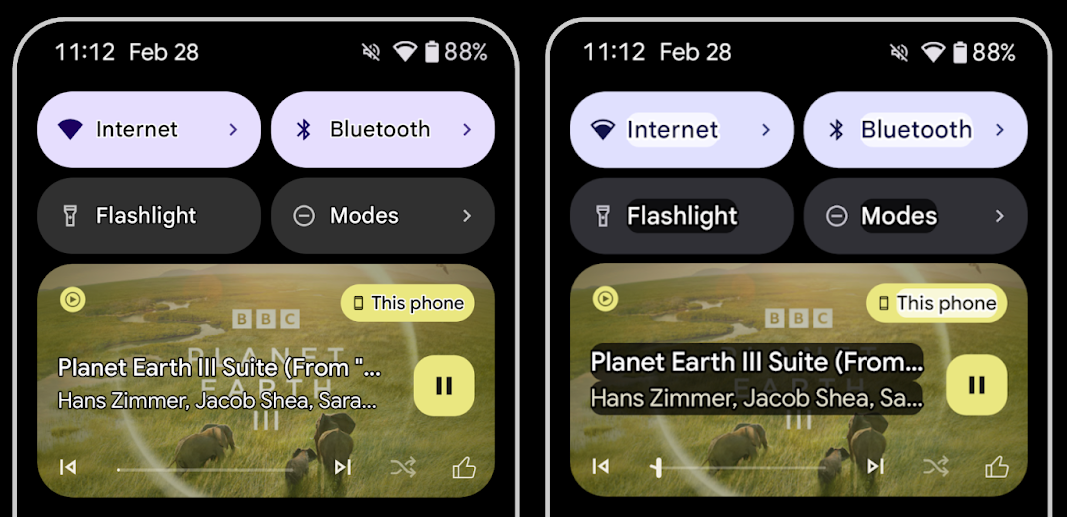
Outline text for maximum text contrast
Users with low vision often have reduced contrast sensitivity, making it challenging to distinguish objects from their backgrounds. To help these users, Android 16 introduces outline text, replacing high contrast text, which draws a larger contrasting area around text to greatly improve legibility.
Android 16 contains new AccessibilityManager APIs to let
your apps check or register a listener to
see if this mode is enabled. This is primarily for UI Toolkits like Compose to
offer a similar visual experience. If you maintain a UI Toolkit library or your
app performs custom text rendering that bypasses the
android.text.Layout class then you can use this to know
when outline text is enabled.
Duration added to TtsSpan
Android 16 extends TtsSpan with a TYPE_DURATION,
consisting of ARG_HOURS, ARG_MINUTES,
and ARG_SECONDS. This lets you directly annotate time
duration, ensuring accurate and consistent text-to-speech output with services
like TalkBack.
Support elements with multiple labels
Android currently allows UI elements to derive their accessibility label from
another, and now offers the ability for multiple labels to be associated, a
common scenario in web content. By introducing a list-based API within
AccessibilityNodeInfo, Android can directly support these
multi-label relationships. As part of this change, we've deprecated
AccessibilityNodeInfo#setLabeledBy and
#getLabeledBy in favor of
#addLabeledBy, #removeLabeledBy, and
#getLabeledByList.
Improved support for expandable elements
Android 16 adds accessibility APIs that allow you to convey the expanded or
collapsed state of interactive elements, such as menus and expandable lists. By
setting the expanded state using setExpandedState and
dispatching TYPE_WINDOW_CONTENT_CHANGED AccessibilityEvents
with a CONTENT_CHANGE_TYPE_EXPANDED content change type,
you can ensure that screen readers like TalkBack announce
state changes, providing a more intuitive and inclusive user experience.
Indeterminate ProgressBars
Android 16 adds RANGE_TYPE_INDETERMINATE, giving a way for
you to expose RangeInfo for both determinate and
indeterminate ProgressBar widgets, allowing services like
TalkBack to more consistently provide feedback for progress
indicators.
Tri-state CheckBox
The new AccessibilityNodeInfo
getChecked and setChecked(int)
methods in Android 16 now support a "partially checked" state in addition to
"checked" and "unchecked." This replaces the deprecated boolean
isChecked and setChecked(boolean).
Supplemental descriptions
When an accessibility service describes a ViewGroup, it
combines content labels from its child views. If you provide a
contentDescription for the ViewGroup, accessibility services assume you are
also overriding the description of non-focusable child views. This can be
problematic if you want to label things like a drop-down (for example, "Font
Family") while preserving the current selection for accessibility (for example,
"Roboto"). Android 16 adds setSupplementalDescription so
you can provide text that provides information about a ViewGroup without
overriding information from its children.
Required form fields
Android 16 adds setFieldRequired to
AccessibilityNodeInfo so apps can tell an accessibility
service that input to a form field is required. This is an important scenario
for users filling out many types of forms, even things as simple as a required
terms and conditions checkbox, helping users to consistently identify and
quickly navigate between required fields.
LEA 보청기를 사용한 음성 통화 시 휴대전화를 마이크 입력으로 사용
Android 16 adds the capability for users of LE Audio hearing aids to switch between the built-in microphones on the hearing aids and the microphone on their phone for voice calls. This can be helpful in noisy environments or other situations where the hearing aid's microphones might not perform well.
LEA 보청기의 주변 볼륨 제어
Android 16 新增了一项功能,可让 LE Audio 助听器用户调节助听器麦克风接收的环境声音的音量。在背景噪音过大或过小的情况下,这可能会很有用。
카메라
Android 16은 전문 카메라 사용자를 위한 지원을 강화하여 하이브리드 자동 노출과 정밀한 색상 온도 및 색조 조정을 지원합니다. 새로운 야간 모드 표시기를 사용하면 앱에서 야간 모드 카메라 세션으로 전환할 시점을 알 수 있습니다. 새로운 Intent 작업을 통해 모션 사진을 더 쉽게 캡처할 수 있으며, HEIC 인코딩 및 ISO 21496-1 초안 표준의 새로운 매개변수를 지원하여 UltraHDR 이미지를 계속 개선하고 있습니다.
하이브리드 자동 노출
Android 16 向 Camera2 添加了新的混合自动曝光模式,让您可以手动控制曝光的特定方面,同时让自动曝光 (AE) 算法处理其余部分。您可以控制 ISO + AE 和曝光时间 + AE,与当前方法(您要么完全手动控制,要么完全依赖自动曝光)相比,可提供更大的灵活性。
fun setISOPriority() {
    // ... (Your existing code before the snippet) ...

    val availablePriorityModes = mStaticInfo.characteristics.get(
        CameraCharacteristics.CONTROL_AE_AVAILABLE_PRIORITY_MODES
    )

    // ... (Your existing code between the snippets) ...

    // Turn on AE mode to set priority mode
    reqBuilder.set(
        CaptureRequest.CONTROL_AE_MODE,
        CameraMetadata.CONTROL_AE_MODE_ON
    )
    reqBuilder.set(
        CaptureRequest.CONTROL_AE_PRIORITY_MODE,
        CameraMetadata.CONTROL_AE_PRIORITY_MODE_SENSOR_SENSITIVITY_PRIORITY
    )
    reqBuilder.set(
        CaptureRequest.SENSOR_SENSITIVITY,
        TEST_SENSITIVITY_VALUE
    )
    val request: CaptureRequest = reqBuilder.build()

    // ... (Your existing code after the snippet) ...
}
정밀한 색상 온도 및 색조 조정
Android 16 adds camera support for fine color temperature and tint adjustments
to better support professional video recording applications. In previous Android
versions, you could control white balance settings through
CONTROL_AWB_MODE, which contains options limited to a
preset list, such as Incandescent,
Cloudy, and Twilight. The
COLOR_CORRECTION_MODE_CCT enables the use of
COLOR_CORRECTION_COLOR_TEMPERATURE and
COLOR_CORRECTION_COLOR_TINT for precise adjustments of
white balance based on the correlated color temperature.
fun setCCT() {
    // ... (Your existing code before this point) ...

    val colorTemperatureRange: Range<Int> =
        mStaticInfo.characteristics[CameraCharacteristics.COLOR_CORRECTION_COLOR_TEMPERATURE_RANGE]

    // Set to manual mode to enable CCT mode
    reqBuilder[CaptureRequest.CONTROL_AWB_MODE] = CameraMetadata.CONTROL_AWB_MODE_OFF
    reqBuilder[CaptureRequest.COLOR_CORRECTION_MODE] = CameraMetadata.COLOR_CORRECTION_MODE_CCT
    reqBuilder[CaptureRequest.COLOR_CORRECTION_COLOR_TEMPERATURE] = 5000
    reqBuilder[CaptureRequest.COLOR_CORRECTION_COLOR_TINT] = 30

    val request: CaptureRequest = reqBuilder.build()

    // ... (Your existing code after this point) ...
}
The following examples show how a photo would look after applying different color temperature and tint adjustments:


카메라 야간 모드 장면 감지
To help your app know when to switch to and from a night mode camera session,
Android 16 adds EXTENSION_NIGHT_MODE_INDICATOR. If
supported, it's available in the CaptureResult within
Camera2.
This is the API we briefly mentioned as coming soon in the How Instagram enabled users to take stunning low light photos blog post. That post is a practical guide on how to implement night mode together with a case study that links higher-quality in-app night mode photos with an increase in the number of photos shared from the in-app camera.
모션 사진 캡처 인텐트 작업
Android 16 adds standard Intent actions —
ACTION_MOTION_PHOTO_CAPTURE, and
ACTION_MOTION_PHOTO_CAPTURE_SECURE — which request that
the camera application capture a motion photo and return
it.
You must either pass an extra EXTRA_OUTPUT to control
where the image will be written, or a Uri through
Intent.setClipData(ClipData). If you don't set a
ClipData, it will be copied there for you when calling
Context.startActivity(Intent).
울트라 HDR 이미지 자동 개선 기능

Android 16 continues our work to deliver dazzling image quality with UltraHDR
images. It adds support for UltraHDR images in the HEIC file
format. These images will get ImageFormat type
HEIC_ULTRAHDR and will contain an embedded gainmap similar
to the existing UltraHDR JPEG format. We're working on AVIF support for UltraHDR
as well, so stay tuned.
In addition, Android 16 implements additional parameters in UltraHDR from the ISO 21496-1 draft standard, including the ability to get and set the colorspace that gainmap math should be applied in, as well as support for HDR encoded base images with SDR gainmaps.
그래픽
Android 16에는 AGSL을 사용한 맞춤 그래픽 효과와 같은 최신 그래픽 개선사항이 포함되어 있습니다.
AGSL을 사용한 맞춤 그래픽 효과
Android 16에서는 RuntimeColorFilter 및 RuntimeXfermode를 추가하여 임곗값, 세피아, 색조 채도와 같은 복잡한 효과를 작성하고 그리기 호출에 적용할 수 있습니다. Android 13부터 AGSL을 사용하여 Shader를 확장하는 맞춤 RuntimeShaders를 만들 수 있었습니다. 새 API는 이를 반영하여 ColorFilter를 확장하는 AGSL 기반 RuntimeColorFilter와 소스 및 대상 픽셀 간에 AGSL 기반 맞춤 컴포지션 및 블렌딩을 구현할 수 있는 Xfermode 효과를 추가합니다.
private val thresholdEffectString = """
    uniform half threshold;

    half4 main(half4 c) {
        half luminosity = dot(c.rgb, half3(0.2126, 0.7152, 0.0722));
        half bw = step(threshold, luminosity);
        return bw.xxx1 * c.a;
    }"""

fun setCustomColorFilter(paint: Paint) {
   val filter = RuntimeColorFilter(thresholdEffectString)
   filter.setFloatUniform(0.5);
   paint.colorFilter = filter
}
연결
Android 16은 앱이 통신 및 무선 기술의 최신 발전에 액세스할 수 있도록 플랫폼을 업데이트합니다.
보안이 강화된 범위 측정
Android 16 adds support for robust security features in Wi-Fi location on supported devices with Wi-Fi 6's 802.11az, allowing apps to combine the higher accuracy, greater scalability, and dynamic scheduling of the protocol with security enhancements including AES-256-based encryption and protection against MITM attacks. This allows it to be used more safely in proximity use cases, such as unlocking a laptop or a vehicle door. 802.11az is integrated with the Wi-Fi 6 standard, leveraging its infrastructure and capabilities for wider adoption and easier deployment.
일반 범위 지정 API
Android 16 包含新的 RangingManager,它提供了在受支持的硬件上确定本地设备与远程设备之间的距离和角度的方法。RangingManager 支持使用各种测距技术,例如 BLE 信道声音探测、基于 BLE RSSI 的测距、超宽带和 Wi-Fi 往返时间。
호환 기기 관리자 기기 감지
In Android 16, new APIs are being introduced for binding your companion app
service. Service will be bound when BLE is in range and Bluetooth is connected
and service will be unbound when BLE is out of range or Bluetooth is
disconnected. App will receives a new
'onDevicePresenceEvent()' callback based on various
of DevicePresenceEvent.
More details can be found in
'startObservingDevicePresence(ObservingDevicePresenceRequest)'.
미디어
Android 16에는 미디어 환경을 개선하는 다양한 기능이 포함되어 있습니다.
사진 선택 도구 개선사항
The photo picker provides a safe, built-in way for users to grant your app access to selected images and videos from both local and cloud storage, instead of their entire media library. Using a combination of Modular System Components through Google System Updates and Google Play services, it's supported back to Android 4.4 (API level 19). Integration requires just a few lines of code with the associated Android Jetpack library.
Android 16 includes the following improvements to the photo picker:
- Embedded photo picker: New APIs that enable apps to embed the photo picker into their view hierarchy. This allows it to feel like a more integrated part of the app while still leveraging the process isolation that allows users to select media without the app needing overly broad permissions. To maximize compatibility across platform versions and simplify your integration, you'll want to use the forthcoming Android Jetpack library if you want to integrate the embedded photo picker.
- Cloud search in photo picker: New APIs that enable searching from the cloud media provider for the Android photo picker. Search functionality in the photo picker is coming soon.
고급 전문가용 동영상
Android 16 引入了对高级专业视频 (APV) 编解码器的支持,该编解码器专为专业级高品质视频录制和后期制作而设计。
APV 编解码器标准具有以下特点:
- 感知上无损的视频画质(接近原始视频画质)
- 复杂度低且吞吐量高的仅帧内编码(无像素域预测),以更好地支持编辑工作流
- 支持高比特率范围(最高几十 Gbps),适用于 2K、4K 和 8K 分辨率内容,由轻量级熵编码方案实现
- 帧平铺,用于沉浸式内容和启用并行编码和解码
- 支持各种色度采样格式和位深
- 支持多次解码和重新编码,且不会严重降低视觉质量
- 支持多视图视频和辅助视频,例如深度、Alpha 和预览
- 支持 HDR10/10+ 和用户定义的元数据
OpenAPV 项目提供了 APV 的参考实现。Android 16 将实现对 APV 422-10 配置文件的支持,该配置文件提供 YUV 422 色彩采样以及 10 位编码,并且目标比特率最高可达 2 Gbps。
개인 정보 보호
Android 16에는 앱 개발자가 사용자 개인 정보를 보호하는 데 도움이 되는 다양한 기능이 포함되어 있습니다.
헬스 커넥트 업데이트
Health Connect adds ACTIVITY_INTENSITY, a data type defined according to World
Health Organization guidelines around moderate and vigorous activity. Each
record requires the start time, the end time, and whether the activity intensity
is moderate or vigorous.
Health Connect also contains updated APIs supporting medical records. This allows apps to read and write medical records in FHIR format with explicit user consent.
Android의 개인 정보 보호 샌드박스
Android 16에는 사용자가 자신의 개인 정보가 보호된다는 사실을 알 수 있는 기술을 개발하기 위한 Google의 지속적인 노력의 일환으로 Android의 개인 정보 보호 샌드박스의 최신 버전이 통합되어 있습니다. Android의 개인 정보 보호 샌드박스 개발자 베타 프로그램에 대한 자세한 내용은 웹사이트를 참고하세요. SDK가 제공하는 앱과 별도의 전용 런타임 환경에서 실행되도록 허용하여 사용자 데이터 수집 및 공유를 더 강력하게 보호하는 SDK 런타임을 확인하세요.
보안
Android 16에는 앱의 보안을 강화하고 앱의 데이터를 보호하는 데 도움이 되는 기능이 포함되어 있습니다.
키 공유 API
Android 16에는 Android 키 저장소 키에 대한 액세스 권한을 다른 앱과 공유하는 것을 지원하는 API가 추가되었습니다. 새 KeyStoreManager 클래스는 앱 uid의 키에 대한 액세스 권한 부여 및 취소를 지원하며 앱이 공유 키에 액세스할 수 있는 API를 포함합니다.
기기 폼 팩터
Android 16은 앱이 Android의 폼 팩터를 최대한 활용할 수 있도록 지원합니다.
TV용 표준화된 화질 및 음질 프레임워크
Android 16의 새로운 MediaQuality 패키지는 오디오 및 사진 프로필, 하드웨어 관련 설정에 액세스하기 위한 표준화된 API 모음을 노출합니다. 이를 통해 스트리밍 앱은 프로필을 쿼리하고 미디어에 동적으로 적용할 수 있습니다.
- 더 넓은 다이나믹 레인지로 마스터링된 영화는 어두운 부분의 미묘한 디테일을 확인하고 주변광에 맞게 조정하려면 더 높은 색상 정확도가 필요하므로 밝기보다 색상 정확도를 선호하는 프로필이 적합할 수 있습니다.
- 라이브 스포츠 이벤트는 종종 협소한 다이내믹 레인지로 마스터링되지만, 햇빛이 비치는 낮에 시청되는 경우가 많으므로 색상 정확성보다 밝기를 선호하는 프로필을 사용하면 더 나은 결과를 얻을 수 있습니다.
- 완전히 양방향인 콘텐츠는 지연 시간을 줄이기 위해 최소한의 처리가 필요하고 프레임 속도가 더 높아야 하므로 많은 TV에 게임 프로필이 제공됩니다.
이 API를 사용하면 앱이 프로필 간에 전환하고 사용자는 지원되는 TV를 콘텐츠에 가장 적합하게 조정할 수 있습니다.
다국어 지원
Android 16에는 기기를 다양한 언어로 사용할 때 사용자 환경을 보완하는 기능이 추가되었습니다.
세로 텍스트
Android 16은 텍스트를 세로로 렌더링하고 측정하기 위한 하위 수준 지원을 추가하여 라이브러리 개발자를 위한 기본적인 세로 쓰기 지원을 제공합니다. 이는 일반적으로 세로 쓰기 시스템을 사용하는 일본어와 같은 언어에 특히 유용합니다. Paint 클래스에 새로운 플래그인 VERTICAL_TEXT_FLAG가 추가되었습니다. 이 플래그가 Paint.setFlags를 사용하여 설정되면 Paint의 텍스트 측정 API는 가로 진행 대신 세로 진행을 보고하고 Canvas는 텍스트를 세로로 그립니다.
val text = "「春は、曙。」"
Box(
    Modifier.padding(innerPadding).background(Color.White).fillMaxSize().drawWithContent {
        drawIntoCanvas { canvas ->
            val paint = Paint().apply { textSize = 64.sp.toPx() }
            // Draw text vertically
            paint.flags = paint.flags or VERTICAL_TEXT_FLAG
            val height = paint.measureText(text)
            canvas.nativeCanvas.drawText(
                text,
                0,
                text.length,
                size.width / 2,
                (size.height - height) / 2,
                paint
            )
        }
    }
) {}
측정 시스템 맞춤설정
이제 사용자는 설정의 지역 설정에서 측정 시스템을 맞춤설정할 수 있습니다. 사용자 환경설정은 언어 코드의 일부로 포함되므로 ACTION_LOCALE_CHANGED에 BroadcastReceiver를 등록하여 지역 설정이 변경될 때 언어 구성 변경을 처리할 수 있습니다.
형식 지정자를 사용하면 로컬 환경에 맞게 조정할 수 있습니다. 예를 들어 영어 (미국)로 '0.5인치'는 휴대전화를 영어 (덴마크)로 설정했거나 측정 시스템 환경설정으로 미터법을 사용하는 영어 (미국)로 휴대전화를 사용하는 사용자에게는 '12,7mm'입니다.
이러한 설정을 찾으려면 설정 앱을 열고 시스템 > 언어 및 지역으로 이동하세요.