

Em dispositivos com Android 8.0 (nível 26 da API) ou versões mais recentes, as telas de início que permitem criar atalhos fixados também permitem fixar widgets na tela inicial. Assim como os atalhos fixados, esses widgets fixados oferecem aos usuários acesso a tarefas específicas no seu app e podem ser adicionados à tela inicial diretamente do app, conforme mostrado no vídeo a seguir.
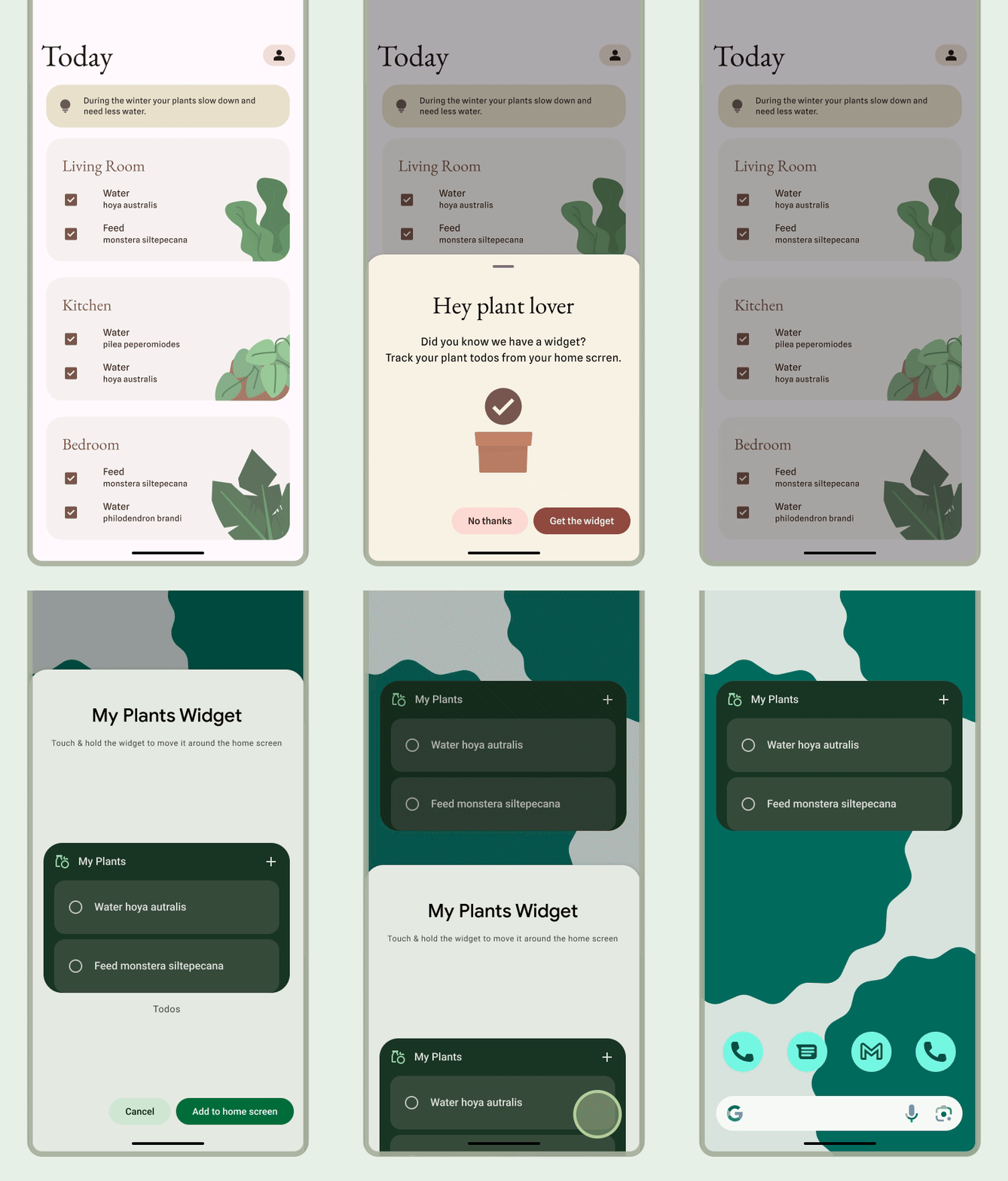
Permitir que os usuários fixem um widget
No seu app, é possível criar uma solicitação para o sistema fixar um widget em uma tela de início compatível realizando as seguintes etapas:
Chame o método
requestPinAppWidget(), conforme mostrado no snippet de código a seguir:
Kotlin
val appWidgetManager = AppWidgetManager.getInstance(context)
val myProvider = ComponentName(context, ExampleAppWidgetProvider::class.java)

if (appWidgetManager.isRequestPinAppWidgetSupported()) {
    // Create the PendingIntent object only if your app needs to be notified
    // when the user chooses to pin the widget. Note that if the pinning
    // operation fails, your app isn't notified. This callback receives the ID
    // of the newly pinned widget (EXTRA_APPWIDGET_ID).
    val successCallback = PendingIntent.getBroadcast(
            /* context = */ context,
            /* requestCode = */ 0,
            /* intent = */ Intent(...),
            /* flags = */ PendingIntent.FLAG_UPDATE_CURRENT)

    appWidgetManager.requestPinAppWidget(myProvider, null, successCallback)
}
Java
AppWidgetManager appWidgetManager = AppWidgetManager.getInstance(context);
ComponentName myProvider = new ComponentName(context, ExampleAppWidgetProvider.class);

if (appWidgetManager.isRequestPinAppWidgetSupported()) {
    // Create the PendingIntent object only if your app needs to be notified
    // when the user chooses to pin the widget. Note that if the pinning
    // operation fails, your app isn't notified. This callback receives the ID
    // of the newly pinned widget (EXTRA_APPWIDGET_ID).
    PendingIntent successCallback = PendingIntent.getBroadcast(
            /* context = */ context,
            /* requestCode = */ 0,
            /* intent = */ new Intent(...),
            /* flags = */ PendingIntent.FLAG_UPDATE_CURRENT);

    appWidgetManager.requestPinAppWidget(myProvider, null, successCallback);
}
Orientações de design relacionadas
Os usuários descobrem e adicionam seu widget pelo seletor de widgets ou no app quando a funcionalidade do widget é mais relevante. Para mais informações, consulte Descoberta e promoção.