

Android 推荐应用架构建议将代码划分为 多个类,以从分离关注点这一原则(其中,层次结构的每个类都具有一项已定义的责任)中受益。这会导致需要连接更多更小的类,以满足彼此的依赖项。
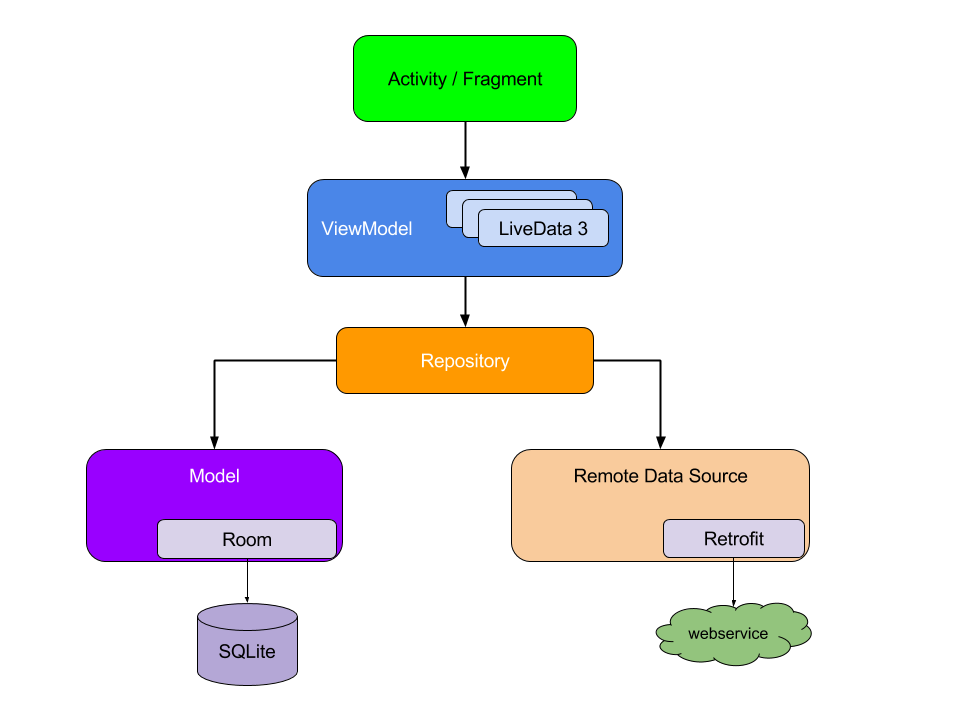
各个类之间的依赖关系可以表示为图表,其中每个类都连接到其所依赖的类。所有类及其依赖关系的表示法便构成了 应用图表 。在图 1 中,您可以看到应用图表的抽象呈现。当类 A (ViewModel) 依赖于类 B (Repository) 时,会有一条从 A 指向 B 的线,表示这种依赖关系。
依赖项注入有助于建立这些连接,并使您可以更换实现以进行测试。例如,在测试依赖于代码库的 ViewModel 时,您可以通过伪造或模拟传递 Repository 的不同实现,以测试不同的情形。
手动依赖项注入的基础知识
本部分介绍如何在实际 Android 应用场景中应用手动依赖项注入。本部分详细介绍了如何开始在应用中使用依赖项注入的迭代方法。该方法会不断改进,直至达到与 Dagger 自动为您生成的场景相似的程度。如需详细了解 Dagger,请参阅 Dagger 基础知识。
将流程 视为应用中与某项功能相对应的一组屏幕。登录、注册和结账都是流程的示例。
在介绍典型 Android 应用的登录流程时,LoginActivity 依赖于 LoginViewModel,而后者又依赖于
UserRepository。然后
UserRepository 依赖于 UserLocalDataSource 和
UserRemoteDataSource,而后者又依赖于 Retrofit 服务。
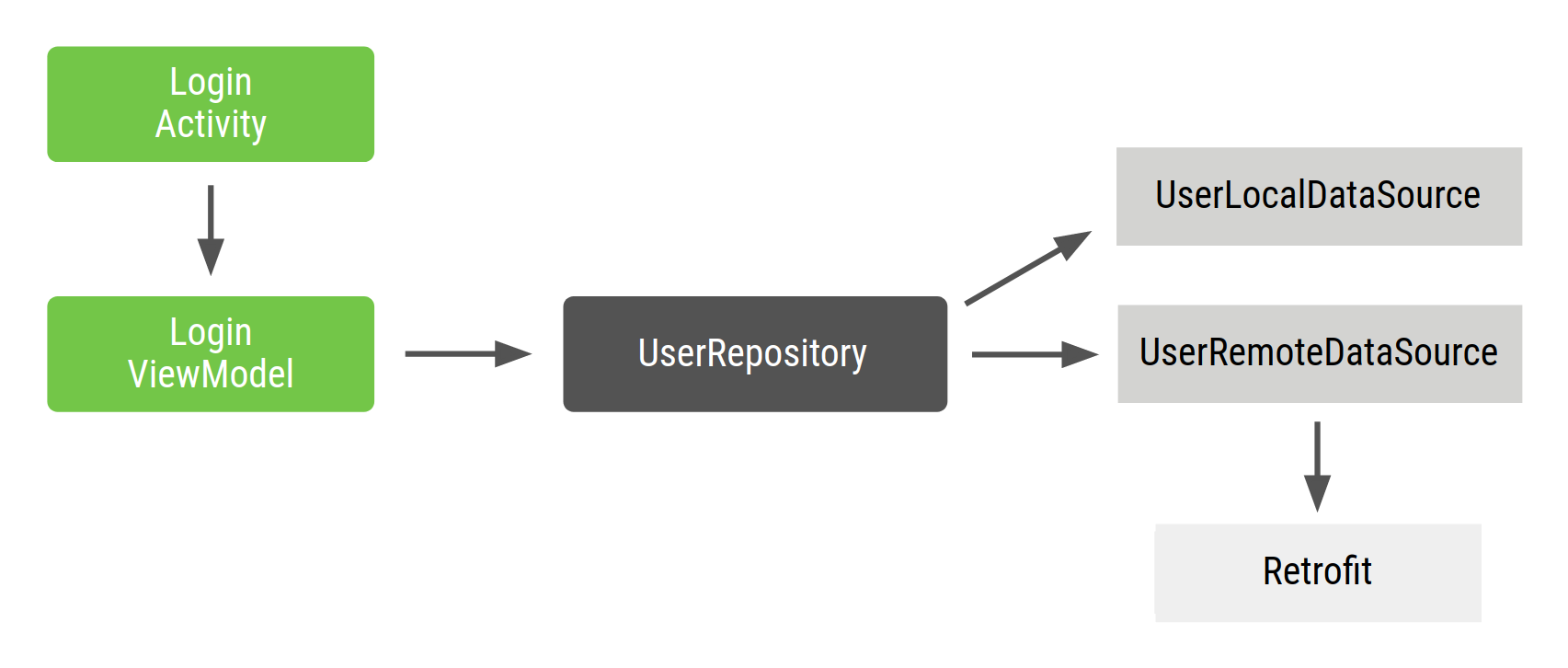
LoginActivity 是登录流程的入口点,用户与 activity 进行交互。因此,LoginActivity 需要创建包含所有依赖项的 LoginViewModel。
该流程的 Repository 和 DataSource 类如下所示:
class UserRepository(
    private val localDataSource: UserLocalDataSource,
    private val remoteDataSource: UserRemoteDataSource
) { ... }

class UserLocalDataSource { ... }
class UserRemoteDataSource(
    private val loginService: LoginRetrofitService
) { ... }
在 Compose 中,ComponentActivity 是入口点;依赖项连接在 onCreate 中发生一次,界面由从 setContent 调用的可组合项描述:
class ApiService {
    /* Your API implementation here */
}

class UserRepository(private val apiService: ApiService) {
    /* Your implementation here */
}

class LoginActivity : ComponentActivity() {
    override fun onCreate(savedInstanceState: Bundle?) {
        super.onCreate(savedInstanceState)
        // Satisfy the dependencies of LoginViewModel recursively,
        // then pass what the UI needs into setContent.
        val apiService = ApiService()
        val userRepository = UserRepository(apiService)

        setContent {
            LoginScreen(userRepository)
        }
    }
}

@Composable
fun LoginScreen(userRepository: UserRepository) {
    val viewModel: LoginViewModel = viewModel(
        factory = LoginViewModelFactory(userRepository)
    )
    // ...
}
这种方法存在以下问题:
- 必须按顺序声明依赖项。必须在
LoginViewModel之前实例化UserRepository才能创建它。 - 很难重复使用对象。如需在多项功能中重复使用
UserRepository,必须使其遵循 单例 模式。单例模式使测试变得更加困难,因为所有测试共享相同的单例实例。
使用容器管理依赖项
如需解决重复使用对象的问题,您可以创建自己的 依赖项容器 类,用于获取依赖项。此容器提供的所有实例都可以是公开的。在示例中,由于您只需要一个 UserRepository 实例,因此您可以将其依赖项设为私有,并可以选择在将来需要提供这些依赖项时将其设为公开:
// Container of objects shared across the whole app
class AppContainer {

    // apiService and userRepository aren't private and will be exposed
    val apiService = ApiService()
    val userRepository = UserRepository(apiService)
}
由于这些依赖项在整个应用中使用,因此需要
将它们放在所有 activity 都可以使用的公共位置:Application
类。创建一个包含 AppContainer 实例的自定义 Application 类。
// Custom Application class that needs to be specified
// in the AndroidManifest.xml file
class MyApplication : Application() {

    // Instance of AppContainer that will be used by all the Activities of the app
    val appContainer = AppContainer()
}
使用 Compose 时,仍会在 Application 子类中创建相同的 AppContainer。您可以在 activity 中调用 setContent 之前访问它,也可以使用 LocalContext 从可组合项内访问它:
class LoginActivity : ComponentActivity() {
    override fun onCreate(savedInstanceState: Bundle?) {
        super.onCreate(savedInstanceState)

        val appContainer = (application as MyApplication).appContainer

        setContent {
            LoginScreen(appContainer.userRepository)
        }
    }
}

// Alternatively, read AppContainer from inside a composable:
@Composable
fun LoginScreen() {
    val context = LocalContext.current
    val appContainer = (context.applicationContext as MyApplication).appContainer
    val viewModel: LoginViewModel = viewModel(
        factory = LoginViewModelFactory(appContainer.userRepository)
    )
    // ...
}
我们建议将依赖项作为可组合项形参传递,而不是从树的深处访问 LocalContext。这可确保可组合项可测试,并使其输入显式。在屏幕根目录中解析容器一次,然后向下传递所需的内容。
这样一来,您就没有单例 UserRepository。相反,您可以在所有 activity 中共享
AppContainer,其包含图表中的对象并创建其他类可以使用的对象实例。
如果应用中的多个位置需要 LoginViewModel,那么集中创建 LoginViewModel 实例是有意义的。
您可以将
LoginViewModel 的创建移至容器,并为工厂提供该类型的新对象。LoginViewModelFactory 的代码如下所示:
// Definition of a Factory interface with a function to create objects of a type
interface Factory<T> {
    fun create(): T
}

// Factory for LoginViewModel.
// Since LoginViewModel depends on UserRepository, in order to create instances of
// LoginViewModel, you need an instance of UserRepository that you pass as a parameter.
class LoginViewModelFactory(private val userRepository: UserRepository) : Factory<LoginViewModel> {
    override fun create(): LoginViewModel {
        return LoginViewModel(userRepository)
    }
}
使用 Compose 时,AppContainer 更新仍会公开工厂。然后,工厂会被 viewModel 可组合项使用,因此
ViewModel 的作用域限定为
最近的 ViewModelStoreOwner(通常是宿主 activity,或者使用
Navigation Compose 时为导航条目):
// AppContainer exposing the factory (unchanged from the snippet above)
class AppContainer {
    // ...
    val userRepository = UserRepository(localDataSource, remoteDataSource)
    val loginViewModelFactory = LoginViewModelFactory(userRepository)
}

// Compose entry point + screen composable
class LoginActivity : ComponentActivity() {
    override fun onCreate(savedInstanceState: Bundle?) {
        super.onCreate(savedInstanceState)
        val appContainer = (application as MyApplication).appContainer
        setContent {
            LoginScreen(appContainer.loginViewModelFactory)
        }
    }
}

@Composable
fun LoginScreen(factory: LoginViewModelFactory) {
    val viewModel: LoginViewModel = viewModel(factory = factory)
    // ...
}
此方法比前一种方法更好,但仍需考虑一些挑战:
您必须自行管理
AppContainer,手动为所有依赖项创建实例。仍然有大量样板代码。您需要手动创建工厂或参数,具体取决于是否要重复使用某个对象。
管理应用流程中的依赖项
如需在项目中添加更多功能,AppContainer 会变得非常复杂。当应用变大并且可以引入不同功能流程时,还会出现更多问题:
当您具有不同的流程时,您可能希望对象仅位于该流程的作用域内。例如,在创建
LoginUserData时(可能包含仅在登录流程中使用的用户名和密码),您不希望保留来自其他用户的旧登录流程中的数据。您需要为每个新流程创建一个新实例。您可以通过在AppContainer内创建FlowContainer对象来实现此目的,如以下代码示例所示。对应用图表和流程容器进行优化可能也非常困难。 您需要记住删除不需要的实例,具体取决于您所处的流程。
我们将 LoginContainer 添加到示例代码中。您希望能够在应用中创建多个 LoginContainer
实例,因此,请不要将其设为单例,而应使其成为具有登录流程需要从 AppContainer 中获取的依赖项的类。
class LoginContainer(val userRepository: UserRepository) {

    val loginData = LoginUserData()

    val loginViewModelFactory = LoginViewModelFactory(userRepository)
}

// AppContainer contains LoginContainer now
class AppContainer {
    ...
    val userRepository = UserRepository(localDataSource, remoteDataSource)

    // LoginContainer will be null when the user is NOT in the login flow
    var loginContainer: LoginContainer? = null
}
在 Compose 中,流程容器的生命周期与组合(而非宿主 Activity)相关联。您无需更改共享的
AppContainer.loginContainer,因为可组合项会将其依赖项作为形参接收,或从提升的 ViewModel
中读取这些依赖项。您有两种选择:
- Navigation Compose 嵌套图(适用于多屏流程的首选方法)。
将登录流程中的所有屏幕放在嵌套的导航图下,并将容器的作用域限定为该图的
NavBackStackEntry。当用户进入流程时,系统会创建容器;当返回堆栈条目弹出时,系统会清除容器,无需手动调用生命周期。如需了解详情,请参阅设计 导航图。 - 屏幕根目录中的
remember(适用于单屏流程或未使用 Navigation Compose 的情况)。在remember内构造容器,以便在每次进入组合时创建一次,并在可组合项离开时进行垃圾回收:
@Composable
fun LoginFlow(appContainer: AppContainer) {
    val loginContainer = remember(appContainer) {
        LoginContainer(appContainer.userRepository)
    }
    val viewModel: LoginViewModel = viewModel(
        factory = loginContainer.loginViewModelFactory
    )
    // Render the login flow using loginContainer.loginData and viewModel.
}
总结
依赖项注入对于创建可扩展且可测试的 Android 应用而言是一项适合的技术。使用容器作为在应用不同部分共享类实例的方式,以及使用工厂创建类实例的集中位置。
当应用变大时,您会发现您编写了大量样板代码(例如工厂),这可能容易出错。您还必须自行管理容器的作用域和生命周期,优化并舍弃不再需要的容器以释放内存。如果操作不当,可能会导致应用出现微小错误和内存泄露。
在 Dagger 部分中,您将学习如何使用 Dagger 自动执行此 过程,并生成与手动编写相同的代码。