
Navigation latency is a critical metric for user experience. To help developers reduce this latency, WebView provides APIs for speculative loading and connection optimization, allowing your app to fetch or render content before the user explicitly navigates to it.
WebView supports three primary types of speculative loading: Preconnect, Prefetch, and Prerender, alongside QUIC hints to optimize protocol negotiation.
By implementing a speculative loading strategy, you can achieve the following:
- Significant reduction in web content loading latency: Move the network start time to earlier in the app lifecycle and prefer faster protocols like HTTP/3.
- Higher navigation success rates: By pre-warming the network and cache, navigations are less likely to fail due to transient network issues.
- Better perceived responsiveness: Prerendering, in particular, enables instant transitions that make the app feel significantly faster.
Choose a speculative loading strategy
The key differentiator between these strategies lies in their scope: Preconnect and QUIC hints APIs are origin-based, which means they only require the target domain. Prefetch and Prerender APIs are URL-based, which means that they require the exact webpage path.
Because Preconnect and QUIC hints operate at the origin level, you can initiate them much earlier in the app lifecycle, even before you know the specific content or page the user will navigate to.
The following table compares these three strategies to help you choose the right one for your use case:
| Feature | Preconnect | Prefetch | Prerender |
|---|---|---|---|
| Primary goal | Warm up the connection | Cache HTML only (without JavaScript or CSS) | Prerender the entire page |
| Scope | Profile level (shared across WebViews) | Profile level (shared across WebViews) | WebView level (bound to a specific WebView) |
| Jetpack WebKit API | androidx.webkit.Profile |
androidx.webkit.Profile |
androidx.webkit.WebViewCompat |
| Core API methods | preconnect(...) |
prefetchUrlAsync(...) |
prerenderUrlAsync(...) |
| Configuration | N/A | PrefetchCache.setMaxPrefetches()PrefetchCache.setPrefetchTtlSeconds() |
setMaxPrerenders() |
| Resource usage | Low (network) | Medium (network, memory) | High (CPU, memory, network) |
| When to use | When the target origin is known, but the specific URL is not yet determined. | When the exact URL is known and navigation is likely, with caching shared across WebViews. | When the exact URL is known and navigation is highly certain within a specific WebView. |
| Benefits | Faster connection setup for any URL on the origin | Faster network load for matched URLs | Truly instant navigation upon activation |
Preconnect to origins
Preconnecting speeds up future loads by preemptively performing DNS lookups and TCP/TLS or QUIC handshakes for a specified origin.
Unlike Prefetch and Prerender, which require an exact destination URL, Preconnect is strictly origin-based. This lets you make the Preconnect call much earlier than Prefetch and Prerender.
This low-resource, Profile-level strategy reduces initial latency for any WebView sharing that Profile, provided the origin hasn't already been visited. The connection remains open for approximately 30 seconds, benefiting any subsequent cross-origin HTTP requests, navigations, or subresources by eliminating handshake overhead.
Implementation
To initiate a preconnection, call preconnect(String url) on a Profile
instance. This API must be called on the UI thread and requires the
WebViewFeature.PRECONNECT to be supported.
The API operates on the origin, but for convenience, a full URL can be provided
(such as https://www.example.com/index.html). This is automatically treated as
a call to the origin (for example, https://www.example.com). Multiple origins
can be connected to by calling this API multiple times.
Kotlin
// Must be called on the @UiThread
if (WebViewFeature.isFeatureSupported(WebViewFeature.PRECONNECT)) {
    profile.preconnect("https://www.example.com/index.html")
    // This initiates a connection to the origin https://www.example.com
}
Java
// Must be called on the @UiThread
if (WebViewFeature.isFeatureSupported(WebViewFeature.PRECONNECT)) {
    profile.preconnect("https://www.example.com/index.html");
    // This initiates a connection to the origin https://www.example.com
}
Indicate QUIC protocol support with QUIC hints
HTTP/3 (which runs over the QUIC transport protocol) offers significant latency improvements over HTTP/2, including 0-RTT handshakes, improved connection resilience, and the elimination of head-of-line blocking during packet loss.
By default, WebView only attempts a QUIC connection if it has an indication that
the origin supports QUIC, such as from an Alt-Svc header or DNS HTTPS record
from a previous interaction. Without this prior knowledge, WebView uses HTTP/2
or HTTP/1.1 for the initial connection.
Calling addQuicHints pre-populates this protocol support information, allowing
WebView to connect using QUIC immediately on the very first connection to the
specified origins.
Preconnect with QUIC hints
While both Preconnect and QUIC hints are origin-level optimizations on a
Profile, they serve distinct, complementary roles:
preconnect: Actively opens and maintains a network connection (DNS lookup and TCP/TLS or QUIC handshake) for approximately 30 seconds. Because it holds open active network connections, it consumes device and network resources and should be reserved for high-probability target origins.addQuicHints: Incurs zero immediate network traffic. It updates theProfilenetwork stack's in-memory server properties to record protocol support. Because it has negligible overhead, you can safely configure QUIC hints during app startup for all known HTTP/3-capable origins.
For optimal performance, call addQuicHints before calling preconnect,
prefetchUrlAsync, or loadUrl. This ensures any subsequent preconnects or
page requests negotiate HTTP/3 from the start.
Implementation
To configure QUIC hints, call addQuicHints(Set<String> urls) on a Profile
instance. You must call this API on the UI thread and verify that WebView
supports the WebViewFeature.ADD_QUIC_HINTS_V1 feature.
Like preconnect, addQuicHints operates on origins, but full URLs can be
provided (such as https://www.example.com/index.html) and are automatically
normalized to their origin (https://www.example.com).
The method is additive: calling it multiple times merges the provided origins
across the Profile.
Kotlin
// Must be called on the @UiThread
@OptIn(Profile.ExperimentalAddQuicHints::class)
if (WebViewFeature.isFeatureSupported(WebViewFeature.ADD_QUIC_HINTS_V1)) {
    val quicOrigins = setOf(
        "https://www.example.com",
        "https://api.example.com"
    )
    profile.addQuicHints(quicOrigins)
    // WebView now prioritizes HTTP/3 over QUIC for connections to these origins
}
Java
// Must be called on the @UiThread
// Requires @Profile.ExperimentalAddQuicHints annotation or suppression
if (WebViewFeature.isFeatureSupported(WebViewFeature.ADD_QUIC_HINTS_V1)) {
    Set<String> quicOrigins = new HashSet<>(Arrays.asList(
        "https://www.example.com",
        "https://api.example.com"
    ));
    profile.addQuicHints(quicOrigins);
    // WebView now prioritizes HTTP/3 over QUIC for connections to these origins
}
Common configuration: PrefetchParameters and PrerenderParameters
Both Prefetch and Prerender use PrefetchParameters or
PrerenderParameters to customize the request. These classes let you provide
additional headers and hints for URL matching, such as No-Vary-Search
configurations.
Kotlin
// Isolated configuration specifically for Cache-Level Prefetching
val prefetchParams = PrefetchParameters.Builder()
    .addAdditionalHeader("X-Custom-Client", "Android-App-V2")
    .setExpectedNoVarySearchHeader(
        NoVarySearchHeader.varyExcept(true, listOf("session_id", "click_ref"))
    )
    .build()
Java
PrefetchParameters prefetchParams = new PrefetchParameters.Builder()
    .addAdditionalHeader("X-Custom-Header", "value")
    /**
     * Hint to ignore specific query parameters during cache matching.
     * This allows the cache to match even if the tracking_id differs.
     */
    .setExpectedNoVarySearchHeader(
        NoVarySearchHeader.varyExcept(true, Arrays.asList("tracking_id"))
    )
    /**
     * Determines if Client Hints are sent.
     * NOTE: This is ignored for Prerendering API requests, which default to
     * the WebView's WebSettings.getJavaScriptEnabled() value.
     */
    .setJavaScriptEnabled(true)
    .build();
Prefetching content
Prefetching downloads the main HTML resource of a URL and stores it in the
profile's network cache. In WebView, a Profile acts as a container for browser
data, including cookies, HTTP cache, and service workers. Because prefetch is a
profile-level operation, any WebView associated with that profile can leverage
the cached response.
Implementation
To initiate a prefetch, call prefetchUrlAsync() on a Profile instance. This
operation only supports the HTTPS scheme.
Kotlin
profile.prefetchUrlAsync(
    url,
    prefetchParams,
    cancellationSignal,
    executor,
    object : WebViewOutcomeReceiver<PrefetchResult, PrefetchException> {
        override fun onResult(result: PrefetchResult) {
            if (result.wasDuplicate()) {
                // URL and No-Vary-Search permutations already exist in the cache layer
            } else {
                // The HTML payload has been successfully secured in the HTTP cache
            }
        }

        override fun onError(error: PrefetchException) {
            when (error) {
                is PrefetchNetworkException -> {
                    // Isolates network layer or server-side HTTP anomalies
                    val code = error.httpStatusCode
                    // Facilitates rapid diagnosis of 4xx or 5xx server responses
                }
                else -> {
                    // Catches generalized execution failures and system constraints
                }
            }
        }
    }
)
Java
profile.prefetchUrlAsync(
    url,
    prefetchParams,
    cancellationSignal,
    executor,
    new WebViewOutcomeReceiver<PrefetchResult, PrefetchException>() {
        @Override
        public void onResult(PrefetchResult result) {
            if (result.wasDuplicate()) {
                // URL and No-Vary-Search permutations already exist in the cache layer
            } else {
                // The HTML payload has been successfully secured in the HTTP cache
            }
        }

        @Override
        public void onError(PrefetchException error) {
            if (error instanceof PrefetchNetworkException) {
                // Isolates network layer or server-side HTTP anomalies
                int code = ((PrefetchNetworkException) error).httpStatusCode;
                // Facilitates rapid diagnosis of 4xx or 5xx server responses
            } else {
                // Catches generalized execution failures and system constraints
            }
        }
    }
);
Interception lifecycle
The WebView prefetch request alters when and how the shouldInterceptRequest()
callback is triggered. Because this has a direct impact on whether your
prefetched content is successfully used, it is critical to understand the
two-step lifecycle:
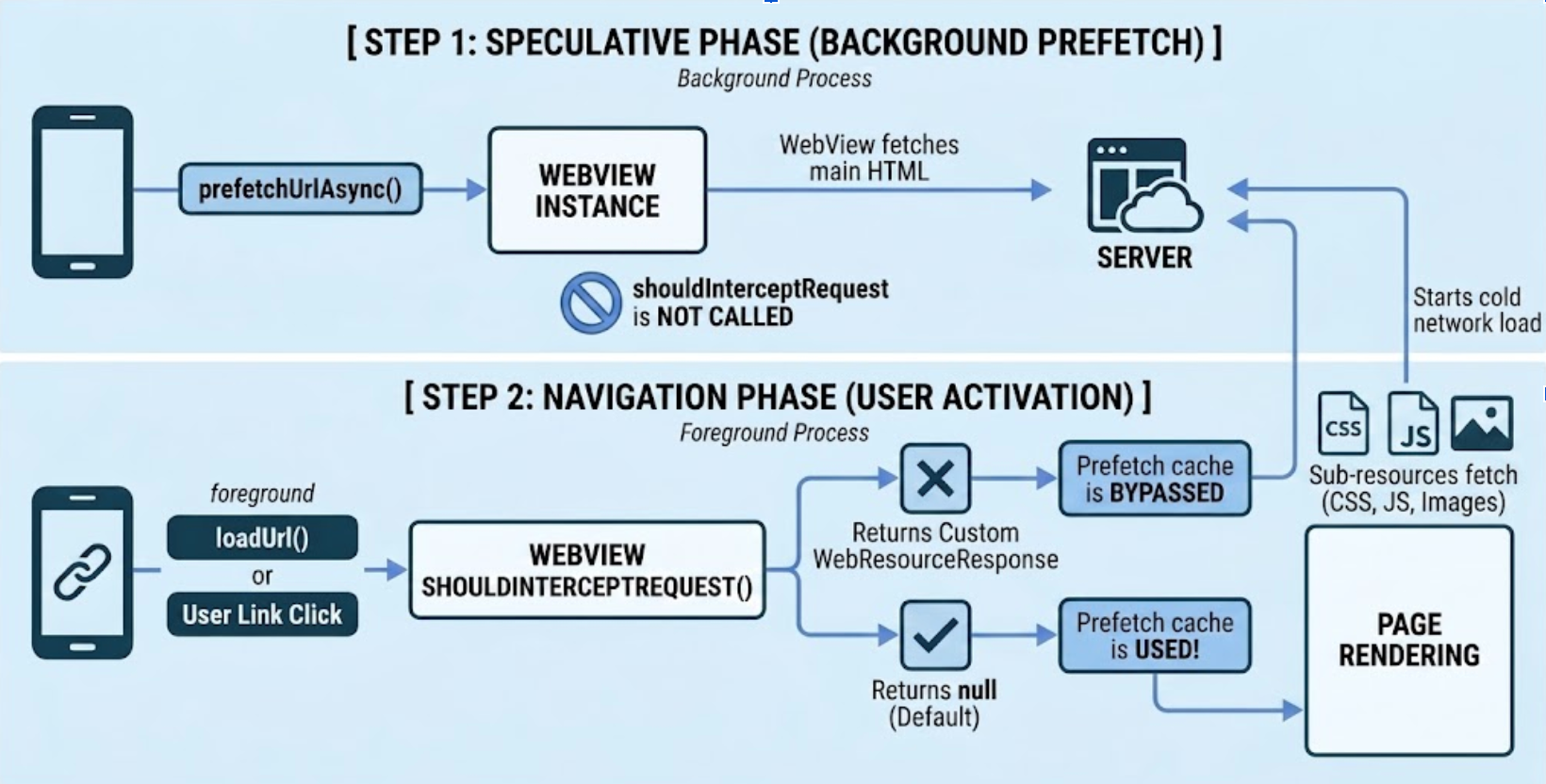
1. The speculative phase (Prefetch request)
When prefetchUrlAsync() is invoked, WebView downloads the main HTML resource
in the background. shouldInterceptRequest() is completely skipped for this
background request. Any custom logic, authorization tokens, or header injections
typically handled inside your interceptor aren't applied to the prefetched HTML
resource.
2. The navigation phase (user activation)
When the app explicitly navigates to the URL (for example, using
WebViewCompat.navigate or loadUrl) or the user clicks a matching
link, WebView determines if it can use the prefetched cache:
Main HTML evaluation: WebView will trigger
shouldInterceptRequest()for the main HTML at this moment. To successfully serve the page from the prefetch cache, your interceptor must returnnull. If you return a customWebResourceResponse, WebView respects your interceptor and entirely bypasses the prefetch cache.Sub-resource evaluation: After the prefetched HTML is cleared for use,
shouldInterceptRequest()triggers normally for all subsequent sub-resources (such as, images, scripts, and CSS) required to finish rendering the page.
Key behaviors
The following operational characteristics and eligibility checks govern how WebView initiates and manages prefetch requests:
- Thread safety: Requests can be initiated from any thread.
- Eligibility: Before initiating a fetch, WebView ensures the request is
safe and contextually appropriate by checking the following:
- Existing cookies: To protect user privacy and prevent CSRF-like side effects, WebView might skip prefetching if the request requires specific authenticated cookies that could trigger a state change on the server.
- Service worker presence: If a Service Worker is already controlling the scope of the URL, WebView can defer to the Service Worker's fetch handler rather than initiating a standard network prefetch.
- Proxy availability: WebView verifies that the current network path (including any configured proxies) is stable to avoid failing speculative requests under complex network configurations.
- If a prefetch fails to start (even with valid parameters), it is often because WebView has determined that a background request could interfere with the user's current session or security state.
- Cancellation: Use the
CancellationSignalto terminate an in-flight request and prevent it from being cached.
Prerendering pages
Prerendering creates hidden "web contents" to fully render a page in the background, including script execution and subresource fetching. Prerendering relies on the same underlying infrastructure as prefetching. If an app initiates a prerender, WebView first performs a prefetch of the response to serve the prerender navigation, avoiding redundant network activity.
Implementation
Prerendering is a WebView instance-level operation. Call prerenderUrlAsync()
using WebViewCompat from the UI thread.
Kotlin
WebViewCompat.prerenderUrlAsync(
    webView,
    url,
    cancellationSignal,
    executor,
    params,
    object : PrerenderOperationCallback {
        override fun onPrerenderActivated() {
            // Called when the user navigates to the URL and the hidden page is swapped in
        }

        override fun onError(exception: Throwable) {
            // exception is an instance of PrerenderException
            // Handle prerender failure (for example, memory pressure or disallowed JavaScript APIs)
        }
    }
)
Java
WebViewCompat.prerenderUrlAsync(webView, url, cancellationSignal, executor, params, new PrerenderOperationCallback() {
    @Override
    public void onPrerenderActivated() {
        // Called when the user navigates to the URL and the hidden page is swapped in.
    }

    @Override
    public void onError(@NonNull Throwable exception) {
        // Handle prerender failure (for example, resource constraints or disallowed APIs).
    }
});
Both prefetch and prerender are fully asynchronous. prefetchUrlAsync() can be
called from any thread, while prerenderUrlAsync() must be initiated from the
UI thread.
Technical constraints
To balance instant navigation with system health, WebView enforces the following runtime constraints:
- Memory pressure: WebView cancels pre-rendered URLs if the device is low on RAM.
- Disallowed APIs: Any attempts by JavaScript to access certain APIs (for example, audio playback, alerts) in a background context will immediately terminate the prerender.
- Instance limit: There is a limit to the number of active prerendered URLs allowed per WebView.
URL matching and No-Vary-Search (NVS)
WebView requires a reliable matching algorithm to ensure a preloaded resource is only served for its intended navigation.
Exact match versus NVS match
By default, prefetch and prerender require an exact URL match. If the navigated URL is identical to the preloaded URL, it is served from cache immediately. If query parameters differ, WebView uses the following No-Vary-Search (NVS) rules:
- The hint: Developers provide a
setExpectedNoVarySearchHeader()hint during initiation. If the navigated URL matches the request URL minus the hinted parameters, WebView blocks briefly to wait for the server's actual headers. - Server header: The NVS response header from the server is the ultimate authority. If the server confirms query differences should be ignored, the match is served from the cache. If not, WebView falls back to a cold network load.
No-Vary-Search (NVS) is for advanced usage, and most developers might not need
it because they pass the exact same URL to both prefetch and navigation
(WebViewCompat.navigate or loadUrl). This guidance is only
necessary if there are differences in query parameters between the prefetch URL
and the navigated URL.
Global configuration
Tune speculative loading behavior at the profile level by configuring
PrefetchCache limits and maximum prerenders. You can also reset custom
prefetch limits back to system defaults:
Kotlin
// Configure prefetch cache limits
profile.prefetchCache.setMaxPrefetches(10)
profile.prefetchCache.setPrefetchTtlSeconds(60)

// Reset to system defaults when needed
profile.prefetchCache.clearMaxPrefetches()

// Configure maximum active prerenders
profile.setMaxPrerenders(2)
Java
// Configure prefetch cache limits
PrefetchCache prefetchCache = profile.getPrefetchCache();
prefetchCache.setMaxPrefetches(10);
prefetchCache.setPrefetchTtlSeconds(60);

// Reset to system defaults when needed
prefetchCache.clearMaxPrefetches();

// Configure maximum active prerenders
profile.setMaxPrerenders(2);
Error handling and exceptions
Speculative operations use an OutcomeReceiverCompat or
PrerenderOperationCallback to report results.
Primary exceptions
When a speculative loading operation fails, your error handler reports one of the following primary exception types to help you diagnose specific failure scenarios:
PrefetchException: The base class for all asynchronous prefetch errors.PrefetchNetworkException: Indicates a network or server level failure. It can include anhttpStatusCodefield (such as, 404 or 503) to help diagnose server-side issues.PrerenderException: The superclass for all prerender-related errors, such as failures due to memory pressure or the use of disallowed APIs (like audio playback) in the background.
Optimization strategies
Follow these recommendations to maximize the benefits of speculative loading while conserving system resources:
- Initiate early: Start prefetching during app startup or as soon as a navigation destination is likely.
- Pair QUIC hints with connection pre-warming: Call
addQuicHints()before initiatingpreconnect(),prefetchUrlAsync(), or standard navigations to ensure WebView attempts to establish connections using HTTP/3. - Integrated strategy: If you prerender a URL already in the prefetch cache, the prerender navigation is served from that cache, avoiding redundant network requests.
- Monitor quotas: Prerendering is resource-heavy. Prefer prefetching for several likely candidates and reserve prerendering for the single most probable navigation.
- Scheme support: Ensure all URLs use the mandatory HTTPS scheme. Invalid
schemes or null inputs trigger a synchronous
IllegalArgumentException.
Additional resources
To learn more about debugging web apps, optimizing WebView startup performance, and handling renderer process termination, see the following resources:
- Enhanced page navigation with the
WebViewCompat.navigatemethod - Debug web apps
- Optimize WebView startup
- Handle WebView renderer process termination