
本課程將說明如何將 CompatTab 和 TabHelper 抽象類別設為子類別,以及如何使用新的 API。在支援支援的平台版本的裝置上,您的應用程式可以使用這項實作。
使用新的 API 實作分頁
使用新版 API 的 CompatTab 和 TabHelper 具體類別是 Proxy 實作。由於上一課中定義的抽象類別會反映新的 API (類別結構、方法簽章等),因此使用這些新版 API 的具體類別只會代理方法呼叫及其結果。
由於延遲類別載入的關係,您可以在這些具體類別中直接使用新版 API,而不是在舊版裝置上當機。系統會在首次存取時載入及初始化類別,藉此例項化該類別,或首次存取其靜態欄位或方法。因此,只要您不在 Honeycomb 之前的裝置上將 Honeycomb 的特定實作項目例項化,Dalvik VM 就不會擲回任何 VerifyError 例外狀況。
為這個實作項目命名慣例,是附加具體類別所需 API 對應的 API 級別或平台版本代碼名稱。舉例來說,由於 CompatTabHoneycomb 和 TabHelperHoneycomb 類別需要使用 Android 3.0 (API 級別 11) 以上版本中可用的 API,因此可以提供原生分頁實作。
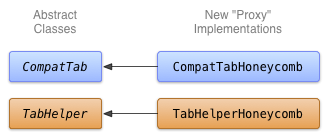
圖 1. 分頁 Honeycomb 實作方式的類別圖表。
實作 CompatTabHoneycomb
CompatTabHoneycomb 是 CompatTab 抽象類別的實作項目,TabHelperHoneycomb 用來參照個別分頁。CompatTabHoneycomb 只會 Proxy 對內含 ActionBar.Tab 物件的所有方法呼叫。
開始使用新的 ActionBar.Tab API 實作 CompatTabHoneycomb:
Kotlin
class CompatTabHoneycomb internal constructor(val activity: Activity, tag: String) :
        CompatTab(tag) {
    ...
    // The native tab object that this CompatTab acts as a proxy for.
    private var mTab: ActionBar.Tab =
            // Proxy to new ActionBar.newTab API
            activity.actionBar.newTab()

    override fun setText(@StringRes textId: Int): CompatTab {
        // Proxy to new ActionBar.Tab.setText API
        mTab.setText(textId)
        return this
    }

    ...
    // Do the same for other properties (icon, callback, etc.)
}
Java
public class CompatTabHoneycomb extends CompatTab {
    // The native tab object that this CompatTab acts as a proxy for.
    ActionBar.Tab mTab;
    ...

    protected CompatTabHoneycomb(FragmentActivity activity, String tag) {
        ...
        // Proxy to new ActionBar.newTab API
        mTab = activity.getActionBar().newTab();
    }

    public CompatTab setText(int resId) {
        // Proxy to new ActionBar.Tab.setText API
        mTab.setText(resId);
        return this;
    }

    ...
    // Do the same for other properties (icon, callback, etc.)
}
實作 TabHelperHoneycomb
TabHelperHoneycomb 是 TabHelper 抽象類別的實作項目,它會透過 Proxy 方法呼叫實際的 ActionBar (從其包含的 Activity 中取得)。
實作 TabHelperHoneycomb,以 Proxy 處理對 ActionBar API 的方法呼叫:
Kotlin
class TabHelperHoneycomb internal constructor(activity: FragmentActivity) : TabHelper(activity) {

    private var mActionBar: ActionBar? = null

    override fun setUp() {
        mActionBar = mActionBar ?: mActivity.actionBar.apply {
            navigationMode = ActionBar.NAVIGATION_MODE_TABS
        }
    }

    override fun addTab(tab: CompatTab) {
        // Tab is a CompatTabHoneycomb instance, so its
        // native tab object is an ActionBar.Tab.
        mActionBar?.addTab(tab.getTab() as ActionBar.Tab)
    }
}
Java
public class TabHelperHoneycomb extends TabHelper {
    ActionBar actionBar;
    ...

    protected void setUp() {
        if (actionBar == null) {
            actionBar = activity.getActionBar();
            actionBar.setNavigationMode(
                    ActionBar.NAVIGATION_MODE_TABS);
        }
    }

    public void addTab(CompatTab tab) {
        ...
        // Tab is a CompatTabHoneycomb instance, so its
        // native tab object is an ActionBar.Tab.
        actionBar.addTab((ActionBar.Tab) tab.getTab());
    }

    // The other important method, newTab() is part of
    // the base implementation.
}