

AppSearch 是一种高性能的设备端搜索解决方案,用于管理本地存储的结构化数据。其中包含用于将数据编入索引和通过全文搜索来检索数据的 API。应用可以使用 AppSearch 提供自定义应用内搜索功能,让用户即使在离线状态下也能搜索内容。
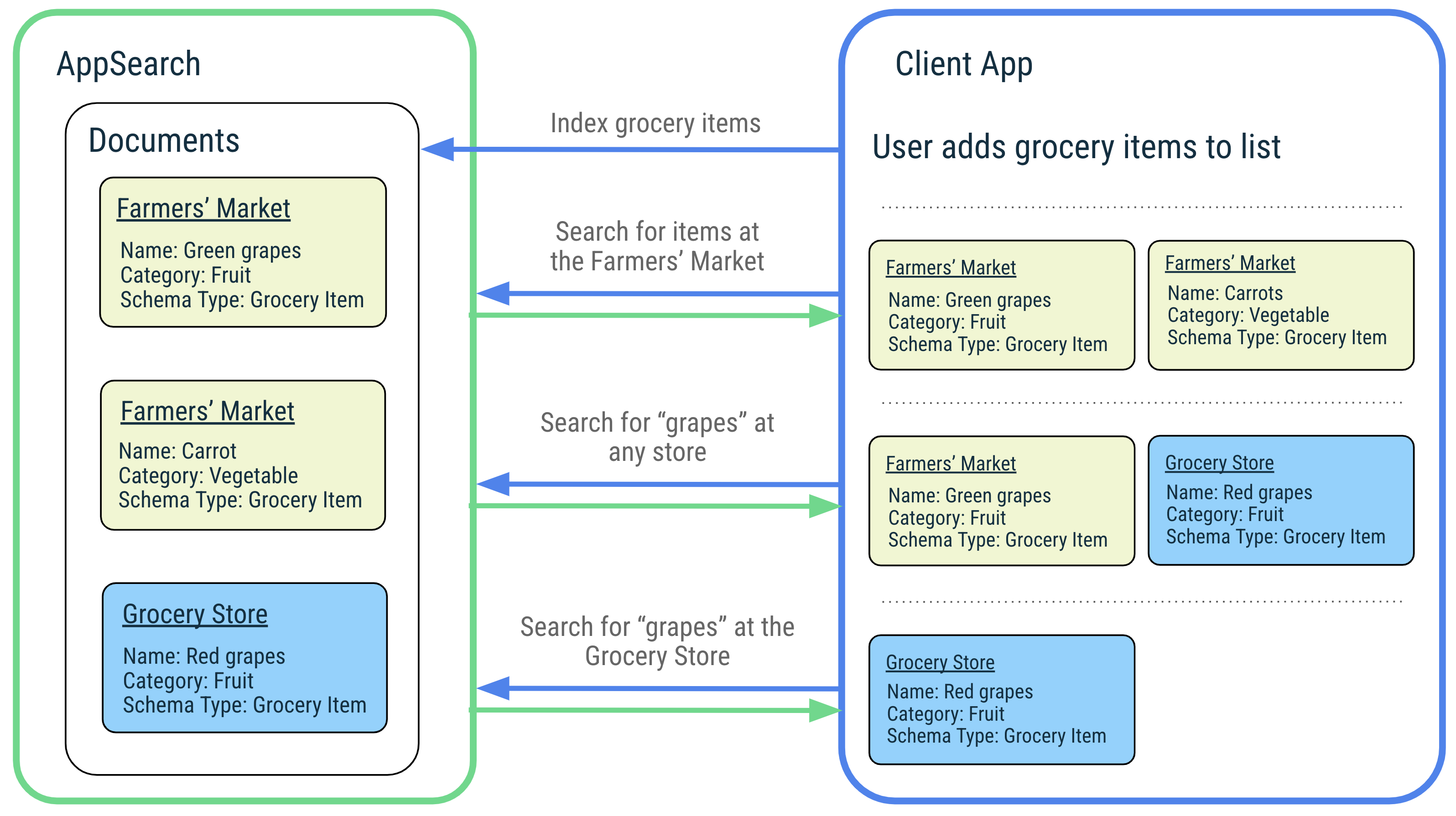
AppSearch 提供以下功能:
- 一种 I/O 占用率低的移动设备优先快速存储实现
- 快速高效地对大型数据集进行索引编制和查询
- 支持多种语言,例如英语和西班牙语
- 相关性排名和使用情况评分
与 SQLite 相比,AppSearch 的 I/O 使用率较低,因此在大型数据集上进行索引编制和搜索时延迟较低。AppSearch 通过支持单次查询来简化跨类型查询,而 SQLite 则会合并来自多个表的结果。
为了说明 AppSearch 的功能,我们以一个音乐应用为例,该应用可管理用户喜爱的歌曲,并允许用户轻松搜索这些歌曲。用户可以欣赏来自世界各地的音乐,歌曲名称也采用不同的语言,AppSearch 原生支持对这些语言进行索引编制和查询。当用户按歌曲名称或音乐人姓名搜索歌曲时,应用只需将请求传递给 AppSearch,即可快速高效地检索匹配的歌曲。应用会显示结果,让用户可以快速开始播放自己喜爱的歌曲。
设置
如需在应用中使用 AppSearch,请将以下依赖项添加到应用的 build.gradle 文件中:
Groovy
dependencies {
    def appsearch_version = "1.2.0-alpha02"

    implementation "androidx.appsearch:appsearch:$appsearch_version"
    // Use kapt instead of annotationProcessor if writing Kotlin classes
    annotationProcessor "androidx.appsearch:appsearch-compiler:$appsearch_version"

    implementation "androidx.appsearch:appsearch-local-storage:$appsearch_version"
    // PlatformStorage is compatible with Android 12+ devices and supports sharing data
    // with other apps. Feature support varies by device. Before calling an API that
    // requires a feature, check Features.isFeatureSupported().
    implementation "androidx.appsearch:appsearch-platform-storage:$appsearch_version"

    // PlayServicesStorage is compatible with all devices that support Google Play Services on
    // all API levels. It offers similar capabilities to PlatformStorage and is the
    // recommended solution for lower API levels on which PlatformStorage is not supported.
    implementation "androidx.appsearch:appsearch-play-services-storage:$appsearch_version"
}
Kotlin
dependencies {
    val appsearch_version = "1.2.0-alpha02"

    implementation("androidx.appsearch:appsearch:$appsearch_version")
    // Use annotationProcessor instead of kapt if writing Java classes
    kapt("androidx.appsearch:appsearch-compiler:$appsearch_version")

    implementation("androidx.appsearch:appsearch-local-storage:$appsearch_version")
    // PlatformStorage is compatible with Android 12+ devices and supports sharing data
    // with other apps. Feature support varies by device. Before calling an API that
    // requires a feature, check Features.isFeatureSupported().
    implementation("androidx.appsearch:appsearch-platform-storage:$appsearch_version")

    // PlayServicesStorage is compatible with all devices that support Google Play Services on
    // all API levels. It offers similar capabilities to PlatformStorage and is the
    // recommended solution for lower API levels on which PlatformStorage is not supported.
    implementation("androidx.appsearch:appsearch-play-services-storage:$appsearch_version")

}
AppSearch 概念
下图展示了 AppSearch 概念及其交互。
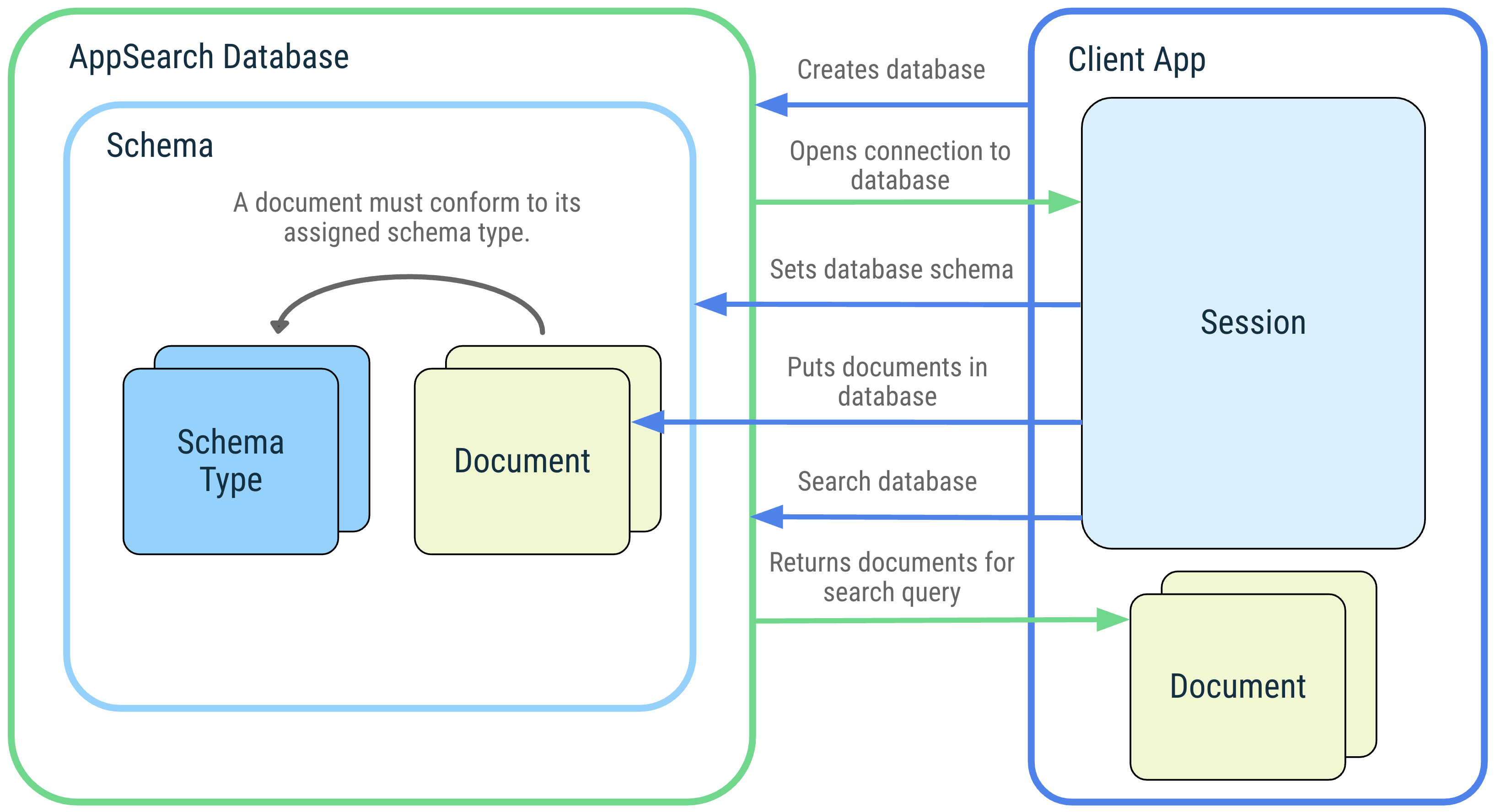 图 1. AppSearch 概念图:AppSearch 数据库、架构、架构类型、文档、会话和搜索。
数据库和会话
AppSearch 数据库是符合数据库架构的文档集合。客户端应用通过提供其应用上下文和数据库名称来创建数据库。数据库只能由创建它们的应用打开。打开数据库后,系统会返回一个会话,以便与数据库进行交互。会话是调用 AppSearch API 的入口点,会一直保持打开状态,直到客户端应用将其关闭。
架构和架构类型
架构表示 AppSearch 数据库中数据的组织结构。
该架构由代表独特数据类型的架构类型组成。 架构类型由包含名称、数据类型和基数的属性组成。将架构类型添加到数据库架构后,即可创建该架构类型的文档并将其添加到数据库中。
文档
在 AppSearch 中,数据单元表示为文档。AppSearch 数据库中的每个文档都由其命名空间和 ID 唯一标识。当只需要查询一个来源(例如用户账号)时,命名空间用于分隔来自不同来源的数据。
文档包含创建时间戳、存留时间 (TTL) 和可用于在检索期间进行排名的分数。系统还会为文档分配一个架构类型,用于描述文档必须具有的其他数据属性。
文档类别是文档的抽象。它包含表示文档内容的带注释字段。默认情况下,文档类的名称会设置架构类型的名称。
搜索
文档会被编入索引,您可以通过提供查询来搜索文档。如果文档包含查询中的字词或符合其他搜索规范,则该文档会匹配并包含在搜索结果中。结果会根据其得分和排名策略进行排序。搜索结果由您可以按顺序检索的页面表示。
AppSearch 为搜索提供自定义功能,例如过滤条件、页面大小配置和摘要。
平台存储空间、本地存储空间或 Play 服务存储空间
AppSearch 提供三种存储解决方案:LocalStorage、PlatformStorage 和 PlayServicesStorage。借助 LocalStorage,您的应用可以管理位于应用数据目录中的应用专用索引。通过 PlatformStorage 和 PlayServicesStorage,您的应用可为系统级中央索引做出贡献。PlatformStorage 的索引托管在系统服务器中,PlayServicesStorage 的索引托管在 Google Play 服务的存储空间中。这些中央索引中的数据访问权限仅限于您的应用贡献的数据以及其他应用明确与您共享的数据。所有这些存储选项都使用相同的 API,并且可以根据设备版本进行互换。
请注意,功能支持因存储选项和设备而异。如需了解详情,请参阅检查功能可用性。
以下代码会在 Android 12(API 级别 31)及更高版本上创建 PlatformStorage 会话,并在较低版本上创建 PlayServicesStorage 或 LocalStorage 会话:
Kotlin
if (Build.VERSION.SDK_INT >= Build.VERSION_CODES.S) {
    appSearchSessionFuture.setFuture(
        PlatformStorage.createSearchSession(
            PlatformStorage.SearchContext.Builder(mContext, DATABASE_NAME)
               .build()
        )
    )
} else {
    if (usePlayServicesStorageBelowS) {
        appSearchSessionFuture.setFuture(
            PlayServicesStorage.createSearchSession(
                PlayServicesStorage.SearchContext.Builder(mContext, DATABASE_NAME)
                    .build()
            )
        )
    } else {
        appSearchSessionFuture.setFuture(
            LocalStorage.createSearchSession(
                LocalStorage.SearchContext.Builder(mContext, DATABASE_NAME)
                    .build()
            )
        )
    }
}
Java
if (Build.VERSION.SDK_INT >= Build.VERSION_CODES.S) {
    mAppSearchSessionFuture.setFuture(PlatformStorage.createSearchSession(
            new PlatformStorage.SearchContext.Builder(mContext, DATABASE_NAME)
                    .build()));
} else {
    if (usePlayServicesStorageBelowS) {
        mAppSearchSessionFuture.setFuture(PlayServicesStorage.createSearchSession(
                new PlayServicesStorage.SearchContext.Builder(mContext, DATABASE_NAME)
                        .build()));
    } else {
        mAppSearchSessionFuture.setFuture(LocalStorage.createSearchSession(
                new LocalStorage.SearchContext.Builder(mContext, DATABASE_NAME)
                        .build()));
    }
}
借助 PlatformStorage 和 PlayServicesStorage,您的应用可以与其他应用安全地共享数据,以便其他应用也可以搜索您应用的数据。系统会使用证书握手来授予只读应用数据共享权限,以确保其他应用有权读取数据。如需详细了解此 API,请参阅 setSchemaTypeVisibilityForPackage() 的文档。
此外,借助 PlatformStorage,已编入索引的数据可以显示在系统界面上。应用可以选择不让其部分或全部数据在系统界面 surface 上显示。如需详细了解此 API,请参阅 setSchemaTypeDisplayedBySystem() 文档。
| 功能 | LocalStorage(与 Android 5.0 及更高版本兼容) |
PlatformStorage(与 Android 12 及更高版本兼容) |
PlayServicesStorage(与 Android 5.0 及更高版本兼容) |
|---|---|---|---|
| 高效的全文搜索 | |||
| 多语言支持 | |||
| 缩减了二进制文件大小 | |||
| 应用间数据共享 | |||
| 能够在系统界面 surface 上显示数据 | |||
| 可编入索引的文档大小和数量不受限制 | |||
| 操作速度更快,且不会增加额外的 binder 延迟 |
在 LocalStorage 和 PlatformStorage 之间进行选择时,还需要考虑其他权衡因素。由于 PlatformStorage 通过 AppSearch 系统服务封装了 Jetpack API,因此与使用 LocalStorage 相比,对 APK 大小的影响微乎其微。不过,这也意味着 AppSearch 操作在调用 AppSearch 系统服务时会产生额外的 binder 延迟。借助 PlatformStorage,AppSearch 会限制应用可编入索引的文档数量和文档大小,以确保中央索引的高效性。PlayServicesStorage 也具有与 PlatformStorage 相同的限制,并且仅在具有 Google Play 服务的设备上受支持。
查看功能的适用范围
虽然所有存储选项都使用相同的 API,但某些功能并非适用于所有存储选项或所有设备。在 API 参考文档中,@RequiresFeature 注解标识了需要其中一项功能的 API,Features 类为每项功能定义了一个常量。例如,INDEXING_TYPE_RANGE 需要 Features.NUMERIC_SEARCH。
对于 PlatformStorage,功能支持取决于设备的 Android 版本。
从 Android 13(API 级别 33)开始,功能支持还取决于设备收到的 Google Play 系统更新。例如,PlatformStorage 仅在以下设备上支持数字搜索 (Features.NUMERIC_SEARCH)、逐字搜索 (Features.VERBATIM_SEARCH) 和联接 (Features.JOIN_SPEC_AND_QUALIFIED_ID):
- 搭载 Android 14(API 级别 34)或更高版本的设备。
- 搭载 Android 13(API 级别 33)且已收到所需 Google Play 系统更新的设备。
搭载 Android 12 或 Android 12L(API 级别 31 和 32)的设备不支持这些功能。
文档中已编入索引的属性数量上限也因设备和存储选项而异。如需在运行时获取限制,请调用 getMaxIndexedProperties()。
请勿仅依赖 Android 版本来确定功能支持情况。在调用需要某项功能的 API 之前,请先在 AppSearchSession.getFeatures() 返回的 Features 对象上调用 isFeatureSupported(),以验证该功能是否受支持。如果不支持所需功能,则操作会失败并抛出异常。例如,在不支持 Features.NUMERIC_SEARCH 的设备上,设置包含 INDEXING_TYPE_RANGE 属性的架构会失败。
以下代码会检查打开的 AppSearchSession 是否支持数字搜索:
Kotlin
val features = session.features
if (features.isFeatureSupported(Features.NUMERIC_SEARCH)) {
    // Numeric search is supported. You can index properties with
    // LongPropertyConfig.INDEXING_TYPE_RANGE and enable numeric search with
    // SearchSpec.Builder.setNumericSearchEnabled(true).
} else {
    // Numeric search isn't supported. Set a schema without range-indexed
    // properties, or switch to a different storage option.
}
Java
Features features = session.getFeatures();
if (features.isFeatureSupported(Features.NUMERIC_SEARCH)) {
    // Numeric search is supported. You can index properties with
    // LongPropertyConfig.INDEXING_TYPE_RANGE and enable numeric search with
    // SearchSpec.Builder.setNumericSearchEnabled(true).
} else {
    // Numeric search isn't supported. Set a schema without range-indexed
    // properties, or switch to a different storage option.
}
AppSearch 使用入门
本部分中的示例展示了如何使用 AppSearch API 与一个假设的记事应用集成。
编写文档类
与 AppSearch 集成的第一步是编写一个文档类,用于描述要插入到数据库中的数据。使用 @Document 注解将类标记为文档类。您可以使用文档类的实例将文档放入数据库以及从数据库中检索文档。
以下代码定义了一个 Note 文档类,其中包含一个 @Document.StringProperty 注解字段,用于为 Note 对象的文本编制索引。
Kotlin
@Document
public data class Note(

    // Required field for a document class. All documents MUST have a namespace.
    @Document.Namespace
    val namespace: String,

    // Required field for a document class. All documents MUST have an Id.
    @Document.Id
    val id: String,

    // Optional field for a document class, used to set the score of the
    // document. If this is not included in a document class, the score is set
    // to a default of 0.
    @Document.Score
    val score: Int,

    // Optional field for a document class, used to index a note's text for this
    // document class.
    @Document.StringProperty(indexingType = AppSearchSchema.StringPropertyConfig.INDEXING_TYPE_PREFIXES)
    val text: String
)
Java
@Document
public class Note {

  // Required field for a document class. All documents MUST have a namespace.
  @Document.Namespace
  private final String namespace;

  // Required field for a document class. All documents MUST have an Id.
  @Document.Id
  private final String id;

  // Optional field for a document class, used to set the score of the
  // document. If this is not included in a document class, the score is set
  // to a default of 0.
  @Document.Score
  private final int score;

  // Optional field for a document class, used to index a note's text for this
  // document class.
  @Document.StringProperty(indexingType = StringPropertyConfig.INDEXING_TYPE_PREFIXES)
  private final String text;

  Note(@NonNull String id, @NonNull String namespace, int score, @NonNull String text) {
    this.id = Objects.requireNonNull(id);
    this.namespace = Objects.requireNonNull(namespace);
    this.score = score;
    this.text = Objects.requireNonNull(text);
  }

  @NonNull
  public String getNamespace() {
    return namespace;
  }

  @NonNull
  public String getId() {
    return id;
  }

  public int getScore() {
    return score;
  }

  @NonNull
  public String getText() {
     return text;
  }
}
打开数据库
您必须先创建数据库,然后才能处理文档。以下代码会创建一个名为 notes_app 的新数据库,并获取 AppSearchSession 的 ListenableFuture,它表示与数据库的连接,并提供用于数据库操作的 API。
Kotlin
val context: Context = getApplicationContext()
val sessionFuture = LocalStorage.createSearchSession(
    LocalStorage.SearchContext.Builder(context, /*databaseName=*/"notes_app")
    .build()
)
Java
Context context = getApplicationContext();
ListenableFuture<AppSearchSession> sessionFuture = LocalStorage.createSearchSession(
       new LocalStorage.SearchContext.Builder(context, /*databaseName=*/ "notes_app")
               .build()
);
设置架构
您必须先设置架构,然后才能在数据库中放入文档和从中检索文档。数据库架构由不同类型的结构化数据组成,称为“架构类型”。以下代码通过将文档类作为架构类型来设置架构。
Kotlin
val setSchemaRequest = SetSchemaRequest.Builder().addDocumentClasses(Note::class.java)
    .build()
val setSchemaFuture = Futures.transformAsync(
    sessionFuture,
    { session ->
        session?.setSchema(setSchemaRequest)
    }, mExecutor
)
Java
SetSchemaRequest setSchemaRequest = new SetSchemaRequest.Builder().addDocumentClasses(Note.class)
       .build();
ListenableFuture<SetSchemaResponse> setSchemaFuture =
       Futures.transformAsync(sessionFuture, session -> session.setSchema(setSchemaRequest), mExecutor);
将文档放入数据库
添加架构类型后,您可以将该类型的文档添加到数据库中。
以下代码使用 Note 文档类构建器构建架构类型为 Note 的文档。它将文档命名空间 user1 设置为表示此示例的任意用户。然后,文档会被插入到数据库中,并附加一个监听器来处理 put 操作的结果。
Kotlin
val note = Note(
    namespace="user1",
    id="noteId",
    score=10,
    text="Buy fresh fruit"
)

val putRequest = PutDocumentsRequest.Builder().addDocuments(note).build()
val putFuture = Futures.transformAsync(
    sessionFuture,
    { session ->
        session?.put(putRequest)
    }, mExecutor
)

Futures.addCallback(
    putFuture,
    object : FutureCallback<AppSearchBatchResult<String, Void>?> {
        override fun onSuccess(result: AppSearchBatchResult<String, Void>?) {

            // Gets map of successful results from Id to Void
            val successfulResults = result?.successes

            // Gets map of failed results from Id to AppSearchResult
            val failedResults = result?.failures
        }

        override fun onFailure(t: Throwable) {
            Log.e(TAG, "Failed to put documents.", t)
        }
    },
    mExecutor
)
Java
Note note = new Note(/*namespace=*/"user1", /*id=*/
                "noteId", /*score=*/ 10, /*text=*/ "Buy fresh fruit!");

PutDocumentsRequest putRequest = new PutDocumentsRequest.Builder().addDocuments(note)
       .build();
ListenableFuture<AppSearchBatchResult<String, Void>> putFuture =
       Futures.transformAsync(sessionFuture, session -> session.put(putRequest), mExecutor);

Futures.addCallback(putFuture, new FutureCallback<AppSearchBatchResult<String, Void>>() {
   @Override
   public void onSuccess(@Nullable AppSearchBatchResult<String, Void> result) {

     // Gets map of successful results from Id to Void
     Map<String, Void> successfulResults = result.getSuccesses();

     // Gets map of failed results from Id to AppSearchResult
     Map<String, AppSearchResult<Void>> failedResults = result.getFailures();
   }

   @Override
   public void onFailure(@NonNull Throwable t) {
      Log.e(TAG, "Failed to put documents.", t);
   }
}, mExecutor);
搜索
您可以使用本部分中介绍的搜索运算符来搜索已编入索引的文档。以下代码在数据库中查询属于 user1 命名空间的文档中的“fruit”一词。
Kotlin
val searchSpec = SearchSpec.Builder()
    .addFilterNamespaces("user1")
    .build();

val searchFuture = Futures.transform(
    sessionFuture,
    { session ->
        session?.search("fruit", searchSpec)
    },
    mExecutor
)
Futures.addCallback(
    searchFuture,
    object : FutureCallback<SearchResults> {
        override fun onSuccess(searchResults: SearchResults?) {
            iterateSearchResults(searchResults)
        }

        override fun onFailure(t: Throwable?) {
            Log.e("TAG", "Failed to search notes in AppSearch.", t)
        }
    },
    mExecutor
)
Java
SearchSpec searchSpec = new SearchSpec.Builder()
       .addFilterNamespaces("user1")
       .build();

ListenableFuture<SearchResults> searchFuture =
       Futures.transform(sessionFuture, session -> session.search("fruit", searchSpec),
       mExecutor);

Futures.addCallback(searchFuture,
       new FutureCallback<SearchResults>() {
           @Override
           public void onSuccess(@Nullable SearchResults searchResults) {
               iterateSearchResults(searchResults);
           }

           @Override
           public void onFailure(@NonNull Throwable t) {
               Log.e(TAG, "Failed to search notes in AppSearch.", t);
           }
       }, mExecutor);
遍历 SearchResults
搜索会返回一个 SearchResults 实例,该实例可用于访问 SearchResult 对象的页面。每个 SearchResult 都包含其匹配的 GenericDocument,即所有文档都会转换为的文档的一般形式。以下代码会获取搜索结果的第一页,并将结果转换回 Note 文档。
Kotlin
Futures.transform(
    searchResults?.nextPage,
    { page: List<SearchResult>? ->
        // Gets GenericDocument from SearchResult.
        val genericDocument: GenericDocument = page!![0].genericDocument
        val schemaType = genericDocument.schemaType
        val note: Note? = try {
            if (schemaType == "Note") {
                // Converts GenericDocument object to Note object.
                genericDocument.toDocumentClass(Note::class.java)
            } else null
        } catch (e: AppSearchException) {
            Log.e(
                TAG,
                "Failed to convert GenericDocument to Note",
                e
            )
            null
        }
        note
    },
    mExecutor
)
Java
Futures.transform(searchResults.getNextPage(), page -> {
  // Gets GenericDocument from SearchResult.
  GenericDocument genericDocument = page.get(0).getGenericDocument();
  String schemaType = genericDocument.getSchemaType();

  Note note = null;

  if (schemaType.equals("Note")) {
    try {
      // Converts GenericDocument object to Note object.
      note = genericDocument.toDocumentClass(Note.class);
    } catch (AppSearchException e) {
      Log.e(TAG, "Failed to convert GenericDocument to Note", e);
    }
  }

  return note;
}, mExecutor);
移除文档
当用户删除笔记时,应用会从数据库中删除相应的 Note 文档。这样可以确保该备注不会再出现在查询中。以下代码会发出明确请求,以通过 ID 从数据库中移除 Note 文档。
Kotlin
val removeRequest = RemoveByDocumentIdRequest.Builder("user1")
    .addIds("noteId")
    .build()

val removeFuture = Futures.transformAsync(
    sessionFuture, { session ->
        session?.remove(removeRequest)
    },
    mExecutor
)
Java
RemoveByDocumentIdRequest removeRequest = new RemoveByDocumentIdRequest.Builder("user1")
       .addIds("noteId")
       .build();

ListenableFuture<AppSearchBatchResult<String, Void>> removeFuture =
       Futures.transformAsync(sessionFuture, session -> session.remove(removeRequest), mExecutor);
持久保存到磁盘
应通过调用 requestFlush() 定期将数据库更新持久保存到磁盘。以下代码会调用 requestFlush() 并传入一个监听器,以确定调用是否成功。
Kotlin
val requestFlushFuture = Futures.transformAsync(
    sessionFuture,
    { session -> session?.requestFlush() }, mExecutor
)

Futures.addCallback(requestFlushFuture, object : FutureCallback<Void?> {
    override fun onSuccess(result: Void?) {
        // Success! Database updates have been persisted to disk.
    }

    override fun onFailure(t: Throwable) {
        Log.e(TAG, "Failed to flush database updates.", t)
    }
}, mExecutor)
Java
ListenableFuture<Void> requestFlushFuture = Futures.transformAsync(sessionFuture,
        session -> session.requestFlush(), mExecutor);

Futures.addCallback(requestFlushFuture, new FutureCallback<Void>() {
    @Override
    public void onSuccess(@Nullable Void result) {
        // Success! Database updates have been persisted to disk.
    }

    @Override
    public void onFailure(@NonNull Throwable t) {
        Log.e(TAG, "Failed to flush database updates.", t);
    }
}, mExecutor);
关闭会话
当应用不再调用任何数据库操作时,应关闭 AppSearchSession。以下代码会关闭之前打开的 AppSearch 会话,并将所有更新保留到磁盘。
Kotlin
val closeFuture = Futures.transform<AppSearchSession, Unit>(sessionFuture,
    { session ->
        session?.close()
        Unit
    }, mExecutor
)
Java
ListenableFuture<Void> closeFuture = Futures.transform(sessionFuture, session -> {
   session.close();
   return null;
}, mExecutor);
其他资源
如需详细了解 AppSearch,请参阅下面列出的其他资源:
示例
- Android AppSearch 示例 (Kotlin):一款记事应用,使用 AppSearch 为用户的记事编制索引,并允许用户搜索其记事。
提供反馈
通过以下资源与我们分享您的反馈和想法:
请报告 bug,以便我们修复。