

本課程將說明如何建立實作項目,鏡像處理較新的 API,同時支援舊版裝置。
決定替代解決方案
以回溯相容的方式使用新版 UI 功能時,最困難的任務是決定並實作舊版平台版本的舊 (備援) 解決方案。在許多情況下,您可以使用舊版 UI 架構功能,達到這些新版 UI 元件的目的。例如:
-
動作列可使用包含圖片按鈕的水平
LinearLayout實作,可做為自訂標題列,或活動版面配置中的檢視區塊。溢位動作可顯示在裝置的「選單」按鈕下方。 -
動作列分頁可以使用包含按鈕的水平
LinearLayout實作,也可以使用TabWidgetUI 元素。 -
NumberPicker和Switch小工具分別可使用Spinner和ToggleButton小工具實作。 -
ListPopupWindow和PopupMenu小工具可以使用PopupWindow小工具實作。
一般來說,將較新的 UI 元件向後移植到舊裝置時,並沒有一體適用的解決方案。請注意使用者體驗:在舊型裝置上,使用者可能不熟悉新版設計模式和 UI 元件。請思考如何使用熟悉的元素提供相同功能。在許多情況下,這並非主要問題,例如應用程式生態系統中較新的 UI 元件十分顯眼 (例如動作列),或是互動模式簡單直覺 (例如使用 ViewPager 的滑動檢視區塊)。
使用舊版 API 實作分頁
如要建立舊版動作列分頁,可以使用 TabWidget 和 TabHost (也可以使用水平配置的 Button 小工具)。請在名為 TabHelperEclair 和 CompatTabEclair 的類別中實作這項功能,因為這項實作作業使用的 API 最晚是在 Android 2.0 (Eclair) 中推出。
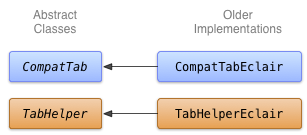
由於沒有 ActionBar.Tab 物件可處理這項儲存作業,因此 CompatTabEclair 實作會將分頁屬性 (例如分頁文字和圖示) 儲存在例項變數中:
Kotlin
class CompatTabEclair internal constructor(val activity: FragmentActivity, tag: String) :
        CompatTab(tag) {

    // Store these properties in the instance,
    // as there is no ActionBar.Tab object.
    private var text: CharSequence? = null
    ...

    override fun setText(resId: Int): CompatTab {
        // Our older implementation simply stores this
        // information in the object instance.
        text = activity.resources.getText(resId)
        return this
    }

    ...
    // Do the same for other properties (icon, callback, etc.)
}
Java
public class CompatTabEclair extends CompatTab {
    // Store these properties in the instance,
    // as there is no ActionBar.Tab object.
    private CharSequence text;
    ...

    public CompatTab setText(int resId) {
        // Our older implementation simply stores this
        // information in the object instance.
        text = activity.getResources().getText(resId);
        return this;
    }

    ...
    // Do the same for other properties (icon, callback, etc.)
}
TabHelperEclair 實作會使用 TabHost 小工具的方法,建立 TabHost.TabSpec 物件和分頁指標:
Kotlin
class TabHelperEclair internal constructor(activity: FragmentActivity) : TabHelper(activity) {

    private var tabHost: TabHost? = null
    ...

    override fun setUp() {
        // Our activity layout for pre-Honeycomb devices
        // must contain a TabHost.
        tabHost = tabHost ?: mActivity.findViewById<TabHost>(android.R.id.tabhost).apply {
            setup()
        }
    }

    override fun addTab(tab: CompatTab) {
        ...
        tabHost?.newTabSpec(tab.tag)?.run {
            setIndicator(tab.getText()) // And optional icon
            ...
            tabHost?.addTab(this)
        }
    }
    // The other important method, newTab() is part of
    // the base implementation.
}
Java
public class TabHelperEclair extends TabHelper {
    private TabHost tabHost;
    ...

    protected void setUp() {
        if (tabHost == null) {
            // Our activity layout for pre-Honeycomb devices
            // must contain a TabHost.
            tabHost = (TabHost) mActivity.findViewById(
                    android.R.id.tabhost);
            tabHost.setup();
        }
    }

    public void addTab(CompatTab tab) {
        ...
        TabSpec spec = tabHost
                .newTabSpec(tag)
                .setIndicator(tab.getText()); // And optional icon
        ...
        tabHost.addTab(spec);
    }

    // The other important method, newTab() is part of
    // the base implementation.
}
您現在有 CompatTab 和 TabHelper 的兩種實作方式:一種適用於搭載 Android 3.0 以上版本的裝置,並使用新的 API;另一種適用於搭載 Android 2.0 以上版本的裝置,並使用舊版 API。下一課將說明如何在應用程式中使用這些實作項目。