

החל מ-Android 15, יש תכונות API לשיפור הטיפול בשגיאות ב-Glance. בדף הזה מפורטות שיטות מומלצות לשימוש בממשקי ה-API האלה.
שימוש בבלוק try-catch סביב רכיבים שאינם קומפוזביליים
Compose לא מאפשרת להשתמש בבלוקים של try-catch סביב פונקציות composable, אבל מאפשרת להשתמש בהם כדי לעטוף את הלוגיקה האחרת של האפליקציה. כך תוכלו להשתמש ב-Compose כדי להציג את השגיאות, כמו בדוגמה הבאה:
provideContent { var isError = false var data = listOf<String>() try { val repository = (context.applicationContext as MyApplication).myRepository data = repository.loadData() } catch (e: Exception) { isError = true // TODO: handle error } if (isError) { ErrorView() } else { Content(data) } }
פריסת ברירת המחדל של השגיאה
אם יש חריגה לא מטופלת או שגיאה בכתיבה, התצוגה המקדימה מציגה פריסת שגיאה שמוגדרת כברירת מחדל:
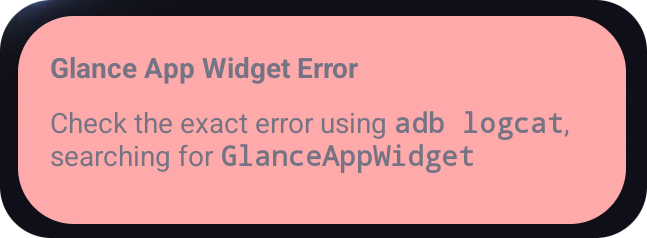
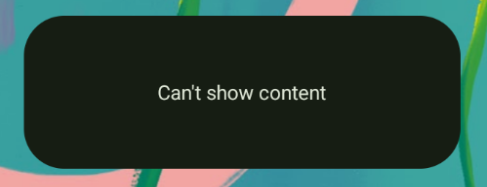
Glance מאפשר למפתחים לספק פריסת XML כגיבוי אם הקומפוזיציה נכשלת. המשמעות היא שהייתה שגיאה בקוד של Compose. ממשק המשתמש של השגיאה הזו מופיע גם אם יש שגיאה לא מטופלת בקוד של האפליקציה.
class UpgradeWidget : GlanceAppWidget(errorUiLayout = R.layout.error_layout) { // ... }
הוספת פעולות לממשק המשתמש של שגיאות שמוגדר כברירת מחדל
החל מ-Glance 1.1.0, אפשר לבטל את קוד הטיפול בשגיאות שמוגדר כברירת מחדל. כך תוכלו להוסיף קריאות חוזרות (callback) לפעולה במקרה של חריגה שלא נתפסה או שגיאה בהרכבה.
כדי להשתמש בתכונה הזו, צריך לבטל את הפונקציה onCompositionError():
GlanceAppWidget.onCompositionError(
    context: Context,
    glanceId: GlanceId,
    appWidgetId: Int,
    throwable: Throwable
)
בפונקציה הזו, Glance חוזר ל-API RemoteViews לטיפול בשגיאות.
כך אפשר לציין פריסות ורכיבי handler לפעולות באמצעות XML.
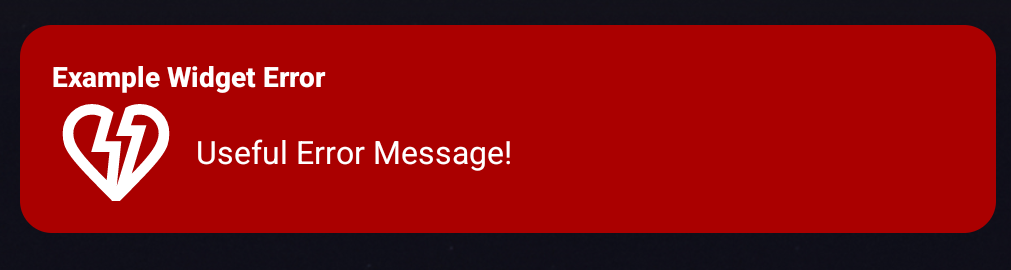
בדוגמאות הבאות מוצגות הוראות מפורטות ליצירת ממשק משתמש לשגיאות שכולל לחצן לשליחת משוב:
כותבים את קובץ ה-
error_layout.xml:<LinearLayout xmlns:android="http://schemas.android.com/apk/res/android" style="@style/Widget.MyApplication.AppWidget.Error" android:id="@android:id/background" android:layout_width="match_parent" android:textSize="24sp" android:layout_height="match_parent" android:orientation="vertical"> <TextView android:id="@+id/error_title_view" android:layout_width="match_parent" android:textColor="@color/white" android:textFontWeight="800" android:layout_height="wrap_content" android:text="Example Widget Error" /> <LinearLayout android:layout_width="match_parent" android:orientation="horizontal" android:paddingTop="4dp" android:layout_height="match_parent"> <ImageButton android:layout_width="64dp" android:layout_height="64dp" android:layout_gravity="center" android:tint="@color/white" android:id="@+id/error_icon" android:src="@drawable/heart_broken_fill0_wght400_grad0_opsz24" /> <TextView android:id="@+id/error_text_view" android:layout_width="wrap_content" android:textColor="@color/white" android:layout_height="wrap_content" android:layout_gravity="center" android:padding="8dp" android:textSize="16sp" android:layout_weight="1" android:text="Useful Error Message!" /> </LinearLayout> </LinearLayout>משנים את הפונקציה
onCompositionError:override fun onCompositionError( context: Context, glanceId: GlanceId, appWidgetId: Int, throwable: Throwable ) { val rv = RemoteViews(context.packageName, R.layout.error_layout) rv.setTextViewText( R.id.error_text_view, "Error was thrown. \nThis is a custom view \nError Message: `${throwable.message}`" ) rv.setOnClickPendingIntent(R.id.error_icon, getErrorIntent(context, throwable)) AppWidgetManager.getInstance(context).updateAppWidget(appWidgetId, rv) }
יוצרים Intent בהמתנה שמפנה אל
GlanceAppWidgetReceiver:private fun getErrorIntent(context: Context, throwable: Throwable): PendingIntent { val intent = Intent(context, UpgradeToHelloWorldPro::class.java) intent.action = "widgetError" return PendingIntent.getBroadcast(context, 0, intent, PendingIntent.FLAG_IMMUTABLE) }
מטפלים בכוונה ב-
GlanceAppWidgetReceiver:override fun onReceive(context: Context, intent: Intent) { super.onReceive(context, intent) Log.e("ErrorOnClick", "Button was clicked.") }