

Android 15 से, Glance पर गड़बड़ी ठीक करने की सुविधा को बेहतर बनाने के लिए, एपीआई की सुविधाएं शामिल की गई हैं. इस पेज पर, इन एपीआई के बारे में सबसे सही तरीके बताए गए हैं.
नॉन-कंपोज़ेबल कॉम्पोनेंट के चारों ओर try-catch ब्लॉक का इस्तेमाल करना
Compose, कंपोज़ेबल के आस-पास try-catch ब्लॉक इस्तेमाल करने की अनुमति नहीं देता. हालांकि, यह आपको अपने ऐप्लिकेशन के अन्य लॉजिक को इन ब्लॉक में रैप करने की अनुमति देता है. इससे आपको अपने गड़बड़ी वाले व्यू के लिए Compose का इस्तेमाल करने की सुविधा मिलती है. इसका उदाहरण यहां दिया गया है:
provideContent {
       var isError = false;
       var data = null
       try {
           val repository = (context.applicationContext as MyApplication).myRepository
           data = repository.loadData()
       } catch (e: Exception) {
           isError = true;
           //handleError
       }

       if (isError) {
           ErrorView()
       } else {
           Content(data)
       }
   }
गड़बड़ी का डिफ़ॉल्ट लेआउट
अगर कोई अनकैच एक्सेप्शन या कंपोज़ गड़बड़ी होती है, तो Glance में डिफ़ॉल्ट गड़बड़ी वाला लेआउट दिखता है:
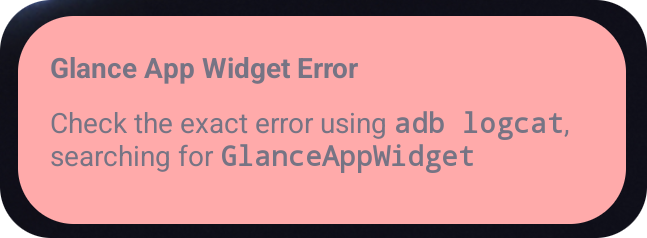
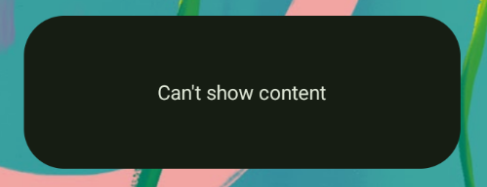
Glance की मदद से डेवलपर, कंपोज़िशन के काम न करने पर एक्सएमएल लेआउट को फ़ॉलबैक के तौर पर उपलब्ध करा सकते हैं. इसका मतलब है कि Compose कोड में कोई गड़बड़ी हुई है. अगर आपके ऐप्लिकेशन के कोड में कोई ऐसी गड़बड़ी है जिसे ठीक नहीं किया गया है, तो भी गड़बड़ी का यह यूज़र इंटरफ़ेस (यूआई) दिखता है.
class UpgradeWidget : GlanceAppWidget(errorUiLayout = R.layout.error_layout)
यह एक स्टैटिक लेआउट है. उपयोगकर्ता इससे इंटरैक्ट नहीं कर सकता. हालांकि, आपातकालीन स्थितियों में यह लेआउट काम का होता है.
गड़बड़ी के डिफ़ॉल्ट यूज़र इंटरफ़ेस (यूआई) में कार्रवाइयां जोड़ना
Glance 1.1.0 से, Glance में गड़बड़ी को हैंडल करने वाले डिफ़ॉल्ट कोड को बदलने की सुविधा मिलती है. इस तरह, कंपोज़िशन में बिना पकड़ी गई गड़बड़ी या त्रुटि होने पर, ऐक्शन कॉलबैक जोड़े जा सकते हैं.
इस सुविधा का इस्तेमाल करने के लिए, onCompositionError() फ़ंक्शन को बदलें:
GlanceAppWidget.onCompositionError(
    context: Context,
    glanceId: GlanceId,
    appWidgetId: Int,
    throwable: Throwable
)
इस फ़ंक्शन में, गड़बड़ी को ठीक करने के लिए Glance, RemoteViews API का इस्तेमाल करता है.
इससे एक्सएमएल का इस्तेमाल करके लेआउट और ऐक्शन हैंडलर तय किए जा सकते हैं.
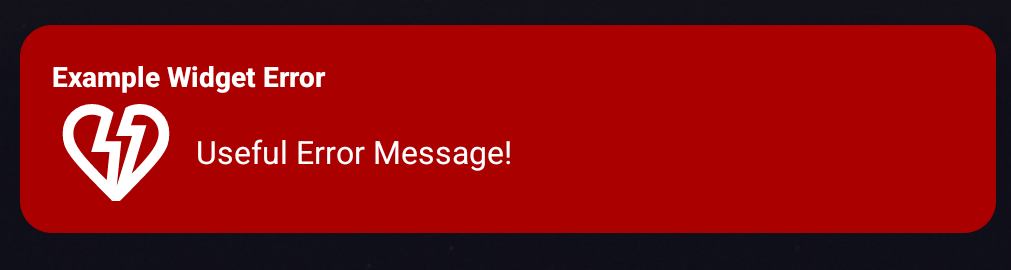
यहां दिए गए उदाहरणों में, गड़बड़ी वाला यूज़र इंटरफ़ेस (यूआई) बनाने का तरीका बताया गया है. इसमें सुझाव/राय देने या शिकायत करने के लिए एक बटन भी शामिल है.
error_layout.xmlफ़ाइल लिखें:<LinearLayout xmlns:android="http://schemas.android.com/apk/res/android" style="@style/Widget.MyApplication.AppWidget.Error" android:id="@android:id/background" android:layout_width="match_parent" android:textSize="24sp" android:layout_height="match_parent" android:orientation="vertical"> <TextView android:id="@+id/error_title_view" android:layout_width="match_parent" android:textColor="@color/white" android:textFontWeight="800" android:layout_height="wrap_content" android:text="Example Widget Error" /> <LinearLayout android:layout_width="match_parent" android:orientation="horizontal" android:paddingTop="4dp" android:layout_height="match_parent"> <ImageButton android:layout_width="64dp" android:layout_height="64dp" android:layout_gravity="center" android:tint="@color/white" android:id="@+id/error_icon" android:src="@drawable/heart_broken_fill0_wght400_grad0_opsz24" /> <TextView android:id="@+id/error_text_view" android:layout_width="wrap_content" android:textColor="@color/white" android:layout_height="wrap_content" android:layout_gravity="center" android:padding="8dp" android:textSize="16sp" android:layout_weight="1" android:text="Useful Error Message!" /> </LinearLayout> </LinearLayout>onCompositionErrorफ़ंक्शन को बदलें:override fun onCompositionError( context: Context, glanceId: GlanceId, appWidgetId: Int, throwable: Throwable ) { val rv = RemoteViews(context.packageName, R.layout.error_layout) rv.setTextViewText( R.id.error_text_view, "Error was thrown. \nThis is a custom view \nError Message: `${throwable.message}`" ) rv.setOnClickPendingIntent(R.id.error_icon, getErrorIntent(context, throwable)) AppWidgetManager.getInstance(context).updateAppWidget(appWidgetId, rv) }एक ऐसा पेंडिंग इंटेंट बनाएं जो आपके
GlanceAppWidgetReceiverको रेफ़रंस करता हो:private fun getErrorIntent(context: Context, throwable: Throwable): PendingIntent { val intent = Intent(context, UpgradeToHelloWorldPro::class.java) intent.setAction("widgetError") return PendingIntent.getBroadcast(context, 0, intent, PendingIntent.FLAG_IMMUTABLE) }अपने
GlanceAppWidgetReceiverमें इंटेंट को हैंडल करें:override fun onReceive(context: Context, intent: Intent) { super.onReceive(context, intent) Log.e("ErrorOnClick", "Button was clicked."); }