

嵌套滚动是一种系统,其中包含在彼此内部的多个滚动组件通过对单个滚动滑动手势做出反应并传达其滚动增量(变化)来协同工作。
嵌套滚动系统允许在可滚动且具有层次结构关联(通常通过共享同一父级)的组件之间进行协调。此系统会关联滚动容器,并允许与正在传播和共享的滚动增量进行交互。
Compose 提供了多种方法来处理可组合项之间的嵌套滚动。 例如,在一个列表中嵌套另一个列表就是一种典型的嵌套滚动,而收起工具栏则是一种更复杂的嵌套滚动情况。
自动嵌套滚动
简单的嵌套滚动无需您执行任何操作。启动滚动操作的手势会自动从子级传播到父级,这样一来,当子级无法进一步滚动时,手势就会由其父元素处理。
部分 Compose 组件和修饰符原生支持自动嵌套滚动,包括:verticalScroll、horizontalScroll、scrollable、Lazy API 和 TextField。这意味着,当用户滚动嵌套组件的内部子级时,之前的修饰符会将滚动增量传播到支持嵌套滚动的父级。
以下示例显示的元素应用了 verticalScroll 修饰符,而其所在的容器同样应用了 verticalScroll 修饰符。
@Composable private fun AutomaticNestedScroll() { val gradient = Brush.verticalGradient(0f to Color.Gray, 1000f to Color.White) Box( modifier = Modifier .background(Color.LightGray) .verticalScroll(rememberScrollState()) .padding(32.dp) ) { Column { repeat(6) { Box( modifier = Modifier .height(128.dp) .verticalScroll(rememberScrollState()) ) { Text( "Scroll here", modifier = Modifier .border(12.dp, Color.DarkGray) .background(brush = gradient) .padding(24.dp) .height(150.dp) ) } } } } }

使用 nestedScroll 修饰符
如果您需要在多个元素之间创建高级协调滚动,可以使用 nestedScroll 修饰符定义嵌套滚动层次结构来提高灵活性。如上一部分所述,某些组件具有内置的嵌套滚动支持。但是,对于不可自动滚动的可组合项(例如 Box 或 Column),此类组件上的滚动增量不会在嵌套滚动系统中传播,并且增量不会到达 NestedScrollConnection 或父组件。若要解决此问题,您可以使用 nestedScroll 向其他组件(包括自定义组件)提供此类支持。
嵌套滚动周期
嵌套滚动周期是指滚动增量在层次结构树中上下分派的流程,这些增量会流经属于嵌套滚动系统的所有组件(或节点),例如通过使用可滚动组件和修饰符或 nestedScroll。
嵌套滚动周期阶段
当可滚动组件检测到触发事件(例如手势)时,在实际滚动操作触发之前,生成的增量会发送到嵌套滚动系统,并经历三个阶段:滚动前、节点消耗和滚动后。
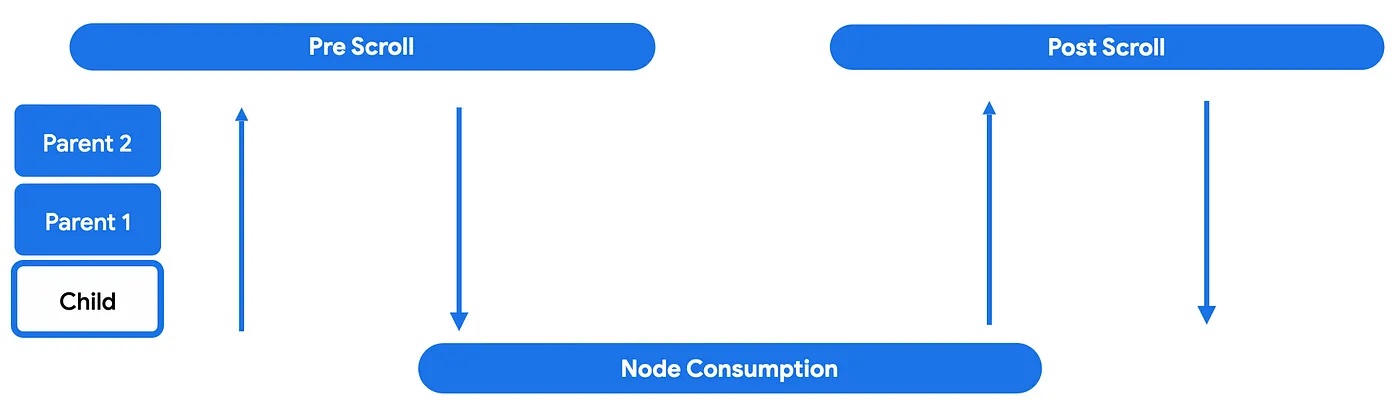
在第一个阶段(即滚动前阶段),接收到触发事件增量的组件会将这些事件通过层次结构树向上分派到最顶层的父级。然后,增量事件将向下冒泡,这意味着增量将从最根部的父级向下传播到启动嵌套滚动周期的子级。

这样,嵌套滚动父级(使用 nestedScroll 或可滚动修饰符的可组合项)就有机会在节点本身可以使用增量之前对增量执行某些操作。

在节点消耗阶段,节点本身将使用其父级未使用的任何增量。此时,滚动动作实际完成并可见。
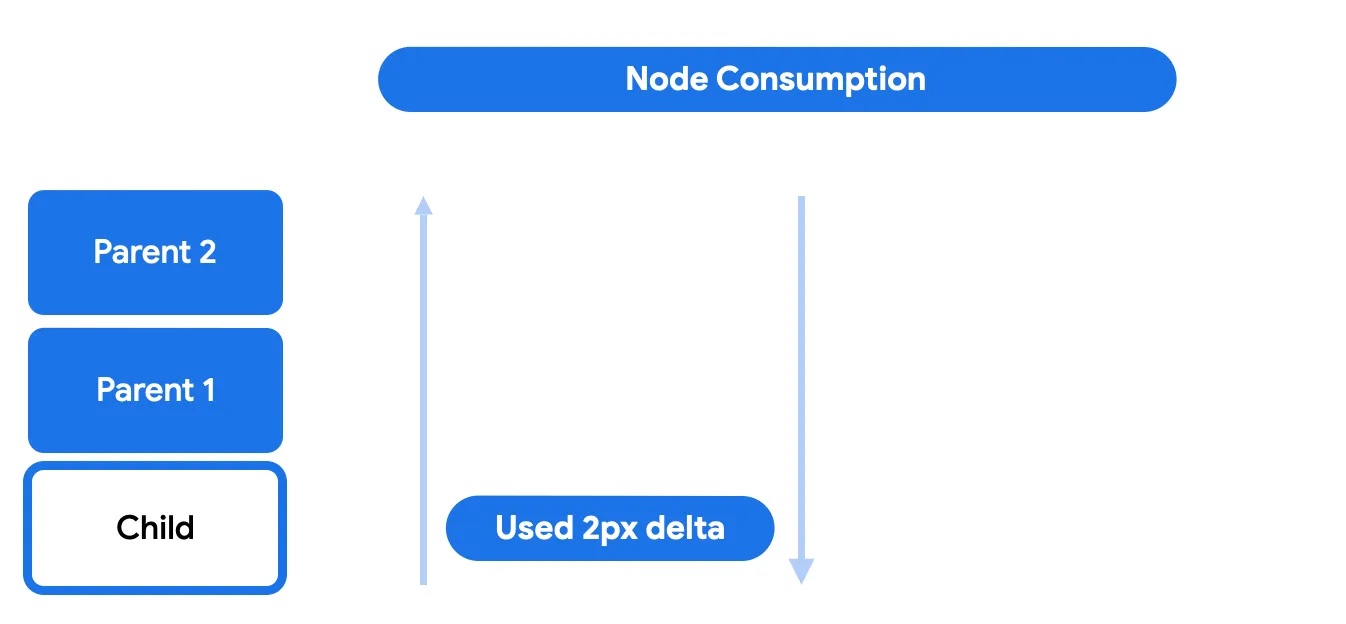
在此阶段,子视图可以选择使用全部或部分剩余滚动。任何剩余内容都将发送回上层,以进入滚动后阶段。
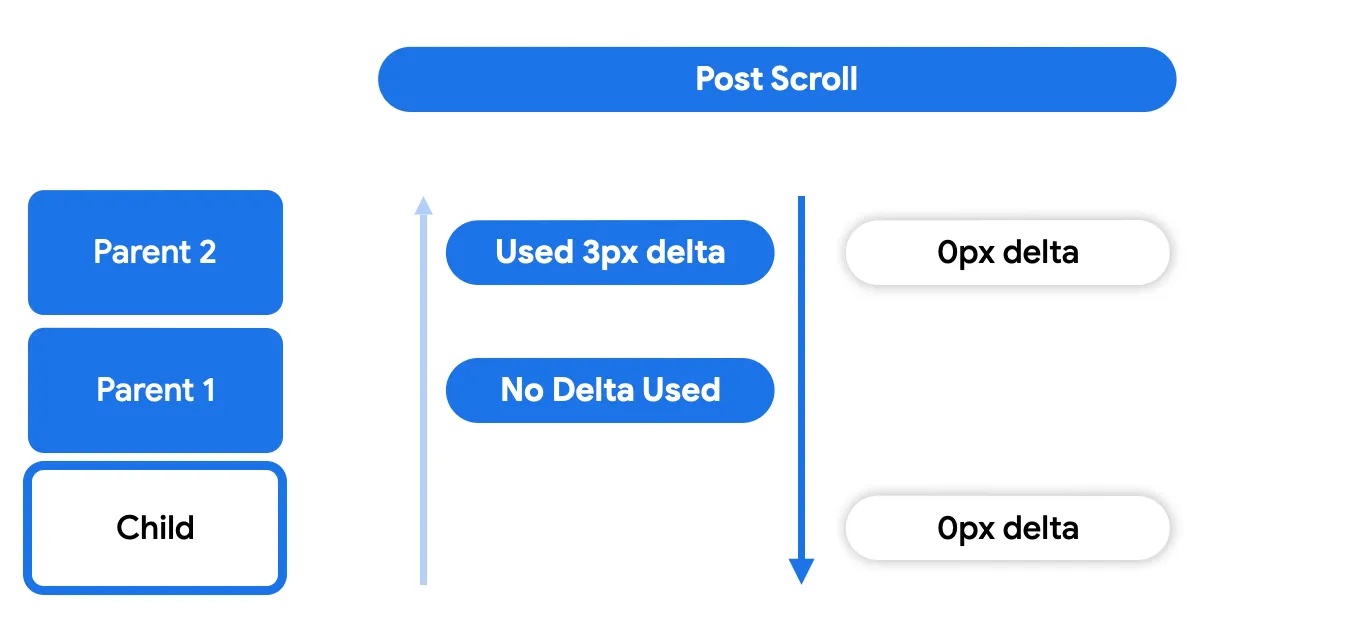
最后,在滚动后阶段,节点本身未使用的任何内容都会再次发送给其祖先节点以供使用。
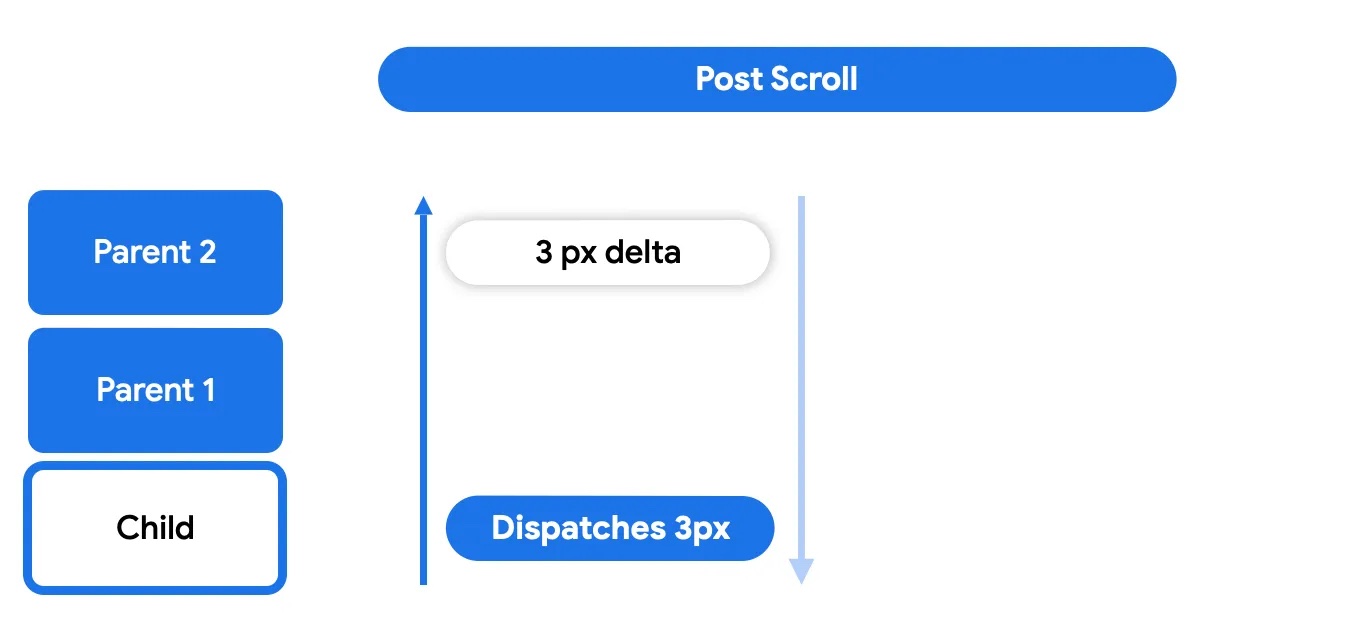
滚动后阶段的工作方式与滚动前阶段类似,任何父级都可以选择是否使用。
与滚动类似,当拖动手势结束时,用户的意图可能会转化为用于快速滑动(使用动画滚动)可滚动容器的速度。快速滑动也是嵌套滚动周期的一部分,拖动事件产生的速度会经历类似的阶段:快速滑动前、节点消耗和快速滑动后。请注意,滑甩动画仅与轻触手势相关联,不会由其他事件(例如 a11y 或硬件滚动)触发。
参与嵌套滚动周期
参与该周期意味着拦截、使用和报告沿层次结构使用的增量。Compose 提供了一组工具,可影响嵌套滚动系统的运作方式以及如何直接与其交互,例如,当您需要在可滚动组件开始滚动之前对滚动增量执行某些操作时。
如果嵌套滚动周期是一个作用于节点链的系统,那么 nestedScroll 修饰符就是一种拦截和插入这些更改并影响在链中传播的数据(滚动增量)的方法。此修饰符可以放置在层次结构中的任何位置,并与树中的嵌套滚动修饰符实例进行通信,以便通过此通道共享信息。此修饰符的构建块为 NestedScrollConnection 和 NestedScrollDispatcher。
NestedScrollConnection 提供了一种方法来响应嵌套滚动周期的各个阶段并影响嵌套滚动系统。它由四个回调方法组成,每个方法分别代表一个使用阶段:滚动前/滚动后和快速滑动前/快速滑动后:
val nestedScrollConnection = object : NestedScrollConnection { override fun onPreScroll(available: Offset, source: NestedScrollSource): Offset { println("Received onPreScroll callback.") return Offset.Zero } override fun onPostScroll( consumed: Offset, available: Offset, source: NestedScrollSource ): Offset { println("Received onPostScroll callback.") return Offset.Zero } }
每个回调还会提供有关正在传播的增量的信息:该特定阶段的 available 增量,以及在先前阶段中使用的 consumed 增量。如果您想在任何时候停止在层次结构中向上级联增量,可以使用嵌套滚动连接来实现:
val disabledNestedScrollConnection = remember { object : NestedScrollConnection { override fun onPostScroll( consumed: Offset, available: Offset, source: NestedScrollSource ): Offset { return if (source == NestedScrollSource.SideEffect) { available } else { Offset.Zero } } } }
所有回调都会提供有关 NestedScrollSource 类型的信息。
NestedScrollDispatcher 会初始化嵌套滚动周期。使用调度程序并调用其方法会触发该周期。可滚动容器具有内置调度程序,可将手势期间捕获的增量发送到系统中。因此,大多数自定义嵌套滚动的用例都涉及使用 NestedScrollConnection 而不是调度程序,以对已有的增量做出响应,而不是发送新的增量。
如需了解更多用法,请参阅 NestedScrollDispatcherSample。
在滚动时调整图片大小
当用户滚动时,您可以创建动态视觉效果,让图片根据滚动位置改变大小。
根据滚动位置调整图片大小
此代码段演示了如何根据垂直滚动位置调整 LazyColumn 中的图片大小。当用户向下滚动时,图片会缩小;当用户向上滚动时,图片会放大,但始终保持在定义的最小和最大尺寸范围内:
@Composable fun ImageResizeOnScrollExample( modifier: Modifier = Modifier, maxImageSize: Dp = 300.dp, minImageSize: Dp = 100.dp ) { var currentImageSize by remember { mutableStateOf(maxImageSize) } var imageScale by remember { mutableFloatStateOf(1f) } val nestedScrollConnection = remember { object : NestedScrollConnection { override fun onPreScroll(available: Offset, source: NestedScrollSource): Offset { // Calculate the change in image size based on scroll delta val delta = available.y val newImageSize = currentImageSize + delta.dp val previousImageSize = currentImageSize // Constrain the image size within the allowed bounds currentImageSize = newImageSize.coerceIn(minImageSize, maxImageSize) val consumed = currentImageSize - previousImageSize // Calculate the scale for the image imageScale = currentImageSize / maxImageSize // Return the consumed scroll amount return Offset(0f, consumed.value) } } } Box(Modifier.nestedScroll(nestedScrollConnection)) { LazyColumn( Modifier .fillMaxWidth() .padding(15.dp) .offset { IntOffset(0, currentImageSize.roundToPx()) } ) { // Placeholder list items items(100, key = { it }) { Text( text = "Item: $it", style = MaterialTheme.typography.bodyLarge ) } } Image( painter = ColorPainter(Color.Red), contentDescription = "Red color image", Modifier .size(maxImageSize) .align(Alignment.TopCenter) .graphicsLayer { scaleX = imageScale scaleY = imageScale // Center the image vertically as it scales translationY = -(maxImageSize.toPx() - currentImageSize.toPx()) / 2f } ) } }
代码要点
- 此代码使用
NestedScrollConnection拦截滚动事件。 onPreScroll会根据滚动增量计算图片大小的变化。currentImageSize状态变量存储图片的当前大小,该大小受minImageSize和maxImageSize. imageScale约束,派生自currentImageSize。LazyColumn基于currentImageSize进行偏移。Image使用graphicsLayer修饰符来应用计算出的缩放比例。graphicsLayer中的translationY可确保图片在缩放时保持垂直居中。
结果
上述代码段会在滚动时产生缩放图片效果:
嵌套滚动互操作性
当您尝试在可滚动的可组合项中嵌套可滚动的 View 元素时,可能会遇到问题,反之亦然。如果您滚动子项,到达其起始或结束边界并预期父项接续滚动,会发生明显的问题。不过,这种预期行为可能无法发生或无法以预期方式发生。
此问题是由可滚动的可组合项中内置的预期行为而导致。可滚动的可组合项有“默认嵌套滚动”规则,这意味着任何可滚动容器都必须通过 NestedScrollConnection 作为父项参与嵌套滚动链,并通过 NestedScrollDispatcher 作为子项参与嵌套滚动链。然后,当子项位于边界上时,子项将为父项推动嵌套滚动。例如,此规则允许 Compose Pager 和 Compose LazyRow 良好地配合工作。然而,当使用 ViewPager2 或 RecyclerView 完成互操作性滚动时,由于不会实现 NestedScrollingParent3,因此无法做到由子项到父项的连续滚动。
如要在可滚动的 View 元素与可滚动的可组合项之间实现双向嵌套的嵌套滚动互操作 API,您可以在下列场景中使用嵌套滚动互操作 API 来缓解这些问题。
包含子级 ComposeView 的协作式父级 View
协作式父级 View 已实现 NestedScrollingParent3,因此能够从参与协作的嵌套子级可组合项接收滚动增量。在这种情况下,ComposeView 将充当子项,并且需要(间接)实现 NestedScrollingChild3。比如,androidx.coordinatorlayout.widget.CoordinatorLayout 就是一个协作式父项的示例。
如果您需要在可滚动的 View 父级容器与嵌套的可滚动子级可组合项之间实现嵌套滚动互操作性,可以使用 rememberNestedScrollInteropConnection()。
rememberNestedScrollInteropConnection() 会允许并记住 NestedScrollConnection,后者支持在实现 NestedScrollingParent3 的 View 父项和 Compose 子项之间实现嵌套滚动互操作性。此方法应与 nestedScroll 修饰符结合使用。由于嵌套滚动在 Compose 端默认处于启用状态,因此您可以使用此连接在 View 端实现嵌套滚动,并在 Views 和可组合项之间添加必要的粘合逻辑。
一个常见的用例是使用 CoordinatorLayout、CollapsingToolbarLayout 和子级可组合项,具体如以下示例所示:
<androidx.coordinatorlayout.widget.CoordinatorLayout xmlns:android="http://schemas.android.com/apk/res/android" xmlns:app="http://schemas.android.com/apk/res-auto" android:layout_width="match_parent" android:layout_height="match_parent"> <com.google.android.material.appbar.AppBarLayout android:id="@+id/app_bar" android:layout_width="match_parent" android:layout_height="100dp" android:fitsSystemWindows="true"> <com.google.android.material.appbar.CollapsingToolbarLayout android:id="@+id/collapsing_toolbar_layout" android:layout_width="match_parent" android:layout_height="match_parent" android:fitsSystemWindows="true" app:layout_scrollFlags="scroll|exitUntilCollapsed"> <!--...--> </com.google.android.material.appbar.CollapsingToolbarLayout> </com.google.android.material.appbar.AppBarLayout> <androidx.compose.ui.platform.ComposeView android:id="@+id/compose_view" app:layout_behavior="@string/appbar_scrolling_view_behavior" android:layout_width="match_parent" android:layout_height="match_parent"/> </androidx.coordinatorlayout.widget.CoordinatorLayout>
在您的 activity 或 fragment 中,您需要设置子级可组合项和必需的 NestedScrollConnection:
open class MainActivity : ComponentActivity() { override fun onCreate(savedInstanceState: Bundle?) { super.onCreate(savedInstanceState) setContentView(R.layout.activity_main) findViewById<ComposeView>(R.id.compose_view).apply { setContent { val nestedScrollInterop = rememberNestedScrollInteropConnection() // Add the nested scroll connection to your top level @Composable element // using the nestedScroll modifier. LazyColumn(modifier = Modifier.nestedScroll(nestedScrollInterop)) { items(20) { item -> Box( modifier = Modifier .padding(16.dp) .height(56.dp) .fillMaxWidth() .background(Color.Gray), contentAlignment = Alignment.Center ) { Text(item.toString()) } } } } } } }
包含子级 AndroidView 的父级可组合项
此场景涵盖了当您的父级可组合项包含子级 AndroidView 时,对 Compose 端嵌套滚动互操作 API 的实现。AndroidView 会实现 NestedScrollDispatcher,因为它充当 Compose 滚动父项的子项;还会实现 NestedScrollingParent3,因为它充当 View 滚动子项的父项。然后,Compose 父项将能够从嵌套的可滚动子级 View 接收嵌套滚动增量。
下面的示例展示了在此场景中如何使用 Compose 收起工具栏来实现嵌套滚动互操作性:
@Composable private fun NestedScrollInteropComposeParentWithAndroidChildExample() { val toolbarHeightPx = with(LocalDensity.current) { ToolbarHeight.roundToPx().toFloat() } val toolbarOffsetHeightPx = remember { mutableStateOf(0f) } // Sets up the nested scroll connection between the Box composable parent // and the child AndroidView containing the RecyclerView val nestedScrollConnection = remember { object : NestedScrollConnection { override fun onPreScroll(available: Offset, source: NestedScrollSource): Offset { // Updates the toolbar offset based on the scroll to enable // collapsible behaviour val delta = available.y val newOffset = toolbarOffsetHeightPx.value + delta toolbarOffsetHeightPx.value = newOffset.coerceIn(-toolbarHeightPx, 0f) return Offset.Zero } } } Box( Modifier .fillMaxSize() .nestedScroll(nestedScrollConnection) ) { TopAppBar( title = {}, modifier = Modifier .height(ToolbarHeight) .offset { IntOffset(x = 0, y = toolbarOffsetHeightPx.value.roundToInt()) } ) AndroidView( { context -> LayoutInflater.from(context) .inflate(R.layout.view_in_compose_nested_scroll_interop, null).apply { with(findViewById<RecyclerView>(R.id.main_list)) { layoutManager = LinearLayoutManager(context, VERTICAL, false) adapter = NestedScrollInteropAdapter() } }.also { // Nested scrolling interop is enabled when // nested scroll is enabled for the root View ViewCompat.setNestedScrollingEnabled(it, true) } }, // ... ) } } private class NestedScrollInteropAdapter : Adapter<NestedScrollInteropAdapter.NestedScrollInteropViewHolder>() { val items = (1..10).map { it.toString() } override fun onCreateViewHolder( parent: ViewGroup, viewType: Int ): NestedScrollInteropViewHolder { return NestedScrollInteropViewHolder( LayoutInflater.from(parent.context) .inflate(R.layout.list_item, parent, false) ) } override fun onBindViewHolder(holder: NestedScrollInteropViewHolder, position: Int) { // ... } class NestedScrollInteropViewHolder(view: View) : ViewHolder(view) { fun bind(item: String) { // ... } } // ... }
此示例展示了如何将该 API 与 scrollable 修饰符结合使用:
@Composable fun ViewInComposeNestedScrollInteropExample() { Box( Modifier .fillMaxSize() .scrollable( rememberScrollableState { // View component deltas should be reflected in Compose // components that participate in nested scrolling it }, Orientation.Vertical ) ) { AndroidView( { context -> LayoutInflater.from(context) .inflate(R.layout.list_item, null) .apply { // Nested scrolling interop is enabled when // nested scroll is enabled for the root View ViewCompat.setNestedScrollingEnabled(this, true) } } ) } }
最后,此示例展示了如何将嵌套滚动互操作 API 与 BottomSheetDialogFragment 结合使用,以实现成功的拖动和关闭操作:
class BottomSheetFragment : BottomSheetDialogFragment() { override fun onCreateView( inflater: LayoutInflater, container: ViewGroup?, savedInstanceState: Bundle? ): View { val rootView: View = inflater.inflate(R.layout.fragment_bottom_sheet, container, false) rootView.findViewById<ComposeView>(R.id.compose_view).apply { setContent { val nestedScrollInterop = rememberNestedScrollInteropConnection() LazyColumn( Modifier .nestedScroll(nestedScrollInterop) .fillMaxSize() ) { item { Text(text = "Bottom sheet title") } items(10) { Text( text = "List item number $it", modifier = Modifier.fillMaxWidth() ) } } } return rootView } } }
请注意,rememberNestedScrollInteropConnection() 会在附加到它的元素中安装 NestedScrollConnection。NestedScrollConnection 负责将增量从 Compose 级别传输到 View 级别。这使元素能够参与嵌套滚动,但不会自动启用元素滚动。对于不可自动滚动的可组合项(例如 Box 或 Column),此类组件上的滚动增量不会在嵌套滚动系统中传播,并且增量不会到达 rememberNestedScrollInteropConnection() 提供的 NestedScrollConnection,因此这些增量不会到达父级 View 组件。如要解决此问题,请确保将可滚动的修饰符也设置为这些类型的嵌套可组合项。如需了解详情,请参阅上文中关于嵌套滚动的部分。
包含子级 ComposeView 的非协作式父级 View
非协作式 View 无法在 View 端实现必要的 NestedScrolling 接口。请注意,这意味着这类 Views 不能直接支持嵌套滚动互操作性。非协作式 Views 是 RecyclerView 和 ViewPager2。
其他资源
为你推荐
- 注意:当 JavaScript 处于关闭状态时,系统会显示链接文字
- 了解手势
- 将
CoordinatorLayout迁移到 Compose - 在 Compose 中使用 View