

侧边导航栏可让用户访问在大屏设备上运行的应用中的目的地。您应在以下情况下使用侧边导航栏:
- 需要可在应用中的任何位置访问的顶级目的地
- 3 到 7 个主要目的地
- 平板电脑或桌面设备布局

本页面介绍了如何在应用中显示栏,以及相关屏幕和基本导航。
API Surface
将 NavigationRail 可组合项与 NavigationRailItem 搭配使用,在应用中实现侧边栏。NavigationRailItem 表示栏列中的单个栏项。
NavigationRailItem 包含以下关键参数:
selected:确定当前导轨项是否在视觉上突出显示。onClick():一个必需的 lambda 函数,用于定义用户点击边栏项时要执行的操作。您通常会在此处处理导航事件、更新所选边栏项状态或加载相应内容。label:在导轨项中显示文本。可选。icon:在导轨项中显示图标。可选。
示例:基于侧边栏的导航
以下代码段实现了一个导航栏,以便用户在应用中的不同屏幕之间导航:
@Composable fun NavigationRailExample(modifier: Modifier = Modifier) { val navController = rememberNavController() val startDestination = Destination.SONGS var selectedDestination by rememberSaveable { mutableIntStateOf(startDestination.ordinal) } Scaffold(modifier = modifier) { contentPadding -> NavigationRail(modifier = Modifier.padding(contentPadding)) { Destination.entries.forEachIndexed { index, destination -> NavigationRailItem( selected = selectedDestination == index, onClick = { navController.navigate(route = destination.route) selectedDestination = index }, icon = { Icon( destination.icon, contentDescription = destination.contentDescription ) }, label = { Text(destination.label) } ) } } AppNavHost(navController, startDestination) } }
要点
NavigationRail会显示一列垂直的边栏项,其中每个项对应一个Destination。val navController = rememberNavController()会创建并记住NavHostController的实例,该实例用于管理NavHost中的导航。var selectedDestination by rememberSaveable { mutableIntStateOf(startDestination.ordinal) }管理所选栏目项的状态。startDestination.ordinal获取Destination.SONGS枚举条目的数字索引(位置)。
- 点击侧边栏项时,系统会调用
navController.navigate(route =
destination.route)
以转到相应界面。 NavigationRailItem的onClicklambda 会更新selectedDestination状态,以直观地突出显示点击的边栏项。- 它会调用
AppNavHost可组合项,并传递navController和startDestination,以显示所选屏幕的实际内容。
结果
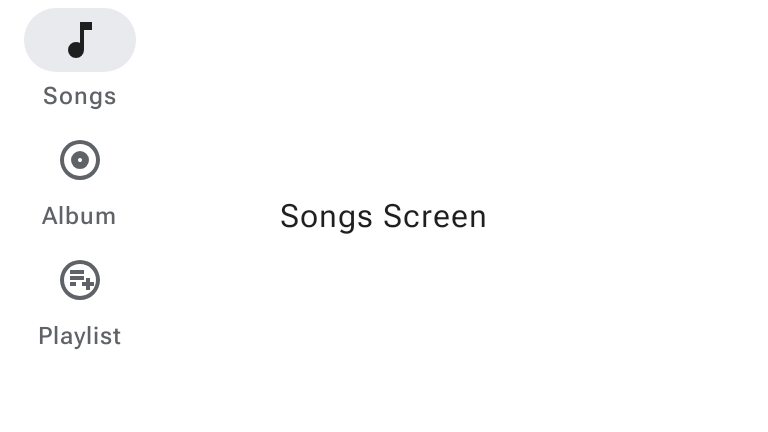
下图显示了上述代码段的结果:
M3 Expressive 更新
Material 3 Expressive 引入了 WideNavigationRail 和 ModalWideNavigationRail,它们支持收起和展开状态,作为标准 NavigationRail 的额外选项。

如需详细了解导航栏的 M3 Expressive 更新,请参阅 Material Design 3 导航栏指南。
收起和展开后的宽侧边导航栏
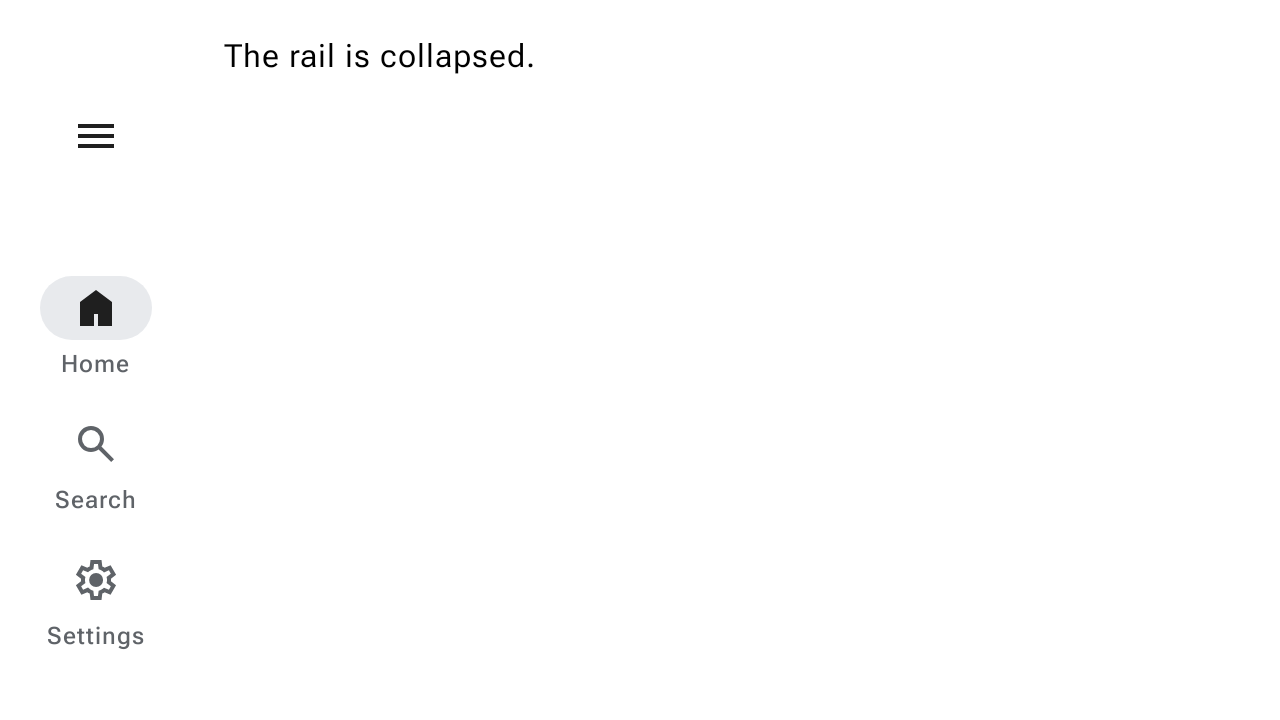
宽导航栏有两种状态:收起和展开,当用户选择菜单按钮时,这两种状态可以相互转换。以下代码段演示了如何实现 WideNavigationRail,以便在收起状态和展开状态之间添加动画效果:
@Composable fun WideNavigationRailResponsiveSample() { var selectedItem by remember { mutableIntStateOf(0) } val items = listOf("Home", "Search", "Settings") val selectedIcons = listOf(AppIcons.HomeFilled, AppIcons.Search, AppIcons.SettingsFilled) val unselectedIcons = listOf(AppIcons.Home, AppIcons.Search, AppIcons.Settings) val state = rememberWideNavigationRailState() val scope = rememberCoroutineScope() Row(Modifier.fillMaxWidth()) { WideNavigationRail( state = state, header = { IconButton( modifier = Modifier .padding(start = 24.dp) .semantics { // The button must announce the expanded or collapsed state of the rail // for accessibility. stateDescription = if (state.currentValue == WideNavigationRailValue.Expanded) "Expanded" else "Collapsed" }, onClick = { scope.launch { if (state.targetValue == WideNavigationRailValue.Expanded) state.collapse() else state.expand() } }, ) { if (state.targetValue == WideNavigationRailValue.Expanded) { Icon(painter = rememberVectorPainter(AppIcons.MenuOpen), "Collapse rail") } else { Icon(painter = rememberVectorPainter(AppIcons.Menu), "Expand rail") } } }, ) { items.forEachIndexed { index, item -> WideNavigationRailItem( railExpanded = state.targetValue == WideNavigationRailValue.Expanded, icon = { val imageVector = if (selectedItem == index) { selectedIcons[index] } else { unselectedIcons[index] } Icon( painter = rememberVectorPainter(imageVector), contentDescription = null ) }, label = { Text(item) }, selected = selectedItem == index, onClick = { selectedItem = index }, ) } } val textString = if (state.currentValue == WideNavigationRailValue.Expanded) "expanded" else "collapsed" Column { Text(modifier = Modifier.padding(16.dp), text = "The rail is $textString.") } } }
模态宽侧边导航栏
展开后的侧边导航栏可以是标准侧边导航栏或模态侧边导航栏。模态配置会与正文内容重叠,并从菜单图标打开。以下代码段演示了如何实现 ModalWideNavigationRail:
@Composable fun ModalWideNavigationRailSample() { var selectedItem by remember { mutableIntStateOf(0) } val items = listOf("Home", "Search", "Settings") val selectedIcons = listOf(AppIcons.HomeFilled, AppIcons.Search, AppIcons.SettingsFilled) val unselectedIcons = listOf(AppIcons.Home, AppIcons.Search, AppIcons.Settings) val state = rememberWideNavigationRailState() val scope = rememberCoroutineScope() Row(Modifier.fillMaxWidth()) { ModalWideNavigationRail( state = state, // Note: the value of expandedHeaderTopPadding depends on the layout of your screen in // order to achieve the best alignment. expandedHeaderTopPadding = 64.dp, header = { IconButton( modifier = Modifier .padding(start = 24.dp) .semantics { // The button must announce the expanded or collapsed state of the rail // for accessibility. stateDescription = if (state.currentValue == WideNavigationRailValue.Expanded) "Expanded" else "Collapsed" }, onClick = { scope.launch { if (state.targetValue == WideNavigationRailValue.Expanded) state.collapse() else state.expand() } }, ) { if (state.targetValue == WideNavigationRailValue.Expanded) Icon(painter = rememberVectorPainter(AppIcons.MenuOpen), "Collapse rail") else Icon(painter = rememberVectorPainter(AppIcons.Menu), "Expand rail") } }, ) { items.forEachIndexed { index, item -> WideNavigationRailItem( railExpanded = state.targetValue == WideNavigationRailValue.Expanded, icon = { Icon( painter = rememberVectorPainter(if (selectedItem == index) selectedIcons[index] else unselectedIcons[index]), contentDescription = null, ) }, label = { Text(item) }, selected = selectedItem == index, onClick = { selectedItem = index }, ) } } val textString = if (state.currentValue == WideNavigationRailValue.Expanded) "expanded" else "collapsed" Column { Text(modifier = Modifier.padding(16.dp), text = "The rail is $textString.") } } }
可关闭的模态宽侧边导航栏
在 Android 设备上,用户可以通过预测性返回手势在屏幕上向左或向右滑动,以返回或关闭模态组件。以下代码段演示了如何通过设置 hideOnCollapse = true 来实现可关闭的 ModalWideNavigationRail:
@Composable fun DismissibleModalWideNavigationRailSample() { var selectedItem by remember { mutableIntStateOf(0) } val items = listOf("Home", "Search", "Settings") val selectedIcons = listOf(AppIcons.HomeFilled, AppIcons.Search, AppIcons.SettingsFilled) val unselectedIcons = listOf(AppIcons.Home, AppIcons.Search, AppIcons.Settings) val state = rememberWideNavigationRailState() val scope = rememberCoroutineScope() Row(Modifier.fillMaxSize()) { ModalWideNavigationRail(state = state, hideOnCollapse = true) { items.forEachIndexed { index, item -> WideNavigationRailItem( railExpanded = true, icon = { Icon( painter = rememberVectorPainter(if (selectedItem == index) selectedIcons[index] else unselectedIcons[index]), contentDescription = null, ) }, label = { Text(item) }, selected = selectedItem == index, onClick = { selectedItem = index scope.launch { state.collapse() } }, ) } } Column(Modifier.fillMaxWidth(), horizontalAlignment = Alignment.CenterHorizontally) { val currentPage = items.get(selectedItem) Button(onClick = { scope.launch { state.expand() } }, Modifier.padding(32.dp)) { Text(text = "$currentPage Page\nOpen modal rail", textAlign = TextAlign.Center) } } } }
