
You can group multiple focus targets together using the focusGroup modifier.
Grouping lets you manage focus hierarchies, isolate logical UI regions (such as
toolbars, dialog actions, or card lists), and intercept when focus enters or
exits a region.
Focus group concepts: enter, exit, and default traversal
A focus group establishes a cohesive navigation boundary around its child focus targets. Understanding how focus moves across this boundary relies on two key concepts:
- Enter: The event that occurs when focus transitions from any element outside the focus group to an element inside the group.
- Exit: The event that occurs when focus leaves the last internal element of the group and transitions to an external focus target.
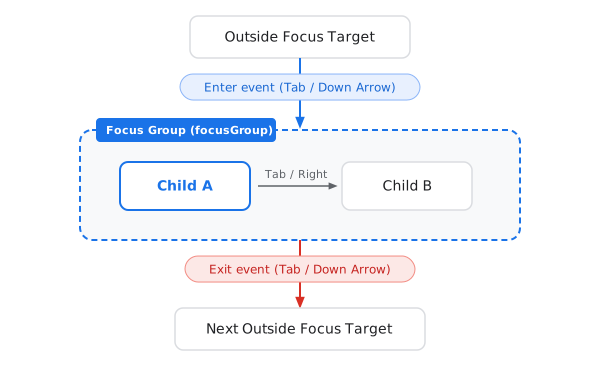
Default focus traversal behavior
By default, when a focus group receives focus from the outside:
- Entering the group: Compose automatically selects an internal child focus target. For one-dimensional (Tab) navigation, it selects the first child in visual appearance order. For two-dimensional (arrow key or D-pad) navigation, it selects the child that is geometrically closest to the incoming direction.
- Navigating within the group: Repeated navigation key presses move focus among the sibling focus targets enclosed by the group.
- Exiting the group: Once the user navigates past the last focus target inside the group, the next key press exits the group and moves focus to the neighboring focus target outside the group.
Customize focus entry redirection
In many UI designs, the default entry target (such as the first child in appearance order) is not the most logical or convenient choice for the user.
Intention and use cases
Consider a confirmation dialog with a "Cancel" button on the left and a primary "Confirm" button on the right. When the user navigates down into the button bar from a form field:
- Default behavior: Focus would land on "Cancel" because it is the first button in visual appearance order.
- Intended behavior: Because "Confirm" is the primary recommended action, you may want focus to land directly on "Confirm" when entering the button group from earlier in the focus order, while still allowing the user to press Left to select "Cancel" if needed.

Other common use cases include:
- Moving focus directly to the currently selected tab when entering a
TabRow. - Moving focus directly to the "Play / Pause" control when entering a media playback bar.
Implementation with onEnter and FocusRequester
To redirect focus upon entering a focus group:
- Apply the
focusGroupmodifier to the parent container enclosing the related focus targets. - Apply the
focusPropertiesmodifier to the container, and configure theonEntercallback. - In the
onEntercallback (scoped toFocusEnterExitScope), callrequestFocus()on aFocusRequesterassociated with the preferred default child usingfocusRequester.
val defaultChildRequester = remember { FocusRequester() } Row( modifier = Modifier .focusGroup() .focusProperties { // Intercept entry into this group and redirect focus to the primary action onEnter = { defaultChildRequester.requestFocus() } } ) { Button(onClick = { /* Cancel action */ }) { Text("Cancel") } Button( onClick = { /* Confirm action */ }, modifier = Modifier.focusRequester(defaultChildRequester) ) { Text("Confirm (Default)") } }
Inside onEnter and onExit, you can also call cancelFocusChange() to
completely block focus transitions across the boundary, or inspect
requestedFocusDirection to customize routing based on whether the user
navigated using Tab, Down, or Left.
Scrollable containers are focus groups by default
In Jetpack Compose, scrollable containers such as LazyRow, LazyColumn,
and LazyVerticalGrid automatically act as focus groups.
You don't need to explicitly apply the focusGroup modifier
to them to set onEnter or onExit callbacks.
Recommended for you
- Note: link text is displayed when JavaScript is off
- Focus targets
- Focus traversal order
- Focus in text fields
- Restore focus
- Programmatically request focus
- Test focus navigation