

เราขอแนะนำให้คุณใช้ PgsGamesSignInClient เพื่อตรวจสอบสิทธิ์ผู้เล่นและส่งข้อมูลระบุตัวตนของผู้เล่นไปยังแบ็กเอนด์ เซิร์ฟเวอร์อย่างปลอดภัย ซึ่งจะช่วยให้เกมดึงข้อมูลระบุตัวตนและข้อมูลอื่นๆ ของผู้เล่นได้อย่างปลอดภัยโดยไม่เสี่ยงต่อการถูกแก้ไขขณะส่งผ่านอุปกรณ์
เมื่อผู้เล่นตรวจสอบสิทธิ์สำเร็จแล้ว คุณสามารถขอรหัสแบบใช้ครั้งเดียวพิเศษ (เรียกว่า รหัสการให้สิทธิ์เซิร์ฟเวอร์) จากบริการเกมของ Play v2 Native SDK (เบต้า) ซึ่งไคลเอ็นต์จะส่งไปยังเซิร์ฟเวอร์ จากนั้นในเซิร์ฟเวอร์ ให้แลกรหัสการให้สิทธิ์เซิร์ฟเวอร์เป็นโทเค็น OAuth 2.0 ที่เซิร์ฟเวอร์ใช้เพื่อเรียก Google Play Games Services API ได้
ดูคำแนะนำเพิ่มเติมเกี่ยวกับการเพิ่มการตรวจสอบสิทธิ์ในเกมได้ที่ การตรวจสอบสิทธิ์แพลตฟอร์ม
คุณต้องทำตามขั้นตอนต่อไปนี้เพื่อเข้าถึงแบบออฟไลน์
- ใน Google Play Console ให้สร้างข้อมูลเข้าสู่ระบบสำหรับเซิร์ฟเวอร์เกม ประเภทไคลเอ็นต์ OAuth ของข้อมูลเข้าสู่ระบบจะเป็น "เว็บ"
- ในแอป Android ให้ขอรหัสการให้สิทธิ์เซิร์ฟเวอร์สำหรับข้อมูลเข้าสู่ระบบของเซิร์ฟเวอร์และส่งรหัสดังกล่าวไปยังเซิร์ฟเวอร์ของคุณ ซึ่งเป็นส่วนหนึ่งของการตรวจสอบสิทธิ์แพลตฟอร์ม
PgsGamesSignInClientสามารถขอขอบเขต OAuth 2.0 ได้ 3 ขอบเขตเมื่อขอสิทธิ์เข้าถึง Play Games Services Web API จากฝั่งเซิร์ฟเวอร์ ขอบเขตที่ไม่บังคับ ได้แก่PGS_AUTH_SCOPE_EMAIL,PGS_AUTH_SCOPE_PROFILEและPGS_AUTH_SCOPE_OPENIDขอบเขตเริ่มต้น 2 ขอบเขต ได้แก่DRIVE_APPFOLDERและGAMES_LITE - ในเซิร์ฟเวอร์เกม ให้แลกรหัสการให้สิทธิ์เซิร์ฟเวอร์เป็นโทเค็นการเข้าถึง OAuth โดยใช้บริการการตรวจสอบสิทธิ์ของ Google แล้วใช้โทเค็นนี้เพื่อเรียกใช้บริการเกมของ Play REST API
ก่อนเริ่มต้น
ก่อนอื่นคุณจะต้องเพิ่มเกมใน Google Play Console ตามที่อธิบายไว้ใน ตั้งค่าบริการเกมของ Google Play กับเกม
สร้างเว็บแอปฝั่งเซิร์ฟเวอร์
บริการเกมของ Google Play ไม่มีการสนับสนุนแบ็กเอนด์สำหรับเกมบนเว็บ แต่มีการสนับสนุนเซิร์ฟเวอร์แบ็กเอนด์สำหรับเซิร์ฟเวอร์ของเกม Android
หากต้องการใช้ REST API สำหรับบริการเกมของ Google Play ในแอปฝั่งเซิร์ฟเวอร์ ให้ทำตามขั้นตอนต่อไปนี้
- ใน Google Play Console เลือกเกม
- ไปที่บริการเกมของ Play > การตั้งค่าและการจัดการ > การกำหนดค่า
- เลือก เพิ่มข้อมูลเข้าสู่ระบบ เพื่อไปยัง หน้าเพิ่มข้อมูลเข้าสู่ระบบ
เลือก เซิร์ฟเวอร์เกม เป็นประเภทข้อมูลเข้าสู่ระบบ แล้วไปยังส่วน การให้สิทธิ์
- หากเซิร์ฟเวอร์เกมมีรหัสไคลเอ็นต์ OAuth อยู่แล้ว ให้เลือกรหัสจากเมนูแบบเลื่อนลง หลังจากบันทึกการเปลี่ยนแปลงแล้ว ให้ไปยัง ส่วนถัดไป
- หากไม่มีรหัสไคลเอ็นต์ OAuth สำหรับเซิร์ฟเวอร์เกม คุณสามารถสร้างรหัสได้
- คลิก สร้างไคลเอ็นต์ OAuth แล้วทำตามลิงก์ สร้างรหัสไคลเอ็นต์ OAuth
- ระบบจะนำคุณไปยังหน้า สร้างรหัสไคลเอ็นต์ OAuth ของ Google Cloud Platform สำหรับโปรเจ็กต์ที่เชื่อมโยงกับเกม
- กรอกแบบฟอร์มของหน้าแล้วคลิกสร้าง อย่าลืมตั้งค่าประเภทแอปพลิเคชันเป็นเว็บแอปพลิเคชัน
- กลับไปที่ส่วน การให้สิทธิ์ ของ หน้าเพิ่มข้อมูลเข้าสู่ระบบ เลือก ไคลเอ็นต์ OAuth ที่สร้างขึ้นใหม่ แล้วบันทึกการเปลี่ยนแปลง
รับรหัสการให้สิทธิ์เซิร์ฟเวอร์
วิธีดึงข้อมูลรหัสการให้สิทธิ์เซิร์ฟเวอร์ที่เกมใช้สำหรับโทเค็นการเข้าถึงในเซิร์ฟเวอร์แบ็กเอนด์
- เรียก
PgsGamesSignInClient_requestServerSideAccessจากไคลเอ็นต์- ตรวจสอบว่าคุณใช้รหัสไคลเอ็นต์ OAuth ที่ลงทะเบียนไว้สำหรับเซิร์ฟเวอร์เกม ไม่ใช่รหัสไคลเอ็นต์ OAuth ของแอปพลิเคชัน Android
- (ไม่บังคับ) หากเซิร์ฟเวอร์เกมต้องเข้าถึงบริการเกมของ Play แบบออฟไลน์ (เข้าถึงได้นานโดยใช้โทเค็นการรีเฟรช) คุณสามารถตั้งค่าพารามิเตอร์
force_refresh_tokenเป็น "จริง"
(ไม่บังคับ) ผู้ใช้ใหม่ควรเห็นหน้าจอขอความยินยอมเพียงหน้าจอเดียวสำหรับขอบเขตเพิ่มเติม ซึ่งเป็นส่วนหนึ่งของการตรวจสอบสิทธิ์ เมื่อยอมรับคำยินยอมแล้ว ให้ ตั้งค่าพารามิเตอร์
PgsAuthScopescopesด้วยขอบเขต OAuthPGS_AUTH_SCOPE_EMAIL,PGS_AUTH_SCOPE_PROFILEและPGS_AUTH_SCOPE_OPENIDหากผู้ใช้ปฏิเสธคำยินยอม ระบบจะส่งเฉพาะขอบเขตเริ่มต้น 2 ขอบเขต ได้แก่DRIVE_APPFOLDERและGAMES_LITEไปยังแบ็กเอนด์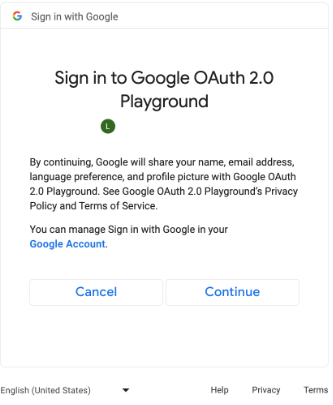
หน้าจอขอความยินยอมสำหรับขอบเขต OAuth เพิ่มเติม (คลิกเพื่อขยาย) // #include "google/games/pgs_games_sign_in_client.h" // 1. Define the Callback // This function is called when the server-side access request completes. // It provides the authorization code (on success) or an error (on failure). void OnServerSideAccessCallback(void* context, PgsError error, const char* serverAuthCode) { if (error == PgsError_Success) { if (serverAuthCode != nullptr) { __android_log_print(ANDROID_LOG_INFO, "Games", "Received Server Auth Code: %s", serverAuthCode); // Send 'serverAuthCode' to your backend server immediately. // Your server will exchange this code for an OAuth access token. } } else { __android_log_print(ANDROID_LOG_ERROR, "Games", "Failed to get server auth code. Error: %d", error); } } // 2. Define the Wrapper Function void RequestServerAccess(PgsGamesSignInClient* signInClient) { if (signInClient == nullptr) { return; } // This must match the "Web client ID" from your Google Cloud Console // (linked to your Play Console Game Server Credential). const char* SERVER_CLIENT_ID = "xxxx"; // Set to 'true' if your server needs a Refresh Token (long-lived access). // Set to 'false' if you only need an Access Token (short-lived). bool forceRefreshToken = false; // Call the API PgsGamesSignInClient_requestServerSideAccess( signInClient, SERVER_CLIENT_ID, forceRefreshToken, OnServerSideAccessCallback, // The callback defined nullptr // User context (optional, passed to callback) ); } // 3. Example Usage void TriggerSignInProcess(PgsGamesClient* gamesClient) { // Obtain the Sign-In Client from the main Games Client PgsGamesSignInClient* signInClient = PgsGamesClient_getSignInClient(gamesClient); RequestServerAccess(signInClient); }
ส่งโทเค็นรหัสการให้สิทธิ์ OAuth ไปยังเซิร์ฟเวอร์แบ็กเอนด์เพื่อให้ระบบแลกโทเค็น ตรวจสอบรหัสผู้เล่นกับบริการเกมของ Play REST API แล้วตรวจสอบสิทธิ์กับเกม
ส่งรหัสการให้สิทธิ์เซิร์ฟเวอร์
ส่งรหัสการให้สิทธิ์เซิร์ฟเวอร์ไปยังเซิร์ฟเวอร์แบ็กเอนด์เพื่อแลกเป็นโทเค็นการเข้าถึงและโทเค็นเพื่อการรีเฟรช ใช้โทเค็นเพื่อการเข้าถึงเพื่อเรียกบริการเกมของ Play API ในนามของผู้เล่น และจัดเก็บโทเค็นการรีเฟรช (ไม่บังคับ) เพื่อรับโทเค็นเพื่อการเข้าถึงใหม่เมื่อโทเค็นเพื่อการเข้าถึงหมดอายุ
ดูข้อมูลเพิ่มเติมเกี่ยวกับวิธีการทำงานของรหัสผู้เล่นได้ที่ รหัสผู้เล่นแบบใหม่
ข้อมูลโค้ดต่อไปนี้แสดงวิธีใช้โค้ดฝั่งเซิร์ฟเวอร์ในภาษาโปรแกรม C++ เพื่อแลกรหัสการให้สิทธิ์เซิร์ฟเวอร์เป็นโทเค็นการเข้าถึง
Java
/**
 * Exchanges the authcode for an access token credential. The credential
 * is associated with the given player.
 *
 * @param authCode - the non-null authcode passed from the client.
 * @param player   - the player object which the given authcode is
 *                 associated with.
 * @return the HTTP response code indicating the outcome of the exchange.
 */
private int exchangeAuthCode(String authCode, Player player) {
try {

    // The client_secret.json file is downloaded from the Google Cloud
    // console. This is used to identify your web application. The
    // contents of this file shouldn't be shared.

    File secretFile = new File("client_secret.json");

    // If we don't have the file, we can't access any APIs, so return
    // an error.
    if (!secretFile.exists()) {
        log("Secret file : " + secretFile
                .getAbsolutePath() + "  does not exist!");
        return HttpServletResponse.SC_FORBIDDEN;
    }

    GoogleClientSecrets clientSecrets = GoogleClientSecrets.load(
            JacksonFactory.getDefaultInstance(), new
            FileReader(secretFile));

    // Extract the application ID of the game from the client ID.
    String applicationId = extractApplicationId(clientSecrets
            .getDetails().getClientId());

    GoogleTokenResponse tokenResponse =
            new GoogleAuthorizationCodeTokenRequest(
            HTTPTransport,
            JacksonFactory.getDefaultInstance(),
            "https://oauth2.googleapis.com/token",
            clientSecrets.getDetails().getClientId(),
            clientSecrets.getDetails().getClientSecret(),
            authCode,
            "")
            .execute();

    TokenVerifier(tokenResponse);

    log("hasRefresh == " + (tokenResponse.getRefreshToken() != null));
    log("Exchanging authCode: " + authCode + " for token");
    Credential credential = new Credential
            .Builder(BearerToken.authorizationHeaderAccessMethod())
            .setJsonFactory(JacksonFactory.getDefaultInstance())
            .setTransport(HTTPTransport)
            .setTokenServerEncodedUrl("https://www.googleapis.com/oauth2/v4/token")
            .setClientAuthentication(new HttpExecuteInterceptor() {
                @Override
                public void intercept(HttpRequest request)
                        throws IOException {
                        }
            })
            .build()
            .setFromTokenResponse(tokenResponse);

    player.setCredential(credential);

    // Now that we have a credential, we can access the Games API.
    PlayGamesAPI api = new PlayGamesAPI(player, applicationId,
            HTTPTransport, JacksonFactory.getDefaultInstance());

    // Call the verify method, which checks that the access token has
    // access to the Games API, and that the Player ID used by the
    // client matches the playerId associated with the accessToken.
    boolean ok = api.verifyPlayer();

    // Call a Games API on the server.
    if (ok) {
        ok = api.updatePlayerInfo();
        if (ok) {
            // persist the player.
            savePlayer(api.getPlayer());
        }
    }

    return ok ? HttpServletResponse.SC_OK :
            HttpServletResponse.SC_INTERNAL_SERVER_ERROR;

  } catch (IOException e) {
    e.printStackTrace();
  }
  return HttpServletResponse.SC_INTERNAL_SERVER_ERROR;
}
คุณสามารถดึงข้อมูลขอบเขต OAuth โดยใช้
ไลบรารีของไคลเอ็นต์ Google API
ใน Java หรือ Python เพื่อรับออบเจ็กต์ GoogleIdTokenVerifier ข้อมูลโค้ดต่อไปนี้แสดงการใช้งานในภาษาโปรแกรม Java
Java
import com.google.api.client.googleapis.auth.oauth2.GoogleIdToken;
import com.google.api.client.googleapis.auth.oauth2.GoogleIdToken.Payload;
import com.google.api.client.googleapis.auth.oauth2.GoogleIdTokenVerifier;

/**
 * Gets the GoogleIdTokenVerifier object and additional OAuth scopes.
 * If additional OAuth scopes are not requested, the idToken will be null.
 *
 * @param tokenResponse - the tokenResponse passed from the exchangeAuthCode
 *                        function.
 *
 **/

void TokenVerifier(GoogleTokenResponse tokenResponse) {

    string idTokenString = tokenResponse.getIdToken();

    GoogleIdTokenVerifier verifier = new GoogleIdTokenVerifier.Builder(transport, jsonFactory)
        // Specify the WEB_CLIENT_ID of the app that accesses the backend:
        .setAudience(Collections.singletonList(WEB_CLIENT_ID))
        // Or, if multiple clients access the backend:
        //.setAudience(Arrays.asList(WEB_CLIENT_ID_1, WEB_CLIENT_ID_2, WEB_CLIENT_ID_3))
        .build();

    GoogleIdToken idToken = verifier.verify(idTokenString);

    // The idToken can be null if additional OAuth scopes are not requested.
    if (idToken != null) {
        Payload payload = idToken.getPayload();

    // Print user identifier
    String userId = payload.getSubject();
    System.out.println("User ID: " + userId);

    // Get profile information from payload
    String email = payload.getEmail();
    boolean emailVerified = Boolean.valueOf(payload.getEmailVerified());
    String name = (String) payload.get("name");
    String pictureUrl = (String) payload.get("picture");
    String locale = (String) payload.get("locale");
    String familyName = (String) payload.get("family_name");
    String givenName = (String) payload.get("given_name");

    // This ID is unique to each Google Account, making it suitable for use as
    // a primary key during account lookup. Email is not a good choice because
    // it can be changed by the user.
    String sub = payload.getSubject();

    // Use or store profile information
    // ...

    } else {
      System.out.println("Invalid ID token.");
    }
}
เรียก REST API จากเซิร์ฟเวอร์
ดูคำอธิบายโดยละเอียดเกี่ยวกับการเรียก API ที่มีได้ที่ REST API สำหรับบริการเกมของ Google Play
ตัวอย่างการเรียก REST API ที่คุณอาจพบว่ามีประโยชน์ ได้แก่
ผู้เล่น
ต้องการรับข้อมูลระบุตัวตนและข้อมูลโปรไฟล์ของผู้เล่นที่ผ่านการตรวจสอบสิทธิ์แล้วใช่ไหม เรียก
Players.get โดยใช้ 'me' เป็นรหัส
ความสำเร็จ
ดูรายละเอียดได้จากคู่มือความสำเร็จ
หากต้องการดูรายการความสำเร็จปัจจุบัน ให้เรียก AchievementDefinitions.list
รวมการเรียกดังกล่าวกับการเรียก Achievements.list เพื่อดูว่าผู้เล่นปลดล็อกความสำเร็จใดบ้าง
เรียก Achievements.unlock เพื่อปลดล็อกความสำเร็จของผู้เล่น
เรียก Achievements.increment เพื่อรายงานความคืบหน้าของความสำเร็จ และดูว่าผู้เล่นปลดล็อกความสำเร็จนั้นแล้วหรือยัง
หากคุณกำลังแก้ข้อบกพร่องของเกมที่ยังไม่พร้อมใช้งาน คุณสามารถเรียก Achievements.reset หรือ Achievements.resetAll จาก Management API เพื่อรีเซ็ตความสำเร็จเป็นสถานะเดิม