

Các tính năng API để cải thiện khả năng xử lý lỗi trên Glance được đưa vào từ Android 15. Trang này cung cấp các phương pháp hay nhất liên quan đến các API này.
Sử dụng khối try-catch xung quanh các thành phần không kết hợp được
Compose không cho phép các khối try-catch xung quanh thành phần kết hợp, nhưng cho phép bạn gói logic khác của ứng dụng trong các khối này. Điều này cho phép bạn sử dụng Compose cho chế độ xem lỗi, như trong ví dụ sau:
provideContent { var isError = false var data = listOf<String>() try { val repository = (context.applicationContext as MyApplication).myRepository data = repository.loadData() } catch (e: Exception) { isError = true // TODO: handle error } if (isError) { ErrorView() } else { Content(data) } }
Bố cục lỗi mặc định
Nếu có một ngoại lệ chưa được phát hiện hoặc lỗi Compose, thì Glance sẽ hiển thị bố cục lỗi mặc định:
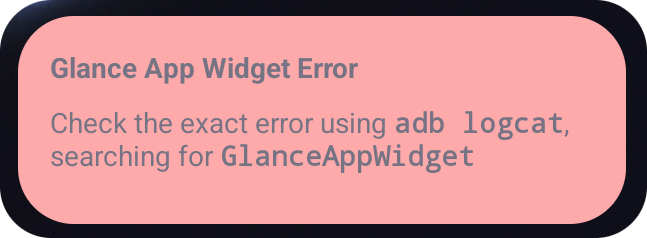
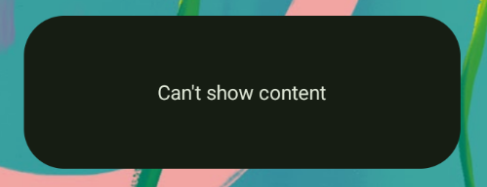
Glance cho phép nhà phát triển cung cấp bố cục XML làm phương án dự phòng nếu quá trình kết hợp không thành công. Điều này có nghĩa là đã xảy ra lỗi trong mã Compose. Giao diện người dùng lỗi này cũng xuất hiện nếu bạn có lỗi chưa được phát hiện trong mã của ứng dụng.
class UpgradeWidget : GlanceAppWidget(errorUiLayout = R.layout.error_layout) { // ... }
Thêm các thao tác vào giao diện người dùng mặc định cho lỗi
Kể từ phiên bản Glance 1.1.0, Glance cho phép bạn ghi đè mã xử lý lỗi mặc định. Bằng cách này, bạn có thể thêm lệnh gọi lại hành động trong trường hợp có ngoại lệ chưa được phát hiện hoặc lỗi trong quá trình kết hợp.
Để sử dụng tính năng này, hãy ghi đè hàm onCompositionError():
GlanceAppWidget.onCompositionError(
    context: Context,
    glanceId: GlanceId,
    appWidgetId: Int,
    throwable: Throwable
)
Trong hàm này, Glance quay lại API RemoteViews để xử lý lỗi.
Điều này cho phép bạn chỉ định bố cục và trình xử lý hành động bằng XML.
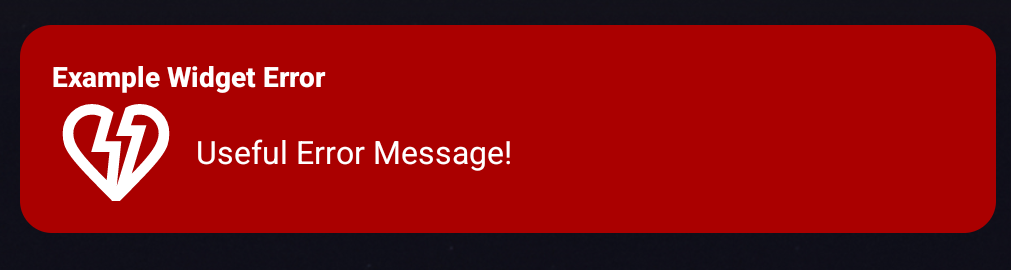
Các ví dụ sau đây hướng dẫn từng bước về cách tạo giao diện người dùng thông báo lỗi có nút gửi ý kiến phản hồi:
Viết tệp
error_layout.xml:<LinearLayout xmlns:android="http://schemas.android.com/apk/res/android" style="@style/Widget.MyApplication.AppWidget.Error" android:id="@android:id/background" android:layout_width="match_parent" android:textSize="24sp" android:layout_height="match_parent" android:orientation="vertical"> <TextView android:id="@+id/error_title_view" android:layout_width="match_parent" android:textColor="@color/white" android:textFontWeight="800" android:layout_height="wrap_content" android:text="Example Widget Error" /> <LinearLayout android:layout_width="match_parent" android:orientation="horizontal" android:paddingTop="4dp" android:layout_height="match_parent"> <ImageButton android:layout_width="64dp" android:layout_height="64dp" android:layout_gravity="center" android:tint="@color/white" android:id="@+id/error_icon" android:src="@drawable/heart_broken_fill0_wght400_grad0_opsz24" /> <TextView android:id="@+id/error_text_view" android:layout_width="wrap_content" android:textColor="@color/white" android:layout_height="wrap_content" android:layout_gravity="center" android:padding="8dp" android:textSize="16sp" android:layout_weight="1" android:text="Useful Error Message!" /> </LinearLayout> </LinearLayout>Ghi đè hàm
onCompositionError:override fun onCompositionError( context: Context, glanceId: GlanceId, appWidgetId: Int, throwable: Throwable ) { val rv = RemoteViews(context.packageName, R.layout.error_layout) rv.setTextViewText( R.id.error_text_view, "Error was thrown. \nThis is a custom view \nError Message: `${throwable.message}`" ) rv.setOnClickPendingIntent(R.id.error_icon, getErrorIntent(context, throwable)) AppWidgetManager.getInstance(context).updateAppWidget(appWidgetId, rv) }
Tạo một ý định đang chờ xử lý tham chiếu đến
GlanceAppWidgetReceivercủa bạn:private fun getErrorIntent(context: Context, throwable: Throwable): PendingIntent { val intent = Intent(context, UpgradeToHelloWorldPro::class.java) intent.action = "widgetError" return PendingIntent.getBroadcast(context, 0, intent, PendingIntent.FLAG_IMMUTABLE) }
Xử lý ý định trong
GlanceAppWidgetReceiver:override fun onReceive(context: Context, intent: Intent) { super.onReceive(context, intent) Log.e("ErrorOnClick", "Button was clicked.") }