

建議您使用 PgsGamesSignInClient 驗證玩家,並安全地將玩家身分傳遞至後端伺服器。這可讓遊戲以安全的方式擷取玩家身分資料和其他資料,避免在透過裝置傳遞的過程中可能遭到竄改的風險。
玩家成功驗證後,您就可以透過 Play 遊戲服務第 2 版 Native SDK (Beta 版) 要求一組一次性代碼 (稱為「伺服器驗證碼」),然後用戶端就會傳遞至伺服器。接著,在伺服器上交換伺服器驗證碼,以取得伺服器可用以呼叫 Google Play Games Services API 的 OAuth 2.0 權杖。
如需在遊戲中加入驗證的其他指引,請參閱「平台驗證」。
離線存取必須採取以下步驟:
- 在 Google Play 管理中心:建立遊戲伺服器的憑證。憑證的 OAuth 用戶端類型為「網站」。
- 在 Android 應用程式:在平台驗證時,要求取得伺服器憑證的伺服器授權碼,然後將該授權碼傳遞至伺服器。
PgsGamesSignInClient要求 Play Games 服務網頁 API 的伺服器端存取權時,可以要求三種 OAuth 2.0 範圍。選用範圍包括PGS_AUTH_SCOPE_EMAIL、PGS_AUTH_SCOPE_PROFILE和PGS_AUTH_SCOPE_OPENID。預設範圍為DRIVE_APPFOLDER和GAMES_LITE。 - 在遊戲伺服器上:使用 Google 驗證服務交換 OAuth 存取權杖的伺服器驗證碼,然後使用此驗證碼呼叫 Play 遊戲服務 REST API。
事前準備
首先您必須在 Google Play 管理中心內加入您的遊戲 (如「設定 Google Play Games 服務」所述)。
建立伺服器端網頁應用程式
Google Play 遊戲服務無法提供網路遊戲的後端支援,但會提供 Android 遊戲伺服器的後端伺服器支援。
如要在伺服器端應用程式中使用 Google Play 遊戲服務的 REST API,請按照以下步驟操作:
- 在 Google Play 管理中心選取遊戲。
- 依序前往「Play 遊戲服務」>「設定與管理」>「設定」。
- 選取「新增憑證」,即可前往「新增憑證」頁面。選取「遊戲伺服器」做為憑證類型,然後繼續前往「授權」部分。
- 如果遊戲伺服器已有 OAuth 用戶端 ID,請從下拉式選單中選取該 ID。儲存變更後,請繼續前往下一節。
- 如果遊戲伺服器沒有現有的 OAuth 用戶端 ID,可以建立一個。
- 點選「建立 OAuth 用戶端」,然後點選「建立 OAuth 用戶端 ID」連結。
- 系統會導向 Google Cloud Platform 的「建立 OAuth 用戶端 ID」頁面,顯示與遊戲相關聯的專案。
- 填寫頁面的表單,然後按一下「建立」。請務必將應用程式類型設為網頁應用程式。
- 返回「新增憑證」頁面的「授權」部分,選取新建立的 OAuth 用戶端,然後儲存變更。
取得伺服器授權碼
如要擷取遊戲在後端伺服器取得存取權杖使用的伺服器授權碼,請按照下列步驟操作:
- 從用戶端呼叫
PgsGamesSignInClient_requestServerSideAccess。- 請務必使用為遊戲伺服器註冊的 OAuth 用戶端 ID,而非 Android 應用程式的 OAuth 用戶端 ID。
- (選用) 如果遊戲伺服器需要離線存取 Play Games 服務 (即使用更新權杖的長期存取權),可將
force_refresh_token參數設為 true。
(選用) 驗證程序會向新使用者顯示單一同意畫面,要求同意額外範圍。接受同意聲明後,請使用
PGS_AUTH_SCOPE_EMAIL、PGS_AUTH_SCOPE_PROFILE和PGS_AUTH_SCOPE_OPENIDOAuth 範圍設定PgsAuthScopescopes參數。如果使用者拒絕同意,系統只會將兩個預設範圍DRIVE_APPFOLDER和GAMES_LITE傳送至後端。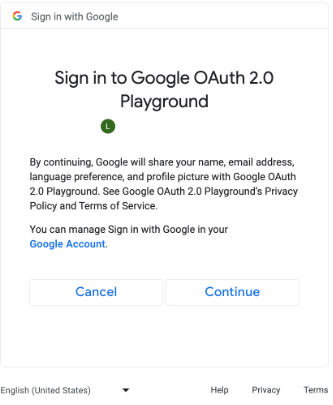
要求額外 OAuth 範圍的同意畫面 (按一下即可放大)。 // #include "google/games/pgs_games_sign_in_client.h" // 1. Define the Callback // This function is called when the server-side access request completes. // It provides the authorization code (on success) or an error (on failure). void OnServerSideAccessCallback(void* context, PgsError error, const char* serverAuthCode) { if (error == PgsError_Success) { if (serverAuthCode != nullptr) { __android_log_print(ANDROID_LOG_INFO, "Games", "Received Server Auth Code: %s", serverAuthCode); // Send 'serverAuthCode' to your backend server immediately. // Your server will exchange this code for an OAuth access token. } } else { __android_log_print(ANDROID_LOG_ERROR, "Games", "Failed to get server auth code. Error: %d", error); } } // 2. Define the Wrapper Function void RequestServerAccess(PgsGamesSignInClient* signInClient) { if (signInClient == nullptr) { return; } // This must match the "Web client ID" from your Google Cloud Console // (linked to your Play Console Game Server Credential). const char* SERVER_CLIENT_ID = "xxxx"; // Set to 'true' if your server needs a Refresh Token (long-lived access). // Set to 'false' if you only need an Access Token (short-lived). bool forceRefreshToken = false; // Call the API PgsGamesSignInClient_requestServerSideAccess( signInClient, SERVER_CLIENT_ID, forceRefreshToken, OnServerSideAccessCallback, // The callback defined nullptr // User context (optional, passed to callback) ); } // 3. Example Usage void TriggerSignInProcess(PgsGamesClient* gamesClient) { // Obtain the Sign-In Client from the main Games Client PgsGamesSignInClient* signInClient = PgsGamesClient_getSignInClient(gamesClient); RequestServerAccess(signInClient); }
將 OAuth 授權碼權杖傳送至後端伺服器,以便讓使用者交換、透過 Play Games 服務 REST API 驗證玩家 ID,並且透過遊戲進行驗證。
傳送伺服器授權碼
傳送伺服器驗證碼至後端伺服器,以交換取得存取權和更新權杖。請使用存取權杖代表玩家呼叫 Play 遊戲服務 API,然後可選擇是否儲存更新權杖,方便在存取權杖過期時取得新的存取權杖。
如要進一步瞭解玩家 ID 的運作方式,請參閱「新一代玩家 ID」。
下列程式碼片段展示如何以 C++ 程式設計語言實作伺服器端程式碼,交換伺服器驗證碼以取得存取權杖。
Java
/**
 * Exchanges the authcode for an access token credential. The credential
 * is associated with the given player.
 *
 * @param authCode - the non-null authcode passed from the client.
 * @param player   - the player object which the given authcode is
 *                 associated with.
 * @return the HTTP response code indicating the outcome of the exchange.
 */
private int exchangeAuthCode(String authCode, Player player) {
try {

    // The client_secret.json file is downloaded from the Google Cloud
    // console. This is used to identify your web application. The
    // contents of this file shouldn't be shared.

    File secretFile = new File("client_secret.json");

    // If we don't have the file, we can't access any APIs, so return
    // an error.
    if (!secretFile.exists()) {
        log("Secret file : " + secretFile
                .getAbsolutePath() + "  does not exist!");
        return HttpServletResponse.SC_FORBIDDEN;
    }

    GoogleClientSecrets clientSecrets = GoogleClientSecrets.load(
            JacksonFactory.getDefaultInstance(), new
            FileReader(secretFile));

    // Extract the application ID of the game from the client ID.
    String applicationId = extractApplicationId(clientSecrets
            .getDetails().getClientId());

    GoogleTokenResponse tokenResponse =
            new GoogleAuthorizationCodeTokenRequest(
            HTTPTransport,
            JacksonFactory.getDefaultInstance(),
            "https://oauth2.googleapis.com/token",
            clientSecrets.getDetails().getClientId(),
            clientSecrets.getDetails().getClientSecret(),
            authCode,
            "")
            .execute();

    TokenVerifier(tokenResponse);

    log("hasRefresh == " + (tokenResponse.getRefreshToken() != null));
    log("Exchanging authCode: " + authCode + " for token");
    Credential credential = new Credential
            .Builder(BearerToken.authorizationHeaderAccessMethod())
            .setJsonFactory(JacksonFactory.getDefaultInstance())
            .setTransport(HTTPTransport)
            .setTokenServerEncodedUrl("https://www.googleapis.com/oauth2/v4/token")
            .setClientAuthentication(new HttpExecuteInterceptor() {
                @Override
                public void intercept(HttpRequest request)
                        throws IOException {
                        }
            })
            .build()
            .setFromTokenResponse(tokenResponse);

    player.setCredential(credential);

    // Now that we have a credential, we can access the Games API.
    PlayGamesAPI api = new PlayGamesAPI(player, applicationId,
            HTTPTransport, JacksonFactory.getDefaultInstance());

    // Call the verify method, which checks that the access token has
    // access to the Games API, and that the Player ID used by the
    // client matches the playerId associated with the accessToken.
    boolean ok = api.verifyPlayer();

    // Call a Games API on the server.
    if (ok) {
        ok = api.updatePlayerInfo();
        if (ok) {
            // persist the player.
            savePlayer(api.getPlayer());
        }
    }

    return ok ? HttpServletResponse.SC_OK :
            HttpServletResponse.SC_INTERNAL_SERVER_ERROR;

  } catch (IOException e) {
    e.printStackTrace();
  }
  return HttpServletResponse.SC_INTERNAL_SERVER_ERROR;
}
您可以使用 Java 或 Python 的 Google API 用戶端程式庫,擷取 OAuth 範圍來取得 GoogleIdTokenVerifier 物件。下列程式碼片段顯示以 Java 程式設計語言實作的內容。
Java
import com.google.api.client.googleapis.auth.oauth2.GoogleIdToken;
import com.google.api.client.googleapis.auth.oauth2.GoogleIdToken.Payload;
import com.google.api.client.googleapis.auth.oauth2.GoogleIdTokenVerifier;

/**
 * Gets the GoogleIdTokenVerifier object and additional OAuth scopes.
 * If additional OAuth scopes are not requested, the idToken will be null.
 *
 * @param tokenResponse - the tokenResponse passed from the exchangeAuthCode
 *                        function.
 *
 **/

void TokenVerifier(GoogleTokenResponse tokenResponse) {

    string idTokenString = tokenResponse.getIdToken();

    GoogleIdTokenVerifier verifier = new GoogleIdTokenVerifier.Builder(transport, jsonFactory)
        // Specify the WEB_CLIENT_ID of the app that accesses the backend:
        .setAudience(Collections.singletonList(WEB_CLIENT_ID))
        // Or, if multiple clients access the backend:
        //.setAudience(Arrays.asList(WEB_CLIENT_ID_1, WEB_CLIENT_ID_2, WEB_CLIENT_ID_3))
        .build();

    GoogleIdToken idToken = verifier.verify(idTokenString);

    // The idToken can be null if additional OAuth scopes are not requested.
    if (idToken != null) {
        Payload payload = idToken.getPayload();

    // Print user identifier
    String userId = payload.getSubject();
    System.out.println("User ID: " + userId);

    // Get profile information from payload
    String email = payload.getEmail();
    boolean emailVerified = Boolean.valueOf(payload.getEmailVerified());
    String name = (String) payload.get("name");
    String pictureUrl = (String) payload.get("picture");
    String locale = (String) payload.get("locale");
    String familyName = (String) payload.get("family_name");
    String givenName = (String) payload.get("given_name");

    // This ID is unique to each Google Account, making it suitable for use as
    // a primary key during account lookup. Email is not a good choice because
    // it can be changed by the user.
    String sub = payload.getSubject();

    // Use or store profile information
    // ...

    } else {
      System.out.println("Invalid ID token.");
    }
}
從伺服器呼叫 REST API
如需可用的 API 呼叫的完整說明,請參閱「Google Play 遊戲服務的 REST API」。
以下是幾個實用的 REST API 呼叫範例,歡迎參考:
播放器
想要取得已驗證玩家的 ID 和設定檔資料嗎?請以 'me' 為 ID 呼叫 Players.get。
成就
詳情請參閱「成就」指南。
如要取得目前成就的清單,請呼叫 AchievementDefinitions.list。
然後結合對 Achievements.list 的呼叫,找出玩家已解鎖的成就。
呼叫 Achievements.unlock 以解鎖玩家成就。
呼叫 Achievements.increment 回報成就的進度,瞭解玩家是否已解鎖成就。
如果正在對尚未成為正式版的遊戲進行偵錯,您可以從 Management API 呼叫 Achievements.reset 或 Achievements.resetAll,將成就重設為原始狀態。