

您可以在應用程式中採用三種樣式:
- 直接用於公開
Style參數的現有元件。 - 在不接受
Style參數的版面配置可組合項上,套用Modifier.styleable樣式。 - 在自訂設計系統中,使用
Modifier.styleable{}並在自己的元件上公開樣式參數。
樣式可用的屬性
樣式支援許多修飾符支援的屬性,但並非所有修飾符都能以樣式複製。您仍需要特定行為的修飾符,例如互動、自訂繪圖或屬性堆疊。
| 分組 | 屬性 | 由子項繼承 |
|---|---|---|
| 版面配置和大小 | ||
| 內容邊框間距 (內部) | - contentPadding(all: Dp)- contentPadding(horizontal: Dp, vertical: Dp)- contentPadding(start: Dp, top: Dp, end: Dp, bottom: Dp)- contentPaddingHorizontal(value: Dp) / contentPaddingVertical(value: Dp)- contentPaddingStart(value: Dp) / contentPaddingTop(value: Dp) / contentPaddingEnd(value: Dp) / contentPaddingBottom(value: Dp) |
否 |
| 外部邊框間距 (外側) | - externalPadding(all: Dp)- externalPadding(horizontal: Dp, vertical: Dp)- externalPadding(start: Dp, top: Dp, end: Dp, bottom: Dp)- externalPaddingHorizontal(value: Dp) / externalPaddingVertical(value: Dp)- externalPaddingStart(value: Dp) / externalPaddingTop(value: Dp) / externalPaddingEnd(value: Dp) / externalPaddingBottom(value: Dp) |
否 |
| 尺寸 | fillWidth()/fillHeight()/fillSize() 和 width、height,以及 size (支援 Dp、DpSize 或 Float 分數)。 |
否 |
| 定位 | left/top/right/bottom抵銷。 |
否 |
| 視覺外觀 | ||
| 填滿 | background 和 foreground (支援 Color 或 Brush)。 |
否 |
| 框線 | borderWidth、borderColor和borderBrush。 |
否 |
| 圖案 | shape |
否,但會與其他屬性搭配使用。clip 和 border 會使用這個定義的形狀。 |
| 陰影 | dropShadow、innerShadow |
否 |
| 轉換 | ||
| 圖層空間移動 | translationX、translationY、scaleX/scaleY、rotationX/rotationY/rotationZ |
否 |
| 控管 | alpha、zIndex (堆疊順序) 和 transformOrigin (樞紐點) |
否 |
| Typography | ||
| 樣式 | textStyle、fontSize、fontWeight、fontStyle和fontFamily |
是 |
| 色彩 | contentColor 和 contentBrush 這也用於設定圖示樣式。 |
是 |
| 段落 | lineHeight、letterSpacing、textAlign、textDirection、lineBreak和 hyphens。 |
是 |
| 裝飾 | textDecoration、textIndent和baselineShift。 |
是 |
使用樣式參數直接在元件上套用樣式
公開 Style 參數的元件可讓您設定樣式:
BaseButton( onClick = { }, style = { } ) { BaseText("Click me") }
在樣式 lambda 中,您可以設定各種屬性,例如 externalPadding 或 background:
BaseButton( onClick = { }, style = { background(Color.Blue) } ) { BaseText("Click me") }
如需支援屬性的完整清單,請參閱「樣式可用的屬性」。
使用修飾符對沒有現有參數的元件套用樣式
如果元件沒有內建樣式參數,您仍可使用 styleable 修飾符套用樣式。開發自訂元件時,這種做法也很有用。
Row( modifier = Modifier.styleable { } ) { BaseText("Content") }
與 style 參數類似,您可以在 lambda 中加入 background、contentPadding 或 externalPadding 等屬性。
Row( modifier = Modifier.styleable { background(Color.Blue) } ) { BaseText("Content") }
多個鏈結的 Modifier.styleable 修飾符會與所套用可組合項目的非繼承屬性相加,行為與定義相同屬性的多個修飾符類似。如果是繼承的屬性,這些屬性會遭到覆寫,且鏈結中的最後一個 styleable 修飾符會設定值。
使用 Modifier.styleable 時,您可能也想建立並提供 StyleState,與修飾符搭配使用,套用以狀態為準的樣式。詳情請參閱「使用樣式設定狀態和動畫」。
定義獨立的樣式
您可以定義獨立的樣式,以便重複使用:
val style = Style { background(Color.Blue) }
然後,您可以將定義的樣式傳遞至可組合項的樣式參數,或使用 Modifier.styleable。使用 Modifier.styleable 時,您也需要建立 StyleState 物件。StyleState 會在「使用樣式設定狀態和動畫」說明文件中詳細說明。
以下範例說明如何直接透過元件的內建參數或 Modifier.styleable 套用樣式:
val style = Style { background(Color.Blue) } // built in parameter BaseButton(onClick = { }, style = style) { BaseText("Button") } // modifier styleable val styleState = remember { MutableStyleState(null) } Column( Modifier.styleable(styleState, style) ) { BaseText("Column content") }
您也可以將該樣式傳遞至多個元件:
val style = Style { background(Color.Blue) } // built in parameter BaseButton(onClick = { }, style = style) { BaseText("Button") } BaseText("Different text that uses the same style parameter", style = style) // modifier styleable val columnStyleState = remember { MutableStyleState(null) } Column( Modifier.styleable(columnStyleState, style) ) { BaseText("Column") } val rowStyleState = remember { MutableStyleState(null) } Row( Modifier.styleable(rowStyleState, style) ) { BaseText("Row") }
新增多個樣式屬性
您可以在每一行設定不同的屬性,新增多個 Style 屬性:
BaseButton( onClick = { }, style = { background(Color.Blue) contentPaddingStart(16.dp) } ) { BaseText("Button") }
樣式中的屬性並非累加,這與以修飾符為基礎的樣式不同。樣式會採用一個樣式區塊內屬性清單中的最後一組值。在以下範例中,背景設定了兩次,TealColor 是套用的背景。如果是邊框間距,contentPaddingTop 會覆寫 contentPadding 設定的頂端邊框間距,且不會合併值。
BaseButton( style = { background(Color.Red) // Background of Red is now overridden with TealColor instead background(TealColor) // All directions of padding are set to 64.dp (top, start, end, bottom) contentPadding(64.dp) // Top padding is now set to 16.dp, all other paddings remain at 64.dp contentPaddingTop(16.dp) }, onClick = { // } ) { BaseText("Click me!") }
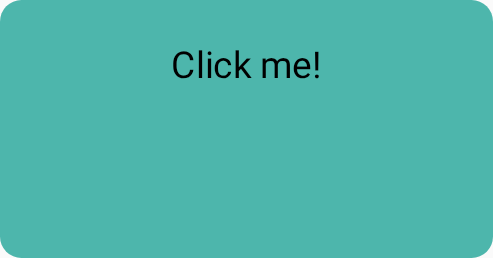
contentPadding 覆寫。合併多個樣式物件
您可以建立多個 Style 物件,並將其傳遞至可組合項的樣式參數。
val style1 = Style { background(TealColor) } val style2 = Style { contentPaddingTop(16.dp) } BaseButton( style = style1 then style2, onClick = { }, ) { BaseText("Click me!") }

contentPaddingTop。如果多個樣式指定相同的屬性,系統會選擇最後設定的屬性。由於樣式中的屬性不會累加,因此最後傳入的邊框間距會覆寫初始 contentPadding 設定的 contentPaddingHorizontal。此外,最後一個背景顏色會覆寫傳入初始樣式所設定的背景顏色。
val style1 = Style { background(Color.Red) contentPadding(32.dp) } val style2 = Style { contentPaddingHorizontal(8.dp) background(Color.LightGray) } BaseButton( style = style1 then style2, onClick = { }, ) { BaseText("Click me!") }
在本例中,套用的樣式具有淺灰色背景和 32.dp 邊框間距,但左側和右側邊框間距的值為 8.dp。

contentPadding 會由不同樣式覆寫。樣式繼承
某些樣式屬性 (例如 contentColor 和文字樣式相關屬性) 會傳播至子項可組合項。在子項可組合函式上設定的樣式,會覆寫該特定子項繼承的父項樣式。

Style、styleable 和直接參數傳播樣式。| 優先順序 | 方法 | 效果 |
|---|---|---|
| 1 (最高) | 可組合函式上的直接引數 | 會覆寫所有內容,例如 Text(color = Color.Red) |
| 2 | 樣式參數 | 本機樣式覆寫 Text(style = Style { contentColor(Color.Red)} |
| 3 | 修飾符鏈 | Modifier.styleable{ contentColor(Color.Red)。 |
| 4 (最低) | 父項樣式 | 可從父項傳遞的屬性 (字體排版/顏色)。 |
父項樣式
您可以從父項可組合函式設定文字屬性 (例如 contentColor),這些屬性會傳播至所有子項 Text 可組合函式。
val styleState = remember { MutableStyleState(null) } Column( modifier = Modifier.styleable(styleState) { background(Color.LightGray) val blue = Color(0xFF4285F4) val purple = Color(0xFFA250EA) val colors = listOf(blue, purple) contentBrush(Brush.linearGradient(colors)) }, ) { BaseText("Children inherit", style = { width(60.dp) }) BaseText("certain properties") BaseText("from their parents") }

子項覆寫屬性
您也可以在特定 Text 可組合函式上設定樣式。如果父項可組合項已設定樣式,子項可組合項設定的樣式會覆寫父項可組合項的樣式。
val styleState = remember { MutableStyleState(null) } Column( modifier = Modifier.styleable(styleState) { background(Color.LightGray) val blue = Color(0xFF4285F4) val purple = Color(0xFFA250EA) val colors = listOf(blue, purple) contentBrush(Brush.linearGradient(colors)) }, ) { BaseText("Children can ", style = { contentBrush(Brush.linearGradient(listOf(Color.Red, Color.Blue))) }) BaseText("override properties") BaseText("set by their parents") }

導入自訂樣式屬性
您可以使用 StyleScope 的擴充功能建立對應至現有樣式定義的自訂屬性,如下例所示:
fun StyleScope.outlinedBackground(color: Color) { border(1.dp, color) background(color) }
在樣式定義中套用這項新屬性:
val customExtensionStyle = Style { outlinedBackground(Color.Blue) }
系統不支援建立新的可設定樣式的屬性。如果您的用途需要這類支援,請提交功能要求。
讀取 CompositionLocal 值
將設計系統符記儲存在 CompositionLocal 中是很常見的做法,這樣就能存取變數,不必將變數做為參數傳遞。樣式可以存取 CompositionLocal,在樣式中擷取全系統值:
val buttonStyle = Style { contentPadding(12.dp) shape(RoundedCornerShape(50)) background(Brush.verticalGradient(LocalCustomColors.currentValue.background)) }