
ScrollIndicator
Functions summary
Unit |
@ComposableA composable that displays a visual indicator of scrolling progress within a scrollable container. |
Unit |
@ComposableA composable that displays a visual indicator of scrolling progress within a scrollable container. |
Unit |
@ComposableA composable that displays a visual indicator of scrolling progress within a scrollable container. |
Unit |
@ComposableA composable that displays a visual indicator of scrolling progress within a scrollable container. |
Functions
ScrollIndicator
@Composable
fun ScrollIndicator(
    state: LazyListState,
    modifier: Modifier = Modifier,
    colors: ScrollIndicatorColors = ScrollIndicatorDefaults.colors(),
    reverseDirection: Boolean = state.layoutInfo.reverseLayout,
    positionAnimationSpec: AnimationSpec<Float> = ScrollIndicatorDefaults.PositionAnimationSpec
): Unit
A composable that displays a visual indicator of scrolling progress within a scrollable container.
Creates a ScrollIndicator based on the values in a LazyListState object that a LazyColumn uses.
To comply with Wear Material Design guidelines, this composable should be aligned to the center end of the screen using Alignment.CenterEnd. It will appear on the right in Ltr orientation and on the left in Rtl orientation.
It detects if the screen is round or square and draws itself as a curve or line.
For more information, see the Scroll indicators guide.
| Parameters | |
|---|---|
state: LazyListState |
the |
modifier: Modifier = Modifier |
The modifier to be applied to the component |
colors: ScrollIndicatorColors = ScrollIndicatorDefaults.colors() |
|
reverseDirection: Boolean = state.layoutInfo.reverseLayout |
Reverses direction of ScrollIndicator if true. The default value is inferred from the |
positionAnimationSpec: AnimationSpec<Float> = ScrollIndicatorDefaults.PositionAnimationSpec |
|
ScrollIndicator
@Composable
fun ScrollIndicator(
    state: ScalingLazyListState,
    modifier: Modifier = Modifier,
    colors: ScrollIndicatorColors = ScrollIndicatorDefaults.colors(),
    reverseDirection: Boolean = state.layoutInfo.reverseLayout,
    positionAnimationSpec: AnimationSpec<Float> = ScrollIndicatorDefaults.PositionAnimationSpec
): Unit
A composable that displays a visual indicator of scrolling progress within a scrollable container.
Creates a ScrollIndicator based on the values in a ScalingLazyListState object that a ScalingLazyColumn uses.
Typically used with the ScreenScaffold but can be used to decorate any full screen situation.
To comply with Wear Material Design guidelines, this composable should be aligned to the center end of the screen using Alignment.CenterEnd. It will appear on the right in Ltr orientation and on the left in Rtl orientation.
It detects if the screen is round or square and draws itself as a curve or line.
For more information, see the Scroll indicators guide.
| Parameters | |
|---|---|
state: ScalingLazyListState |
the |
modifier: Modifier = Modifier |
The modifier to be applied to the component |
colors: ScrollIndicatorColors = ScrollIndicatorDefaults.colors() |
|
reverseDirection: Boolean = state.layoutInfo.reverseLayout |
Reverses direction of ScrollIndicator if true. The default value is inferred from the |
positionAnimationSpec: AnimationSpec<Float> = ScrollIndicatorDefaults.PositionAnimationSpec |
|
ScrollIndicator
@Composable
fun ScrollIndicator(
    state: ScrollState,
    modifier: Modifier = Modifier,
    colors: ScrollIndicatorColors = ScrollIndicatorDefaults.colors(),
    reverseDirection: Boolean = false,
    positionAnimationSpec: AnimationSpec<Float> = ScrollIndicatorDefaults.PositionAnimationSpec
): Unit
A composable that displays a visual indicator of scrolling progress within a scrollable container.
Creates a ScrollIndicator based on the values in a ScrollState object. e.g. a Column implementing androidx.compose.foundation.verticalScroll provides a ScrollState.
To comply with Wear Material Design guidelines, this composable should be aligned to the center end of the screen using Alignment.CenterEnd, such as by setting modifier = Modifier.align(Alignment.CenterEnd). This way, the ScrollIndicator will appear on the right in Ltr orientation and on the left in Rtl orientation.
It detects if the screen is round or square and draws itself as a curve or line.
For more information, see the Scroll indicators guide.
| Parameters | |
|---|---|
state: ScrollState |
The scrollState to use as the basis for the ScrollIndicatorState. |
modifier: Modifier = Modifier |
The modifier to be applied to the component - usually set to |
colors: ScrollIndicatorColors = ScrollIndicatorDefaults.colors() |
|
reverseDirection: Boolean = false |
Reverses direction of ScrollIndicator if true |
positionAnimationSpec: AnimationSpec<Float> = ScrollIndicatorDefaults.PositionAnimationSpec |
|
ScrollIndicator
@Composable
fun ScrollIndicator(
    state: TransformingLazyColumnState,
    modifier: Modifier = Modifier,
    colors: ScrollIndicatorColors = ScrollIndicatorDefaults.colors(),
    reverseDirection: Boolean = state.layoutInfo.reverseLayout,
    positionAnimationSpec: AnimationSpec<Float> = ScrollIndicatorDefaults.PositionAnimationSpec
): Unit
A composable that displays a visual indicator of scrolling progress within a scrollable container.
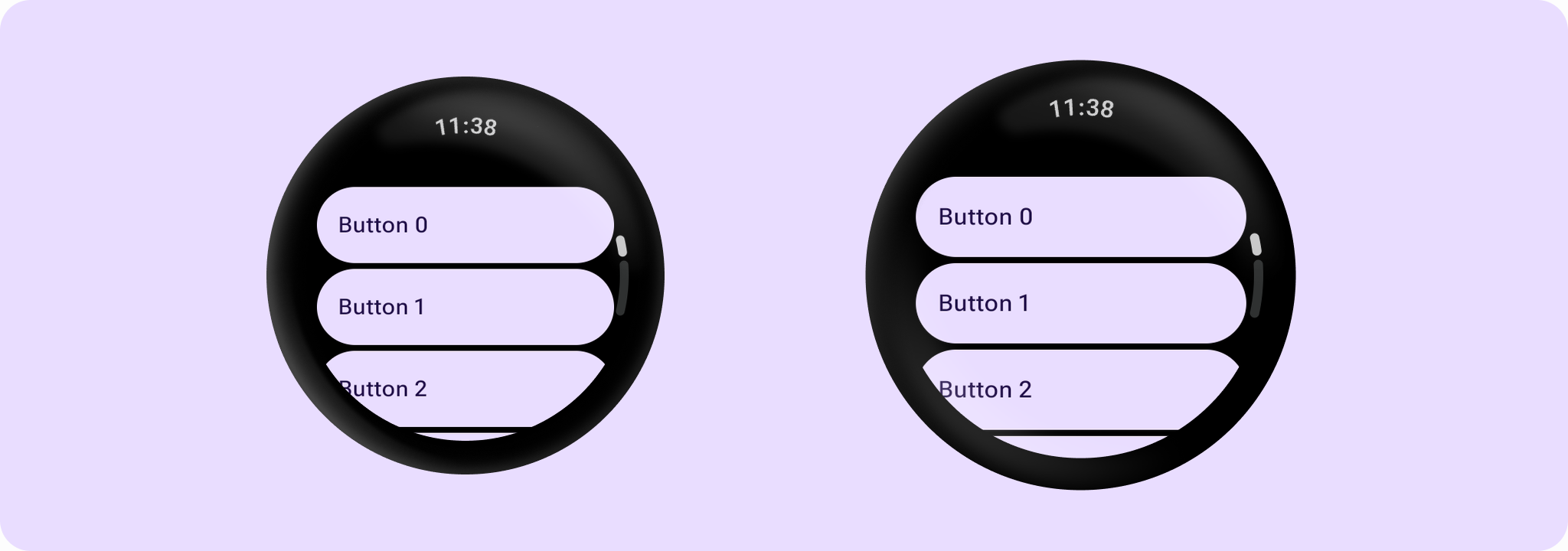
Creates a ScrollIndicator based on the values in a TransformingLazyColumnState object that a androidx.wear.compose.foundation.lazy.TransformingLazyColumn uses.
Typically used with the ScreenScaffold but can be used to decorate any full screen situation.
To comply with Wear Material Design guidelines, this composable should be aligned to the center end of the screen using Alignment.CenterEnd. It will appear on the right in Ltr orientation and on the left in Rtl orientation.
It detects if the screen is round or square and draws itself as a curve or line.
For more information, see the Scroll indicators guide.
Example of a sample ScrollIndicator with TransformingLazyColumn:
import androidx.compose.foundation.background
import androidx.compose.foundation.layout.Box
import androidx.compose.foundation.layout.fillMaxSize
import androidx.compose.foundation.layout.fillMaxWidth
import androidx.compose.ui.Alignment
import androidx.compose.ui.Modifier
import androidx.compose.ui.graphics.Color
import androidx.wear.compose.foundation.lazy.TransformingLazyColumn
import androidx.wear.compose.foundation.lazy.rememberTransformingLazyColumnState
import androidx.wear.compose.material3.Button
import androidx.wear.compose.material3.ButtonDefaults
import androidx.wear.compose.material3.ScreenScaffoldDefaults
import androidx.wear.compose.material3.ScrollIndicator
import androidx.wear.compose.material3.Text
import androidx.wear.compose.material3.TimeText

val scrollState = rememberTransformingLazyColumnState()
Box(modifier = Modifier.fillMaxSize()) {
    TransformingLazyColumn(
        modifier = Modifier.background(Color.Black),
        state = scrollState,
        contentPadding = ScreenScaffoldDefaults.contentPadding,
    ) {
        items(15) {
            Button(
                onClick = {},
                label = { Text("Button $it") },
                modifier =
                    Modifier.minimumVerticalContentPadding(
                            ButtonDefaults.minimumVerticalListContentPadding
                        )
                        .fillMaxWidth(),
            )
        }
    }
    ScrollIndicator(modifier = Modifier.align(Alignment.CenterEnd), state = scrollState)
    TimeText()
}
| Parameters | |
|---|---|
state: TransformingLazyColumnState |
the |
modifier: Modifier = Modifier |
The modifier to be applied to the component |
colors: ScrollIndicatorColors = ScrollIndicatorDefaults.colors() |
|
reverseDirection: Boolean = state.layoutInfo.reverseLayout |
Reverses direction of ScrollIndicator if true. The default value is inferred from the |
positionAnimationSpec: AnimationSpec<Float> = ScrollIndicatorDefaults.PositionAnimationSpec |
|